Flashlabs Pricing in 2026: Real Costs, Limits, and Alternatives
Flashlabs prices like most AI outbound tools: credits, seats, and an annual discount that quietly locks you in. Here is how to model the real cost per usable contact before you sign.
TL;DR
- Flashlabs prices the way nearly every AI outbound platform does in 2026: credit bundles, per-seat minimums, and a double-digit discount for paying annually. The sticker price is rarely what you actually spend.
- The number that matters is not cost per credit — it is cost per usable contact: a verified, deliverable, in-ICP record that a rep can actually email or call.
- A 60% usable rate turns a $0.10 credit into a $0.17 contact. A 35% usable rate turns it into $0.29. Model this before you sign, not after your first invoice.
- Budget for the four costs that never appear on a pricing page: wasted credits on duplicates and catch-alls, seat minimums, annual lock-in, and the separate verification tool you will end up buying anyway.
- If your real need is contact data rather than a full AI-agent workflow, a focused finder like Tomba ($49/mo Starter, free tier at 25 searches) usually lands well under the all-in-one cost per contact.
What is Flashlabs, and who is its pricing built for?#
Flashlabs sits in the AI-assisted outbound category — the cluster of tools that promise to find prospects, enrich them, and draft or send the outreach in one workflow. That positioning matters more than any single number, because it determines the shape of the bill. Tools that bundle data plus sending plus AI generation almost always charge on two axes at once: credits for the data and AI work, and seats for the humans who log in.
Before you evaluate flashlabs pricing, be honest about which axis you actually consume. A three-person SDR team burning 20,000 records a month has a completely different cost profile from a solo founder who needs 800 accurate emails and nothing else. All-in-one platforms are priced for the first group and tend to punish the second.
One caveat worth stating up front, because this is a neutral review and not a vendor page: published plans in this category change often — sometimes quarterly. Treat the tier names and figures on any vendor's site as the source of truth on the day you buy, and use the framework below to compare whatever you find there against alternatives. What does not change is the structure of the bill, and that is what you can actually plan around.

How does Flashlabs pricing actually work?#
Credit-based platforms in this space share four billing mechanics. Check each one against whatever Flashlabs currently publishes:
- Credit consumption rules. Does a search that returns nothing still burn a credit? Does an enrichment that returns a phone number cost more than one that returns an email? Multi-credit actions are the single biggest gap between your projected and actual spend.
- Seat minimums. Some plans quote a monthly price that assumes two or three seats. If you are a one-person shop paying a three-seat floor, your effective rate is triple the headline.
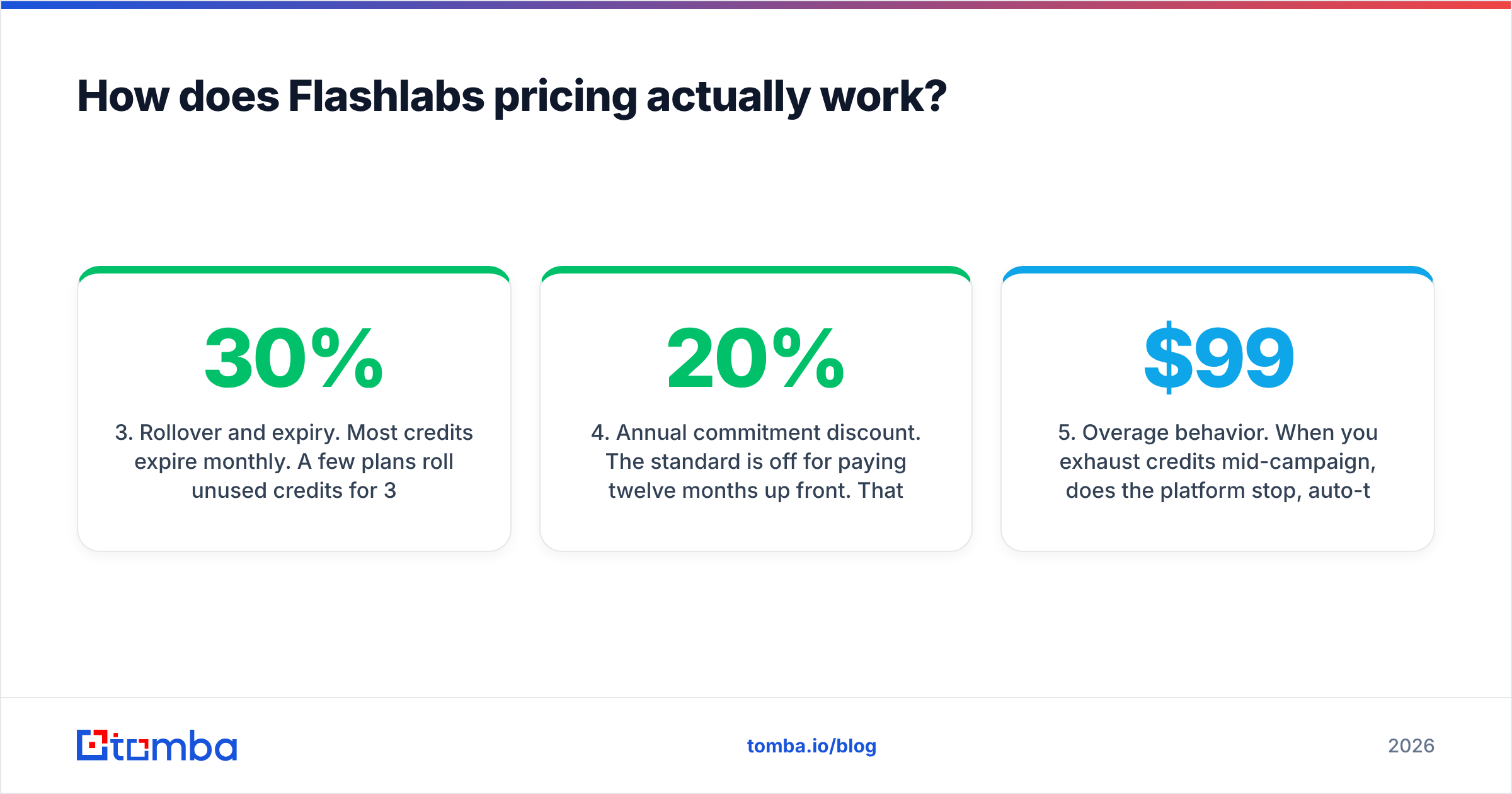
- Rollover and expiry. Most credits expire monthly. A few plans roll unused credits for 30 days. If your outbound is campaign-shaped — heavy months and quiet months — expiry can silently waste 20–30% of what you bought.
- Annual commitment discount. The standard is 20% off for paying twelve months up front. That is real savings if the tool works, and a real trap if you churn in month three. Run a paid month before committing to a year.
- Overage behavior. When you exhaust credits mid-campaign, does the platform stop, auto-top-up at a premium rate, or force a mid-cycle upgrade? Auto-top-up at retail rates is how a $99 plan becomes a $260 invoice.
- What is excluded. Sending infrastructure, mailbox warmup, dedicated IPs, and verification are frequently sold separately or capped hard on entry tiers.
If you can answer those six questions in writing before you enter a card, you have done more due diligence than most buyers in this category.
What does a credit actually cost you?#
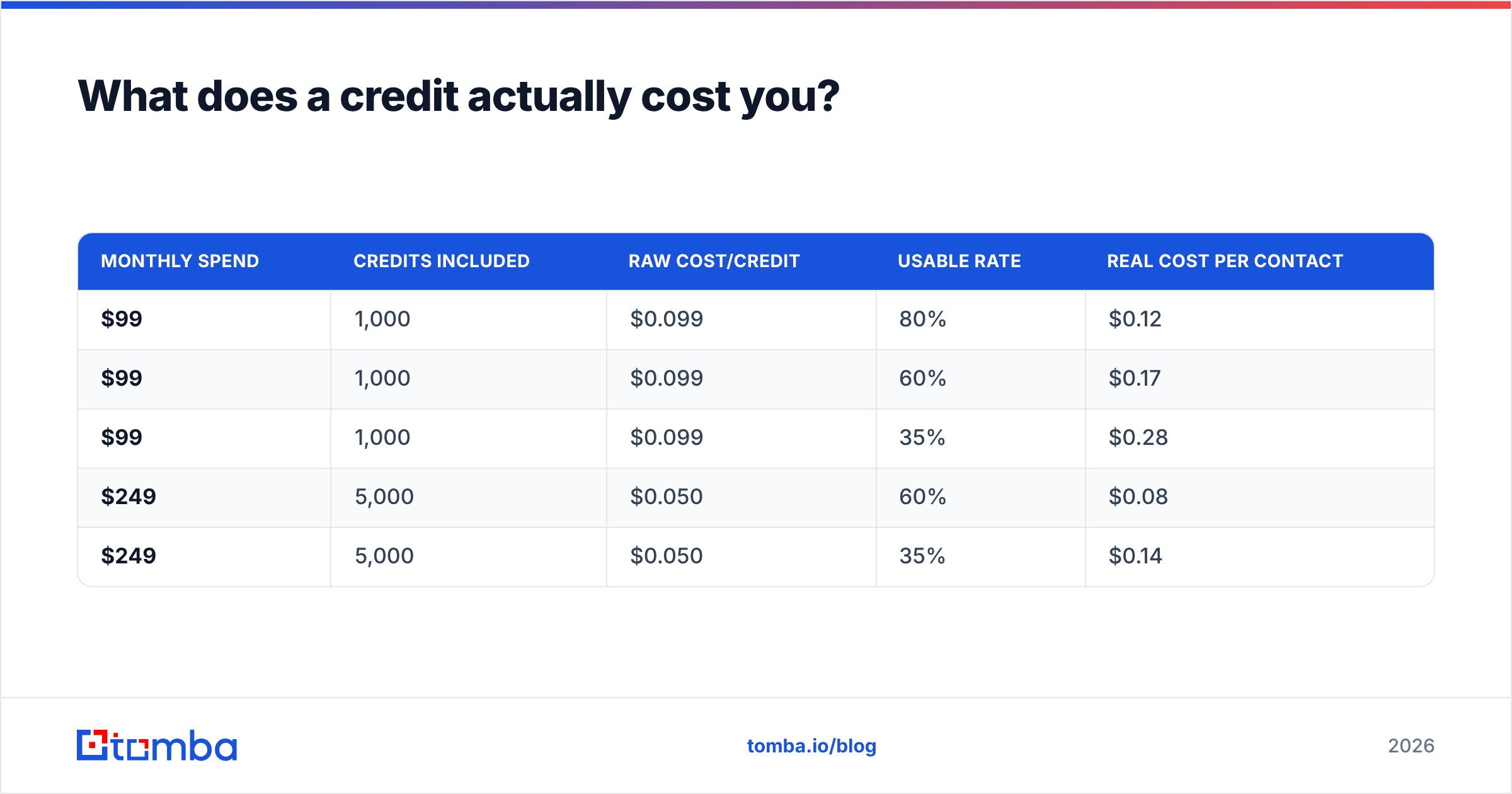
Here is the math that should drive the decision. Take your plan cost, divide by credits, then divide again by your usable rate — the share of returned records that survive verification, deduplication, and ICP filtering.
Cost per usable contact = (monthly price ÷ credits) ÷ usable rateRun it across realistic scenarios:
| Monthly spend | Credits included | Raw cost/credit | Usable rate | Real cost per contact |
|---|---|---|---|---|
| $99 | 1,000 | $0.099 | 80% | $0.12 |
| $99 | 1,000 | $0.099 | 60% | $0.17 |
| $99 | 1,000 | $0.099 | 35% | $0.28 |
| $249 | 5,000 | $0.050 | 60% | $0.08 |
| $249 | 5,000 | $0.050 | 35% | $0.14 |
Two lessons fall out of that table. First, volume tiers genuinely help — the per-credit rate roughly halves as you move up. Second, and more important: accuracy beats discount every time. A platform at half the per-credit price with a 35% usable rate costs more per real contact than a pricier one hitting 80%. This is why cheap bulk data is usually the most expensive data you can buy.
The usable rate is also the number vendors are least eager to discuss, because it depends on your ICP, your geography, and how aggressively the provider pads results with catch-all or role-based addresses. Test it yourself: pull 100 records from a domain you know well, run them through an independent email verifier, and count what survives. That 20-minute exercise is worth more than any G2 badge.
What hidden costs should you budget for?#
- Duplicate burn. If the platform does not deduplicate against contacts you already pulled, you pay twice for the same person. Ask whether previously-enriched records are free to re-pull.
- Catch-all ambiguity. Catch-all domains accept every address, so verification returns "unknown" rather than valid. Vendors handle this differently — some charge full price and hand you a coin flip. A dedicated catch-all verifier resolves a large share of those, but it is usually a separate line item.
- The second verification tool. Almost every team running serious volume ends up buying standalone verification on top of their data platform, because bouncing above 2–3% damages sender reputation faster than any campaign gains justify. Budget for it from day one.
- Seat creep. Add a second SDR and an ops person and a three-seat plan becomes a five-seat plan mid-year.
- API access gating. If you plan to enrich inside your CRM or a workflow tool, confirm the API is on your tier and check its rate limits — not just that it exists.
- Export restrictions. Some platforms cap CSV exports or restrict them on entry plans, which quietly makes your data non-portable and raises your switching cost later.
None of these are unique to Flashlabs. They are the standard economics of the category, documented across buyer reviews on G2's lead intelligence category and Capterra's lead generation listings. The point is that the pricing page is the beginning of the total cost of ownership, not the end of it.
How does Flashlabs pricing compare to the alternatives?#
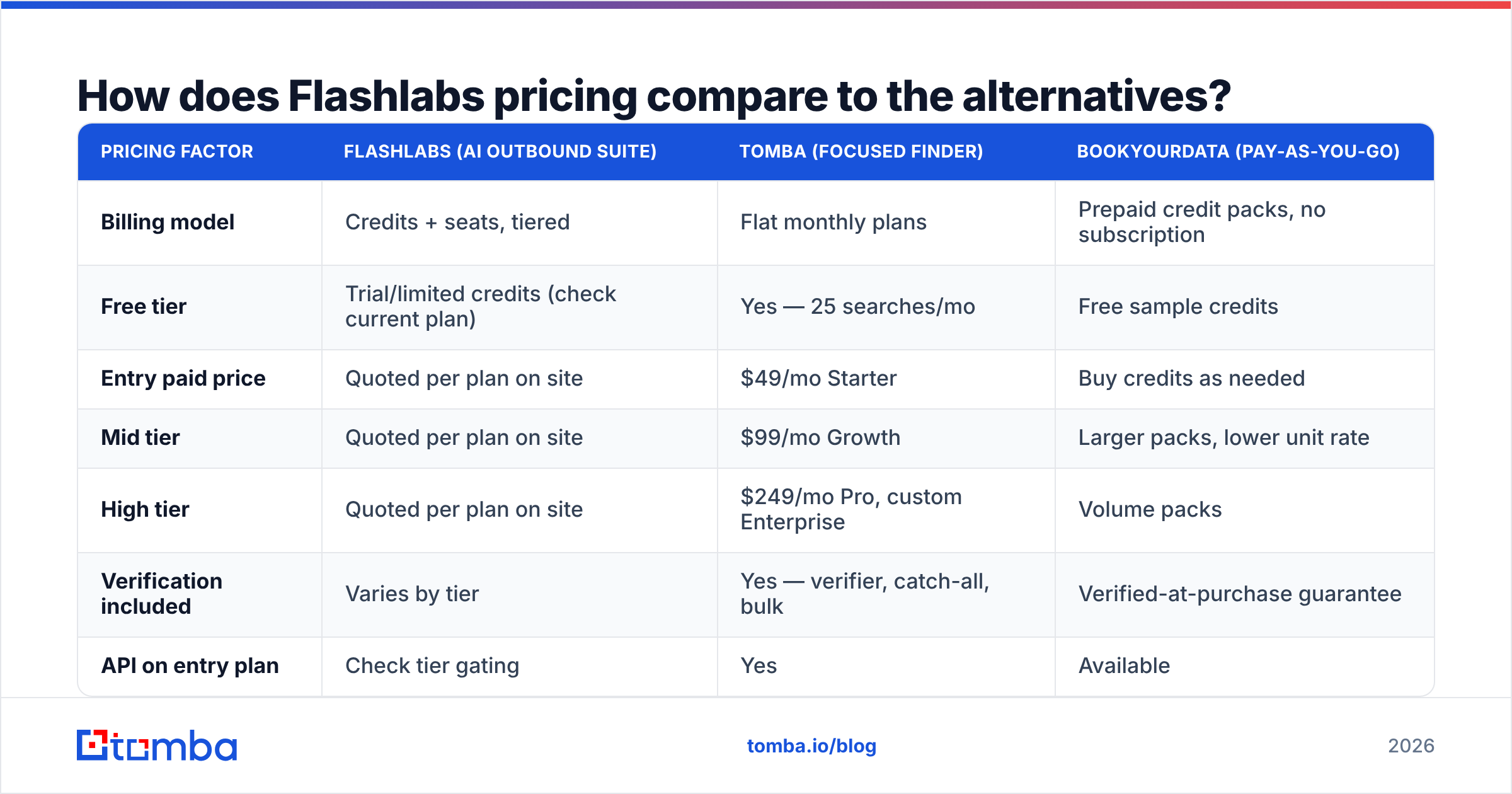
The honest comparison is not "which tool is cheapest" — it is "which billing model matches how I actually work." Three models dominate:
| Pricing factor | Flashlabs (AI outbound suite) | Tomba (focused finder) | BookYourData (pay-as-you-go) |
|---|---|---|---|
| Billing model | Credits + seats, tiered | Flat monthly plans | Prepaid credit packs, no subscription |
| Free tier | Trial/limited credits (check current plan) | Yes — 25 searches/mo | Free sample credits |
| Entry paid price | Quoted per plan on site | $49/mo Starter | Buy credits as needed |
| Mid tier | Quoted per plan on site | $99/mo Growth | Larger packs, lower unit rate |
| High tier | Quoted per plan on site | $249/mo Pro, custom Enterprise | Volume packs |
| Verification included | Varies by tier | Yes — verifier, catch-all, bulk | Verified-at-purchase guarantee |
| API on entry plan | Check tier gating | Yes | Available |
| Best for | Teams wanting data + AI sequencing in one console | Teams that need accurate contact data and already have a sender | Buyers who want no recurring bill |
A few notes on reading that table fairly.
All-in-one is not automatically overpriced. If Flashlabs replaces a data tool, a sequencer, and an AI copy assistant, comparing its plan to a $49 finder is comparing a bundle to a component. The correct comparison is bundle price versus the summed price of the stack it replaces — and for teams already paying for a sequencer they like, the bundle is redundant spend.
Pay-as-you-go deserves more credit than it gets. BookYourData's prepaid model is a genuinely good fit for lumpy demand: you buy 5,000 records for a Q1 push and pay nothing in Q2. Subscription platforms cannot match that flexibility, and for seasonal or project-based outbound it is often the cheaper path outright.
Focused finders win on cost per contact. When the job is "give me accurate work emails for these 3,000 people," a specialist tool priced flat tends to beat a bundled credit model, because you are not funding sequencing features you already have elsewhere. You can see the tier structure and included volumes on the Tomba pricing page and run the same cost-per-usable-contact formula against it.
Is Flashlabs worth it in 2026?#
It depends almost entirely on whether you use the AI layer.
It is likely worth it if: you have two or more reps running consistent volume, you want data and sequencing in one console, you value AI-drafted first touches, and your monthly record volume is high enough to reach the discounted per-credit tiers. Consolidation has real value — fewer integrations to maintain, one vendor to renegotiate with, one place your team logs in.
It is likely not worth it if: you are a solo founder or a two-person team, your volume is under a few thousand records a month, you already run Instantly, Smartlead, or a similar sender you are happy with, or your outbound is seasonal. In all four cases you are paying a bundle premium plus seat minimums for capacity you will not consume, and expiring credits will quietly eat the difference.
There is also a strategic argument for keeping data separate from sending. When your finder, your verifier, and your sequencer are separate vendors, you can swap the weak one without rebuilding your whole motion. When they are one vendor, a degradation in data quality forces you to rip out your entire outbound stack — or tolerate it. Teams that have been through one bad renewal cycle tend to price that optionality highly.
How do you cut your cost per usable contact?#
Regardless of which platform you land on, four habits move the number more than any discount negotiation:
- Verify before you send, always. Bounces cost you deliverability, and deliverability costs you every future campaign. Run every list through verification even when the source claims it is pre-verified.
- Deduplicate against your CRM first. Re-enriching contacts you already own is the most common form of pure waste. Pull your existing records, diff, then enrich only the delta.
- Search by domain, not by person, when prospecting accounts. A domain search returns the whole mapped team plus the company's email pattern in one call, which is far cheaper than a dozen individual lookups when you are targeting accounts rather than named people.
- Batch your work. Bulk operations almost always cost less per record than one-off lookups, and they let you verify and dedupe in the same pass rather than three separate ones.
- Track cost per reply, not cost per contact. The end metric is pipeline. A data source with a 25% higher price but a meaningfully better response rate is the cheaper source, and it is not close.
What should you do before you enter a card?#
Run a controlled bake-off. Pick 200 accounts that represent your real ICP — same industries, same company sizes, same countries. Pull the same target roles from Flashlabs and from one or two alternatives. Verify all outputs with the same independent verifier. Then compare four numbers: match rate, verified-valid rate, catch-all rate, and total spend. Divide spend by verified-valid records and you have your true cost per contact per vendor.
That exercise takes an afternoon and routinely changes buying decisions, because the winner on the pricing page is often the loser on the spreadsheet. Do it before the annual discount tempts you into a twelve-month commitment.
Where does Tomba fit?#
If your bottleneck is contact data rather than sequencing, start with the piece that actually gates your pipeline. The Tomba Email Finder returns verified professional email addresses by name, domain, or company, with verification, catch-all handling, and bulk processing in the same account — Free at 25 searches a month, $49/mo Starter, $99/mo Growth, $249/mo Pro. Test it against your own ICP alongside whatever Flashlabs quotes you, measure verified-valid records per dollar, and let the spreadsheet pick the winner.
Related guides#
Ready to find emails that actually work?
Join 150,000+ professionals who stopped guessing and started sending. Free credits on signup — no credit card required.
Get the Tomba newsletter
Practical outbound tactics and product updates — once every two weeks.
About the author