Follow Up Email After Leaving Voicemail: 6 Templates
A voicemail alone is a dead end. Paired with an email sent minutes later, it turns into a two-channel reminder that actually gets read. Here is the timing, the copy, and the cadence.
TL;DR
- A voicemail on its own is close to worthless. Paired with an email sent within about five minutes, it becomes a two-channel reminder that reaches the prospect where they actually read: their inbox.
- Send the email while the voicemail notification is still on their lock screen. Same-hour beats same-day, and same-day beats "I'll circle back tomorrow."
- The email should reference the voicemail in one clause, not summarize it. Repeating the whole message wastes the only advantage you have — brevity.
- Six templates below cover the common cases: first touch, referral, inbound lead, trigger event, re-engagement, and breakup.
- The whole play collapses if the email address is wrong. Verify before you dial, not after.
Why send a follow up email after leaving voicemail at all?#
Because the voicemail will probably never be played, and the email will probably be skimmed.
That is the honest framing. Voicemail-to-text previews, spam labeling on unknown numbers, and the general collapse of phone answer rates mean your recorded message is a low-probability channel on its own. But it is not zero-value — it creates a small, specific piece of context that makes your email less cold. "I just left you a voicemail" is a claim the prospect can verify in two seconds, and verifiable claims read as legitimate.
The combination works because the two channels do different jobs:
- The voicemail establishes that a human tried. It puts your name and company on their missed-call log, which is a durable artifact even if they never press play.
- The email delivers the actual message. Inbox is where B2B decisions get read, forwarded, and archived for later. Voicemail has no forward button anyone uses.
- The pairing creates recall. Two touches from the same name within minutes register as one deliberate outreach, not two random interruptions.
- The email is searchable. Three weeks later, when the prospect finally has budget, they search your company name in Gmail — not in their voicemail app.
- The email carries the link. No prospect is typing a URL they heard spoken aloud.
Gartner's research on the B2B buying journey makes a related point: buyers spend the overwhelming majority of their purchase cycle away from any seller, doing independent research. Your job on a cold touch is not to close. It is to be the name they can find when they start looking.
How fast should the email go out after the voicemail?#
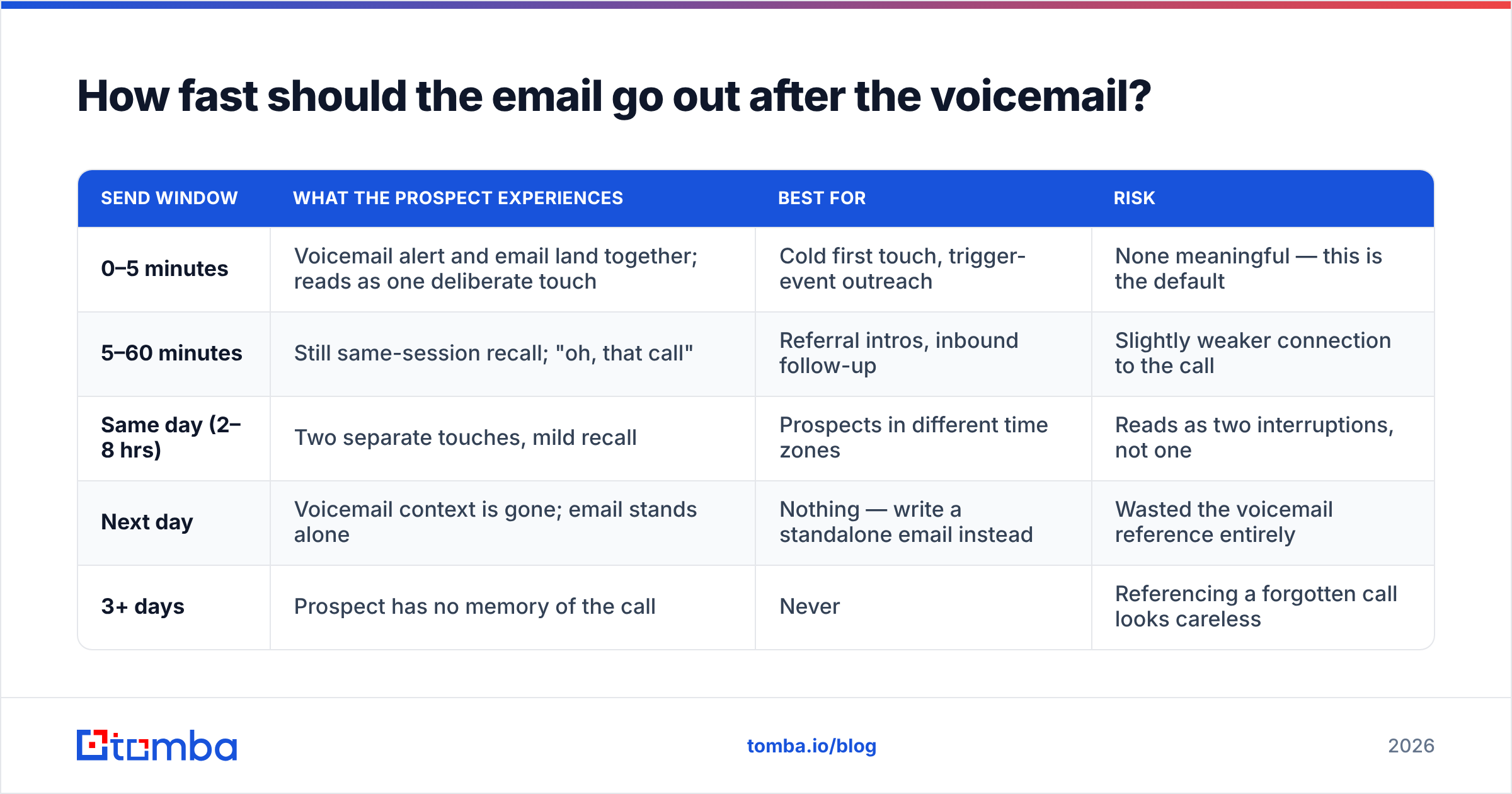
Within five minutes, in almost every case. The voicemail notification and the email arrive in the same attention window, and the prospect processes them as one event.
Here is how the timing windows actually behave in practice:
| Send window | What the prospect experiences | Best for | Risk |
|---|---|---|---|
| 0–5 minutes | Voicemail alert and email land together; reads as one deliberate touch | Cold first touch, trigger-event outreach | None meaningful — this is the default |
| 5–60 minutes | Still same-session recall; "oh, that call" | Referral intros, inbound follow-up | Slightly weaker connection to the call |
| Same day (2–8 hrs) | Two separate touches, mild recall | Prospects in different time zones | Reads as two interruptions, not one |
| Next day | Voicemail context is gone; email stands alone | Nothing — write a standalone email instead | Wasted the voicemail reference entirely |
| 3+ days | Prospect has no memory of the call | Never | Referencing a forgotten call looks careless |
The practical implication: draft the email before you dial. Have it queued with a placeholder, leave the voicemail, then adjust one sentence and hit send. Reps who dial first and write afterward slip out of the five-minute window on every third call.
What should the follow up email after leaving voicemail actually say?#
Four parts, in this order, and nothing else:
- One clause referencing the voicemail. "Just left you a voicemail" — that is the whole reference. Do not transcribe.
- One sentence of specific relevance. Why this company, not any company. A hiring signal, a funding round, a tech-stack change, a mutual connection.
- One sentence of value. What changes for them, stated concretely, not as a category ("cut onboarding from 3 weeks to 4 days," not "improve efficiency").
- One low-friction ask. A question they can answer in five words, or an interest check. Not a 30-minute calendar link on touch one.
Total: 60–90 words. If your email is longer than the voicemail was, you have inverted the point of the play.
Template 1 — Cold first touch#
Subject: quick voicemail — {{Company}} onboarding

{{FirstName}},

Just left you a voicemail. Short version: I noticed {{Company}}
posted three implementation roles this quarter, which usually
means onboarding volume is outpacing the team.

We helped {{SimilarCompany}} cut their setup cycle from three
weeks to four days without adding headcount.

Worth a 10-minute look, or is this handled?

{{YourName}}
Template 2 — Referral or mutual connection#
Subject: {{ReferrerName}} suggested I reach out

{{FirstName}},

Left you a voicemail just now — {{ReferrerName}} mentioned you
were rebuilding the outbound motion at {{Company}} and thought
the timing might line up.

Happy to send over what worked for her team instead of taking
a call, if that's easier.

Which do you prefer?

{{YourName}}
Template 3 — Inbound lead who went quiet#
Subject: your {{ResourceName}} download

{{FirstName}},

Just tried you by phone and left a message. You grabbed our
{{ResourceName}} last Thursday — most people who download that
one are mid-way through evaluating {{Category}} vendors.

If that's you, I can send a two-page comparison instead of
pitching. If it isn't, tell me and I'll close the loop.

{{YourName}}
Template 4 — Trigger event#
Subject: congrats on the {{Round}} raise

{{FirstName}},

Left you a voicemail. Saw the {{Round}} announcement — the
usual next 90 days involve doubling the sales team and
discovering the data layer can't keep up.

That's the exact problem we fix. Two customers went through
it last year; happy to share what broke first.

Open to it?

{{YourName}}
Template 5 — Re-engagement after a stalled deal#
Subject: picking this back up?

{{FirstName}},

Voicemail just left. We spoke in {{Month}} and you flagged
budget as the blocker — new fiscal year usually resets that.

Nothing has changed on our side except pricing got simpler.
Is this back on the table for {{Quarter}}, or should I stop
checking in?

{{YourName}}
Template 6 — Breakup#
Subject: closing the file

{{FirstName}},

That was my last voicemail — four calls, three emails, no
signal, so I'll assume this isn't a priority.

If I've read that wrong, one word back and I'll pick it up.
Otherwise I'll leave you alone and check in next year.

{{YourName}}
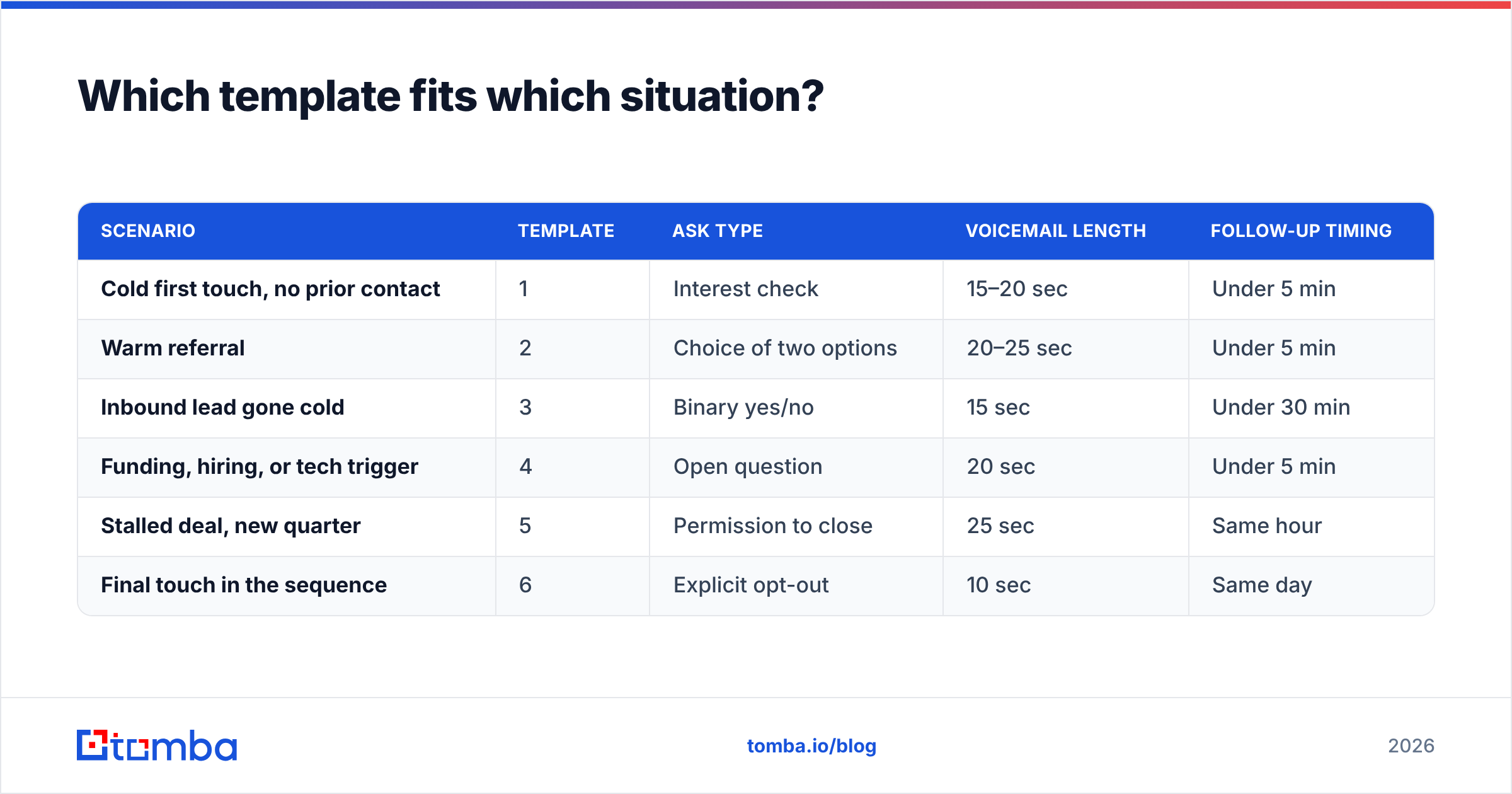
Which template fits which situation?#
| Scenario | Template | Ask type | Voicemail length | Follow-up timing |
|---|---|---|---|---|
| Cold first touch, no prior contact | 1 | Interest check | 15–20 sec | Under 5 min |
| Warm referral | 2 | Choice of two options | 20–25 sec | Under 5 min |
| Inbound lead gone cold | 3 | Binary yes/no | 15 sec | Under 30 min |
| Funding, hiring, or tech trigger | 4 | Open question | 20 sec | Under 5 min |
| Stalled deal, new quarter | 5 | Permission to close | 25 sec | Same hour |
| Final touch in the sequence | 6 | Explicit opt-out | 10 sec | Same day |
Notice the pattern: the colder the contact, the shorter the ask. A cold prospect will answer "is this handled?" but will not book a demo. A stalled deal will tolerate a direct question because you have already earned the conversation.
How do you write the voicemail so the email has something to reference?#
Keep it under 20 seconds, and end it by naming the email. That single sentence is what stitches the two channels together.
A working structure:
- Name and company, spoken slowly. Two seconds. Say your number at the end, not here.
- One reason you called. Specific to them. "Saw you're hiring three implementation managers."
- The handoff. "I'm sending you an email right now with the details — subject line says 'quick voicemail.'"
- Your number, twice, slowly. Most reps rush this and it makes the whole message useless.
The handoff line is the highest-leverage sentence in the entire play. It converts a passive voicemail into an instruction, and it gives your email a subject line the prospect is already primed to look for. If you take one thing from this post, take that.
For a refresher on why the channel behaves the way it does, voicemail's history as a store-and-forward system explains a lot about why it was never designed for the attention economy it now competes in.
What if you don't have the prospect's email address?#
Then you do not have a follow-up play — you have a voicemail and a hope. This is where most double-tap sequences quietly fail: the rep has a direct dial from a data vendor, no verified email, and guesses first.last@company.com on the way out the door.
Guessed addresses bounce. Bounces damage sender reputation. Damaged reputation means the emails that do have correct addresses start landing in spam. One sloppy guess taxes the whole sequence.
The fix is boring and mechanical:
- Resolve the address before you dial. Use an email finder against the person's name and company domain, or run a domain search to pull the company's pattern and full contact list at once.
- Verify it, don't trust it. Run every address through an email verifier before it enters the sequence. Catch-all domains need their own handling.
- Match the phone to the person. If your direct dial and your email came from different sources, confirm they belong to the same human. A phone finder that pulls both from one record removes the mismatch risk entirely.
- Batch the whole list. Pulling addresses one at a time is how the five-minute window gets missed. Resolve the week's list on Monday.

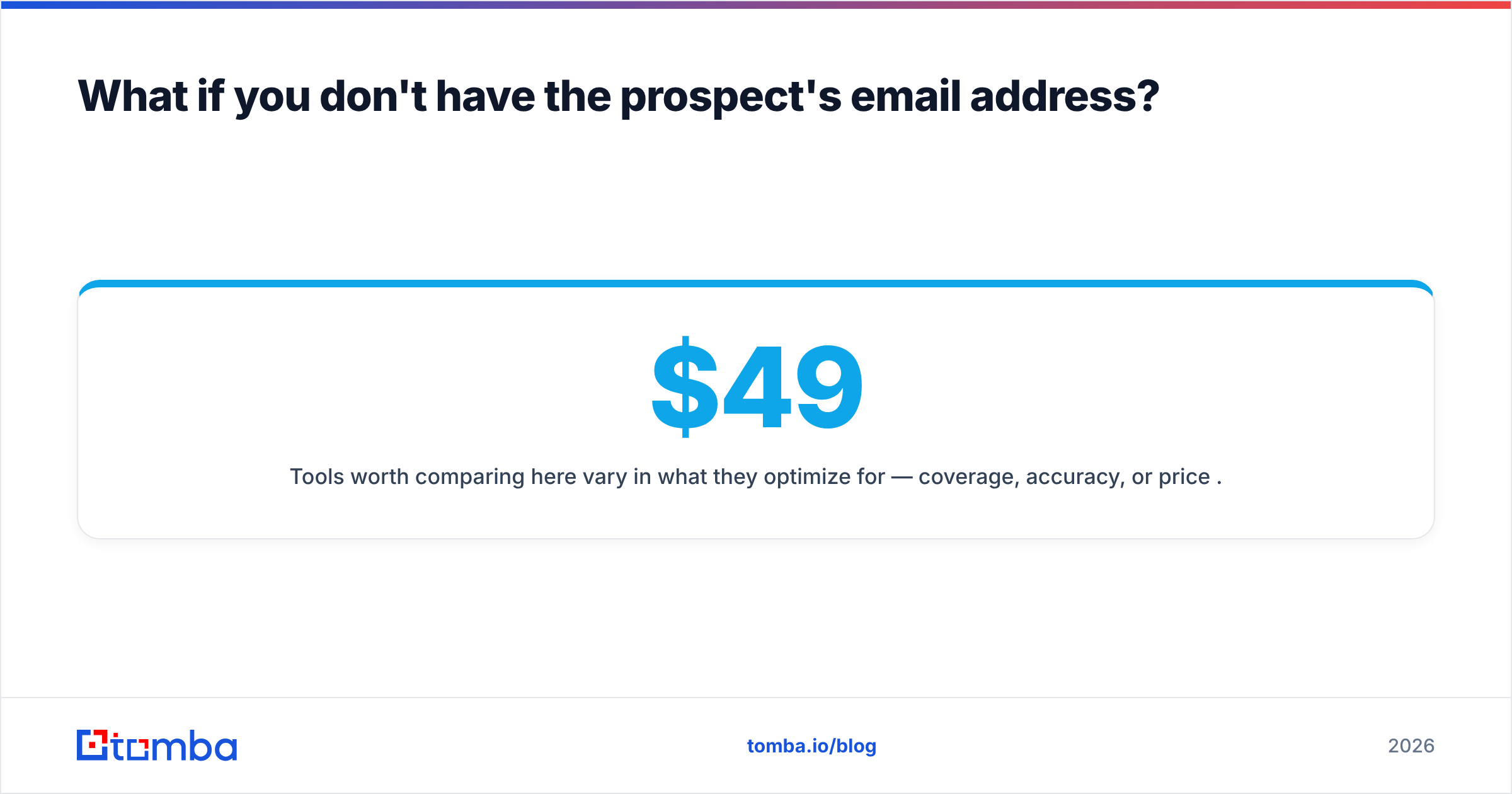
Tools worth comparing here vary in what they optimize for — coverage, accuracy, or price per credit. Tomba pricing starts with a free tier at 25 searches per month, then Starter at $49/mo, Growth at $99/mo, and Pro at $249/mo. Peers like BookYourData take a prepaid, pay-as-you-go approach that suits teams buying a list once rather than enriching continuously. Neither model is wrong; they serve different buying rhythms. Check current reviews on G2 before committing to an annual plan.
How many voicemail-plus-email cycles should a sequence contain?#
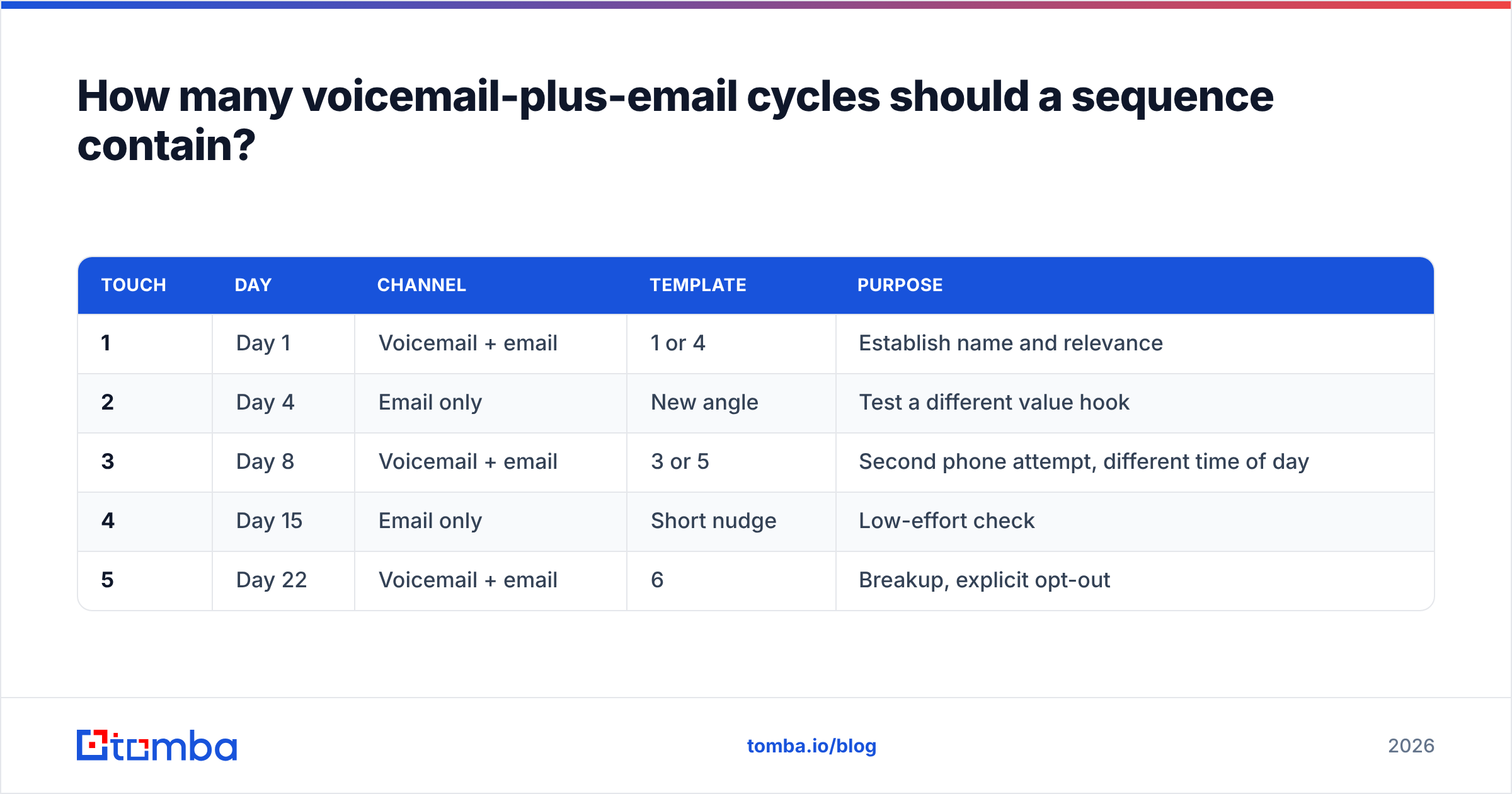
Three to four paired touches over two to three weeks, then a breakup. More than that and you are not persistent, you are noise.
| Touch | Day | Channel | Template | Purpose |
|---|---|---|---|---|
| 1 | Day 1 | Voicemail + email | 1 or 4 | Establish name and relevance |
| 2 | Day 4 | Email only | New angle | Test a different value hook |
| 3 | Day 8 | Voicemail + email | 3 or 5 | Second phone attempt, different time of day |
| 4 | Day 15 | Email only | Short nudge | Low-effort check |
| 5 | Day 22 | Voicemail + email | 6 | Breakup, explicit opt-out |
Two rules make this cadence work. First, vary the time of day on each call — a prospect who never answers at 9am may pick up at 4:30pm. Second, never repeat the same value proposition twice. If the hiring angle got no response on touch one, the hiring angle will get no response on touch three. Change the argument, not just the wording.
HubSpot's sales statistics roundup is a reasonable sanity check on how many touches are typical before a first response — the number is higher than most reps assume, and it is the main reason sequences get abandoned one touch too early.
What mistakes kill the double-tap?#
- Transcribing the voicemail into the email. The prospect now has the same message twice and a reason to ignore both. Reference it in a clause; deliver new information in the body.
- Sending hours later. After roughly an hour, the connection between the two touches evaporates. You have spent a voicemail for nothing.
- Leading with the calendar link. A meeting request on touch one asks for 30 minutes from someone who has not agreed to 30 seconds.
- Guessing the email address. Covered above, and it is the single most expensive mistake because it damages every other email you send that week.
- Writing a subject line that does not match what you said on the phone. If the voicemail promised "quick voicemail" in the subject, the subject must be "quick voicemail." That is the whole handoff.
- Leaving a 45-second voicemail. Nobody finishes it. Under 20 seconds or don't bother.
- Sending from a domain with no authentication. If your SPF record and DMARC are not configured, the follow-up email never arrives and the voicemail reference makes no sense.
Does this play still work in 2026?#
Yes, for a narrower set of situations than it did five years ago — and that narrowing is the point.
The double-tap works when you have a real reason to call a specific person: a trigger event, a referral, an inbound signal, or a stalled deal worth reviving. It does not work as a volume tactic. Calling 200 unqualified contacts and firing 200 "just left you a voicemail" emails produces exactly what you would expect: nothing, plus a bruised sending domain.
Treat the voicemail as an expensive touch. You get one 20-second slot in someone's day, and the email is the only part of the pair they will actually read. Spend both on prospects who have a plausible reason to care.
Where should you start?#
Fix the data layer first, then the copy. A perfect template sent to a guessed address is worth less than a mediocre template sent to a verified one — the first bounces, the second gets read.
Pull your target list, resolve each contact's work email and direct dial from the same record, and verify the addresses before the first dial goes out. Tomba Email Finder handles the first half of that — name plus company domain in, verified professional address out, with the free tier covering 25 searches a month if you want to test the workflow on a small list before committing. Get the addresses right, queue the email before you dial, and the five-minute rule takes care of the rest.
Related guides#
// get started
Find, verify and enrich your first contacts today
Start on the free plan with 25 searches a month, then scale when your team is ready.
Free plan · No credit card required · GDPR & CCPA
// about the author