Follow Up Email After Meeting With Action Items: 2026 Guide
Most meetings die in the 24 hours after they end. Here are the templates, timing rules, and action-item formats that turn a recap email into a signed next step.
TL;DR
- Send the recap within 24 hours. After 48 hours, the meeting is a memory, not a commitment — and your reply rate drops hard.
- Every action item needs three things: an owner, a date, and a verifiable outcome. "Sync on pricing" is not an action item.
- Put the ask above the fold. Decision-makers read the first two lines on a phone, then decide whether to open the thread again.
- Use a table or numbered list for action items — plain prose recaps get skimmed and forgotten.
- CC accuracy matters more than copy quality. If the economic buyer's address is wrong or bounces, the best-written recap in the world lands nowhere.
Why do most follow up emails after meetings get ignored?#
Because they're written as documentation, not as a next step.
The typical post-meeting email reads like minutes: a chronological summary of what everyone said, ending with "let me know if I missed anything." Nobody replies to that. There's no ask, no deadline, no consequence for silence. It's an artifact, filed and forgotten.
A follow up email after meeting with action items has a different job. It converts verbal agreement into written commitment while the conversation is still fresh, and it does it in a format the recipient can act on in under 60 seconds. That means the reader should be able to open it on a phone, see their name next to a specific task and a specific date, and either agree or push back.
The three failure modes that kill recap emails:
- No owner. "We'll circle back on the security review" belongs to nobody, so nobody does it.
- No date. "Next week" is not a date. "Thursday, March 12" is.
- Buried ask. The one thing you need — a signature, an intro, a calendar hold — sits in paragraph four under three paragraphs of pleasantries.
Fix those three and your reply rate on recap emails roughly doubles in most pipelines. HubSpot's sales research has consistently shown that response rate correlates far more strongly with clarity of ask than with email length.
What should a follow up email after meeting with action items include?#
Six components, in this order. Skip any of them and you lose either clarity or momentum.
- Subject line that references the meeting — "Recap: [Company] × [Your Company], Aug 21" beats "Great meeting you!" because it's searchable six weeks later when someone digs for the thread.
- One-sentence context anchor — who met, when, and why. This exists for the people who were forwarded the thread but weren't in the room.
- Decisions made — what was actually agreed, stated as fact. Two to four bullets maximum.
- Action items table — owner, task, due date, status. This is the load-bearing part of the email.
- The single next step — one ask, stated plainly, with a date attached.
- Attachment or link block — the deck, the pricing sheet, the security doc. Named clearly, not "see attached."
Here's how the same information performs in different formats.
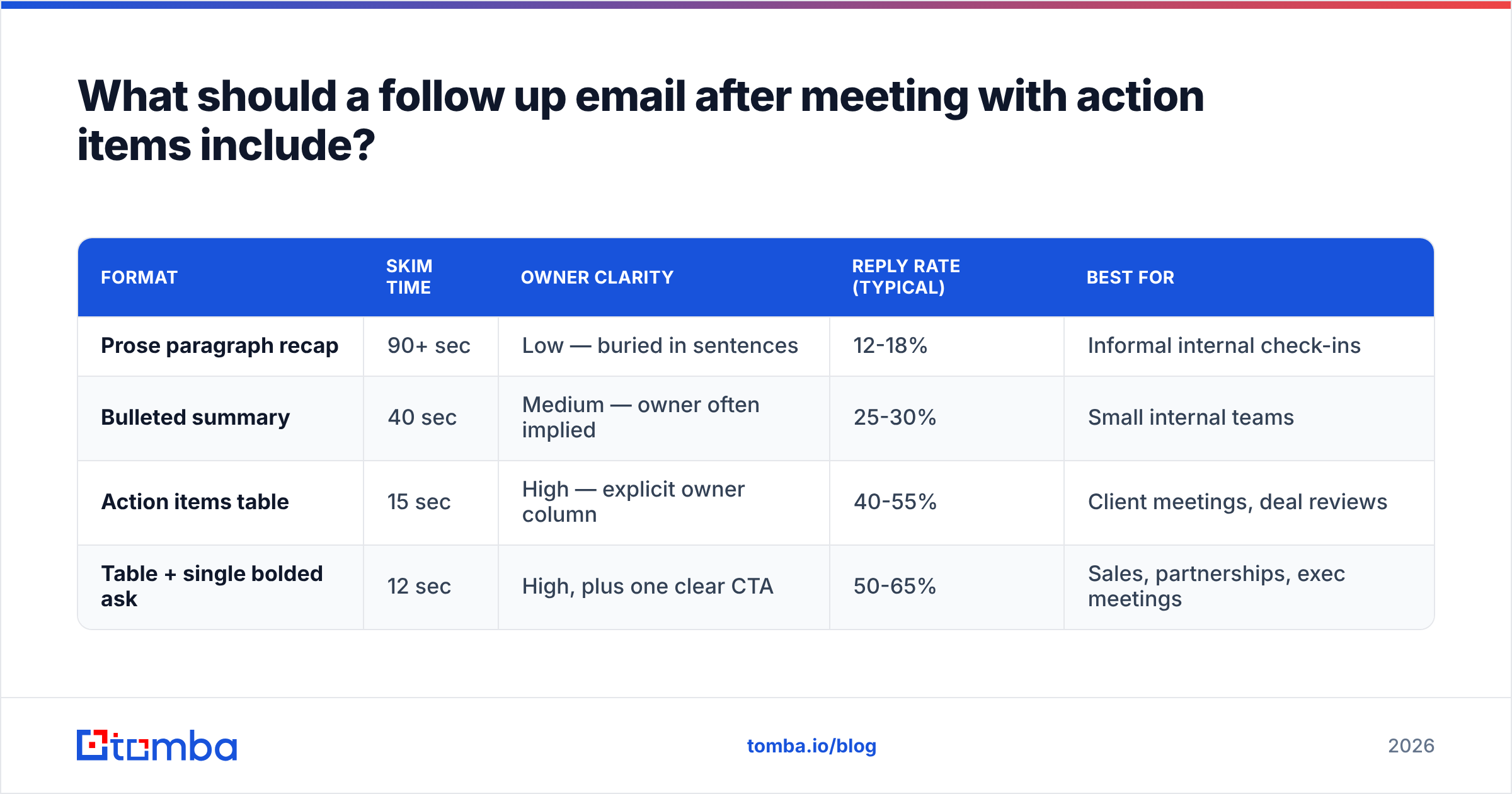
| Format | Skim time | Owner clarity | Reply rate (typical) | Best for |
|---|---|---|---|---|
| Prose paragraph recap | 90+ sec | Low — buried in sentences | 12-18% | Informal internal check-ins |
| Bulleted summary | 40 sec | Medium — owner often implied | 25-30% | Small internal teams |
| Action items table | 15 sec | High — explicit owner column | 40-55% | Client meetings, deal reviews |
| Table + single bolded ask | 12 sec | High, plus one clear CTA | 50-65% | Sales, partnerships, exec meetings |
The table format wins because it exploits how people actually read email: they scan for their own name. When "Sarah — send SOC 2 report — Aug 26" appears in a row, Sarah's eye catches it in under two seconds. A paragraph that says "Sarah kindly agreed to look into the compliance documentation when she gets a chance" hides the same commitment behind twelve words of softening.
How fast should you send the follow up?#
Within 24 hours. Ideally within four.
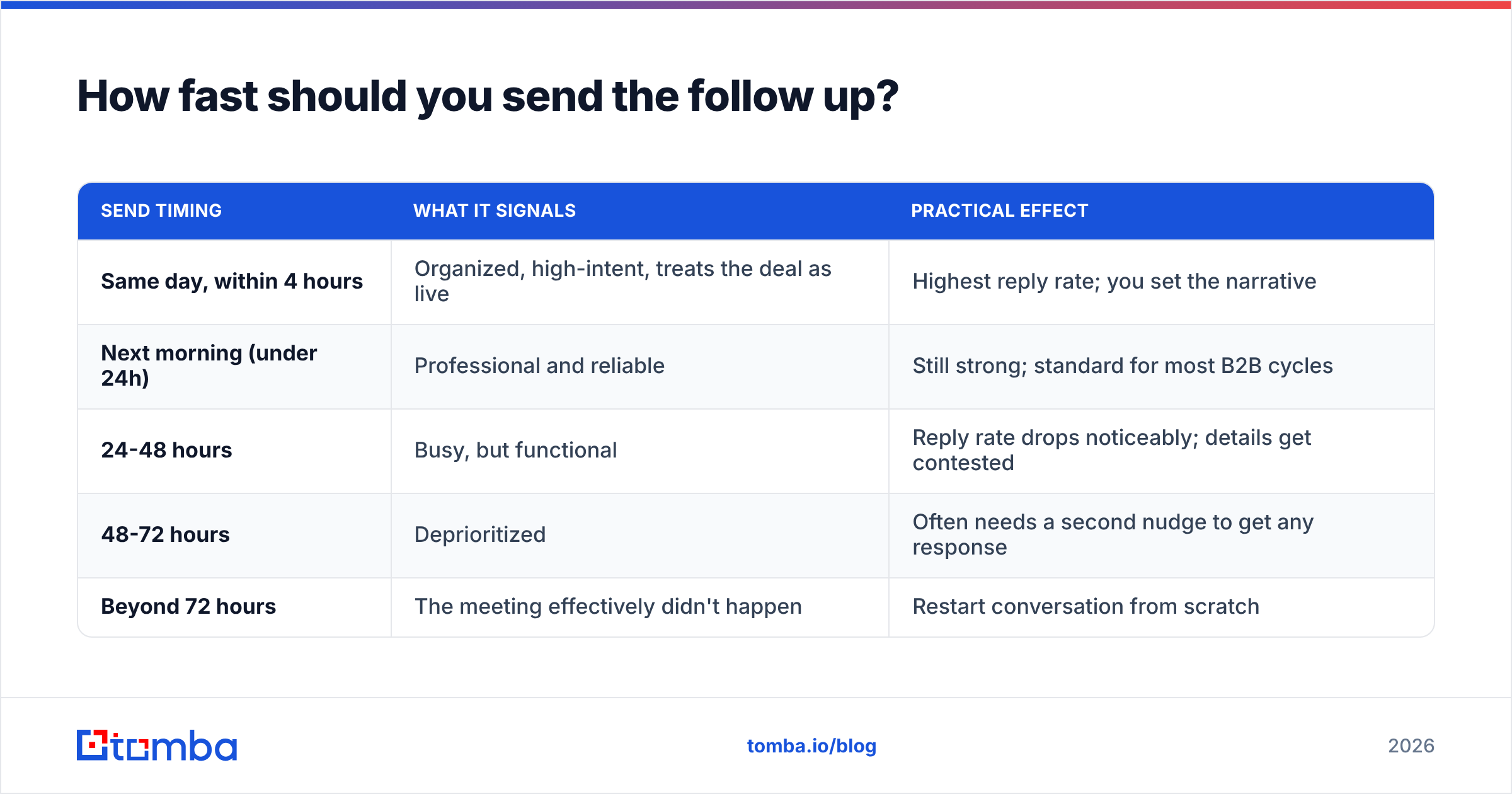
The decay curve on meeting recall is steep. What felt like a shared understanding at 2pm has drifted into two different memories by the next morning. Your recap is not just a to-do list — it's the canonical record of what was agreed, and whoever writes it first frames the deal.
| Send timing | What it signals | Practical effect |
|---|---|---|
| Same day, within 4 hours | Organized, high-intent, treats the deal as live | Highest reply rate; you set the narrative |
| Next morning (under 24h) | Professional and reliable | Still strong; standard for most B2B cycles |
| 24-48 hours | Busy, but functional | Reply rate drops noticeably; details get contested |
| 48-72 hours | Deprioritized | Often needs a second nudge to get any response |
| Beyond 72 hours | The meeting effectively didn't happen | Restart conversation from scratch |
One caveat: fast does not mean sloppy. A recap sent 30 minutes after the call with a wrong figure in the pricing summary costs you more than a careful email sent the next morning. Draft fast, verify the numbers, then send.
What does a good action item actually look like?#
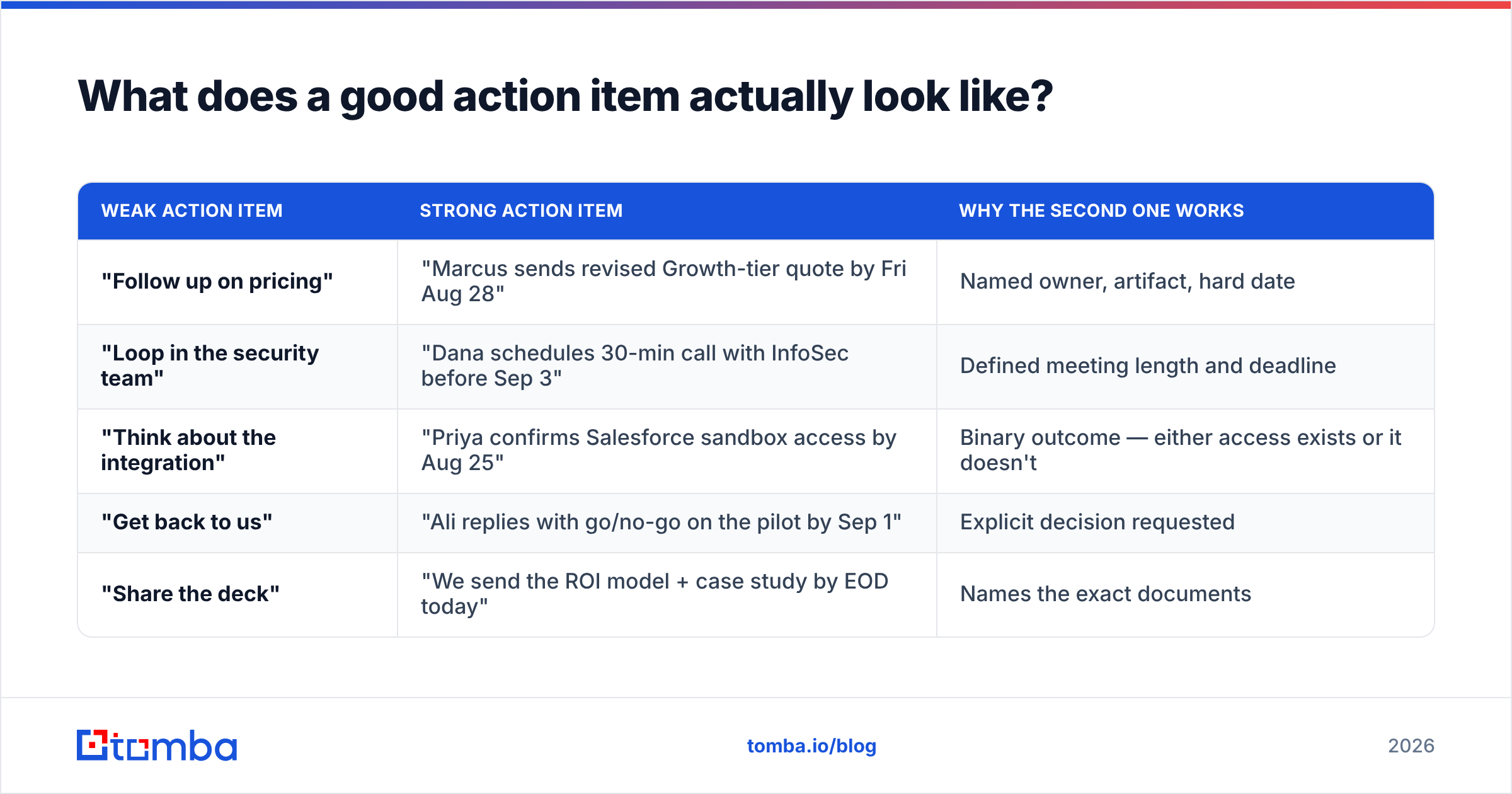
An action item is verifiable. If two people could disagree about whether it was completed, it isn't specific enough.
Compare:
| Weak action item | Strong action item | Why the second one works |
|---|---|---|
| "Follow up on pricing" | "Marcus sends revised Growth-tier quote by Fri Aug 28" | Named owner, artifact, hard date |
| "Loop in the security team" | "Dana schedules 30-min call with InfoSec before Sep 3" | Defined meeting length and deadline |
| "Think about the integration" | "Priya confirms Salesforce sandbox access by Aug 25" | Binary outcome — either access exists or it doesn't |
| "Get back to us" | "Ali replies with go/no-go on the pilot by Sep 1" | Explicit decision requested |
| "Share the deck" | "We send the ROI model + case study by EOD today" | Names the exact documents |
Notice that every strong version contains a verb, a named person, a deliverable, and a date. That's the whole formula. You can enforce it as a habit: if you can't fill all four slots, the item isn't ready to be an action item — it's a topic for the next meeting.
What are the best follow up email templates for 2026?#
Four templates covering the situations that come up most. Adapt the specifics, keep the structure.
Template 1 — Discovery call recap (sales)#
Subject: Recap: Acme × Northwind, Aug 21 — next step Sep 2
Hi Jordan,
Thanks for the time today. Quick recap so we're aligned:
What we agreed
- Northwind's current tooling can't dedupe records across the two CRMs post-merger
- Target is a working pilot before the Q4 planning cycle
- Budget owner is Ellen (CFO); she needs a one-page ROI summary
Action items
Owner
Task
Due
Me
Send ROI one-pager + security overview
Aug 22
Jordan
Forward one-pager to Ellen
Aug 25
Jordan
Confirm sandbox access for the pilot
Aug 27
Both
30-min technical scoping call
Sep 2
Next step: I've sent a calendar hold for Sep 2 at 10am ET. If that time doesn't work, reply with two windows and I'll adjust.
Best,
Marcus
Template 2 — Internal project meeting#
Cut the pleasantries entirely. Internal recaps should be 80% table.
Subject: [Project Atlas] Action items from Aug 21 standup
Decisions: shipping the v2 schema migration on Sep 5; feature-flagging the new dashboard until QA signs off.
Owner
Task
Due
Blocker
Dana
Migration dry-run on staging
Aug 26
None
Priya
QA test plan for dashboard
Aug 28
Needs Dana's dry-run
Sam
Update runbook + rollback steps
Sep 2
None
Me
Comms draft for customers
Sep 3
Needs Sam's runbook
Flag anything that slips by Monday and we'll re-plan.
Template 3 — Post-demo, no clear next step#
The hardest case. The meeting was polite but nothing was committed. Your job is to manufacture a decision point without pressure-selling.
Subject: Two paths after yesterday's demo
Hi Sam,
Yesterday raised one open question: whether the enrichment volume justifies a paid tier this quarter or whether you'd rather test on the free tier first.
Two honest paths:
- Test first — run 500 records through the free tier, compare match rates against your current vendor, decide in two weeks.
- Pilot now — 30-day paid pilot with our team handling the initial import, so you get a real-volume answer instead of a sample-size answer.
Either is fine by me. Which one do you want to take, and by when should I check back?
Marcus
Template 4 — The reminder when nobody replied#
Subject: Re: Recap: Acme × Northwind, Aug 21
Jordan — bumping this so it doesn't drop. The only item on your side is forwarding the ROI one-pager to Ellen. If it's easier, I can send it to her directly — just reply with her email and I'll take it off your plate.
That last move works because it lowers the cost of replying to near zero. A one-word answer or a forwarded address closes the loop.
How do you make sure the recap reaches the right people?#
This is the part most guides skip, and it's where recap emails quietly fail.
You can write a flawless action-items email and still get nothing back because the person who actually approves budget was never on the thread. In a typical B2B deal there are three to seven people with influence, and the one who ran the call is rarely the one who signs. Gartner's B2B buying research puts the average enterprise buying group at six to ten stakeholders — which means your recap needs a distribution strategy, not just a send button.
Practical steps:
- Ask in the meeting who else should see the recap. "Who else needs to be looped in on this?" is a normal question and it saves a week of routing.
- Verify addresses before you add them to CC. A guessed pattern like
first.last@company.comfails often enough to matter, and a bounce on a CC line can drag your whole domain's sender reputation down over time. - Use a pattern lookup rather than guessing. A company email pattern check tells you the actual format a domain uses before you send.
- Verify anything you found rather than were given. Running a new address through an email verifier takes seconds and prevents the silent failure where your recap bounces and nobody tells you.
- Log the thread in your CRM the same day. If the recap lives only in your inbox, the deal has a single point of failure.
What tools help you run this workflow at scale?#
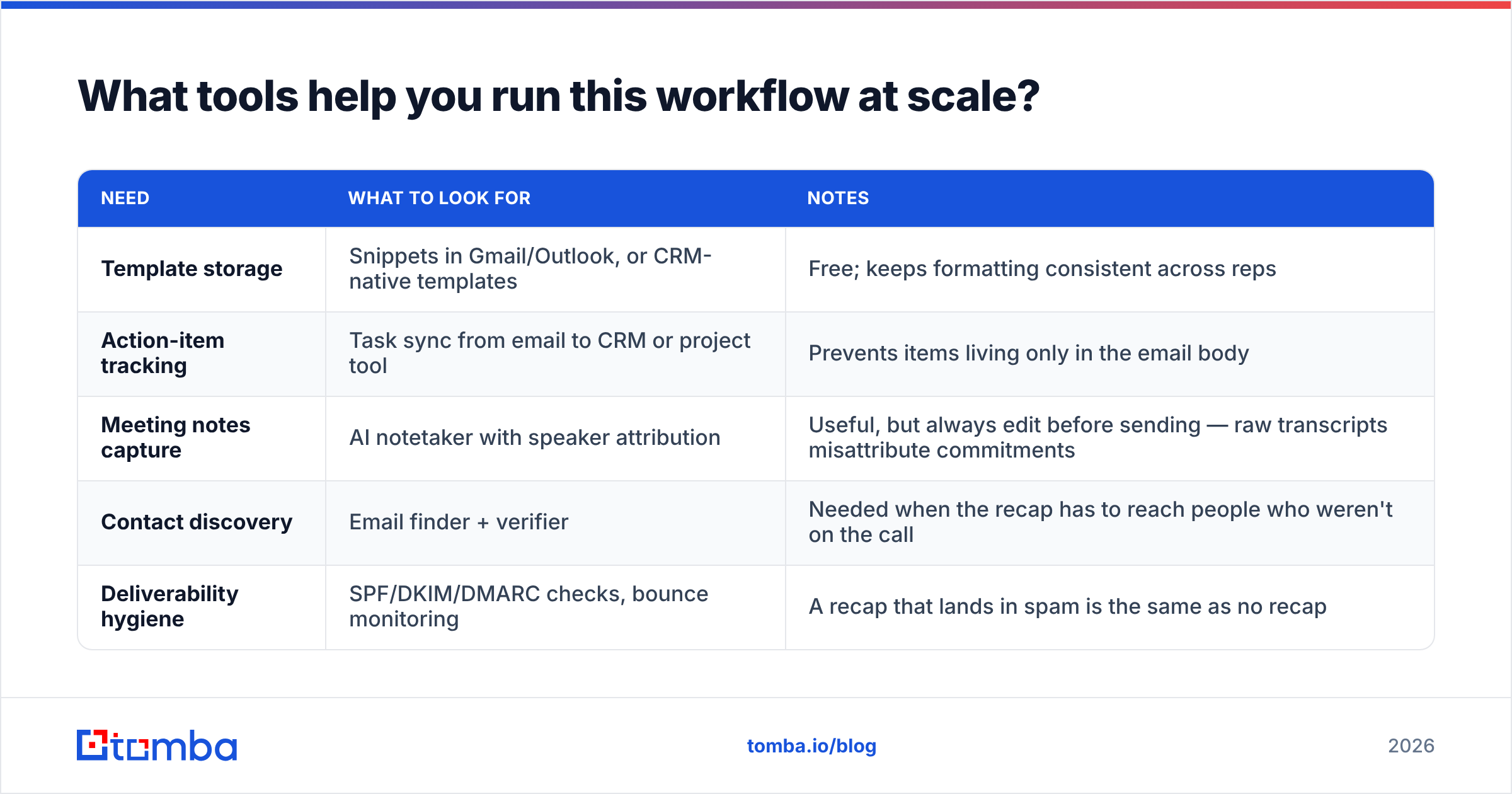
If you're sending two recaps a week, a text file of templates is enough. At twenty a week across a team, you need tooling.
| Need | What to look for | Notes |
|---|---|---|
| Template storage | Snippets in Gmail/Outlook, or CRM-native templates | Free; keeps formatting consistent across reps |
| Action-item tracking | Task sync from email to CRM or project tool | Prevents items living only in the email body |
| Meeting notes capture | AI notetaker with speaker attribution | Useful, but always edit before sending — raw transcripts misattribute commitments |
| Contact discovery | Email finder + verifier | Needed when the recap has to reach people who weren't on the call |
| Deliverability hygiene | SPF/DKIM/DMARC checks, bounce monitoring | A recap that lands in spam is the same as no recap |
On the contact side, this is where an email finder earns its keep: you leave a call knowing the CFO's name but not her address, and you need it before the recap goes out that afternoon — not next week. Tools in this space range from broad data platforms like Apollo and ZoomInfo down to focused finders. BookYourData is a solid option if you want pre-built verified lists rather than on-demand lookups, and Tomba's domain search covers the case where you need every published address at a company domain in one pass. Tomba pricing starts free at 25 searches per month, with the Starter plan at $49/mo and Growth at $99/mo — see Tomba pricing for the full breakdown.
For deliverability, the basics still decide everything. Check your SPF record, keep your bounce rate under 2%, and don't blast a fifteen-person CC list from a domain with no sending history. Google's own guidance on bulk sender requirements, published at Google Workspace's postmaster docs, is the baseline every B2B sender should meet.
How do you follow up when they still don't respond?#
Three touches, then change the channel.
- Touch 1 (day 3): Bump the original thread. One sentence. Reference the single outstanding item.
- Touch 2 (day 7): Add value — a relevant case study, a benchmark, a competitor announcement. Don't just ask again.
- Touch 3 (day 12): The permission-to-close email. "Should I assume this isn't a priority this quarter? Totally fine either way — I'd just rather stop filling your inbox."
That third email gets replies at a surprising rate because it's genuinely easy to answer and it removes the social pressure to say yes. Reviews across G2's sales engagement category consistently show that sequences ending in a graceful exit outperform ones that just fade out.
After three emails, switch medium. A LinkedIn message, a call, or an approach to a second stakeholder will out-perform a fourth email to the same silent inbox. If you need a direct line, a phone finder closes that gap without you having to guess at a switchboard.
What mistakes should you avoid in a meeting recap?#
- Rewriting history. Don't record an agreement that wasn't made. If it was ambiguous in the room, write it as a question: "Did I hear correctly that legal review happens after the pilot, not before?"
- Attaching five files. One or two, named specifically. Five attachments reads as a homework assignment.
- Assigning work to people who weren't in the meeting. Send them a separate note first.
- Writing more than 200 words above the table. Nobody reads it.
- Forgetting to date-stamp the subject line. Six weeks later, "Recap" is unsearchable and "Recap: Acme × Northwind, Aug 21" is one search away.
- Sending from a domain you haven't warmed. New domain, fifteen recipients, links and attachments — that's a spam-folder profile even when the content is legitimate.
Get the recap to the right inbox#
A follow up email after meeting with action items only works if it reaches the people who can act on the items. The writing is the easy half; the routing is where deals stall.
If you leave meetings with names but not addresses — the CFO who needs the ROI summary, the InfoSec lead who has to approve the sandbox, the ops manager who owns the integration — Tomba Email Finder resolves them by name and company domain, verifies them before you hit send, and keeps your bounce rate low enough that your recaps keep landing in the inbox instead of the spam folder. Start on the free tier at 25 searches a month and upgrade only when the volume justifies it.
Related guides#
Ready to find emails that actually work?
Join 150,000+ professionals who stopped guessing and started sending. Free credits on signup — no credit card required.
Get the Tomba newsletter
Practical outbound tactics and product updates — once every two weeks.
About the author