Forager vs UpLead 2026: Which B2B Data Tool Wins?
Forager and UpLead sell the same promise — verified B2B contacts — but they price, source, and verify data in completely different ways. Here's the honest breakdown, plus where a cheaper third option beats both.
TL;DR
- Forager is a lean, credit-based prospecting tool built around waterfall-style email discovery and a Chrome workflow. It fits solo founders and small SDR pods who want contacts fast without a platform commitment.
- UpLead is a database-first platform: 160M+ contacts, 50+ search filters, real-time verification at export, and native CRM push. It fits teams that need to build lists by criteria, not just look up one person at a time.
- The real split is lookup vs. list-building. If you already know who you want, Forager-style lookup wins on cost. If you're searching by title, industry, tech stack, and headcount, UpLead's filters earn their price.
- Pricing reality: UpLead starts around $99/mo for 170 credits on Essentials; Forager sits lower but caps features and enrichment depth. Neither is cheap at scale — per-credit cost is what actually bites.
- If your bottleneck is verified work emails at volume rather than filter depth, an API-first email finder like Tomba ($49/mo Starter, free tier included) covers the same job for a fraction of the seat cost.
What Is Forager and Who Is It Actually For?#
Forager positions itself as a fast, no-bloat B2B contact tool. You give it a name and a company (or a LinkedIn profile, or a domain), and it runs a discovery-and-verification sequence to return a work email — and in some plans, a mobile number.
The design philosophy is narrow and fast. There is no enormous filter panel, no intent data, no ABM scoring dashboard. You look people up, you export, you move on. Credits deplete per successful find, which is the fair model — you don't pay for misses.
Who it fits:
- Solo founders doing founder-led sales. You already know your 200 target accounts. You need emails, not a discovery engine.
- Agencies running client-specific lists. Lookups are bursty and account lists arrive from the client.
- Recruiters sourcing from LinkedIn. Profile-in, contact-out is the entire workflow.
- Small SDR pods who use a separate sequencer (Instantly, Smartlead, lemlist) and only need the data layer.
Who it does not fit: anyone whose primary question is "who should I contact?" rather than "how do I reach this specific person?" That's a different tool category, and it's where UpLead lives.

What Is UpLead and How Does Its Database Model Differ?#
UpLead is a searchable B2B contact database with verification bolted onto the export step. Instead of asking "find me this person," you ask "show me every VP of Engineering at 50-500 employee SaaS companies in the US using AWS," and the platform returns a list you can filter, preview, and export.
Three things define UpLead's model:
- Filter depth. 50+ filters including technographics, industry, revenue band, headcount, location, and job function. This is the core value proposition and the reason people pay a premium over pure lookup tools.
- Real-time verification at export. UpLead verifies the email at the moment you spend the credit, and advertises a 95% accuracy guarantee — you get the credit back on a bounce. That guarantee is a meaningful risk transfer, not just marketing.
- Native CRM push. Salesforce, HubSpot, Pipedrive, Outreach, and Zapier connectors mean lists land where reps work. If you're running a CRM-centric motion, that removes a CSV step you'd otherwise repeat weekly.
The trade-off: credits are expensive and plans are seat-based. A team of four on Plus is a real budget line, and unused monthly credits generally don't roll over indefinitely. You're paying for the search index, not just the contact.
Forager vs UpLead: How Do They Compare Head-to-Head?#
Here's the side-by-side. Treat pricing as directional — both vendors adjust tiers, and annual billing shifts the math roughly 20-25%.
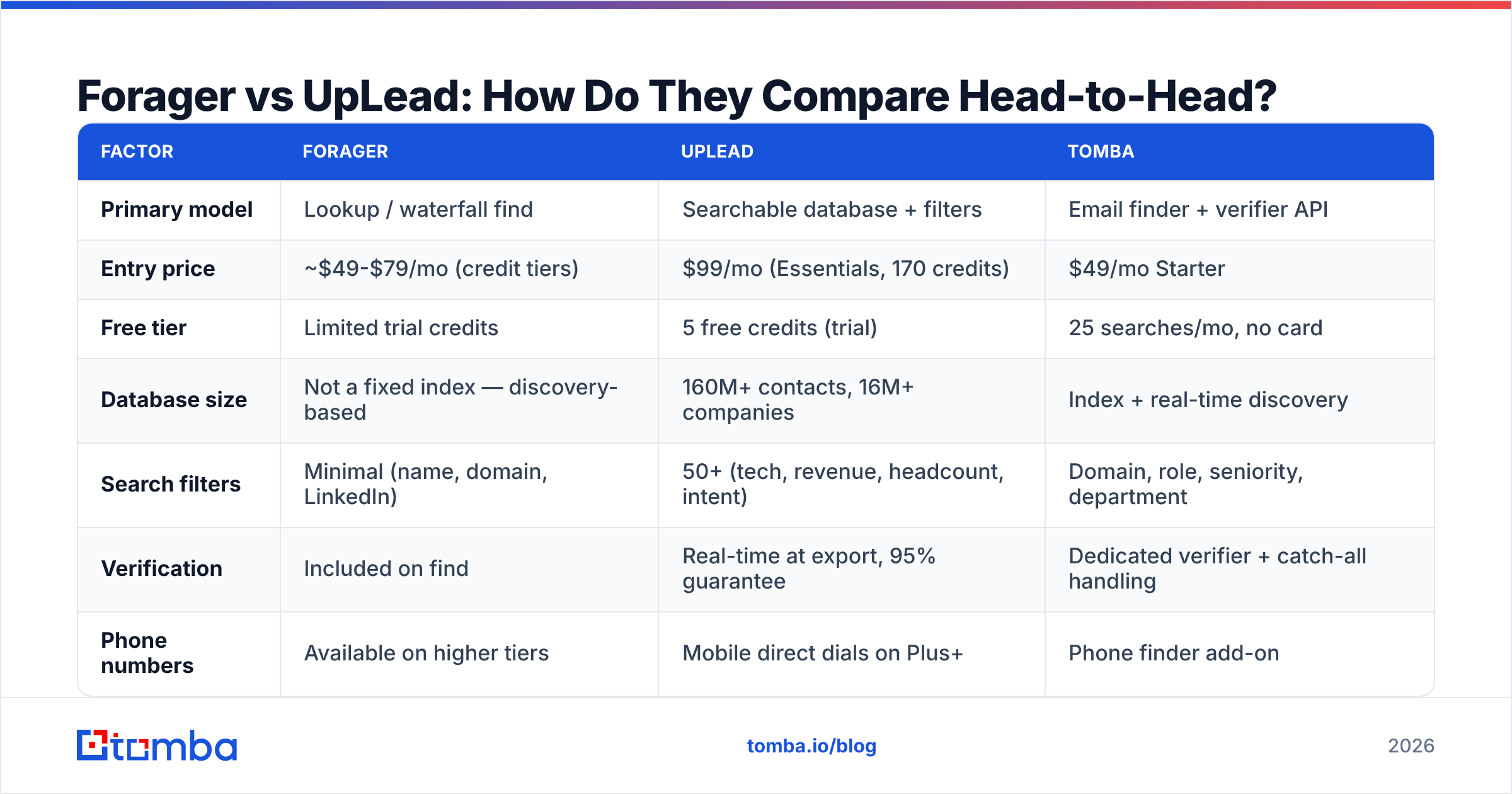
| Factor | Forager | UpLead | Tomba |
|---|---|---|---|
| Primary model | Lookup / waterfall find | Searchable database + filters | Email finder + verifier API |
| Entry price | ~$49-$79/mo (credit tiers) | $99/mo (Essentials, 170 credits) | $49/mo Starter |
| Free tier | Limited trial credits | 5 free credits (trial) | 25 searches/mo, no card |
| Database size | Not a fixed index — discovery-based | 160M+ contacts, 16M+ companies | Index + real-time discovery |
| Search filters | Minimal (name, domain, LinkedIn) | 50+ (tech, revenue, headcount, intent) | Domain, role, seniority, department |
| Verification | Included on find | Real-time at export, 95% guarantee | Dedicated verifier + catch-all handling |
| Phone numbers | Available on higher tiers | Mobile direct dials on Plus+ | Phone finder add-on |
| API access | Limited | Available on higher tiers | Full Tomba API on all paid plans |
| Credit rollover | Plan-dependent | Limited / annual plans only | Monthly reset, bulk pricing |
| Best for | Known-account lookup | Net-new list building | Volume email discovery + verification |
The table makes the positioning obvious. UpLead charges for discovery — the ability to find people you didn't know existed. Forager charges for retrieval — getting contact details for people you've already identified. Confusing those two jobs is the single most common reason teams overpay.

Which One Has Better Data Accuracy?#
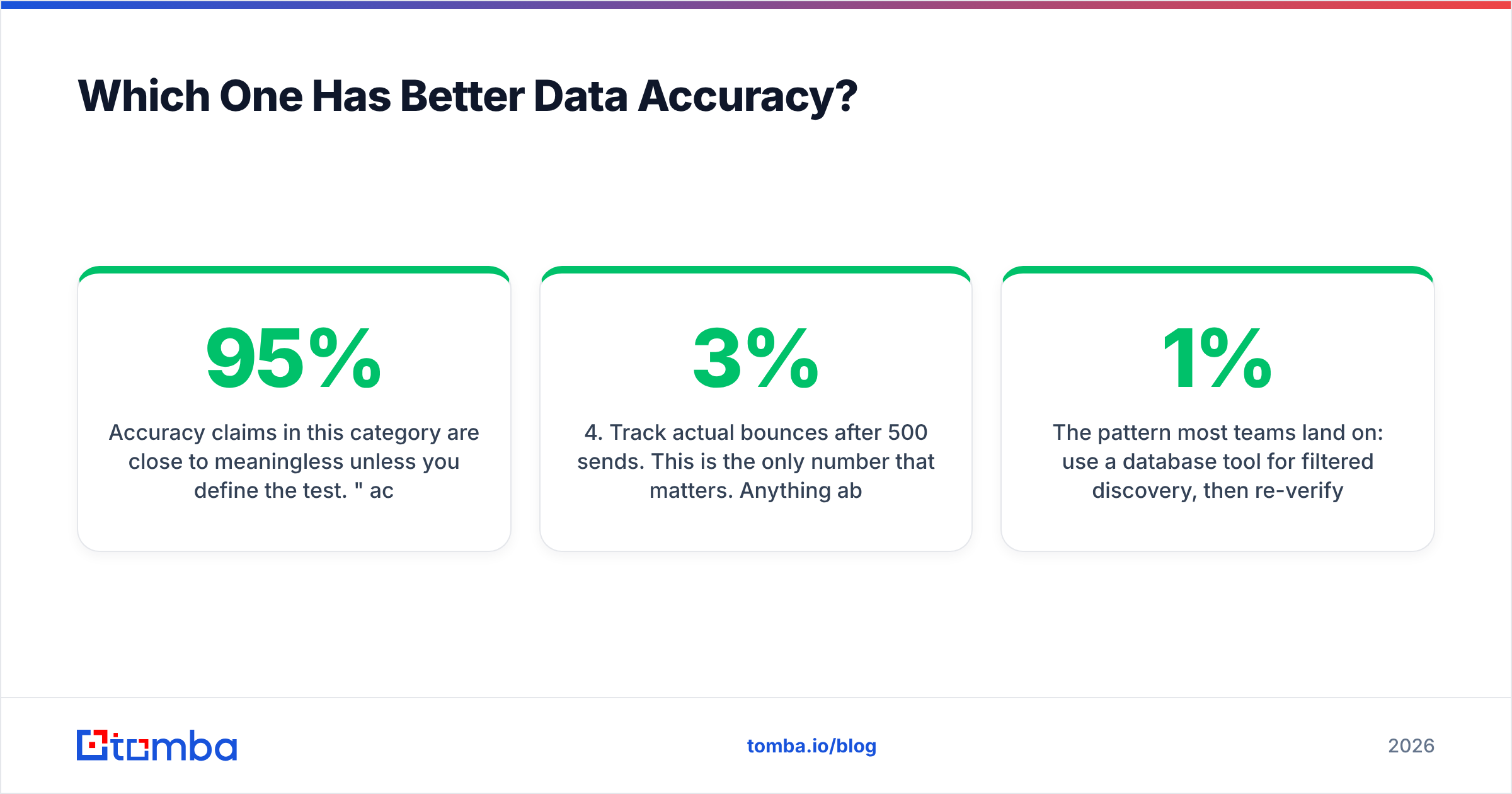
Accuracy claims in this category are close to meaningless unless you define the test. "95% accurate" from one vendor and "98% accurate" from another are usually measuring different things: syntax validity, SMTP acceptance, or actual inbox delivery.
Here's how to run a real bake-off in an afternoon:
- Build one control list of 200 contacts you can independently confirm — people whose emails appear on company sites, in conference speaker bios, or in your own closed-won CRM records.
- Run the same list through both tools. Record hit rate (how many returned an email at all) and match rate (how many matched your known-good address).
- Send a throwaway verification pass through a neutral third-party checker so no vendor is grading its own homework. A free email checker works for spot checks.
- Track actual bounces after 500 sends. This is the only number that matters. Anything above 3% bounce will start damaging your sender reputation regardless of which vendor's dashboard says "verified."
- Segment by company size. Almost every tool is strong on 1,000+ employee companies with predictable email patterns and weak on 10-person startups using custom domains.
In practice, UpLead's real-time verification-at-export produces cleaner exports because the check happens at the moment of spend rather than against a cached record from six months ago. Forager's discovery-first approach tends to have higher hit rates on obscure or small-company contacts precisely because it isn't limited to a pre-built index.
The pattern most teams land on: use a database tool for filtered discovery, then re-verify the entire export through a dedicated email verifier before it touches a sequencer. Catch-all domains are the specific failure mode here — they accept everything at SMTP, so a naive verifier marks them "valid" and you find out the truth from your bounce report. A catch-all verifier is what separates a 1% bounce list from a 6% one.
How Does Pricing Really Compare at Volume?#
Sticker price misleads. What matters is cost per usable contact — the price after you subtract misses, bounces, and duplicates.
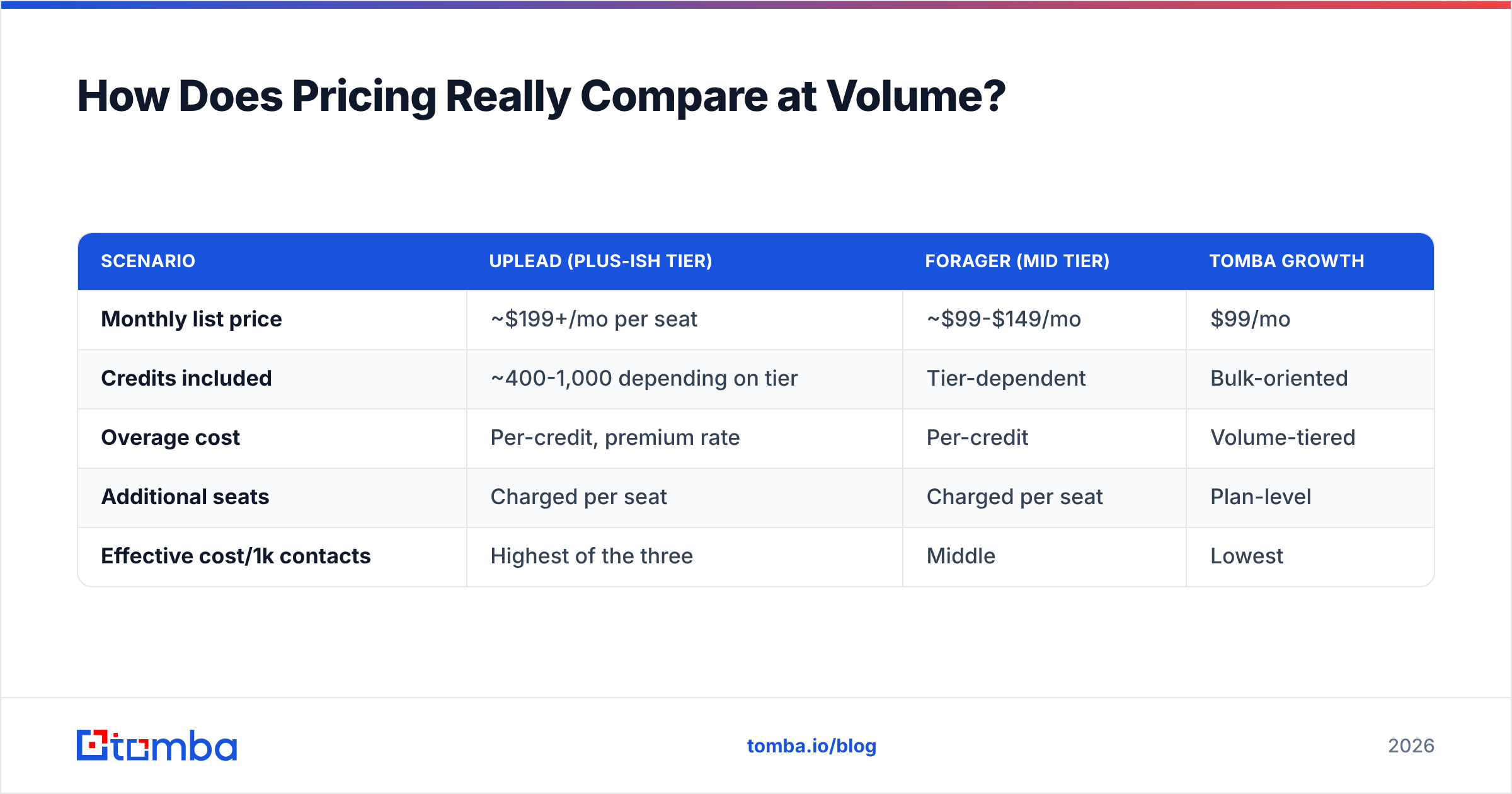
Work the math for a team needing 2,000 verified contacts a month:
| Scenario | UpLead (Plus-ish tier) | Forager (mid tier) | Tomba Growth |
|---|---|---|---|
| Monthly list price | ~$199+/mo per seat | ~$99-$149/mo | $99/mo |
| Credits included | ~400-1,000 depending on tier | Tier-dependent | Bulk-oriented |
| Overage cost | Per-credit, premium rate | Per-credit | Volume-tiered |
| Additional seats | Charged per seat | Charged per seat | Plan-level |
| Effective cost/1k contacts | Highest of the three | Middle | Lowest |
Three cost traps to watch for regardless of which you pick:
- Seat multiplication. Database platforms price per seat. Four reps on a $99 plan is $396/mo, not $99. API-first tools usually charge for volume, not headcount — that's a structural difference, not a discount.
- Credits burned on misses. Check the refund policy carefully. UpLead's bounce-credit-back guarantee is genuinely good here. Tools that charge for a "found" email that later bounces are charging you twice: once in credits, once in deliverability damage.
- Annual lock-in. Both vendors push annual heavily. That's fine once you've validated fit — it's expensive when you sign in month one and discover the coverage doesn't match your ICP by month three. Run the 200-contact test first.

When Should You Skip Both and Use Something Else?#
Neither tool is wrong. But there are three situations where a third option is simply the better buy.
1. You need volume email discovery, not filter depth. If your ICP is already defined and your account list comes from somewhere else — a partner list, a conference roster, an Apollo alternative export, your CRM's dormant accounts — you're paying UpLead a premium for a search index you barely touch. A domain search that returns every public email at a company for one credit is a much better unit economic.
2. You want the data inside your own systems. Both Forager and UpLead are primarily UI-first. If you're an ops or engineering-led team, the ability to hit an endpoint from a workflow — enrich on form submit, backfill on CRM record create, batch overnight — changes what you can build. That's an API question, and API access on database platforms typically sits behind the top tier.
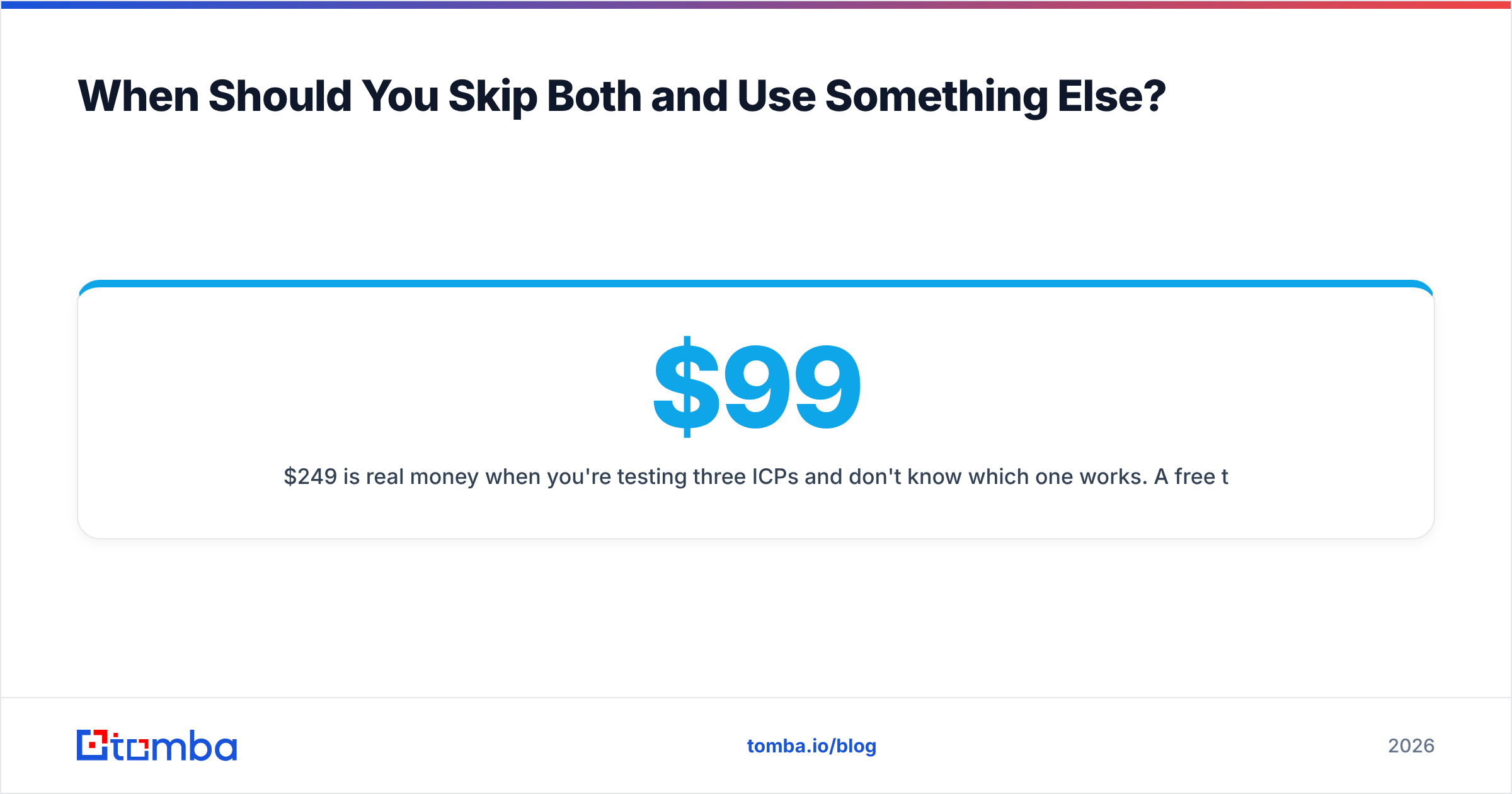
3. Budget is a hard constraint and you're pre-PMF. $99-$249/mo per seat is real money when you're testing three ICPs and don't know which one works. A free tier that actually lets you test (25 searches/mo, no card) plus a $49/mo Starter is a much lower-stakes way to validate a channel.
Worth naming honestly: if you specifically need a pre-built, human-verified list by exact criteria — say 5,000 dentists in Texas with verified direct dials — a purpose-built list provider like BookYourData is a legitimate alternative to both, since pay-as-you-go list purchase avoids subscription commitment entirely. Different job, different tool.
What Does the Right Stack Actually Look Like?#
Most teams that get this right don't run one tool. They run a layered stack:
- Discovery layer — where you decide who. This can be UpLead's filters, LinkedIn Sales Navigator, a partner list, or an intent signal. Pay for depth here only if you genuinely search by criteria.
- Enrichment layer — where you turn a name and company into a reachable contact. This is high-volume, repetitive, and should be as cheap per unit as possible. An email finder or bulk email finder belongs here.
- Verification layer — the non-negotiable gate before anything hits a sequencer. Always re-verify, even data from a vendor that claims it verified. Vendor caches age.
- Delivery layer — sequencer plus warmed domains. No amount of data quality survives a cold domain sending 400 emails on day one.
Getting these confused is why so many teams conclude "the data was bad" when the actual failure was deliverability, or conclude "the tool is expensive" when they were paying database prices for enrichment work.
Independent review sites are useful sanity checks on vendor claims — G2's B2B data category and Capterra both surface unfiltered complaints about credit policies and coverage gaps that vendor pages won't tell you.
Forager vs UpLead: What's the Verdict?#
Pick UpLead if you build net-new lists by criteria, need technographic or revenue filters, run a CRM-centric motion, and have budget for seat-based pricing. The 95% guarantee with credit-back on bounces is real risk reduction, and the filter set is the deepest of the two.
Pick Forager if your account list already exists, you want lower monthly commitment, you work primarily from LinkedIn profiles, and you'd rather pay per successful find than per seat.
Pick neither if your actual bottleneck is verified work emails at volume with API access — that's a different product category, and paying database prices for it is the most common overspend in outbound tooling.
The fastest way to settle it: run the same 200-contact control list through all three, count real bounces after 500 sends, and let the numbers decide instead of the pricing page.
Test it against your own list. Tomba's Email Finder gives you 25 free searches a month with no card required — enough to run the 200-contact bake-off described above on a representative sample. Paid plans start at $49/mo Starter and $99/mo Growth, with full API access on every paid tier and a dedicated verifier for catch-all domains. Check Tomba pricing and see whether the enrichment layer of your stack really needs a database-tier budget.
Related guides#
Ready to find emails that actually work?
Join 150,000+ professionals who stopped guessing and started sending. Free credits on signup — no credit card required.
Get the Tomba newsletter
Practical outbound tactics and product updates — once every two weeks.
About the author