Formal Email Subject Line Examples: 60+ That Get Replies
Sixty-plus formal email subject line examples for job applications, meeting requests, client escalations, invoices, and executive outreach. Plus the length, tone, and structure rules that decide which ones get opened.
Good formal email subject line examples do one job. They tell the reader what the email is about. This guide hands you 60+ formal email subject line examples you can copy today. It also covers the length, tone, and format rules behind them.
TL;DR
- A formal subject line has one job. It tells the reader what the email is about and what it asks for. Keep it under 60 characters.
- The best lines use a noun plus a detail, like "Contract Review — Acme MSA, due Friday." Skip full sentences and question marks.
- Drop greetings, exclamation marks, emoji, ALL CAPS, and vague words like "Quick question."
- Phones cut the subject at 35-40 characters. Put the key detail first: a company, an invoice number, a job title, or a date.
- Below you get 60+ formal email subject line examples, sorted by scenario.
What counts as a formal email subject line?#
A formal subject line is one you would be happy to see quoted in court. It reads neutral, clear, and plain. It says what the email holds.
Think of it as the label on a file folder. A magazine headline hides facts to make you click. A file label spells things out, so you can find it a year later. Formal email works like the label.
The subject is just one header field in the message. It sits next to From, To, and Date in the email header specification. But it is the only part that competes for eyes in a list of 200 unread items.
Three signals make a subject line read as formal:
- Noun-first structure. "Q3 Budget Approval" reads formal. "Can you approve the Q3 budget?" reads casual. Formal lines name a thing.
- Hard details. Invoice numbers, contract names, job titles, dates, and ticket IDs. They make the email easy to search.
- Flat tone. No hype, no fake rush. Write "Follow-Up: Vendor Security Review" instead of "Just circling back on that security thing!"
What makes formal email subject line examples actually work?#
Being formal is not enough. These rules decide if the email gets opened or ignored.
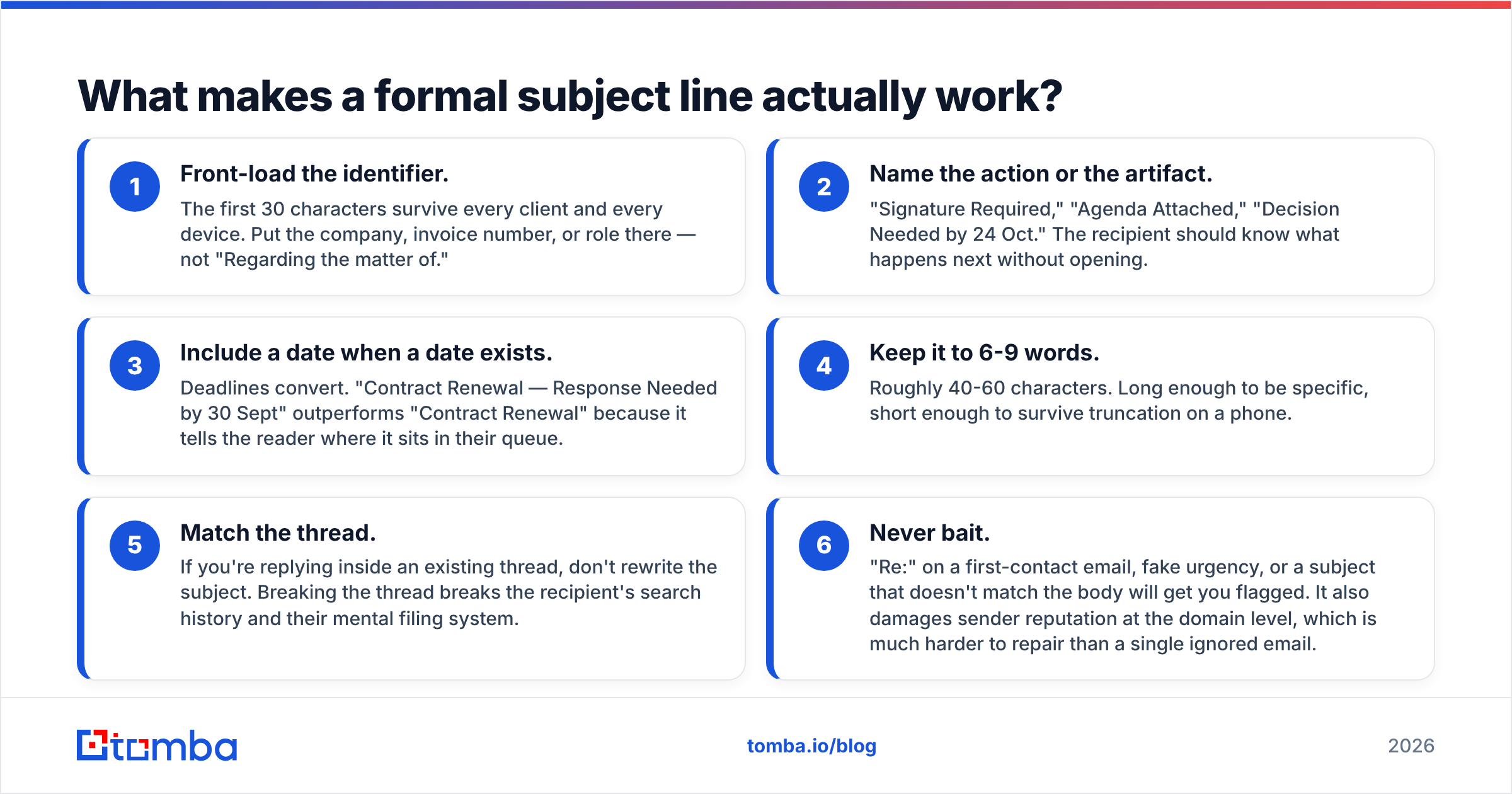
- Put the key detail first. The first 30 characters show up on every device. Start with the company, the invoice number, or the job title.
- Name the action or the file. "Signature Required." "Agenda Attached." "Decision Needed by 24 Oct." The reader should know what comes next.
- Add a date when you have one. Deadlines get replies. "Contract Renewal — Response Needed by 30 Sept" beats plain "Contract Renewal."
The next three rules are about form and trust.
- Use 6 to 9 words. That is about 40 to 60 characters. Long enough to be clear, short enough to survive a phone.
- Match the thread. Do not rewrite the subject in a reply. It breaks the search history for everyone on the thread.
- Never bait. A fake "Re:" or a fake deadline gets you flagged. It also hurts sender reputation across your whole domain.

Formal vs. semi-formal vs. cold outreach: what's the difference?#
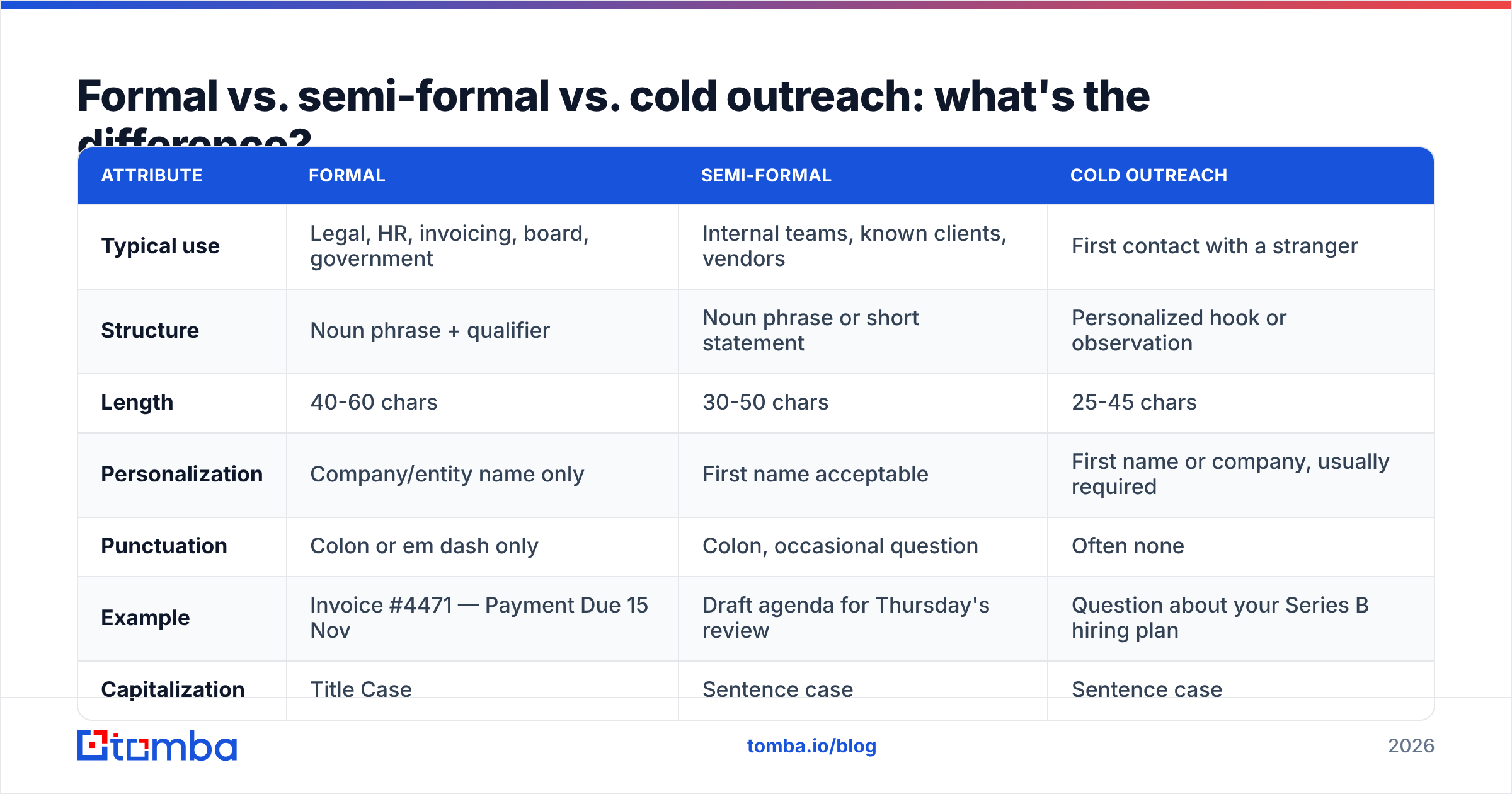
The same email can need three different subject lines. It depends on who reads it. Here is how the three styles differ.
| Attribute | Formal | Semi-formal | Cold outreach |
|---|---|---|---|
| Typical use | Legal, HR, invoicing, board, government | Internal teams, known clients, vendors | First contact with a stranger |
| Structure | Noun phrase + qualifier | Noun phrase or short statement | Personalized hook or observation |
| Length | 40-60 chars | 30-50 chars | 25-45 chars |
| Personalization | Company/entity name only | First name acceptable | First name or company, usually required |
| Punctuation | Colon or em dash only | Colon, occasional question | Often none |
| Example | Invoice #4471 — Payment Due 15 Nov | Draft agenda for Thursday's review | Question about your Series B hiring plan |
| Capitalization | Title Case | Sentence case | Sentence case |
| Emoji / caps | Never | Never | Rarely, and risky |
Most people slip in one way. They use cold outreach tricks on formal email. A teaser subject works on a stranger. It looks shifty in your CFO's inbox. The reverse fails too. A flat, plain line gives a cold prospect no reason to open.
How long should a formal email subject line be?#
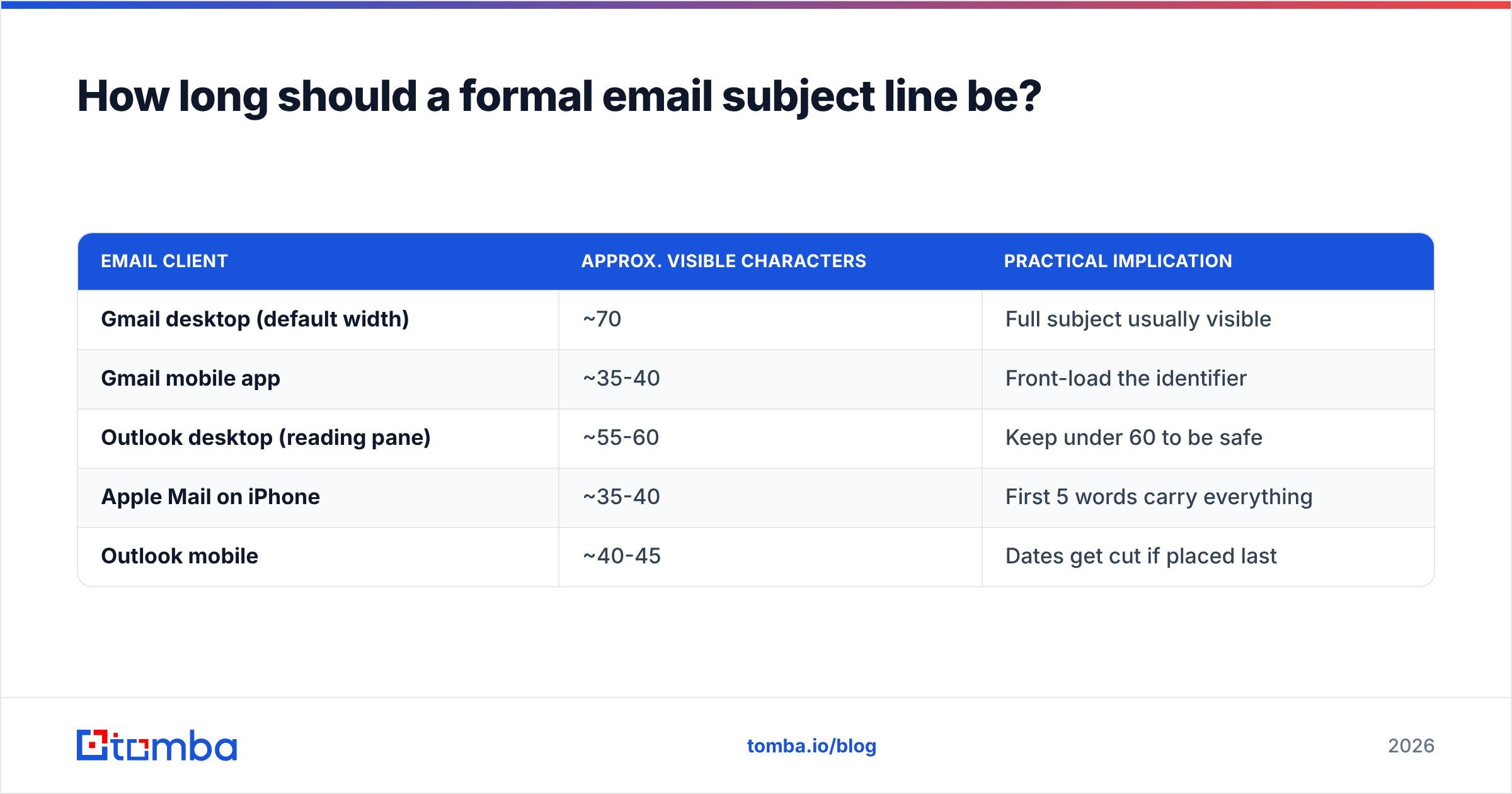
Short enough to fit the smallest preview you care about. The cut-off shifts by app and window size. These numbers work in practice.
| Email client | Approx. visible characters | Practical implication |
|---|---|---|
| Gmail desktop (default width) | ~70 | Full subject usually visible |
| Gmail mobile app | ~35-40 | Front-load the identifier |
| Outlook desktop (reading pane) | ~55-60 | Keep under 60 to be safe |
| Apple Mail on iPhone | ~35-40 | First 5 words carry everything |
| Outlook mobile | ~40-45 | Dates get cut if placed last |
Good formal email subject line examples stay under 60 characters. Put the key noun in the first 35. Take this subject: "Regarding the outstanding balance on account 4471." A phone shows "Regarding the outstanding balance o…" The account number is gone, and that was the useful part. Rewrite it as "Account 4471 — Outstanding Balance." Now it works on every screen.
What are the best formal email subject line examples by scenario?#
Copy these formal email subject line examples, swap the brackets, and send. Legal and government work skews stricter. Agencies and startups can drop a notch.
Job applications and recruiting#
- Application: Senior Backend Engineer (Req. #2291).
- Application — Marketing Manager, [Company Name].
- Referral Application: Data Analyst, via [Referrer Name].
- Follow-Up: Product Designer Application, Submitted 12 Sept.
- Interview Availability — [Your Name], Senior PM Role.
- Thank You — Final Round Interview, 18 Sept.
- Offer Acceptance: [Your Name], Start Date 3 Nov.
- Withdrawal of Application — [Role], [Your Name].
- Reference Request: [Candidate Name], Account Executive.
- Salary Discussion — [Role Title], Follow-Up to 14 Oct Call.
Meeting requests and scheduling#
- Meeting Request: Q4 Roadmap Review.
- Agenda Attached — Steering Committee, 22 Oct.
- Reschedule Request: Vendor Review, Originally 9 Oct.
- Availability for Quarterly Business Review — Week of 3 Nov.
- Calendar Hold: Contract Kickoff, 45 Minutes.
- Follow-Up: Action Items from 12 Sept Planning Session.
- Cancellation Notice — Weekly Sync, 8 Oct.
- Board Meeting Materials — Distribution for 30 Oct.
Client and vendor communication#
- Statement of Work — [Project Name], For Review.
- Contract Renewal: [Company] MSA, Expires 31 Dec.
- Change Order #3 — [Project], Approval Requested.
- Deliverable Submitted: Phase 2 Documentation.
- Service Update — Scheduled Maintenance, 14 Nov 02:00 UTC.
- Escalation: Ticket #8842, Unresolved After 72 Hours.
- Onboarding Documents — [Client Name], Action Required.
- Notice of Termination — [Service Agreement], Effective 31 Jan.
Invoicing and finance#
- Invoice #4471 — Payment Due 15 Nov.
- Payment Reminder: Invoice #4471, 14 Days Overdue.
- Remittance Advice — Payment Sent 12 Oct.
- Purchase Order #PO-2291 — Confirmation Requested.
- Expense Report Submission — September, [Your Name].
- Budget Variance Report — Q3, For Your Review.
- Final Notice: Invoice #4471, Account Suspension 30 Nov.
- Corrected Invoice #4471-R — Supersedes Prior Version.
Executive and board communication#
- Decision Required: Vendor Selection, by 24 Oct.
- Q3 Performance Summary — Executive Briefing.
- Risk Notification: [System Name] Capacity Constraint.
- Recommendation: [Initiative Name], Two Options Attached.
- Headcount Request — Engineering, FY26 Planning.
- Post-Incident Review — 8 Oct Outage, Summary Attached.
- Strategic Update: [Partnership Name], Confidential.
- Approval Requested — Capital Expenditure, $240K.
HR, internal, and administrative#
- Resignation Notice — [Your Name], Effective 14 Nov.
- Leave Request: 3-14 Dec, Coverage Plan Attached.
- Policy Update — Remote Work Guidelines, Effective 1 Jan.
- Performance Review Scheduling — Q4 Cycle.
- Onboarding Schedule — [New Hire Name], Starting 3 Nov.
- Benefits Enrollment — Deadline 30 Nov.
- Incident Report Submission — [Date], For HR Review.
- Confirmation of Employment — [Employee Name], Verification Request.
Academic and research#
- Manuscript Submission: [Title], for [Journal Name].
- Research Collaboration Inquiry — [Department], [University].
- Thesis Committee Request — [Your Name], PhD Candidate.
- Grant Application: [Program Name], Deadline 15 Jan.
- Recommendation Letter Request — Graduate Admissions, Due 1 Dec.
- Conference Abstract Submission — [Conference Name] 2026.
Legal, compliance, and government#
- Notice of Dispute — Agreement Dated 12 Mar 2024.
- Records Request Under FOIA — [Agency Name].
- Compliance Certification — SOC 2 Type II, Annual Renewal.
- Data Subject Access Request — [Requester Name].
- Cease and Desist — Trademark Use, [Mark Name].
- Regulatory Filing Confirmation — [Form Number], Q3.
Apologies and corrections#
- Correction: Invoice #4471, Amount Restated.
- Apology and Resolution Plan — 8 Oct Service Interruption.
- Clarification — Prior Email Sent in Error, 12 Sept.
What kills a formal subject line?#
Some patterns fail so often they are worth naming. Keep them out of your own formal email subject line examples.
- "Quick question" signals nothing and gets pushed down the pile. The question is never quick.
- "Touching base" or "Circling back" is filler. Name the real reason instead: "Follow-Up: Contract Signature, Requested 12 Sept."
- "URGENT" in caps reads as a scam or as poor planning. If it is urgent, give the deadline.
- A fake "Re:" prefix is a known trick. Spam filters and people both catch it.
Three more habits do quiet damage.
- No subject at all is a strong spam signal. It also makes the message hard to find later.
- A first name alone looks like a hacked account. "John" is not a subject line.
- Emoji in formal mail reads as unserious, even one. A legal notice is not a newsletter.
Sales teams that publish open-rate data, such as HubSpot's sales blog, keep finding the same thing. Clear beats clever in B2B. The gap grows as the reader gets more senior.
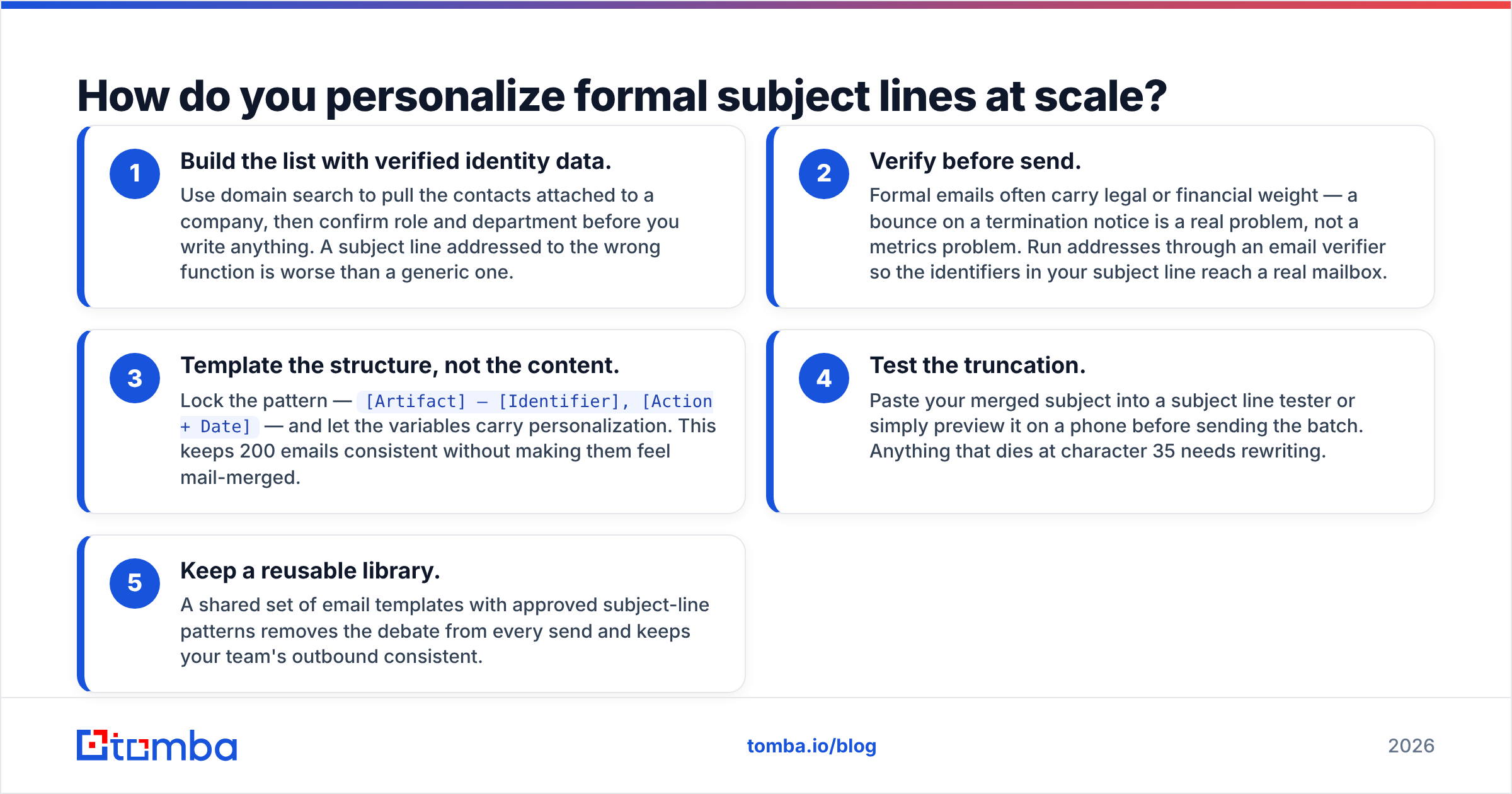
How do you personalize formal subject lines at scale?#
Formal lines lean on hard details. Hard details need clean data. Say you send 40 renewal notices. You need the right company, the right contact, and an address that works.
Here is a process that holds up:
- Build the list with verified data. Use domain search to pull the contacts at a company. Check the role before you write a word.
- Verify before you send. A bounced termination notice is a legal problem, not a metrics problem. Run each address through an email verifier.
- Template the shape, not the words. Lock the pattern:
[Artifact] — [Identifier], [Action + Date]. Let the variables carry the detail.
Two more steps keep a batch clean.
- Test the cut-off. Paste the merged subject into a subject line tester. Or just look at it on a phone.
- Keep a shared library. A set of email templates with approved patterns ends the debate on every send.
Comparing tools? Review sites like G2 let you filter by data accuracy and deliverability instead of ad copy. Hunter, BookYourData, Apollo, and Tomba all source data in different ways. The right pick depends on what you need: breadth, depth, or API control.
Should you change the subject line mid-thread?#
Usually no. Change it only when the topic really changes.
Keep the thread when you reply, follow up, or add a person to a live discussion. A new thread throws away that history.
Start a new thread when the topic has moved on. Do it when the thread runs past 15 messages and nobody can follow it. Do it when you need a clean record for one item, such as a contract or an invoice. Then name the link: "New Thread: Contract Amendment — Continues from 12 Sept Renewal Discussion."
There is a middle path. Legal and buying teams often add a tag to the old subject. "Invoice #4471 — Payment Due 15 Nov [RESOLVED]" keeps search intact and shows the state.
FAQ#
Where can I find formal email subject line examples to copy? Use the 65 formal email subject line examples above. Pick your scenario, swap the brackets, and send.
Should formal subject lines use title case or sentence case? Use Title Case for outside and legal mail. Sentence case is fine inside your company. Pick one and stick to it.
Is it acceptable to use a question in a formal subject line? Rarely. A question sounds casual and invites a one-word reply. Turn "Can you approve the budget?" into "Budget Approval Requested — Q4."
How many words should a formal subject line be? Six to nine words, or 40 to 60 characters. Under four words and you dropped a detail. Over ten and you wrote the email in the subject.
Do formal subject lines affect deliverability? Only in an indirect way. The text alone rarely trips a filter. But caps, heavy punctuation, and fake "Re:" prefixes add up. Weak engagement over time also drags down email deliverability.
Should I include the recipient's name in the subject? Only when it clears up who you mean. HR notes, reference requests, and job applications qualify. Elsewhere it reads like a merge field.
Where to start#
Pick the scenario closest to yours. Swap the brackets. Check that the key noun lands in the first 35 characters. That one edit fixes most subject lines.
The harder part is reaching a real person. Start with the Tomba Email Finder. Search by domain, name, or company. Confirm the role, then verify the address. The free tier covers 25 searches a month. Paid plans start at $49/mo, and full Tomba pricing is on the site. Even the best formal email subject line examples need a valid address underneath.
Related guides#
Ready to find emails that actually work?
Join 150,000+ professionals who stopped guessing and started sending. Free credits on signup — no credit card required.
Get the Tomba newsletter
Practical outbound tactics and product updates — once every two weeks.
About the author