Free Email Address Search: How to Find Any Email in 2026
Free email lookups range from genuinely useful to actively harmful to your sender reputation. Here's what the free tiers actually give you, where they break, and how to verify what you find before you send.
TL;DR
- A free email address search is real and usable — but every provider caps it somewhere: monthly credits, verification depth, or export rights.
- The free tiers worth your time give you verified results (SMTP-checked, with a confidence score). The ones that don't are just pattern guessers with a nicer UI.
- Tomba's free tier gives 25 searches per month with full verification; Hunter gives 25 with 50 verifications; most "unlimited free" tools are scraped databases with 40-60% accuracy.
- Free permutators and email generators cost nothing and are genuinely useful — as long as you run the output through a verifier before sending.
- Once you're doing more than ~25 lookups a month, the math flips: a $49/mo plan is cheaper than the deliverability damage from bounced guesses.
What is a free email address search?#
A free email address search is any method of finding a person's work email address without paying — either by using a tool's free tier, by deducing the company's email pattern, or by pulling the address from a public source the person already published.
Three distinct things get lumped under the same phrase, and confusing them is why people end up with 30% bounce rates:
- Free lookup tools — you enter a name and a domain, the tool returns an address it has in its database or has just computed and verified. Limited by monthly credits.
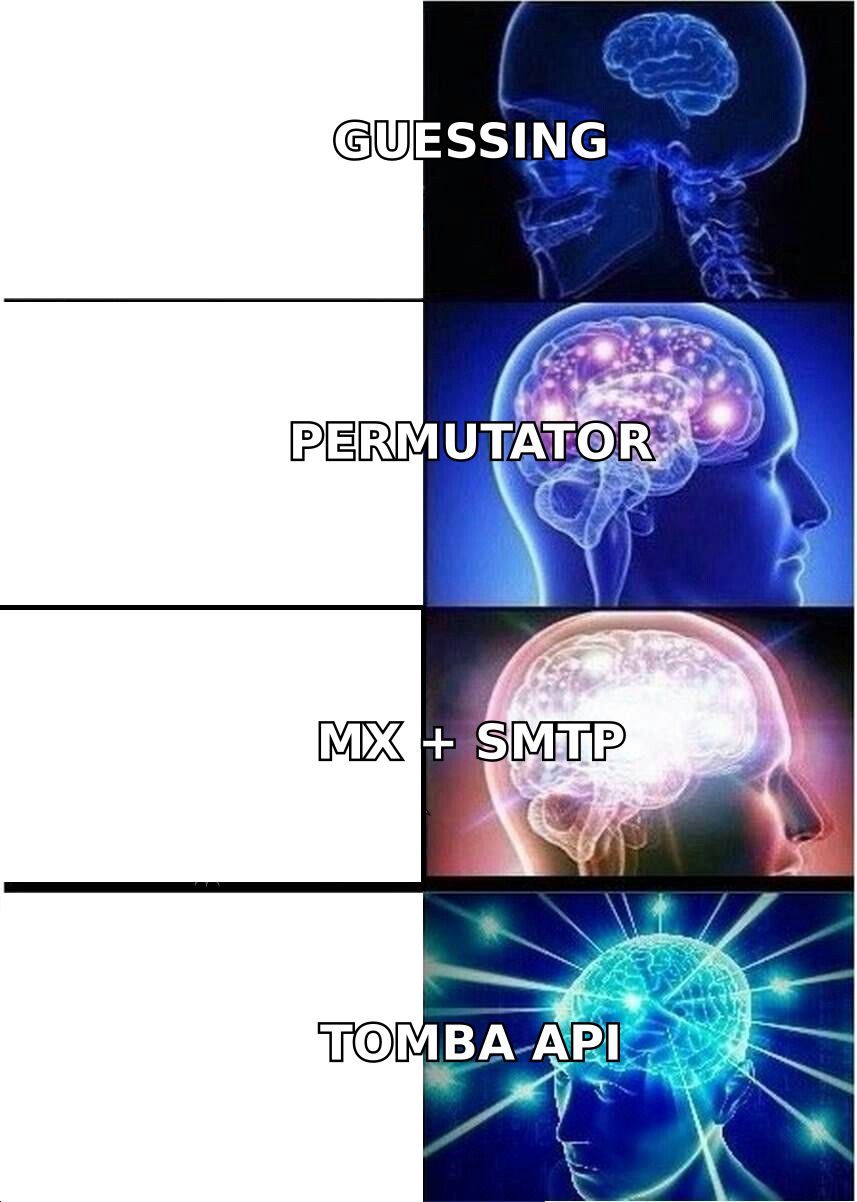
- Free pattern generators (permutators) — you enter a name and a domain, the tool returns all 20-odd possible combinations. Unlimited, but nothing is verified.
jane.doe@,jdoe@,j.doe@,jane@— one is right, nineteen will bounce. - Free manual sourcing — GitHub commit histories, conference speaker pages, WHOIS records, press-release contacts, personal sites. Slow, but often the highest-confidence source you'll get.
Only the first category returns something you can safely send to. The second is raw material. The third is craft work that doesn't scale past a handful of targets.
How does a free email address search actually work?#
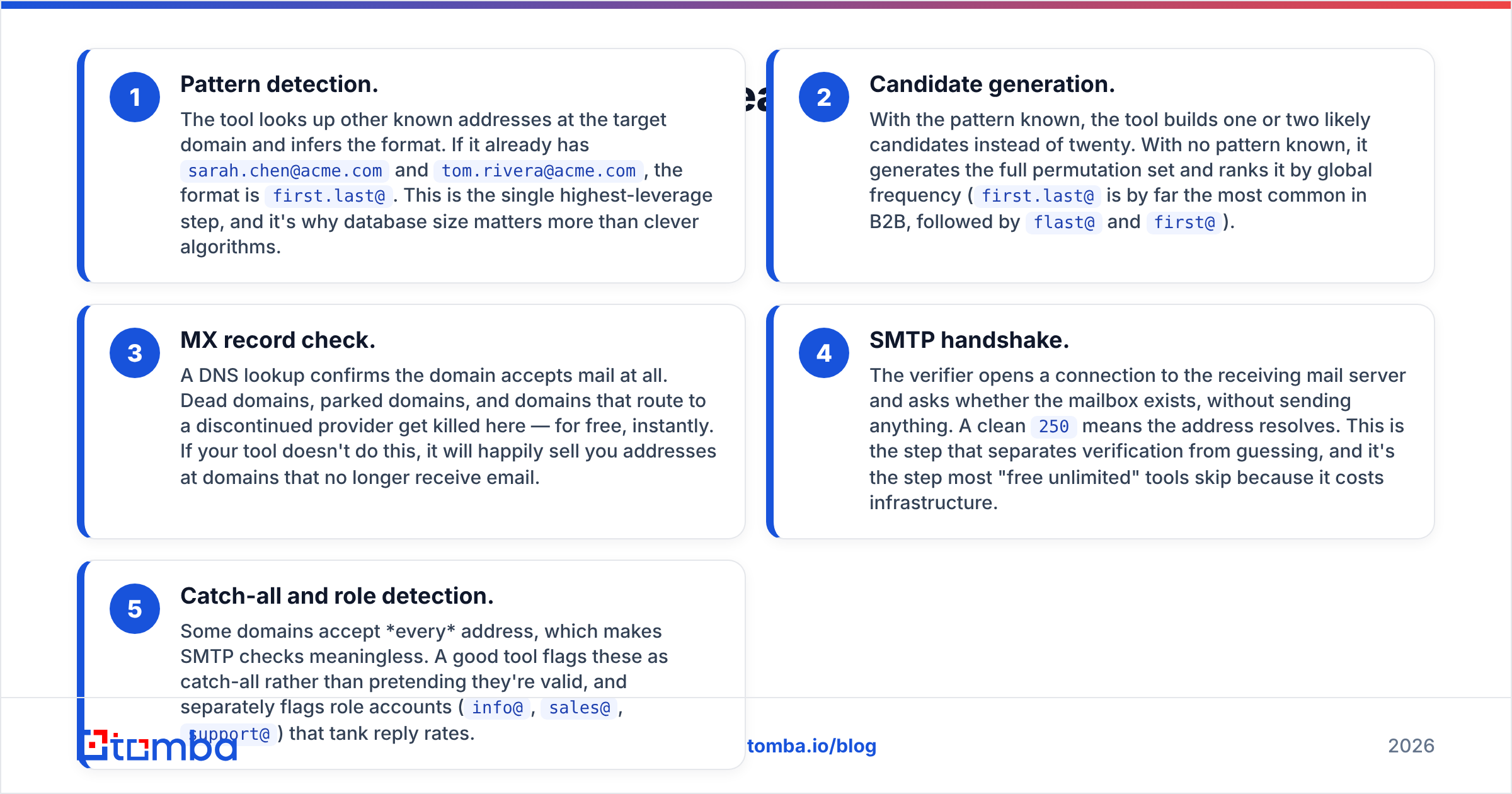
Under the hood, every serious finder — free tier or paid — runs the same five-step chain. Knowing it tells you exactly which step your free tool is skipping.
- Pattern detection. The tool looks up other known addresses at the target domain and infers the format. If it already has
sarah.chen@acme.comandtom.rivera@acme.com, the format isfirst.last@. This is the single highest-leverage step, and it's why database size matters more than clever algorithms. - Candidate generation. With the pattern known, the tool builds one or two likely candidates instead of twenty. With no pattern known, it generates the full permutation set and ranks it by global frequency (
first.last@is by far the most common in B2B, followed byflast@andfirst@). - MX record check. A DNS lookup confirms the domain accepts mail at all. Dead domains, parked domains, and domains that route to a discontinued provider get killed here — for free, instantly. If your tool doesn't do this, it will happily sell you addresses at domains that no longer receive email.
- SMTP handshake. The verifier opens a connection to the receiving mail server and asks whether the mailbox exists, without sending anything. A clean
250means the address resolves. This is the step that separates verification from guessing, and it's the step most "free unlimited" tools skip because it costs infrastructure. - Catch-all and role detection. Some domains accept every address, which makes SMTP checks meaningless. A good tool flags these as catch-all rather than pretending they're valid, and separately flags role accounts (
info@,sales@,support@) that tank reply rates.
A free tier that runs all five steps on 25 contacts is worth more than an "unlimited" tool that runs two steps on 25,000. You're not buying volume — you're buying the right to hit send without wrecking your sender reputation.
Which free email address search tools are worth using in 2026?#
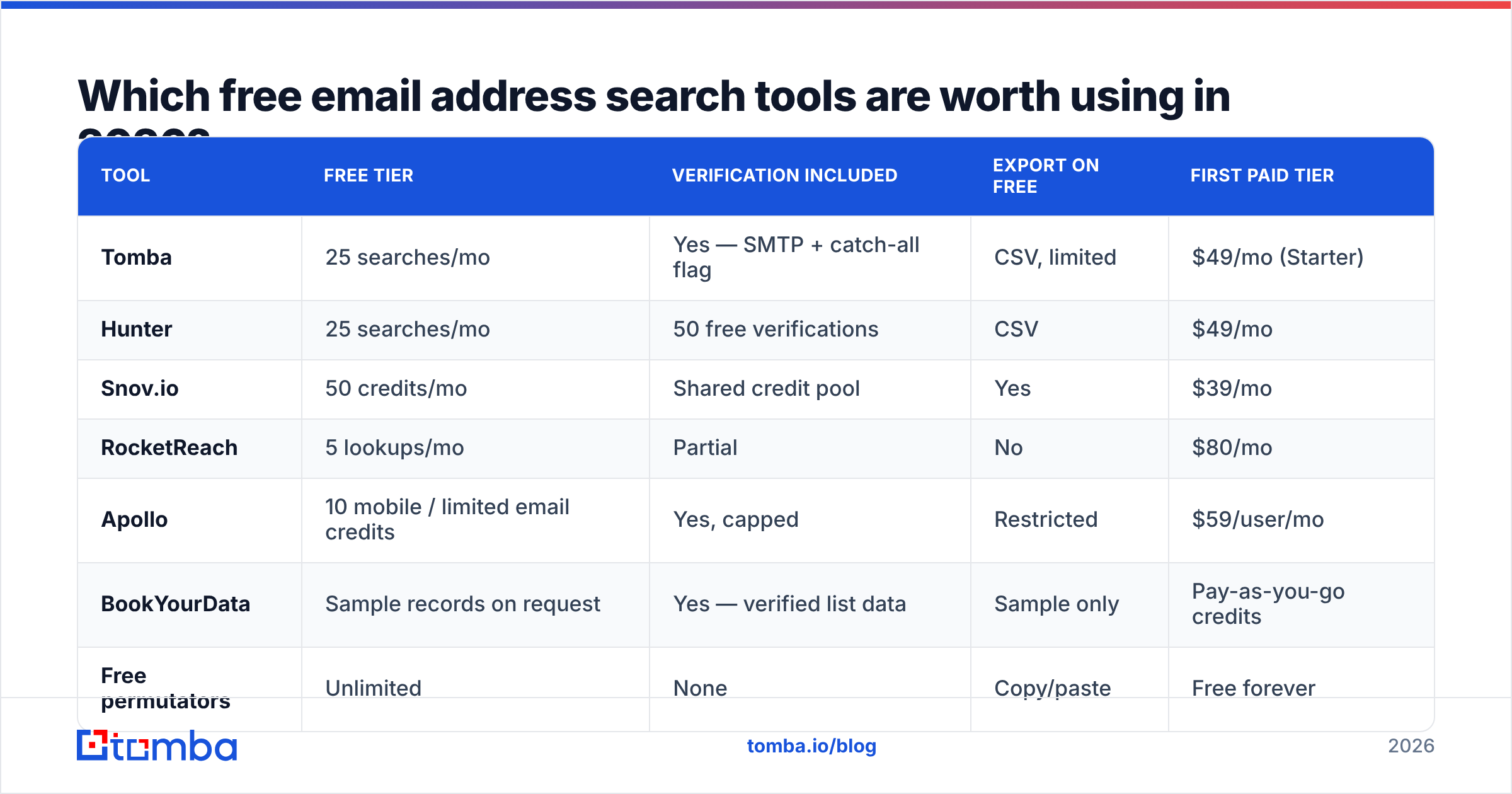
Here's how the main options compare on what actually matters: what the free tier includes, whether results are verified, and where the wall is.

| Tool | Free tier | Verification included | Export on free | First paid tier |
|---|---|---|---|---|
| Tomba | 25 searches/mo | Yes — SMTP + catch-all flag | CSV, limited | $49/mo (Starter) |
| Hunter | 25 searches/mo | 50 free verifications | CSV | $49/mo |
| Snov.io | 50 credits/mo | Shared credit pool | Yes | $39/mo |
| RocketReach | 5 lookups/mo | Partial | No | $80/mo |
| Apollo | 10 mobile / limited email credits | Yes, capped | Restricted | $59/user/mo |
| BookYourData | Sample records on request | Yes — verified list data | Sample only | Pay-as-you-go credits |
| Free permutators | Unlimited | None | Copy/paste | Free forever |
Two notes on reading this table honestly.
First, "credits" are not a standard unit. Some tools charge one credit per search, others per result returned, others per row enriched — meaning a 50-credit tier can evaporate in ten queries. Read the credit definition before you compare numbers.
Second, BookYourData plays a different game entirely: it's a pay-as-you-go verified database rather than a lookup subscription, which suits teams that want a one-time list with a bounce guarantee more than a recurring seat. If your need is "give me 2,000 verified contacts in this ICP, once," a credit-based database is often the cleaner buy than any monthly finder tier. If your need is "look up 40 specific people a month, forever," a finder subscription wins.
For a broader sense of how buyers rate these categories against each other, the lead intelligence category on G2 is a reasonable sanity check on vendor claims — though be aware that review volume correlates with marketing spend more than with data quality.
How accurate is a free email address search?#
Accuracy on free tiers is usually identical to paid tiers from the same vendor — the free tier is a sample, not a degraded product. The real accuracy gap is between vendors, not between tiers.

What moves accuracy, in order of impact:
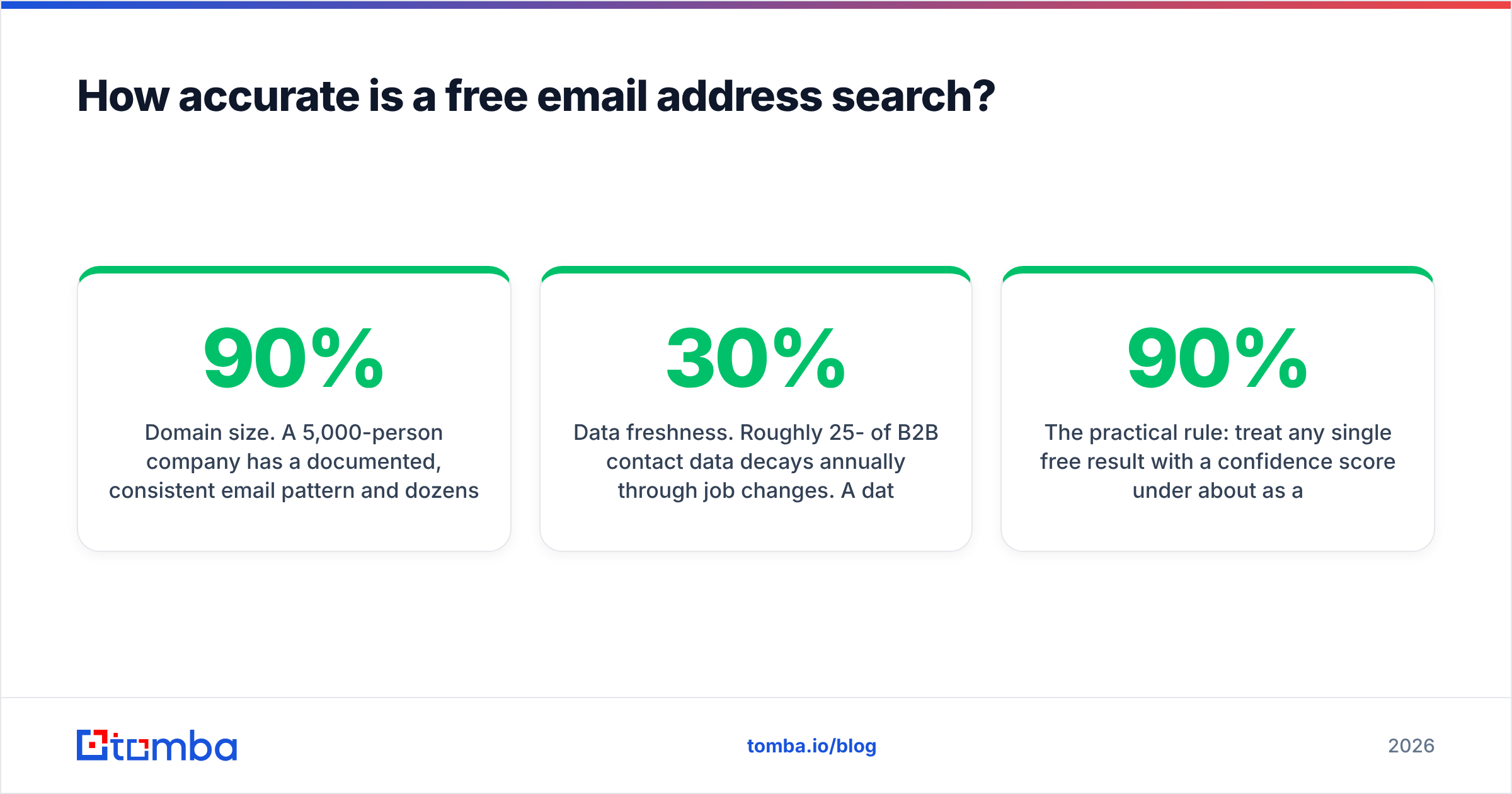
- Domain size. A 5,000-person company has a documented, consistent email pattern and dozens of public addresses to infer it from. Hit rates above 90% are normal. A 6-person agency on a custom domain may have no public addresses at all, and hit rates fall below 50% for everyone.
- Region. North American and Western European B2B coverage is dense. APAC, LATAM, and MENA coverage is materially thinner across every vendor, free or paid — anyone claiming otherwise is quoting a global average that hides the gap.
- Catch-all domains. Roughly a fifth of B2B domains accept all mail. On these, no SMTP check can confirm a specific mailbox. Good tools say "catch-all, unverifiable"; bad tools return "valid" and let you eat the bounce. A dedicated catch-all verifier uses secondary signals to score these instead of guessing.
- Data freshness. Roughly 25-30% of B2B contact data decays annually through job changes. A database refreshed quarterly beats a bigger database refreshed yearly, every time.
The practical rule: treat any single free result with a confidence score under about 90% as a hypothesis, not a fact. Either verify it independently or send to it as your last touch of a sequence, not your first — a bounce on message one poisons the whole thread.
What are the real limits of free tiers?#
Credits are the visible limit. These four are the ones that surprise people:
Export restrictions. Several tools let you see results on the free plan but not download them. You end up copy-pasting rows by hand, which is a deliberate friction tax designed to push you to upgrade.
No API access. Free tiers are almost always UI-only. If you want to enrich rows inside a workflow — a Google Sheets add-on, a CRM sync, an automation step — you need a paid plan. This is the limit that matters most for anyone building a repeatable process rather than doing one-off research.
Shared credit pools. Search and verification often draw from the same bucket. Find 25 addresses and you have zero verifications left, which defeats the purpose. Check whether the two are metered separately.
Rate limiting and cooldowns. Some free tiers throttle you to a handful of lookups per hour, making bulk work impossible even within your monthly cap.

How do you verify an email you found for free?#
Never send to an unverified address. The cost of a bounce isn't the lost email — it's the mailbox provider's record that you sent to a non-existent user, repeatedly. Bounce rates above about 3% are where inbox placement starts degrading, and the damage compounds over weeks.
The free-and-safe workflow:
- Generate candidates. Use a free email permutator to produce every plausible format for the name and domain. Zero cost, no account needed.
- Cut the list with pattern logic. If you already know one address at that company, keep only candidates matching that format. This usually reduces twenty candidates to one.
- Verify the survivor. Run it through an email verifier for an MX and SMTP check plus a catch-all flag. Most tools include a small number of free verifications monthly — this is where you spend them.
- Handle catch-alls separately. If the domain is catch-all, don't burn more credits trying to confirm it. Either find a second corroborating source (a public profile, a signature in an email thread, a conference listing) or route it to LinkedIn instead.
- Log what you learn. Once you've confirmed the pattern for a domain, every future contact there is free — you just apply the format. Keep a running pattern map per account. Over a year this is worth more than any single tool.
That last step is the one experienced prospectors do and beginners skip. Twenty confirmed patterns across your target accounts turns a paid lookup problem into a free one.
Is free email address searching legal?#
Finding a business email address is legal in most jurisdictions. Sending to it is where the rules bite, and the two questions are separate.
Under GDPR, a work email at a corporate domain is still personal data, so you need a lawful basis — legitimate interest is the standard one for B2B outreach, and it requires that your message be relevant to the recipient's professional role, that you identify yourself clearly, and that you honor opt-outs immediately. Under CAN-SPAM in the US, cold B2B email is permitted with accurate headers, a real physical address, and a working unsubscribe. Canada's CASL is stricter and closer to consent-based.
What is not defensible anywhere: scraping personal addresses, harvesting from data breaches, buying lists of unknown provenance, or ignoring unsubscribes. If a free tool won't tell you where its data came from, that's a compliance risk you're inheriting, not avoiding — check the vendor's data sources before you build a pipeline on it. For the technical background on address structure and the public-record aspects, Wikipedia's email address entry is a decent primer.
When should you stop using free tools?#
Run the arithmetic rather than the vibe. Three signals mean you've outgrown free:
You're spending more than an hour a week on lookups. At any reasonable hourly value, 60 minutes of manual sourcing costs more than a month of a paid plan. Free tiers are efficient at 10 lookups and absurdly inefficient at 100.
You're mixing three tools to stretch credits. Using Tool A for searches, Tool B for verification, and Tool C for exports means three logins, three data formats, and three inconsistent confidence scales. The consolidation alone justifies one paid seat.
You need it inside a workflow. The moment a lookup needs to happen automatically — on form fill, on CRM record create, on list import — you need API access, and no free tier offers it meaningfully. That's the genuine dividing line between the free tier as a sample and the paid tier as a tool.
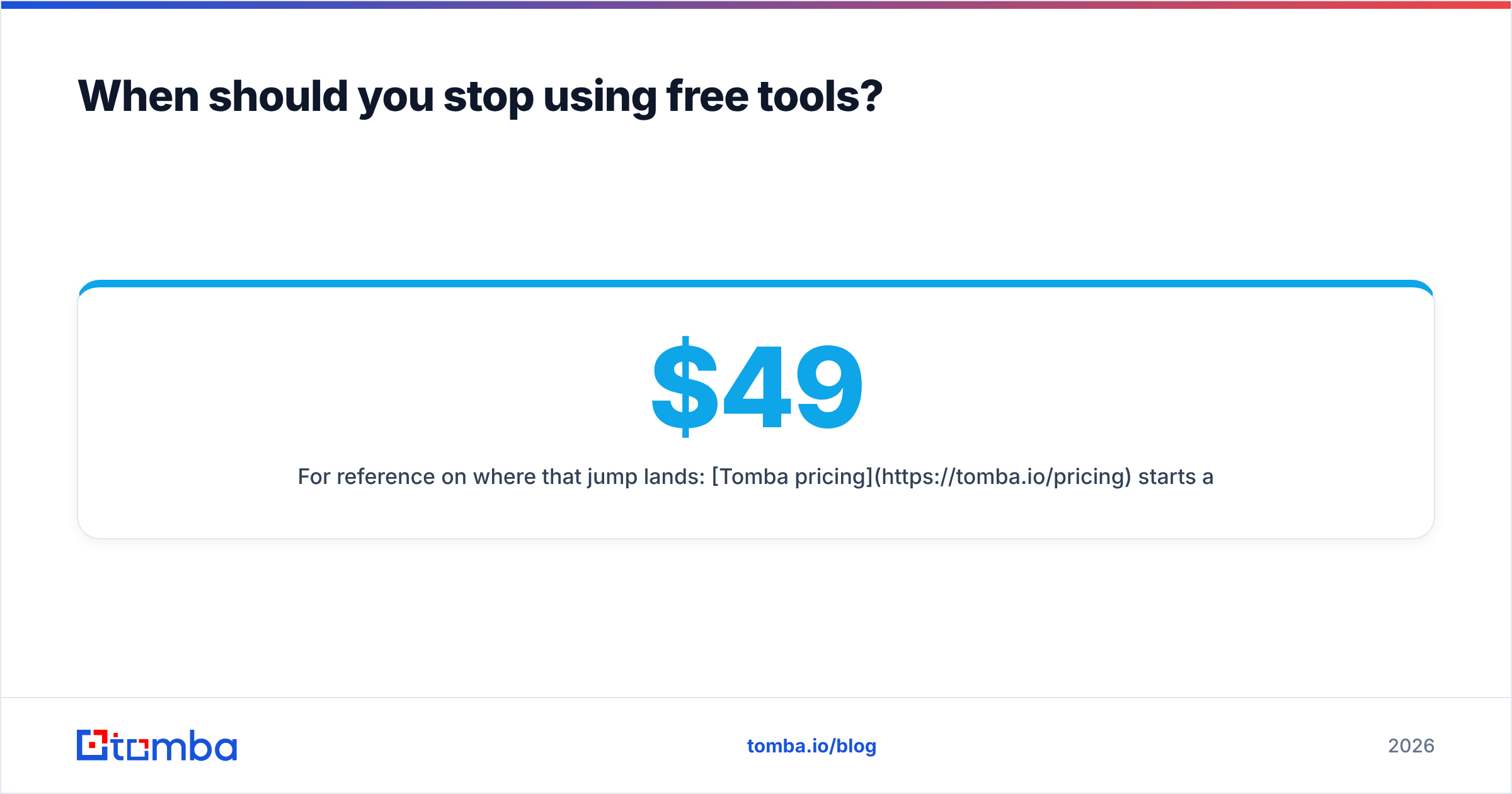
For reference on where that jump lands: Tomba pricing starts at $49/mo for Starter, $99/mo for Growth, and $249/mo for Pro, with the free tier at 25 searches monthly. That structure is deliberately close to the category norm — Hunter and Snov.io sit in the same band — so the decision rarely comes down to price. It comes down to accuracy on your domains, which is exactly what free tiers exist to let you test.
Test the same 20 target contacts across two or three free tiers before you pay anyone. Vendor-published accuracy averages are close to meaningless for your specific ICP; a 20-contact bake-off on your own list takes twenty minutes and tells you more than every review site combined.
Frequently asked questions#
Can I find someone's email address for completely free? Yes, for a limited volume. Free tiers of 25-50 lookups monthly, plus free permutators and manual sourcing, cover most individual research needs. There's no legitimate unlimited free option that returns verified results.
Are free email finders accurate? The free tier of a reputable tool is as accurate as its paid tier — you get less volume, not worse data. Standalone "free unlimited" databases are a different thing and typically run 40-60% accuracy.
What's the best free way to verify an address? MX check first (free, instant, kills dead domains), then an SMTP check through a verifier's free allowance. Never verify by sending a test email — that's the exact behavior that damages sender reputation.
How do I find emails at a whole company rather than one person? Use a domain search to return every known address at a domain along with the detected pattern, then filter to the roles you want.
Start with the free tier and test it against contacts you can independently confirm. The Tomba Email Finder gives you 25 searches a month at no cost, with full SMTP verification, catch-all flagging, and confidence scores on every result — the same engine that runs on the paid plans, just metered. Run your twenty hardest domains through it, check the hit rate against what you already know, and let the data decide whether you ever need to upgrade.
Related guides#
Ready to find emails that actually work?
Join 150,000+ professionals who stopped guessing and started sending. Free credits on signup — no credit card required.
Get the Tomba newsletter
Practical outbound tactics and product updates — once every two weeks.
About the author