Free Email Addresses Directory: What Actually Works in 2026
Free email directories promise millions of contacts and deliver bounces. Here is what free sources actually contain in 2026, how accurate they really are, and the point where paying beats scraping.
TL;DR
- A "free email addresses directory" is almost never a directory. It is either a scraped dump, a freemium search tool with a credit cap, or a public source you have to mine yourself.
- Public sources (company sites, WHOIS, GitHub commits, academic pages, press releases) are legitimately free and legitimately useful — they just cost you time instead of money.
- Downloadable free lists are the worst option: typically 25–60% dead, frequently role addresses, and often illegal to use in the EU without a lawful basis.
- Verification is non-negotiable. A free address you did not verify costs more than a paid address you did, because bounces damage sender reputation.
- The honest break-even: free sources make sense under roughly 50 contacts a month. Above that, a paid finder with a free tier (Tomba starts free at 25 searches/mo, then $49/mo) wins on hours saved alone.
What is a free email addresses directory?#
The phrase covers four very different things, and conflating them is why most people end up with a bounced list.
Type 1 — the downloadable dump. A CSV floating around a forum, a Telegram channel, or a "10 million B2B contacts, free" landing page. This is scraped data of unknown age with no provenance. Treat it as radioactive.
Type 2 — the freemium finder. A real product with a free plan: search by domain or by name, get a small number of credits per month. Tomba's free tier (25 searches), Hunter's free plan, and similar tools sit here. This is a directory in the sense that a search engine is a directory — you query it, you don't browse it.
Type 3 — the public directory. Genuinely open sources: university staff pages, government contact registries, conference speaker lists, open-source contributor metadata, regulatory filings. No login, no credits, no terms violation.
Type 4 — the pattern generator. Not a directory at all. You know the company's format is first.last@domain.com, so you generate the address and verify it. A free email permutator does the generating; a verifier decides which guess is real.
If someone says "free email addresses directory" and means Type 1, walk away. Everything worth doing lives in Types 2–4.
Where does free email directory data actually come from?#
Every dataset — free or $10,000/year — is assembled from a small number of upstream sources. Knowing them tells you exactly why free data decays.
- Crawled web pages — team pages, "contact us" footers, PDF press kits, blog author bylines. High trust when fresh, but a page published in 2021 is still on the internet in 2026 with an employee who left in 2022.
- WHOIS and DNS records — registrant contacts, MX records, SPF and DMARC entries. Mostly redacted for individuals since GDPR, but still excellent for confirming which mail provider a domain uses.
- Public code and document metadata — Git commit authorship, PGP keyrings, PDF and Office document properties. Surprisingly rich for engineering and academic targets, useless for sales leadership.
- Regulatory and academic registries — SEC filings, EU business registries, university department pages, grant databases. Slow-moving, accurate, and legally clean.
- User contributions and contact-book uploads — the quiet engine behind several "free" consumer-facing directories. This is also where the biggest privacy exposure sits, because the person listed never opted in.
- Pattern inference — no source at all. The tool observes that 40 known addresses at
acme.comfollowf.last@, then predicts the 41st. Accuracy here depends entirely on sample size.
A paid provider blends all six, re-crawls on a schedule, and runs SMTP checks before returning a result. A free dump did one crawl, once, and never looked back. That is the entire difference, and it explains most of the accuracy gap you will see below.
How accurate are free email directories in 2026?#
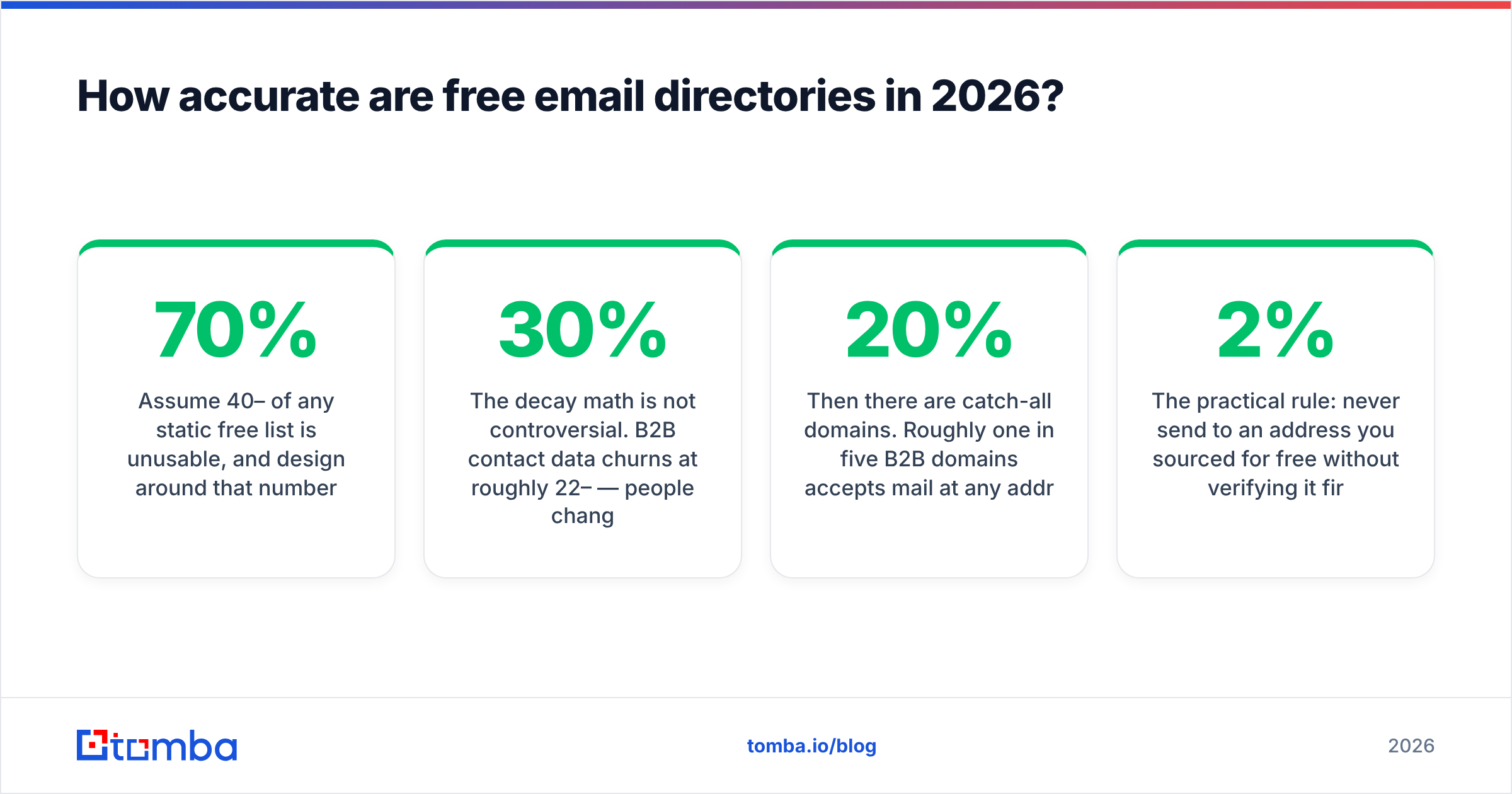
Assume 40–70% of any static free list is unusable, and design around that number.
The decay math is not controversial. B2B contact data churns at roughly 22–30% per year — people change jobs, companies rebrand domains, and mail admins retire aliases. A list scraped 18 months ago has lost a third of its value before you touch it. Add the addresses that were guessed rather than confirmed in the first place, and 50% deliverability on a free dump is a normal outcome, not a pessimistic one.

There is a second problem that raw accuracy percentages hide: composition. Free lists over-index on role addresses — info@, sales@, support@, hello@. Those are cheap to scrape because they sit in page footers. They are also the addresses least likely to reach a decision-maker and most likely to be monitored by a shared inbox with an aggressive spam filter.
Then there are catch-all domains. Roughly one in five B2B domains accepts mail at any address, which means a naive SMTP check returns "valid" for asdfgh@company.com. Free tools usually report these as deliverable and move on. If your list is 20% catch-all and you treat all of them as verified, you have quietly poisoned your own send. A dedicated catch-all verifier is the only way to separate real mailboxes from a domain that says yes to everything.
The practical rule: never send to an address you sourced for free without verifying it first. A free email checker costs nothing and takes seconds. Skipping that step is how a 2% bounce rate becomes an 11% bounce rate, and how a warmed domain becomes a burned one.
Which free email sources are worth using?#
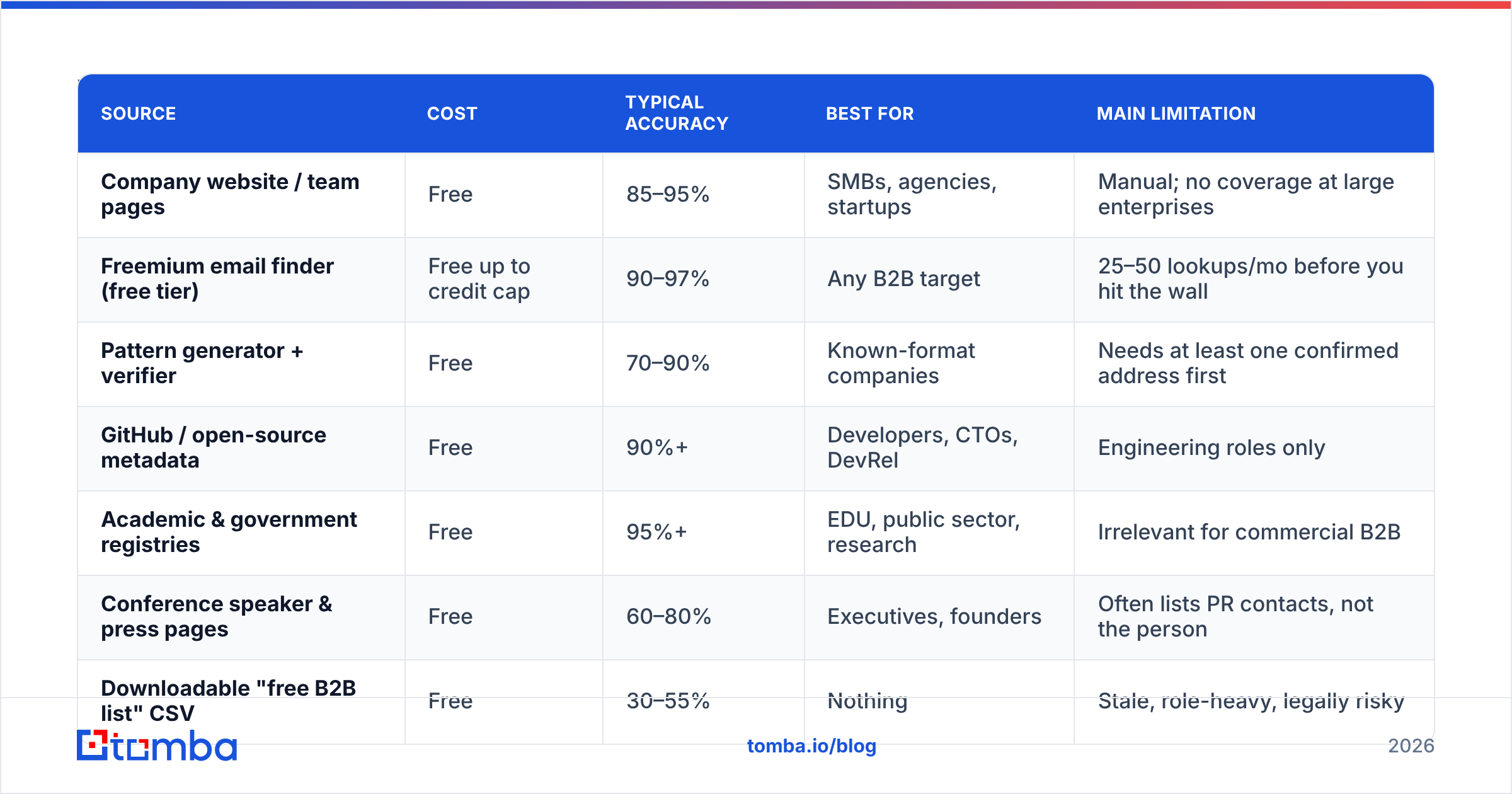
Not all free sources are equal. Ranked by what they actually return per hour spent:
| Source | Cost | Typical accuracy | Best for | Main limitation |
|---|---|---|---|---|
| Company website / team pages | Free | 85–95% | SMBs, agencies, startups | Manual; no coverage at large enterprises |
| Freemium email finder (free tier) | Free up to credit cap | 90–97% | Any B2B target | 25–50 lookups/mo before you hit the wall |
| Pattern generator + verifier | Free | 70–90% | Known-format companies | Needs at least one confirmed address first |
| GitHub / open-source metadata | Free | 90%+ | Developers, CTOs, DevRel | Engineering roles only |
| Academic & government registries | Free | 95%+ | EDU, public sector, research | Irrelevant for commercial B2B |
| Conference speaker & press pages | Free | 60–80% | Executives, founders | Often lists PR contacts, not the person |
| Downloadable "free B2B list" CSV | Free | 30–55% | Nothing | Stale, role-heavy, legally risky |
| Paid database with free trial | Free trial, then paid | 93–98% | Volume outbound | Costs money past the trial |
The pattern is obvious once it is laid out: the free sources that work are narrow and verifiable. The free sources that fail are broad and anonymous. Any list that promises millions of contacts with no explanation of where they came from is telling you it was scraped once and never maintained.
If you want the narrow-and-verifiable approach at slightly larger scale, a domain search does in one query what an hour of manual site-crawling does — it returns every public address pattern on a domain, with sources attached, so you can see which page each address came from.
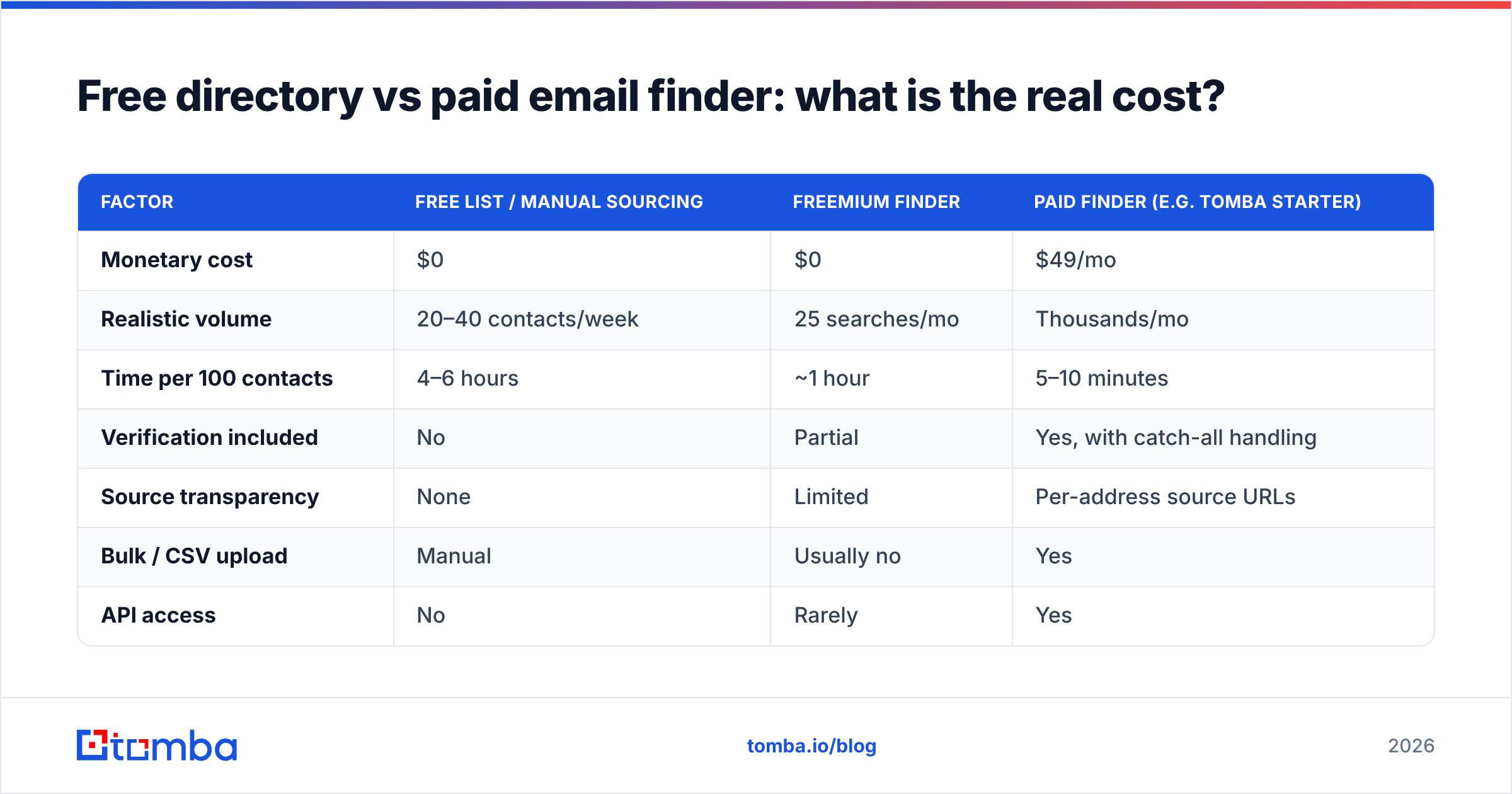
Free directory vs paid email finder: what is the real cost?#
Free is never free; it is billed in hours and in deliverability. Here is the comparison that actually matters.
| Factor | Free list / manual sourcing | Freemium finder | Paid finder (e.g. Tomba Starter) |
|---|---|---|---|
| Monetary cost | $0 | $0 | $49/mo |
| Realistic volume | 20–40 contacts/week | 25 searches/mo | Thousands/mo |
| Time per 100 contacts | 4–6 hours | ~1 hour | 5–10 minutes |
| Verification included | No | Partial | Yes, with catch-all handling |
| Source transparency | None | Limited | Per-address source URLs |
| Bulk / CSV upload | Manual | Usually no | Yes |
| API access | No | Rarely | Yes |
| CRM integration | Copy-paste | No | HubSpot, Salesforce, Pipedrive |
| Legal defensibility | Weak | Moderate | Documented sourcing |
Run the arithmetic on a single SDR at $60k fully loaded — roughly $30/hour. Five hours of manual sourcing to assemble 100 contacts costs $150 in labour, produces a list you still have to verify, and does not scale. The same 100 verified contacts through a paid tool cost a fraction of one month's subscription and take ten minutes. The break-even is somewhere around 50 contacts per month; below that, free sourcing is genuinely rational, and above it the math stops working almost immediately.

Worth noting for the "I want a real database, not a search tool" crowd: providers like BookYourData sell pay-as-you-go B2B lists with accuracy guarantees, which is a different model from credit-based finders and suits teams that want a one-time bulk pull rather than a monthly subscription. Both approaches are defensible; the wrong answer is the anonymous free CSV. Independent review platforms like G2 are the fastest way to sanity-check any vendor's real-world accuracy claims against user reports.

How do you build your own free email directory the right way?#
If you are staying free, do it systematically instead of opportunistically. This workflow produces a usable internal directory rather than a pile of guesses.
- Fix the target list first, not the emails. Define 50–200 companies by firmographic criteria before you look up a single address. Sourcing without a target list is how people end up with 4,000 irrelevant contacts.
- Confirm one address per domain manually. Find any real, published address at the company — a founder's byline, a support alias, a press contact. One confirmed address reveals the format for the whole organisation.
- Derive the pattern, then generate. With the format known, use a company email pattern check or a permutator to produce candidates for your actual targets.
- Verify every candidate before it enters the sheet. Syntax, MX, SMTP, and catch-all status. An unverified row is not a contact; it is a liability. Use an email verifier as a hard gate, not a nice-to-have.
- Record the source URL next to every address. This is what makes your directory auditable under GDPR and what lets you re-check an address in six months instead of re-sourcing it from scratch.
- Re-verify on a 90-day cycle. Contact data decays continuously. A directory you built in January and never touched is a different quality of asset by April.
Steps 4 and 5 are the ones people skip, and they are the two that separate a directory from a dump.
Is using a free email addresses directory legal?#
It depends on jurisdiction and on what you scraped — and "it was publicly available" is not the defence people think it is.
Under GDPR, a business email that identifies a person (jane.doe@acme.com) is personal data. Public availability does not create a lawful basis; you still need one, and for cold B2B outreach that basis is normally legitimate interest, which requires a documented balancing test, a clear identification of yourself, and a working opt-out. Scraped lists of unknown provenance fail this because you cannot demonstrate where the data came from. That is precisely why step 5 above matters. The GDPR overview on Wikipedia is a reasonable starting point, though it is not legal advice and neither is this post.
Under CAN-SPAM in the US, the bar is lower — accurate headers, a real physical address, a functioning unsubscribe — but the law explicitly calls out "harvesting" addresses from websites as an aggravating factor that raises penalties. Canada's CASL is stricter than both and effectively requires consent or a documented existing business relationship.
The compliance-safe posture is boring and effective: source from identifiable public pages, log the URL, verify before sending, honour opt-outs immediately, and never buy a list whose origin nobody can explain.
When should you stop using free sources?#
Four signals, any one of which means the free approach has expired:
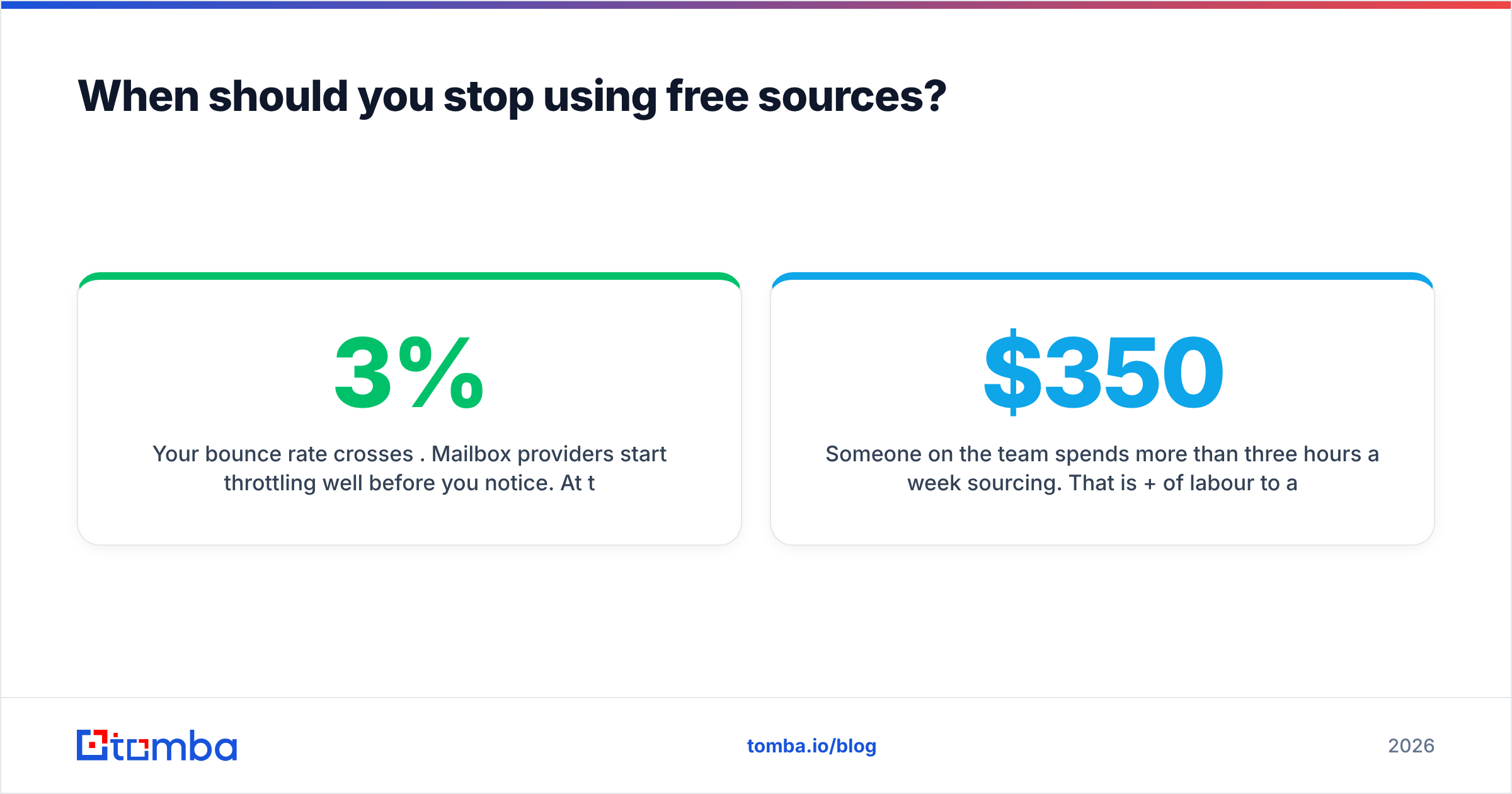
- Your bounce rate crosses 3%. Mailbox providers start throttling well before you notice. At that point the cost of free data is your domain's sender reputation, which is expensive to rebuild.
- Someone on the team spends more than three hours a week sourcing. That is $350+/month of labour to avoid a $49/month subscription.
- You need contacts at companies over 500 employees. Enterprise team pages are thin by design; free crawling returns
info@and nothing else. - You need the data inside a system. The moment you want addresses flowing into HubSpot or Salesforce automatically, manual sourcing is architecturally dead and you need an email finder API.
Until one of those triggers fires, free sourcing genuinely works. Plenty of founders have built a first 100 customers on nothing but company websites and a verifier. The mistake is not starting free — it is staying free three months past the point where the math flipped.
What is the honest verdict on free email directories?#
Free sources are fine. Free directories, in the download-a-CSV sense, are not.
The distinction is provenance. A public team page is a source you can point to, date, and re-check. A 10-million-row file with no origin is a bet that someone else's stale crawl matches your target market, and that bet loses roughly half the time. Combine narrow free sources with mandatory verification and you get a small, clean, legally defensible list. Combine a broad free dump with hope and you get a bounce rate that follows you around for a quarter.
Start with the free tier of a real tool rather than a free file from a stranger. Tomba's Email Finder gives you 25 searches a month at no cost, returns the source URL for every address it finds, and flags catch-all domains instead of pretending they are clean — which is exactly the audit trail a free directory can never give you. When the volume outgrows the free tier, Tomba pricing starts at $49/mo for Starter and $99/mo for Growth, with bulk upload, verification, and API access included rather than sold separately. Build the list small and verified first; scale it only once you know the addresses are real.
Related guides#
Ready to find emails that actually work?
Join 150,000+ professionals who stopped guessing and started sending. Free credits on signup — no credit card required.
Get the Tomba newsletter
Practical outbound tactics and product updates — once every two weeks.
About the author