Free Email Finder by Domain: How to Find Company Emails in 2026
Free domain email lookups can work — if you know their limits. Here's how domain search actually finds addresses, which free tools give real credits, and when free stops being cheap.
TL;DR
- A free email finder by domain takes a company website (like
stripe.com) and returns the professional email addresses it can find or infer for that domain — usually 10–50 lookups per month before you hit a wall. - Free tiers are real, but they're sampling tools, not pipelines. Tomba's free plan gives 25 searches/month; most competitors sit in the 10–50 range with weaker verification.
- The pattern engine matters more than the database size. A tool that knows a domain uses
first.last@and confirms it via SMTP beats one that dumps 40 unverified guesses. - Catch-all domains break most free tools. If the mail server accepts everything, "valid" means nothing without a dedicated catch-all check.
- Free is right for one-off research and testing accuracy. The moment you need 200+ contacts a month with bounce-safe data, credits are cheaper than your time.
What Is a Free Email Finder by Domain?#
A free email finder by domain is a tool that takes one input — a company's website or email domain — and returns the work email addresses associated with it. You type shopify.com, you get back a list of addresses, names, job titles, and (in better tools) a confidence score per address.
Think of it like a building directory in a lobby. The building is the domain. The directory lists who works there and on which floor. A good directory is current and complete; a bad one lists three tenants who moved out in 2021 and misses the two who matter. Domain-based email finders are exactly that directory, rebuilt continuously from public web crawls, corporate filings, and user contributions.
Technically, this is called domain search, and it differs from a name-based lookup in one important way: you don't need to know who you're looking for yet. Name-based search answers "what's Maria Chen's email at Acme?" Domain search answers "who works at Acme and how do I reach them?" That makes it the natural first step in prospecting, when you have a target account list but no named contacts.
Free versions of these tools exist for one reason: sampling. Vendors know the fastest way to prove data quality is to let you run a domain you already know — your own company, a former employer, a client — and check the output against reality. That's the intended use, and it's also the smartest way to evaluate any provider before spending money.
How Does Domain Email Search Actually Work?#
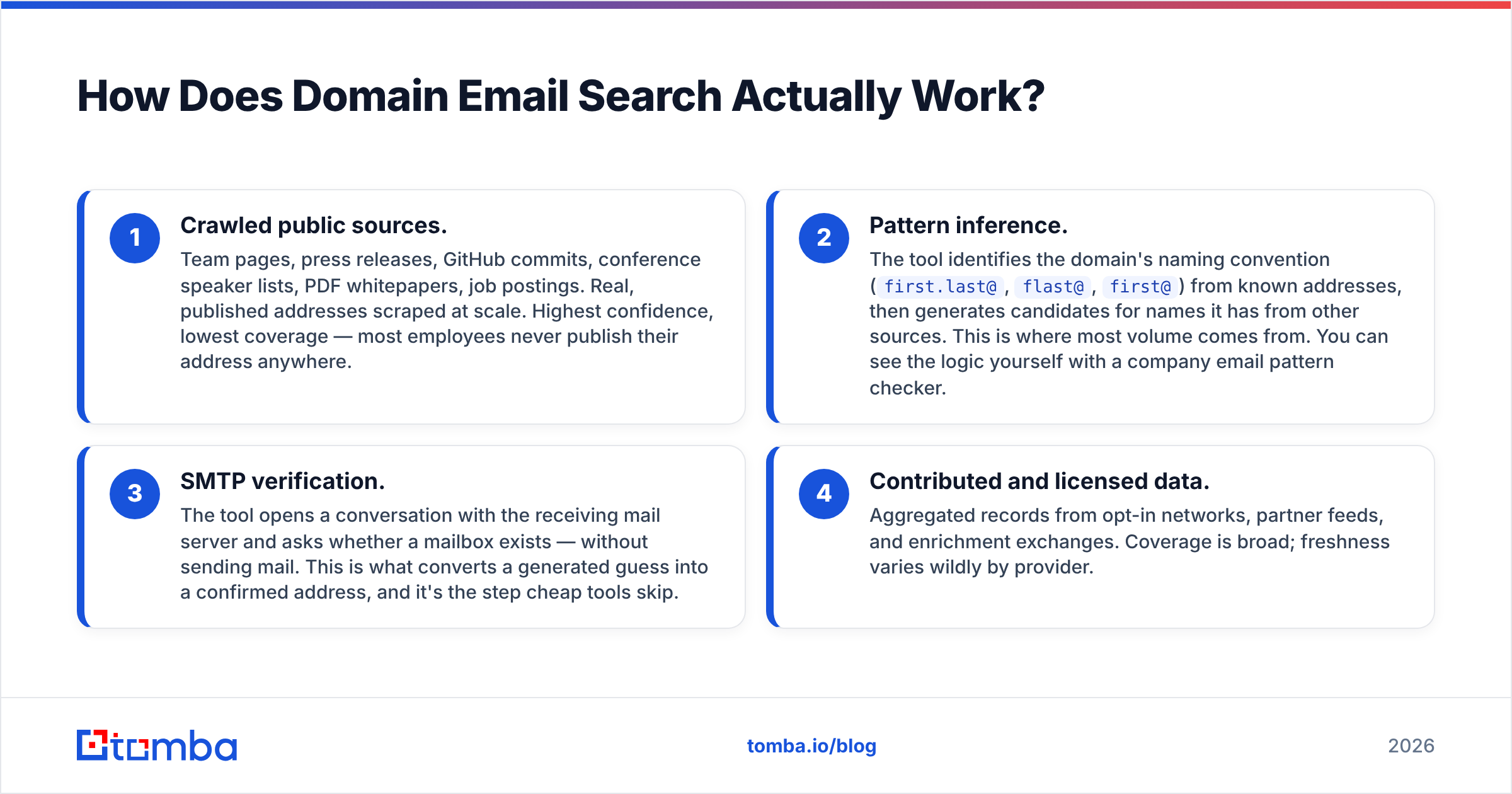
Every domain-based finder runs some combination of four mechanisms. Understanding which one produced your result tells you how much to trust it.
- Crawled public sources. Team pages, press releases, GitHub commits, conference speaker lists, PDF whitepapers, job postings. Real, published addresses scraped at scale. Highest confidence, lowest coverage — most employees never publish their address anywhere.
- Pattern inference. The tool identifies the domain's naming convention (
first.last@,flast@,first@) from known addresses, then generates candidates for names it has from other sources. This is where most volume comes from. You can see the logic yourself with a company email pattern checker. - SMTP verification. The tool opens a conversation with the receiving mail server and asks whether a mailbox exists — without sending mail. This is what converts a generated guess into a confirmed address, and it's the step cheap tools skip.
- Contributed and licensed data. Aggregated records from opt-in networks, partner feeds, and enrichment exchanges. Coverage is broad; freshness varies wildly by provider.
The quality difference between free tools comes down to whether step 3 happens. A tool that runs steps 1, 2, and 4 and hands you the raw output will show you plenty of addresses — and a meaningful share of them will bounce. A tool that runs step 3 returns fewer addresses and a much better list.

What Do You Actually Get on a Free Plan?#
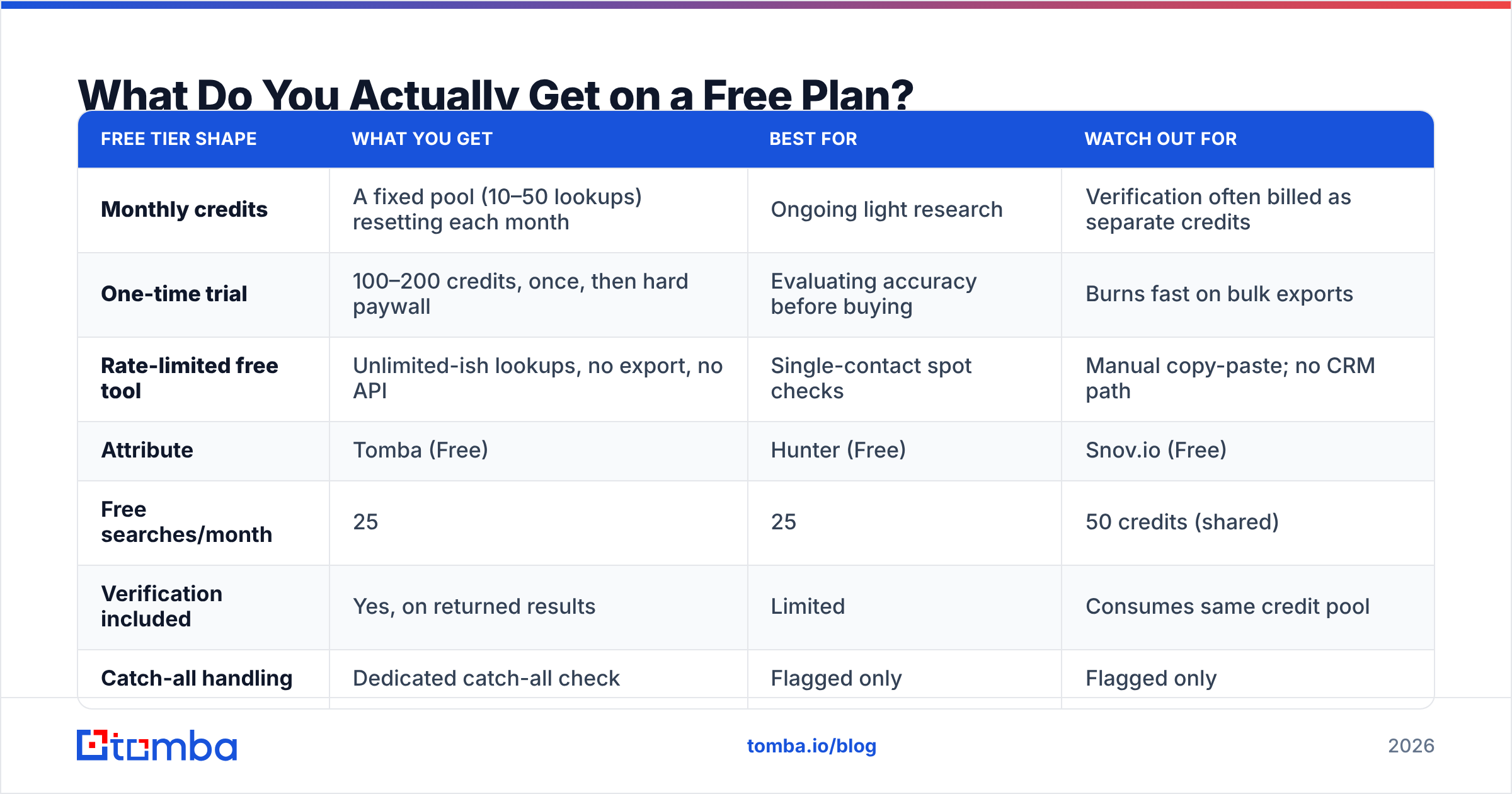
Free tiers cluster into three shapes, and the shape matters more than the raw number.
| Free tier shape | What you get | Best for | Watch out for |
|---|---|---|---|
| Monthly credits | A fixed pool (10–50 lookups) resetting each month | Ongoing light research | Verification often billed as separate credits |
| One-time trial | 100–200 credits, once, then hard paywall | Evaluating accuracy before buying | Burns fast on bulk exports |
| Rate-limited free tool | Unlimited-ish lookups, no export, no API | Single-contact spot checks | Manual copy-paste; no CRM path |
Here's how the major free offerings compare on the attributes that decide whether the free tier is usable or theatre:
| Attribute | Tomba (Free) | Hunter (Free) | Snov.io (Free) | Skrapp (Free) |
|---|---|---|---|---|
| Free searches/month | 25 | 25 | 50 credits (shared) | 100 emails (trial-style) |
| Verification included | Yes, on returned results | Limited | Consumes same credit pool | Basic |
| Catch-all handling | Dedicated catch-all check | Flagged only | Flagged only | Flagged only |
| API access on free | Yes, rate-limited | Yes, rate-limited | Yes | No |
| Export format | CSV | CSV | CSV | CSV |
| Entry paid tier | $49/mo | $49/mo | $39/mo | $49/mo |
Two honest caveats about this table. First, vendors change free-tier limits often — check the vendor's own pricing page before you plan around a number. Second, "50 credits" at one vendor is not "50 credits" at another; some charge one credit per domain search regardless of how many addresses come back, others charge per address returned. That single difference can make a nominally larger free tier smaller in practice.
If you want to compare more than the free tiers, the paid economics are covered on Tomba pricing — Free (25 searches/mo), Starter $49/mo, Growth $99/mo, Pro $249/mo, and custom Enterprise.

Which Free Email Finder Is Most Accurate?#
Accuracy is the only metric that matters, and it's the one every vendor claims to lead on. Cut through it by running your own test — you can do this entirely on free tiers in under an hour.
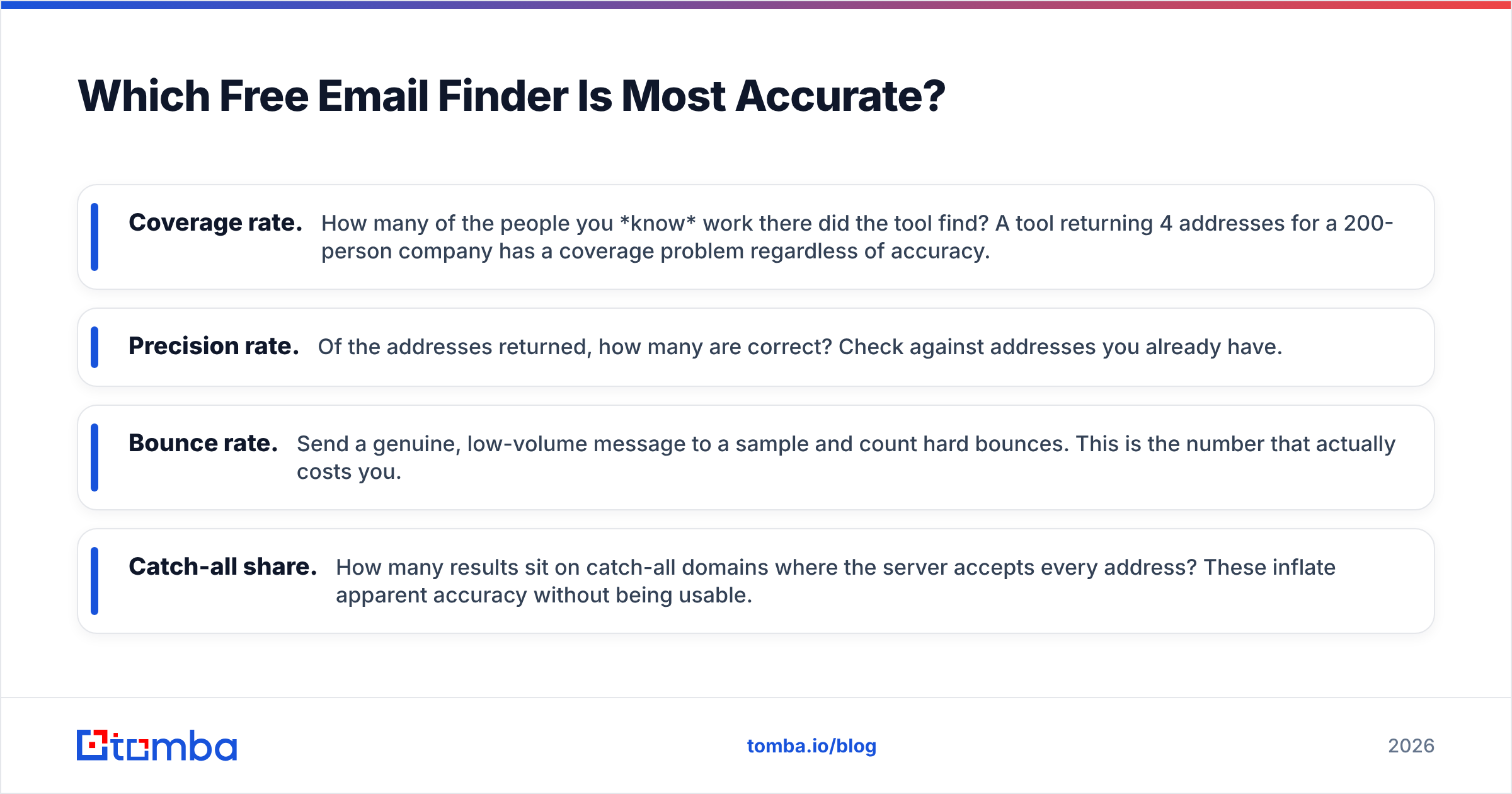
Pick 20 domains you have ground truth for: your own company, past employers, clients, partners. For each tool, run the domain search and record three numbers.
- Coverage rate. How many of the people you know work there did the tool find? A tool returning 4 addresses for a 200-person company has a coverage problem regardless of accuracy.
- Precision rate. Of the addresses returned, how many are correct? Check against addresses you already have.
- Bounce rate. Send a genuine, low-volume message to a sample and count hard bounces. This is the number that actually costs you.
- Catch-all share. How many results sit on catch-all domains where the server accepts every address? These inflate apparent accuracy without being usable.
That last one deserves attention. Roughly a fifth of B2B domains run catch-all configurations, and a naïve SMTP check on a catch-all domain returns "valid" for asdfgh@company.com. Any tool that reports high accuracy without disclosing its catch-all handling is measuring the wrong thing. Tools with a dedicated catch-all verifier resolve these separately rather than dumping them into the "valid" bucket.
Independent review platforms are useful sanity checks on vendor claims — G2's email finder category aggregates verified user reviews with sample sizes worth reading, and Capterra covers similar ground for smaller teams. Neither replaces your own 20-domain test, but they catch outlier problems fast.

When Should You Stop Using the Free Tier?#
Free stops being free at a predictable point. Do the arithmetic honestly.
At 25 free searches a month, you can research roughly one target account per working day. If your outbound motion needs 200 contacts a month, you have three options: pay for credits, run multiple free accounts (a terms-of-service violation at every vendor, and the reason accounts get banned), or find addresses manually.
Manual finding costs about 5–8 minutes per contact once you factor in LinkedIn lookup, pattern guessing, and verification. At 200 contacts, that's 17–27 hours a month. Any SDR salary makes a $49/mo Starter plan the cheaper option by an order of magnitude before you count the bounce damage from unverified guesses.
The specific triggers to upgrade:
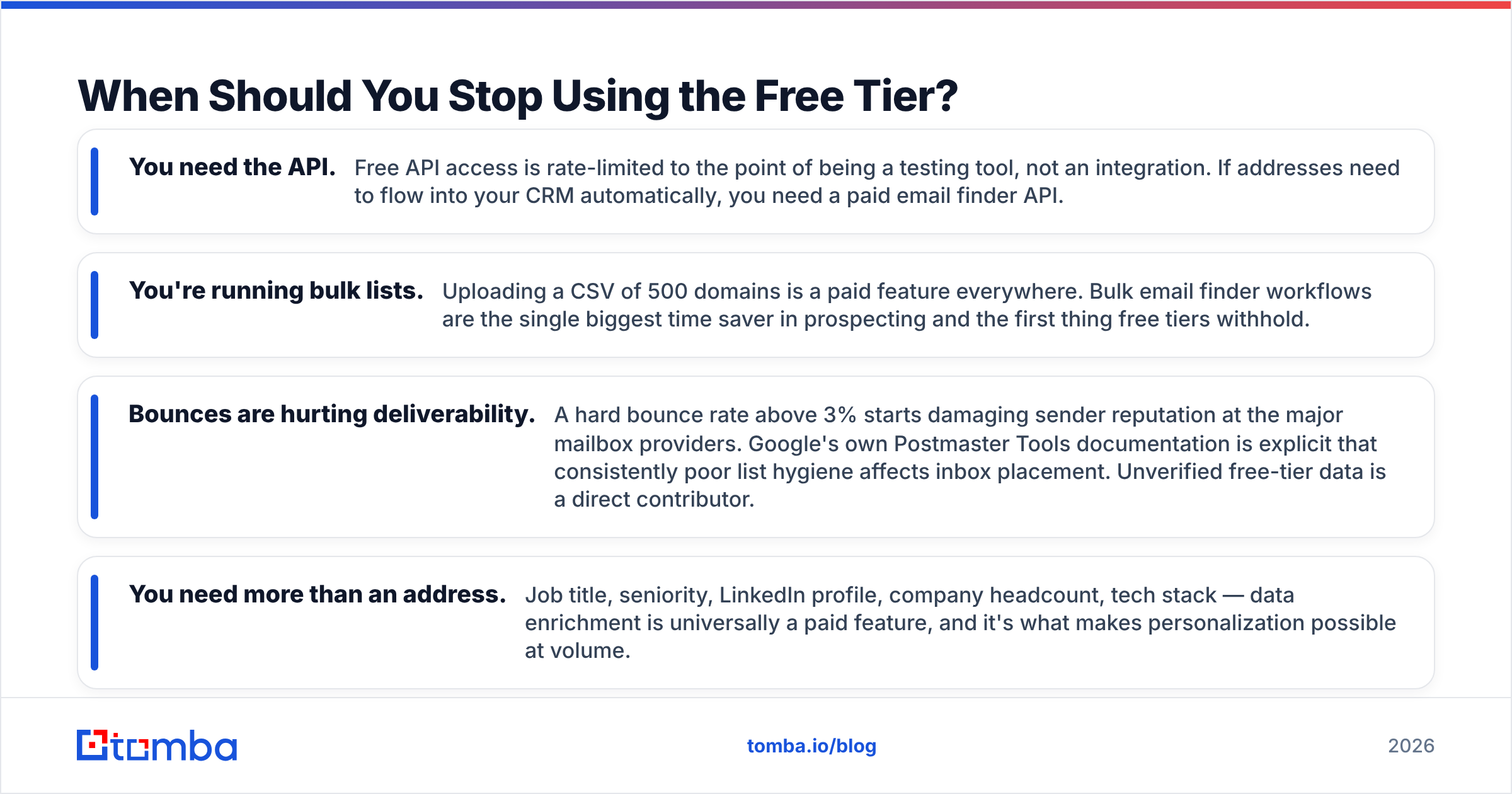
- You need the API. Free API access is rate-limited to the point of being a testing tool, not an integration. If addresses need to flow into your CRM automatically, you need a paid email finder API.
- You're running bulk lists. Uploading a CSV of 500 domains is a paid feature everywhere. Bulk email finder workflows are the single biggest time saver in prospecting and the first thing free tiers withhold.
- Bounces are hurting deliverability. A hard bounce rate above 3% starts damaging sender reputation at the major mailbox providers. Google's own Postmaster Tools documentation is explicit that consistently poor list hygiene affects inbox placement. Unverified free-tier data is a direct contributor.
- You need more than an address. Job title, seniority, LinkedIn profile, company headcount, tech stack — data enrichment is universally a paid feature, and it's what makes personalization possible at volume.

What Are the Alternatives to Domain Search?#
Domain search isn't always the right entry point. Match the method to what you already know.
- You have a name and a company → use a name-based email finder. Faster and more precise than pulling the whole domain and filtering.
- You have a LinkedIn profile URL → a LinkedIn finder resolves the profile to a work address directly, skipping the pattern-guessing step entirely.
- You have an address and need context → reverse email lookup works backwards from the address to the person and company.
- You found a great article and want the writer → an author finder pulls the byline contact from the page, which is far more reliable than guessing at a media company's naming convention.
- You have a list to clean, not build → skip finding entirely and run an email verifier over what you already have. Cleaning an existing list is usually higher ROI than adding to it.
A note on peers: BookYourData takes a different and legitimate approach — pay-as-you-go access to a pre-built, verified B2B database rather than live domain crawling. If your need is "give me 500 verified CFO contacts in manufacturing" rather than "tell me who works at these 12 specific accounts," a database-first tool is often the better structural fit. The two models solve genuinely different problems, and plenty of teams run both.
How Do You Get the Most Out of 25 Free Searches?#
Treat free credits as a scarce resource and they'll go a lot further.
Verify your target list before you search. Confirm the domain is the operating domain, not a parked redirect or a regional variant. Searching acme.co.uk when the corporate mail runs on acme.com burns a credit for nothing.
Search the domain once, harvest everything. Most tools charge per domain search, not per returned address. Export the full result set the first time rather than running the same domain twice.
Derive the pattern, then extrapolate. Once a domain search reveals that a company uses first.last@, you can construct addresses for named prospects yourself with an email permutator and validate them with a free email checker — no additional domain search credits consumed.
Prioritize accounts by reachability, not just fit. If a domain returns nothing useful, that's information. Deprioritize it rather than spending three more credits confirming the same gap.
Never fire blind at catch-all domains. If verification comes back "catch-all," treat it as unknown, not valid. Route those through a catch-all finder or reach the person through another channel.
Is a Free Email Finder by Domain Worth It?#
Yes — for the job it's designed to do.
A free tier is the right tool when you're validating a vendor's accuracy on domains you know, researching a handful of strategic accounts, spot-checking a contact before an important email, or testing whether domain search fits your workflow at all. In those cases, 25 searches a month is genuinely sufficient and paying would be waste.
It's the wrong tool when free credits become the constraint on your pipeline. If you're rationing lookups, opening second accounts, or falling back to manual pattern guessing to stretch the month, the free tier has stopped saving money and started costing time. That's not a flaw in free tiers — it's the point at which they've done their job and handed you off.
The honest framing: free tiers are how you decide which provider to pay, not how you avoid paying one. Use them for exactly that. Run the same 20 domains through three tools, measure coverage and bounce rate yourself, and let the numbers pick the winner rather than the marketing page.
Start With the Free Tier, Then Scale#
Run your own accuracy test before you commit a dollar. The Tomba Email Finder gives you 25 free searches a month with verification included on results and a dedicated catch-all check — enough to benchmark it against whatever you're using now on domains where you already know the right answer. If the coverage and bounce numbers hold up on your accounts, Starter at $49/mo opens bulk uploads, full API access, and enrichment. If they don't, you'll have learned that on someone else's credits instead of your own.
Related guides#
Ready to find emails that actually work?
Join 150,000+ professionals who stopped guessing and started sending. Free credits on signup — no credit card required.
Get the Tomba newsletter
Practical outbound tactics and product updates — once every two weeks.
About the author