Free Email Search in 2026: What Actually Works (and What Doesn't)
Free email search tools promise unlimited lookups and rarely deliver. Here's how the free tiers actually compare on credits, accuracy, and the hidden limits nobody advertises.
TL;DR
- "Free email search" almost never means unlimited. Every credible tool caps you at 10–50 lookups a month, and the ones advertising "unlimited" are usually pattern generators that guess rather than verify.
- The free tools that work fall into three buckets: vendor free tiers (Tomba, Hunter, Snov.io), pure guess-and-check utilities (permutators, MX checks), and manual OSINT (GitHub commits, WHOIS, author bylines).
- Accuracy is the real cost. A guessed address that bounces costs you sender reputation, which is far more expensive than a $49/mo plan.
- For under ~25 lookups a month, free tiers genuinely work. Past roughly 100 verified contacts a month, stitching free tools together costs more in your time than a paid plan costs in cash.
- Always run a free verification pass before sending, whatever source the address came from.
What Does "Free Email Search" Actually Mean in 2026?#
Free email search means finding a person's professional email address without paying — either through a vendor's free tier, a free public utility, or manual research across public sources.
The phrase gets used loosely, and that's where people get burned. There are three distinct things being sold as "free," and they behave very differently:
- Free tiers with real verification — a vendor gives you a small monthly credit allowance against their full database and validation stack. Tomba's free plan (25 searches/month), Hunter's free plan, and Snov.io's trial credits all fall here. Accuracy matches the paid product; only volume is capped.
- Free pattern generators — tools that take "Jane Doe" + "acme.com" and output
jane@acme.com,jdoe@acme.com,jane.doe@acme.com. Unlimited, genuinely free, and completely unverified. An email permutator is a hypothesis machine, not an answer. - Manual OSINT — pulling addresses from GitHub commit logs, conference speaker pages, WHOIS records, press releases, and article bylines. Free in cash, expensive in hours.
- Free verification utilities — syntax, MX record, and SMTP-level checks you can run without an account. These don't find addresses, they filter them, and they're the most underrated free tool in the stack.
Most people who search for a free email search tool are trying to do #1 but end up doing #2 without a #4 step. That's the sequence that produces 30% bounce rates.
How Do the Major Free Tiers Compare?#
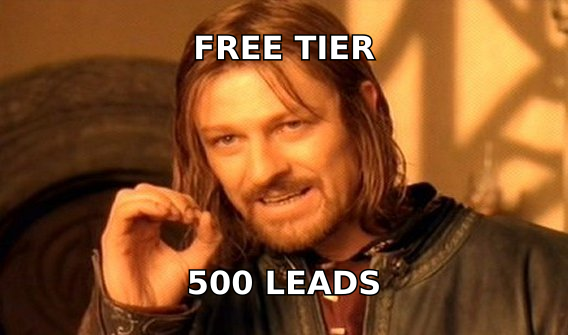
Here's what the free plans actually give you as of early 2026. Credit definitions differ — some vendors count a search and a verification as two separate credits, which quietly halves your usable allowance.
| Tool | Free monthly allowance | Verification included? | Bulk upload on free? | API on free? | Best free-tier use case |
|---|---|---|---|---|---|
| Tomba | 25 searches | Yes, verifier included | Limited | Yes, rate-limited | Small verified batches, API testing |
| Hunter.io | 25 searches + 50 verifications | Yes, separate pool | No | Yes | Domain-level discovery |
| Snov.io | 50 credits (trial-style) | Yes, credits shared | Yes | Yes | One-off list build |
| Apollo.io | Limited email credits, cap varies by region | Partial | No | No | Browsing company data |
| Skrapp | ~50 credits | Basic | No | No | LinkedIn-first prospecting |
| Email permutator (any) | Unlimited | No | Manual | No | Generating guesses to verify elsewhere |
| BookYourData | Pay-as-you-go, sample records on request | Yes | Yes | Yes | Buying a clean, verified list outright |
Two things stand out. First, "credits" is not a standard unit — always read whether a verification burns one. Second, only a handful of vendors let you touch the API on a free plan, which matters a lot if you're evaluating tools for engineering work rather than one-off lookups. Check the Tomba pricing page for exactly where the free tier ends and Starter ($49/mo) begins.
BookYourData sits in a different category from the rest of the table. It sells verified, pre-built contact lists rather than a per-lookup search tool, so its "free" story is a sample rather than a monthly allowance. If your problem is "I need 5,000 verified contacts in one industry by Friday," a purchased list beats grinding through free tiers — different tool, different job.

Why Is Accuracy the Real Cost of Free Email Search?#
Because a bad address doesn't cost you nothing — it costs you deliverability.
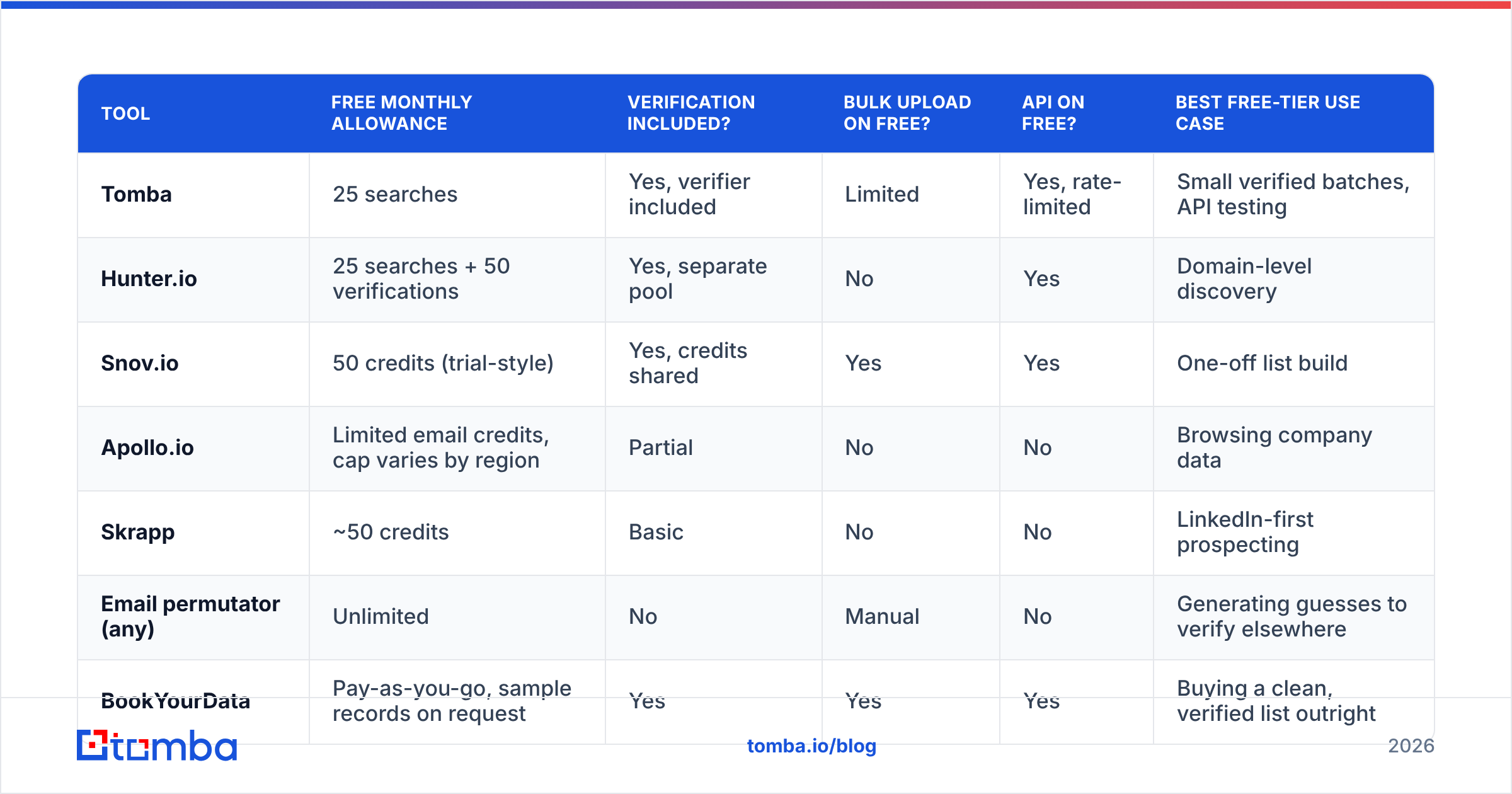
Think of your sending domain like a credit score. Every hard bounce is a missed payment. Mailbox providers track your bounce rate, and once you cross roughly 2–3%, filtering tightens on everything you send, including messages to addresses that were perfectly valid. A free permutator that hands you eight guesses and no verification is asking you to pay for its output with your sender reputation.
Run the numbers. Say you generate 200 guessed addresses for free and send to all of them:
- Realistic hit rate on unverified guesses: 30–50%, depending on how standard the company's email format is
- Hard bounces: 100–140 messages
- Bounce rate: 50%+ — well past the threshold where Google and Microsoft start throttling you
- Recovery time: weeks of warmup to repair, or a new domain entirely
Versus verifying those same 200 guesses first: you send to the 80 that pass, you bounce on maybe 2, and your domain stays clean. The verification step is the difference between a free method that works and a free method that quietly destroys your channel.
This is why the fourth category — free verification utilities — matters more than the finders. A free email checker costs you nothing and catches the majority of dead guesses before they touch your sending infrastructure. Even a purely manual workflow should end with a verification pass.
What's the Best Free Email Search Workflow?#
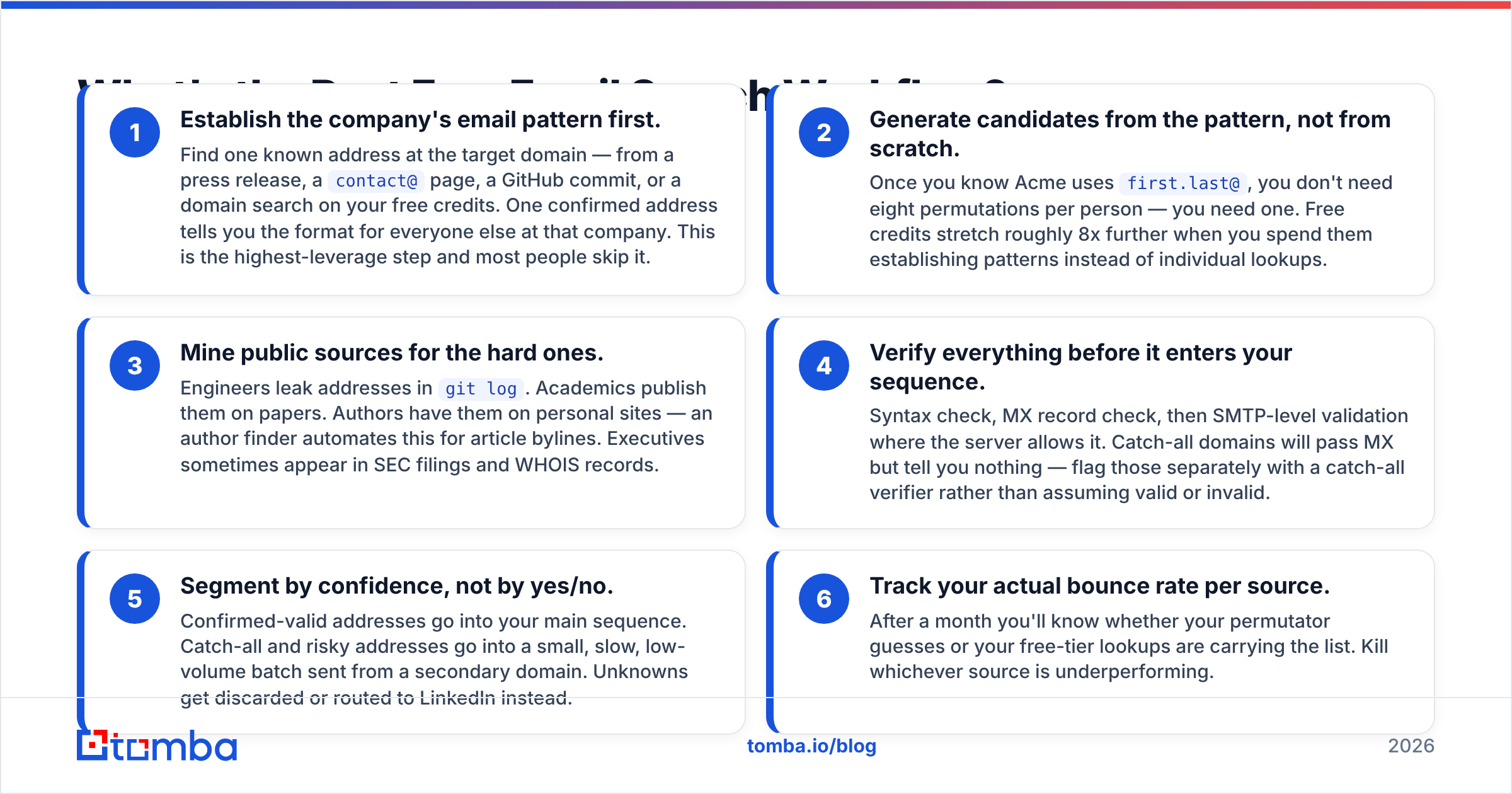
If you're committed to spending zero dollars, here's the sequence that produces the highest verified yield per hour of work. It stacks free resources rather than relying on any single one.
- Establish the company's email pattern first. Find one known address at the target domain — from a press release, a
contact@page, a GitHub commit, or a domain search on your free credits. One confirmed address tells you the format for everyone else at that company. This is the highest-leverage step and most people skip it. - Generate candidates from the pattern, not from scratch. Once you know Acme uses
first.last@, you don't need eight permutations per person — you need one. Free credits stretch roughly 8x further when you spend them establishing patterns instead of individual lookups. - Mine public sources for the hard ones. Engineers leak addresses in
git log. Academics publish them on papers. Authors have them on personal sites — an author finder automates this for article bylines. Executives sometimes appear in SEC filings and WHOIS records. - Verify everything before it enters your sequence. Syntax check, MX record check, then SMTP-level validation where the server allows it. Catch-all domains will pass MX but tell you nothing — flag those separately with a catch-all verifier rather than assuming valid or invalid.
- Segment by confidence, not by yes/no. Confirmed-valid addresses go into your main sequence. Catch-all and risky addresses go into a small, slow, low-volume batch sent from a secondary domain. Unknowns get discarded or routed to LinkedIn instead.
- Track your actual bounce rate per source. After a month you'll know whether your permutator guesses or your free-tier lookups are carrying the list. Kill whichever source is underperforming.
Done properly, this workflow gets a solo founder 60–100 verified contacts a month at zero cash cost. It also takes somewhere between 6 and 15 hours. Price your own time before deciding that's a win.

Are Free Email Search Tools Legal and Compliant?#
Mostly yes for B2B, with real caveats — and "free" doesn't change the legal analysis at all.
Business email addresses are generally treated as business contact data rather than sensitive personal data, but the rules differ by jurisdiction:
- GDPR (EU/UK): You need a lawful basis. Legitimate interest can cover B2B outreach, but you must be able to document the balancing test, honor opt-outs immediately, and disclose your data source on request. Personal addresses (
@gmail.com,@outlook.com) attached to individuals get much stricter treatment than role addresses at a company domain. - CAN-SPAM (US): Cold B2B email is legal. You must not use deceptive headers or subject lines, must include a physical postal address, and must honor unsubscribes within 10 business days.
- CASL (Canada): Considerably stricter — generally requires express or implied consent before the first message. Implied consent exists in narrow cases, like a conspicuously published business address relevant to the recipient's role.
Where free tools create risk is provenance. A vendor with a documented compliance posture can tell you where an address came from. A permutator can't, because it invented the address. If a recipient files a GDPR data-subject request, "our software guessed it" is a weak answer. Vendors publishing their data sources make that conversation much shorter.
Scraping is the other line. Pulling addresses from a public conference page is generally fine. Automated scraping of a platform that prohibits it in its terms of service — LinkedIn being the obvious case — is a contractual problem regardless of whether the tool you used was free. G2's software category listings are a reasonable place to check how vendors describe their own sourcing before you commit.
When Should You Stop Using Free Tools and Pay?#
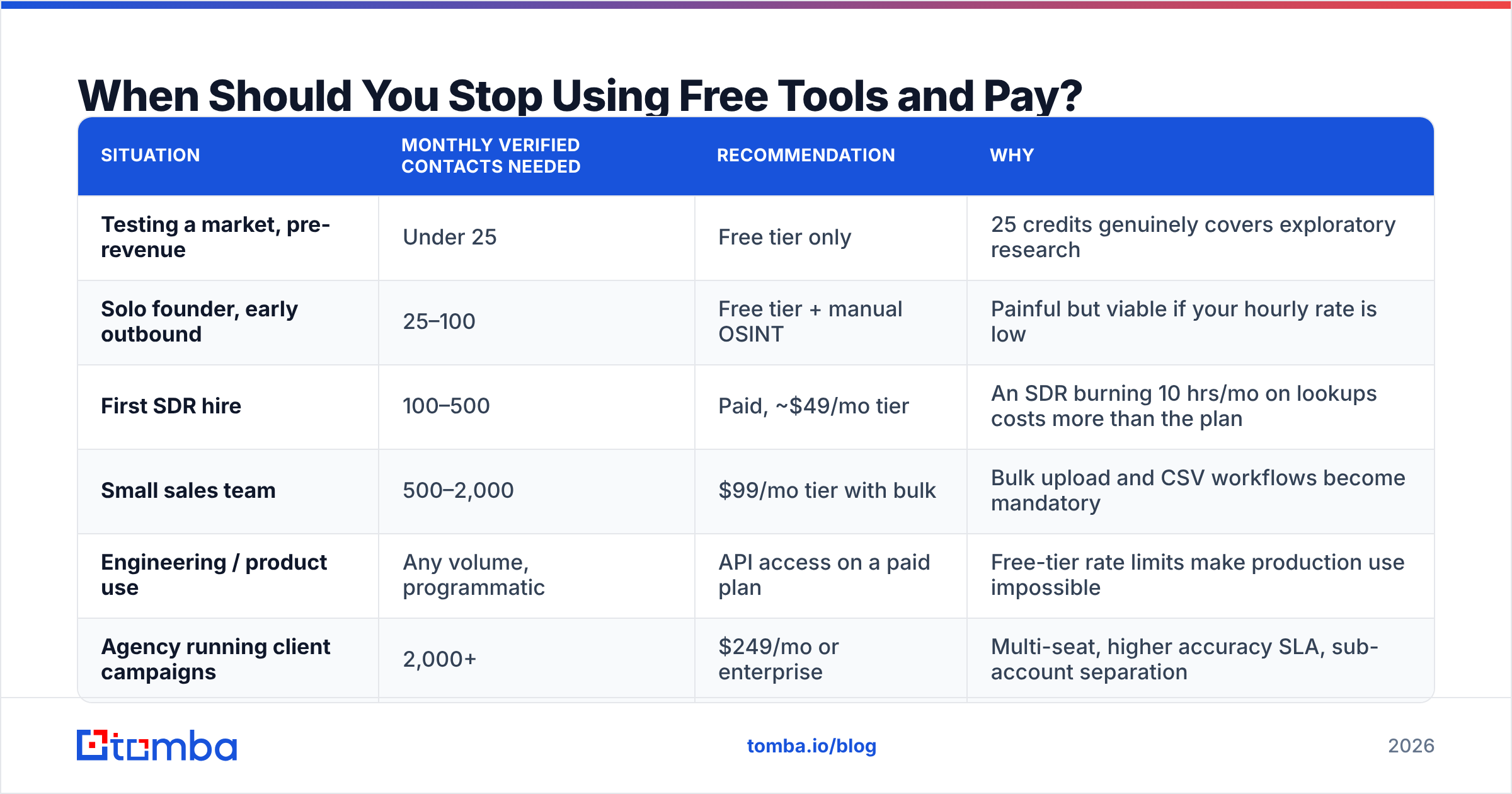
The break-even isn't about volume alone — it's about volume multiplied by how much your time is worth.
Here's the honest decision framework:
| Situation | Monthly verified contacts needed | Recommendation | Why |
|---|---|---|---|
| Testing a market, pre-revenue | Under 25 | Free tier only | 25 credits genuinely covers exploratory research |
| Solo founder, early outbound | 25–100 | Free tier + manual OSINT | Painful but viable if your hourly rate is low |
| First SDR hire | 100–500 | Paid, ~$49/mo tier | An SDR burning 10 hrs/mo on lookups costs more than the plan |
| Small sales team | 500–2,000 | $99/mo tier with bulk | Bulk upload and CSV workflows become mandatory |
| Engineering / product use | Any volume, programmatic | API access on a paid plan | Free-tier rate limits make production use impossible |
| Agency running client campaigns | 2,000+ | $249/mo or enterprise | Multi-seat, higher accuracy SLA, sub-account separation |
The clearest signal that you've outgrown free: you find yourself keeping a spreadsheet of which free tools you've already used up this month. That bookkeeping overhead is itself a cost.
The second signal is bulk. Every free tier restricts or blocks batch upload, because batch is where the vendor's compute bill lives. If your workflow starts with a CSV of 400 names, no combination of free tools handles it gracefully — you want a bulk email finder and you want it before you've wasted a weekend.
The third is API. If you're enriching records on signup, populating a CRM automatically, or building anything programmatic, free-tier rate limits will fail in production. That's not a pricing objection, it's an architectural one. The email finder API tier you need is determined by your request volume, not your budget preferences.
What Should You Watch Out For in "Unlimited Free" Tools?#
Treat "unlimited free email search" as a claim requiring evidence. In practice it means one of five things:
- It's a permutator in disguise. Unlimited guesses, zero verification. Useful as an input to a verification step, useless as an output.
- You're the product. Some free extensions harvest your contacts, browsing data, or CRM records and resell the aggregate. Read the privacy policy — specifically the "data we collect from your use of the service" section.
- The data is stale. A one-time scraped dump from 2022 sold as a live database. B2B contact data decays at roughly 25–30% a year through job changes alone; a four-year-old dataset is majority-wrong.
- The cap is hidden downstream. Unlimited searching, but exporting requires a paid plan. You can look but you can't take anything with you.
- It's a lead magnet with a short fuse. "Unlimited for 7 days," which is a trial with better marketing.
None of these are automatically disqualifying — a time-boxed trial with full features is a legitimately good way to evaluate a tool. Just know which one you're getting. Hunter's own pricing page and comparable vendor docs are worth reading directly rather than relying on a comparison post, including this one.
One more practical warning: free browser extensions that inject into LinkedIn or Gmail have broad permissions by necessity. Audit what a free extension asks for before installing. A tool that requests "read and change all your data on all websites" for a lookup feature deserves scrutiny, free or not.
How Do You Get the Most Out of a 25-Credit Free Tier?#
Spend credits on patterns, not on people.
The single biggest efficiency gain in free email search is realizing that companies have formats, not individual addresses. Twenty-five credits spent on twenty-five individual name lookups gets you twenty-five contacts. Twenty-five credits spent on twenty-five domain pattern lookups can get you hundreds of high-confidence addresses, because you then derive every colleague's address from the confirmed format.
Practical tactics:
- Batch by company. Pick 20 target accounts. Burn one credit per account to establish the format. Derive the rest.
- Use the free verification pool separately. On tools where verification credits are a separate allowance from search credits, your derived addresses can be validated without spending search credits at all.
- Reset dates matter. Free tiers reset monthly. If you're doing a one-off project, spreading it across a month boundary doubles your allowance legitimately.
- Don't waste credits on gettable addresses.
hello@,support@,press@are on the company website. Never spend a lookup on a role address you can find in ten seconds. - Cross-check high-value targets. For the five contacts that actually matter, spend a credit on two different tools and see if they agree. Agreement between independent sources is a stronger accuracy signal than any single tool's confidence score.
- Log your misses. Note which domains returned nothing. Catch-all-heavy industries (agencies, consultancies, some enterprise) will consistently frustrate free tools, and you'll learn to route those to LinkedIn instead of burning credits.
If you're doing this manually today, a Google Sheets add-on turns steps 1 through 4 into formulas, which removes most of the copy-paste tax without costing anything extra on a free plan.
The Bottom Line#
Free email search works — within limits that most vendors describe accurately and most "unlimited" tools don't. Use free tiers for pattern discovery, use permutators for hypothesis generation, use free verification for everything, and be honest with yourself about the hour cost of stitching it together. Somewhere around 100 verified contacts a month, the math flips and a paid plan becomes the cheaper option.
If you want to start free and scale without switching stacks, the Tomba Email Finder gives you 25 searches a month with the same verification engine that powers the paid tiers — including API access, so what you build on the free plan keeps working when you upgrade to Starter at $49/mo. Test the accuracy on domains you already know the answers for, then decide.
Related guides#
Ready to find emails that actually work?
Join 150,000+ professionals who stopped guessing and started sending. Free credits on signup — no credit card required.
Get the Tomba newsletter
Practical outbound tactics and product updates — once every two weeks.
About the author