Free Email Verification API in 2026: What You Actually Get
Free email verification APIs exist, but the free tier is a trial, not a plan. Here's what each provider actually gives away, where the limits bite, and how to pick one without rewriting your stack in three months.

TL;DR
- A "free email verification API" almost always means a monthly credit allowance on a paid platform — typically 25 to 100 verifications per month — not an unmetered endpoint.
- Free tiers are fine for prototyping, signup-form validation at low volume, and evaluating accuracy. They break the moment you verify a real list.
- The three things that actually differ between providers: catch-all handling, rate limits on the free plan, and whether the free key uses the same accuracy engine as paid.
- Regex and MX-only checks are free forever and catch maybe 40% of bad addresses. SMTP-level verification is where the cost comes from.
- Budget for the paid step. Tomba's free tier gives 25 searches/month; the Starter plan at $49/mo is where most teams land once they move past testing.
What Is a Free Email Verification API?#
An email verification API takes an address, runs a series of checks against it, and returns a status — valid, invalid, risky, unknown — usually in under a second. The "free" part refers to a monthly credit allowance the vendor gives you before billing starts.
Think of it like a gym day pass. You get the full equipment, the full experience, and a hard cap on how long you stay. Nobody is running their training program on day passes.
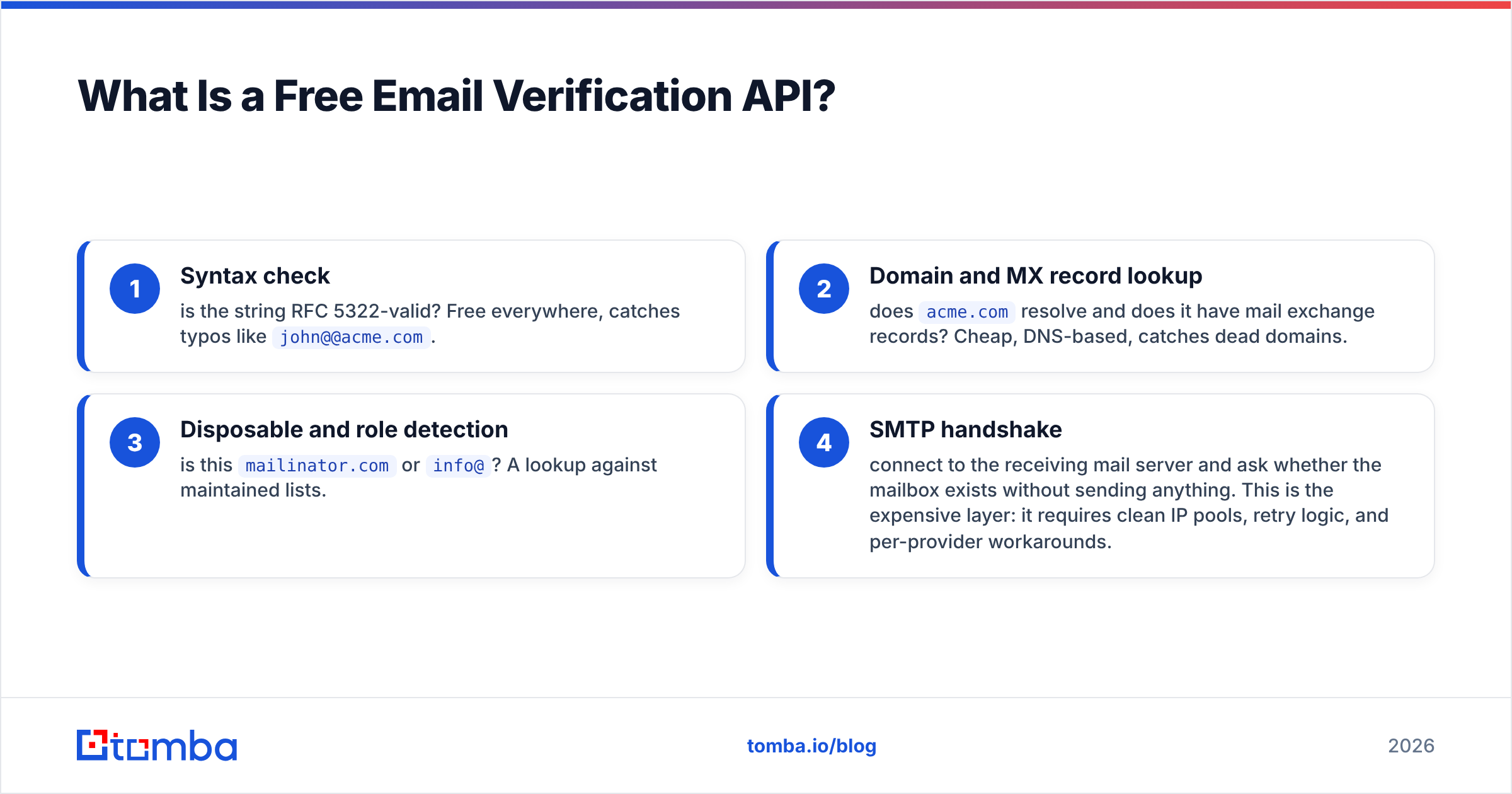
Under the hood, a verification call typically runs four layers:
- Syntax check — is the string RFC 5322-valid? Free everywhere, catches typos like
john@@acme.com. - Domain and MX record lookup — does
acme.comresolve and does it have mail exchange records? Cheap, DNS-based, catches dead domains. - Disposable and role detection — is this
mailinator.comorinfo@? A lookup against maintained lists. - SMTP handshake — connect to the receiving mail server and ask whether the mailbox exists without sending anything. This is the expensive layer: it requires clean IP pools, retry logic, and per-provider workarounds.
Steps 1 through 3 you could build yourself in an afternoon. Step 4 is why verification vendors exist and why free tiers are metered.

Why Do Free Tiers Cap So Aggressively?#
Because every SMTP verification costs the provider real money and real reputation.
When a verification API pings Google Workspace or Microsoft 365 to ask about a mailbox, it's using an outbound IP. Do that too often from the same range and the receiving provider throttles or blocks you. Maintaining a rotating pool of warm, non-blacklisted IPs is the actual product. Credits are how vendors ration access to it.
There's a second reason: catch-all domains. Roughly 15 to 20% of B2B domains accept mail for any address, so the SMTP handshake returns "yes" regardless of whether the mailbox exists. Resolving those requires pattern databases, historical send data, and probabilistic scoring — none of which a vendor gives away in unlimited quantity. If a provider's free tier claims unlimited verification, it is almost certainly doing syntax and MX only, and quietly marking every catch-all as valid.
That last point matters more than the credit count. A free API that returns 98% "valid" is not accurate — it's optimistic. Check what the vendor does with catch-alls before you compare anything else. Tomba splits this out with a dedicated catch-all verifier rather than lumping it into a single valid/invalid flag.

Which Free Email Verification APIs Are Worth Testing?#
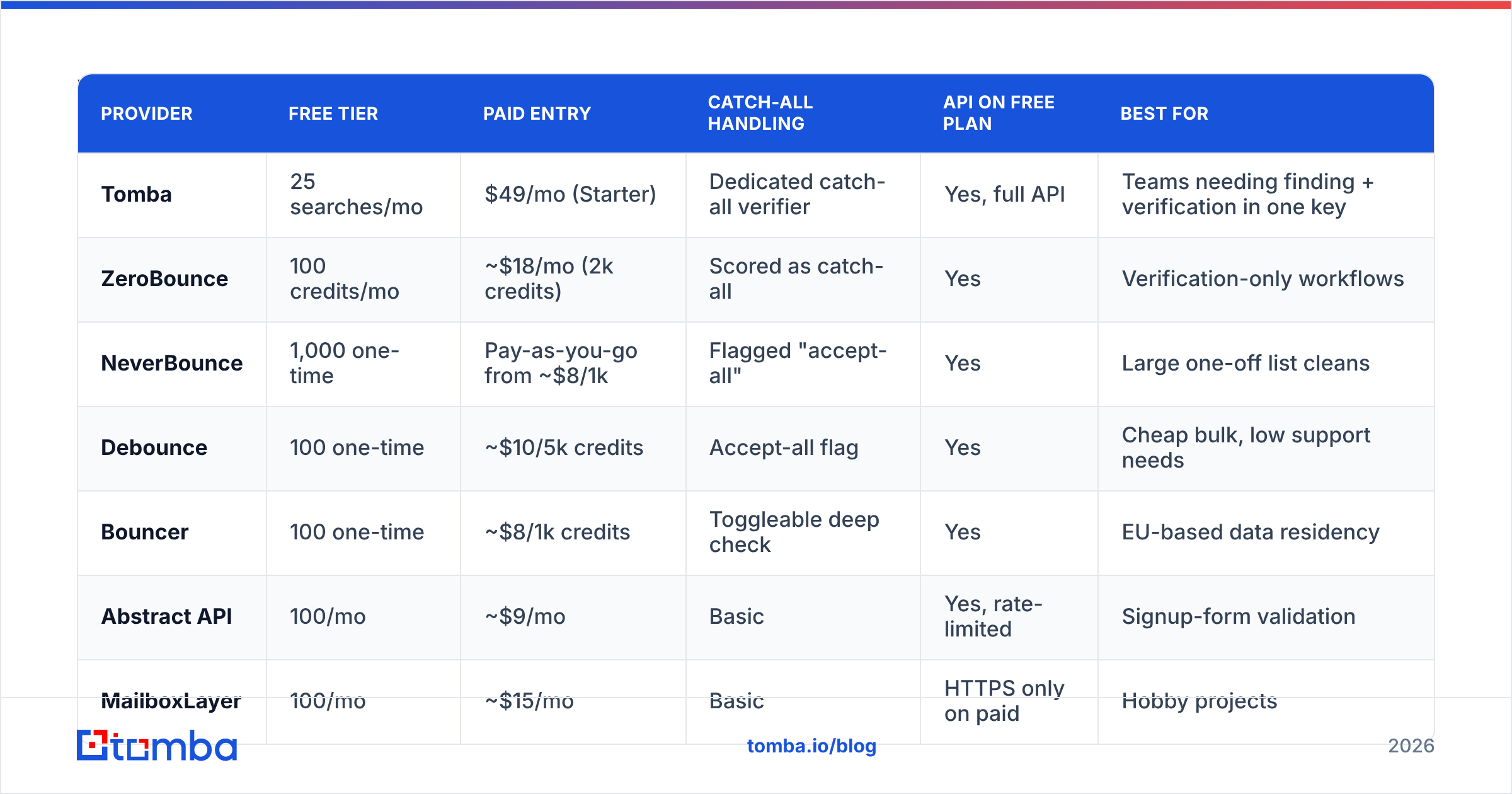
Here's how the commonly-shortlisted providers compare on their free tiers as of 2026. Credit allowances change; check the vendor's pricing page before committing.
| Provider | Free tier | Paid entry | Catch-all handling | API on free plan | Best for |
|---|---|---|---|---|---|
| Tomba | 25 searches/mo | $49/mo (Starter) | Dedicated catch-all verifier | Yes, full API | Teams needing finding + verification in one key |
| ZeroBounce | 100 credits/mo | ~$18/mo (2k credits) | Scored as catch-all | Yes | Verification-only workflows |
| NeverBounce | 1,000 one-time | Pay-as-you-go from ~$8/1k | Flagged "accept-all" | Yes | Large one-off list cleans |
| Debounce | 100 one-time | ~$10/5k credits | Accept-all flag | Yes | Cheap bulk, low support needs |
| Bouncer | 100 one-time | ~$8/1k credits | Toggleable deep check | Yes | EU-based data residency |
| Abstract API | 100/mo | ~$9/mo | Basic | Yes, rate-limited | Signup-form validation |
| MailboxLayer | 100/mo | ~$15/mo | Basic | HTTPS only on paid | Hobby projects |
Two things to notice. First, "one-time" versus "per month" is a real distinction — NeverBounce's 1,000 credits are generous but they don't refill, so they're an evaluation budget, not an operating budget. Second, several providers gate HTTPS, higher rate limits, or the bulk endpoint behind the paid tier, which means your free-tier integration test doesn't reflect production behavior.
For a fuller breakdown of how the finding side of these tools stacks up, the accuracy benchmark below covers the same vendor set.

What Should You Check Before Wiring One In?#
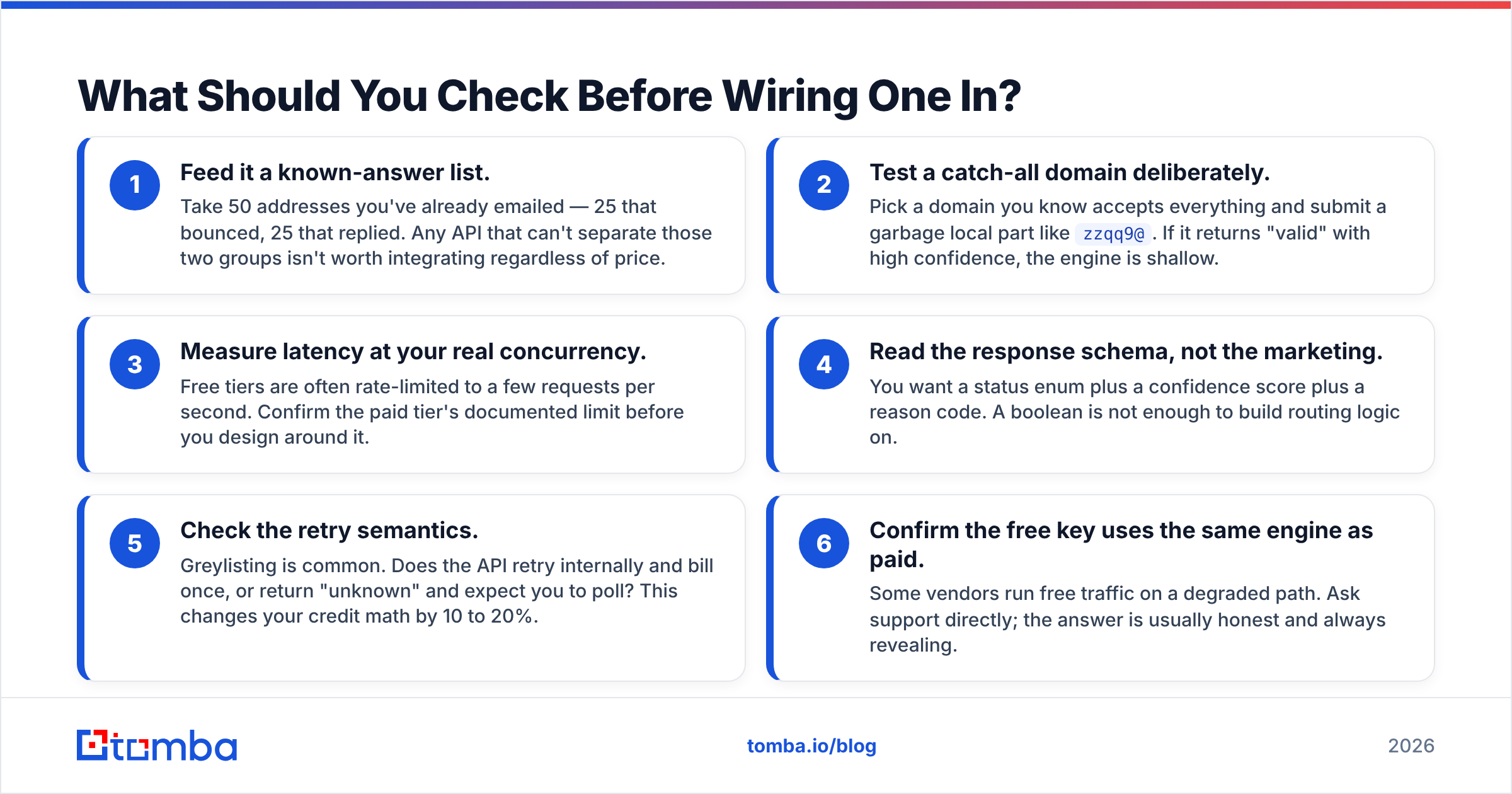
Run these five checks during your free-tier trial. They take an hour and save you a migration.
- Feed it a known-answer list. Take 50 addresses you've already emailed — 25 that bounced, 25 that replied. Any API that can't separate those two groups isn't worth integrating regardless of price.
- Test a catch-all domain deliberately. Pick a domain you know accepts everything and submit a garbage local part like
zzqq9@. If it returns "valid" with high confidence, the engine is shallow. - Measure latency at your real concurrency. Free tiers are often rate-limited to a few requests per second. Confirm the paid tier's documented limit before you design around it.
- Read the response schema, not the marketing. You want a status enum plus a confidence score plus a reason code. A boolean is not enough to build routing logic on.
- Check the retry semantics. Greylisting is common. Does the API retry internally and bill once, or return "unknown" and expect you to poll? This changes your credit math by 10 to 20%.
- Confirm the free key uses the same engine as paid. Some vendors run free traffic on a degraded path. Ask support directly; the answer is usually honest and always revealing.
Is a Free Tier Enough for Production?#
No, and the arithmetic makes that obvious quickly.
A 100-credit monthly free tier covers roughly one small prospecting list per month. If you're running outbound at any real volume — say 2,000 new contacts a month — you need 2,000 verification credits plus headroom for re-verification of your existing database every 90 days, since B2B data decays at around 22 to 30% per year according to HubSpot's research on database decay.
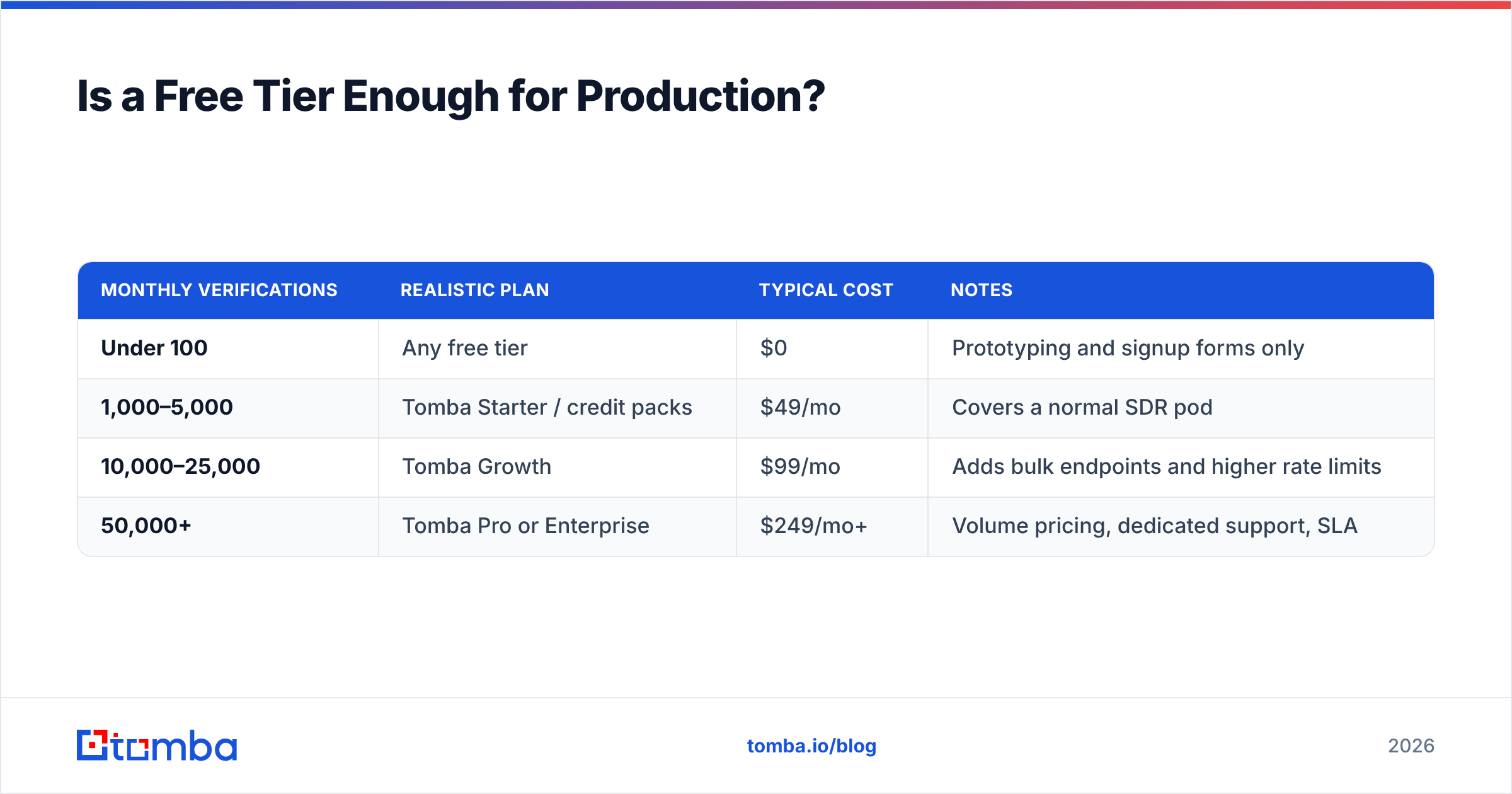
Here's the honest cost picture at three volumes:
| Monthly verifications | Realistic plan | Typical cost | Notes |
|---|---|---|---|
| Under 100 | Any free tier | $0 | Prototyping and signup forms only |
| 1,000–5,000 | Tomba Starter / credit packs | $49/mo | Covers a normal SDR pod |
| 10,000–25,000 | Tomba Growth | $99/mo | Adds bulk endpoints and higher rate limits |
| 50,000+ | Tomba Pro or Enterprise | $249/mo+ | Volume pricing, dedicated support, SLA |
The comparison people actually need is not "which free tier is biggest" but "which vendor do I want to be paying in six months." Free-tier size is a bad proxy for that. Accuracy on catch-alls, API stability, and whether the same key also does email finding matter far more.
How Does Verification Differ From Email Finding?#
They're adjacent but not the same job, and conflating them is the most common integration mistake.
Email finding takes a name and a domain and produces an address. Email verification takes an address and produces a confidence judgment. You usually need both, in that order, and running them through two different vendors means two API keys, two billing relationships, and two accuracy models that disagree with each other.
- Finder-first workflow — you have a company list, need contacts. Use domain search to pull the pattern and known addresses, then verify what comes back.
- Verifier-first workflow — you bought or inherited a list. Run it through bulk verification before anything touches your sending domain.
- Enrichment workflow — you have partial records. Contact enrichment fills gaps, verification confirms them.
- Real-time workflow — a form submission needs a yes/no in 300ms. This is the only case where a lightweight, syntax-plus-MX check is genuinely sufficient.
Providers that do only one half of this force you into the two-vendor tax. Tomba, ZeroBounce, and BookYourData each approach the combined problem differently — BookYourData leans toward pre-verified purchased contact data with a guarantee attached, which suits teams who'd rather buy a clean list than build one. Tomba leans toward search-and-verify from a live index. Both are defensible; pick based on whether your motion is list-buying or list-building.
What Does the Integration Actually Look Like?#
Every serious provider exposes a REST endpoint that takes an address and returns JSON. The Tomba API follows the same shape as the rest of the category:
GET https://api.tomba.io/v1/email-verifier/{email}
X-Tomba-Key: <public_key>
X-Tomba-Secret: <secret_key>
The response you care about includes status, result, score, and the sub-checks (regexp, gibberish, disposable, webmail, mx_records, smtp_server, smtp_check, accept_all, block). Build your routing on score plus accept_all, not on result alone — that's the single change that most improves real-world bounce rates.
Practical guardrails worth building in from day one:
- Cache aggressively. A verified address does not need re-verification for 60 to 90 days. Caching cuts credit spend more than any pricing negotiation will.
- Handle
unknownexplicitly. Don't treat it as invalid. Queue it, retry once after 24 hours, then route to a lower-risk send. - Verify at the point of capture, not at send time. Catching a typo while the user is still on the form is worth more than catching it in a bounce report.
- Set a hard credit ceiling in code. Runaway loops against a metered API are a real and expensive failure mode.
If you'd rather not write any of this, the Chrome extension, Google Sheets add-on, and bulk verification interfaces cover most non-engineering workflows without an API key at all.
What Are the Free Alternatives to a Metered API?#
Three, and each has a specific ceiling.
Self-hosted SMTP checks. Libraries exist in every language. They work until your IP gets throttled by Google and Microsoft, which happens fast — often within a few hundred checks from a cold IP. Fine for internal tooling, unusable for lists. Gmail's sender guidelines spell out why aggressive probing damages your standing.
Syntax and MX validation only. Genuinely free forever, genuinely useful, genuinely limited. Catches typos and dead domains, misses every valid-syntax-invalid-mailbox case — which is the majority of bounces. Tomba's free email checker does this without an account.
Send-and-observe. Mail the list, watch the bounces, clean afterward. This is what verification exists to prevent. A 5% bounce rate on a cold domain is enough to damage sender reputation for weeks, and both Google and Yahoo now enforce bounce thresholds explicitly.
None of these replace a real verification API at volume. They replace it at zero volume, which is a different thing.
Which One Should You Pick?#
Decide on three questions, in this order:
- Do you also need to find addresses, or only verify them? If both, pick a combined platform and stop comparing verification-only tools.
- What's your monthly volume in six months, not this month? Price the plan you'll be on, not the tier you're testing.
- How much does a catch-all miss cost you? If you're selling into mid-market and enterprise where catch-all domains cluster, deep catch-all handling is worth paying for. If you're selling to SMBs on Google Workspace, it matters less.
Free tiers are a legitimate way to answer question three cheaply. Use them for that, then move.
Ready to test it properly? Start with the Tomba Email Finder — the free tier gives you 25 searches a month with the same engine paid accounts use, so your evaluation reflects what you'd actually get in production. Pair it with the email verifier to see how a single key handles finding and verification together, and check the Tomba pricing page when you're ready to scale past the free allowance.
Related guides#
Ready to find emails that actually work?
Join 150,000+ professionals who stopped guessing and started sending. Free credits on signup — no credit card required.
Get the Tomba newsletter
Practical outbound tactics and product updates — once every two weeks.
About the author