Free Gmail Email Tracker Risks: The Hidden Cost of Pixels
Free Gmail trackers promise open rates in one click. What you actually get is a rewritten link domain, a 1x1 pixel, an extension reading your inbox, and open data that stopped being reliable years ago. Here is the honest breakdown.
TL;DR
- A free Gmail email tracker works by injecting a 1x1 tracking pixel and rewriting your links through a third-party domain. Both changes touch the two things spam filters look at hardest: image loading and link reputation.
- Open rates from free trackers are inflated. Gmail's image proxy, Apple Mail Privacy Protection, and security scanners fire pixels without a human ever reading the message.
- The permission scope is the part nobody reads. Most free Gmail tracker extensions request read/modify access to your entire mailbox, not just the threads you track.
- Shared tracking domains are the quiet killer: you inherit the sending reputation of every other free user on that same link domain.
- Better trade: stop paying for opens with deliverability, and spend the effort on verified addresses and reply-based metrics instead.
What is a free Gmail email tracker, and how does it actually work?#
A free Gmail email tracker is a browser extension or add-on that tells you when someone opens your email and clicks your links. You install it, it hooks into the Gmail compose window, and a checkbox appears near the send button.
Think of it like a courier who slips a hidden postcard into every envelope you mail. When the recipient opens the envelope, the postcard silently mails itself back to the courier with a timestamp. Handy for you. Invisible to them. And the courier keeps a copy of everything.
Technically, two things happen the moment you hit send:
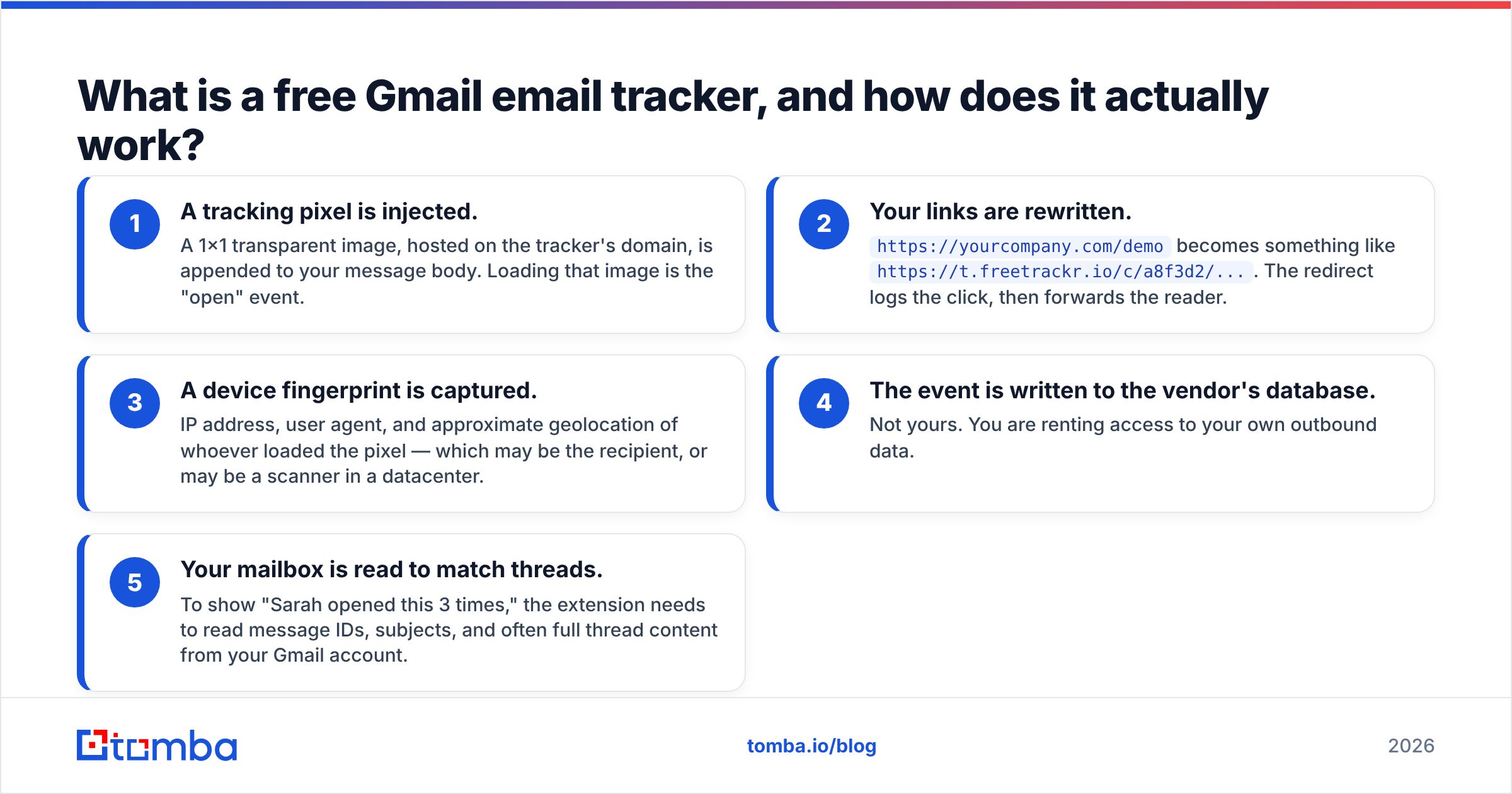
- A tracking pixel is injected. A 1x1 transparent image, hosted on the tracker's domain, is appended to your message body. Loading that image is the "open" event.
- Your links are rewritten.
https://yourcompany.com/demobecomes something likehttps://t.freetrackr.io/c/a8f3d2/.... The redirect logs the click, then forwards the reader. - A device fingerprint is captured. IP address, user agent, and approximate geolocation of whoever loaded the pixel — which may be the recipient, or may be a scanner in a datacenter.
- The event is written to the vendor's database. Not yours. You are renting access to your own outbound data.
- Your mailbox is read to match threads. To show "Sarah opened this 3 times," the extension needs to read message IDs, subjects, and often full thread content from your Gmail account.
None of those five steps is inherently malicious. All five have consequences that free tiers rarely put in the marketing copy.

Why do free Gmail trackers hurt deliverability?#
Because you are adding two unfamiliar signals to a message that would otherwise look like plain person-to-person mail.
Shared tracking domains are the biggest problem. Paid platforms give you a custom tracking domain (links.yourcompany.com) that carries your own reputation. Free tiers almost never do — that feature is the upsell. So every free user on that tool routes clicks through the same handful of domains. When a few hundred of those users blast unverified lists, filters start associating that link domain with spam. Your careful one-to-one email to a warm prospect now contains a link on a degraded domain.
Image-only HTML raises the flag. A short plain-text-looking email whose only image is a 1x1 transparent GIF from an unrelated domain is a textbook bulk-mail pattern. It is one of the oldest heuristics in spam filtering and it never went away. If you want to see what your message looks like to a filter before sending, run it through a spam checker and look specifically at the link and image lines.
Redirect chains add latency and risk. Security gateways at enterprise recipients (Proofpoint, Mimecast, Microsoft Defender) unwrap redirects and evaluate the destination. A redirect through an unknown intermediary is more suspicious than a direct link, and some gateways strip or quarantine on that basis alone.
You lose the plain-text advantage. Cold outreach performs best when it looks like an email a human typed. Tracking forces multipart HTML with embedded assets, which is measurably a different animal. Google's own guidance for bulk senders, published via Postmaster Tools, leans hard on authentication and complaint rates — but the underlying content signals still shape whether you land in Primary, Promotions, or Spam.
If deliverability is already shaky, the fix is upstream of tracking. Get your SPF record and DMARC right, keep bounce rates low, and understand what actually drives email deliverability before adding pixels to the payload.
How accurate are open rates in 2026?#
Not accurate enough to make decisions with. This is the single most under-discussed item in the free gmail email tracker risks list, because a wrong number is worse than no number.
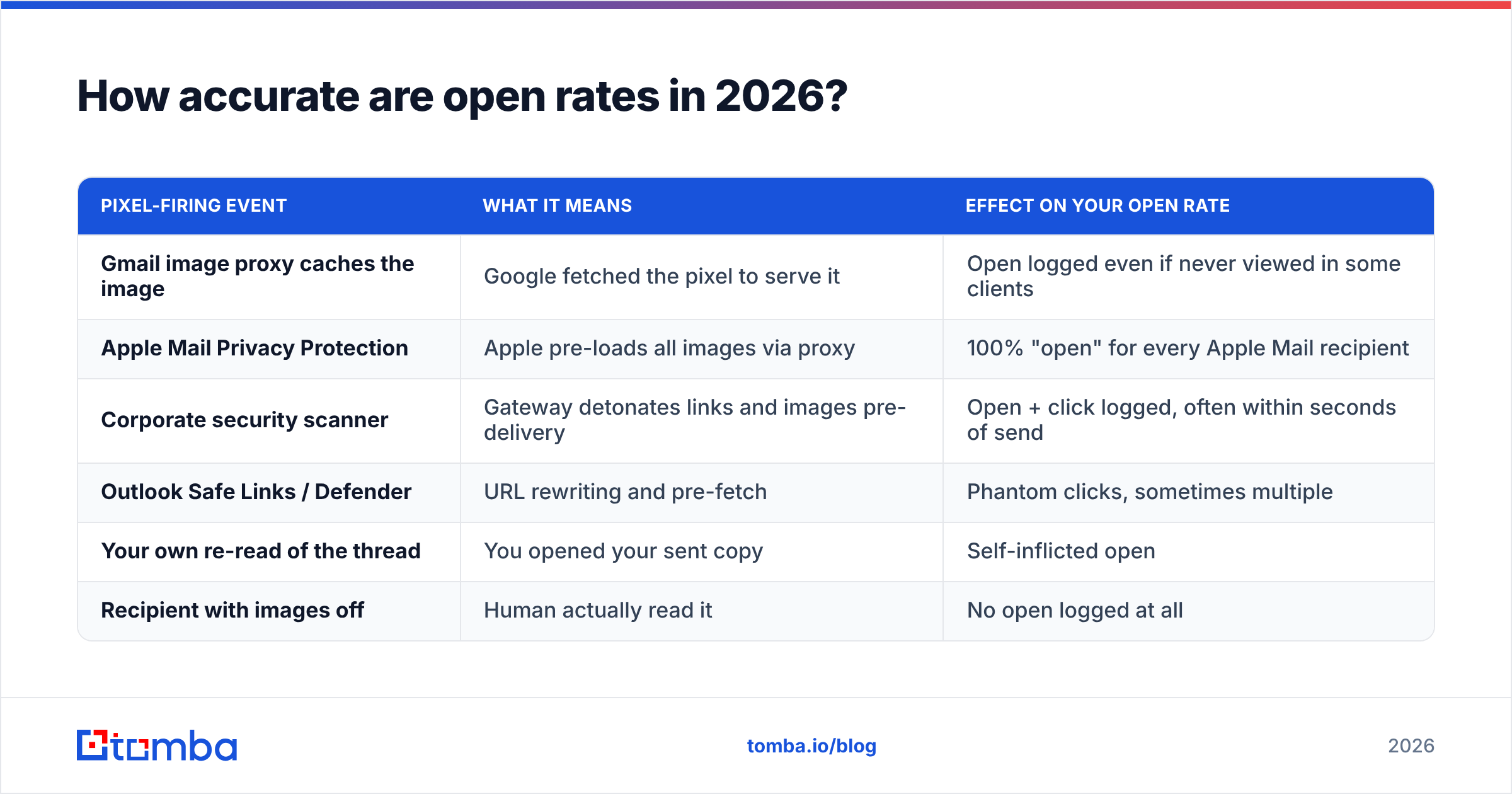
Here is what fires your pixel besides an actual human reading your email:
| Pixel-firing event | What it means | Effect on your open rate |
|---|---|---|
| Gmail image proxy caches the image | Google fetched the pixel to serve it | Open logged even if never viewed in some clients |
| Apple Mail Privacy Protection | Apple pre-loads all images via proxy | 100% "open" for every Apple Mail recipient |
| Corporate security scanner | Gateway detonates links and images pre-delivery | Open + click logged, often within seconds of send |
| Outlook Safe Links / Defender | URL rewriting and pre-fetch | Phantom clicks, sometimes multiple |
| Your own re-read of the thread | You opened your sent copy | Self-inflicted open |
| Recipient with images off | Human actually read it | No open logged at all |
Two failure modes, opposite directions. Machines inflate opens. Privacy-conscious readers deflate them. The result is a metric with noise in both tails and no way to separate them on a free plan.
The tell: if you see an "open" 4 seconds after sending, from a datacenter IP, that is a scanner. If you see 12 opens in one minute, that is a proxy or a forward loop, not a hot prospect. Free trackers rarely filter these; some paid ones do, imperfectly.
Practical consequence: never build follow-up automation on opens. "They opened 3 times, send the aggressive follow-up" is a rule that will make you look ridiculous to someone whose security gateway did the opening. Track response rate instead — it is a metric no proxy can fake.
Is a free Gmail tracker a privacy and compliance risk?#
Yes, in three distinct ways. Treat these as separate problems because they have separate fixes.
1. Extension permission scope. When a Chrome extension asks to "read, compose, send, and permanently delete all your email," that is not a tracking-only permission. It is total mailbox access. Free tools have to monetize somehow, and the asset sitting in front of them is your inbox. Check the OAuth scopes on the Google account permissions page before and after install — not just the Chrome Web Store listing.
2. Recipient consent under GDPR and ePrivacy. A tracking pixel is generally treated as terminal-equipment access, which in the EU sits under the ePrivacy Directive and typically requires consent, not just legitimate interest. Reading the actual text at GDPR-info is more useful than any vendor's compliance page. Several EU data protection authorities have issued fines specifically over unconsented email tracking. "But it's free and everyone does it" is not a defense your legal team will enjoy.
3. Where the event data goes. Free tiers are ad-supported or data-supported by definition. Read the privacy policy for the phrase "aggregated and anonymized" — that is usually where the resale clause lives. Your prospect list, send timing, and engagement patterns are commercially valuable to someone.
There is also a plain business risk: enterprise buyers increasingly run inbound mail through gateways that flag tracking pixels and show the recipient a banner. Getting caught tracking a CISO on the first touch is a bad opening move.
Free vs paid vs no tracking: what actually changes?#
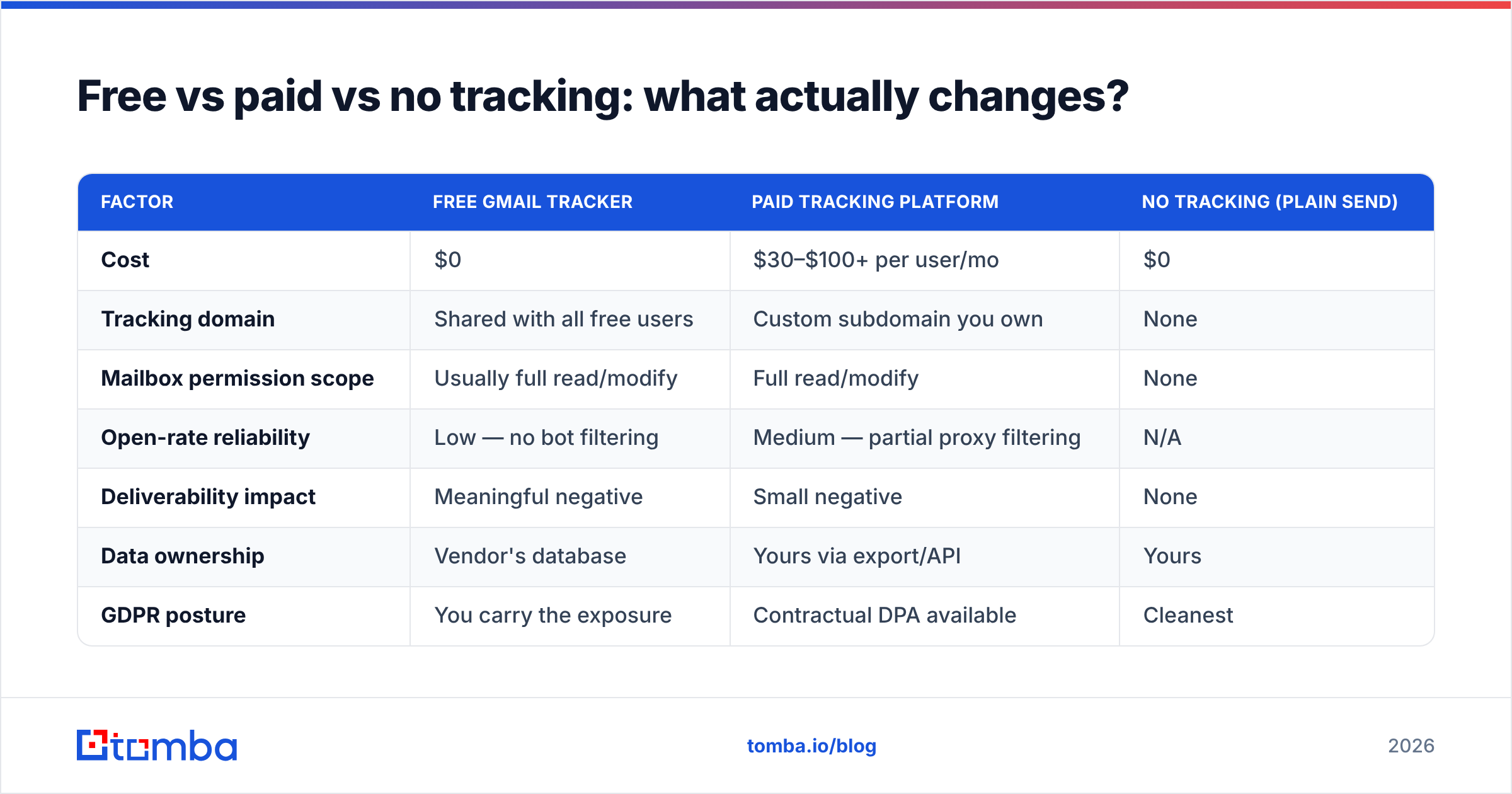
| Factor | Free Gmail tracker | Paid tracking platform | No tracking (plain send) |
|---|---|---|---|
| Cost | $0 | $30–$100+ per user/mo | $0 |
| Tracking domain | Shared with all free users | Custom subdomain you own | None |
| Mailbox permission scope | Usually full read/modify | Full read/modify | None |
| Open-rate reliability | Low — no bot filtering | Medium — partial proxy filtering | N/A |
| Deliverability impact | Meaningful negative | Small negative | None |
| Data ownership | Vendor's database | Yours via export/API | Yours |
| GDPR posture | You carry the exposure | Contractual DPA available | Cleanest |
| Best for | Testing whether you need tracking at all | Teams running volume with a real ops process | 1:1 senior outbound, regulated industries |
The honest read: free trackers are fine as a two-week experiment to learn your baseline. They are a poor permanent foundation. Paid platforms fix the tracking-domain and support problems but not the fundamental measurement noise. And for high-value, low-volume outbound to senior buyers, no tracking at all is a legitimate — often better — choice.

What should you measure instead of opens?#
Replace one unreliable metric with three reliable ones. Every item below is machine-proof: a scanner cannot fake it.
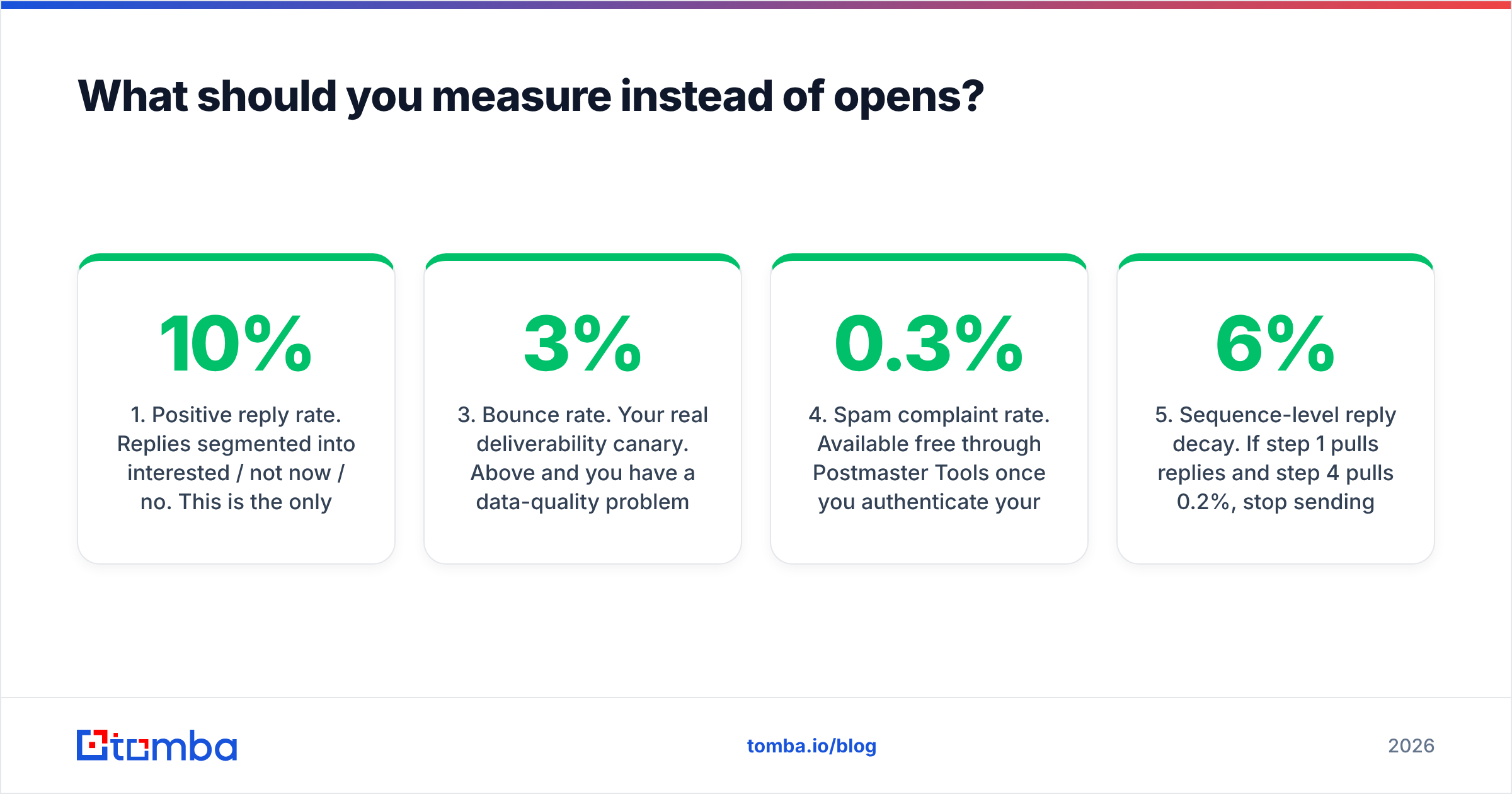
- Positive reply rate. Replies segmented into interested / not now / no. This is the only metric that correlates with pipeline. Target 5–10% on well-targeted cold outbound; below 2% means targeting or copy, not tracking.
- Meetings booked per 100 sends. The number your manager actually cares about. It bypasses every proxy artifact.
- Bounce rate. Your real deliverability canary. Above 3% and you have a data-quality problem that no tracker will diagnose for you. A pre-send email verifier pass fixes this at the source.
- Spam complaint rate. Available free through Postmaster Tools once you authenticate your domain. Google's threshold guidance sits around 0.3%; treat 0.1% as your internal ceiling.
- Sequence-level reply decay. If step 1 pulls 6% replies and step 4 pulls 0.2%, stop sending step 5. You do not need opens to see that.
- Domain-level engagement. Which company sizes and industries reply at all. This drives targeting decisions that open rates never could.
Notice what these have in common: they are all outcomes, not proxies for outcomes. Open rate is a proxy metric that has been degrading for six years straight. Litmus has documented the client-side changes driving that degradation since Apple's MPP launch, and nothing since has reversed the trend.
How do you fix the underlying problem instead?#
Most people install a tracker because they are anxious about whether their email arrived at all. That anxiety is usually justified — but the cause is bad data, not missing telemetry.
Run the diagnostic in this order:
- Is the address real? A guessed
firstname.lastname@pattern that hard-bounces looks identical to "never opened" in your head. Verification removes that ambiguity entirely. Start with a free email checker on a sample of 20 addresses from your list. If more than 2 fail, your list is the problem. - Is the domain catch-all? Catch-all domains accept everything and tell you nothing. They need a different verification path — a catch-all verifier rather than standard SMTP validation.
- Is your authentication clean? SPF, DKIM, and DMARC aligned. Ten minutes of DNS work beats any tracking dashboard.
- Are you sending to the right person? A perfectly delivered email to the wrong title is a delivered failure. Pulling contacts by role via domain search beats spraying a scraped list and watching pixels.
- Is your volume sane? New domain, 200 sends a day, no warmup — the tracker will faithfully report that nobody opened anything, and it will be right for reasons unrelated to your copy.
Fix those five and the value of open tracking drops close to zero, because you will already know your mail is arriving.
What about tracking for one-to-one sales emails?#
This is the one case where tracking earns its keep — and where the free version is most defensible.
If you send 15 highly researched emails a week to named accounts, an open notification is a genuine timing signal: call while the tab is warm. The volume is low enough that shared-domain reputation damage is negligible, and the compliance exposure is bounded.
Even here, apply three guardrails:
- Turn tracking off for anyone in the EU, UK, or a regulated industry unless you have a documented lawful basis.
- Turn tracking off on the first touch to enterprise security, legal, or finance titles. They will notice, and it costs you credibility.
- Never send an automated follow-up triggered purely by an open. Use it as a nudge to your own calendar, not as a trigger for the prospect.
At any volume above roughly 50 sends a day, the math flips. Shared tracking domains, mixed-quality lists, and bot-inflated opens compound into a measurably worse inbox rate — and you are optimizing against a number that is 30–60% noise.
The bottom line#
Free Gmail trackers are not a scam. They are a trade: you exchange a slice of deliverability, full mailbox permissions, and some regulatory exposure for a metric that machines corrupt in both directions. For a short diagnostic run, that trade is reasonable. As permanent infrastructure, it is not.
The senders who consistently get replies are not the ones with the best open-rate dashboards. They are the ones whose lists are verified, whose domains are authenticated, and whose targeting is tight enough that they do not need a pixel to tell them whether the email mattered.
Start where the leverage is. Before you install another extension, make sure every address you send to is real and correctly routed. Tomba Email Finder returns verified professional addresses by name, domain, or company, with confidence scoring and source attribution — so a silent inbox means "they didn't care," not "it never arrived." The free tier covers 25 searches a month, and paid plans start at $49/mo on the Starter tier; see full Tomba pricing for Growth and Pro details. Fix the data first, and you will need the pixel a lot less.
Related guides#
Ready to find emails that actually work?
Join 150,000+ professionals who stopped guessing and started sending. Free credits on signup — no credit card required.
Get the Tomba newsletter
Practical outbound tactics and product updates — once every two weeks.
About the author