Funnelflare Pricing, Reviews, Pros and Cons (2026)
Funnelflare bundles CRM, email sequences, and a dialer into one per-seat subscription. Here's what it actually costs, what reviewers praise, and where the pricing model starts to hurt.
TL;DR
- Funnelflare is an all-in-one sales automation platform — CRM, email sequences, a built-in dialer, and website visitor tracking — sold on a per-user, per-month subscription rather than a credit model.
- Expect roughly $70–$80 per user per month at list price, with telephony minutes, SMS, and onboarding billed on top. Always confirm current numbers on funnelflare.io before budgeting.
- Reviewers consistently praise the automation depth and responsive support; the recurring complaints are a dated interface, a thin third-party integration catalog, and a small review footprint that makes due diligence harder.
- The pricing model punishes teams that need data more than seats. If four of your six users only touch the system to look up contacts, you are paying full freight for read-only activity.
- A cheaper pattern for most small teams: keep a lightweight CRM, add a usage-priced data layer, and buy sequencing separately. That stack often lands under $150/month total.
What is Funnelflare, and who is it built for?#
Funnelflare is sales automation software that tries to collapse four tools into one subscription: a CRM, an email sequencer, a VoIP dialer, and behavioral tracking that tells a rep when a prospect opened a quote or came back to the pricing page.
The target buyer is a small-to-midsize sales team — typically 3 to 25 reps — that has outgrown spreadsheets and a shared inbox but does not want to assemble Salesforce plus Outreach plus a dialer plus an enrichment vendor. That "one login, one invoice" pitch is genuinely the product's strongest argument, and it is the reason Funnelflare shows up in searches next to bigger names.
It is worth being clear about what Funnelflare is not. It is not a data provider. It does not ship you a contact database, it does not find email addresses from a domain, and it does not verify deliverability at scale. It is the machinery that acts on records you already have. That distinction matters more than any line on the pricing page, because it determines whether Funnelflare replaces two tools in your stack or four.
How does Funnelflare pricing actually work?#
Funnelflare prices per user, per month. There is no meaningful free tier, and — unlike most modern prospecting tools — there is no credit pool that lets a light user cost less than a heavy one.
Here is the structure you should model, based on the vendor's published approach and what buyers report. Treat the dollar figures as a planning range, not a quote:
- Base seat fee. Roughly $70–$80 per user per month, billed monthly or annually. Annual prepay typically shaves 10–20%.
- Minimum seat count. Small-team platforms usually enforce a floor (commonly 2–3 seats). A solo founder rarely gets solo pricing.
- Telephony usage. The dialer is a headline feature, but call minutes, local presence numbers, and SMS are metered separately. Budget $10–$30 per active dialer, per month.
- Implementation and onboarding. Automation platforms that promise "we'll build your workflows" almost always attach a one-time setup fee. Ask for it in writing before signing.
- Data you still have to buy. Funnelflare automates outreach; it does not source contacts. Enrichment, email discovery, and verification remain separate line items.
- Contract term. Month-to-month is usually available at a premium. The advertised price is often the annual-commitment price.
That last point is where most pricing-page confusion starts. The number you see is frequently the best-case annual rate, and the number on your invoice includes usage and a term you cannot exit for twelve months.

What does Funnelflare really cost a five-person team?#
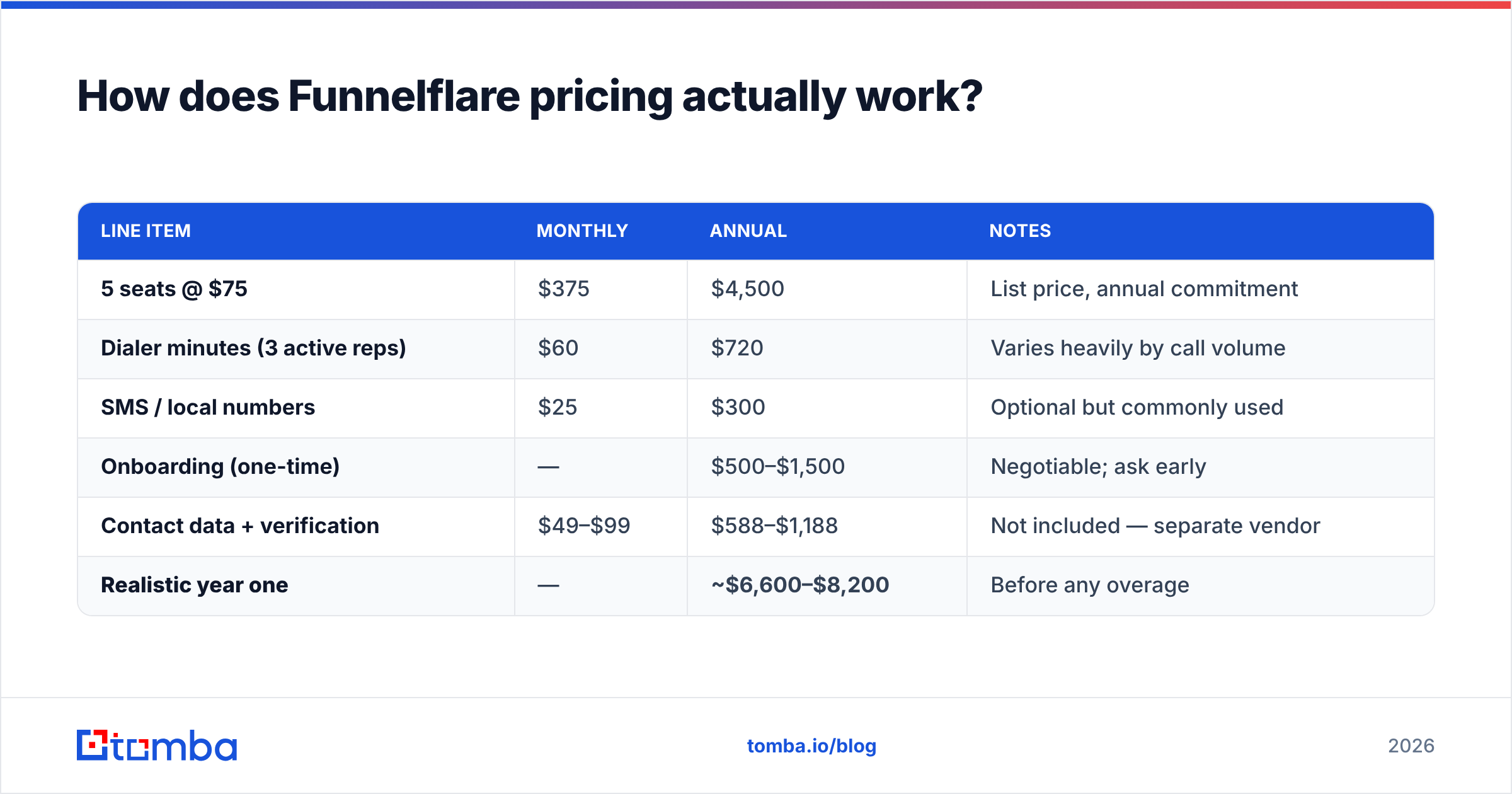
Run the arithmetic before the demo, not after. A five-seat deployment at the middle of the range looks like this:
| Line item | Monthly | Annual | Notes |
|---|---|---|---|
| 5 seats @ $75 | $375 | $4,500 | List price, annual commitment |
| Dialer minutes (3 active reps) | $60 | $720 | Varies heavily by call volume |
| SMS / local numbers | $25 | $300 | Optional but commonly used |
| Onboarding (one-time) | — | $500–$1,500 | Negotiable; ask early |
| Contact data + verification | $49–$99 | $588–$1,188 | Not included — separate vendor |
| Realistic year one | — | ~$6,600–$8,200 | Before any overage |
Nothing here is scandalous — it is standard for the category. But "one tool, one invoice" turns out to be one tool and three invoices, and the seat fee is only about 60% of the total. That gap is the single most useful thing to know about Funnelflare pricing before you talk to sales.
What do Funnelflare reviews say?#
The honest headline: there are not many of them.
Funnelflare carries a small number of public reviews across G2 and Capterra compared to category leaders with thousands. Ratings that do exist skew positive — generally in the 4.3–4.7 range — but a high average across a dozen reviews tells you far less than a 4.2 across two thousand. Small samples over-represent enthusiastic early adopters and customers the vendor personally onboarded.
What reviewers reliably say:
The praise. Support responsiveness comes up repeatedly, and it is credible — small vendors genuinely do answer faster than enterprise ones. Buyers also like that automation triggers can chain across email, tasks, and calls without a Zapier layer in the middle, and that visitor tracking surfaces intent signals a plain CRM would miss.
The criticism. The interface reads as dated next to tools rebuilt in the last three years. The integration catalog is thin, so anything outside the core list means custom API work. And several reviewers mention a learning curve steep enough that the automation depth goes unused — teams end up paying suite prices for CRM-plus-email behavior.
The silence. Almost no reviews discuss data quality, because Funnelflare does not supply data. If your evaluation is really about "will my reps have someone to call," reviews of this product will not answer that question.
Read reviews for texture, not verdicts. Filter for companies your size, in your motion, and discount anything older than eighteen months.
What are the pros of Funnelflare?#
- Consolidation that actually reduces tool count. CRM plus sequencer plus dialer in one place removes the sync problems that eat RevOps hours. If you have ever debugged why a call log did not reach the deal record, you know the value.
- Automation triggers on real behavior. Quote opens, page revisits, and email engagement can fire tasks and calls automatically. That is closer to true sales automation than the "send three emails on a timer" that many tools call automation.
- Support you can reach. Small vendors compete on service. Multiple buyers report getting a human quickly, including help configuring workflows.
- Predictable billing. Per-seat pricing has one underrated virtue: no surprise credit exhaustion mid-quarter. You know the number.
- Sensible fit for phone-heavy motions. If your reps dial daily, having the dialer native rather than bolted on is a real workflow win.
What are the cons of Funnelflare?#
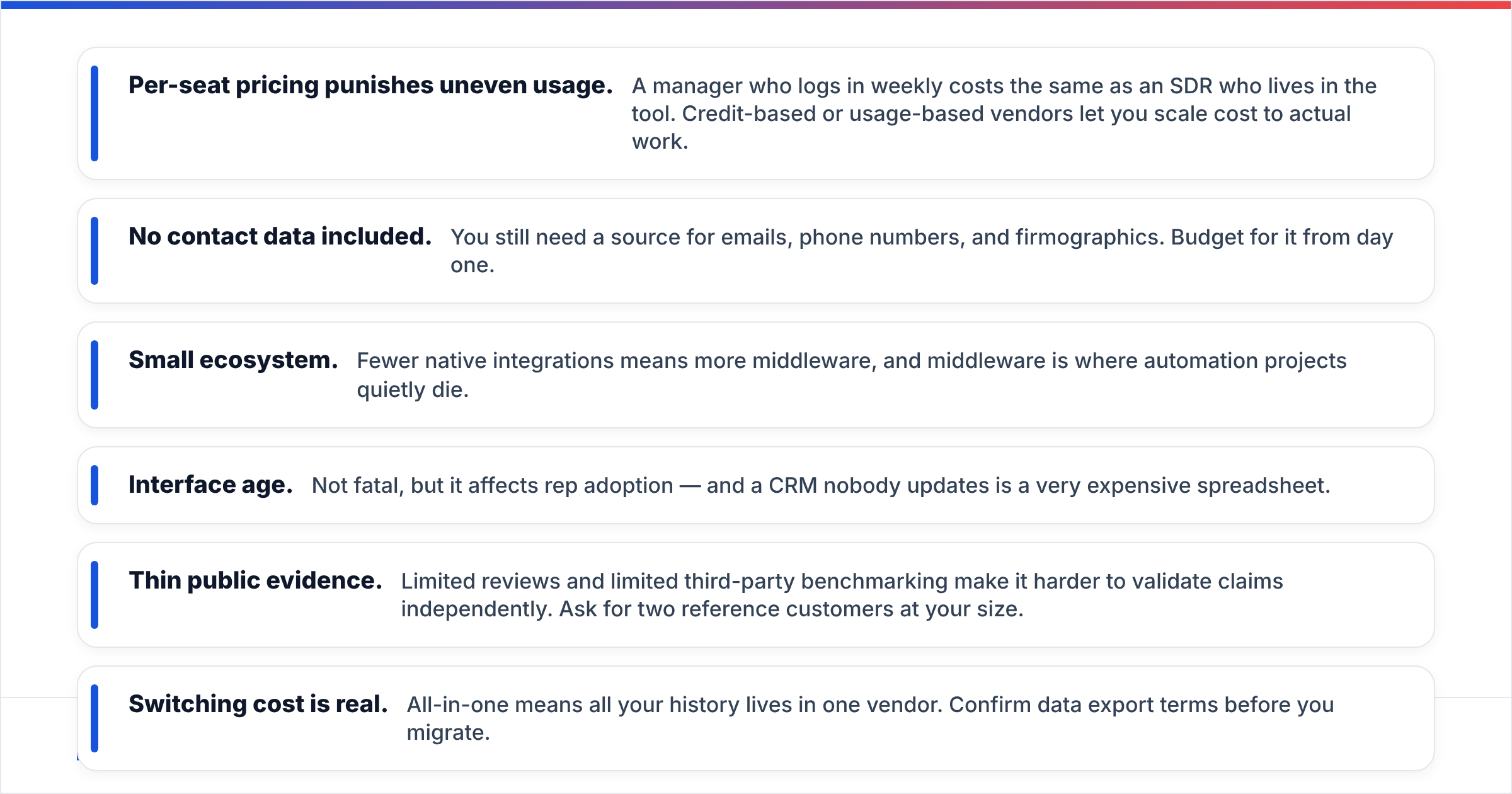
- Per-seat pricing punishes uneven usage. A manager who logs in weekly costs the same as an SDR who lives in the tool. Credit-based or usage-based vendors let you scale cost to actual work.
- No contact data included. You still need a source for emails, phone numbers, and firmographics. Budget for it from day one.
- Small ecosystem. Fewer native integrations means more middleware, and middleware is where automation projects quietly die.
- Interface age. Not fatal, but it affects rep adoption — and a CRM nobody updates is a very expensive spreadsheet.
- Thin public evidence. Limited reviews and limited third-party benchmarking make it harder to validate claims independently. Ask for two reference customers at your size.
- Switching cost is real. All-in-one means all your history lives in one vendor. Confirm data export terms before you migrate.

How does Funnelflare compare to other sales automation tools?#
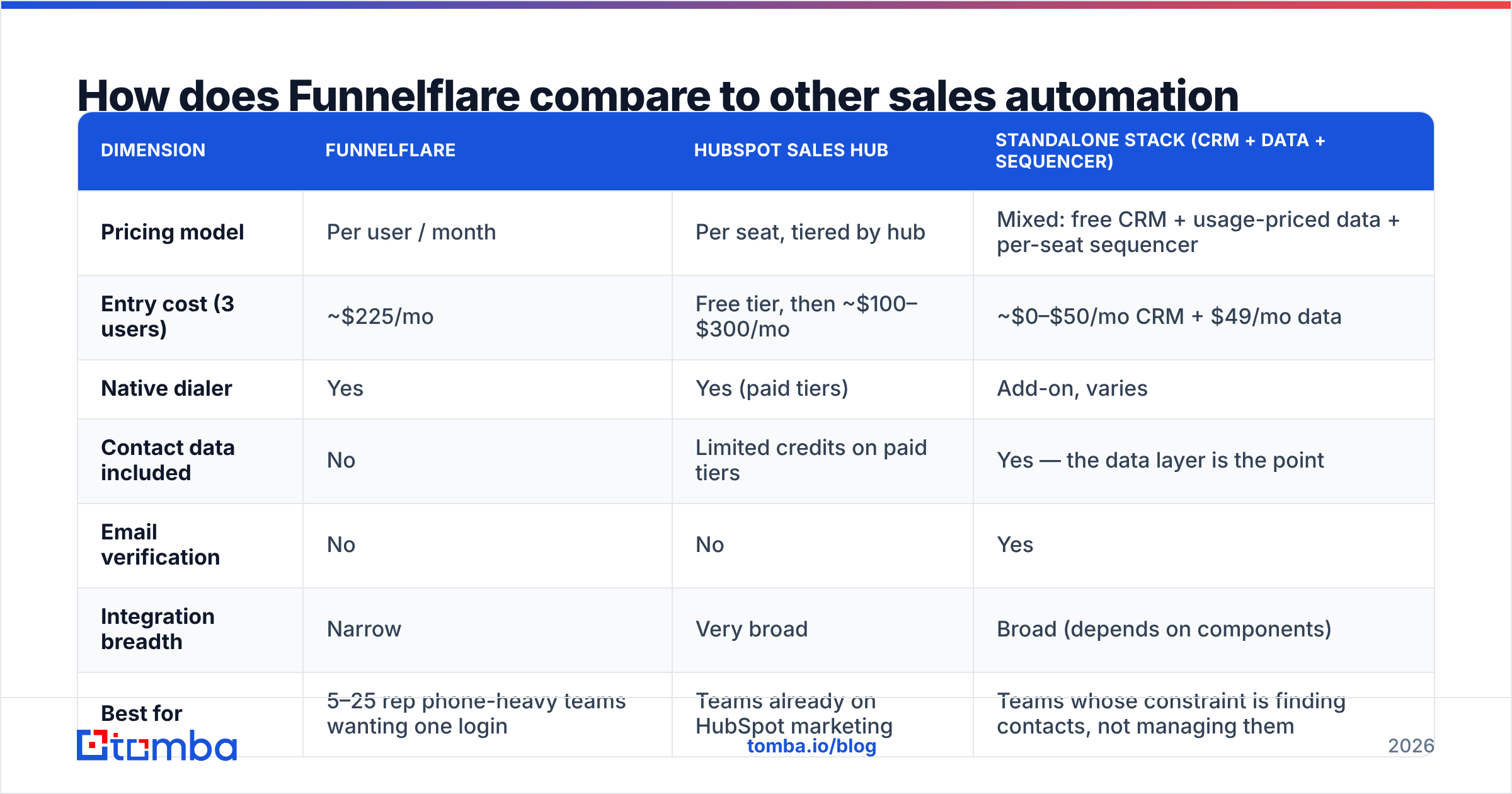
The useful comparison is not feature-by-feature — it is what pricing model matches your bottleneck. If your bottleneck is process, buy a suite. If your bottleneck is contacts, buy data and keep the suite small.
| Dimension | Funnelflare | HubSpot Sales Hub | Standalone stack (CRM + data + sequencer) |
|---|---|---|---|
| Pricing model | Per user / month | Per seat, tiered by hub | Mixed: free CRM + usage-priced data + per-seat sequencer |
| Entry cost (3 users) | ~$225/mo | Free tier, then ~$100–$300/mo | ~$0–$50/mo CRM + $49/mo data |
| Native dialer | Yes | Yes (paid tiers) | Add-on, varies |
| Contact data included | No | Limited credits on paid tiers | Yes — the data layer is the point |
| Email verification | No | No | Yes |
| Integration breadth | Narrow | Very broad | Broad (depends on components) |
| Best for | 5–25 rep phone-heavy teams wanting one login | Teams already on HubSpot marketing | Teams whose constraint is finding contacts, not managing them |
| Main risk | Paying seat prices for light users | Tier creep as you add hubs | You own the integration work |
HubSpot is the obvious suite comparison because its free CRM tier removes the floor entirely — you can run a three-person team on $0 of CRM and spend the budget on data instead.
The third column deserves a serious look if you are under ten reps. A free or low-cost CRM, a usage-priced data layer, and a $30–$50/seat sequencer will typically undercut an all-in-one by 40–60% while giving you better contact coverage. The tradeoff is that you own the wiring.
Where does data fit — and what should you actually pay for it?#
This is the part Funnelflare's pricing page cannot answer, and it is usually the larger line item over a year.
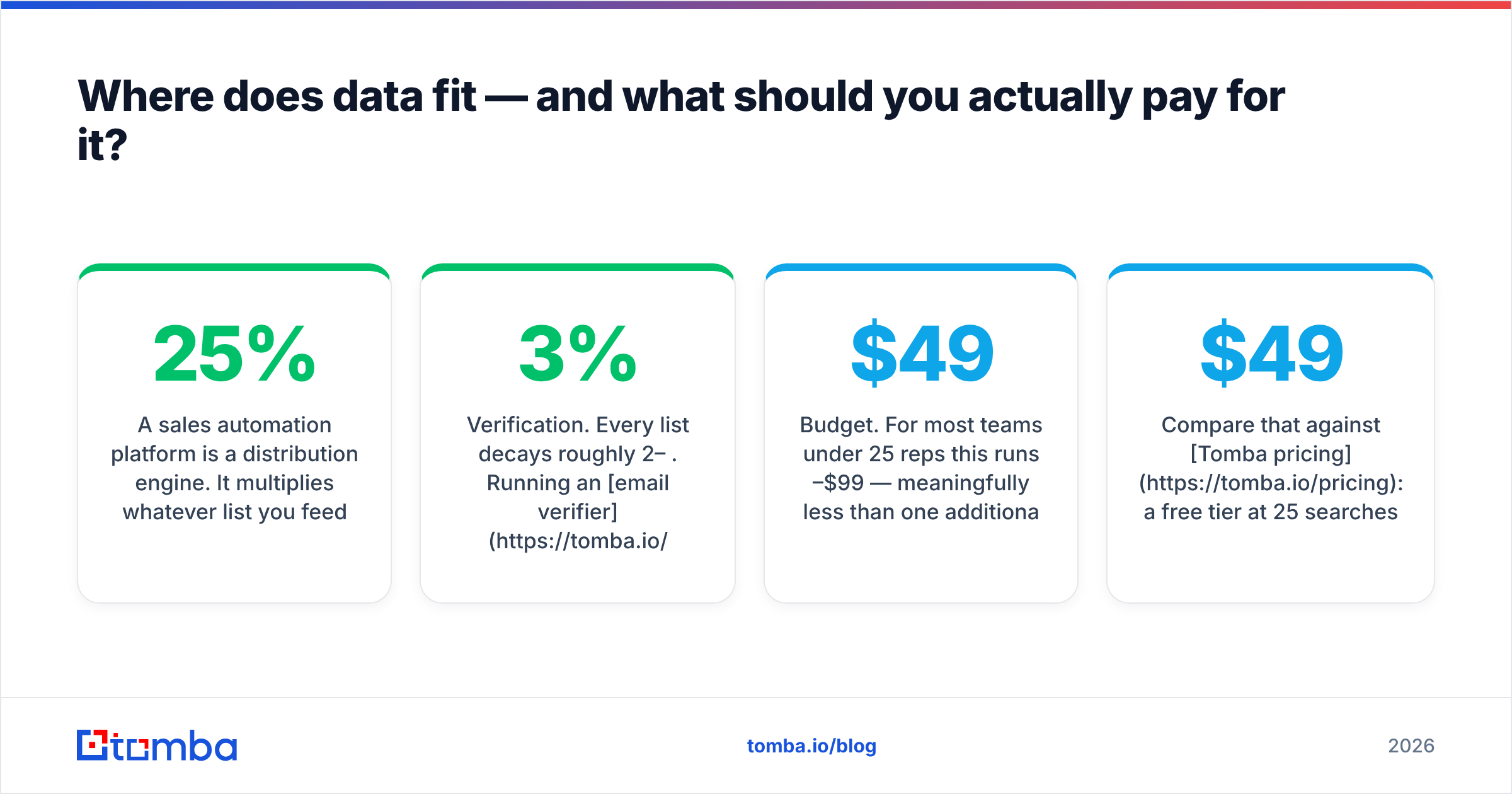
A sales automation platform is a distribution engine. It multiplies whatever list you feed it. Feed it a list with a 25% bounce rate and it will multiply your domain damage instead of your pipeline. So the data layer is not an optional add-on to the automation budget — it is the input that determines whether the automation budget returns anything.
Practical split for a five-rep team:
- Contact discovery. Finding verified work emails by domain, name, or company. A domain search across your target account list is usually the fastest way to build a first list.
- Verification. Every list decays roughly 2–3% per month. Running an email verifier before each send protects sender reputation far more cheaply than repairing it later.
- Enrichment. Filling in title, company size, and phone so your automation branches have something to branch on. Contact enrichment turns a name into a segment.
- Budget. For most teams under 25 reps this runs $49–$99/month — meaningfully less than one additional Funnelflare seat.
Compare that against Tomba pricing: a free tier at 25 searches/month, Starter at $49/mo, Growth at $99/mo, and Pro at $249/mo. The reason usage pricing wins here is simple — your list-building is bursty. You build a thousand-contact list in week one and barely touch it in week three. Seats bill flat; credits bill for the burst.
Who should buy Funnelflare, and who should skip it?#
Buy it if: you run a phone-and-email motion with 5–25 reps who each use the system daily, you value one vendor over best-of-breed, and your contact data problem is already solved. The consolidation is real and the support is good.
Skip it if: your team has uneven usage, you need broad integrations with an existing stack, or — most commonly — your actual constraint is that reps do not have enough qualified contacts to work. No amount of automation fixes an empty list. In that case, put the money into data and use a cheaper CRM.
Negotiate hard either way. Ask for the month-to-month price alongside the annual, ask what onboarding costs, ask for the telephony rate card, and ask for two references at your headcount. Small vendors have more room to move than enterprise ones, and the published price is rarely the floor.
Start with the list, not the software#
The most expensive mistake in this category is buying automation before you have anything to automate. Before you commit to a per-seat contract, prove the motion works: build a target account list, find the decision-makers, verify the addresses, and run a hundred manual touches. If that converts, the automation spend is justified. If it does not, the automation only makes failure faster.
Build that list with Tomba Email Finder. Search by domain, name, or company, verify before you send, and start free with 25 searches a month — no seat minimum, no annual commitment, and no invoice arriving before you have proof the motion works.
Related guides#
Ready to find emails that actually work?
Join 150,000+ professionals who stopped guessing and started sending. Free credits on signup — no credit card required.
Get the Tomba newsletter
Practical outbound tactics and product updates — once every two weeks.
About the author