G Lock EasyMail7 vs Saleshandy (2026): Which One Wins?
One is a Windows desktop bulk mailer you own outright. The other is a cloud cold-outreach platform built on sequences and inbox rotation. Here is how EasyMail7 and Saleshandy actually differ — and which one fits your motion.
G Lock EasyMail7 vs Saleshandy is an odd match-up. One tool sits on your own PC. The other runs in the cloud. Here is the short answer first, then the detail.
TL;DR
- These two are not real rivals. G-Lock EasyMail7 is a Windows desktop mailer you buy once. Saleshandy is a cloud cold-email tool you rent by the month.
- Pick EasyMail7 if contact data must stay on your machine, you mail opt-in lists, and you already trust an SMTP relay or Amazon SES.
- Pick Saleshandy if you run cold sequences, need inbox rotation, and want every reply in one place.
- Neither one fixes your list. Both assume the addresses are already good. Bad data kills more campaigns than bad copy.
- The 2026 stack is simple. A data layer finds and verifies emails. It then feeds whichever sender fits your rules.
What is G-Lock EasyMail7?#
G-Lock EasyMail7 is desktop email software from G-Lock Software, built for Windows. Think of it as owning a delivery van instead of renting courier slots. The van sits in your driveway. You decide what goes in it. Nobody else sees the manifest.
Under the hood it is a client-server app on your own hardware. The server part holds the list database, the queue, and the sending. Clients connect to it, so a small team can share lists without handing them to a SaaS vendor.
It ships with its own mail server. Even so, most serious users point it at an outside relay — Amazon SES, SendGrid, Mailgun, or a company SMTP host. Sending straight from an office IP is a fast route to the spam folder.
You get list import, segments, merge tags, HTML templates, autoresponders, bounce handling over POP3/IMAP, open and click tracking, and spam-score tests. Your data never leaves your network unless you send it out. That is the whole pitch, and agencies under strict data agreements care about it more than any feature grid.
The trade-off is the work. You take on IP warmup, DNS records, blocklist checks, throttling, and suppression lists. EasyMail7 hands you the controls. It does not press them for you.
What is Saleshandy?#
Saleshandy is a cloud cold-email platform for sales teams and agencies. If EasyMail7 is a delivery van, Saleshandy is the dispatch desk. It picks which driver takes which route. It staggers departures so no van looks odd. It tells you when a package gets signed for.
The core object is the sequence: a multi-step campaign with delays, rules, and stop-on-reply. Around it sit the parts cold outreach needs. You connect many mailboxes and rotate sends across them. Warmup runs on those inboxes. A unified inbox pulls replies from twelve mailboxes into one view. You also get custom tracking domains, spintax, A/Z testing, and a score that flags spammy copy before you hit send.
Saleshandy also bundles a B2B lead database and email finder. That overlaps with dedicated data vendors. The data is handy, but whether it is accurate enough to be your only source is another question. Test it on your own ICP before you buy a year of credits.
Integrations cover the usual CRMs — HubSpot, Pipedrive, Salesforce, Zapier — so replies and prospect status sync back to your pipeline.
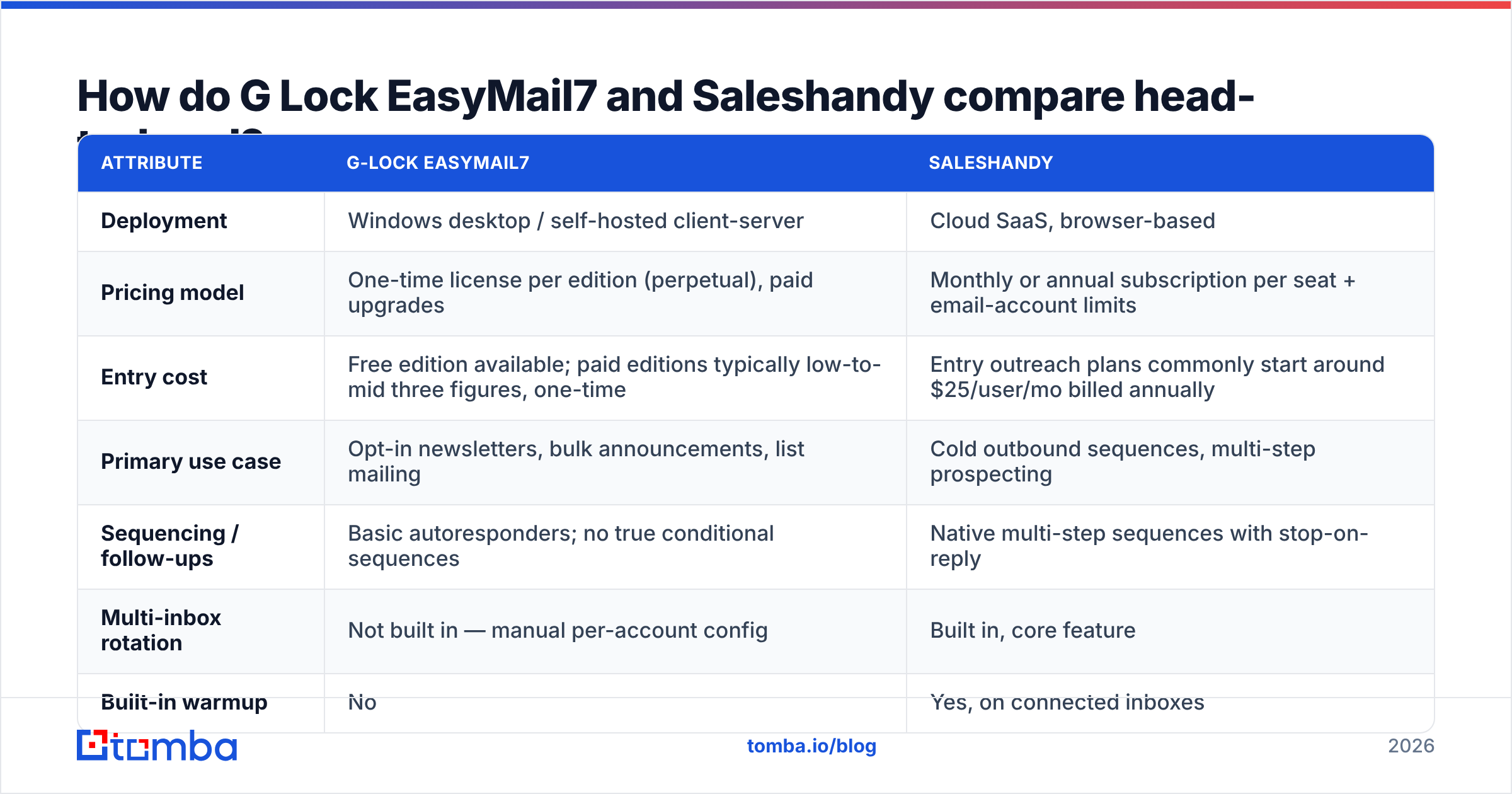
G Lock EasyMail7 vs Saleshandy: how do they compare head-to-head?#
Here is the honest side-by-side. Prices move often, so treat these as directional and check the vendor pages before you buy.
| Attribute | G-Lock EasyMail7 | Saleshandy |
|---|---|---|
| Deployment | Windows desktop / self-hosted client-server | Cloud SaaS, browser-based |
| Pricing model | One-time license per edition (perpetual), paid upgrades | Monthly or annual subscription per seat + email-account limits |
| Entry cost | Free edition available; paid editions typically low-to-mid three figures, one-time | Entry outreach plans commonly start around $25/user/mo billed annually |
| Primary use case | Opt-in newsletters, bulk announcements, list mailing | Cold outbound sequences, multi-step prospecting |
| Sequencing / follow-ups | Basic autoresponders; no true conditional sequences | Native multi-step sequences with stop-on-reply |
| Multi-inbox rotation | Not built in — manual per-account config | Built in, core feature |
| Built-in warmup | No | Yes, on connected inboxes |
| Unified reply inbox | No (replies land in your normal client) | Yes |
| Data residency | Your machine, your control | Vendor cloud |
| Lead data included | No | Yes — bundled B2B database and finder |
| Ops burden | High: IPs, DNS, throttling, blocklists on you | Low: vendor handles infrastructure |
| Best for | Privacy-constrained senders with opt-in lists | SDR teams and agencies running cold outbound |
The G Lock EasyMail7 vs Saleshandy split is easy to read once you see it side by side. These are not two versions of one tool. You are choosing between owning infrastructure and renting an outbound motion.
Which one actually lands in the inbox?#
Neither tool "has better deliverability" on its own. That phrase is mostly marketing. Email deliverability rests on four things: sender reputation, authentication, list quality, and content. A tool can only make each one easier or harder to get right.
Where Saleshandy has the edge. Inbox rotation spreads volume across many mailboxes, so no single sender trips a volume filter. Warmup builds engagement on new domains before real sends begin. Custom tracking domains keep you off a shared, burned CNAME. Sequence scoring catches the phrases that get cold mail filtered. For cold outreach, these are table stakes in 2026. Rebuilding them around a desktop app is real engineering work.
Where EasyMail7 has the edge. You control the relay. Say you already run a warm, well-authenticated domain through SES or a dedicated MTA. EasyMail7 just puts messages on it. Nothing is shared with other tenants. No other customer can torch a shared IP pool and drag your Monday campaign down with it. For opt-in mail to an engaged list, that is a strong position.
Where both are helpless. Invalid addresses. Hard bounces above 2–3% hurt your reputation no matter which app sent the mail. Google and Microsoft both tightened bulk-sender rules in the last two years, and bounce rate is one of the loudest bad signals you can send.
So run every list through an email verifier before it touches either platform. Watch catch-all domains too. They accept everything at the SMTP layer and tell you nothing useful without a catch-all verifier.
What are the real trade-offs beyond features?#
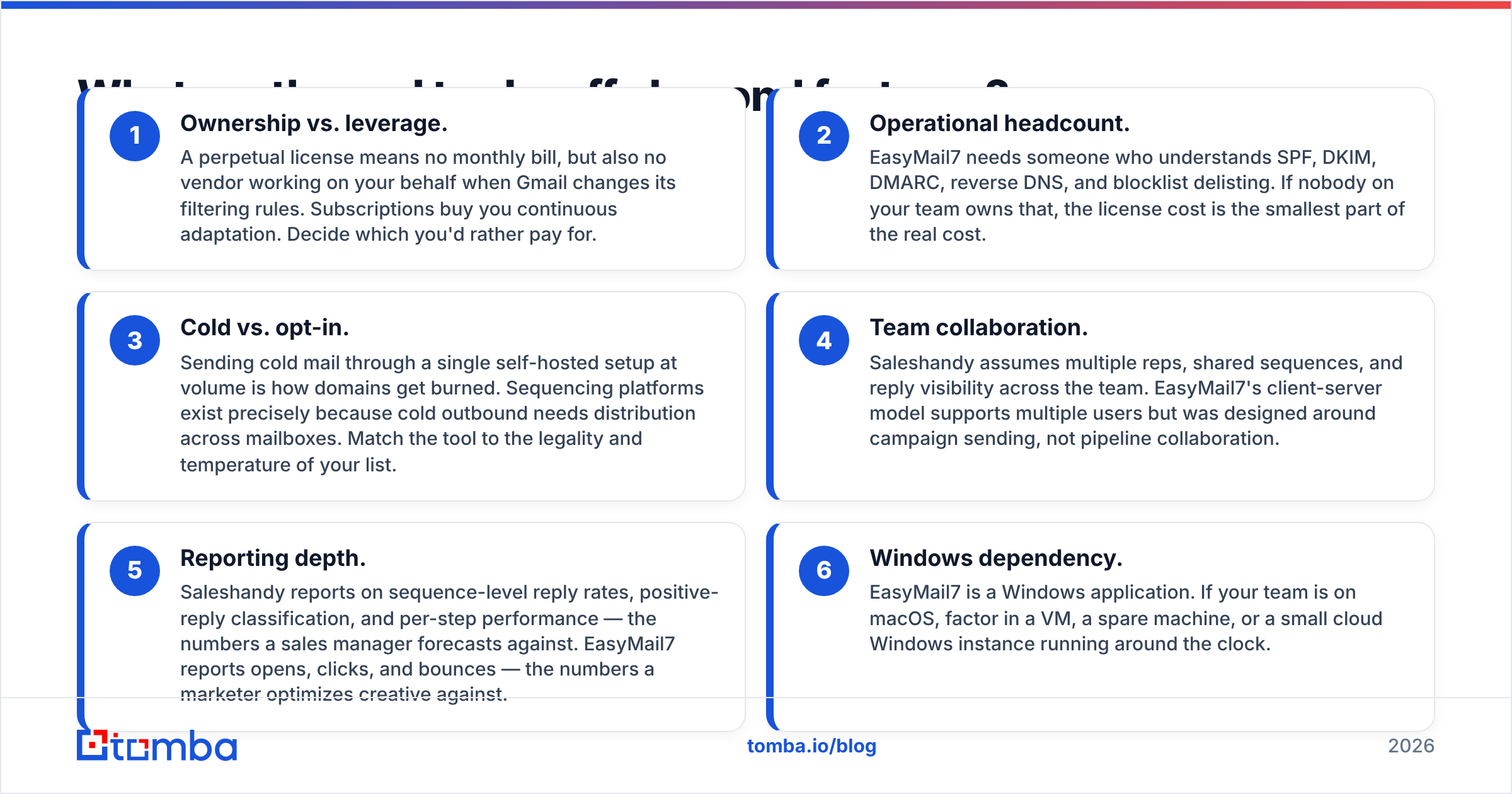
Feature grids hide the calls that bite six months in. Three of them decide the tool:
- Ownership vs. leverage. A one-time license means no monthly bill. It also means no vendor working for you when Gmail changes its filtering rules. A subscription buys that ongoing work.
- Ops headcount. EasyMail7 needs someone who knows SPF, DKIM, DMARC, reverse DNS, and blocklist delisting. Without that person, the license is the small part of the cost.
- Cold vs. opt-in. High-volume cold mail from one self-hosted setup burns domains. Sequencers spread sends across mailboxes for a reason.
Three more decide how the tool feels day to day:
- Team work. Saleshandy assumes many reps, shared sequences, and shared reply views. EasyMail7 supports several users, but it was built for sending, not pipeline work.
- Reporting depth. Saleshandy reports reply rates, positive replies, and per-step results — what a sales manager forecasts against. EasyMail7 reports opens, clicks, and bounces.
- Windows only. On a Mac team, budget for a VM, a spare machine, or a small cloud Windows box.
What does each one cost in 2026?#
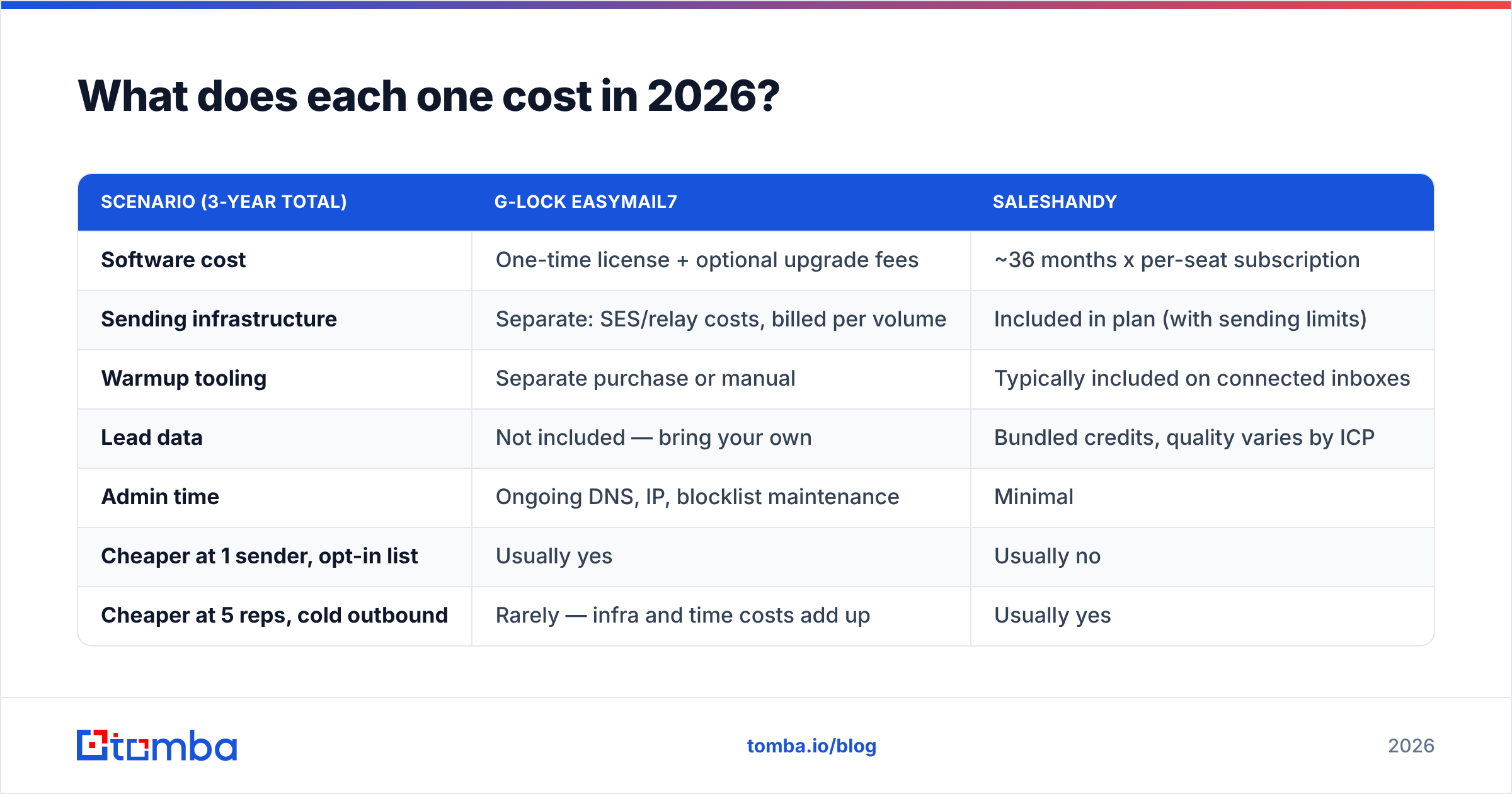
A perpetual license and a subscription only compare over a set horizon. Here is a three-year view for a small team. The figures are representative, so verify current numbers with each vendor.
| Scenario (3-year total) | G-Lock EasyMail7 | Saleshandy |
|---|---|---|
| Software cost | One-time license + optional upgrade fees | ~36 months x per-seat subscription |
| Sending infrastructure | Separate: SES/relay costs, billed per volume | Included in plan (with sending limits) |
| Warmup tooling | Separate purchase or manual | Typically included on connected inboxes |
| Lead data | Not included — bring your own | Bundled credits, quality varies by ICP |
| Admin time | Ongoing DNS, IP, blocklist maintenance | Minimal |
| Cheaper at 1 sender, opt-in list | Usually yes | Usually no |
| Cheaper at 5 reps, cold outbound | Rarely — infra and time costs add up | Usually yes |
The pattern is simple. EasyMail7 wins the spreadsheet when volume is steady, the list is opt-in, and you already own solid email infrastructure. Saleshandy wins as reps and mailboxes multiply, because rebuilding rotation, warmup, and a shared inbox around a desktop app costs more in engineering hours than the subscription costs in dollars.
Cross-check both against peer reviews on G2 before you commit. The three-star reviews tell you more than the feature pages do.

Does either tool solve your data problem?#
No. This is the part most comparison posts skip.
EasyMail7 has no contact database at all. It expects a CSV. Saleshandy bundles a lead finder, which helps. Still, bundled databases are built for breadth across every vertical, not depth in yours. Sell to Series-A fintech CTOs in the Nordics and a general database will return plenty of rows. Few of them will reach a human.
The failure mode is quiet. You export 5,000 contacts, send, and see a 4% bounce rate with a low reply rate. The copy was not the problem. A third of the addresses were guessed, stale, or belonged to people who left the company.
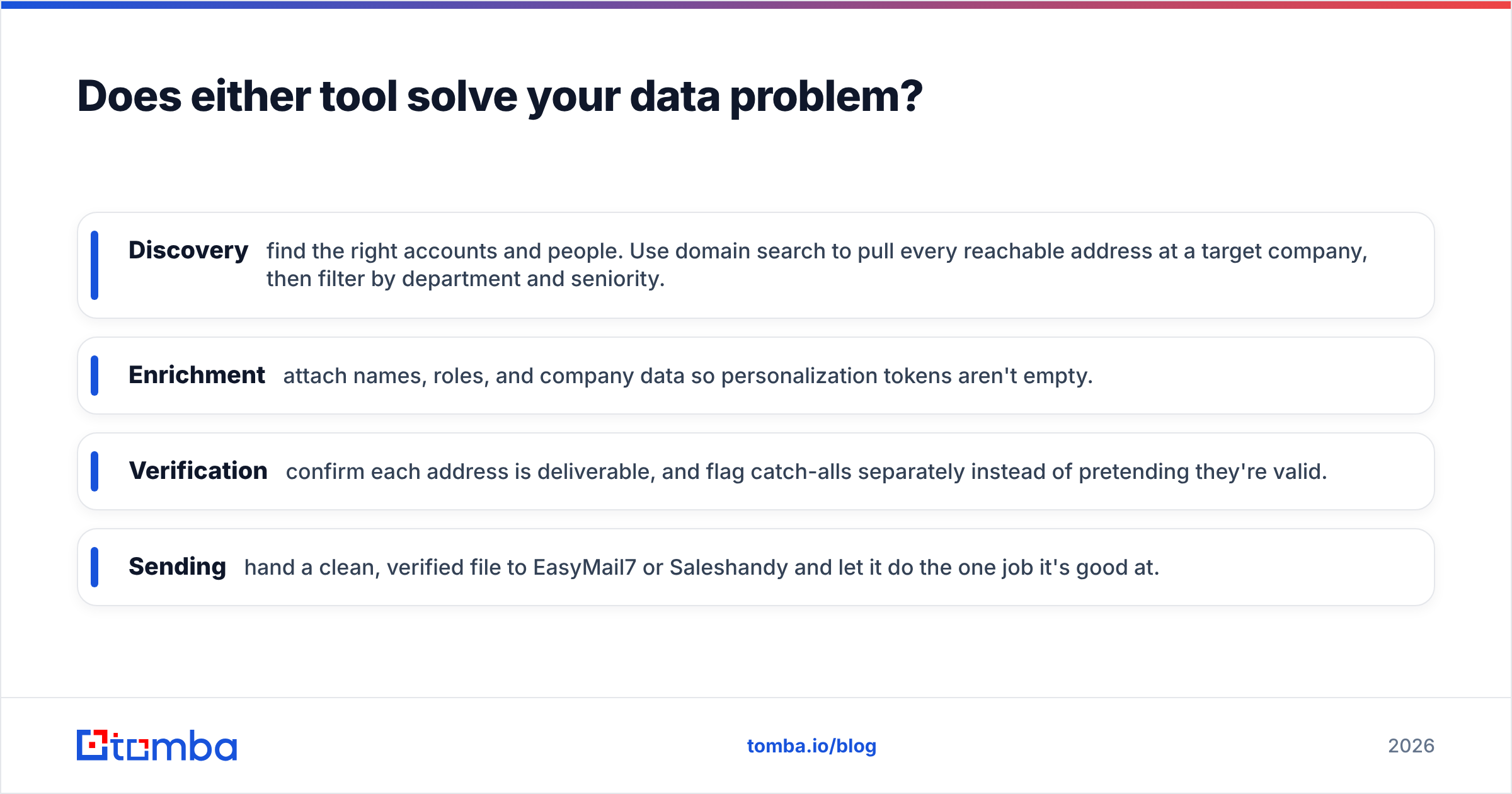
A cleaner setup separates the layers:
- Discovery — find the right accounts and people. Use domain search to pull every reachable address at a target company, then filter by department and seniority.
- Enrichment — attach names, roles, and company data so personalization tokens are never empty.
- Verification — confirm each address is deliverable, and flag catch-alls instead of pretending they are valid.
- Sending — hand a clean file to EasyMail7 or Saleshandy and let it do its one job.
Keeping discovery and verification outside the sending tool has a second benefit. It makes the sender swappable. If you outgrow EasyMail7 or churn off Saleshandy, your data layer stays put. For big lists, a bulk email finder workflow handles thousands of rows in one pass.
So which should you choose?#
Here is the G Lock EasyMail7 vs Saleshandy answer in three lines.
Choose G-Lock EasyMail7 if you mail permission-based lists, data residency is a hard rule from legal or a client contract, someone on the team knows email infrastructure, and you would rather pay once than monthly. It is a mature Windows app with a real audience.
Choose Saleshandy if you run cold outbound with several reps, you need sequences with stop-on-reply, and you want rotation, warmup, and shared reply handling without building any of it. Most teams landing on this comparison want this one.
Choose neither as your data source. Both are sending tools. Feed them a bad list and they will deliver your bad list very efficiently.
Where should you start?#
Fix the data first, then pick the sender. A verified list lifts results on either platform. The wrong platform with a clean list still beats the right platform with a dirty one.
Start with the Tomba Email Finder to build a verified prospect list from company domains, names, or LinkedIn profiles. Each result carries source-level confidence scoring, so you know why an address is valid, not just that it is. Every result is verified before it reaches you, and catch-all domains get flagged rather than quietly passed through.
The free tier includes 25 searches a month, enough to test accuracy on your own ICP. Paid plans start at $49/mo; see Tomba pricing for the full breakdown. Export the clean file, load it into EasyMail7 or Saleshandy, and let the sender do the part it is good at.
Related guides#
Ready to find emails that actually work?
Join 150,000+ professionals who stopped guessing and started sending. Free credits on signup — no credit card required.
Get the Tomba newsletter
Practical outbound tactics and product updates — once every two weeks.
About the author