Gallabox Pricing Reviews Pros and Cons: A 2026 Breakdown
A plain-English teardown of Gallabox pricing reviews pros and cons in 2026 — the per-chat Meta fees the plan page hides, and who should pick something else.
Gallabox pricing reviews pros and cons, in plain words: the plan fee is low, and the Meta chat fees are not. This guide breaks down both.
TL;DR
- Gallabox is a WhatsApp Business API tool. You get a shared inbox, no-code bots, and a light CRM.
- Plans start cheap. Agent seats and contact caps drive the real cost.
- Meta bills you per chat template. That fee lands on top of the plan fee.
- Reviews praise setup and support. They fault thin reports, sync lag, and seat costs.
- Good fit: shops, schools, real estate, and clinics with high WhatsApp volume in India, MENA, and Southeast Asia.
- Poor fit: outbound B2B teams that sell into email-first markets.
- Gallabox pricing reviews pros and cons in one line: solid inbox, weak reports, watch the Meta bill.
What is Gallabox and who uses it?#
Gallabox is an official Meta Business Solution Provider. It sits on top of the WhatsApp Business API. It turns that API into a tool your team can run.
Think of a switchboard for one phone line. WhatsApp gives you the line. Gallabox gives you the operators, the routing, the call log, and the script.
You get one shared inbox for many agents. You get a drag-and-drop bot builder. You get broadcasts. You get a simple contact record that acts like a light CRM.
Who buys it? Brands that sell on WhatsApp. Shops that chase carts. Schools that chase sign-ups. Agents who book site visits. Clinics that book slots.
Most users sit in India, the UAE, Saudi Arabia, Indonesia, and Brazil. In those markets, a buyer reads a WhatsApp note and skips the email.
Do your buyers live in an inbox instead? Then this whole class of tool is wrong for you. Use an email finder and a sequencer.
How much does Gallabox cost in 2026?#
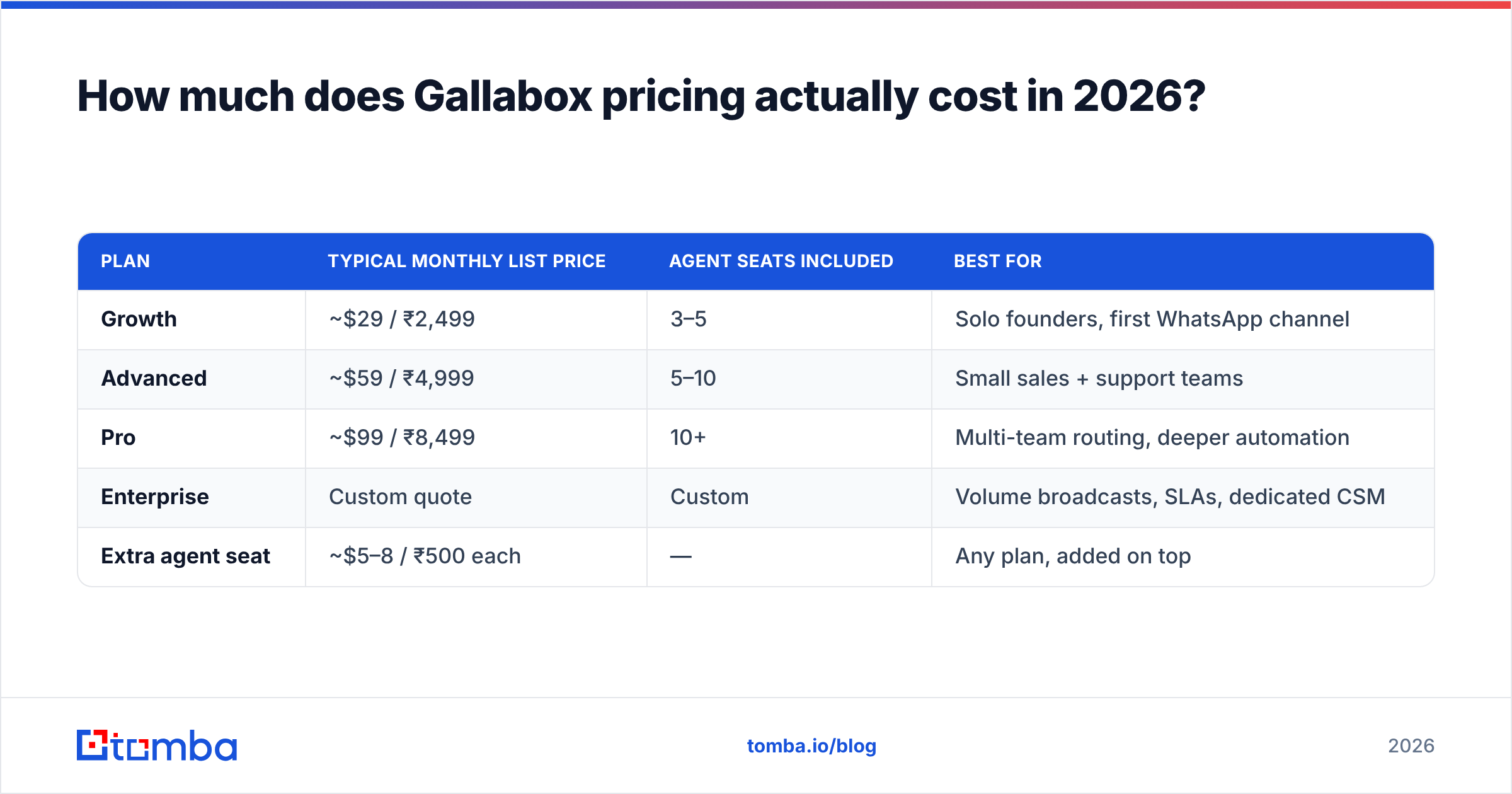
There are three self-serve tiers plus an enterprise plan. Prices differ by region. The India site quotes rupees. The global site quotes dollars.
The table below shows list prices at the time of writing. Check the official Gallabox pricing page before you budget. This vendor moves tiers often.
| Plan | Typical monthly list price | Agent seats included | Best for |
|---|---|---|---|
| Growth | ~$29 / ₹2,499 | 3–5 | Solo founders, first WhatsApp channel |
| Advanced | ~$59 / ₹4,999 | 5–10 | Small sales and support teams |
| Pro | ~$99 / ₹8,499 | 10+ | Multi-team routing, deeper bots |
| Enterprise | Custom quote | Custom | Big broadcasts, SLAs, named CSM |
| Extra agent seat | ~$5–8 / ₹500 each | — | Any plan, added on top |
Four things matter more than the headline price:
- Annual billing saves 15–20%. It also locks you in before you know your true chat volume.
- Seats drive the cost. Each tier bundles a few agents. Every extra agent is billed on top. A 15-person team on Advanced costs far more than the plan page hints.
- Contact caps bite. Growth is fine for a few thousand contacts. A blast to 50,000 pushes you up a tier, no matter how few agents you have.
- The number and the Meta checks are on you. Gallabox helps, but Facebook Business Manager checks run on their own clock.

Hidden costs behind Gallabox pricing reviews pros and cons#
Most searches for Gallabox pricing reviews pros and cons start with a shock bill. Here is why.
Meta bills you for chats. Gallabox bills you for software. The two are separate. Since the 2024–2025 shift to per-template rates, the model works like this:
- Marketing templates cost the most. Think promos, cart nudges, and win-backs. Rates change by country.
- Utility templates cost less. Think order notes, shipping updates, and one-time codes. Many are free inside an open service window.
- Service chats are mostly free. The clock runs 24 hours from the buyer's first note.
Do the math. A brand that sends 100,000 marketing templates a month can pay Meta far more than it pays Gallabox. Your plan may cost $59. Your chat spend may hit $900.
Other line items teams forget:
- Setup fees on enterprise deals.
- Middleware. Need a connector they do not offer? You pay for Zapier or Make.
- A data source. Gallabox talks to contacts you already have. It does not find new ones. Most teams add a B2B database to keep the pipe full.
- Number quality. A poor rating from Meta caps your send limits. The fix costs time, not cash. It still costs revenue.

What do Gallabox reviews say?#
Scores on G2 and Capterra are good. Most WhatsApp tools sit in the 4.3 to 4.7 band. Gallabox sits there too. The themes matter more than the stars.
What users praise:
- Setup and human help. This is the top theme by far. Users name their account manager. Meta's checks confuse most teams the first time, so this help counts.
- The no-code bot builder. A marketer can ship a lead-qualifying flow with no dev help.
- Inbox basics. Assignment, notes, and tags work the way a team lead expects.
- Speed to launch. Many teams go live in days, not weeks.
What users fault:
- Thin reports. Fine for message counts. Weak for source and cohort views. Teams export to a sheet.
- A light CRM. It works as a contact log. It does not work as a pipeline. Most teams sync to HubSpot, Zoho, or Salesforce.
- Sync lag. Some users report slow syncs or missed webhooks. Support fixes them. A lag mid-campaign still hurts.
- Seat creep. Teams start cheap, add agents, and land 2–3x over budget in a year.
- Feature gates. Some flows live on higher tiers only. One small need can force an upgrade.
Read any review set with care. Vendors ask for reviews right after a good setup. That skews the "great support" theme and hides the users who left.
Gallabox pricing reviews pros and cons at a glance#
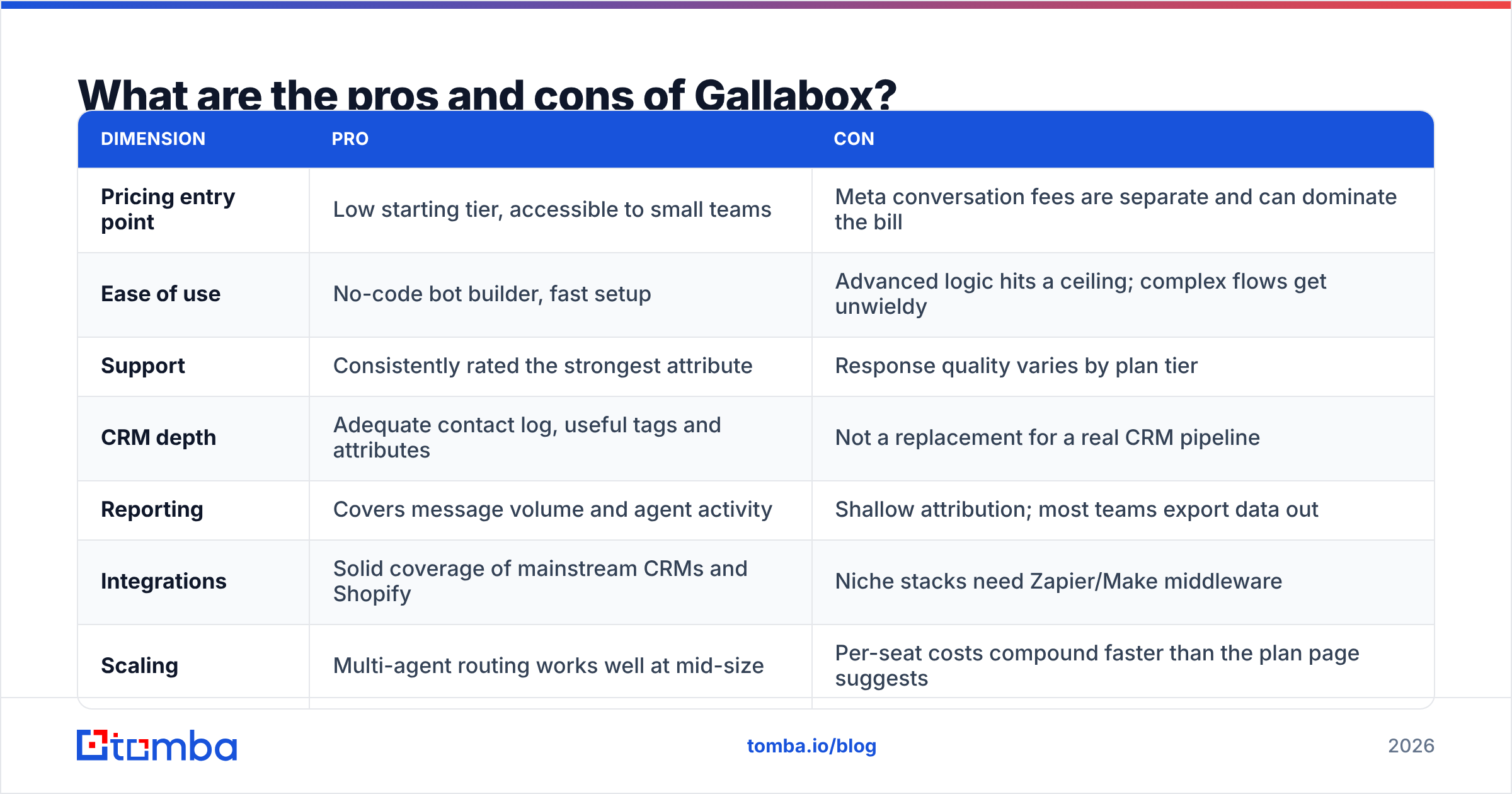
| Area | Pro | Con |
|---|---|---|
| Entry price | Low first tier, easy for small teams | Meta chat fees are separate and can dwarf it |
| Ease of use | No-code bots, fast setup | Complex flows hit a ceiling fast |
| Support | The strongest trait by far | Quality varies by tier |
| CRM depth | Fine contact log, useful tags | Not a real pipeline tool |
| Reports | Covers message and agent counts | Weak on source; most teams export |
| Integrations | Good coverage of big CRMs and Shopify | Niche stacks need Zapier or Make |
| Scaling | Multi-agent routing works at mid-size | Seat costs stack up fast |
| Channels | Excellent on WhatsApp | Weak if you need email, SMS, and voice too |
Short version: the product is well built and WhatsApp-first. Support beats the norm. Reports fall short of it. It is not the cheapest tool, and it is not the deepest one. It does not try to be.
How does Gallabox compare to other WhatsApp tools?#
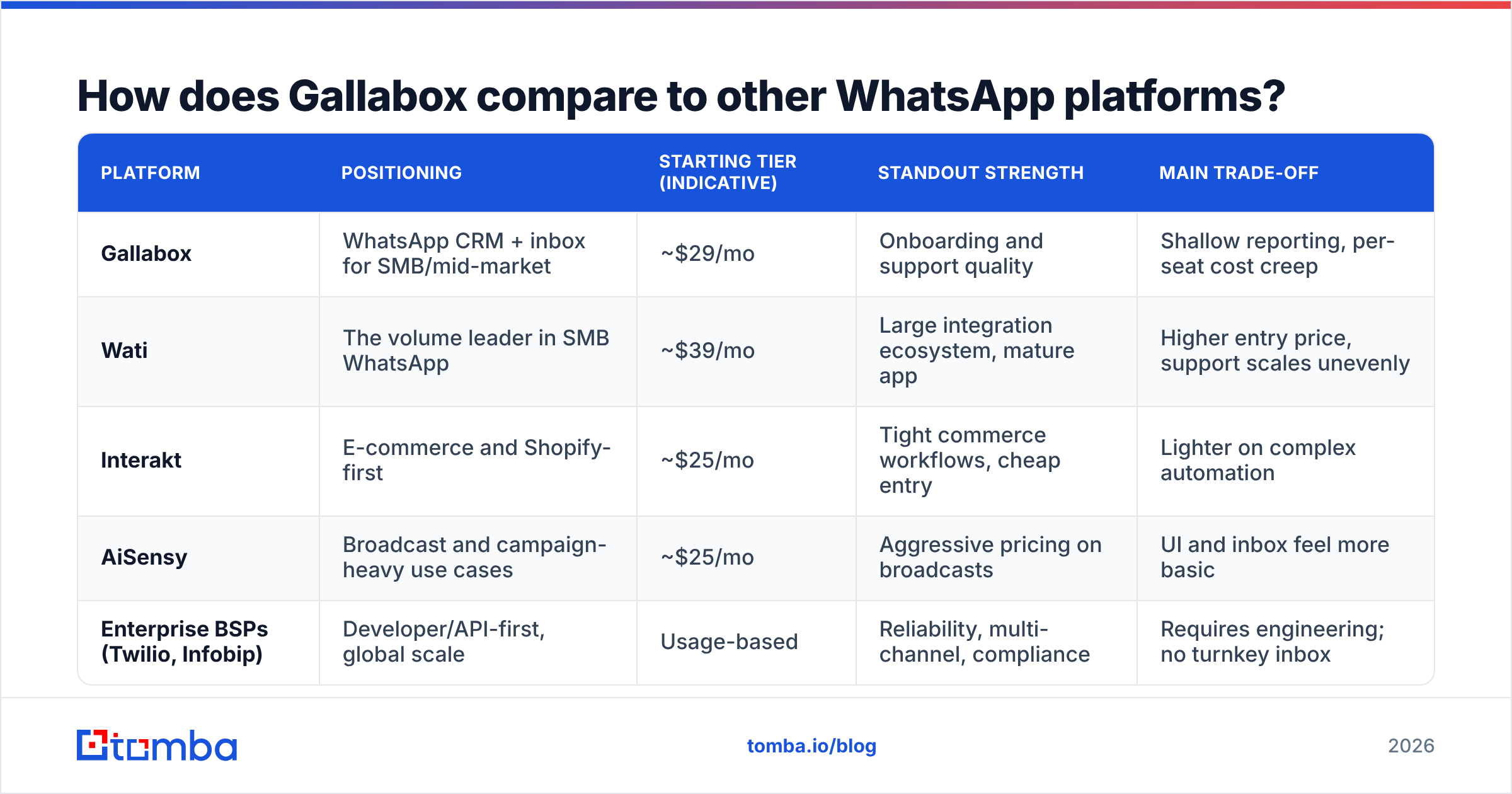
The field is crowded. The gaps are small. All the tools below are official Meta partners. All pass Meta's chat fees on to you. All ship an inbox and a bot builder.
| Platform | Positioning | Starting tier | Standout strength | Main trade-off |
|---|---|---|---|---|
| Gallabox | WhatsApp CRM and inbox for SMBs | ~$29/mo | Setup and support quality | Thin reports, seat creep |
| Wati | The volume leader in SMB WhatsApp | ~$39/mo | Big app and add-on ecosystem | Higher entry price, uneven support |
| Interakt | Shop and Shopify-first | ~$25/mo | Tight order workflows, cheap entry | Lighter on complex bots |
| AiSensy | Broadcast-heavy use cases | ~$25/mo | Cheap rates on broadcasts | Basic inbox and UI |
| Twilio, Infobip | API-first, global scale | Usage-based | Uptime, many channels, compliance | Needs devs; no ready inbox |
List prices shift by region. Check each vendor before you sign. Price is the wrong lens anyway. Shape of use is the right one.
- Pick Gallabox or Wati if people handle lots of chats and you need a real inbox.
- Pick Interakt if WhatsApp is mostly an order channel.
- Pick AiSensy if you mostly broadcast and rarely reply.
- Pick Twilio or Infobip if you have devs and many channels.
Is Gallabox worth it for a B2B sales team?#
Yes, with one condition: your buyers message you first.
Gallabox shines in the middle and the end of the funnel. A lead fills a form. A bot asks the basics. An agent picks up the thread. The deal closes in the chat. That loop beats email where WhatsApp rules.
It does not create demand. There is no prospect database. There is no email lookup. You cannot build a list of the 400 firms you want to win. If you pick the accounts and you make first contact, Gallabox sits idle until something fills it.
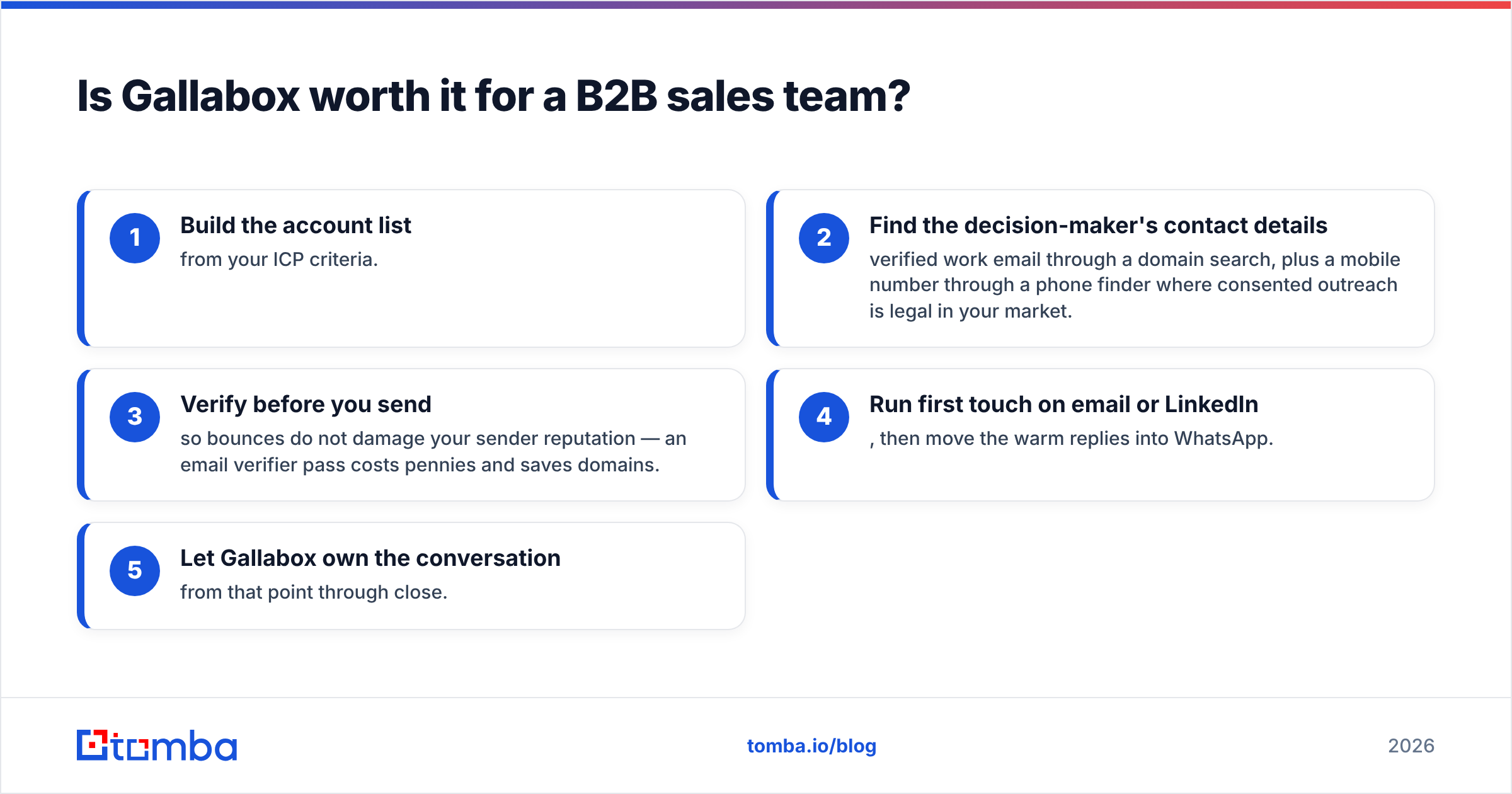
That something is a contact data layer. A working stack looks like this:
- Build the account list from your ICP rules.
- Find the buyer's details. Get a work email with a domain search. Add a mobile number with a phone finder where such outreach is legal.
- Verify first. Bounces hurt your sender score. An email verifier pass costs pennies and saves domains.
- Send the first touch by email or LinkedIn. Move warm replies into WhatsApp.
- Let Gallabox own the chat from there to the close.
The math works too. A Tomba Starter plan runs $49 a month. It covers list building and checks for a small team. The WhatsApp layer then handles chats. Two tools, two clean jobs.
What to check before you buy#
Run this list against your own numbers first:
- Count your monthly templates by type. Price them at Meta's country rates. Do this before you look at plans.
- Count your agents in 12 months, not today. Multiply by the seat rate.
- Test the bot builder on your hardest flow. Every builder demos well on a two-step tree.
- Check that the CRM sync writes both ways. One-way sync creates cleanup work forever.
- Ask what they do if Meta caps your number.
- Negotiate. List tiers are opening bids, above all on annual deals with 10 seats or more.
The verdict on Gallabox pricing reviews pros and cons#
Here is the verdict on Gallabox pricing reviews pros and cons. The tool earns its scores on support and speed. It loses points on reports and seat creep. The plan fee is fair. The Meta chat fee is the real budget line, and no vendor can change that. If your buyers talk to you on WhatsApp, it is a fair pick. Just model the whole cost, not the plan price.
It will not build your pipeline. If your problem is "we lack the right people to talk to," a chat tool is the wrong buy. Start with verified contact data. The Tomba Email Finder finds work emails by domain, name, or firm. The free tier gives you 25 searches a month, so you can test it against your own list first. Build the list. Then pick the channel.
Related guides#
Ready to find emails that actually work?
Join 150,000+ professionals who stopped guessing and started sending. Free credits on signup — no credit card required.
Get the Tomba newsletter
Practical outbound tactics and product updates — once every two weeks.
About the author