Gazelle vs Salesbot in 2026: Which Fills Your Pipeline?
Gazelle finds growing companies before they announce anything. Salesbot talks to the leads already knocking. They solve opposite halves of the pipeline problem — here's which one earns your budget first, and what neither of them does.
TL;DR
- Gazelle (gazelle.ai) is a company-intelligence database built around growth and expansion signals. Salesbot is Kommo's no-code conversational bot that qualifies inbound chats inside a CRM. They are not substitutes.
- If your problem is "we don't know who to call," Gazelle. If your problem is "leads message us at 11pm and nobody answers," Salesbot.
- Gazelle is quote-based enterprise pricing with a heavy economic-development and investment-attraction user base. Salesbot rides on Kommo seat pricing and is gated to the higher tiers.
- Neither tool reliably hands you a verified work email for the specific decision-maker you want. That gap is where most "we bought data and nothing happened" stories come from.
- Cheapest sane stack for a small outbound team: signals or a lighter list source + an email finder + verification, then add conversational automation once inbound volume justifies it.
What are Gazelle and Salesbot, exactly?#
Start here, because the name collision does real damage to buying decisions.
Gazelle (gazelle.ai) is a B2B company intelligence platform. It indexes millions of companies worldwide and layers on growth indicators — hiring velocity, financial performance, facility expansion, ownership changes, investment activity. Its original and still-strongest constituency is economic development organizations and investment attraction teams: people whose job is to find companies likely to open a plant, office, or regional HQ in their territory. Commercial sales teams use it too, mostly for account discovery and territory planning rather than day-to-day contact sourcing.
Salesbot is a feature, not a standalone company. It's the no-code chatbot builder inside Kommo (formerly amoCRM). You draw a flow — trigger, message, condition, action — and it runs against incoming conversations on WhatsApp, Instagram, Facebook Messenger, Telegram, and website live chat. It can greet, qualify, tag, create or move a deal down the pipeline, assign an owner, and hand off to a human when the conversation gets real.
A quick disambiguation, since "salesbot" is also a generic noun: if you're evaluating Zoho SalesIQ's bot, an Intercom Fin-style agent, or a homegrown GPT wrapper on your site chat, the comparison framework in this post still holds. The category question is the same — outbound signal data versus inbound conversation automation.
So the honest framing of "gazelle vs salesbot" isn't which tool is better. It's which end of your funnel is actually broken.

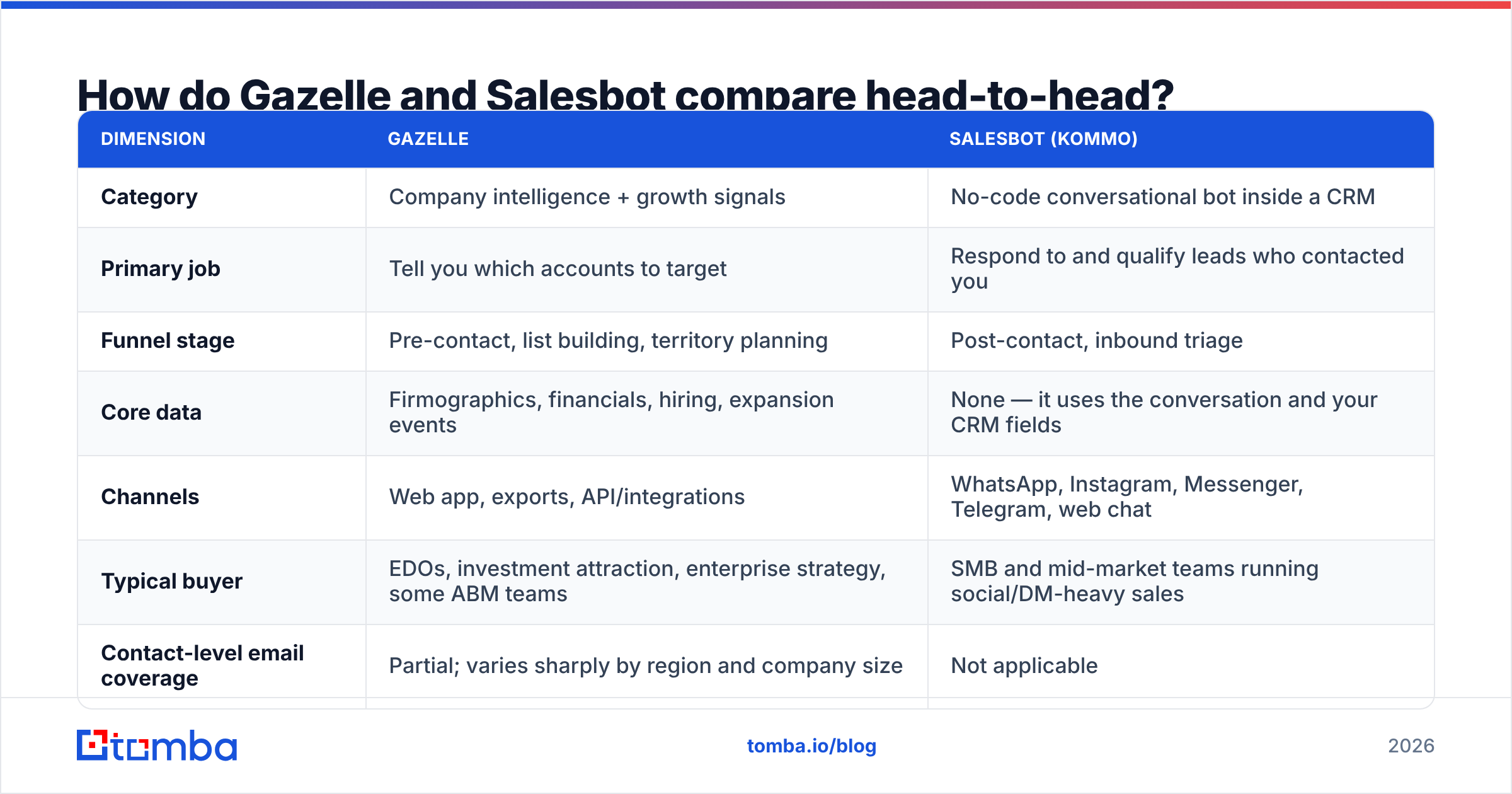
How do Gazelle and Salesbot compare head-to-head?#
| Dimension | Gazelle | Salesbot (Kommo) |
|---|---|---|
| Category | Company intelligence + growth signals | No-code conversational bot inside a CRM |
| Primary job | Tell you which accounts to target | Respond to and qualify leads who contacted you |
| Funnel stage | Pre-contact, list building, territory planning | Post-contact, inbound triage |
| Core data | Firmographics, financials, hiring, expansion events | None — it uses the conversation and your CRM fields |
| Channels | Web app, exports, API/integrations | WhatsApp, Instagram, Messenger, Telegram, web chat |
| Typical buyer | EDOs, investment attraction, enterprise strategy, some ABM teams | SMB and mid-market teams running social/DM-heavy sales |
| Contact-level email coverage | Partial; varies sharply by region and company size | Not applicable |
| Pricing model | Quote-based, annual, seat + data scope | Per user/month on Kommo's higher tiers |
| Time to first value | Weeks (onboarding, territory setup) | Hours to days (draw a flow, publish) |
| Fails when | You need a verified inbox for a named person, fast | You have no inbound volume to automate |
Read that last row twice. It's the whole decision.
What does Gazelle actually do well?#
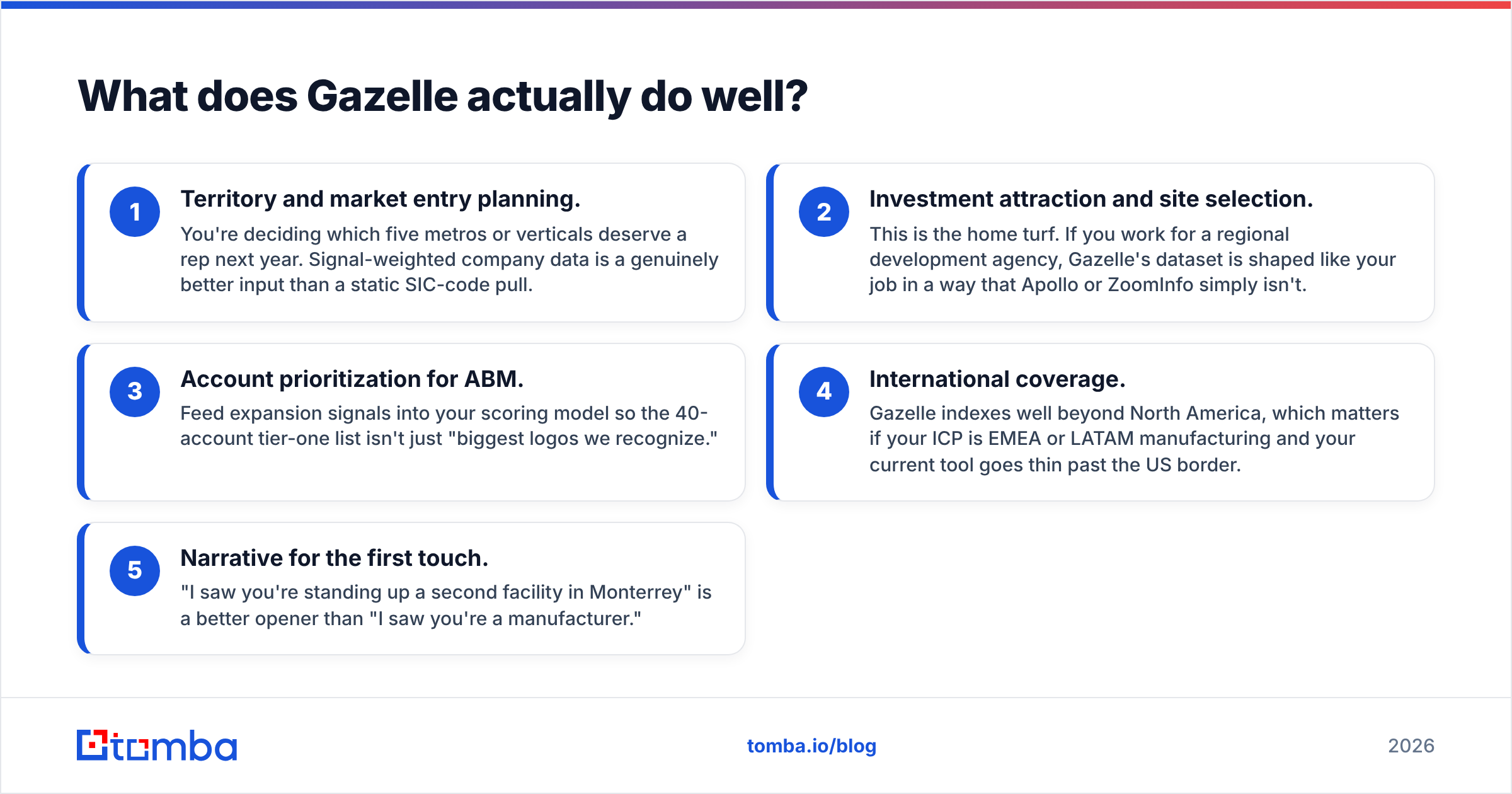
Gazelle's differentiator is that it tries to tell you when a company is about to do something, not just that it exists. Anyone can sell you a list of manufacturers with 200-500 employees. Gazelle's pitch is a list of manufacturers with 200-500 employees whose headcount is up 18% year over year, whose parent just raised, and who have a facility footprint that no longer fits.
Where that earns its keep:
- Territory and market entry planning. You're deciding which five metros or verticals deserve a rep next year. Signal-weighted company data is a genuinely better input than a static SIC-code pull.
- Investment attraction and site selection. This is the home turf. If you work for a regional development agency, Gazelle's dataset is shaped like your job in a way that Apollo or ZoomInfo simply isn't.
- Account prioritization for ABM. Feed expansion signals into your scoring model so the 40-account tier-one list isn't just "biggest logos we recognize."
- International coverage. Gazelle indexes well beyond North America, which matters if your ICP is EMEA or LATAM manufacturing and your current tool goes thin past the US border.
- Narrative for the first touch. "I saw you're standing up a second facility in Monterrey" is a better opener than "I saw you're a manufacturer."
Where does Gazelle fall short?#
Three things, consistently, in how buyers describe it.
Pricing opacity. There's no public price list. Expect an annual contract, a discovery call, and a quote scoped to seats and data breadth. That's normal for enterprise data, but it makes Gazelle a hard first purchase for a three-person sales team that wants to test a hypothesis this month. Compare that to a tool with published tiers — you can see Tomba pricing in about four seconds and start on a free tier the same day.
Contact-level depth. Company intelligence and contact intelligence are different products. Gazelle will hand you a company, a location, a signal, and often some named executives. What it will not reliably hand you is a deliverable, verified email address for the specific VP of Operations you decided to target — especially at mid-market firms outside major English-speaking markets. You'll still need a step between "target account" and "message in inbox."
Onboarding weight. Signal platforms reward configuration. Territories, saved searches, alert rules, CRM sync. That's fine if you have a RevOps function. If you don't, the tool sits unused after week three — a pattern you'll see repeated in the platform reviews on G2.
None of this makes Gazelle a bad product. It makes it a top-of-funnel strategy product that people sometimes buy expecting a contact database.
What does Salesbot actually do well?#
Salesbot solves an embarrassingly common leak: inbound messages that go unanswered.
If a meaningful share of your leads arrive as DMs — Instagram, WhatsApp, a website chat widget — response latency is your conversion rate. A bot that replies in four seconds, asks three qualifying questions, tags the record, and drops a deal into the right pipeline stage will beat a human who replies in six hours. Not because bots are smarter, but because the lead has already messaged two competitors by then.
What Salesbot does well specifically:
- Instant triage on messaging channels. Native WhatsApp/Instagram/Telegram handling is the real draw. Plenty of chatbots do website widgets; fewer do DM channels cleanly inside the CRM record.
- No-code flow building. Sales ops can build and edit flows without engineering. Conditions, delays, buttons, and CRM actions are drag-and-drop.
- CRM-native actions. Because it lives inside Kommo, the bot writes to fields, moves deals, and assigns owners directly. No Zapier tax for basic operations.
- After-hours coverage. The cheapest headcount you'll ever add is the one that works at 2am and asks for nothing.
Where does Salesbot fall short?#
It requires inbound volume. A bot with nothing to answer is a very expensive decoration. If you're doing pure outbound with 30 conversations a month, this is not your problem to solve.
It's married to Kommo. Salesbot isn't a standalone purchase. Adopting it means adopting Kommo as your CRM, and Salesbot access sits on the higher plan tiers — verify current tier gating on Kommo's pricing page before you budget, since vendors move features between plans.
Flow logic gets brittle. No-code branching is delightful for three steps and painful for thirty. Teams routinely build a monster flow, lose track of which branch fires, and quietly turn half of it off.
It doesn't create demand. This is the honest limit. Salesbot makes existing demand convert better. It does not put a new logo in your CRM that wasn't already headed there.

What does each one cost in 2026?#
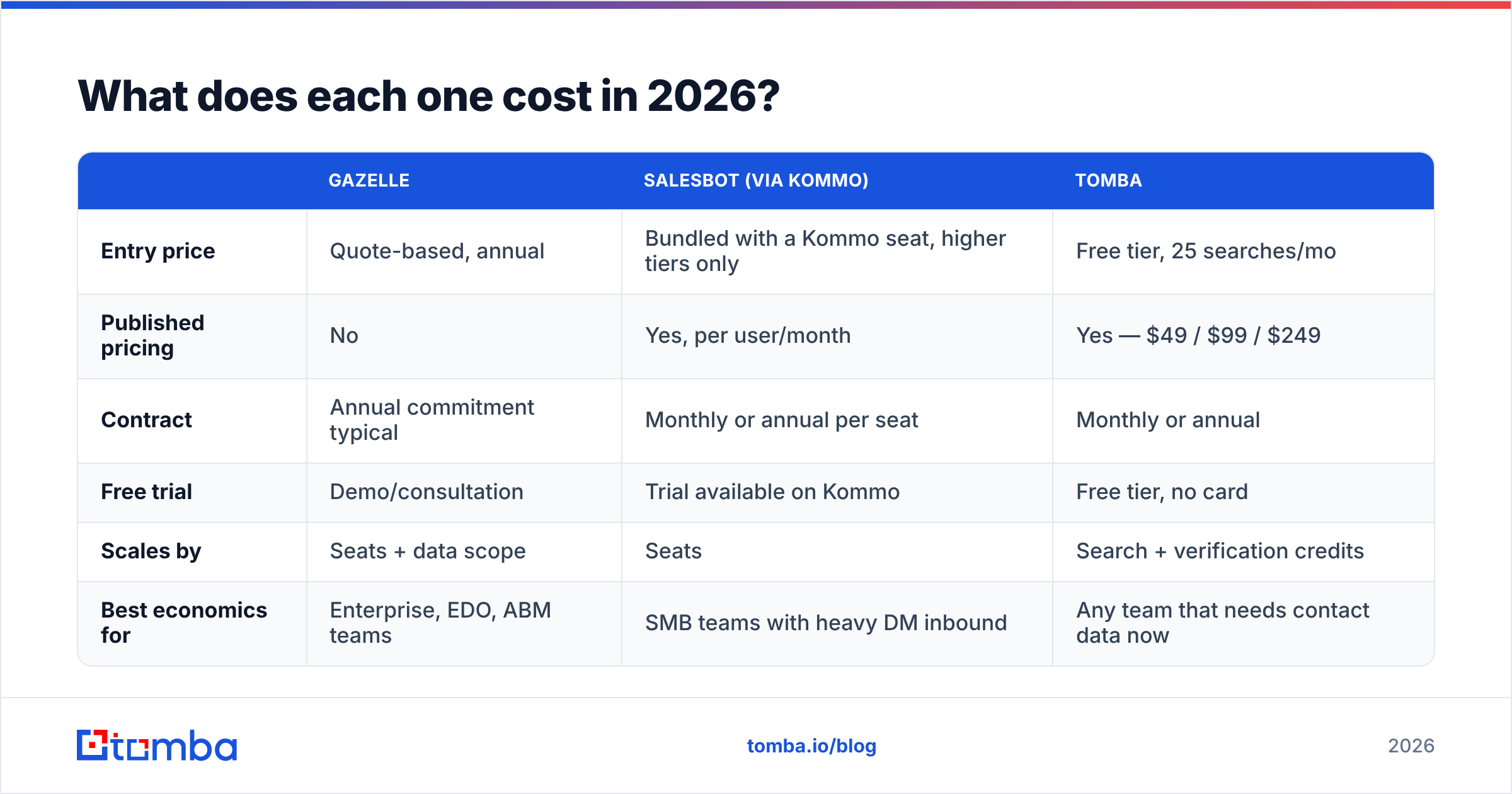
Prices move, and one of these vendors doesn't publish. Treat this as a shape, not a quote — confirm on the vendor page before you plan a budget.
| Gazelle | Salesbot (via Kommo) | Tomba | |
|---|---|---|---|
| Entry price | Quote-based, annual | Bundled with a Kommo seat, higher tiers only | Free tier, 25 searches/mo |
| Published pricing | No | Yes, per user/month | Yes — $49 / $99 / $249 |
| Contract | Annual commitment typical | Monthly or annual per seat | Monthly or annual |
| Free trial | Demo/consultation | Trial available on Kommo | Free tier, no card |
| Scales by | Seats + data scope | Seats | Search + verification credits |
| Best economics for | Enterprise, EDO, ABM teams | SMB teams with heavy DM inbound | Any team that needs contact data now |
The strategic point: Gazelle and Salesbot both bill for a platform. Contact data bills for volume. That's why teams often end up running a lightweight data tool alongside whichever platform they chose, rather than instead of it.
Which should you buy first?#
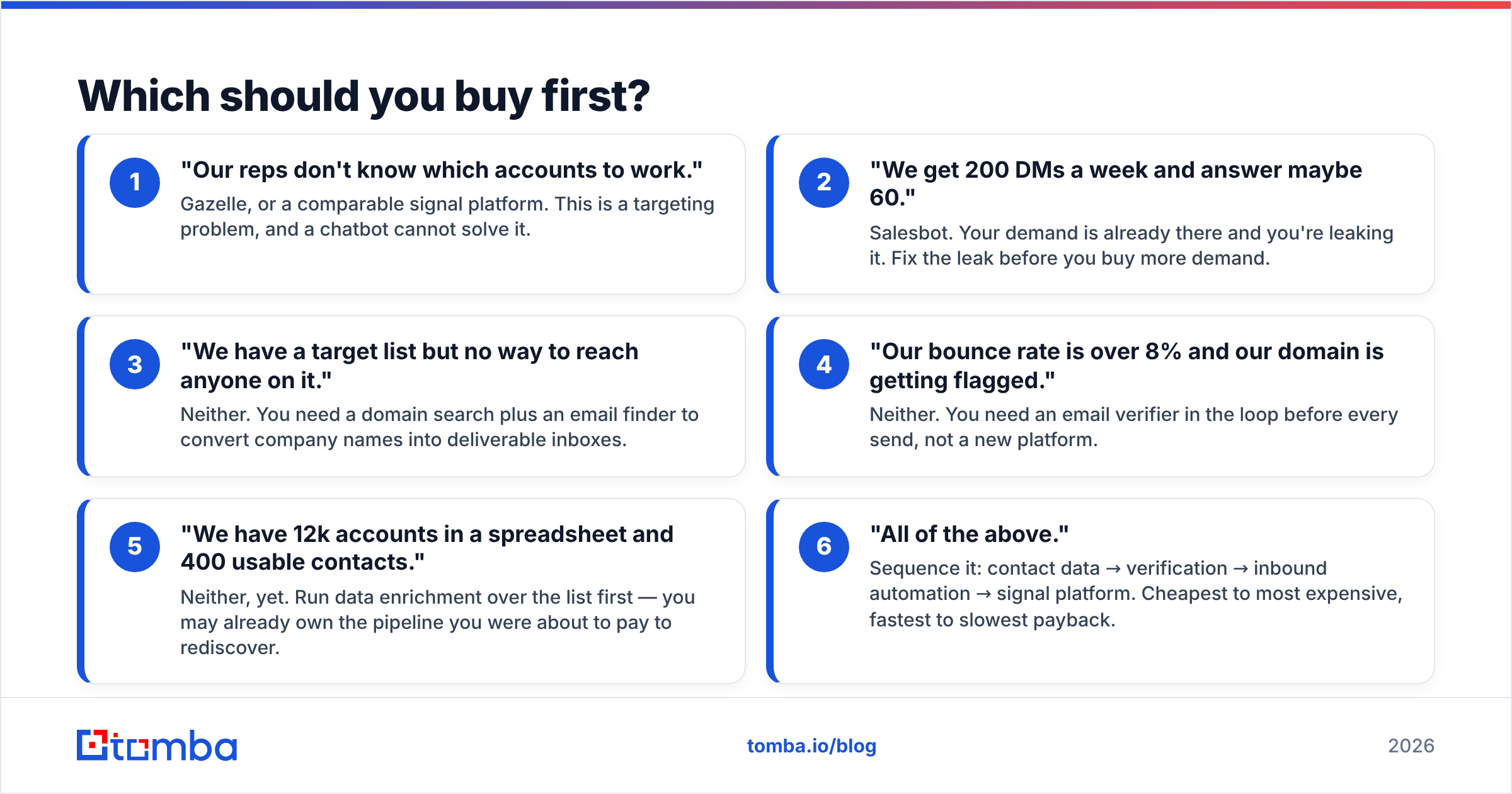
Pick by symptom, not by feature list.
- "Our reps don't know which accounts to work." Gazelle, or a comparable signal platform. This is a targeting problem, and a chatbot cannot solve it.
- "We get 200 DMs a week and answer maybe 60." Salesbot. Your demand is already there and you're leaking it. Fix the leak before you buy more demand.
- "We have a target list but no way to reach anyone on it." Neither. You need a domain search plus an email finder to convert company names into deliverable inboxes.
- "Our bounce rate is over 8% and our domain is getting flagged." Neither. You need an email verifier in the loop before every send, not a new platform.
- "We have 12k accounts in a spreadsheet and 400 usable contacts." Neither, yet. Run data enrichment over the list first — you may already own the pipeline you were about to pay to rediscover.
- "All of the above." Sequence it: contact data → verification → inbound automation → signal platform. Cheapest to most expensive, fastest to slowest payback.
Most teams that ask "gazelle vs salesbot" are actually in bucket 3 or 5. They've correctly diagnosed that something in the pipeline is broken and reached for the two most visible tools in the conversation.
Do you still need an email finder either way?#
Yes, and this is the part that gets skipped in vendor comparisons.
Signal platforms end at the account. Chatbots start after the lead raises a hand. Between "this company is expanding" and "this person replied," there's a step neither product owns: turning a name and a domain into a verified, deliverable work address.
That step is unglamorous and it's where campaigns die. A 2,000-account list from any premium data source will typically give you partial contact coverage, stale addresses from role changes, and a pile of catch-all domains that look valid and aren't. Send into that and you get bounces, then spam folder placement, then a reputation problem that takes months to unwind.
Concretely, the missing middle looks like:
- Domain → people. You have
acme.comand a job title. You need the humans. That's domain search. - Name + domain → address. You have "Dana Whitfield, Acme." You need
d.whitfield@acme.com, confirmed against the company's actual pattern rather than guessed. - Address → deliverable. SMTP checks, disposable detection, role-account flags, and a real answer on catch-all domains instead of a shrug.
- List → enriched list. Bulk processing so this happens over 5,000 rows in one job, not 5,000 tab-outs.
You can bolt this onto either side of the comparison. Gazelle gives you the accounts; the finder gives you the inboxes. Salesbot handles the people who message you; the finder handles the ones who never will.
What's the honest verdict?#
Gazelle wins if you're an enterprise, EDO, or ABM team whose bottleneck is knowing where to point. It's a strategy instrument. Budget for annual commitment, a real onboarding, and someone who owns the configuration.
Salesbot wins if you already run on Kommo, or would happily switch, and messaging channels are where your leads actually live. It's an operational instrument with a fast, measurable payback — response time down, qualified conversations up.
Neither wins if what you actually needed was contact data. That's not a knock on either vendor; it's a category boundary that marketing pages blur.
The stack that works for most sub-50-person sales teams in 2026 isn't one hero platform. It's a modest data layer that produces verified contacts on demand, a sending motion that respects deliverability, and then automation on whichever end proves it's the constraint.
Start with the contact layer, because it's the one you can test this week without a procurement cycle.
Ready to fill the gap both tools leave? Tomba's Email Finder turns a name and a company domain into a verified, deliverable work email — with pattern detection, SMTP validation, and catch-all handling built in. Start on the free tier with 25 searches a month, no card required, and scale to Starter at $49/mo when your list outgrows it. Run it alongside Gazelle, alongside Salesbot, or on its own while you decide which of them you actually need.
Related guides#
Ready to find emails that actually work?
Join 150,000+ professionals who stopped guessing and started sending. Free credits on signup — no credit card required.
Get the Tomba newsletter
Practical outbound tactics and product updates — once every two weeks.
About the author