How to Generate Sales Qualified Leads in 2026: A Practical Guide
Most teams confuse MQLs with SQLs and wonder why pipeline stalls. Here's the qualification framework, data stack, and outbound motion that actually turns raw contacts into sales qualified leads.
TL;DR
- A sales qualified lead (SQL) is a contact your sales team has agreed to work — it clears fit, need, timing, and authority checks, not just a form fill.
- The single biggest leak in SQL generation is data quality: bad emails and stale titles kill 20-40% of an outbound list before the first send.
- Use a two-gate model — a fit gate (firmographics, ICP match) and an intent gate (behavior, triggers) — then hand off only what clears both.
- Budget roughly $150-$400 per SQL in mid-market B2B; the levers that move it are list precision, verification, and sequence relevance, not send volume.
- Build the motion in this order: define ICP → source contacts → verify → score → sequence → hand off with a written SLA.
What is a sales qualified lead, exactly?#
A sales qualified lead is a prospect that sales has explicitly accepted as worth working. That acceptance is the whole point. If marketing declares a lead "qualified" and sales quietly ignores it, you don't have an SQL — you have an argument.
The distinction that matters day to day:
- Lead — a name and a contact method. No judgment attached.
- Marketing qualified lead (MQL) — behavior suggests interest: downloaded a guide, attended a webinar, hit the pricing page three times. See the definition of a marketing qualified lead for the standard framing.
- Sales accepted lead (SAL) — a rep has looked at it and agreed it's worth a call. This intermediate stage is where most disputes get resolved.
- Sales qualified lead (SQL) — the rep has had contact and confirmed fit, need, budget signal, and a plausible timeline.
- Opportunity — an SQL with a defined deal, amount, and close date in the CRM.
Teams that skip stage 3 usually end up with an inflated SQL count and a conversion rate that looks terrible at the next stage. Add the SAL gate. It costs one field in your CRM and saves quarters of finger-pointing.
How do MQLs and SQLs actually differ?#
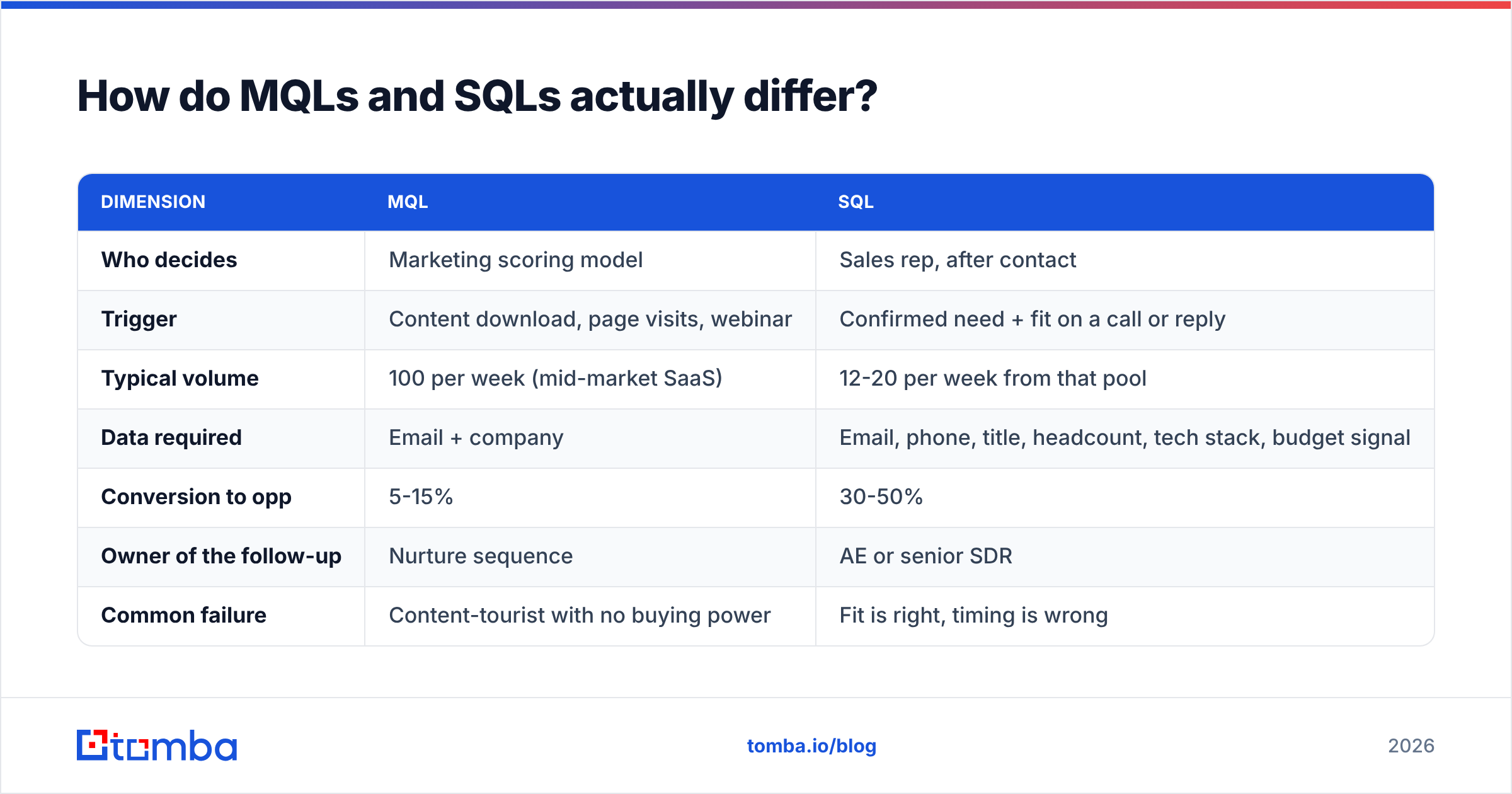
| Dimension | MQL | SQL |
|---|---|---|
| Who decides | Marketing scoring model | Sales rep, after contact |
| Trigger | Content download, page visits, webinar | Confirmed need + fit on a call or reply |
| Typical volume | 100 per week (mid-market SaaS) | 12-20 per week from that pool |
| Data required | Email + company | Email, phone, title, headcount, tech stack, budget signal |
| Conversion to opp | 5-15% | 30-50% |
| Owner of the follow-up | Nurture sequence | AE or senior SDR |
| Common failure | Content-tourist with no buying power | Fit is right, timing is wrong |
The volume drop between rows two and three is normal and healthy. A funnel where 80% of MQLs become SQLs isn't efficient — it means your MQL bar is set so high you're missing pipeline, or your SQL bar is so low that reps are accepting junk to hit an activity number.
What qualification framework should you use?#
Pick one and enforce it. The framework matters less than the consistency.
- BANT (Budget, Authority, Need, Timeline) — old, blunt, still works for transactional deals under $25k where the buyer knows what they want.
- MEDDIC (Metrics, Economic buyer, Decision criteria, Decision process, Identify pain, Champion) — the right choice for enterprise cycles over 90 days with multiple stakeholders.
- CHAMP (Challenges, Authority, Money, Prioritization) — puts pain before budget, which fits discovery-led motions better than BANT.
- GPCTBA/C&I — HubSpot's expanded model; heavy, but useful when your product changes how a team operates. HubSpot publishes their full qualification framework breakdown if you want the long version.
- FAINT (Funds, Authority, Interest, Need, Timing) — designed for buyers who have money but no allocated budget line, which describes most net-new category purchases.
A workable default for mid-market B2B: use a lightweight fit score before outreach (firmographic only, no human involved), then MEDDIC-lite on the first call. Two gates, two owners, no ambiguity about who declared what.
What does the SQL generation pipeline look like end to end?#
Step 1 — Define the ICP in filters, not adjectives#
"Mid-sized companies that care about efficiency" is not an ICP. This is:
- Headcount 50-500
- North America or EU/UK
- Runs Salesforce or HubSpot
- Has at least 3 open sales roles posted in the last 60 days
- Titles: VP Sales, Head of RevOps, Director of Demand Gen
Every one of those is queryable. If a criterion can't be turned into a filter or a scraped signal, it belongs in your positioning doc, not your targeting.
Step 2 — Source the contacts#
You have three realistic paths, and most teams use a blend:
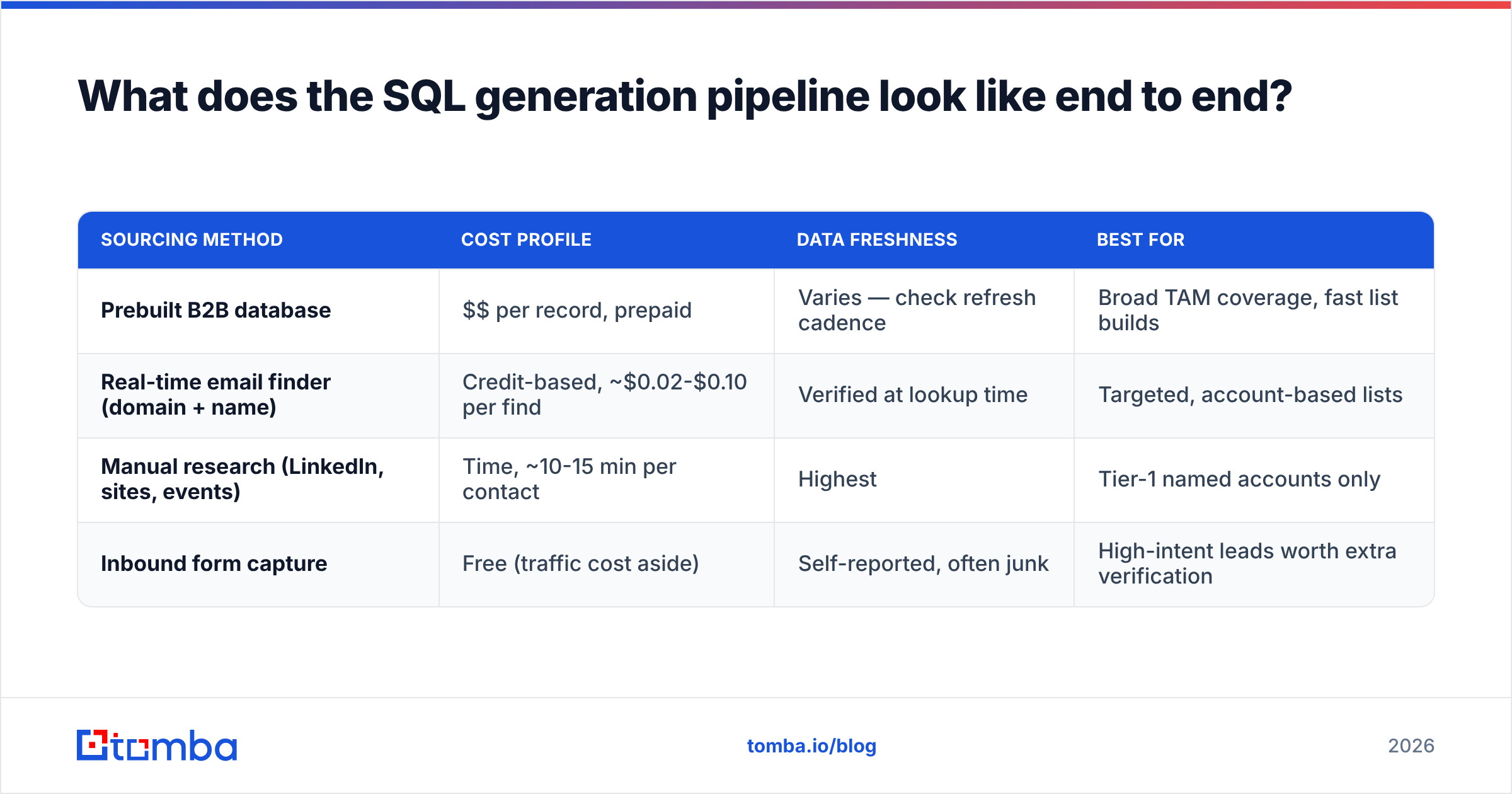
| Sourcing method | Cost profile | Data freshness | Best for |
|---|---|---|---|
| Prebuilt B2B database | $$ per record, prepaid | Varies — check refresh cadence | Broad TAM coverage, fast list builds |
| Real-time email finder (domain + name) | Credit-based, ~$0.02-$0.10 per find | Verified at lookup time | Targeted, account-based lists |
| Manual research (LinkedIn, sites, events) | Time, ~10-15 min per contact | Highest | Tier-1 named accounts only |
| Inbound form capture | Free (traffic cost aside) | Self-reported, often junk | High-intent leads worth extra verification |
A real-time email finder tends to beat a static database on accuracy for the same reason a fresh grocery run beats last month's leftovers: the record is resolved when you ask, not when the vendor last crawled. Static databases still win on breadth — if you need every SaaS company in DACH with 200+ employees, that's a database query, not a per-contact lookup. Vendors like BookYourData build around that prebuilt, pay-as-you-go model and do it well; the tradeoff is you're buying a snapshot rather than a live resolution.
Step 3 — Verify before you score#
This is the step teams skip, and it's the most expensive skip in the funnel. Sending to unverified addresses damages sender reputation, which suppresses inbox placement for the good addresses on the same list. You don't just lose the bad contacts — you lose reach to the good ones.
Run every list through an email verifier before it enters a sequence. Kill anything that comes back invalid. For catch-all domains — which reject nothing at the SMTP layer and therefore always "pass" a naive check — use a dedicated catch-all verifier that scores deliverability probability instead of returning a useless "unknown."

Accuracy differences between providers look small in a marketing table and enormous in a quarterly report. On a 10,000-contact list, moving from 88% to 96% deliverable accuracy is 800 additional reachable prospects — at a 2% meeting rate, that's 16 extra meetings you'd otherwise have paid for and never received.
Step 4 — Score for fit and intent separately#
Keep the two scores apart. A blended number hides which lever is broken.
Fit score (0-50): headcount band, industry, tech stack match, geography, revenue proxy. Computed automatically at enrichment time. No human touches it.
Intent score (0-50): pricing page visits, demo request, competitor comparison page views, job postings for roles your product supports, funding announcements, leadership changes.
Route the combinations differently:
- High fit + high intent → SDR calls within 4 hours. This is your SQL candidate pool.
- High fit + low intent → outbound sequence with a trigger-based hook. Slow burn.
- Low fit + high intent → self-serve or PLG path. Don't spend rep time.
- Low fit + low intent → suppress. Don't nurture. Nurturing bad fit is a tax you pay forever.
Step 5 — Sequence with a reason to reply#
Volume is not a strategy in 2026. Google and Microsoft both tightened bulk-sender enforcement, and blanket sends now get filtered before a human sees them. The mechanics that still work:
- One trigger per email. New funding round, new VP, a job posting, a tech-stack change. Reference the specific thing.
- Under 90 words. Reps who cut to 60-80 words consistently see higher response rates than those writing 150-word value pitches.
- One ask, low friction. "Worth a 15-minute look?" outperforms "Can we book a 30-minute discovery call Tuesday at 2?"
- Multichannel, not multi-email. Email → LinkedIn view → email → phone → LinkedIn message beats five emails to the same inbox.
- Stop at 5-6 touches. Reply rates past touch six are statistically noise, and continued sending raises complaint rates.
Step 6 — Hand off with a written SLA#
Write it down and make both sides sign it:
- Marketing delivers leads with these seven fields populated and verified.
- Sales works every routed lead within X hours and dispositions it within Y days.
- Rejected leads come back with a reason code, not a silent delete.
- Both teams review reason-code distribution monthly.
That last bullet is the feedback loop. Without it, your scoring model never improves and you'll be having the same MQL-quality fight in Q4 that you had in Q1.
How much should an SQL cost you?#
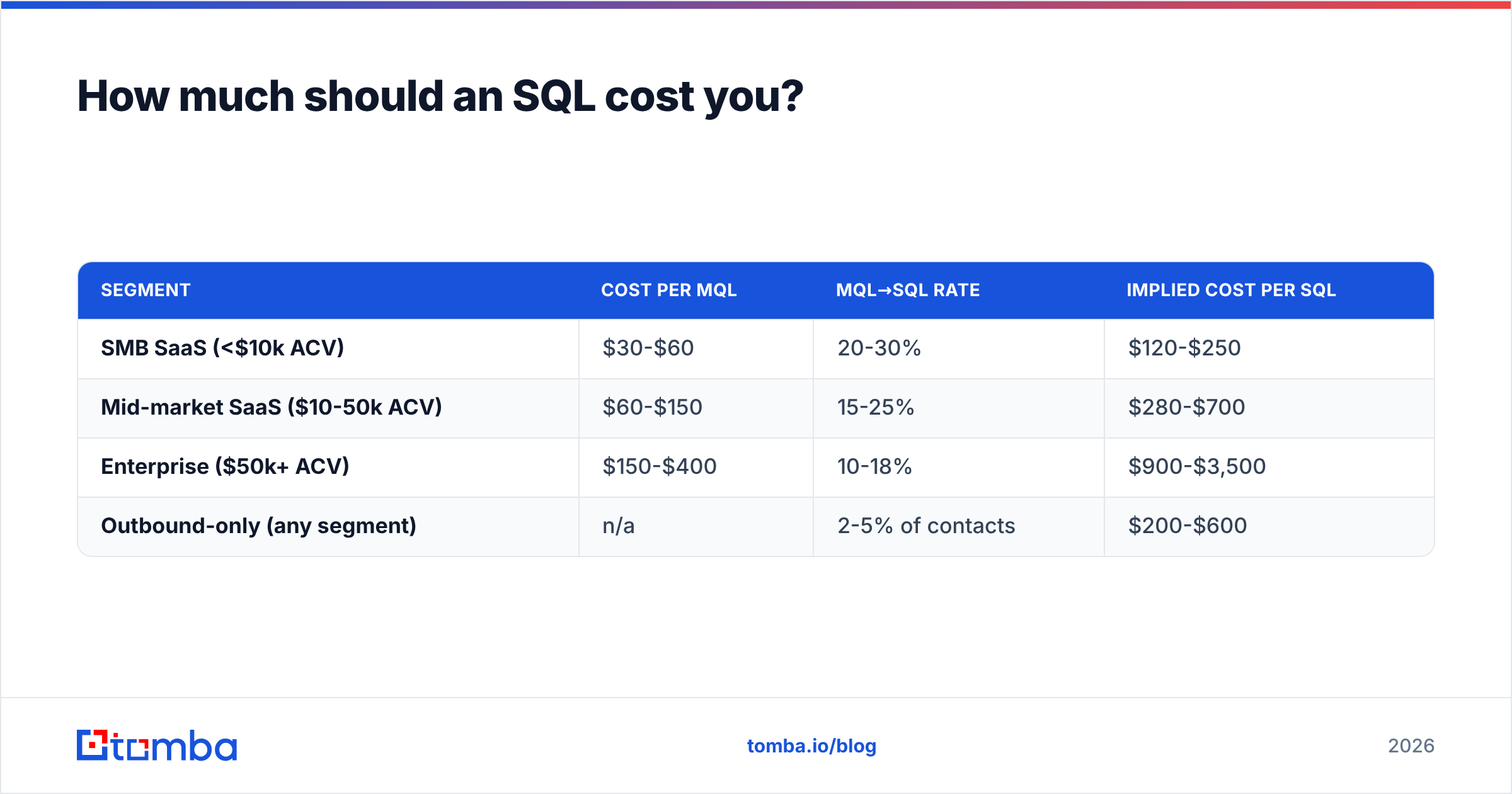
Benchmark ranges vary by segment, but the arithmetic is the useful part:
| Segment | Cost per MQL | MQL→SQL rate | Implied cost per SQL |
|---|---|---|---|
| SMB SaaS (<$10k ACV) | $30-$60 | 20-30% | $120-$250 |
| Mid-market SaaS ($10-50k ACV) | $60-$150 | 15-25% | $280-$700 |
| Enterprise ($50k+ ACV) | $150-$400 | 10-18% | $900-$3,500 |
| Outbound-only (any segment) | n/a | 2-5% of contacts | $200-$600 |
The lever most teams reach for first — more volume — is the worst one. Doubling send volume roughly doubles cost and, because of deliverability penalties, delivers less than double the meetings. The cheaper levers, in order of return:
- Tighten the ICP filter. Removing your worst-fit 30% typically raises reply rate more than any copy change.
- Verify the list. Straight reduction in wasted sends and reputation damage.
- Enrich for personalization inputs. Titles, recent news, tech stack. Data enrichment turns a generic template into a specific one without extra rep time.
- Fix routing speed. Lead response research from Harvard Business Review found firms responding within an hour were roughly seven times more likely to have a meaningful conversation than those waiting even two hours.
- Rewrite copy. Real, but it's the fifth lever, not the first.
Which tools do you actually need?#
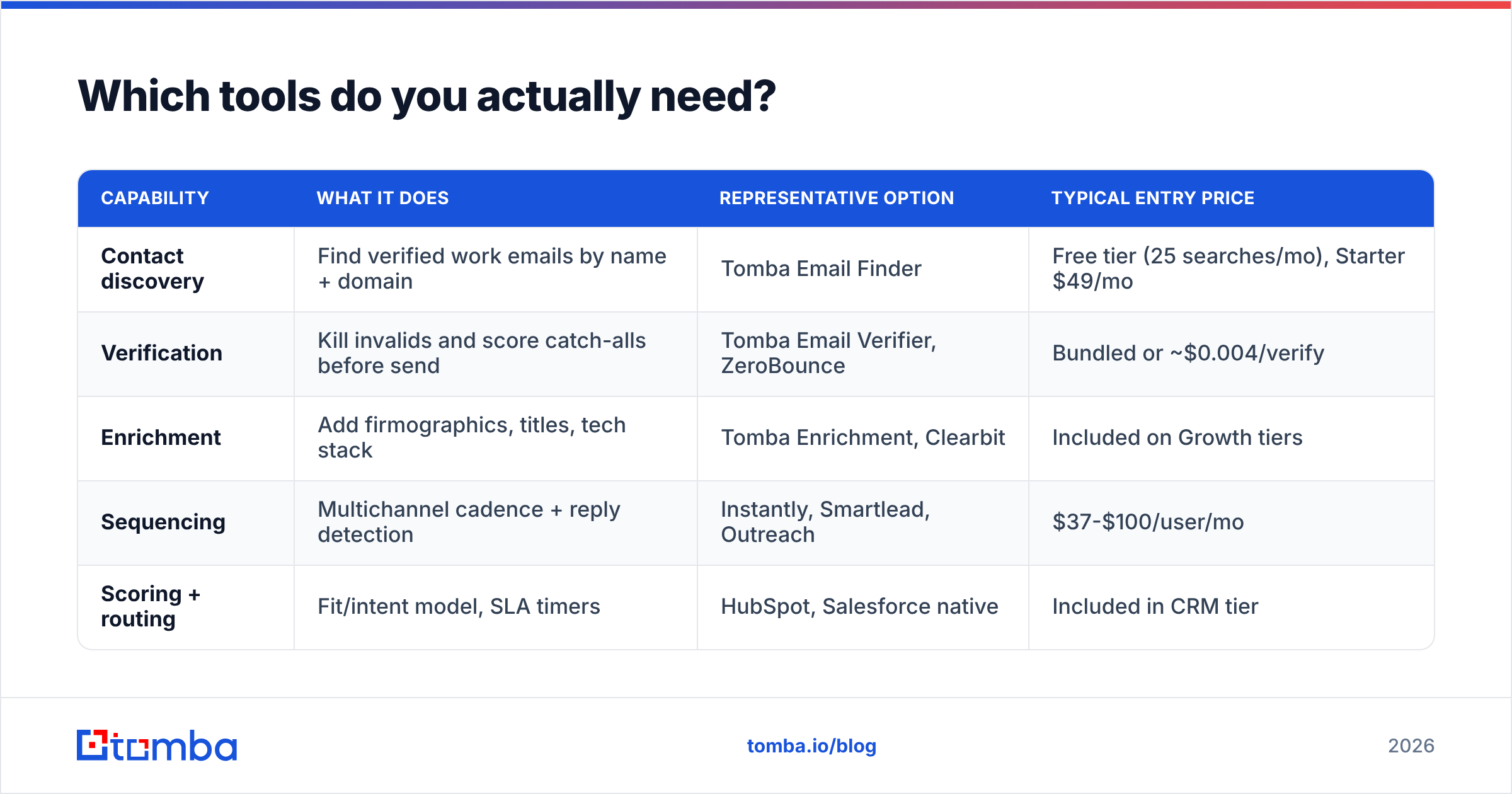
You need four capabilities. Whether they come from one vendor or four matters less than whether they're wired together.
| Capability | What it does | Representative option | Typical entry price |
|---|---|---|---|
| Contact discovery | Find verified work emails by name + domain | Tomba Email Finder | Free tier (25 searches/mo), Starter $49/mo |
| Verification | Kill invalids and score catch-alls before send | Tomba Email Verifier, ZeroBounce | Bundled or ~$0.004/verify |
| Enrichment | Add firmographics, titles, tech stack | Tomba Enrichment, Clearbit | Included on Growth tiers |
| Sequencing | Multichannel cadence + reply detection | Instantly, Smartlead, Outreach | $37-$100/user/mo |
| Scoring + routing | Fit/intent model, SLA timers | HubSpot, Salesforce native | Included in CRM tier |

Two practical notes on stack assembly. First, check whether your discovery tool exposes an API — pushing lookups through the Tomba API or an equivalent means enrichment happens inside your workflow instead of in a CSV somebody forgets to re-upload. Second, compare credit models carefully. Some vendors charge for a lookup that returns nothing; some only charge on a successful, verified find. On a 5,000-contact month that difference is real money. Tomba pricing runs Free (25 searches/mo), Starter $49/mo, Growth $99/mo, and Pro $249/mo, with Enterprise quoted. Cross-check whatever you're evaluating against verified user reviews on G2 rather than vendor-published accuracy claims.
What are the most common SQL generation mistakes?#
- Treating a demo request as an automatic SQL. Plenty of demo requests come from students, competitors, and people with zero budget. Qualify them like anything else.
- Scoring on engagement alone. Someone who opens every email may be a curious peer, not a buyer. Fit has to gate intent.
- No suppression list discipline. Re-contacting closed-lost accounts from 8 months ago at the same cadence as fresh prospects burns goodwill and inflates complaint rates.
- Letting reps self-declare SQLs with no definition. If the bonus is tied to SQL count and the definition is fuzzy, the definition will drift. Every time.
- Buying a list and skipping verification because "the vendor said it's 95% accurate." Vendor-claimed accuracy is measured under vendor-chosen conditions. Verify anyway; it costs a fraction of a cent per record.
- Measuring SQL volume without measuring SQL→opportunity rate. Volume alone rewards lowering the bar. Always report the pair.
How do you know it's working?#
Track five numbers, weekly, on one dashboard:
- MQL→SAL rate — is sales accepting what marketing sends?
- SAL→SQL rate — does contact confirm the qualification?
- SQL→opportunity rate — is the SQL bar honest?
- Median time-to-first-touch — the routing-speed metric.
- Cost per SQL, trailing 30 days — the efficiency metric.
If rate #1 is below 60%, your scoring model is wrong. If #2 is fine but #3 is under 30%, reps are accepting leads to hit activity targets. If #4 exceeds four hours, fix routing before you touch anything else — it's the cheapest fix on the list.
Where to start this week#
Pick your ten best-fit target accounts. Pull decision-maker contacts with a domain search, verify each one, enrich for title and recent company news, and write ten individual emails referencing a real trigger. Send them. Measure replies.
If that produces two conversations, you have a repeatable motion worth scaling with automation. If it produces zero, the problem is your ICP or your offer — and no amount of sending volume will fix either.
When you're ready to scale the sourcing half of that loop, the Tomba Email Finder resolves verified work emails by name and domain in real time, with a free tier of 25 searches per month to test against your own known-good list before you commit to a plan. Run it against contacts you already have the correct email for — that's the only accuracy benchmark that reflects your actual market.
Related guides#
// get started
Find, verify and enrich your first contacts today
Start on the free plan with 25 searches a month, then scale when your team is ready.
Free plan · No credit card required · GDPR & CCPA
Get the Tomba newsletter
Product and data updates
// about the author