Generect vs GetProspect: Which B2B Lead Data Tool Wins in 2026?
Generect sells live LinkedIn-sourced lead data through an API. GetProspect sells a searchable B2B database with an email finder on top. Here is which one actually fits your outbound motion in 2026 — and where both fall short.
Generect vs GetProspect is a choice between two ways of buying B2B lead data. One sells it through an API. The other sells it through a search UI. This guide compares both on price, data accuracy, and team fit — and shows the gap each one leaves you to fill.
TL;DR
- Generect is a LinkedIn-centric lead data engine built API-first. You send filters. It returns fresh people and company records. It suits engineering-backed teams that want data piped into their own stack.
- GetProspect is a self-serve email finder plus a searchable B2B database with a Chrome extension. It suits SDRs and founders who build lists in a UI, without code.
- Neither tool is a full outbound suite. Both stop at data. You still need sequencing, verification hygiene, and CRM sync elsewhere.
- Cost per usable contact matters more than the sticker price. A cheap plan that returns 40% unverified emails costs more than a mid-tier plan at 90%+ deliverable.
- Want one vendor for finding, verifying, catch-all handling, and enrichment? Compare both against a dedicated email finder before you sign an annual contract.
What are Generect and GetProspect, exactly?#
They solve overlapping problems from opposite directions.
Generect sells lead data with one main claim: freshness, sourced from LinkedIn-style signals. Its natural home is the API. You define an ideal customer profile in code — headcount band, industry, geo, seniority, job title keywords — and it returns matching people and company records on demand. There is a UI, but the product is built for code first. Teams who use it well are running a data pipeline, not a manual list-building session.
GetProspect starts at the other end. The core loop is simple. Search the database or browse LinkedIn with the Chrome extension. Collect prospects into a list. Reveal their work emails. Export to CSV or push to a CRM. It has an API too, but most use is hands-on. The database is large — tens of millions of companies and hundreds of millions of contact records. The filters are easy for a non-technical rep.
The short version: Generect is infrastructure, GetProspect is a workspace. The Generect vs GetProspect call is mostly about who on your team touches the data first.
Generect vs GetProspect: how do they compare head-to-head?#
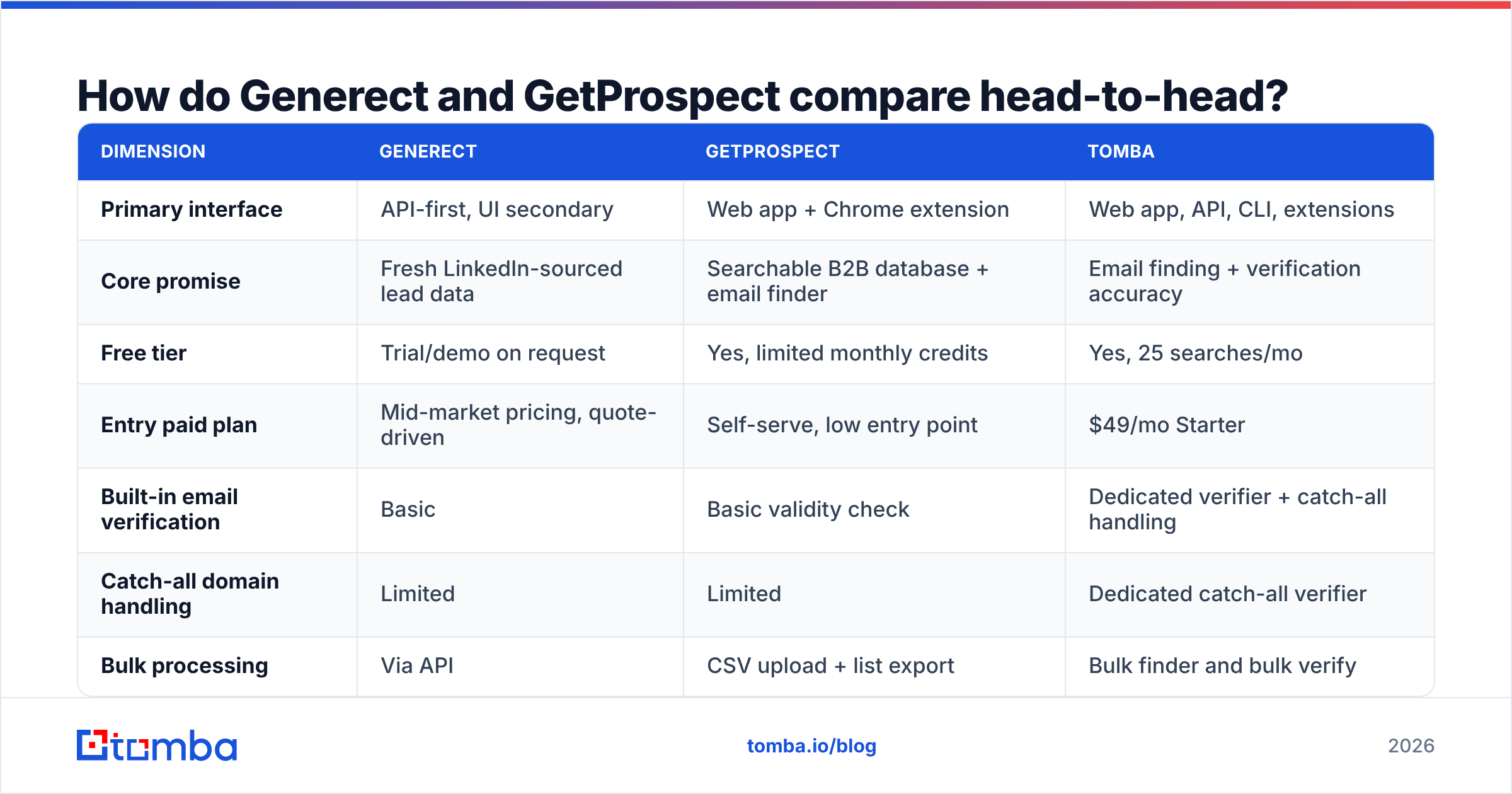
Here is the side-by-side. The third column is a dedicated email-finding tool, so you can see where a pure data-accuracy play sits against both.
| Dimension | Generect | GetProspect | Tomba |
|---|---|---|---|
| Primary interface | API-first, UI secondary | Web app + Chrome extension | Web app, API, CLI, extensions |
| Core promise | Fresh LinkedIn-sourced lead data | Searchable B2B database + email finder | Email finding + verification accuracy |
| Free tier | Trial/demo on request | Yes, limited monthly credits | Yes, 25 searches/mo |
| Entry paid plan | Mid-market pricing, quote-driven | Self-serve, low entry point | $49/mo Starter |
| Built-in email verification | Basic | Basic validity check | Dedicated verifier + catch-all handling |
| Catch-all domain handling | Limited | Limited | Dedicated catch-all verifier |
| Bulk processing | Via API | CSV upload + list export | Bulk finder and bulk verify |
| Phone numbers | Yes, on higher tiers | Limited | Yes, phone finder + validator |
| Best for | Data engineering teams | SDRs and founders building lists | Teams that need deliverable emails at scale |

Read that table with one caveat: published pricing on both vendors moves. Generect leans quote-driven past a starter footprint. GetProspect adjusts its credit bundles now and then. Always pull the live number from each pricing page before you build a business case on it.
Which one is more accurate — and how would you know?#
Accuracy is where most comparison posts get lazy. "94% accurate" on a marketing page is not a measurement. It is a claim about a sample nobody shows you.
Run your own test. It takes an afternoon. It will save you a quarter of wasted sends.
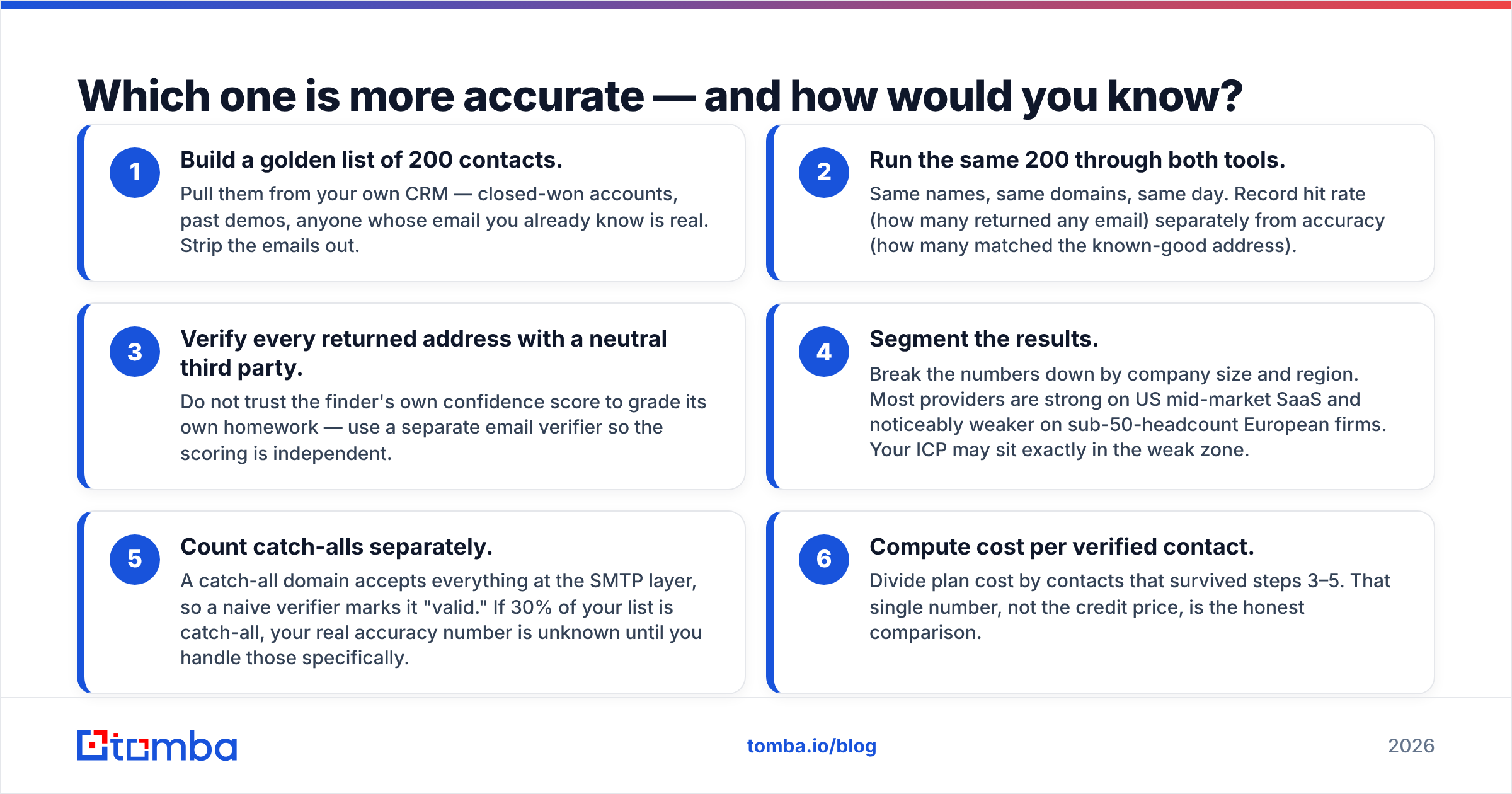
- Build a golden list of 200 contacts. Pull them from your own CRM — closed-won accounts, past demos, anyone whose email you know is real. Strip the emails out.
- Run the same 200 through both tools. Same names, same domains, same day. Record hit rate (how many returned any email) apart from accuracy (how many matched the known-good address).
- Verify every returned address with a neutral third party. Do not let a finder grade its own homework. Use a separate email verifier so the scoring is independent.
Those three steps give you raw numbers. The next three turn them into a decision.
- Segment the results. Break the numbers down by company size and region. Most providers are strong on US mid-market SaaS. Most are weaker on sub-50-headcount European firms. Your ICP may sit in the weak zone.
- Count catch-alls separately. A catch-all domain accepts every address at the SMTP layer, so a naive verifier marks it "valid." If 30% of your list is catch-all, your real accuracy number is unknown until you handle those.
- Compute cost per verified contact. Divide plan cost by the contacts that survived steps 3–5. That number, not the credit price, is the honest comparison.

In our testing, the pattern is consistent. LinkedIn-sourced providers like Generect tend to win on coverage: they find a record for more people. Database-plus-verification products tend to win on deliverability: more of what they return actually lands. Which one matters depends on your bottleneck — finding people, or reaching them.

How does pricing actually work for each?#
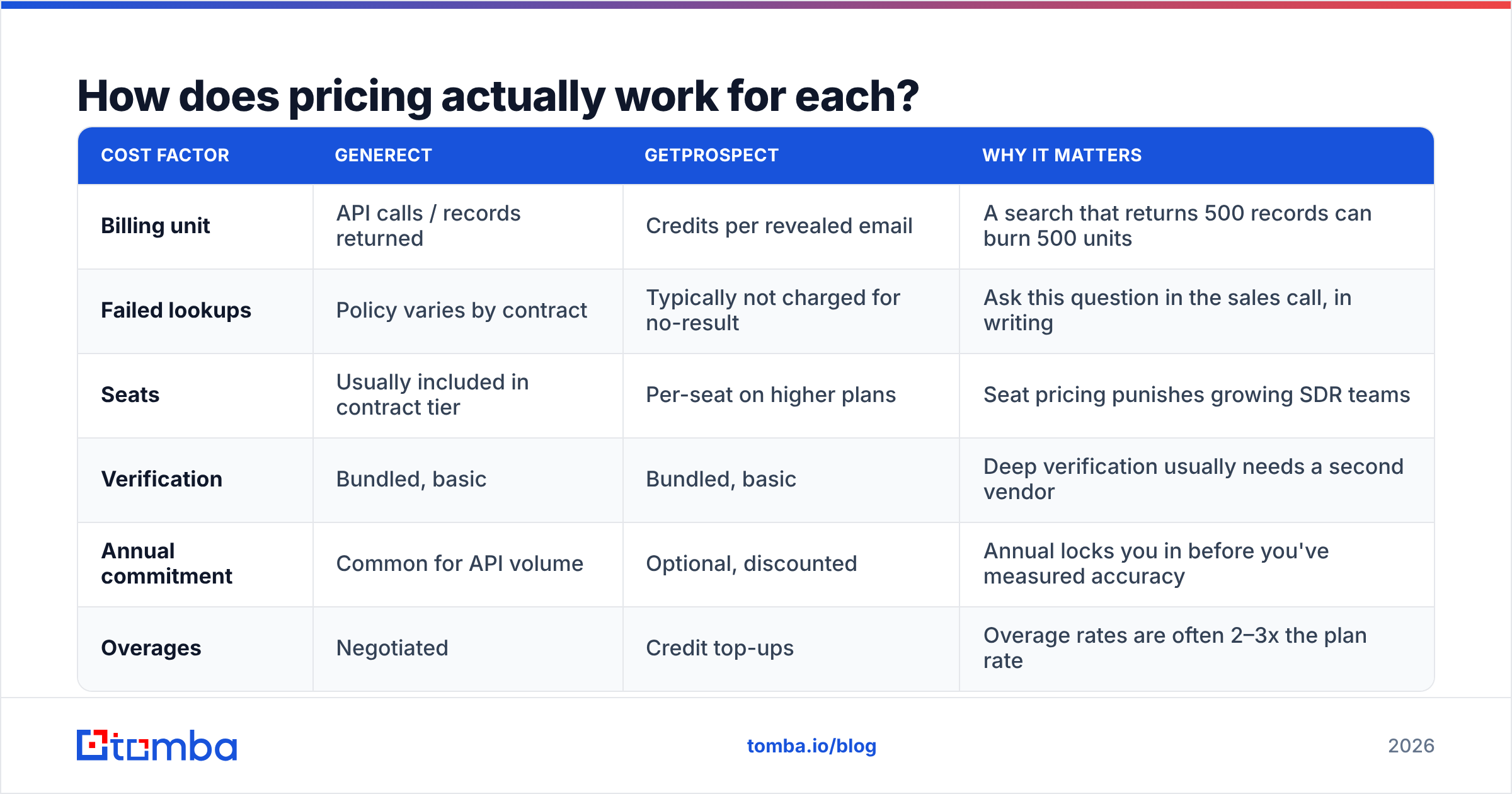
Both vendors use credits. But they meter different things, and that difference is where budgets get blown.
| Cost factor | Generect | GetProspect | Why it matters |
|---|---|---|---|
| Billing unit | API calls / records returned | Credits per revealed email | A search that returns 500 records can burn 500 units |
| Failed lookups | Policy varies by contract | Typically not charged for no-result | Ask this question in the sales call, in writing |
| Seats | Usually included in contract tier | Per-seat on higher plans | Seat pricing punishes growing SDR teams |
| Verification | Bundled, basic | Bundled, basic | Deep verification usually needs a second vendor |
| Annual commitment | Common for API volume | Optional, discounted | Annual locks you in before you've measured accuracy |
| Overages | Negotiated | Credit top-ups | Overage rates are often 2–3x the plan rate |
Credit models carry one big risk: you pay for the same contact more than once. Once to find it. Again to verify it somewhere else. A third time when your sequencer bills per active contact. Putting find-plus-verify with one vendor usually cuts 20–30% before you negotiate anything. That is the case for checking Tomba pricing next to these two. A $49/mo Starter plan with verification included is not competing on features. It is competing on how many line items you end up with.
Who should pick Generect?#
Pick Generect if three things are true.
- You have engineering capacity. The value is in the API. If nobody will write a scheduled job that pulls fresh records into your warehouse, you are paying for infrastructure you will use like a spreadsheet.
- Your ICP is defined by employment signals. Job changes, new hires in a target function, headcount growth. Generect's LinkedIn-derived sourcing is genuinely useful here. A rep checking profiles by hand cannot do this at volume.
- You want to own the enrichment layer. If your stack already has a warehouse, reverse-ETL, and a CRM sync, adding a raw data source is easy. If it doesn't, you are buying the hard half of a solution.
Where it disappoints: teams who expected a list-building UI as polished as the API. Non-technical users will feel the friction within a week.
Who should pick GetProspect?#
Pick GetProspect if you are the opposite profile.
- Your primary user is an SDR or a founder. The Chrome extension is the fastest path from "interesting company" to "12 contacts in a list." That workflow is hard to beat with an API.
- You need results today, not after a sprint. Sign up, install the extension, export a CSV. There is no integration project.
- Your volume is moderate. A few thousand contacts a month fits the self-serve tiers. Once you pull six figures of records, the credit math favours a contract-priced data provider.
Where it disappoints: catch-all-heavy verticals. Also anyone who read "valid" in the UI as "will land in the inbox." It usually means the syntax is fine and the domain accepts mail. That is a much weaker claim. Run exports through a dedicated catch-all verifier before you sequence them.

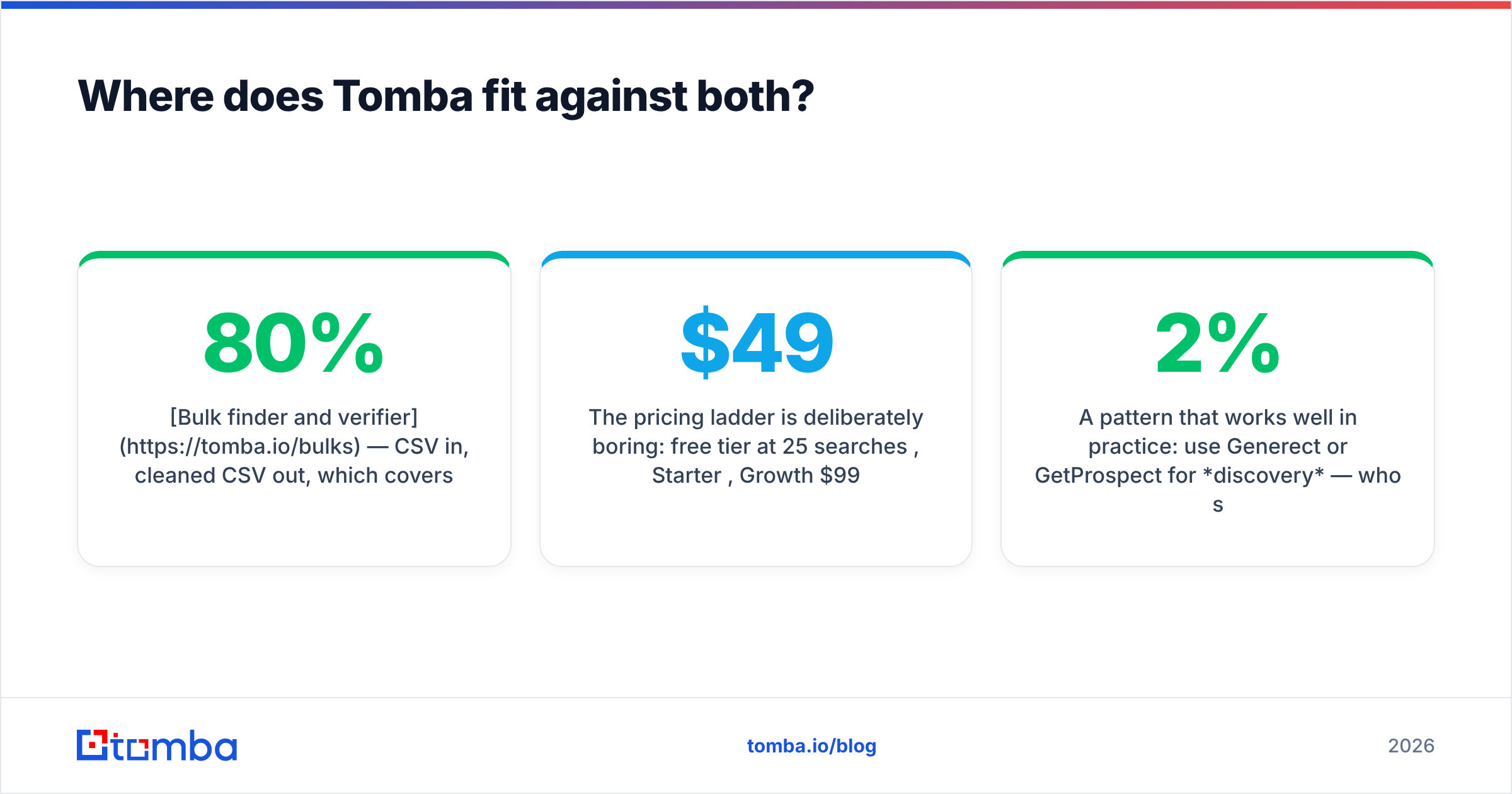
Where does Tomba fit against both?#
Honestly: Tomba is not trying to be Generect. There is no live LinkedIn employment-signal feed here. If that is your requirement, Generect is the better buy.
Tomba competes on the part both tools treat as a checkbox. Turning a name and a domain into an address that actually delivers. The stack is built around that one job:
- Email finder — name plus domain in, verified address out, with a source-backed confidence signal instead of an opaque score.
- Domain search — list every findable address at a company, useful when you have no target person yet.
- Bulk finder and verifier — CSV in, cleaned CSV out. That covers the 80% case people otherwise script badly.
- Tomba API — the same endpoints in code, plus a CLI and an MCP server for AI agents.
The pricing ladder is deliberately boring. Free tier at 25 searches/mo, Starter $49/mo, Growth $99/mo, Pro $249/mo, Enterprise on quote. No seat tax to grow an SDR pod.
One pattern works well in practice. Use Generect or GetProspect for discovery — who should I contact. Then run everything through a verification layer before it touches a sequencer. Coverage from one vendor, deliverability from another, and your bounce rate stays under 2%.
Does either tool protect your sender reputation?#
No. And this is the most expensive misunderstanding in the category.
Data vendors sell you addresses. Buying a list does nothing for your email deliverability. Your reputation comes from authentication records, volume ramp, engagement, and bounce rate. A high bounce rate from unverified data is the fastest way to burn a domain. Neither vendor is accountable for that.
Here is the minimum hygiene checklist before any sourced list gets sequenced:
- SPF, DKIM, and DMARC set on the sending domain, checked with a real lookup rather than assumed.
- Every address verified on its own, with catch-alls held back in a separate low-volume segment.
- Duplicates removed across all sources. The same person from two vendors means two sends to one inbox.
- Volume ramped slowly on new domains rather than blasting from day one.
- A hard bounce threshold. Pause at 3% and re-clean instead of pushing through.
Both vendors have thousands of reviews on G2 worth skimming. Filter for reviewers in your segment and company size. A glowing review from a 500-person enterprise sales org tells you little about a 20-person agency in Germany.
So which one wins?#
There is no single winner in Generect vs GetProspect, and any post claiming otherwise is selling something.
Generect wins when your team is technical, your ICP runs on hiring signals, and you want data flowing into infrastructure you control. It is the stronger choice for a RevOps-led motion with engineering support.
GetProspect wins when speed to first list beats pipeline architecture, when your users are reps rather than engineers, and when volume is moderate. It is the stronger choice for a small team that needs contacts in a CSV this afternoon.
Neither wins on deliverability. Both stop at "here is an address." The gap between an address existing and an address receiving your email is where most cold outbound quietly fails. Closing it takes a verification layer with real catch-all handling.
Run the 200-contact test above against both, plus one dedicated finder. Let cost per verified contact make the call. It usually gives a different answer than the feature grid does.
Start with the accuracy layer. Before you sign an annual contract with either vendor, run your current prospect list through the Tomba Email Finder. The free tier gives you 25 searches a month — enough to benchmark hit rate and deliverability against whatever you use today. If the numbers look better, Starter is $49/mo with verification included, and the same endpoints work via API, CLI, and bulk upload. Measure first, then buy.
Related guides#
Ready to find emails that actually work?
Join 150,000+ professionals who stopped guessing and started sending. Free credits on signup — no credit card required.
Get the Tomba newsletter
Practical outbound tactics and product updates — once every two weeks.
About the author