Generect vs Mailcheck (2026): Which Email Finder Wins?
Generect sells a LinkedIn-shaped B2B database. Mailcheck sells fast, cheap email lookups. We break down coverage, verification, pricing, and API depth so you can pick the one your outbound actually needs.
TL;DR
- Generect is a lead-database play: LinkedIn-shaped company and people search, list building, and an API aimed at teams that want volume and filters.
- Mailcheck is a lookup-and-verify play: a Chrome extension plus bulk finder built for speed and low cost per email, not for database browsing.
- If your bottleneck is "who should I contact?", Generect is the closer fit. If it's "I have the names, get me the addresses", Mailcheck is.
- Neither is strong on catch-all domains, which is where most cold-email bounce rates actually come from.
- If you want find + verify + enrich behind one API with a free tier to test on, Tomba is the third option most buyers end up shortlisting.
What are Generect and Mailcheck, exactly?#
They solve adjacent problems, which is why they end up on the same shortlist and then confuse people.
Generect positions itself as a B2B lead-generation database with real-time LinkedIn-derived data. You search by company attributes, headcount, job title, geography, and technology, then export contacts or pull them through an API. The pitch is freshness: instead of a static database refreshed quarterly, Generect leans on live lookups so the job title you export today matches the job title on the profile today.
Mailcheck is a French-built email finder and verifier. Its centre of gravity is the Chrome extension — you're on a LinkedIn profile or a company site, you click, you get an address. It also does bulk CSV enrichment and verification. The pitch is cost efficiency: cheap credits, no charge for emails it can't find, fast turnaround.
So the honest framing of Generect vs Mailcheck is not "which tool is better." It's "which half of the prospecting problem are you actually stuck on?"
How do Generect and Mailcheck compare at a glance?#
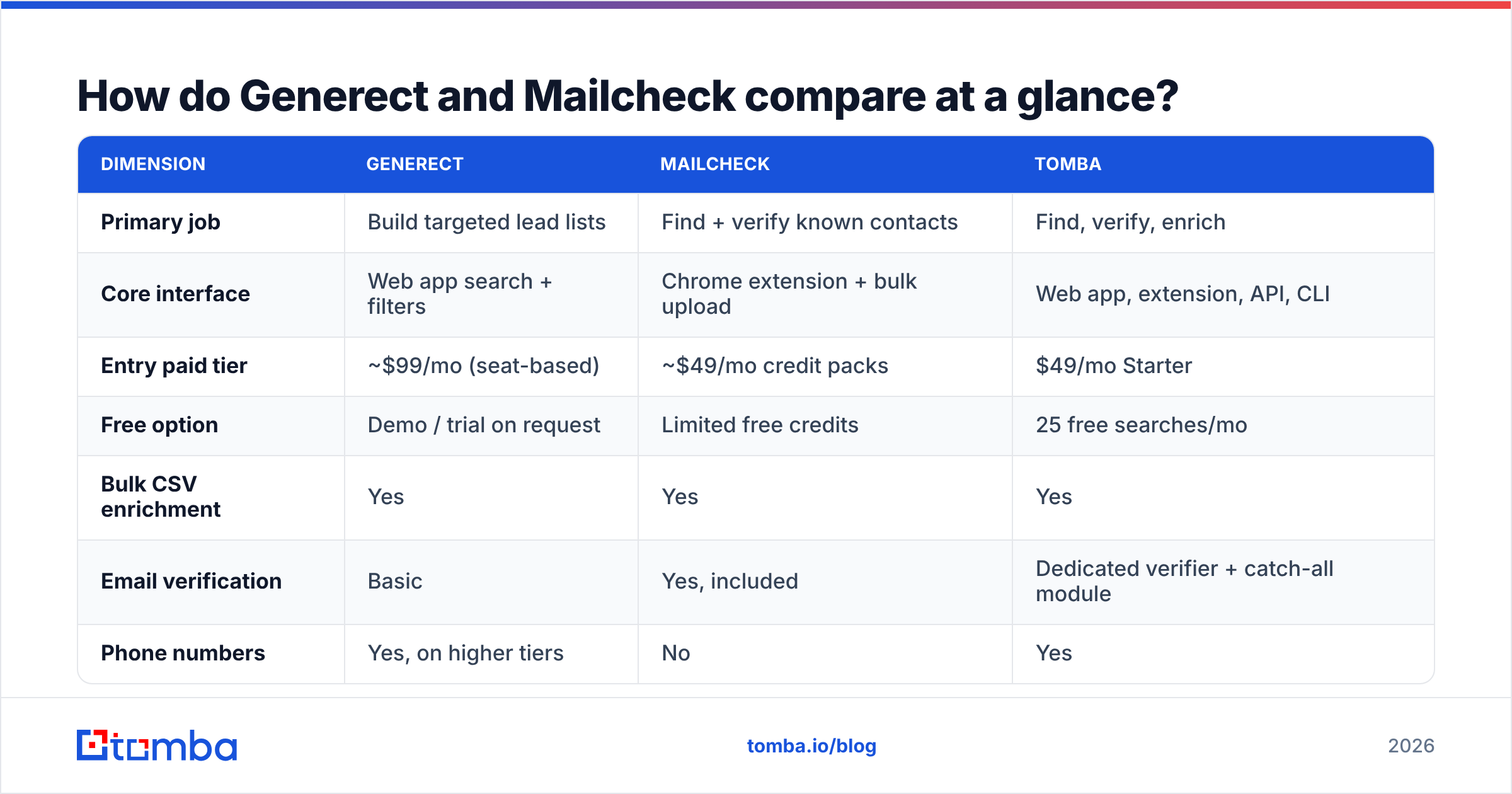
Here's the practical side-by-side. Pricing moves — treat the figures as directional and confirm on each vendor's page before you buy.
| Dimension | Generect | Mailcheck | Tomba |
|---|---|---|---|
| Primary job | Build targeted lead lists | Find + verify known contacts | Find, verify, enrich |
| Core interface | Web app search + filters | Chrome extension + bulk upload | Web app, extension, API, CLI |
| Entry paid tier | ~$99/mo (seat-based) | ~$49/mo credit packs | $49/mo Starter |
| Free option | Demo / trial on request | Limited free credits | 25 free searches/mo |
| Bulk CSV enrichment | Yes | Yes | Yes |
| Email verification | Basic | Yes, included | Dedicated verifier + catch-all module |
| Phone numbers | Yes, on higher tiers | No | Yes |
| Public API | Yes | Yes | Yes, plus CLI and MCP server |
| Best for | SDR teams building TAM lists | Growth marketers with existing lists | Teams that need one accurate data layer |
The pattern: Generect charges you for discovery, Mailcheck charges you for resolution, and the two bills are not interchangeable. Teams that buy Generect and then complain about deliverability usually needed a verifier. Teams that buy Mailcheck and then complain about "not enough leads" needed a database.

Which one actually finds more valid emails?#
Depends entirely on what you feed it.
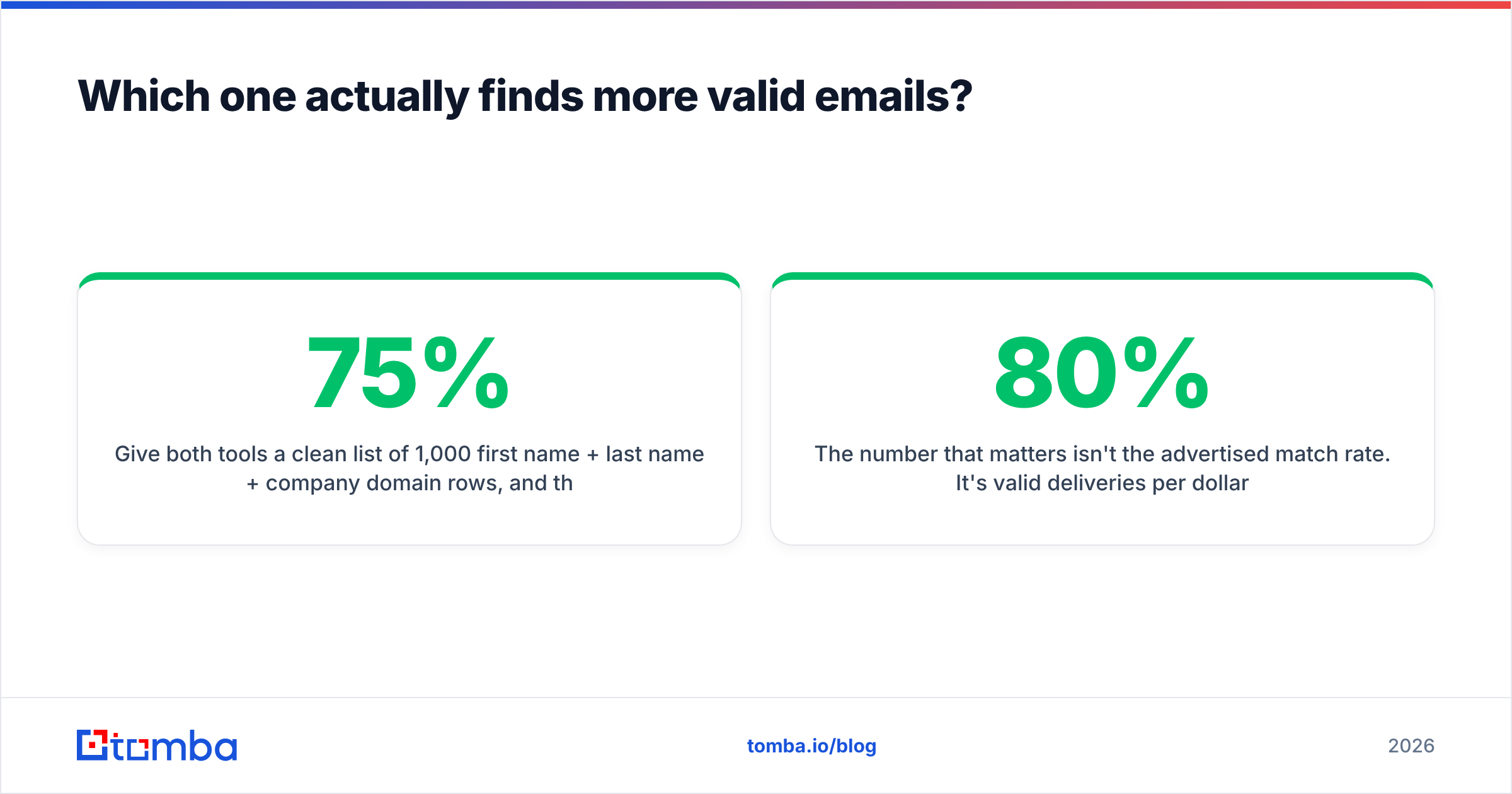
Give both tools a clean list of 1,000 first name + last name + company domain rows, and the gap narrows a lot. Email-finding on a known domain is a fairly commoditised problem: pattern inference, SMTP probing, historical sightings in public sources. Most credible vendors land in the 55–75% match-rate band on mid-market SaaS domains, with results collapsing on small local businesses and privacy-heavy European companies.
Give both tools a filter instead — "VP of Marketing at 200–500 employee fintechs in Germany" — and Generect wins by default, because Mailcheck was never trying to answer that question.
Where the two genuinely diverge is what happens to the rows they can't confidently resolve:
- Generect tends to return the best-guess address alongside the profile record. Good for coverage, dangerous if you don't verify before sending.
- Mailcheck is more conservative and doesn't bill you for misses, which keeps your cost-per-valid-email honest but leaves gaps in your list.
Neither behaviour is wrong. They're different defaults, and they produce very different bounce rates if you push exports straight into a sequencer.

The number that matters isn't the advertised match rate. It's valid deliveries per dollar after verification. A tool with an 80% match rate and a 15% bounce rate is worse than a tool with a 65% match rate and a 2% bounce rate — because the second one doesn't cost you domain reputation. Run the arithmetic on your own sample before you sign an annual contract.
[Suggested screenshot: side-by-side export from Generect's people search and Mailcheck's bulk enrichment, same 100-row input list, with match-rate and bounce columns highlighted.]
How does the pricing actually compare?#
Two different billing philosophies, and this is where most of the buying decision gets made.
Generect is closer to a classic sales-intelligence contract: seats, tiers, annual discounts, credits that reset monthly. Budget predictability is good; flexibility is not. If two of your five SDRs go quiet for a quarter, you're still paying for their seats.
Mailcheck is closer to a utility: buy credits, spend credits, top up. Great when volume is spiky. Less great when you need ten people in the tool with role permissions and shared lists.
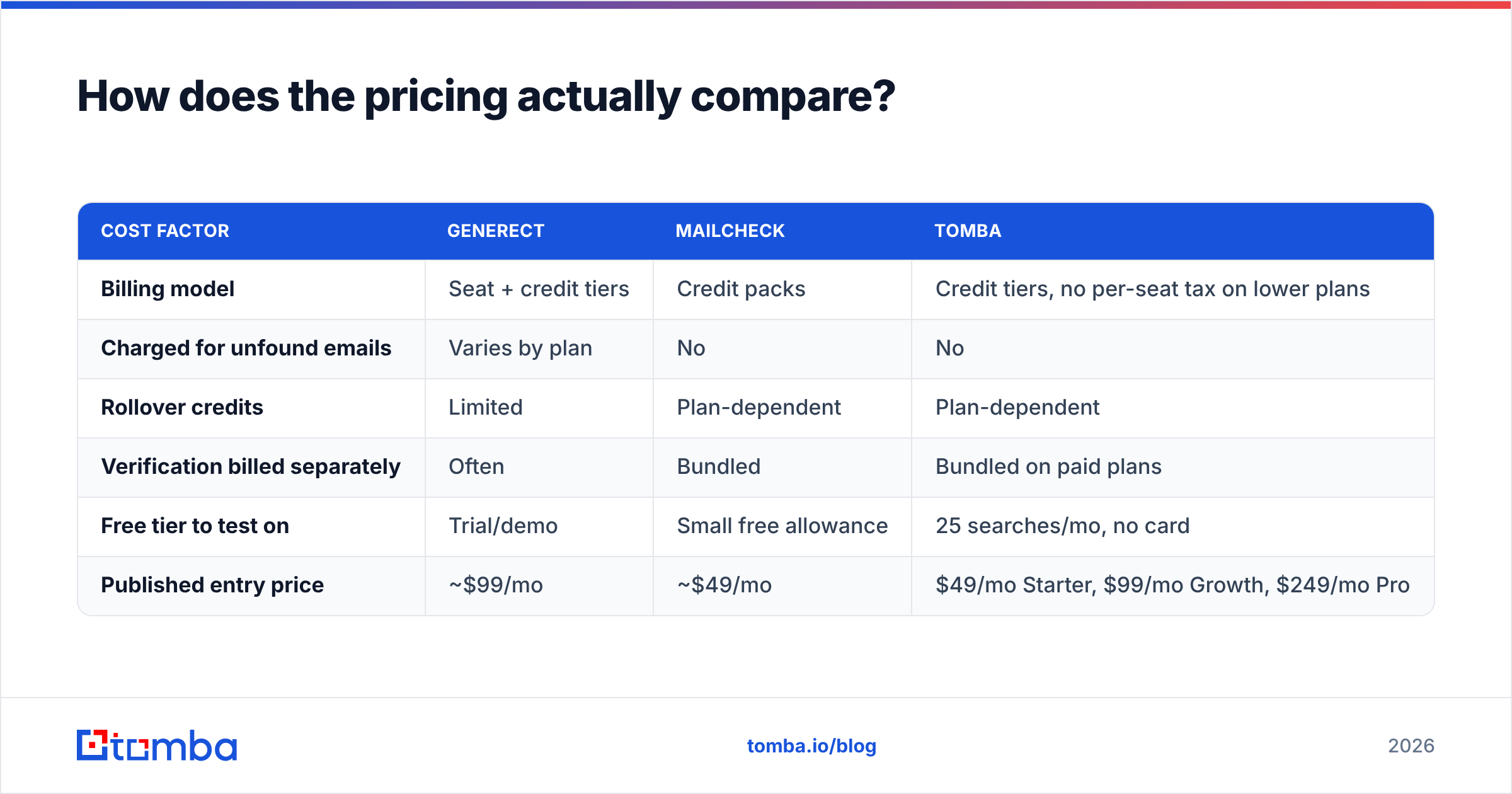
| Cost factor | Generect | Mailcheck | Tomba |
|---|---|---|---|
| Billing model | Seat + credit tiers | Credit packs | Credit tiers, no per-seat tax on lower plans |
| Charged for unfound emails | Varies by plan | No | No |
| Rollover credits | Limited | Plan-dependent | Plan-dependent |
| Verification billed separately | Often | Bundled | Bundled on paid plans |
| Free tier to test on | Trial/demo | Small free allowance | 25 searches/mo, no card |
| Published entry price | ~$99/mo | ~$49/mo | $49/mo Starter, $99/mo Growth, $249/mo Pro |

A note buyers routinely miss: "credits" mean different things at different vendors. Some charge one credit per lookup attempt, some per successful find, some charge separately for the verification step, and some charge extra for the phone number attached to the same record. Before comparing sticker prices, normalise everything to cost per verified, deliverable email. That single calculation reorders most shortlists. Full Tomba pricing is public if you want a fixed reference point to compare against.
What about catch-all domains and verification?#
This is the part of the Generect vs Mailcheck decision nobody puts in a comparison chart, and it's the part that determines whether your campaign lands.
Roughly a fifth to a quarter of B2B domains are configured as catch-all: the mail server accepts anything at the domain, so a standard SMTP check returns "valid" whether or not the mailbox exists. Every finder on the market can hand you first.last@catchall-domain.com and mark it green. Only some of them can tell you whether a human reads it.
- Generect treats verification as a secondary feature. You'll usually want a dedicated verifier downstream.
- Mailcheck includes verification in the core workflow, which is a real advantage over Generect for send-ready lists — but catch-all resolution remains a hard problem for any single-signal checker.
- Tomba splits this out explicitly with a catch-all verifier that layers pattern confidence, historical sighting data, and domain behaviour rather than relying on the SMTP handshake alone.
If you're sending from a domain you care about, assume every "valid" flag on a catch-all domain is a maybe. Segment those rows, send them from a secondary domain, and watch the bounce rate separately. Your sender reputation is the asset you're protecting, and it's much cheaper to protect than to rebuild.

[Suggested screenshot: Google Postmaster Tools reputation graph showing the dip that follows a single unverified 5,000-contact send.]
Is Generect better for list building?#
Yes — with a caveat about what kind of list.
Generect's strength is the search layer. Filter by firmographics, pull the matching people, export. For an SDR team that needs to construct a total addressable market from scratch every quarter, that's a workflow Mailcheck simply doesn't offer. You'd be pasting LinkedIn URLs one at a time, which stops scaling around row 200.
The caveat is that LinkedIn-derived data inherits LinkedIn's biases. Coverage is excellent for tech, SaaS, consulting, and anything where professionals maintain profiles for career reasons. It thins out fast for trades, manufacturing floor management, regional retail, healthcare administration, and most of the non-English SMB world. If your ICP is a 40-person industrial supplier in Ohio, a LinkedIn-shaped database will show you three people and none of them will be the buyer.
For those segments you're better off working from the domain inward — start with the company website, then run a domain search to pull every published address on that domain with role and confidence attached. Different mechanism, and it doesn't care whether the buyer keeps a profile current.
Is Mailcheck better for one-off and mid-volume lookups?#
Yes, and it's a legitimately good tool at that job.
The extension is quick, the miss policy is fair, and the pricing is friendly to solo founders and small growth teams. If your process is "I found 60 interesting companies on Product Hunt this month, get me the founder's email," Mailcheck does that with almost no friction and very little spend.
Where it runs out of road:
- Team workflows. Shared lists, permissions, and usage reporting are thinner than in seat-based platforms.
- API depth. Fine for enrichment calls; less suited to being the data layer behind a product.
- Adjacent data. No phone numbers, limited firmographic enrichment. You'll bolt on a second vendor.
- Discovery. It resolves contacts you already identified. It won't tell you who to identify.
That's not a flaw so much as a scope decision, and it's why the honest answer to "Generect or Mailcheck" is often "neither alone."
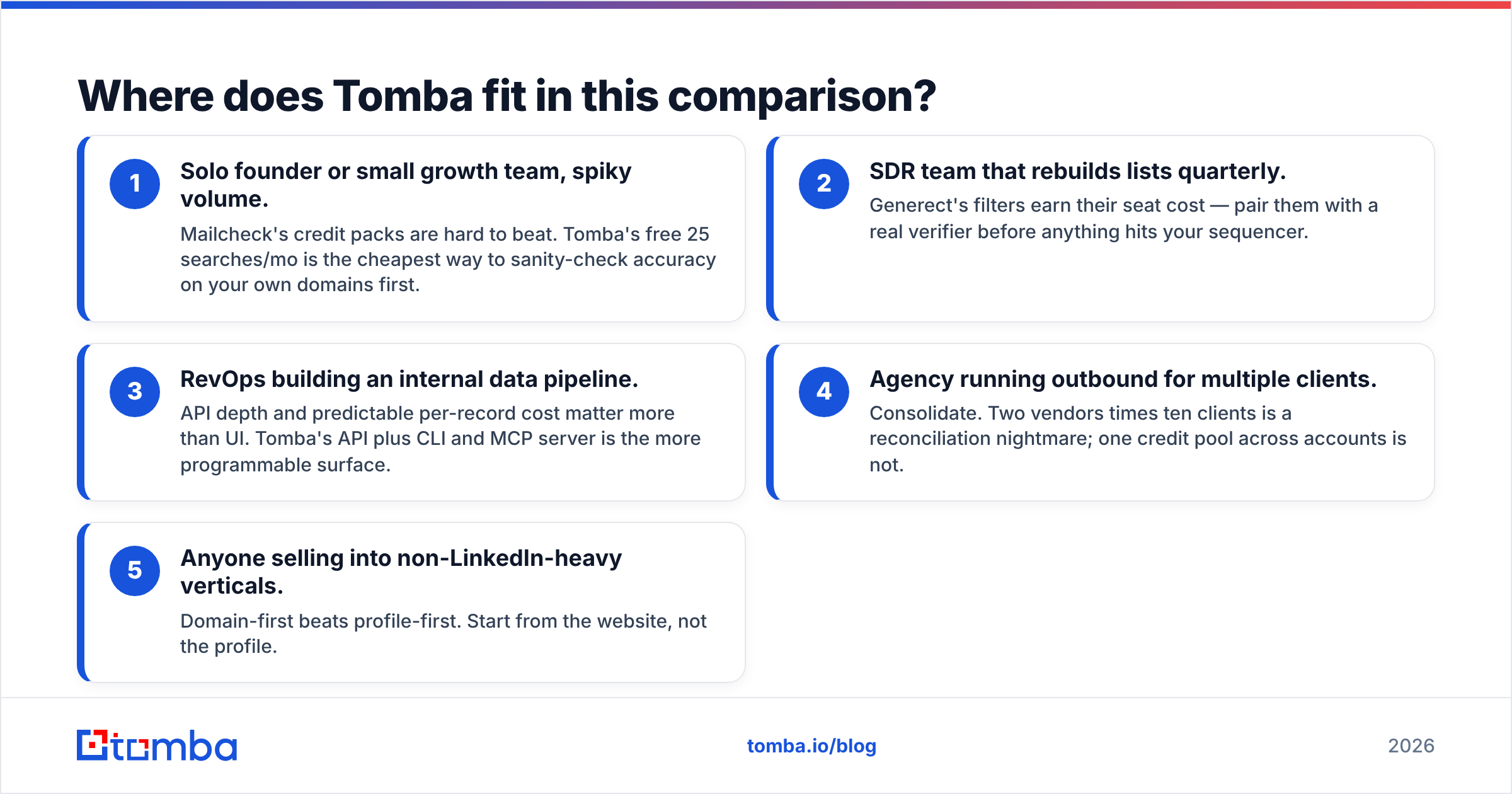
Where does Tomba fit in this comparison?#
Tomba is the consolidation option — one data layer that covers both halves rather than two subscriptions that each cover one.
Concretely, that means the email finder for name-plus-domain resolution, domain search for company-wide sweeps, a dedicated email verifier with catch-all handling, phone finder for multichannel, and data enrichment to fill out records already in your CRM. Same credit pool, same API key.
How the three shake out by buyer type:
- Solo founder or small growth team, spiky volume. Mailcheck's credit packs are hard to beat. Tomba's free 25 searches/mo is the cheapest way to sanity-check accuracy on your own domains first.
- SDR team that rebuilds lists quarterly. Generect's filters earn their seat cost — pair them with a real verifier before anything hits your sequencer.
- RevOps building an internal data pipeline. API depth and predictable per-record cost matter more than UI. Tomba's API plus CLI and MCP server is the more programmable surface.
- Agency running outbound for multiple clients. Consolidate. Two vendors times ten clients is a reconciliation nightmare; one credit pool across accounts is not.
- Anyone selling into non-LinkedIn-heavy verticals. Domain-first beats profile-first. Start from the website, not the profile.
Independent reviews on G2 are worth reading for all three, with the usual caveat that review-site scores track onboarding experience more closely than they track data accuracy.
How should you run the evaluation?#
Don't trust anyone's published match rate, including the numbers in this post. Run a controlled test:
- Take 200 contacts you already have verified addresses for — past customers, closed-lost deals, inbound leads. This is your answer key.
- Strip the emails, keep name and domain, upload the same file to each tool.
- Score three things: match rate, accuracy against the answer key, and cost for the run.
- Repeat with 200 contacts from your hardest segment, not your easiest.
The second test is the one that matters. Every vendor performs well on well-known tech domains. The shortlist ranking almost always changes when you switch to the segment you actually struggle with, and that reordering is worth more than any comparison table — this one included.
The bottom line#
Generect if discovery is your bottleneck and your ICP lives on LinkedIn. Mailcheck if resolution is your bottleneck and you want the lowest per-lookup cost. Neither one removes the need for serious verification before you send.
If you'd rather not run two subscriptions and reconcile two credit systems, start with the Tomba Email Finder — 25 free searches a month, no card required, and finder, verifier, catch-all checker, and enrichment sit on the same key. Run your 200-row answer-key test on all three, then buy the one that wins on your data, not on anyone's marketing page.
Related guides#
Ready to find emails that actually work?
Join 150,000+ professionals who stopped guessing and started sending. Free credits on signup — no credit card required.
Get the Tomba newsletter
Practical outbound tactics and product updates — once every two weeks.
About the author