Generect vs Mailtester Ninja: Which B2B Email Tool Wins in 2026?
Generect sells lead lists and LinkedIn scraping. Mailtester Ninja sells cheap verification. We compare accuracy, pricing, API limits, and who each one actually fits in 2026.
TL;DR
- Generect is a lead-database and LinkedIn-extraction tool. You buy contacts and company lists; verification is a side feature, not the core.
- Mailtester Ninja is a pure email-verification API with unusually cheap pay-as-you-go pricing. It does not find emails for you.
- They are not really competitors — they sit at opposite ends of the same workflow. Comparing them fairly means comparing what you still have to buy alongside each.
- If you need find + verify in one place with a proper API, a combined tool like Tomba removes the second vendor and the second invoice.
- Budget reality: Mailtester Ninja can cost under $0.001 per verification; Generect starts in the hundreds per month. Very different buying decisions.
What are Generect and Mailtester Ninja?#
Generect is a B2B data platform built around LinkedIn. Its pitch is real-time extraction: instead of serving you a stale database row, it goes and pulls a lead's details when you ask for them, then returns work email and company data. It ships a lead-search UI, a LinkedIn scraping layer, and an API for teams that want to pipe contacts into their own systems.
Mailtester Ninja is a much narrower product. It is an email verification service — you send it an address, it tells you whether the mailbox is likely to accept mail. It got attention because of price: pay-as-you-go credits that land far below what ZeroBounce or NeverBounce charge, plus a free tier generous enough for solo operators. There's no lead database, no scraper, no prospecting UI.
So the honest framing is this: Generect answers "who should I email and what's their address?" Mailtester Ninja answers "will this address bounce?" Most outbound teams need both answers, which is why the real comparison below includes a third column — what a combined finder-plus-verifier looks like.
How do the two tools actually differ?#
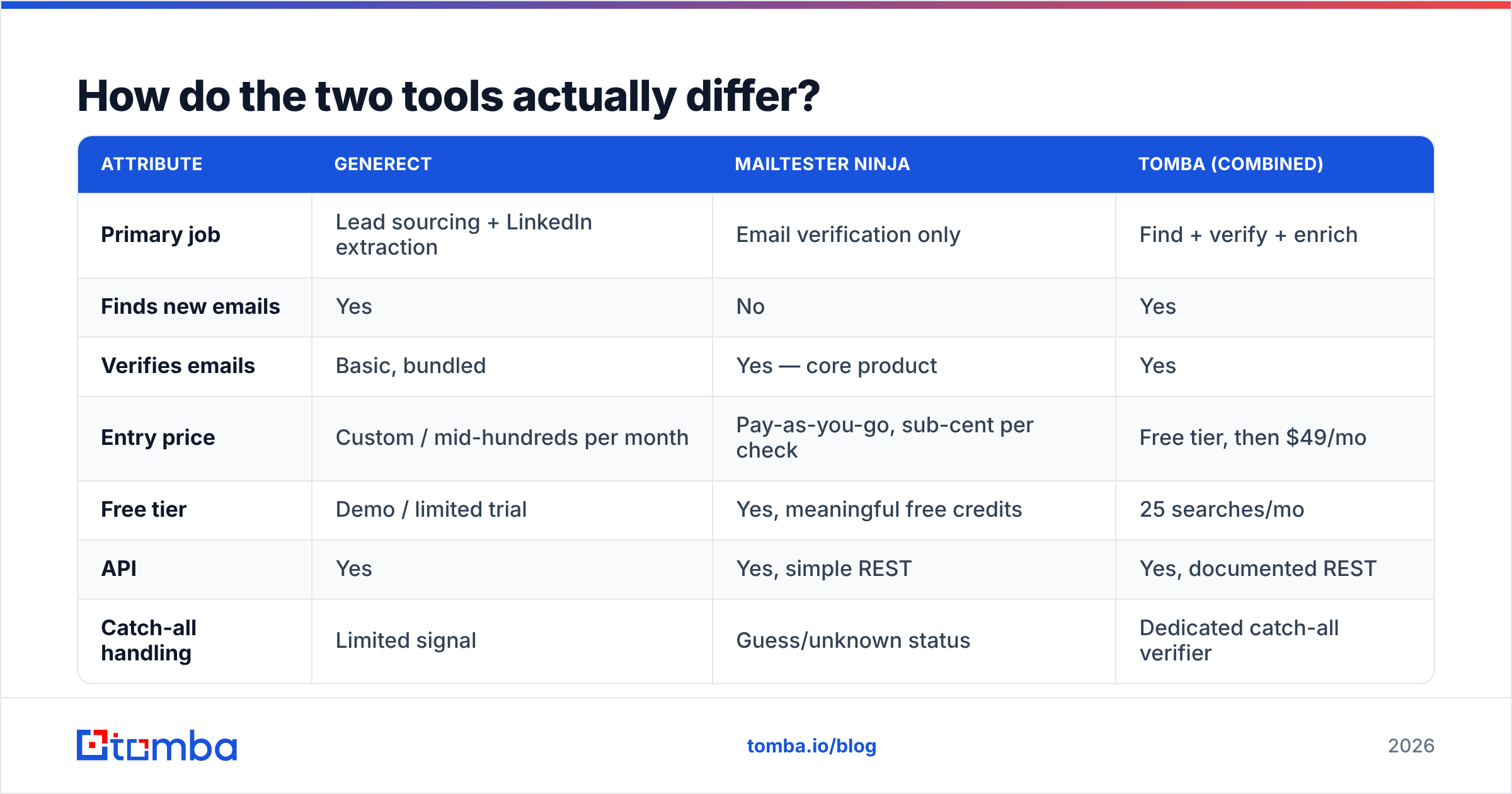
Here is the side-by-side, including a combined-tool column so you can see the workflow gap each one leaves behind.
| Attribute | Generect | Mailtester Ninja | Tomba (combined) |
|---|---|---|---|
| Primary job | Lead sourcing + LinkedIn extraction | Email verification only | Find + verify + enrich |
| Finds new emails | Yes | No | Yes |
| Verifies emails | Basic, bundled | Yes — core product | Yes |
| Entry price | Custom / mid-hundreds per month | Pay-as-you-go, sub-cent per check | Free tier, then $49/mo |
| Free tier | Demo / limited trial | Yes, meaningful free credits | 25 searches/mo |
| API | Yes | Yes, simple REST | Yes, documented REST |
| Catch-all handling | Limited signal | Guess/unknown status | Dedicated catch-all verifier |
| Bulk workflow | List export | CSV bulk verify | Bulk find + bulk verify |
| Best for | Teams buying lead lists at volume | Cleaning lists you already own | Teams doing both in one place |
The pattern is easy to read. Generect gives you contacts but leaves list hygiene thin. Mailtester Ninja gives you hygiene but no contacts. Neither one is wrong — they're just half a stack each.
Is Generect worth it for lead sourcing?#
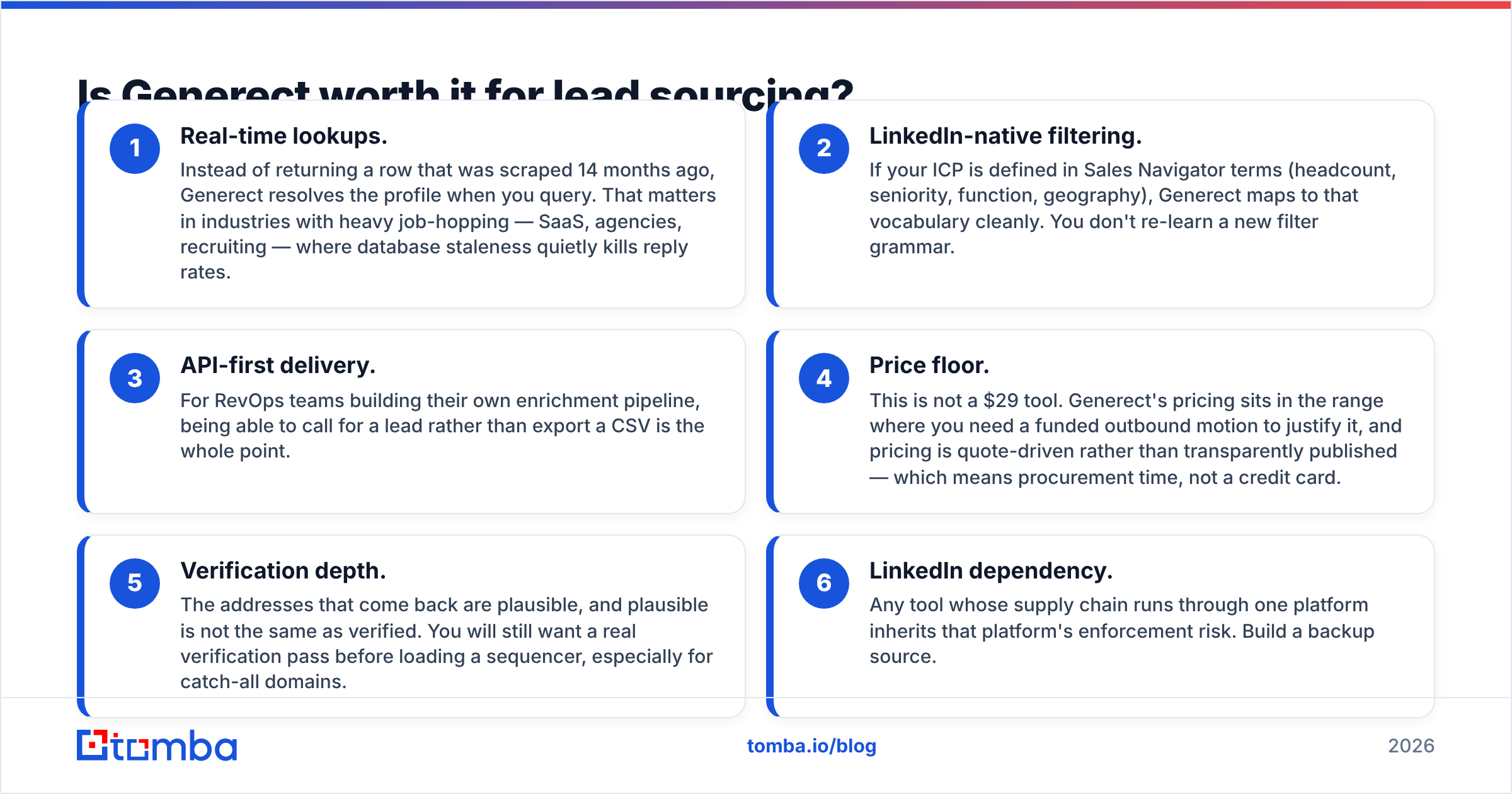
Generect earns its place when your bottleneck is volume of net-new contacts, specifically from LinkedIn. Three things it does well:
- Real-time lookups. Instead of returning a row that was scraped 14 months ago, Generect resolves the profile when you query. That matters in industries with heavy job-hopping — SaaS, agencies, recruiting — where database staleness quietly kills reply rates.
- LinkedIn-native filtering. If your ICP is defined in Sales Navigator terms (headcount, seniority, function, geography), Generect maps to that vocabulary cleanly. You don't re-learn a new filter grammar.
- API-first delivery. For RevOps teams building their own enrichment pipeline, being able to call for a lead rather than export a CSV is the whole point.
Where it gets uncomfortable:
- Price floor. This is not a $29 tool. Generect's pricing sits in the range where you need a funded outbound motion to justify it, and pricing is quote-driven rather than transparently published — which means procurement time, not a credit card.
- Verification depth. The addresses that come back are plausible, and plausible is not the same as verified. You will still want a real verification pass before loading a sequencer, especially for catch-all domains.
- LinkedIn dependency. Any tool whose supply chain runs through one platform inherits that platform's enforcement risk. Build a backup source.
If you're evaluating Generect against broader databases, it's worth also looking at how a B2B database with published pricing compares on cost per usable contact — not cost per credit, which is the number vendors prefer you to look at.
Is Mailtester Ninja accurate enough to trust?#
Mostly yes, with a specific caveat that applies to every verifier on the market.
Mailtester Ninja runs the standard verification chain: syntax check, domain and MX record lookup, then an SMTP conversation with the receiving server to see whether the mailbox is accepted. On domains that answer honestly — most self-hosted mail servers, many Google Workspace tenants — this is reliable and cheap.
The caveat is catch-all domains. A catch-all server accepts mail for any address at the domain, so definitely-not-real@company.com returns the same "accepted" as the CEO's actual inbox. Every SMTP-based verifier hits this wall. Mailtester Ninja will typically return an unknown or risky status, which is honest — but it hands the decision back to you.
That's the gap where a dedicated catch-all verifier earns its keep, because catch-all domains are not a rounding error. Depending on the segment, 15–25% of B2B domains run catch-all. If you discard all of them you throw away a quarter of your list; if you mail all of them blind you take bounce damage.
Practical guidance regardless of which verifier you pick:
- Never mail "unknown" at volume. Segment them into a lower-volume, higher-warmth campaign or run them through a secondary check.
- Verify close to send time. A list verified 60 days ago is not a verified list. B2B email decays roughly 2–2.5% per month.
- Watch your bounce ceiling, not your average. Google and Microsoft judge you per-domain and per-sending-window. One bad batch can drag your sender reputation down for weeks.
- Test the vendor on your own data. Run 500 addresses you already know the answer to. Vendor-published accuracy numbers are marketing; your list is the benchmark.
What does each one actually cost?#
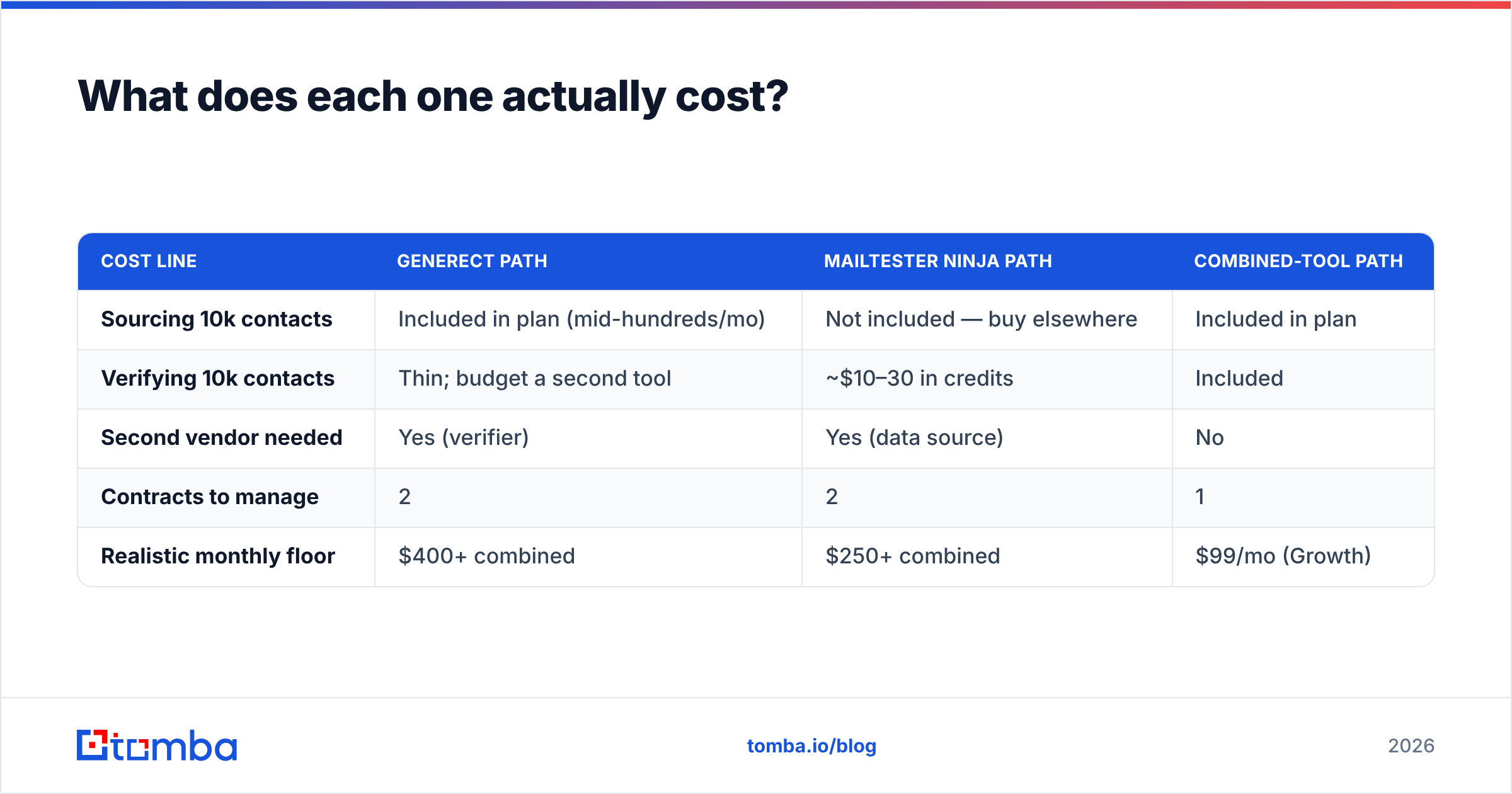
Cost comparison is awkward here because the two tools price on different units — Generect prices access to data, Mailtester Ninja prices per check. Here's the practical translation for a team doing 10,000 outbound contacts a month.
| Cost line | Generect path | Mailtester Ninja path | Combined-tool path |
|---|---|---|---|
| Sourcing 10k contacts | Included in plan (mid-hundreds/mo) | Not included — buy elsewhere | Included in plan |
| Verifying 10k contacts | Thin; budget a second tool | ~$10–30 in credits | Included |
| Second vendor needed | Yes (verifier) | Yes (data source) | No |
| Contracts to manage | 2 | 2 | 1 |
| Realistic monthly floor | $400+ combined | $250+ combined | $99/mo (Growth) |
The number people miss is the second vendor. Whichever of these two you buy, you are buying half the workflow, and the other half still has a price tag. That's not a knock on either product — it's just the arithmetic. For comparison, Tomba pricing runs a free tier at 25 searches/mo, Starter at $49/mo, Growth at $99/mo, and Pro at $249/mo, with finding and verification in the same account and the same email finder API.
If you're a solo founder cleaning a list you already scraped, Mailtester Ninja's economics are genuinely hard to beat — a few dollars gets you a long way. If you're a 12-rep team with a defined ICP and no list at all, Generect's price makes more sense than paying a data broker per record. The mistake is buying either one and expecting it to cover the whole pipeline.

Which one should you pick for your team?#
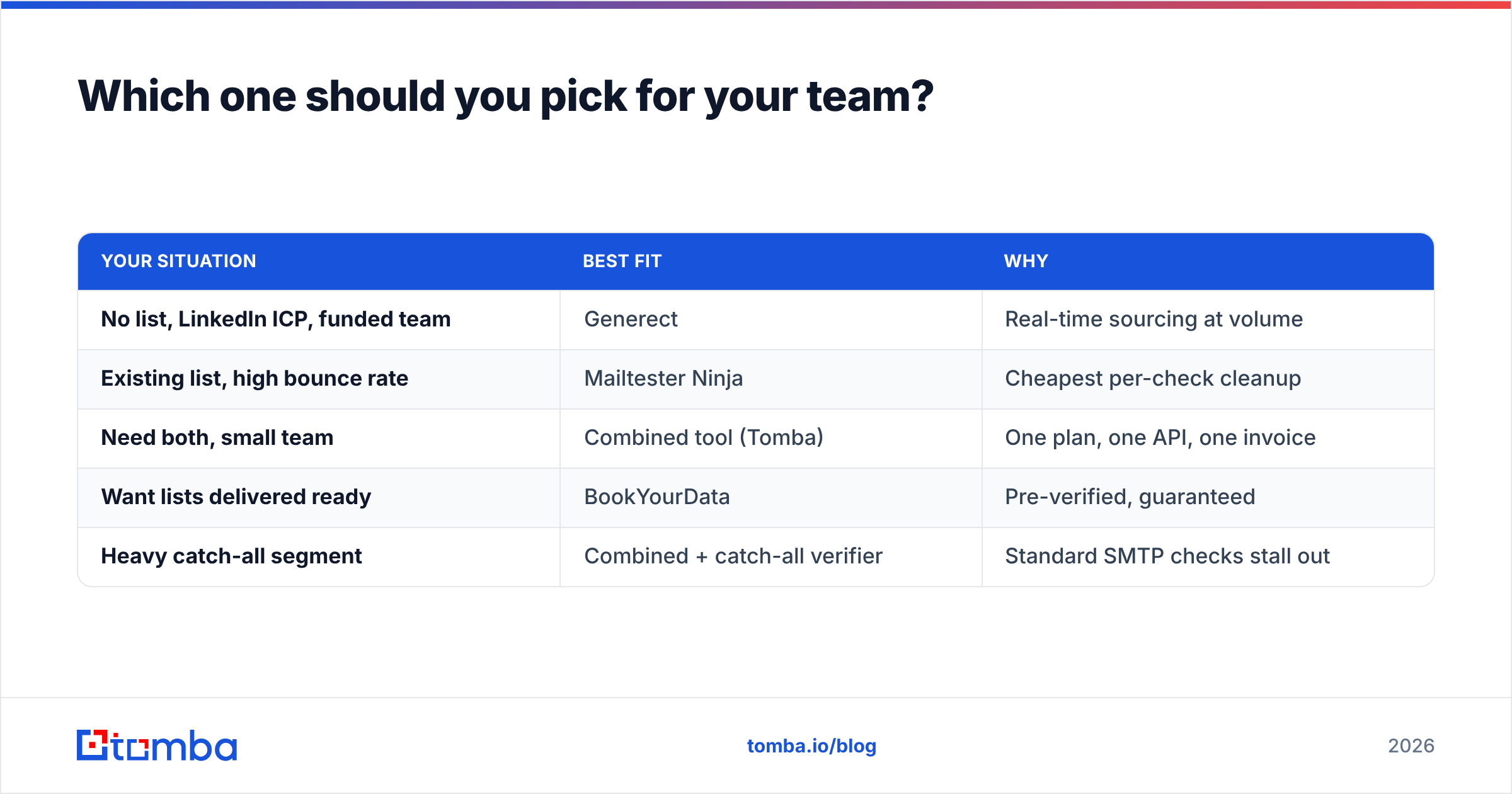
Match the tool to the bottleneck, not to the feature list.
Pick Generect if: your ICP lives on LinkedIn, you have budget above ~$400/month for data, you already run a verification step you trust, and freshness matters more than price per record. Recruiting agencies and SaaS SDR teams targeting fast-moving companies get the most out of the real-time angle.
Pick Mailtester Ninja if: you already have lists — from events, a CRM export, a scraper, a partner — and your problem is bounce rate, not contact count. At sub-cent pricing, there's almost no scenario where verifying is not worth it. It's also a sensible cheap layer on top of another data source, including Generect.
Pick a combined platform if: you're tired of reconciling two credit balances and two APIs. Finding and verifying in one system means the verification result travels with the record instead of living in a CSV somewhere. That's the argument for tools like Tomba, Findymail, or Apollo depending on how much CRM and sequencing you want bundled.
Consider a curated list vendor if: you want verified contacts delivered rather than assembled. BookYourData is a solid option in that lane — you buy a pre-verified list with a bounce guarantee rather than running the pipeline yourself. It's a different purchase model from both tools here, and for teams without a data ops person, sometimes the right one.
A quick decision table:
| Your situation | Best fit | Why |
|---|---|---|
| No list, LinkedIn ICP, funded team | Generect | Real-time sourcing at volume |
| Existing list, high bounce rate | Mailtester Ninja | Cheapest per-check cleanup |
| Need both, small team | Combined tool (Tomba) | One plan, one API, one invoice |
| Want lists delivered ready | BookYourData | Pre-verified, guaranteed |
| Heavy catch-all segment | Combined + catch-all verifier | Standard SMTP checks stall out |
How do you build the workflow either way?#
Whichever vendor you land on, the sequence that protects deliverability looks the same:
- Define the ICP before you buy credits. Every tool charges for lookups whether or not the lead was a fit. Tighten filters first.
- Source contacts — from Generect, from a domain search against target company domains, or from a list vendor.
- Verify immediately, then re-verify anything older than 30 days before it enters a sequence.
- Split catch-all and unknown into their own segment. Lower volume, more personalization, separate sending domain if you can.
- Enrich what survives — job title, company size, tech stack — so the copy has something to work with. Data enrichment at this stage costs less than enriching everything upfront.
- Monitor bounce by segment, not in aggregate, so you can see which source is degrading. If a source consistently produces 4%+ bounces after verification, the source is the problem.
For teams doing this at any scale, the G2 category listings are useful for spotting which vendors have recent, verified reviews versus which are coasting on 2023 ratings. And if deliverability is the actual pain, Google's own sender guidelines remain the definitive source on what bulk senders must do — worth reading before you blame a data vendor for inbox placement.
What's the verdict?#
Generect and Mailtester Ninja solve different halves of the same problem, and the better question is what you'd pair each one with. Generect is a legitimate sourcing tool with a real freshness advantage and a price that assumes a funded team. Mailtester Ninja is one of the cheapest credible verifiers available and an easy yes for anyone with an existing list. Neither is a full outbound data stack on its own.
If you'd rather not run two vendors, two credit balances, and two integrations, start with a platform that does both. Tomba's email finder finds addresses by domain, name, or company and verifies them in the same call, with a free tier at 25 searches a month, Starter at $49/mo, and Growth at $99/mo — plus a documented API, a Chrome extension, and bulk processing when you outgrow one-at-a-time lookups. Run 25 searches against your own target accounts and compare the hit rate to whatever you're using now. That test takes ten minutes and settles the question better than any comparison table.
Related guides#
Ready to find emails that actually work?
Join 150,000+ professionals who stopped guessing and started sending. Free credits on signup — no credit card required.
Get the Tomba newsletter
Practical outbound tactics and product updates — once every two weeks.
About the author