Generect vs The Data City: Which B2B Data Tool Wins in 2026?
Generect sells contacts. The Data City sells company intelligence. They get compared constantly, but they solve different problems. Here is the honest breakdown of coverage, pricing, and which one actually belongs in your stack.
TL;DR — Generect vs The Data City in one minute
- Generect is a contact-data tool. It turns LinkedIn-style searches into names, job titles, and work emails you can send to.
- The Data City is a UK company-data tool. It sorts firms by what they really do, using live website data instead of old SIC codes.
- They are not true rivals. One answers "who do I email here?" The other answers "which firms are even in this new sector?"
- Both price by quote. That makes budgets harder than they should be. Neither posts a clean self-serve price list.
- Need emails more than market maps? A finder-plus-verifier stack costs less and fails less often.
Most people search Generect vs The Data City after both names land in the same shortlist. On a slide the two look alike. They are not. Here is the plain-English split.
Generect vs The Data City: what does each tool do?#
Generect is a B2B lead-data provider. Its main promise is live lookups. Most tools hand you a database snapshot built 14 months ago. Generect queries live sources at the moment you ask. You get company records, people records, and contact details.
The search logic is LinkedIn-shaped. Filter by headcount, industry, region, seniority, or keyword. You can work in the app or through the API. Typical buyers are outbound teams, lead-gen agencies, and product teams that pipe lead data into their own app.
The Data City is a different animal. It is a UK company-data platform built on Real-Time Industrial Classification (RTIC). Standard industry codes describe modern firms badly. A carbon-accounting startup gets filed under "computer programming activities." That tells you nothing.
The Data City reads company websites and other public signals. It then sorts firms by what they genuinely do. Buyers include economic development agencies, councils, universities, investors, and strategy teams. They need to size a sector, track its growth, and name the firms inside it.
So the honest way to frame Generect vs The Data City is not "which tool wins." It is "which question are you asking?"
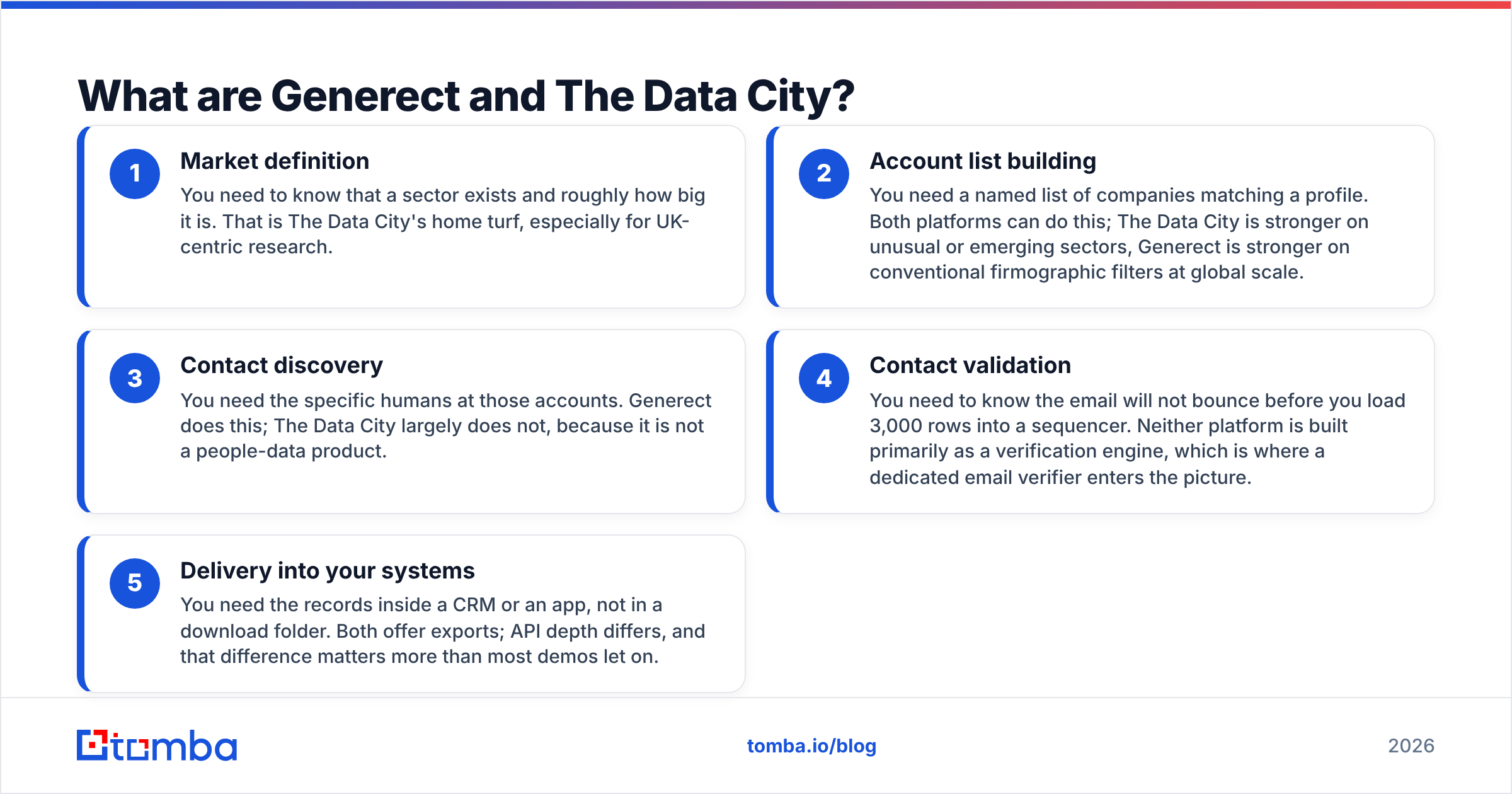
Here is the split, in the order most teams hit it:
- Market definition — First you learn that a sector exists and how big it is. That is The Data City's home turf, mostly in the UK.
- Account list building — Next you need named firms that fit your profile. Both tools do this. The Data City is better at new or odd sectors. Generect is better at plain firmographic filters at global scale.
- Contact discovery — Then you need the people. Generect does this. The Data City does not, because it is not a people-data product.
- Contact validation — You need to know an email will not bounce. Neither tool is built for that job. This is where a dedicated email verifier comes in.
- Delivery into your systems — Last, the records must land in a CRM or an app. Both offer exports. API depth differs, and that gap matters more than demos admit.

Generect vs The Data City: head-to-head comparison#
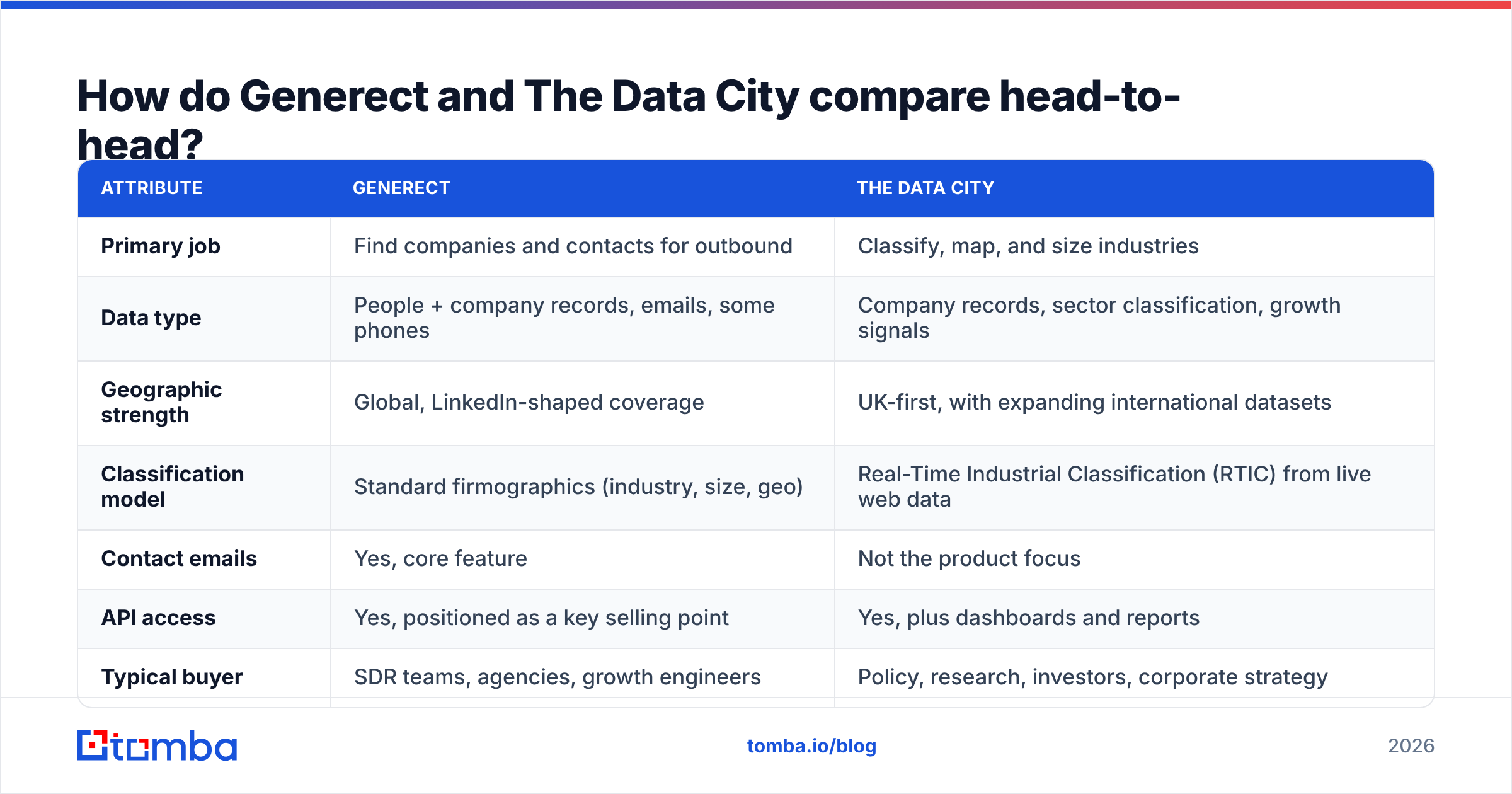
| Attribute | Generect | The Data City |
|---|---|---|
| Primary job | Find companies and contacts for outbound | Classify, map, and size industries |
| Data type | People + company records, emails, some phones | Company records, sector classification, growth signals |
| Geographic strength | Global, LinkedIn-shaped coverage | UK-first, with expanding international datasets |
| Classification model | Standard firmographics (industry, size, geo) | Real-Time Industrial Classification (RTIC) from live web data |
| Contact emails | Yes, core feature | Not the product focus |
| API access | Yes, positioned as a key selling point | Yes, plus dashboards and reports |
| Typical buyer | SDR teams, agencies, growth engineers | Policy, research, investors, corporate strategy |
| Pricing model | Quote / plan-based, not fully public | Subscription, quote-based by seat and dataset |
| Free self-serve trial | Limited, usually demo-gated | Demo-gated |
| Best output format | Lead lists, enriched records, API responses | Sector maps, company universes, trend reports |
Read that table twice before you book a demo. Most of the pain here comes from mismatched hopes. A research platform will not hand you a sequencer-ready contact list. An outbound tool will not size the UK quantum-computing cluster.
Generect vs The Data City: which has better data coverage?#
Neither. They count different things.
Generect's story is breadth of people records and fresh contact details. Live lookup is a good fit for that job. Contact data goes stale fast. The industry pegs decay at 25 to 30 percent a year, driven by job changes alone. A tool that refreshes on request beats a quarterly dump, as long as the sources are good.
The Data City's story is a complete company universe inside its scope. Say you want every UK firm working near green hydrogen. That includes the 40-person shops no analyst has covered. Standard databases miss them or file them wrong. The catch is that this depth is UK-heavy. A US or APAC motion gets far less from it.
A practical test: take ten accounts you already closed. Run them through both tools.
- The Data City passes if it names your sector correctly and surfaces twenty similar firms you had never heard of.
- Generect passes if it returns the right decision-maker at eight of those ten accounts, with an email that survives checks.
- If a tool fails its own test on your ICP, no feature list saves it.
Generect vs The Data City pricing: what will you pay?#
Both sit behind a sales call. That is the least fun answer possible. Neither posts the clear tiers you get from self-serve tools. So treat any number in a third-party listicle with doubt, then confirm it direct. Review profiles on G2 show how buyers describe value. They are not a price sheet.
You can still plan around the shape of the cost:
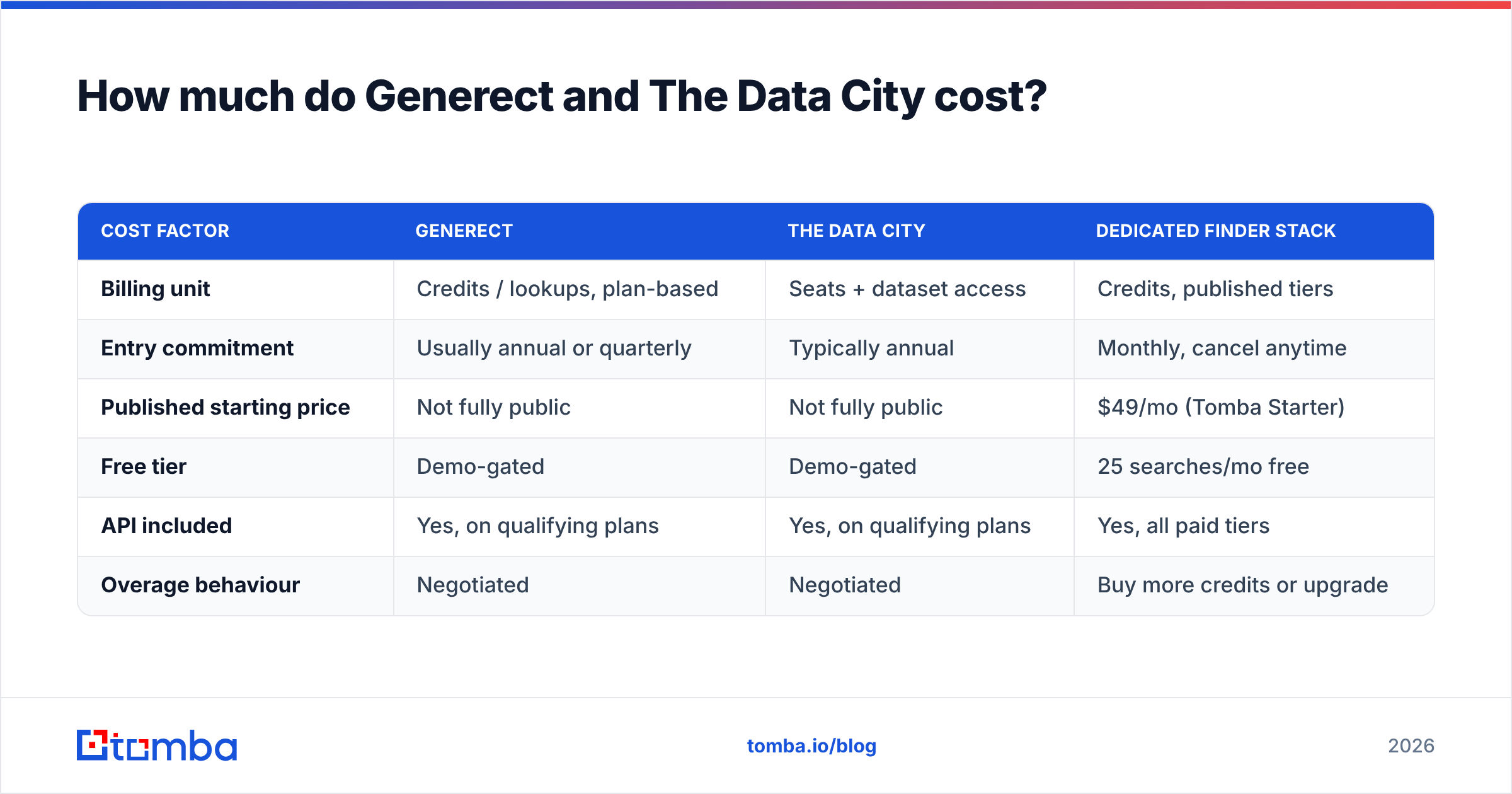
| Cost factor | Generect | The Data City | Dedicated finder stack |
|---|---|---|---|
| Billing unit | Credits / lookups, plan-based | Seats + dataset access | Credits, published tiers |
| Entry commitment | Usually annual or quarterly | Typically annual | Monthly, cancel anytime |
| Published starting price | Not fully public | Not fully public | $49/mo (Tomba Starter) |
| Free tier | Demo-gated | Demo-gated | 25 searches/mo free |
| API included | Yes, on qualifying plans | Yes, on qualifying plans | Yes, all paid tiers |
| Overage behaviour | Negotiated | Negotiated | Buy more credits or upgrade |
Here is why that matters. Outbound volume is spiky. You run a campaign, burn credits, then go quiet for six weeks. Annual seat deals punish that pattern. Research work is the opposite. It is steady and long-horizon, so seats suit it fine. The pricing model tells you who each product was built for.
For the transparent end of the market, Tomba pricing runs Free (25 searches a month), Starter at $49/mo, Growth at $99/mo, Pro at $249/mo, and custom Enterprise. No demo needed to see it.
Generect vs The Data City for outbound sales: which wins?#
Generect wins for most outbound teams. One caveat matters.
Generect is built for the motion. It returns people, not just firms. API-first delivery lets your ops person pipe records into the CRM. No manual export ritual. Its filters match how SDR managers think: headcount band, seniority, region, tech, recent hiring.
The caveat is checking emails. Any provider that hands you an address is making a guess. The guess gets weaker at small firms, on catch-all domains, and after a role change. Catch-all domains are the quiet killer. The mail server accepts every address, so a basic check marks it "valid." You learn the truth when bounces spike three days into a campaign. A dedicated catch-all verifier exists for exactly that reason.
Here is a rule that has survived a lot of campaigns. Never send to a list you did not check yourself. Vendor checks are a start, not a promise. Keep hard bounces under 2 percent and your sender reputation holds. Sit above 4 or 5 percent and inbox placement drops for every later campaign, including the good ones.

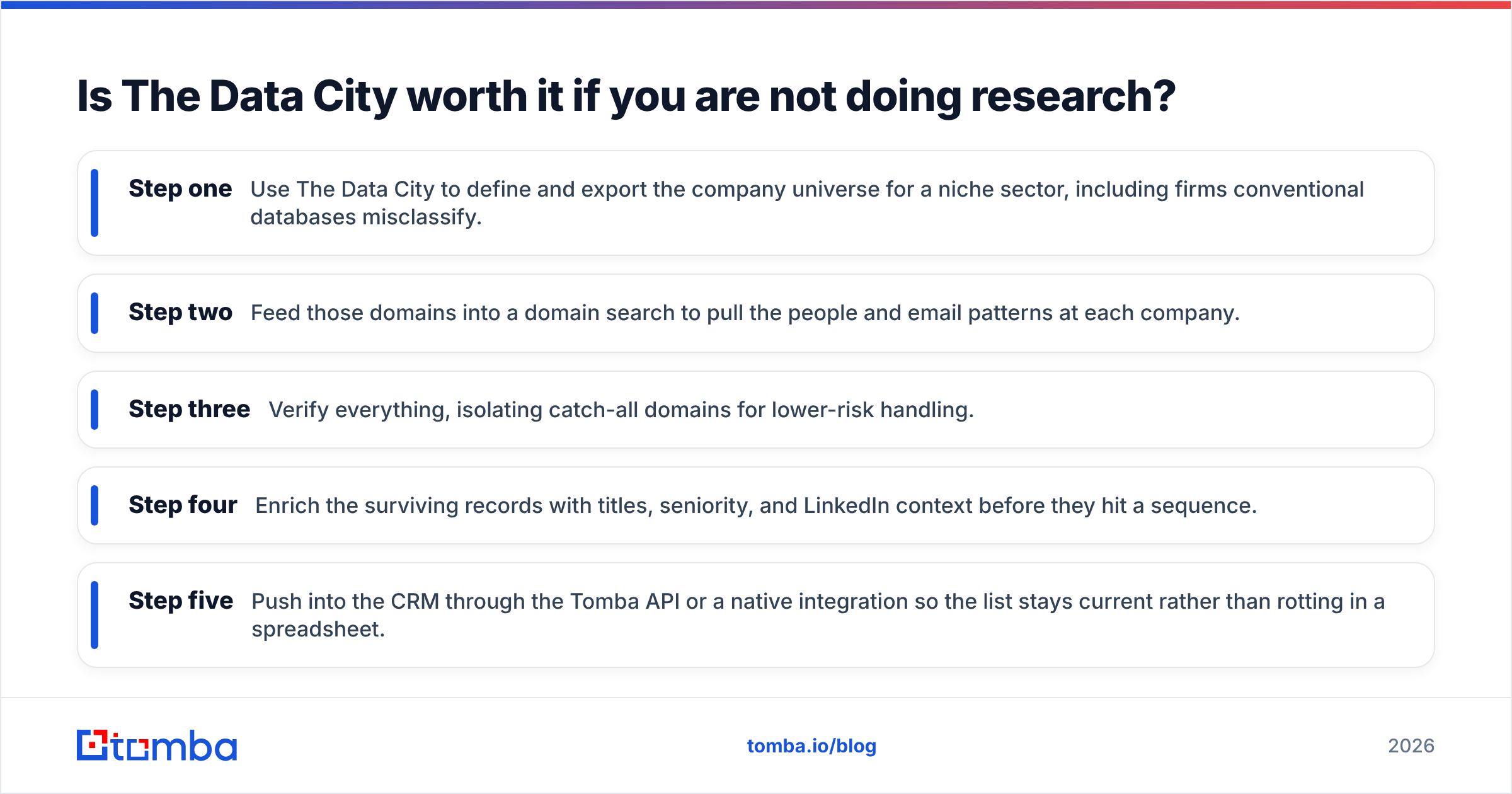
Is The Data City worth it if you are not doing research?#
Probably not. That is not a knock on the tool.
The Data City earns its keep when you ask "what is happening in this sector?" Think regional strategy, investment theses, cluster studies, grant work, spin-out tracking, or M&A scans. In those jobs RTIC beats legacy codes. Little else matches it for the UK.
It disappoints the buyer who wanted a prospecting tool. You get a great list of firms. Then you ask, "so who do I contact?" That last mile is not the product's job, and onboarding will not change it.
There is a hybrid pattern that works well, and more teams should use it:
- Step one — Use The Data City to define and export the company list for a niche sector, including firms other databases misfile.
- Step two — Feed those domains into a domain search to pull the people and email patterns at each firm.
- Step three — Verify everything. Flag catch-all domains for safer handling.
- Step four — Add titles, seniority, and LinkedIn context before the records hit a sequence.
- Step five — Push into the CRM through the Tomba API or a native integration, so the list stays fresh.
That order gives you research-grade targeting with outbound-grade reach. Neither tool does both alone.
Generect vs The Data City: where each one falls short#
Generect's weak points. Hidden pricing slows down buying. Small teams often just want to test 500 lookups first. Live lookup is great for freshness, but speed and volume matter. Bulk jobs behave unlike single lookups, so test at your real volume, not the demo's. Coverage also skews to roles and regions where profiles are well kept. Trades, manufacturing, and non-English mid-market segments get thin.
The Data City's weak points. The UK focus is the big one. If under 30 percent of your pipeline is UK-based, the value drops fast. It is also a considered buy with a learning curve. An analyst will love it. An SDR will barely open it. And since it skips contact discovery, it is one part of a stack, never the whole stack.
What both share. Demo-gated pricing, annual-leaning contracts, and the assumption that someone on your team can put data to work. If that person does not exist, budget for the time.
Generect vs The Data City: which should you choose in 2026?#
Pick based on the question in front of you.
- Building outbound pipeline worldwide? Generect is the closer fit, paired with your own email checks.
- Sizing or tracking UK industries? The Data City, and it is not close.
- Doing both? Use The Data City for targeting and a contact-data layer for sending. Do not force either into the other's role.
- Just need emails today, with no procurement cycle? Neither. Pick a self-serve finder with public pricing and an API you can test this afternoon.
That last case is more common than the comparison genre admits. Many teams who search Generect vs The Data City have no market-mapping problem at all. They have 400 target domains and no contacts. That problem is solved, and it should cost tens of dollars a month.
If that is you, start with the Tomba Email Finder. Give it a name and a domain, or just a domain. You get verified work emails back through the app, the API, the CLI, or a spreadsheet add-in. The free tier covers 25 searches a month, so you can test accuracy against your own known-good list first. Starter is $49/mo when you are ready for real volume. Test it against whatever the demo deck promised you.
Related guides#
Ready to find emails that actually work?
Join 150,000+ professionals who stopped guessing and started sending. Free credits on signup — no credit card required.
Get the Tomba newsletter
Practical outbound tactics and product updates — once every two weeks.
About the author