Generect vs Wiza: Which B2B Lead Data Tool Wins in 2026?
Generect sells lead data through an API. Wiza sells LinkedIn exports through a browser workflow. They look like competitors until you try to run both on the same list — here's where each one breaks.
TL;DR
- Generect is a lead-data platform built API-first: you query a database of companies and people, filter hard, and pull structured records into your own systems. It suits engineering-adjacent GTM teams.
- Wiza is a LinkedIn-native export tool: you run a Sales Navigator or LinkedIn search, hit export, and get a CSV with verified emails and (on higher plans) phone numbers. It suits SDRs who live inside LinkedIn.
- They are only nominally competitors. Generect wins on programmatic access and filtering depth; Wiza wins on speed-from-search-to-CSV and on LinkedIn-specific coverage.
- Both charge on credits, and both burn credits on records you may not want. That's where the real cost difference shows up — not on the sticker price.
- If your actual job is "get a valid work email for this person at this domain," a dedicated email finder is cheaper than either, and you can bolt it onto whichever prospecting motion you already run.
What are Generect and Wiza, exactly?#
Start here, because the category label ("B2B lead generation tool") hides how different these two products are in daily use.
Generect positions itself as a data provider first and an interface second. The core offering is a set of APIs — leads, companies, LinkedIn-derived profiles — that return structured JSON you can pipe into a CRM, a data warehouse, or an enrichment pipeline. There's a UI for search, but the product's center of gravity is the endpoint. The pitch is real-time lookup rather than a stale snapshot: you ask for the record when you need it instead of buying a dump that decays.
Wiza is the opposite shape. It's a Chrome extension plus a web app that reads a LinkedIn or Sales Navigator search you've already built, then converts it into an exportable contact list with emails and phone numbers appended. The workflow is: search on LinkedIn → click export → wait → download CSV or push to your CRM. There is an API, but most Wiza revenue comes from people who never touch it.
So the honest framing of Generect vs Wiza is not "which database is bigger." It's: do you want to build queries, or do you want to export the search you already know how to run?
How do Generect and Wiza get their data?#
This matters more than any feature grid, because sourcing determines what breaks.
Wiza's source of truth is LinkedIn. Your export is bounded by what your Sales Navigator search returned. That's a strength — LinkedIn is the most self-maintained professional dataset on earth, and job changes surface there before they surface anywhere else. It's also a hard ceiling: no LinkedIn profile, no record. Companies whose staff don't post, don't maintain profiles, or work in industries with low LinkedIn adoption (a lot of manufacturing, trades, regional SMBs) will be thin or absent.
Generect leans on a broader crawl plus real-time resolution. You can search by company attributes, technographics, headcount bands and role filters without starting from a LinkedIn URL. That opens up account-first prospecting: define the account list, then ask for the people. The tradeoff is that "real-time" resolution costs latency and occasionally returns nothing at all for obscure domains.
Both then run the same last-mile step everyone runs: pattern inference plus SMTP-level validation to decide whether first.last@domain.com actually accepts mail. That step is commoditized. Which is why the differences in reported accuracy between mid-tier tools are usually smaller than the marketing suggests.

Two things skew accuracy numbers in every vendor benchmark you'll read, including this one:
- Catch-all domains. If a domain accepts all mail, SMTP validation can't confirm anything. Vendors either mark these "risky" (honest, lower headline accuracy) or "valid" (dishonest, higher headline accuracy). Always check how a tool labels catch-alls before comparing percentages — a catch-all verifier exists precisely because this bucket needs separate handling.
- Sample composition. Run a test on 500 US SaaS employees and everyone scores 90%+. Run it on 500 European logistics companies and the spread widens by 25 points.

Generect vs Wiza: how do the features compare?#
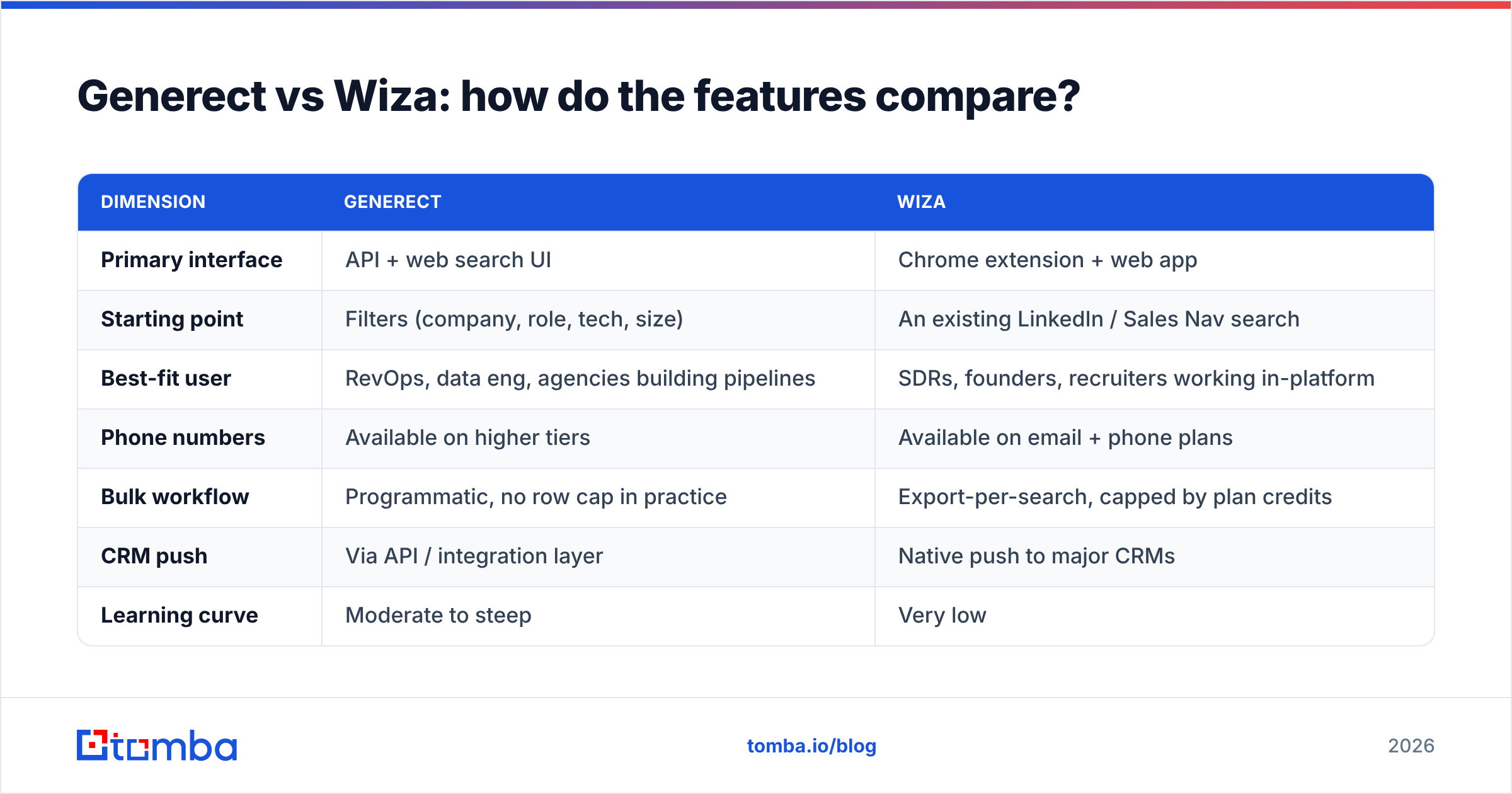
| Dimension | Generect | Wiza |
|---|---|---|
| Primary interface | API + web search UI | Chrome extension + web app |
| Starting point | Filters (company, role, tech, size) | An existing LinkedIn / Sales Nav search |
| Best-fit user | RevOps, data eng, agencies building pipelines | SDRs, founders, recruiters working in-platform |
| Phone numbers | Available on higher tiers | Available on email + phone plans |
| Bulk workflow | Programmatic, no row cap in practice | Export-per-search, capped by plan credits |
| CRM push | Via API / integration layer | Native push to major CRMs |
| Learning curve | Moderate to steep | Very low |
| Credit burn model | Per returned record | Per exported contact |
| Free entry point | Limited trial | Small monthly free allowance |
Read that table as a fork, not a scoreboard. If two of the "Generect" cells describe your team, the pricing conversation is basically over.
The structural difference worth naming: Wiza's ceiling is your LinkedIn search skill, Generect's ceiling is your ability to express an ICP as filters. Neither of those is a data problem. They're both operator problems, and they're the reason two teams evaluating the same pair reach opposite conclusions.
Which one is more accurate on email?#
Nobody outside the vendors can publish a clean, reproducible answer here, and you should distrust any post that claims one. What you can do is control the test:
- Build one list of 200 contacts you already have confirmed emails for — past customers, current pipeline, anyone whose address you know bounces-free.
- Strip the emails. Keep name + company domain only.
- Run the same list through both tools. Record found-rate and match-rate separately. Found-rate is how many returned something; match-rate is how many returned the right thing.
- Count the risky bucket. Catch-alls and "accept-all" flags aren't wins or losses — they're a third category, and the tool that hides them is the one costing you deliverability.
- Re-verify everything with a neutral third party. Running the output of Tool A through Tool A's own verifier is circular. Use an independent email verifier so the grader isn't the contestant.
In our experience with tools in this tier, found-rate spreads of 10–20 points are common and match-rate spreads are much narrower. Translation: the tool that "finds more" often just guesses more. Guessed addresses that route to a catch-all domain look like wins in a CSV and look like bounces in your sending stats three weeks later.
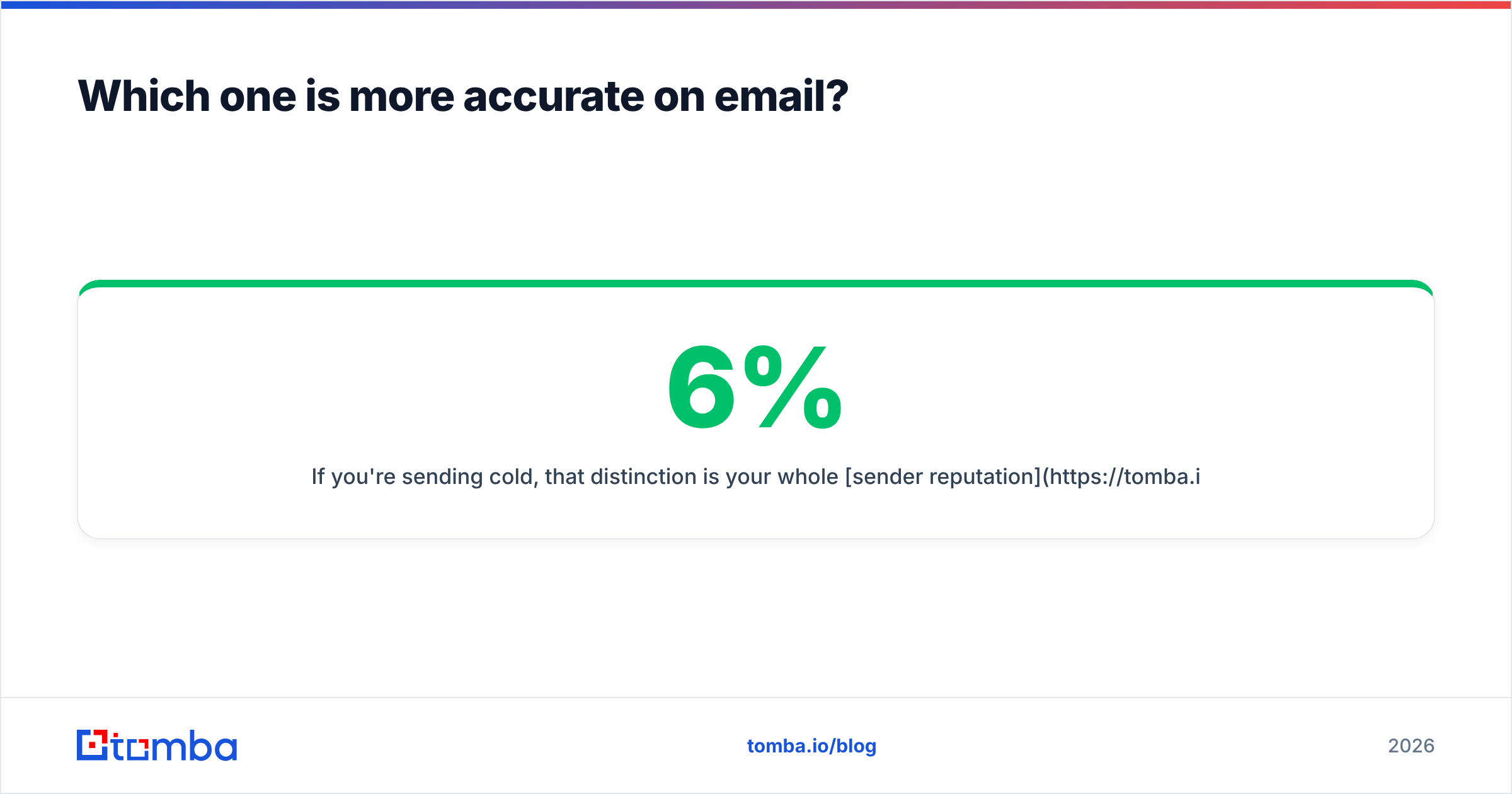
If you're sending cold, that distinction is your whole sender reputation. A 6% bounce rate doesn't cost you 6% of your list. It costs you inbox placement on the other 94%.
What do Generect and Wiza cost?#
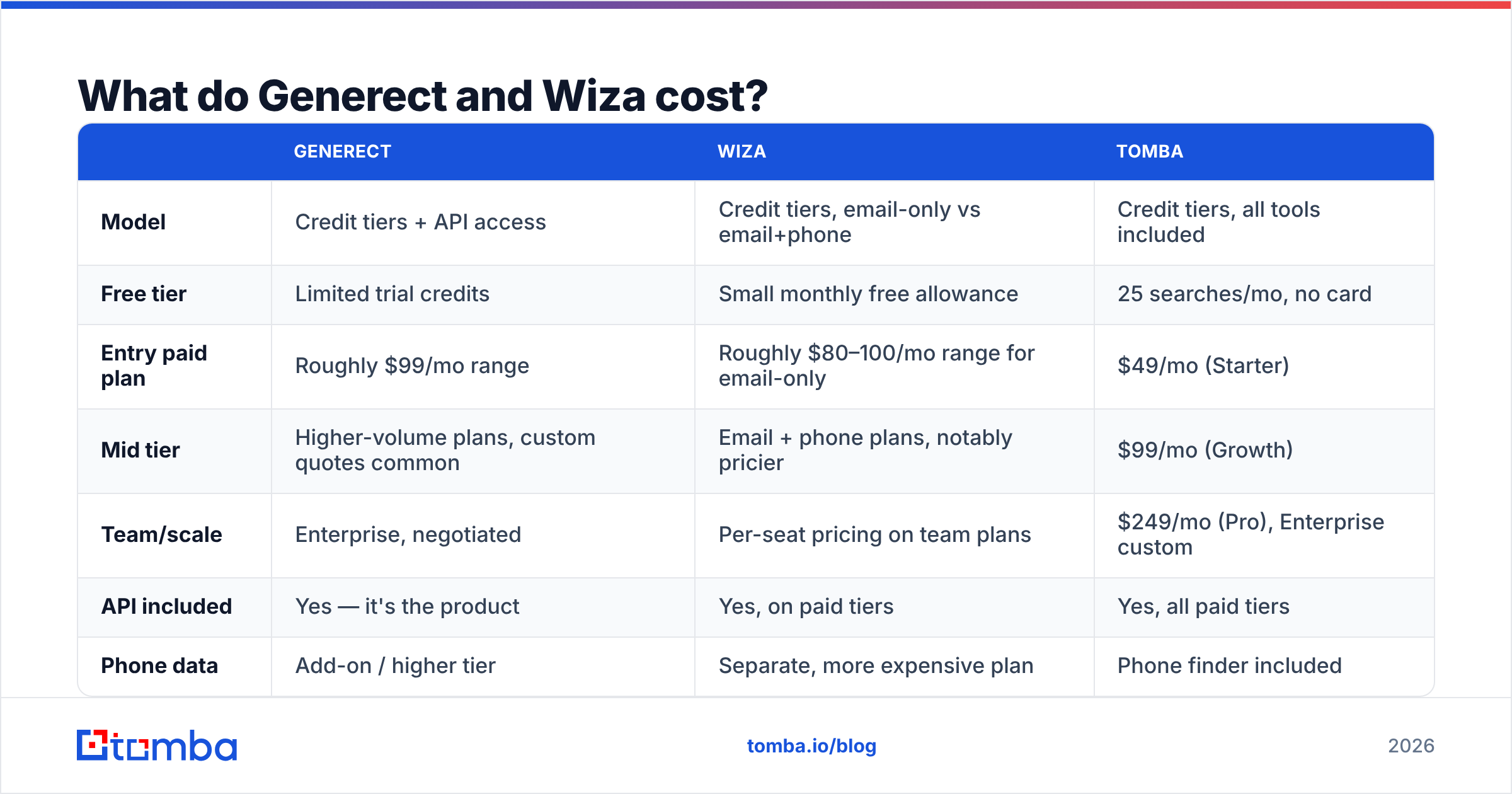
Both vendors publish tiered credit plans and adjust them regularly, so treat the shape as durable and the exact numbers as something to confirm on their pricing pages before you buy.
| Generect | Wiza | Tomba | |
|---|---|---|---|
| Model | Credit tiers + API access | Credit tiers, email-only vs email+phone | Credit tiers, all tools included |
| Free tier | Limited trial credits | Small monthly free allowance | 25 searches/mo, no card |
| Entry paid plan | Roughly $99/mo range | Roughly $80–100/mo range for email-only | $49/mo (Starter) |
| Mid tier | Higher-volume plans, custom quotes common | Email + phone plans, notably pricier | $99/mo (Growth) |
| Team/scale | Enterprise, negotiated | Per-seat pricing on team plans | $249/mo (Pro), Enterprise custom |
| API included | Yes — it's the product | Yes, on paid tiers | Yes, all paid tiers |
| Phone data | Add-on / higher tier | Separate, more expensive plan | Phone finder included |

Three cost traps that don't appear on any pricing page:
- Per-seat multiplication. Tools with a per-seat model look cheap for one SDR and stop looking cheap at five. Run the math at your actual headcount, then again at next quarter's headcount.
- Credits burned on rows you delete. If a tool charges when it returns a record — regardless of whether the record is usable — your effective cost per usable contact can be double the sticker rate. Ask both vendors directly: "am I charged for a record flagged risky or catch-all?"
- The verification you'll buy anyway. Many teams buy a finder and then buy a separate verifier because they don't trust the finder's own flags. That's two line items solving one job. Check Tomba pricing as a reference point for what bundled finding + verification looks like on a single bill.

Who should pick Generect?#
Choose Generect if three or more of these are true:
- You have someone who writes code. The API is the value. Using Generect purely through the UI is paying for a Ferrari to sit in traffic.
- You prospect account-first. You define target companies by firmographics or tech stack, then find people — rather than starting from a name.
- You need data inside a system, not a spreadsheet. Warehouse, CRM enrichment job, internal scoring model.
- Your ICP is under-represented on LinkedIn. Regional, industrial, non-Anglophone, or SMB-heavy segments where profile coverage is patchy.
- You're an agency running many client ICPs. Programmatic access scales across accounts in a way manual exports never will.
Who should pick Wiza?#
Choose Wiza if these describe you:
- Sales Navigator is already your daily driver. You have saved searches, Boolean strings that work, and a lead list discipline built around LinkedIn.
- You need contacts today, not a pipeline next sprint. Export-to-CSV in five minutes is a real advantage on day one.
- Your team is non-technical. Zero setup, no keys, no docs.
- You recruit as well as sell. Wiza's LinkedIn-native shape fits talent sourcing better than most sales-data tools do.
- Job-change signals matter to you. LinkedIn-sourced data surfaces role changes earliest, and role changes are the highest-converting trigger in outbound.
Where Wiza frustrates people: the moment you need contacts outside what Sales Navigator will show you, or you need the same lookup to run automatically 400 times a night. That's not a flaw — it's the boundary of the design. Teams that hit that wall usually keep Wiza for manual prospecting and add an API tool underneath it. Our Wiza alternative breakdown covers that split in more depth.
What's the option most teams skip?#
Here's the uncomfortable part of the Generect vs Wiza decision: for a large share of buyers, neither is what the job needs.
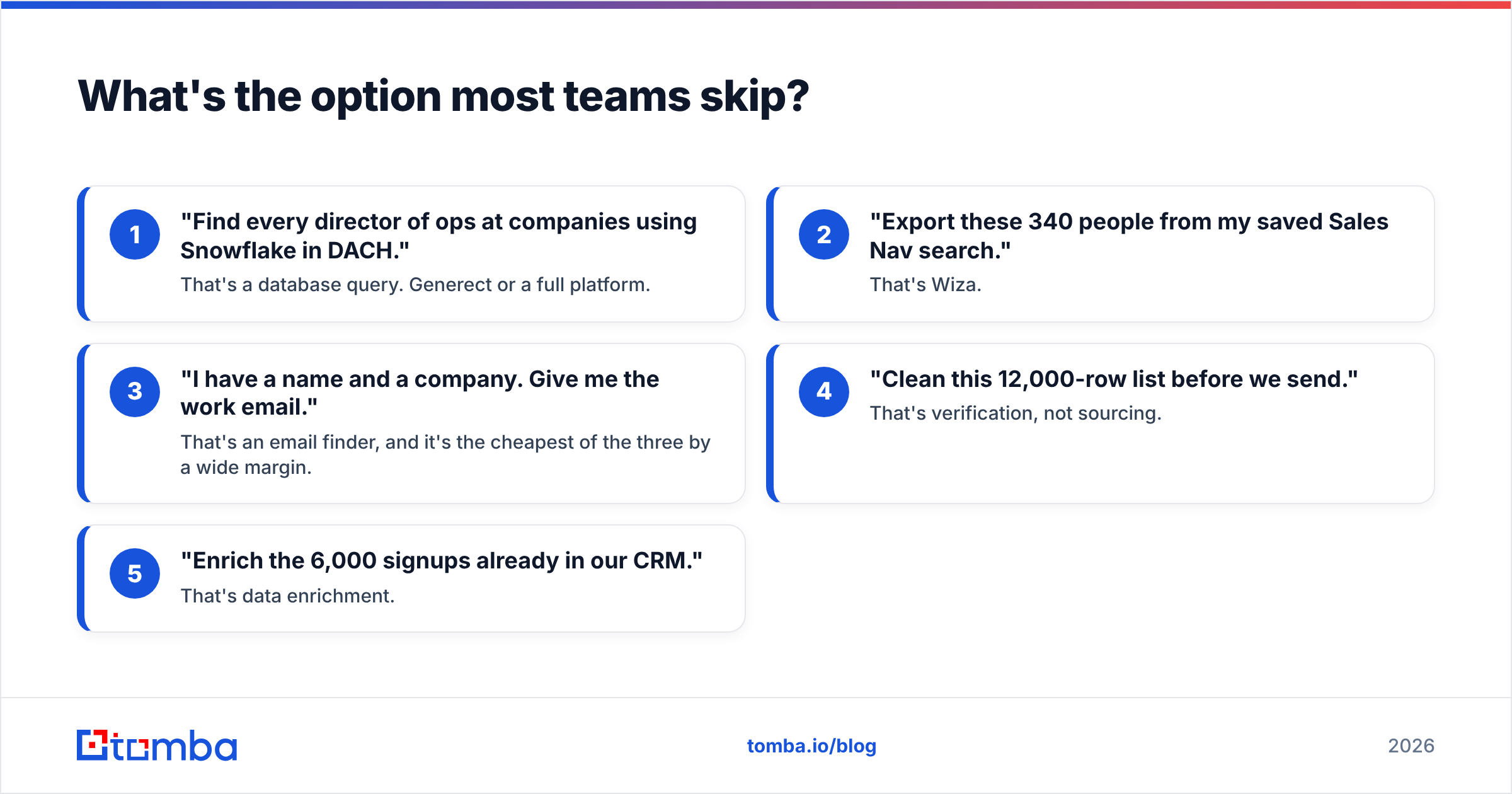
Run the diagnostic. Over the last 90 days, what did your team actually ask a data tool to do?
- "Find every director of ops at companies using Snowflake in DACH." — That's a database query. Generect or a full platform.
- "Export these 340 people from my saved Sales Nav search." — That's Wiza.
- "I have a name and a company. Give me the work email." — That's an email finder, and it's the cheapest of the three by a wide margin.
- "Clean this 12,000-row list before we send." — That's verification, not sourcing.
- "Enrich the 6,000 signups already in our CRM." — That's data enrichment.
Most teams describe job #1 in the evaluation call and then spend 80% of their credits on jobs #3, #4 and #5. You end up paying database-tier pricing for lookup-tier work.
That's the gap Tomba fills. Starter is $49/mo, the free tier gives you 25 searches with no card, and finding, verification, domain search, catch-all handling and enrichment all sit on the same credit pool and the same Tomba API — so you're not reconciling three invoices to answer one question. It won't replace a full-fat lead database for job #1. It will absolutely replace the expensive way you're currently doing #3 through #5.
Whichever way you lean, check current standing on a neutral source like G2 before you sign. Review velocity over the last two quarters tells you more about a data vendor's trajectory than its feature page does.
Final verdict: Generect or Wiza?#
Pick Generect if data has to move through code. API-first design, account-first filtering, and coverage that isn't bounded by LinkedIn profiles. Budget for someone to build with it.
Pick Wiza if data has to move through a rep. Fastest path from a search you already trust to a CSV you can send from today. Budget for per-seat costs as the team grows.
Pick neither if your real bottleneck is email accuracy and cost per usable contact. Then you want a focused finder plus verifier on one bill — and you want to run the 200-row test above before you commit to anything, because your ICP, not the vendor's benchmark, is the only sample that matters.
Ready to see what your list looks like without the credit math? Start with the Tomba Email Finder — 25 free searches a month, no card, and verification results labelled honestly (valid, invalid, or catch-all) so you know exactly what you're sending to before it hits your sender reputation. Run it head-to-head against whatever you're paying for now on the same 200 contacts, and let the bounce rate settle the argument.
Related guides#
Ready to find emails that actually work?
Join 150,000+ professionals who stopped guessing and started sending. Free credits on signup — no credit card required.
Get the Tomba newsletter
Practical outbound tactics and product updates — once every two weeks.
About the author