GetEmail.io Pricing, Reviews, Pros and Cons (2026 Guide)
GetEmail.io sells email lookups in credit blocks that look cheap at $49/mo — until you run the per-credit math. Here is the real cost, what reviewers actually say, and where it wins or loses in 2026.

TL;DR
- GetEmail.io is a lightweight email finder built around a name + company lookup, a Chrome extension, and an API. It is not a database or a sales engagement platform.
- Published plans start at a free tier of roughly 10 credits per month and climb through paid tiers in the $49–$399/mo range. The headline price is not the number that matters — cost per usable email is.
- Reviews are consistently positive on speed and ease of use, and consistently critical on credit consumption, limited data depth (no phones, thin firmographics), and support responsiveness.
- Credits are typically consumed on searches, not just successful finds, so a low hit rate on your ICP quietly doubles your effective cost.
- If you need bulk work, verification, catch-all handling, or phone data in the same subscription, a broader platform like Tomba or a prepaid database like BookYourData will land cheaper per contact.
What is GetEmail.io?#
GetEmail.io is a single-purpose email finder. You give it a first name, last name, and a company domain; it predicts and returns the most likely professional email address with a confidence score. That is the whole product surface, plus the wrappers around it.
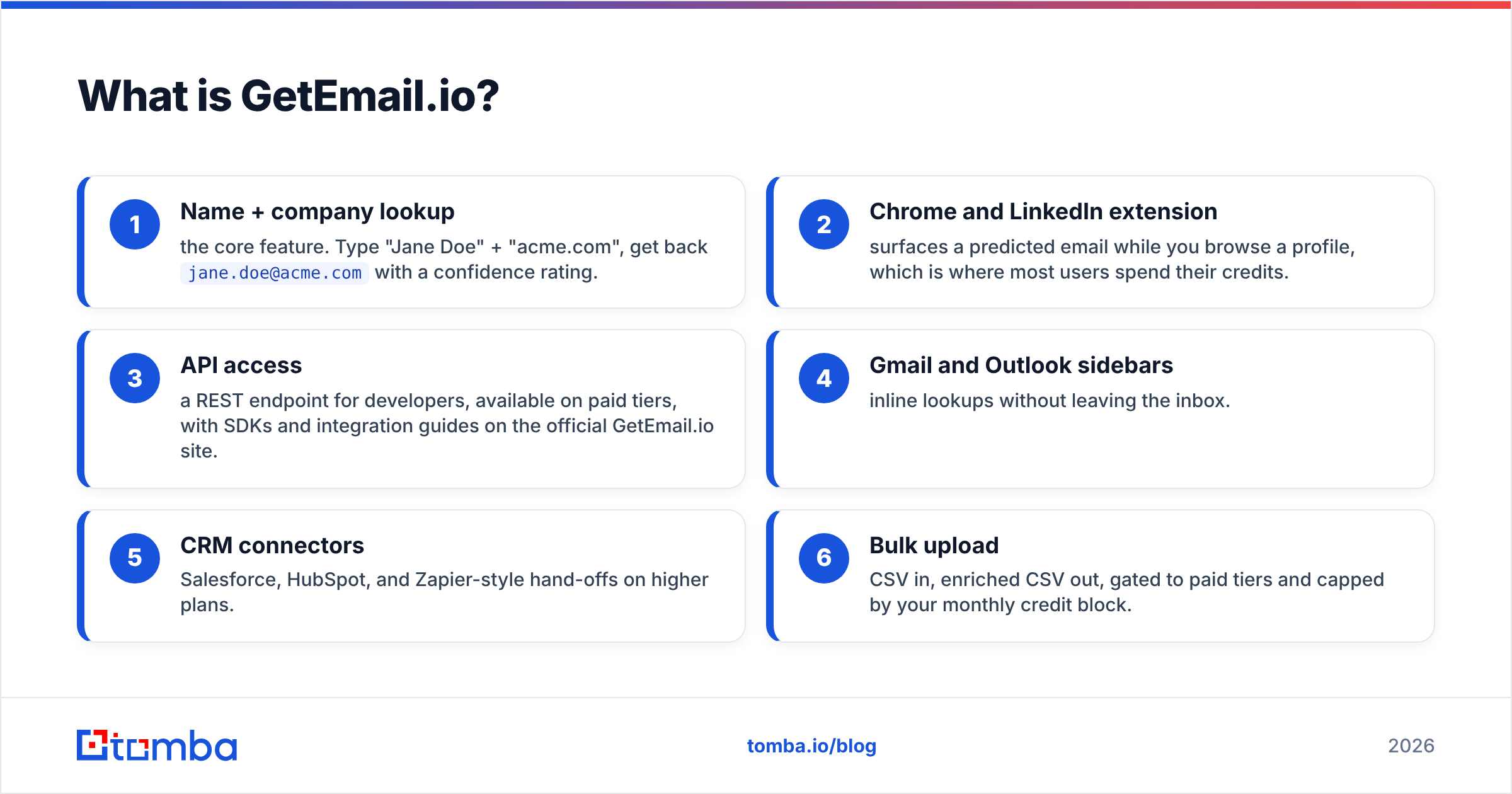
Here is what you actually get when you subscribe:
- Name + company lookup — the core feature. Type "Jane Doe" + "acme.com", get back
jane.doe@acme.comwith a confidence rating. - Chrome and LinkedIn extension — surfaces a predicted email while you browse a profile, which is where most users spend their credits.
- API access — a REST endpoint for developers, available on paid tiers, with SDKs and integration guides on the official GetEmail.io site.
- Gmail and Outlook sidebars — inline lookups without leaving the inbox.
- CRM connectors — Salesforce, HubSpot, and Zapier-style hand-offs on higher plans.
- Bulk upload — CSV in, enriched CSV out, gated to paid tiers and capped by your monthly credit block.
What it is not: a contact database you can browse, a verification suite, a phone-number source, or an outreach sequencer. That focus is the product's biggest strength and the reason its pricing gets criticised — you are paying a subscription for one job.
How much does GetEmail.io pricing cost in 2026?#
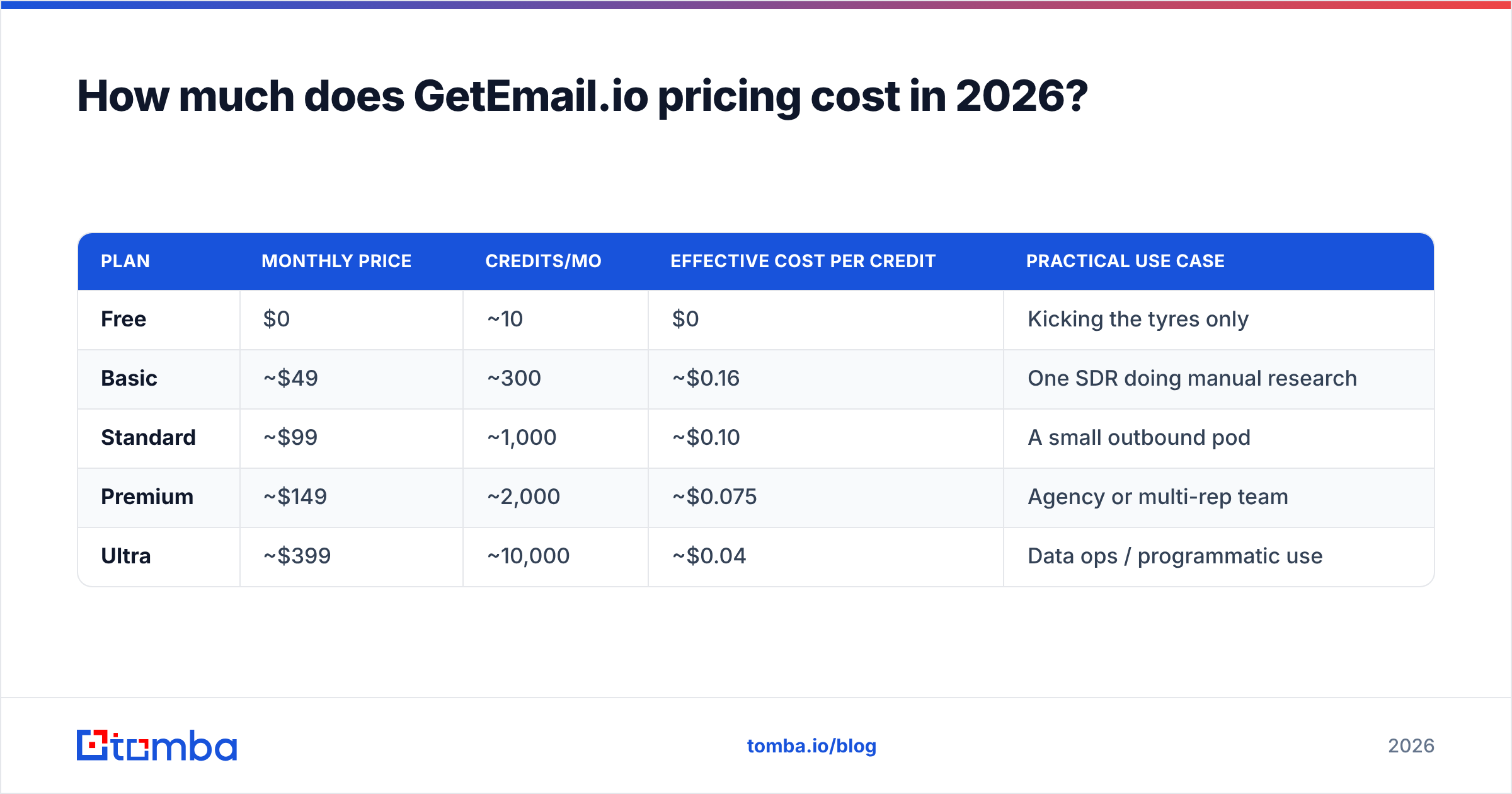
GetEmail.io uses a classic credit-block subscription: fixed monthly fee, fixed credit allowance, credits reset each month. The numbers below reflect publicly listed rates at the time of writing — always confirm on the vendor's own pricing page before you buy, since tiers get renamed and re-cut regularly.
| Plan | Monthly price | Credits/mo | Effective cost per credit | Practical use case |
|---|---|---|---|---|
| Free | $0 | ~10 | $0 | Kicking the tyres only |
| Basic | ~$49 | ~300 | ~$0.16 | One SDR doing manual research |
| Standard | ~$99 | ~1,000 | ~$0.10 | A small outbound pod |
| Premium | ~$149 | ~2,000 | ~$0.075 | Agency or multi-rep team |
| Ultra | ~$399 | ~10,000 | ~$0.04 | Data ops / programmatic use |
Two things in that table deserve more attention than the headline price.
First, the free tier is a demo, not a trial. Ten lookups per month is roughly one prospecting session's worth of curiosity. Compare that to Tomba's free tier at 25 searches per month, or the various free checkers that let you validate a list before you spend anything. If you are evaluating tools seriously, ten credits will not tell you whether the data works on your accounts — and that is the only test that counts.
Second, the per-credit curve is steep in the wrong direction for small teams. At the Basic tier you are paying about 16 cents per lookup. At Ultra you are paying about 4 cents. That is a 4x spread, which means the tool is priced for volume buyers while the entry plan subsidises them. Most two-to-five-person sales teams live in the $49–$99 band, which is exactly where the per-unit economics are worst.

What counts as a credit?#
This is the single most important line item in any email-finder contract, and it is where GetEmail.io pricing draws the most complaints. On most credit-based finders, a credit is deducted when the system performs a search — including searches that return a low-confidence guess or nothing at all. It is not a per-success charge.
Run the math on that. If your list is 60% findable (normal for mid-market SaaS ICPs, and optimistic for SMB, healthcare, or non-US targets), your real cost per usable email on the Basic plan is not $0.16. It is closer to $0.27. On a 2,000-contact quarter, that difference is the entire tool budget.
Before you commit, ask support three questions in writing:
- Are credits deducted on unsuccessful searches?
- Do unused credits roll over, or expire monthly?
- Is bulk enrichment charged at the same rate as single lookups?
The answers determine your real price far more than the tier label does.
How accurate is GetEmail.io?#
Accuracy on any email finder is two separate numbers that vendors love to blur together: hit rate (what percentage of your list returns an address at all) and precision (what percentage of returned addresses actually deliver).
GetEmail.io leans heavily on pattern prediction. It infers the company's email format, applies it to the name, and scores its own confidence. That approach is fast and cheap to run, and it works well on companies with a clean, consistent format and a decent public footprint — think funded US tech companies with 50–5,000 employees.
Where prediction-first tools get thin:
- Catch-all domains. If a domain accepts everything, a prediction plus an SMTP check tells you nothing. You need dedicated catch-all verification logic, which is a separate product category.
- Inconsistent formats. Companies that mix
first.last@andflast@after an acquisition break pattern inference. - Non-US and non-English names. Transliteration and diacritics are where hit rates fall off a cliff.
- Sub-20-employee companies. Not enough public signal to infer a pattern with confidence.

The practical fix regardless of which finder you pick: never send to a finder's output unverified. Route everything through an email verifier as a second, independent pass. A tool that returns a 95%-confidence guess is still returning a guess, and your domain reputation pays for the wrong ones.
What do GetEmail.io reviews actually say?#
Aggregate review sentiment on G2 and Capterra is broadly favourable, with a recognisable shape: high marks for simplicity, lower marks for value and support.
What reviewers consistently praise:
- Speed of the extension. Click a LinkedIn profile, get an address in a second. This is the feature people actually renew for.
- Zero learning curve. There is no onboarding, no data model, no schema to understand. New reps are productive in five minutes.
- Clean API. Developers report straightforward integration with sensible response payloads.
What reviewers consistently criticise:
- Credit burn. The most common complaint by a wide margin — credits disappear faster than expected, particularly for users who browse LinkedIn heavily with the extension active.
- No phone numbers or deep firmographics. If your motion is multichannel, you are buying a second tool anyway.
- Cancellation and billing friction. Several reviewers report slow support responses when downgrading or cancelling. Read the renewal terms.
- Data staleness on smaller companies. Predicted formats that were right two years ago are not always right today.
Take review scores as directional, not decisive. Review platforms skew toward users who were prompted at their happiest moment, and email-finder scores in particular are dominated by ease-of-use ratings rather than measured data quality. Your own 200-contact test against known-good addresses is worth more than every star rating combined.
What are the pros and cons of GetEmail.io?#
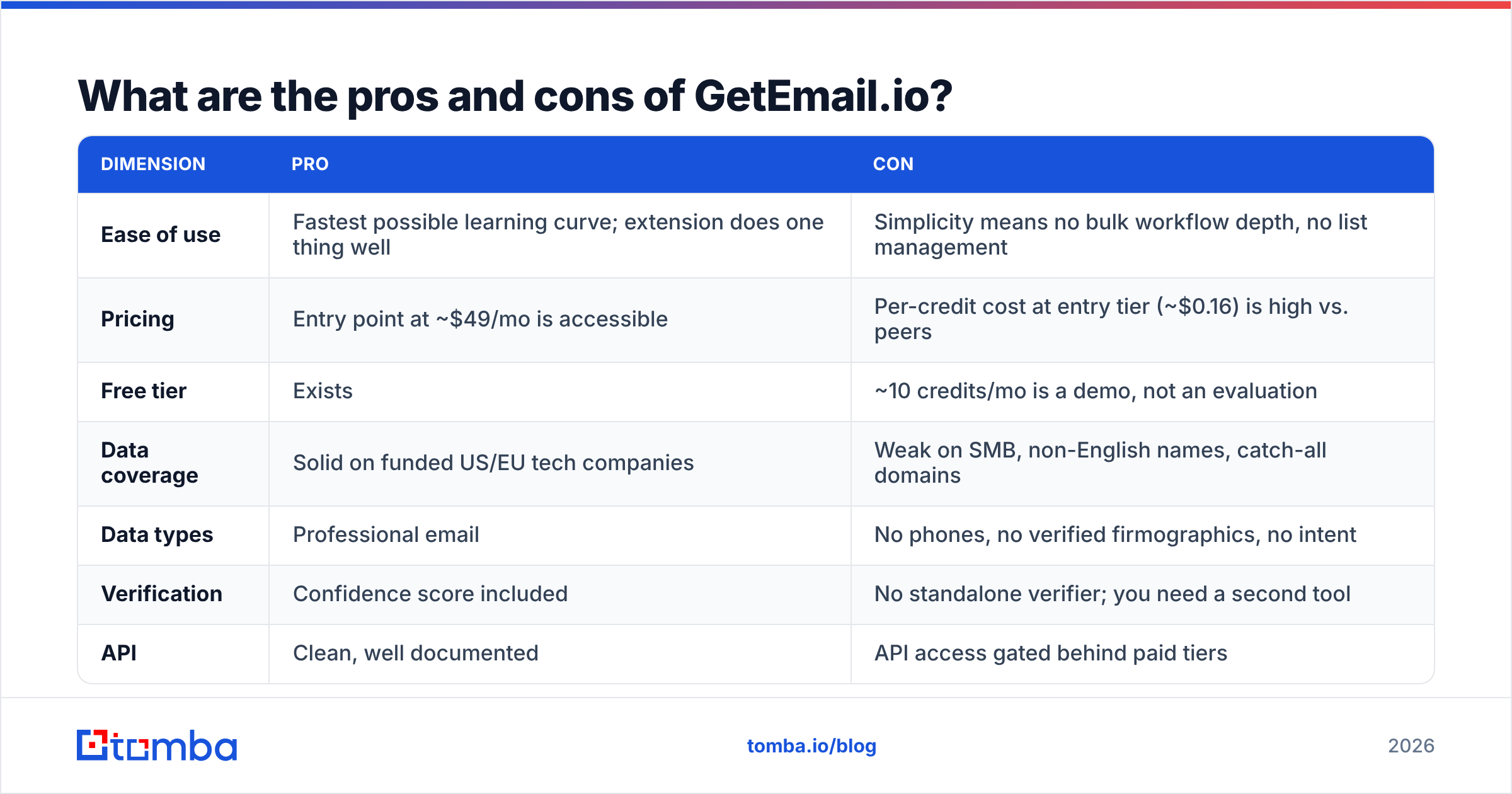
| Dimension | Pro | Con |
|---|---|---|
| Ease of use | Fastest possible learning curve; extension does one thing well | Simplicity means no bulk workflow depth, no list management |
| Pricing | Entry point at ~$49/mo is accessible | Per-credit cost at entry tier (~$0.16) is high vs. peers |
| Free tier | Exists | ~10 credits/mo is a demo, not an evaluation |
| Data coverage | Solid on funded US/EU tech companies | Weak on SMB, non-English names, catch-all domains |
| Data types | Professional email | No phones, no verified firmographics, no intent |
| Verification | Confidence score included | No standalone verifier; you need a second tool |
| API | Clean, well documented | API access gated behind paid tiers |
| Support | Responsive for technical questions | Repeated reports of billing/cancellation friction |
The honest summary: GetEmail.io is a good feature sold as a product. If the only thing you need is a name-to-email lookup while browsing profiles, it does that with less friction than almost anything else. The moment your workflow includes a second step — verify, enrich, dedupe, call — you are stacking subscriptions.

How does GetEmail.io compare to the alternatives?#
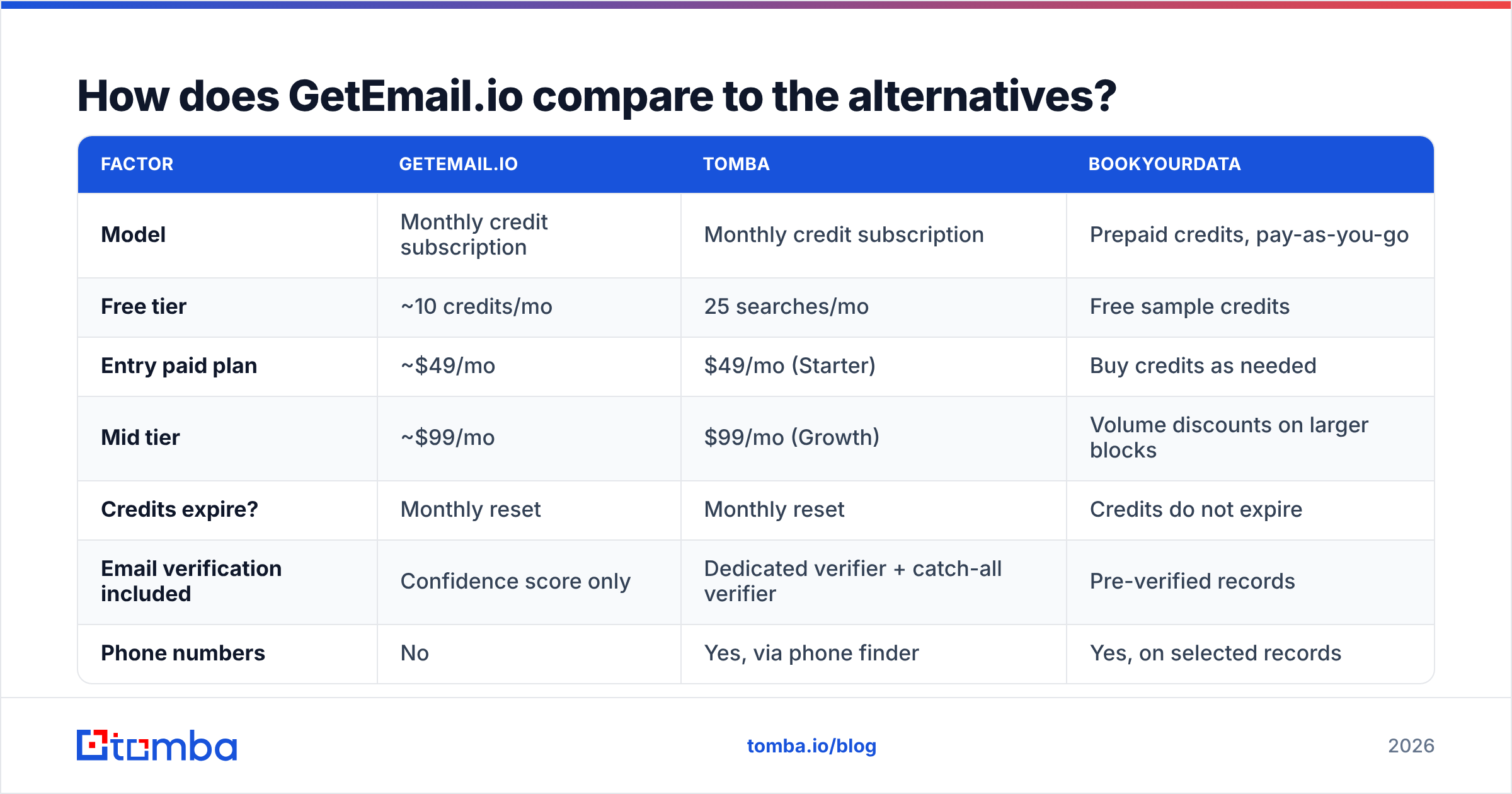
Three sensible comparison points, each representing a different purchasing model: subscription finder (GetEmail.io), full-stack finder + verifier suite (Tomba), and prepaid database (BookYourData).
| Factor | GetEmail.io | Tomba | BookYourData |
|---|---|---|---|
| Model | Monthly credit subscription | Monthly credit subscription | Prepaid credits, pay-as-you-go |
| Free tier | ~10 credits/mo | 25 searches/mo | Free sample credits |
| Entry paid plan | ~$49/mo | $49/mo (Starter) | Buy credits as needed |
| Mid tier | ~$99/mo | $99/mo (Growth) | Volume discounts on larger blocks |
| Credits expire? | Monthly reset | Monthly reset | Credits do not expire |
| Email verification included | Confidence score only | Dedicated verifier + catch-all verifier | Pre-verified records |
| Phone numbers | No | Yes, via phone finder | Yes, on selected records |
| Bulk processing | CSV upload, credit-capped | Bulk finder + bulk verify | Native — built for list buying |
| Domain-wide search | Limited | Full domain search | Filtered database export |
| API + CLI + integrations | API | API, CLI, MCP, Sheets, Excel, Airtable | API + direct export |
| Best for | Solo reps doing manual LinkedIn research | Teams that need find + verify + enrich in one bill | Buyers who want a clean list once, no subscription |

Read the table by workflow, not by price. All three land near the same headline number at the entry point. What differs is what happens after the lookup.
If your team is a single rep clicking through 30 LinkedIn profiles a day, GetEmail.io's simplicity genuinely wins and the credit burn stays manageable.
If your team is running structured outbound — build a list, find addresses, verify them, check catch-alls, push to CRM, add phone as a fallback channel — you want those steps on one bill and one API. That is where a suite approach pays for itself, because the alternative is three subscriptions with three credit pools that never line up. Tomba's pricing puts the finder, verifier, domain search, and bulk processing inside the same plan rather than as add-ons.
If you buy lists in bursts rather than continuously — a quarterly campaign, an event follow-up, a new territory launch — BookYourData's non-expiring prepaid model is the better fit and the honest recommendation. Paying $49 every month for a tool you use six weeks a year is the most common way teams waste budget on this category, and prepaid credits solve exactly that problem.
Is GetEmail.io worth it in 2026?#
Yes, in a narrow case. No, in most.
Buy it if: you are one or two people, your prospecting is manual and LinkedIn-driven, your targets are established US or Western European companies, and you genuinely will not need phone numbers, bulk enrichment, or standalone verification within the next two quarters.
Skip it if: you run bulk lists, you target SMBs or non-English-speaking markets, you already pay for a separate verifier (you are double-paying for overlapping capability), your usage is seasonal, or your cost-per-meeting math is tight enough that a 16-cent-per-lookup entry tier shows up in it.
The test that decides it: take 200 contacts you already have verified addresses for. Run them through the free tier plus a paid month of whichever tools are on your shortlist. Measure hit rate and precision separately. Divide the monthly fee by the number of correct, deliverable addresses returned. That single number — cost per usable email — is the only comparison that survives contact with a real campaign, and it routinely reorders vendor shortlists that looked settled on paper.
How do you cut your cost per verified email?#
Regardless of which vendor you pick, four habits cut real spend:
- Filter before you enrich. Every contact you look up who was never going to be a fit is a wasted credit. Tighten the ICP filter upstream, not downstream.
- Deduplicate first. Duplicate rows in a CSV burn duplicate credits. Run a dedupe pass before any bulk upload.
- Verify with a separate engine. A finder grading its own homework is not verification. A second independent pass catches the confident-but-wrong results that destroy email deliverability.
- Match billing model to usage rhythm. Continuous outbound → subscription. Burst campaigns → prepaid credits. Mismatching these is the most expensive mistake in this category.
- Instrument the API. If you are enriching programmatically, log hit rate per source domain. Within a month you will know which segments are worth spending credits on and which to route to a different channel entirely.
Ready to price your actual workflow, not just the headline?#
If your outbound needs more than a name-to-email guess — bulk lists, real verification, catch-all handling, domain-wide discovery, and phone as a fallback channel on one bill — start with the Tomba Email Finder. The free tier gives you 25 searches a month, which is enough to run a genuine sample against your own ICP rather than a ten-credit demo. Run the same 200 contacts through it, measure cost per usable email, and let that number pick your vendor.
Related guides#
Ready to find emails that actually work?
Join 150,000+ professionals who stopped guessing and started sending. Free credits on signup — no credit card required.
Get the Tomba newsletter
Practical outbound tactics and product updates — once every two weeks.
About the author