GetEmail.io vs Ocean.io: Which B2B Data Tool Wins in 2026
One tool guesses email addresses from a name and a domain. The other maps entire markets by company lookalike. Here is where GetEmail.io and Ocean.io actually differ on data, pricing and accuracy — and which one your pipeline needs.
GetEmail.io vs Ocean.io comes up a lot, but it is an odd matchup. One tool turns a name and a domain into a work email. The other maps whole markets and tells you which companies to chase. Here is how they compare on data, price and accuracy, and what to do if you need both jobs done.
TL;DR
- GetEmail.io is an email finder. You give it a first name, last name and company domain. It predicts the most likely work email and checks it. Cheap, fast and narrow.
- Ocean.io is an ICP and market-mapping platform. Its edge is lookalike company search. Feed it 20 accounts you closed and it returns thousands of similar ones, then layers contacts on top.
- They are not really competitors. Ocean.io answers who should I target. GetEmail.io answers what is that person's email.
Most GetEmail.io vs Ocean.io shortlists come down to budget:
- The price gap is huge. GetEmail.io starts in the double digits per month. Ocean.io is seat-based and usually sold on annual contracts in the hundreds per month.
- Want both halves without the enterprise contract? A per-credit email finder with domain search, verification and enrichment in one API, like Tomba at $49/mo, is usually the cheaper middle path.
GetEmail.io vs Ocean.io: what is each tool for?#
They both sell "B2B contact data," which is why they show up in the same search results. Under the hood they are built for opposite jobs.
GetEmail.io is a single-purpose email finder. Its core loop is pattern prediction. The engine learns that a company uses first.last@, flast@ or first@, applies that pattern to the name you supplied, then tries to validate the result before handing it back. It ships a web app, a Chrome extension, a Gmail sidebar, a LinkedIn integration and an API. That is the whole product. There is no company database to browse, no filtering by headcount or tech stack, no intent signals.
Ocean.io is the opposite shape. It is a company-first data platform, and its headline feature is lookalike search. You upload a list of your best customers, and Ocean.io finds companies that resemble them. The match is based on what those companies say about themselves, such as website copy, products and market positioning, not just SIC/NAICS codes. On top of that account layer, it exposes contacts with emails and, for some records, direct dials. It sells to RevOps and demand-gen teams who need a market map pushed into HubSpot or Salesforce. It is not built for a solo rep hunting one email.
Think of it as a hardware store versus an architect. GetEmail.io sells you the exact screw you asked for. Ocean.io tells you what house to build. Neither is wrong. Buying the wrong one is.
GetEmail.io vs Ocean.io: feature by feature#
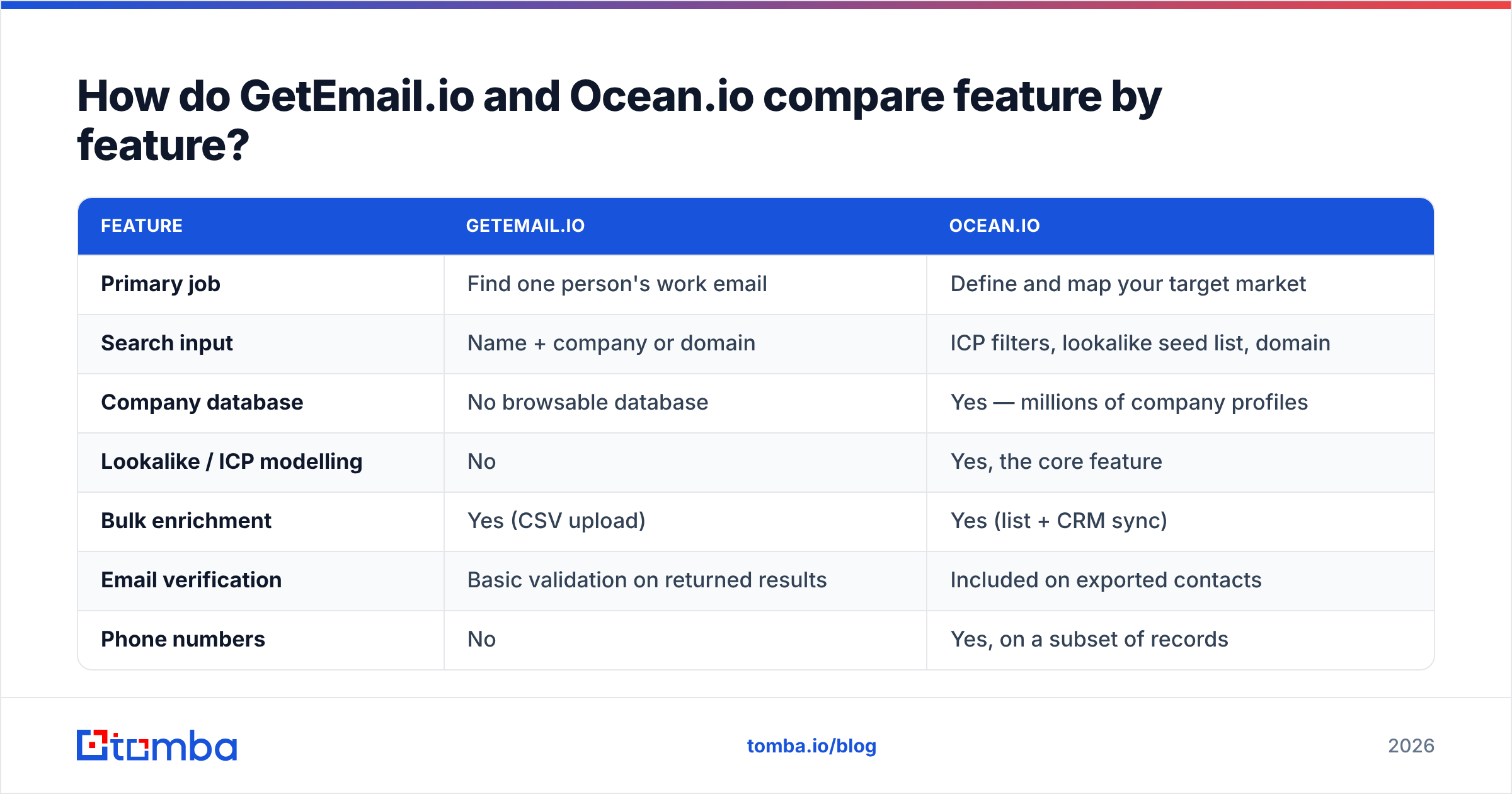
Here is the practical breakdown. The figures reflect what each vendor publishes today. Always re-check the vendor page before you sign, because data tools re-price often.
| Feature | GetEmail.io | Ocean.io |
|---|---|---|
| Primary job | Find one person's work email | Define and map your target market |
| Search input | Name + company or domain | ICP filters, lookalike seed list, domain |
| Company database | No browsable database | Yes — millions of company profiles |
| Lookalike / ICP modelling | No | Yes, the core feature |
| Bulk enrichment | Yes (CSV upload) | Yes (list + CRM sync) |
| Email verification | Basic validation on returned results | Included on exported contacts |
| Phone numbers | No | Yes, on a subset of records |
| CRM sync | Via API / Zapier | Native HubSpot and Salesforce sync |
| Chrome extension | Yes | Yes |
| Typical buyer | Solo founder, recruiter, single SDR | RevOps, demand gen, sales ops teams |
| Contract shape | Monthly self-serve | Seat-based, usually annual |
The row that decides most evaluations is "company database." If your workflow already starts from a list, such as Sales Navigator exports, event attendee sheets or a scraped directory, you do not need Ocean.io's account intelligence. You would be paying a platform price for a lookup you could buy per credit.
If you genuinely do not know which 2,000 companies to call this quarter, no email finder will fix that. Ocean.io's lookalike engine is a real answer to that problem.
GetEmail.io vs Ocean.io: which one is more accurate?#
Accuracy here means two different things. Mixing them up is how teams end up with 12% bounce rates.
Discovery rate is the share of your input rows that come back with any email at all. Deliverability accuracy is the share of returned emails that land in a real inbox. A tool can win one and lose the other badly. A pattern-guessing engine will happily return john.smith@acme.com for every John Smith. You get a pretty 95% hit rate now and a bounce problem three weeks later.
GetEmail.io leans on prediction plus a confidence score. It returns fewer flat "not found" answers than database-only tools. Still, treat anything below its high-confidence tier as unverified. Run it through a separate email verifier before it enters a sequence. Ocean.io's contact emails come from its own dataset, so coverage is uneven by region. It is strong across Europe and the Nordics, thinner for small US companies, and near-empty where company web presence is sparse.

The only honest way to judge either one is a test. Run the same 100-row list through both. Use rows you can confirm yourself, such as customers, partners and ex-colleagues. Score four numbers: found, verified-valid, bounced, and cost per valid email. Vendor accuracy claims are marketing. Your list is the benchmark that matters. User reviews on G2 help you spot support and billing complaints, but they will never tell you how a tool performs on your ICP.
One more trap: catch-all domains. A large slice of B2B domains accept every address at the SMTP layer. A naive verifier marks them "valid," and you learn the truth from the bounce. Neither tool makes catch-all handling a headline feature. If much of your market sits behind Google Workspace catch-alls, budget for a dedicated catch-all verifier.
GetEmail.io vs Ocean.io: what does each one cost?#
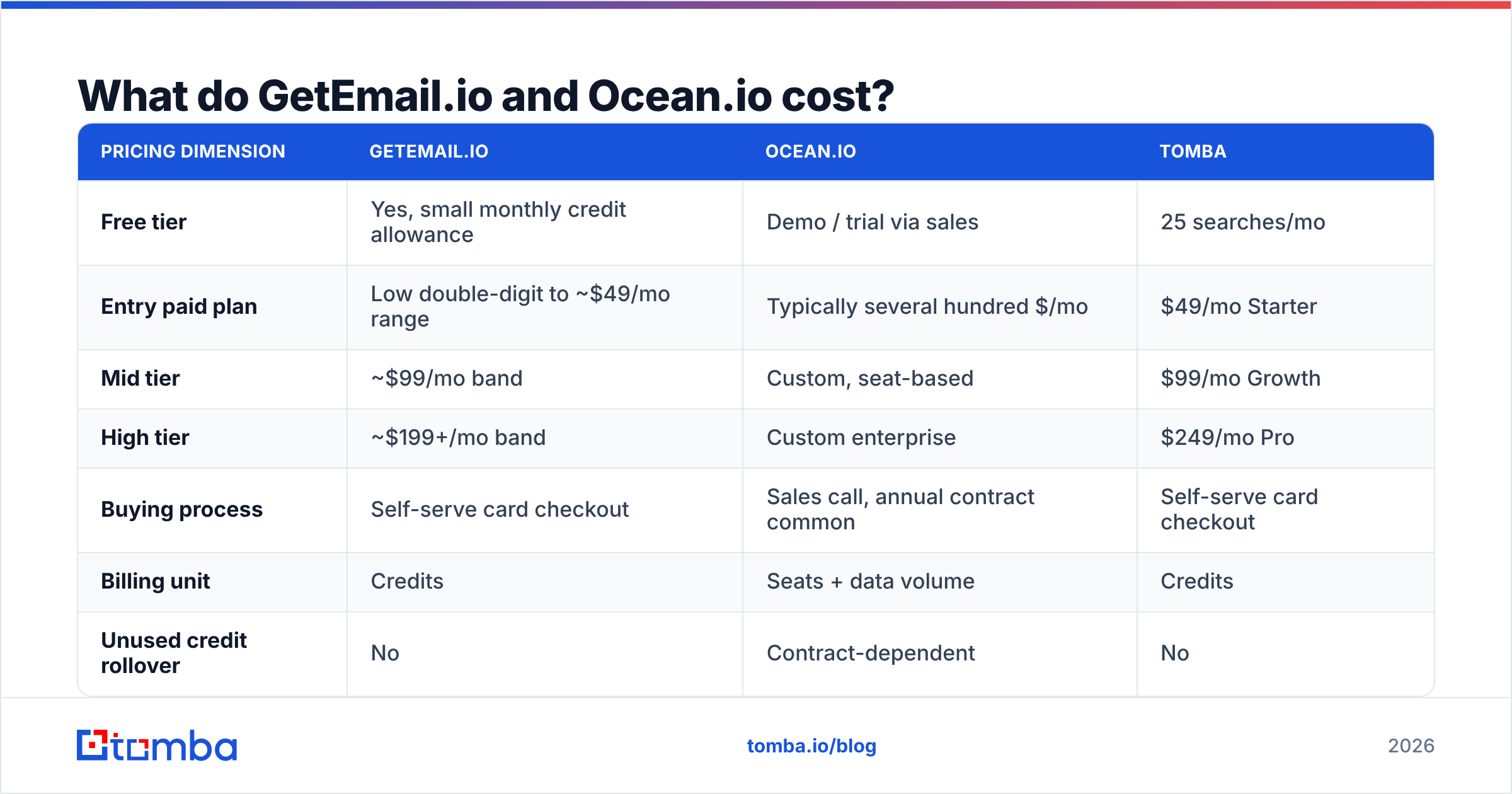
This is where the two products stop looking comparable at all.
| Pricing dimension | GetEmail.io | Ocean.io | Tomba |
|---|---|---|---|
| Free tier | Yes, small monthly credit allowance | Demo / trial via sales | 25 searches/mo |
| Entry paid plan | Low double-digit to ~$49/mo range | Typically several hundred $/mo | $49/mo Starter |
| Mid tier | ~$99/mo band | Custom, seat-based | $99/mo Growth |
| High tier | ~$199+/mo band | Custom enterprise | $249/mo Pro |
| Buying process | Self-serve card checkout | Sales call, annual contract common | Self-serve card checkout |
| Billing unit | Credits | Seats + data volume | Credits |
| Unused credit rollover | No | Contract-dependent | No |
Two things fall out of that table. First, the two tools are not in the same budget conversation. You are choosing between a $50 tool and a platform commitment, so the real question is whether the market-mapping layer is worth 5–10x. Second, seat-based pricing punishes small teams that need broad access. If four people need the odd lookup, a credit-based tool costs you one subscription. A seat-based platform costs you four.
Check the current Tomba pricing tiers against whatever both vendors quote you. Cost per valid email, not the sticker price, is what should drive the decision.

Which tool should you actually choose?#
Match the tool to the bottleneck you have right now, not the one you might have next year.
- You already have a target list and just need emails. Pick GetEmail.io or another credit-based finder. Paying for account intelligence you never open is waste. Add a verification step before you send.
- You do not know who to target. Pick Ocean.io. Lookalike modelling on closed-won accounts is a real capability, and no amount of email lookup fixes a vague ICP.
- You need emails at volume, programmatically. Neither is ideal here. You want a documented email finder API with per-credit pricing, bulk endpoints and verification in the same response. Then enrichment happens in your CRM at write time, not in a weekly CSV ritual.
The next three cases are where most GetEmail.io vs Ocean.io shortlists fall apart:
- You need phone numbers too. Ocean.io covers this in part. GetEmail.io does not cover it at all. If cold calling is core, budget for a dedicated phone finder.
- You are a small team where four people each need occasional access. Avoid seat-based pricing. Credit pools scale better under light, spiky usage.
- You are enriching inbound signups in real time. Neither product is built for this by default. Look for a data enrichment endpoint that returns company and role data on form submit in under a second.
Is there a better middle option?#
Yes. It is the reason most GetEmail.io vs Ocean.io evaluations end without a purchase from either.
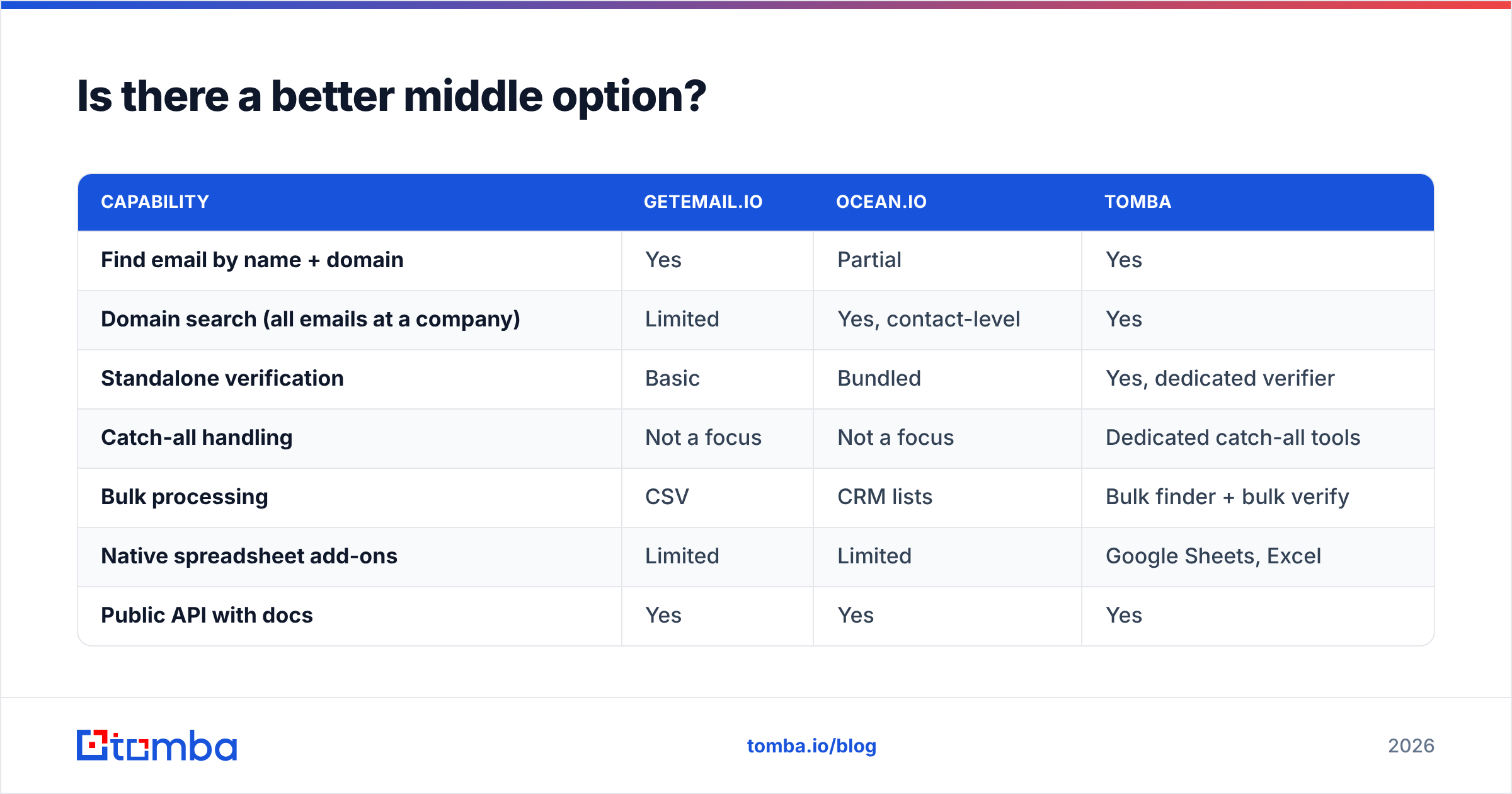
The gap sits between "one lookup at a time" and "annual platform contract." Most teams need three things: find emails from a domain or a name, verify them so campaigns do not bounce, and add role and company context. They do not need a full go-to-market suite. They also cannot run on a pure guess-the-pattern tool.

| Capability | GetEmail.io | Ocean.io | Tomba |
|---|---|---|---|
| Find email by name + domain | Yes | Partial | Yes |
| Domain search (all emails at a company) | Limited | Yes, contact-level | Yes |
| Standalone verification | Basic | Bundled | Yes, dedicated verifier |
| Catch-all handling | Not a focus | Not a focus | Dedicated catch-all tools |
| Bulk processing | CSV | CRM lists | Bulk finder + bulk verify |
| Native spreadsheet add-ons | Limited | Limited | Google Sheets, Excel |
| Public API with docs | Yes | Yes | Yes |
| Free tier to test | Small allowance | Sales-gated | 25 searches/mo |
| Entry price | Low | High | $49/mo |
Tomba's approach is deliberately unbundled. The email finder handles name-plus-domain lookups. Domain search pulls every public address at a company with roles and confidence scores. The verifier scrubs the list, and enrichment fills in the rest, all on the same credit pool and the same API key. You are not paying for a TAM engine you will not use, and you are not stitching three vendors together to get a clean list.
The honest caveat: Tomba does not do lookalike company modelling. If ICP definition is your real bottleneck, Ocean.io does something Tomba does not, and you should buy it. Tools that pretend to do everything usually do one thing well and the rest badly.
How do you run a fair 30-minute test?#
Before you commit to any of the three, run this:
- Build a 100-row control list. Mix company sizes, use at least three countries, and include 10 rows where you already know the correct email.
- Run the identical list through each tool. Same columns, same order, no manual cleanup between runs.
- Score four metrics. Found rate, verified-valid rate, known-answer match rate on your 10 control rows, and cost per valid email.
- Send a 50-address test campaign from a warmed domain and log the real bounce rate. This is the only number that survives contact with reality.
- Check the exit cost. Can you export your data? Is the contract monthly or annual? A tool you cannot leave is a tool you will overpay for.
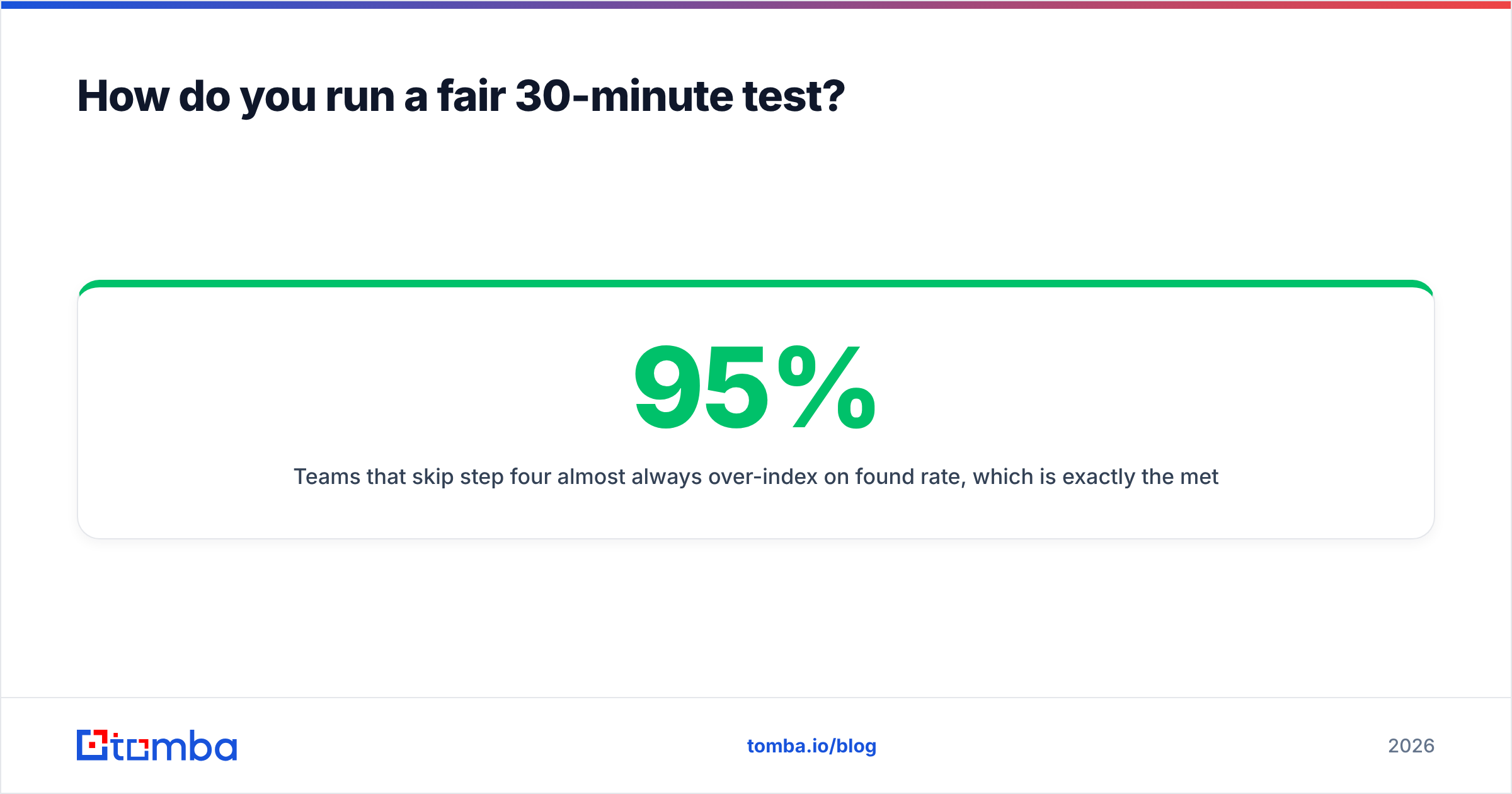
Teams that skip step four almost always over-index on found rate, which is the metric vendors tune for demos. A 95% found rate at a 9% bounce rate is worse than a 70% found rate at a 1% bounce rate. The second one keeps your sender reputation intact, and reputation damage takes weeks to undo.
GetEmail.io vs Ocean.io: the verdict#
GetEmail.io wins if your only problem is turning names into emails on a small budget. Ocean.io wins if your problem is that you do not know which accounts to chase, and you have the budget and the RevOps team to put a market map to work. The two rarely compete for the same dollar once you write down which bottleneck you actually have.
If your answer is "both, but not at that price," which it is for most teams under 50 reps, start with the finding-and-verifying layer. Buy the intelligence layer later, once your ICP is proven rather than guessed.
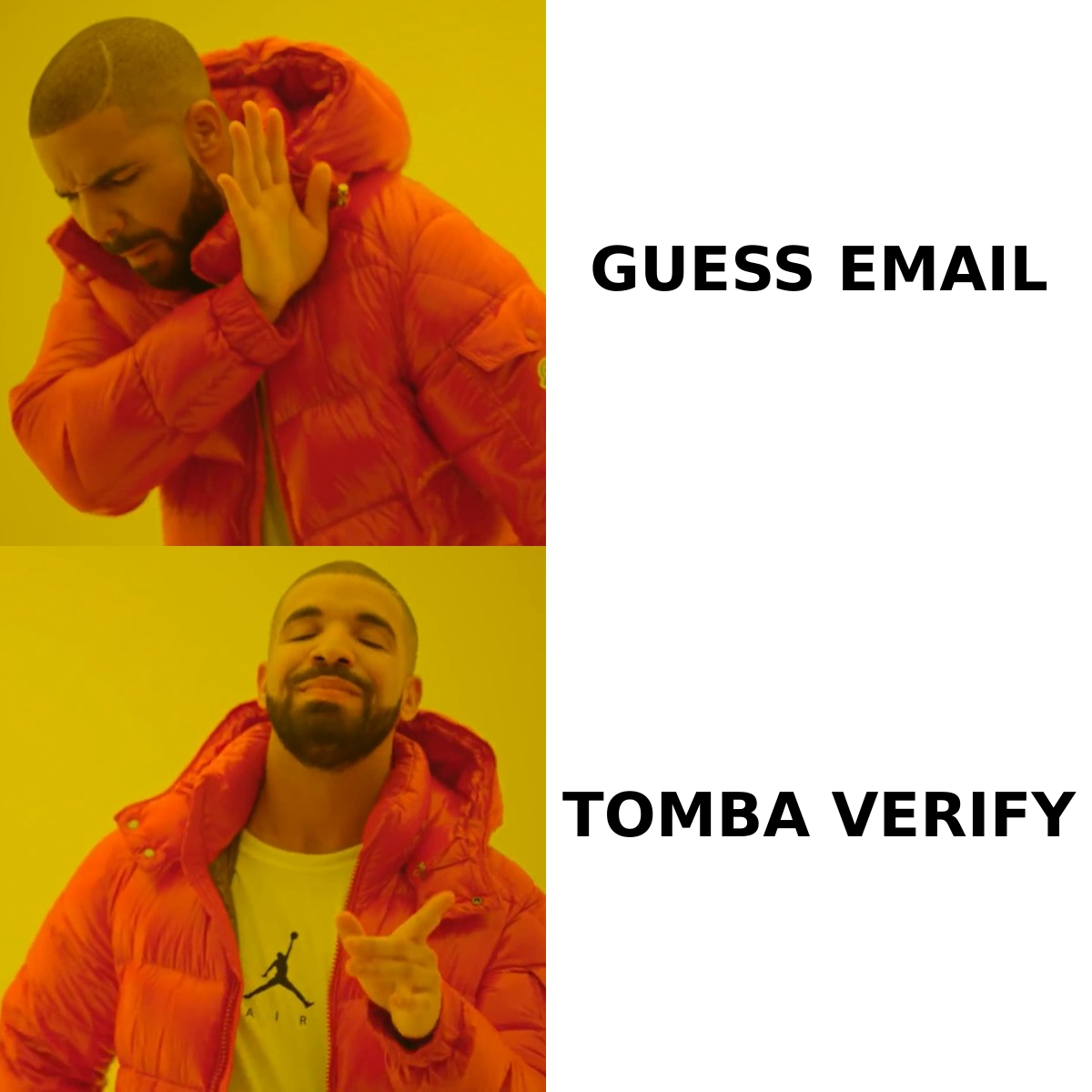
Try Tomba Email Finder free. Twenty-five searches a month, no card, no sales call. Run your control list through the Tomba Email Finder, verify the output, and compare the cost per valid email against whatever the other two quote you. If the numbers favour them, buy theirs. If they favour a $49/mo credit pool with domain search, verification and enrichment on one API key, you already know where to start.
Related guides#
Ready to find emails that actually work?
Join 150,000+ professionals who stopped guessing and started sending. Free credits on signup — no credit card required.
Get the Tomba newsletter
Practical outbound tactics and product updates — once every two weeks.
About the author