GetProspect Email Finder Review 2026: Accuracy, Pricing, Limits
An honest look at GetProspect's email finder in 2026 — where its 200M-contact database wins, where credit math gets expensive, and which alternatives beat it on verified-hit rate.
The GetProspect email finder pulls work emails from LinkedIn profiles. This review covers what it costs, how well it works, and when a cheaper tool wins.
TL;DR
- GetProspect is a LinkedIn-first B2B contact database. You get a Chrome extension, a bulk finder, and a claimed 200M+ contact index. It works best when your prospecting starts inside LinkedIn Sales Navigator.
- The free plan gives you 50 valid emails a month. That is enough to test with. Paid plans start near $49/mo and bill by "valid emails" instead of raw lookups.
- Accuracy holds up on well-indexed tech and SaaS domains. It drops on small business, non-English, and catch-all domains. That is where most teams lose money.
- Credits drive the real cost. Exports, enrichment, and verification each eat budget at a different rate, and unused credits rarely roll over.
- Need an API, catch-all resolution, or per-domain pattern discovery? A dedicated email finder usually wins on cost per verified contact.
What is the GetProspect email finder?#
GetProspect is a lead-generation platform built on one core loop. Find a person on LinkedIn. Pull their work email. Push it to a list or your CRM.
It started as a Chrome extension that collected contact data from Sales Navigator results. It now ships a full database product with filters (job title, company size, industry, tech stack, location), bulk enrichment, and an API.
The GetProspect email finder works three ways:
- Extension capture — run a LinkedIn or Sales Navigator search, click the GetProspect button, and it collects profiles plus emails into a list.
- Database search — skip LinkedIn. Filter the stored index by firmographic criteria, then reveal emails for the contacts you want.
- Bulk / CSV enrichment — upload names and company domains. It returns emails, sometimes with a confidence label.
One nuance matters. This is a database lookup tool, not a live-discovery engine. If a contact sits in the index with a recently verified email, results come back fast and clean. If not, you fall back to pattern inference. That is the same guess-and-verify logic every finder uses.

How accurate is the GetProspect email finder?#
Vendors in this category all claim 95–98% accuracy, and GetProspect is no exception. Read those as ceiling figures. They are measured on the contacts the tool chose to return, not on your list.
A different number matters more. Call it verified hit rate. Out of 1,000 real prospects you upload, how many come back with an email that is correct and safe to send? That figure always lands below the marketing claim. It folds in coverage misses, catch-all guesswork, and stale records.
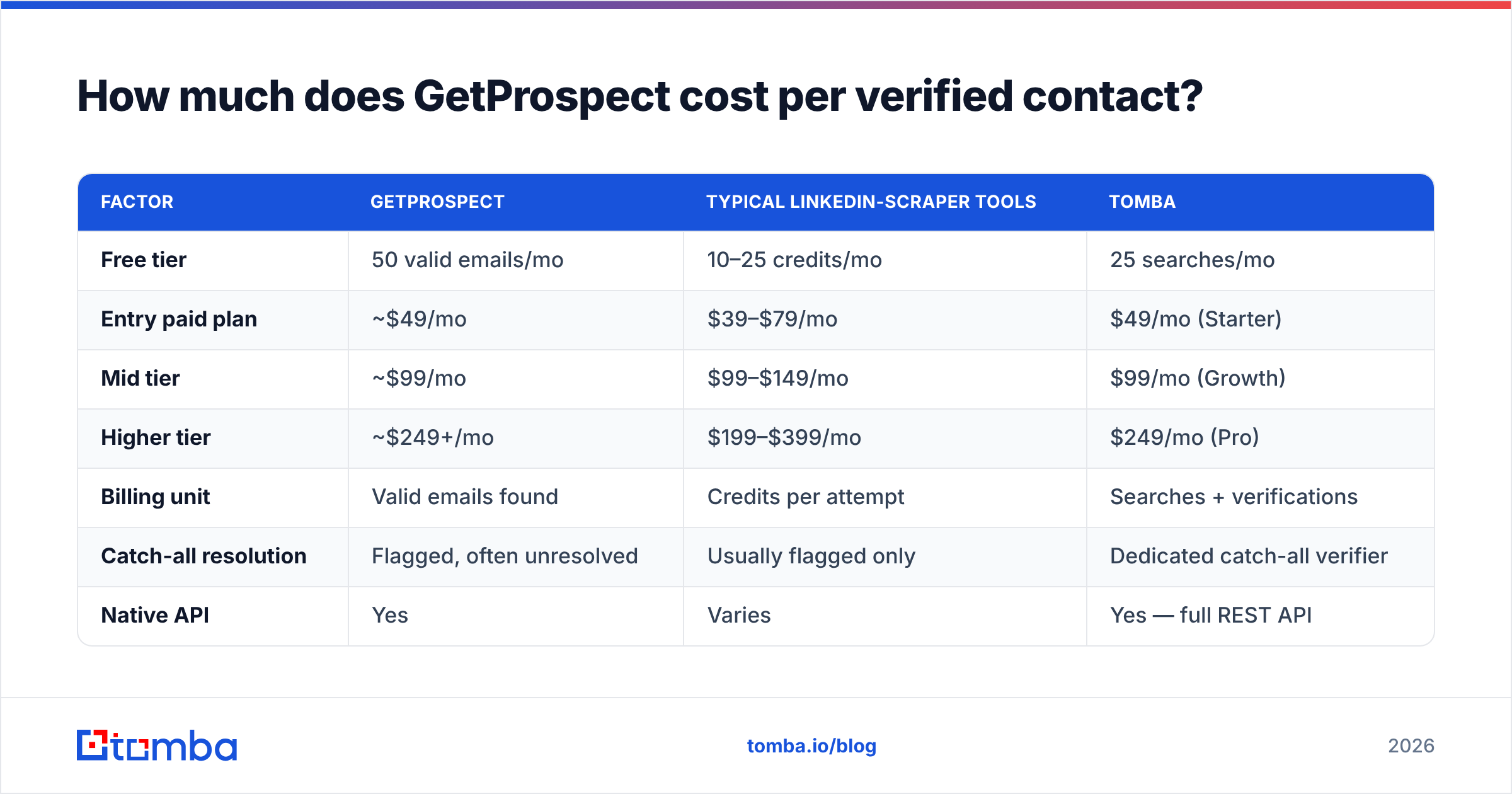
Here is how coverage tends to break down by segment, based on what most teams report in head-to-head tests.
| Prospect segment | Typical GetProspect coverage | Main failure mode |
|---|---|---|
| US/EU SaaS, 50–500 employees | High | Few — this is the sweet spot |
| Enterprise (5,000+ employees) | High | Stale records after reorgs |
| SMB / local services | Medium-low | Not indexed, weak pattern data |
| Non-English domains (JP, KR, DE SMB) | Low-medium | Sparse source coverage |
| Catch-all domains | Ambiguous | Returns "accept-all", unresolved |
| Recently changed jobs (<90 days) | Low | Index lag |
Two takeaways follow. First, test on your own ICP before you sign an annual deal. A 500-row sample from your real target list tells you more than any review, this one included. Second, treat any finder's output as a candidate list, never a verified one. Run it through an independent email verifier before you load a sequence. It is the cheapest insurance in outbound.
Why catch-all domains decide the winner#
Many B2B domains are set up as catch-all. The mail server accepts every address at that domain, so a standard SMTP check cannot tell a real mailbox from a typo. Most finders label these "accept-all" and hand the risk back to you.
That hurts, because catch-all domains skew toward mid-market and enterprise. Those are the accounts with real deal size. A tool that returns 300 addresses with 90 unresolved catch-alls has not given you 300 usable contacts. A dedicated catch-all verifier changes the math. Resolving half of those unknowns beats a few points of headline accuracy.
How much does the GetProspect email finder cost per verified contact?#
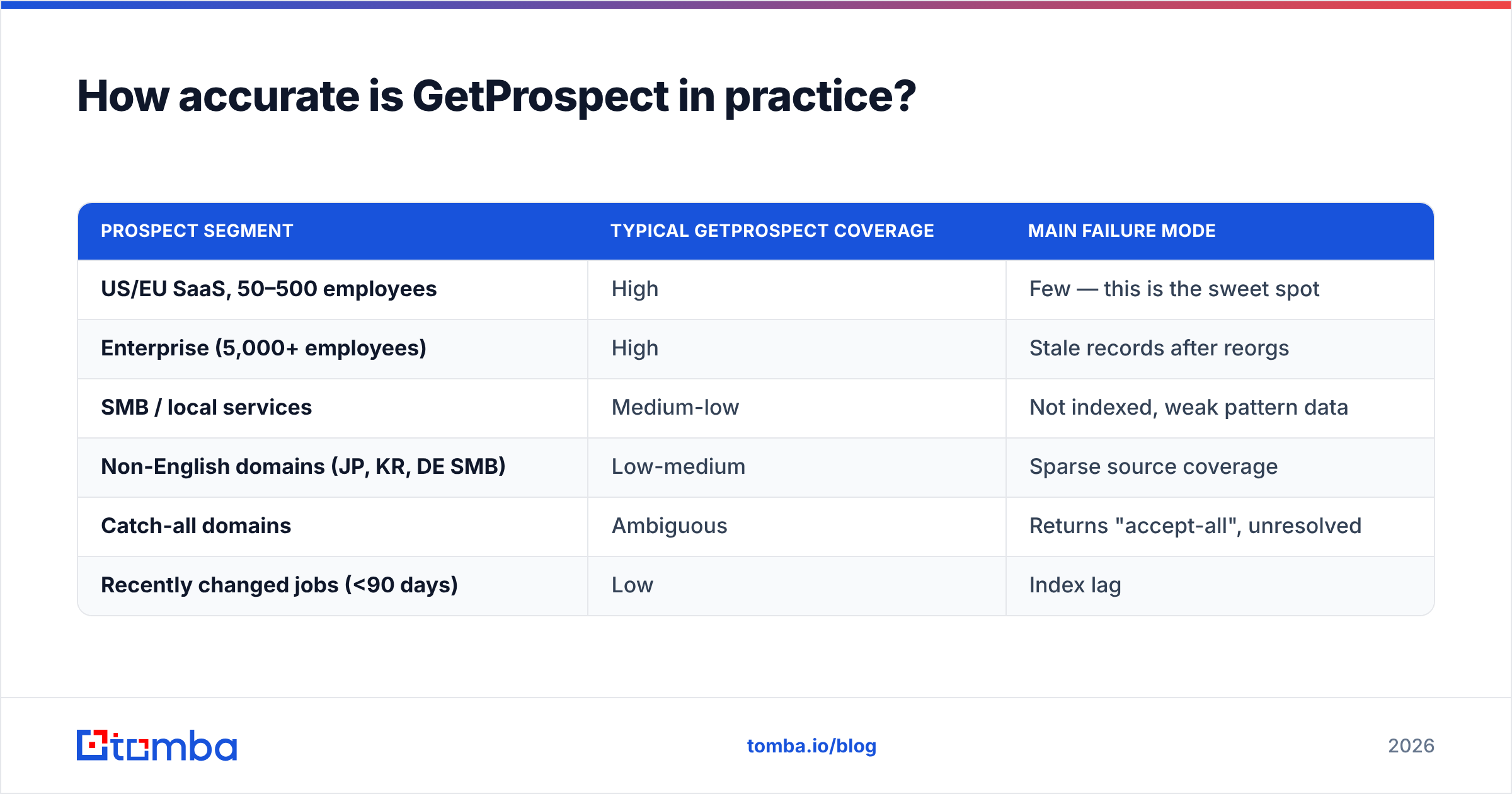
GetProspect bills on valid emails found, not raw searches. That is fairer than credit-per-attempt pricing. Still, watch three things.
- Credits reset monthly and rarely roll over. If your prospecting is bursty — heavy one month, light the next — you pay for capacity you never touch.
- Enrichment and phone data draw from separate or larger pools. One "full" contact reveal can cost several times a plain email lookup.
- Export limits and seat pricing are separate levers. A team of four on a mid tier hits seat cost before it hits credit cost.
Use one metric: cost per contact you actually emailed. Take your monthly fee. Divide it by the number of contacts that passed verification and entered a live sequence. That number is often 2–4x the sticker price per credit.
| Factor | GetProspect | Typical LinkedIn-scraper tools | Tomba |
|---|---|---|---|
| Free tier | 50 valid emails/mo | 10–25 credits/mo | 25 searches/mo |
| Entry paid plan | ~$49/mo | $39–$79/mo | $49/mo (Starter) |
| Mid tier | ~$99/mo | $99–$149/mo | $99/mo (Growth) |
| Higher tier | ~$249+/mo | $199–$399/mo | $249/mo (Pro) |
| Billing unit | Valid emails found | Credits per attempt | Searches + verifications |
| Catch-all resolution | Flagged, often unresolved | Usually flagged only | Dedicated catch-all verifier |
| Native API | Yes | Varies | Yes — full REST API |
| LinkedIn extension | Yes (core strength) | Yes | Yes |
| Spreadsheet add-ons | Limited | Rare | Excel + Google Sheets |
| Credit rollover | No | Rarely | Check current plan terms |
Prices in this category move often. Confirm them on the official GetProspect site and on Tomba pricing before you budget. Read recent buyer reviews on G2 as well, rather than trusting one comparison table — including this one.
Is GetProspect better than the alternatives?#
It depends on where your prospecting workflow starts.
GetProspect wins when:
- Your motion is LinkedIn-native. Search in Sales Navigator, capture with the extension, build a list. The extension is mature and the loop is clean.
- You want database filters without a data project. The firmographic filters are good enough for a two-person SDR team to self-serve.
- You value simple billing. Paying for valid emails rather than attempts removes a whole class of nasty surprises.
- Non-technical people own prospecting. The UI is friendly. Nobody has to touch an API.
Other tools win when:
- You need domain-level discovery. If your question is "who works at this company, and what is the email pattern," a domain search is a different and faster tool. It returns every address it can find plus the inferred pattern.
- You are building automation. An email finder API with predictable rate limits, a CLI, and MCP support fits a RevOps pipeline better than a UI-first product.
- Catch-all domains dominate your ICP. See above. This is the biggest silent cost in the category.
- You need contacts outside LinkedIn. Authors, blog contributors, and support contacts are not in a LinkedIn-derived index. An author finder or reverse email lookup covers ground a scraper never will.
One more option deserves a name: prebuilt list vendors. Tools like BookYourData sell verified contact lists outright, pay-as-you-go, with no monthly commitment. That is a different purchase from a per-lookup finder. If your need is "give me 5,000 verified HR directors in the US," a list vendor is the shorter path. Nothing stops you from running both.

What does a realistic GetProspect workflow look like?#
Here is the loop most teams settle into, and where each step leaks money.
- Set a tight ICP filter. Broad filters burn credits on people you would never contact. Narrow by title, company size, and geography before you reveal anything.
- Reveal in small batches. Pull 100–200 contacts. Check the quality. Then scale. Revealing 2,000 at once locks in whatever the index holds, good or bad.
- Export and deduplicate. Overlap with your CRM is the most common hidden waste — you pay to rediscover contacts you already own. A remove duplicates pass takes thirty seconds.
- Verify on your own. Never send to an "accept-all" or "unknown" record without a second check. Run the list through verification and split it into safe, risky, and discard.
- Enrich only the survivors. Phone numbers and firmographic data cost more per record than emails. Spend that budget on contacts that passed verification, not on the raw pull.
- Track bounce rate by source. If GetProspect contacts bounce harder than another source, you have your renewal answer. No debate needed.

Step 4 is not theater. Bounce rate feeds straight into sender reputation, and damage from one bad send takes weeks to repair. Google and Yahoo cap spam complaints for bulk senders and expect authenticated, low-bounce mail. The current rules sit in Google's sender guidelines. One campaign at 8% bounce can cost more in deliverability than a year of finder fees.
What are the biggest limitations to plan around?#
Index lag on job changes. Every database-first tool has a refresh cadence. Contacts who moved roles last quarter are the most likely to be wrong. They are also the ones you most want to reach, since new decision-makers buy. Check high-value targets by hand.
LinkedIn dependency. The extension's value rests on LinkedIn's tolerance of automated collection, and that tolerance has narrowed over the years. Heavy use carries account-level risk that no vendor can remove. Keep your scraping light, and never run it on an account you cannot afford to lose.
Coverage outside the tech corridor. Is your ICP manufacturing in the Midwest, logistics in Southeast Asia, or professional services in Europe? Expect much lower hit rates than the marketing pages suggest. Sample first.
Catch-all ambiguity, again. It bears repeating, because nobody budgets for it. Every unresolved accept-all address is either a wasted credit or a bounce waiting to happen.
Team and export ceilings. Check seat counts and monthly export caps against your real team size. These limits are what force mid-cycle upgrades.
Who should actually buy GetProspect?#
Good fit: a small SDR team that lives in Sales Navigator. Targets are US/EU tech companies with 50–1,000 staff. Nobody wants engineering involved. Budget sits near $49–$99/mo.
Poor fit: RevOps teams building automated enrichment pipelines. Agencies running high-volume, multi-client campaigns where cost per verified contact decides everything. Anyone whose ICP sits outside LinkedIn's well-indexed core. Teams that need catch-all resolution as a real feature, not a flag.
Reasonable hybrid: use GetProspect for discovery. Then run every export through an independent verification and enrichment layer before it reaches your sequencer. That splits the job between the tool that finds people and the tool that confirms they are reachable. It usually costs less than paying one vendor to do both badly.

How do you run a fair 30-minute bake-off?#
Skip the reviews and run the test. It takes half an hour.
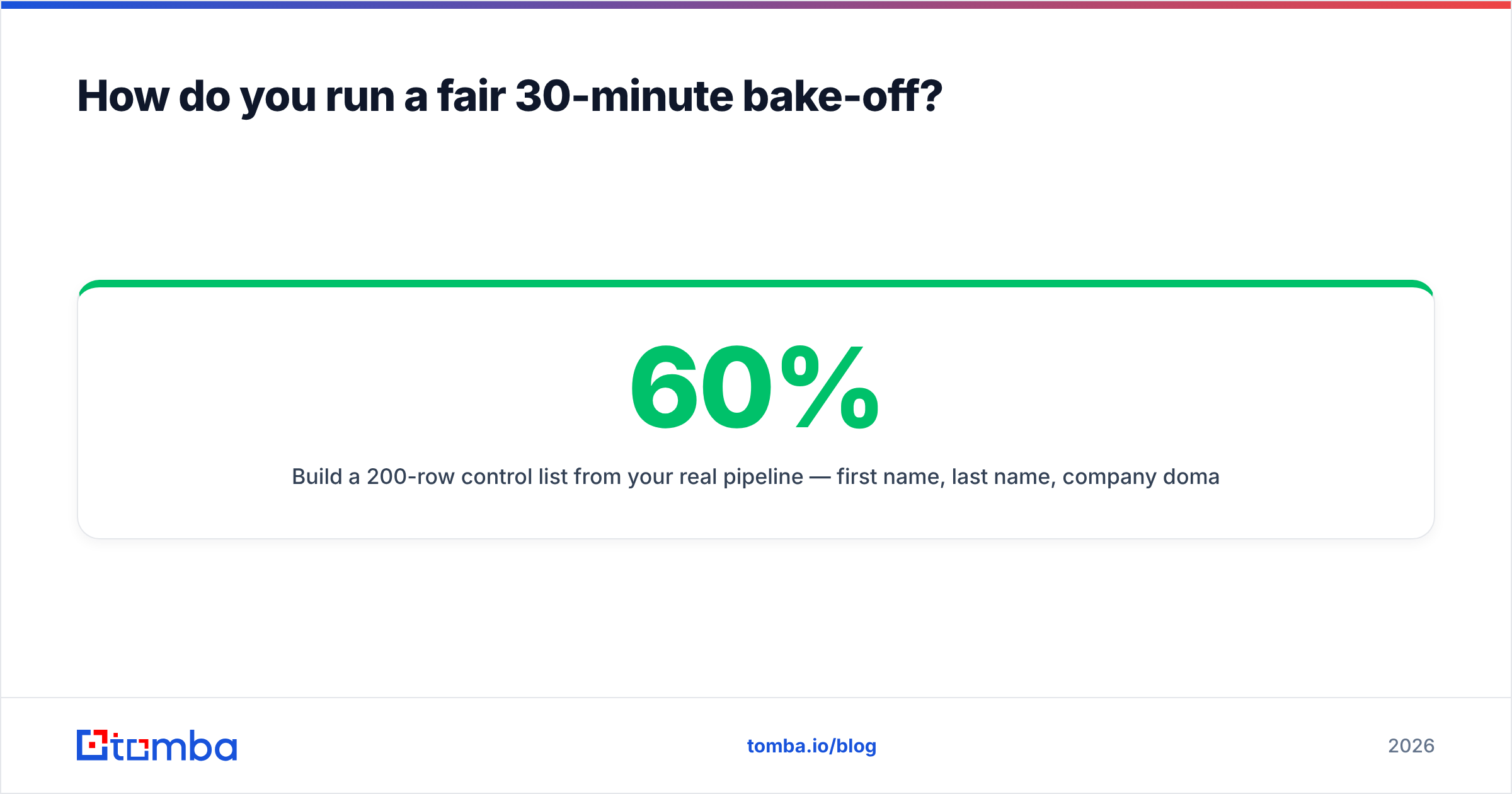
- Build a 200-row control list from your real pipeline: first name, last name, company domain. Mix it on purpose — 60% core ICP, 20% SMB, 20% harder segments such as non-English domains and recent job changes.
- Run the same list through every candidate. Free tiers usually cover it: GetProspect's 50 valid emails, Tomba's 25 free searches, and whatever else you are weighing.
- Score three columns, not one. Coverage means how many returned an address. Correctness means how many survive independent verification. Cost means credits burned.
- Compute cost per verified contact. Monthly price ÷ contacts that passed. This is the only number that predicts your real spend.
- Check the catch-all column on its own. Count the results that came back unresolved. That is your hidden liability.
- Test the API if you plan to use it. Read the docs, make ten calls, check the response shape and rate limits. A tool that feels nice in the UI can be miserable in a pipeline.
Whichever tool wins your bake-off is the right answer for your list. It may not be the right answer for anyone else's.
The bottom line#
The GetProspect email finder is a competent LinkedIn-first tool with fair billing and a real free tier. If your prospecting starts in Sales Navigator, and your targets are well-indexed Western tech companies, it will do the job without drama. If your ICP is broader, your workflow is API-driven, or catch-all domains fill your target accounts, you will get more verified contacts per dollar elsewhere.
Want to test that on your own list? The Tomba Email Finder gives you 25 free searches a month, no card needed. That is enough to run a real sample against your ICP, catch-all domains included. Paid plans start at $49/mo for Starter, $99/mo for Growth, and $249/mo for Pro. Every tier includes the finder, verifier, domain search, and API. Run the bake-off, compare cost per verified contact, and let the numbers pick the tool.
Related guides#
Ready to find emails that actually work?
Join 150,000+ professionals who stopped guessing and started sending. Free credits on signup — no credit card required.
Get the Tomba newsletter
Practical outbound tactics and product updates — once every two weeks.
About the author