GetProspect vs Getro 2026: Which Tool Actually Finds Emails?
GetProspect and Getro get typed into the same search box, but they solve completely different problems. Here's what each one actually does, what they cost, and which one belongs in your outbound stack.
TL;DR
- GetProspect is a B2B email finder and lightweight prospecting CRM. Getro is job-board and talent-network software for VC firms, accelerators, and communities. They are not competitors.
- If you searched "GetProspect vs Getro," you almost certainly want one of them and not the other. The name similarity is the only overlap.
- GetProspect sells self-serve credits starting free; Getro sells annual, quote-based contracts to organizations that run a portfolio job board.
- If your actual job is filling a cold-outreach list with verified work emails, the real comparison set is GetProspect, Hunter, Apollo, and Tomba — not Getro.
- Whatever finder you pick, verify before you send. Unverified lists are the single fastest way to torch a sending domain.
Why do people compare GetProspect and Getro?#
Because of five shared letters. That's it.
Type "getpro" into Google and autocomplete offers both. Both are B2B SaaS. Both have clean startup-y marketing sites. Both show up in lists of "recruiting and sourcing tools" because Getro is genuinely a sourcing tool and GetProspect is genuinely used by recruiters to find candidate emails. So the two names collide in the same searches, the same G2 category browsing sessions, and the same internal Slack threads where someone half-remembers a vendor name.
Here's the honest version of this comparison: they do not overlap in function at all. One finds contact data for people you want to email. The other runs a job board and talent network on behalf of an investor or community. Choosing between them isn't a feature trade-off — it's figuring out which problem you actually have.
The rest of this post does two things. First, it separates the two clearly so you stop wasting evaluation cycles. Second, it gives you the comparison you probably wanted in the first place: how GetProspect stacks up against real email-finding alternatives.
What is GetProspect?#
GetProspect is a B2B lead database and email finder. The core loop is: search for people by job title, company, industry, headcount, or location; pull their work email; export to CSV or push to your CRM. It also ships a Chrome extension that pulls contacts off LinkedIn search results and profile pages, plus a simple built-in list manager that some teams use as a mini-CRM.
Typical GetProspect use cases:
- LinkedIn Sales Navigator scraping — run a search, click the extension, export a list with emails attached.
- Domain-level prospecting — pick a target account, list the people at it, pick your entry point.
- List enrichment — upload names and companies you already have, get emails back.
- Recruiter sourcing — find candidate contact details outside of InMail.
- API/integration work — push discovered contacts into HubSpot, Pipedrive, or a sequencer.
What GetProspect is not: a sending platform. It does not warm up mailboxes, run sequences, or manage replies. You pair it with something like Instantly, Smartlead, or your existing sales engagement tool.
What is Getro?#
Getro sells network software to organizations that have a talent problem on behalf of other companies. Its two main products are a job board (aggregating open roles across a portfolio of companies into one branded board) and a talent network (a searchable candidate pool that portfolio companies can recruit from).
The buyer is almost always one of:
- A venture capital firm running a "jobs at our portfolio" page as a founder-value service.
- An accelerator or incubator connecting cohort companies with candidates.
- A professional community or association monetizing or servicing its member base.
- An economic development org or university alumni network doing the same thing at a regional scale.
Getro's value is in automation: it crawls portfolio company career pages so job listings stay fresh without anyone updating a spreadsheet, and it gives the network operator analytics on placements and engagement. Pricing is quote-based and annual — there's no free credit tier to kick around on a Tuesday afternoon.
If you are a VC platform lead, Getro is a serious tool worth a demo. If you are an SDR trying to book meetings, Getro will not help you and there is no configuration that makes it help you.

How do GetProspect and Getro compare side by side?#
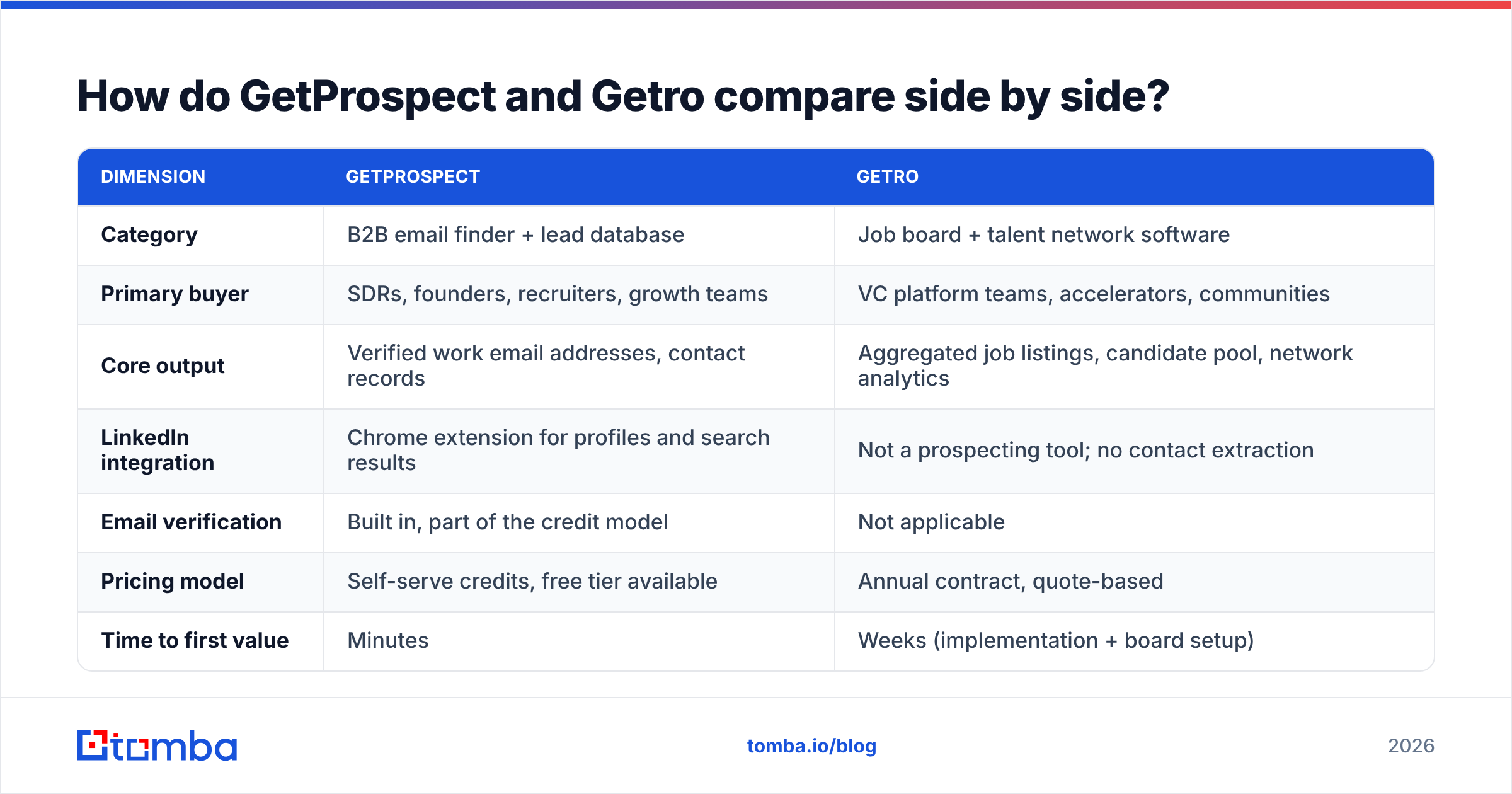
| Dimension | GetProspect | Getro |
|---|---|---|
| Category | B2B email finder + lead database | Job board + talent network software |
| Primary buyer | SDRs, founders, recruiters, growth teams | VC platform teams, accelerators, communities |
| Core output | Verified work email addresses, contact records | Aggregated job listings, candidate pool, network analytics |
| LinkedIn integration | Chrome extension for profiles and search results | Not a prospecting tool; no contact extraction |
| Email verification | Built in, part of the credit model | Not applicable |
| Pricing model | Self-serve credits, free tier available | Annual contract, quote-based |
| Time to first value | Minutes | Weeks (implementation + board setup) |
| Fits in an outbound stack? | Yes — it's the data layer | No |
The table makes the point better than any paragraph: there is no row where these two products are competing for the same budget line. If someone on your team put both on an evaluation shortlist, that shortlist has a scoping error in it.
Which one fits your job?#
Use this as a five-second router:
- You need emails for cold outreach. → GetProspect (or a direct competitor — see below). Getro is irrelevant.
- You run a VC portfolio jobs page. → Getro. GetProspect is irrelevant.
- You're a recruiter sourcing candidates directly. → GetProspect for contact data; Getro only if you're the one operating the talent network, not the one recruiting from it.
- You're a founder hiring for your own startup and your investor uses Getro. → You get Getro's benefit for free as a portfolio company. You still need a separate finder for outbound sales.
- You want both. → That's fine, they're not mutually exclusive. They just come out of different budgets and serve different teams.
What does each one actually cost?#
Pricing on both sides moves, so treat these as directional and confirm on the vendors' own pages before you sign anything.
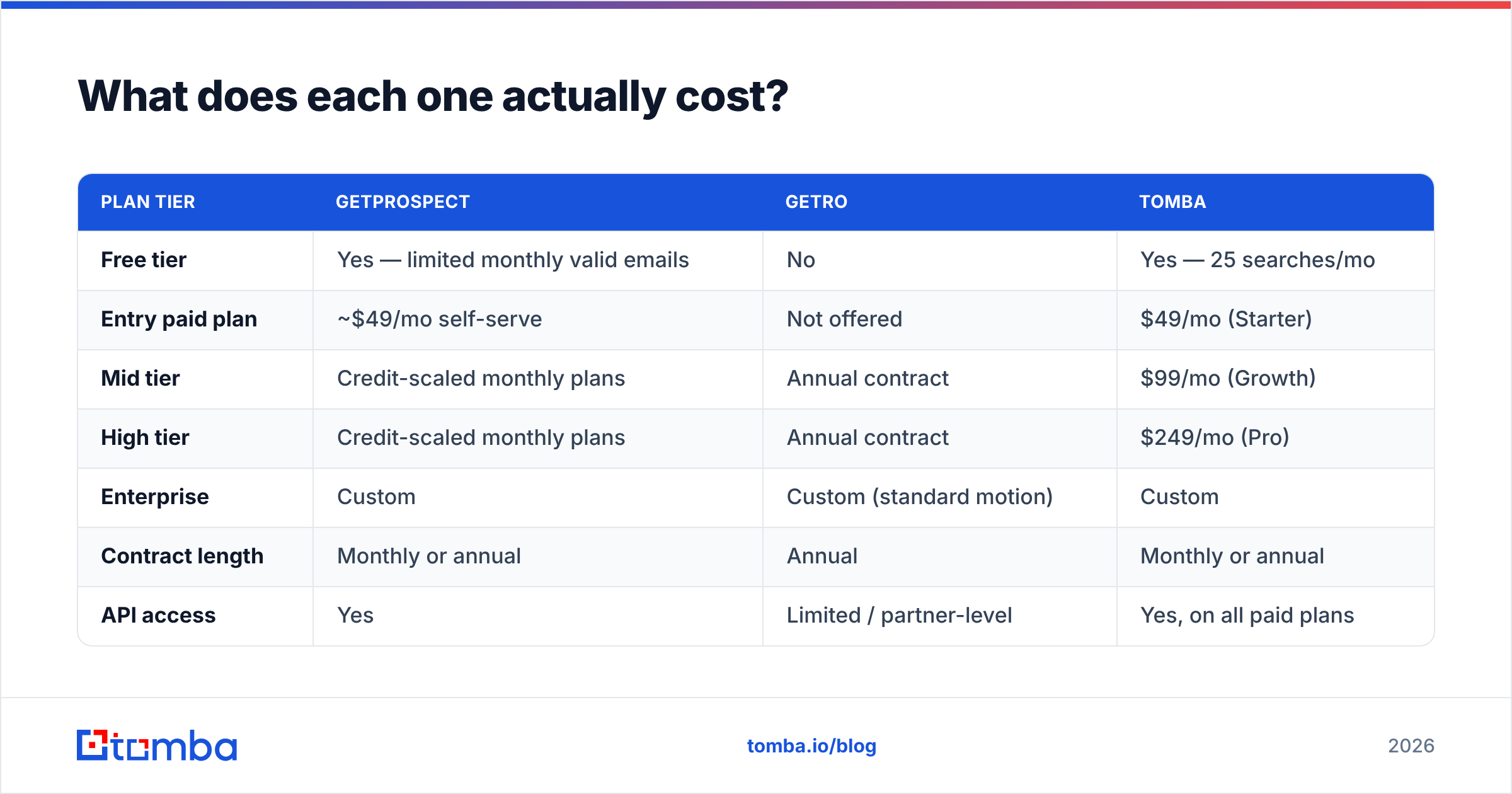
| Plan tier | GetProspect | Getro | Tomba |
|---|---|---|---|
| Free tier | Yes — limited monthly valid emails | No | Yes — 25 searches/mo |
| Entry paid plan | ~$49/mo self-serve | Not offered | $49/mo (Starter) |
| Mid tier | Credit-scaled monthly plans | Annual contract | $99/mo (Growth) |
| High tier | Credit-scaled monthly plans | Annual contract | $249/mo (Pro) |
| Enterprise | Custom | Custom (standard motion) | Custom |
| Contract length | Monthly or annual | Annual | Monthly or annual |
| API access | Yes | Limited / partner-level | Yes, on all paid plans |
Two things worth noticing. First, Getro's model is fundamentally different — it's a platform license, not a credit meter, and there is no way to test it for $0 the way you can with a finder. Second, the entry price point for self-serve email finders has converged hard: most credible vendors, including Tomba pricing, sit right around the $49/month mark for a starter plan. The differentiator is no longer the sticker price. It's what percentage of your credits come back with a usable address.
Is GetProspect accurate enough for cold outreach?#
Accuracy is the only metric that matters in this category, and it's the one every vendor markets loosely.
Here's the distinction that gets blurred. A finder can return a "valid" email in two very different ways:
- Pattern inference. The tool knows
firstname.lastname@company.comis the format at that domain, so it constructs an address and calls it found. Cheap, fast, and often wrong for anyone with a common name or a nonstandard alias. - Verified discovery. The tool has actually seen the address in a source, then confirms deliverability via SMTP-level checks before handing it over.
Most tools do a blend. The ratio is what separates a 3% bounce rate from a 12% one, and a 12% bounce rate is how you get your domain flagged. Google and Microsoft's 2024 bulk-sender rules put a hard ceiling on spam complaints and made list hygiene non-negotiable — you can read the current state of play in most email deliverability primers.
Practical test before you commit to any vendor, GetProspect included:
- Pull 100 contacts from a domain you know well.
- Manually check 10 of them against LinkedIn, the company site, or a mutual contact.
- Run the full 100 through an independent email verifier — not the vendor's own, since that's the same engine that produced them.
- Count catch-all domains separately. They inflate "valid" counts and hide risk.
- Only then compare price-per-usable-contact, not price-per-credit.
Teams that skip step 3 routinely discover, six weeks into a campaign, that a third of their "verified" list was catch-all guesswork. Independent reviews on G2 are useful for spotting patterns here — look specifically at one- and two-star reviews mentioning bounce rates, not the overall score.

What should you compare GetProspect against instead?#
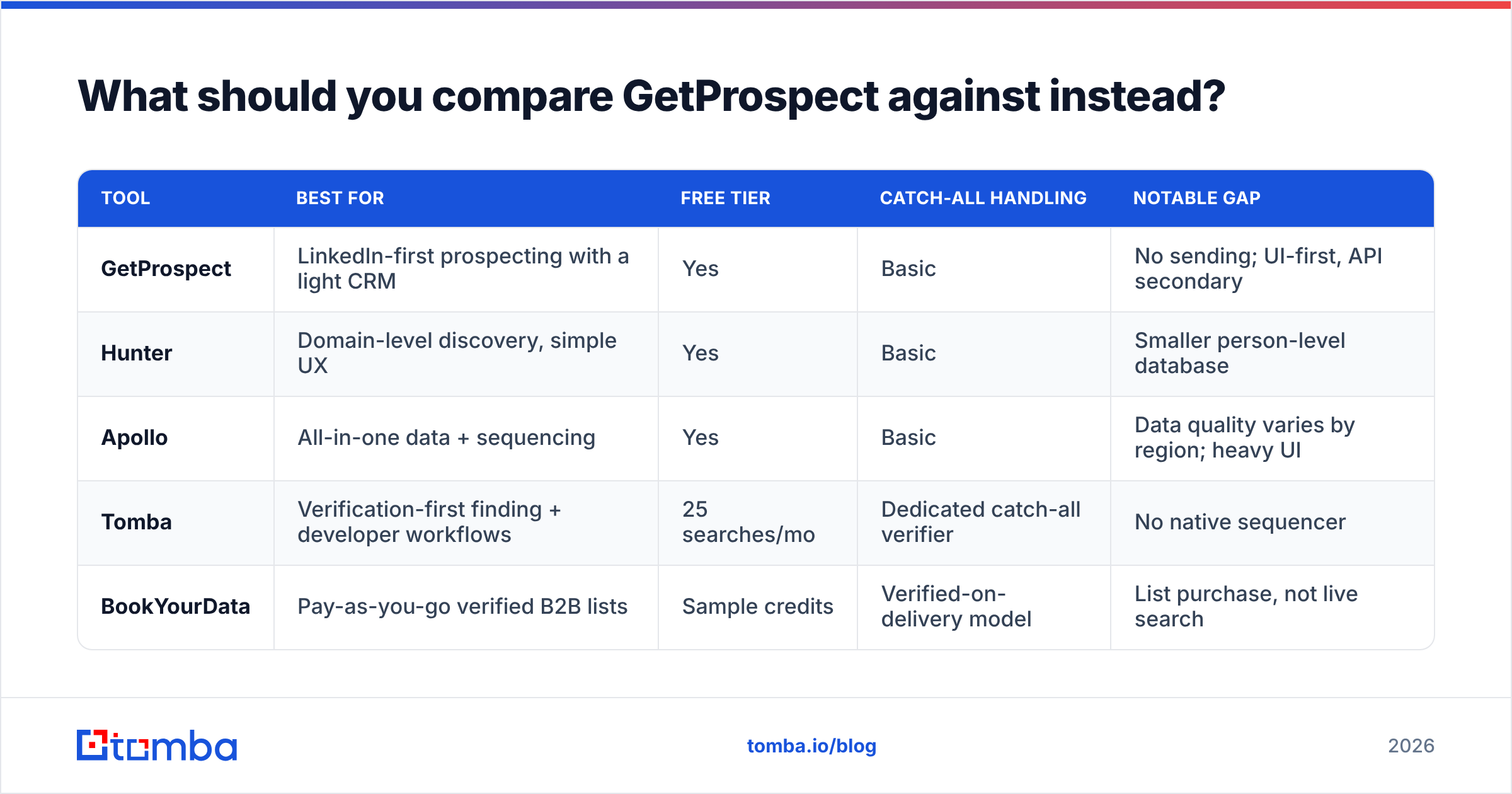
If you've correctly concluded that Getro isn't your competitor set, here's the real one.
| Tool | Best for | Free tier | Catch-all handling | Notable gap |
|---|---|---|---|---|
| GetProspect | LinkedIn-first prospecting with a light CRM | Yes | Basic | No sending; UI-first, API secondary |
| Hunter | Domain-level discovery, simple UX | Yes | Basic | Smaller person-level database |
| Apollo | All-in-one data + sequencing | Yes | Basic | Data quality varies by region; heavy UI |
| Tomba | Verification-first finding + developer workflows | 25 searches/mo | Dedicated catch-all verifier | No native sequencer |
| BookYourData | Pay-as-you-go verified B2B lists | Sample credits | Verified-on-delivery model | List purchase, not live search |
Pick based on where your workflow actually lives:
- Your workflow is a browser tab on LinkedIn. GetProspect's extension is genuinely good at this, and so is a dedicated LinkedIn finder. Test both on the same 50 profiles.
- Your workflow is a spreadsheet of company domains. You want strong domain search and a solid bulk email finder for batch runs.
- Your workflow is code. This is where a lot of finders quietly fall down. If you're enriching inside your own product or a data pipeline, an API with predictable rate limits and clean error semantics matters more than any UI feature.
- Your workflow is buying lists. Then a pay-as-you-go vendor beats a subscription — you're not paying for months you don't prospect.
What's the verdict on GetProspect vs Getro?#
There isn't one, and that's the useful answer. GetProspect is a competent, well-priced email finder with a strong LinkedIn extension and a free tier that lets you evaluate it honestly. Getro is a well-regarded talent network platform for organizations that operate on behalf of a portfolio. Neither is a substitute for the other, and no amount of feature comparison will change that.
If you landed here through outbound sales work: your shortlist is GetProspect, Hunter, Apollo, Tomba, and possibly a list vendor. Evaluate them on verified-email rate against your ICP, catch-all transparency, and per-usable-contact cost. Run the same 100-domain test against each one and let the bounce data decide.
If you landed here through platform or community work: book the Getro demo, ask specifically about job-crawl freshness across your portfolio's ATS mix, and ignore everything else in this post.
Ready to test a finder on your own list?#
Start with the accuracy test, not the pricing page. Run your next 100 target domains through the Tomba Email Finder — the free tier gives you 25 searches a month with no card, every result comes back with a confidence score and source attribution, and catch-all domains are flagged separately instead of being quietly counted as wins. If the hit rate beats what you're getting today, the $49/month Starter plan pays for itself in one campaign's worth of avoided bounces. If it doesn't, you've lost nothing but an afternoon.
Related guides#
Ready to find emails that actually work?
Join 150,000+ professionals who stopped guessing and started sending. Free credits on signup — no credit card required.
Get the Tomba newsletter
Practical outbound tactics and product updates — once every two weeks.
About the author