GetProspect vs GoCustomer: Which B2B Data Tool Wins in 2026?
GetProspect sells contact data and LinkedIn extraction. GoCustomer sells AI-personalized sending. They solve different halves of outbound — here's which one you actually need, and what the pricing really costs.
TL;DR
- GetProspect is a contact database plus LinkedIn email extractor — roughly 200M+ contact records, a Chrome extension, and list-building workflows. It answers "who do I email?"
- GoCustomer is an AI-driven outbound sending platform — personalization, sequencing, mailbox rotation. It answers "how do I email them at scale?"
- They are not direct substitutes. Comparing them head-to-head only makes sense if you're deciding which half of the outbound stack to buy first.
- Buy data first. A perfect AI-written sequence sent to a 40%-bounce list destroys your domain faster than a bad subject line ever will.
- If you want verified emails without a database subscription markup, a dedicated finder like Tomba Email Finder ($49/mo Starter, free tier at 25 searches) covers the data layer and hands off cleanly to whatever sender you pick.
What are GetProspect and GoCustomer, actually?#
Most "X vs Y" searches assume the two tools do the same job. This one doesn't. Understanding the split saves you from buying twice.
GetProspect (getprospect.com) is a B2B contact data platform. Its core loop: search a database of company and people records, filter by title, industry, headcount, location, and geography, then export verified emails to CSV or a CRM. Its most-used feature is the LinkedIn Chrome extension — you run a Sales Navigator search, click extract, and GetProspect pulls names plus discovered email addresses into a list. It also does email verification, basic enrichment, and a lightweight built-in email sender that most teams ignore in favor of a real sequencer.
GoCustomer is an AI sales-engagement platform. Its pitch is hyper-personalization: you connect mailboxes, feed it a lead list, and it generates per-prospect email copy using signals it scrapes (LinkedIn activity, company news, website content), then sends across rotated inboxes with warmup built in. It does not pretend to be a database of record — you bring the leads, it writes and sends.
Here's the practical framing:
- GetProspect answers "who" — the list-building and contact-discovery layer.
- GoCustomer answers "what and when" — the copy, sequencing, and deliverability layer.
- Neither answers "is this email actually deliverable" with the rigor a dedicated verifier gives you. GetProspect verifies, but its verification is bundled and opaque; GoCustomer largely assumes your list is clean.
- Both charge per-seat or per-credit, so running them together means two subscriptions plus your CRM.
- Overlap exists but is thin — GetProspect's sender is basic, GoCustomer's enrichment is shallow. Neither replaces the other.
If your instinct is "just pick one," the honest answer is that you'll end up with two tools regardless. The real question is which one you buy first and which one you replace with something cheaper.

How do GetProspect and GoCustomer compare on features and price?#
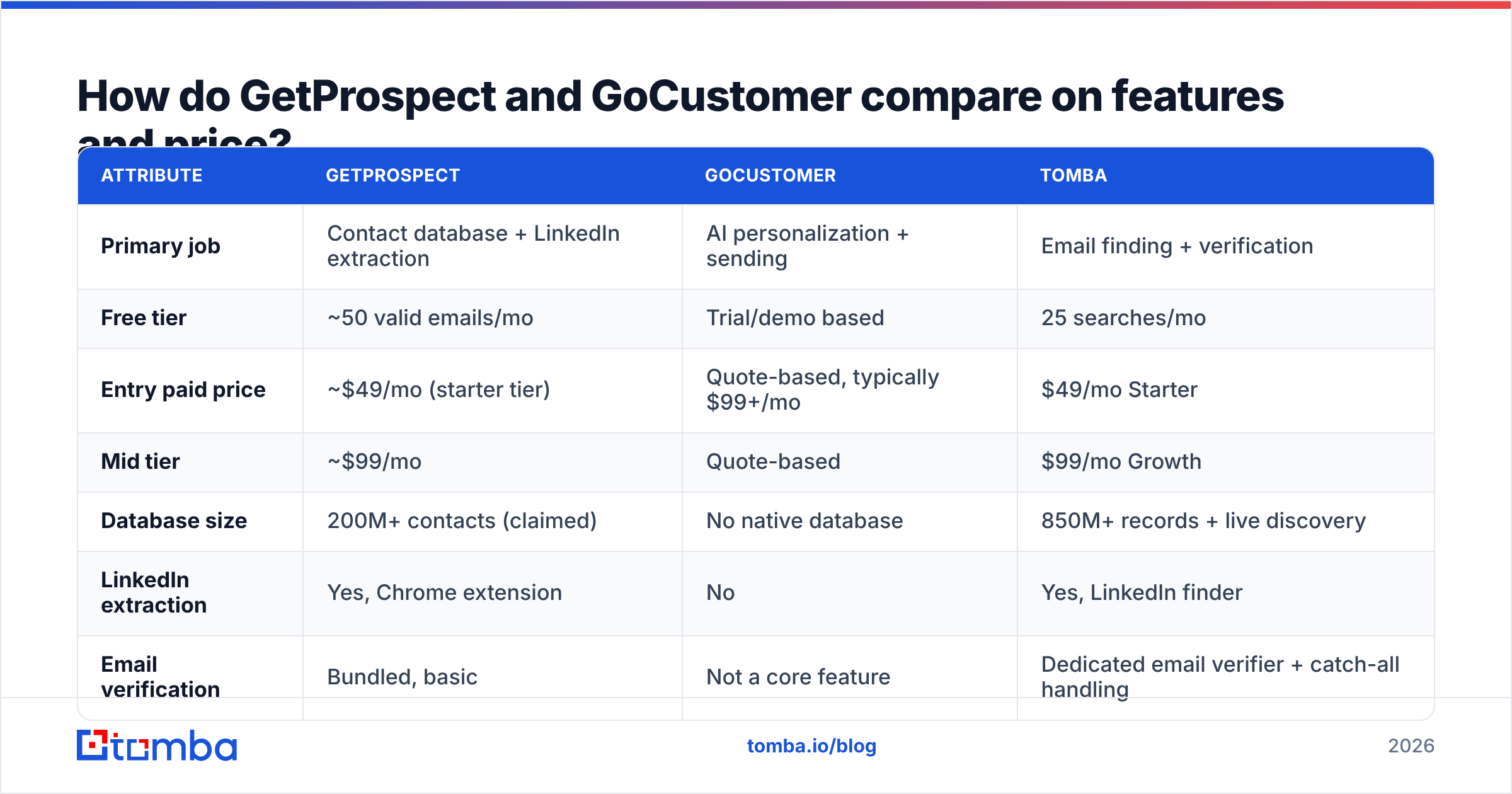
Pricing on both platforms moves, and both publish credit-based tiers where a "credit" means different things depending on the action. Treat the numbers below as the shape of the market rather than a signed quote — verify on each vendor's page before you buy.
| Attribute | GetProspect | GoCustomer | Tomba |
|---|---|---|---|
| Primary job | Contact database + LinkedIn extraction | AI personalization + sending | Email finding + verification |
| Free tier | ~50 valid emails/mo | Trial/demo based | 25 searches/mo |
| Entry paid price | ~$49/mo (starter tier) | Quote-based, typically $99+/mo | $49/mo Starter |
| Mid tier | ~$99/mo | Quote-based | $99/mo Growth |
| Database size | 200M+ contacts (claimed) | No native database | 850M+ records + live discovery |
| LinkedIn extraction | Yes, Chrome extension | No | Yes, LinkedIn finder |
| Email verification | Bundled, basic | Not a core feature | Dedicated email verifier + catch-all handling |
| Sending/sequencing | Basic built-in sender | Core product, multi-inbox rotation | None — pairs with your sequencer |
| API access | Yes, on paid plans | Yes | Yes, Tomba API on all paid plans |
| Best for | List builders, agencies, recruiters | Teams who already have lists and want AI copy | Anyone who needs accurate, verified emails |
Read that table one more time with a budget in mind. If you buy GetProspect at $99/mo for data and GoCustomer at roughly $99–$199/mo for sending, you're at $200–$300/mo before your CRM, before your warmup tool, and before a single reply lands.
What does GetProspect get right?#
The LinkedIn extension is genuinely good. If your prospecting motion starts inside Sales Navigator — and for most SDR teams it does — being able to select 500 profiles and pull them into a structured list with emails attached removes an hour of manual work per campaign. The filtering is decent, the CSV export is clean, and the CRM sync covers the usual suspects.
The weak spot is what happens after export. GetProspect's own valid-email guarantee is generous on paper, but bundled verification tends to be a single SMTP check, not layered validation. On catch-all domains — which now cover a large slice of mid-market B2B — a single check tells you almost nothing. That's why teams building lists at volume run a second pass through a dedicated catch-all verifier before anything touches a sequencer.
What does GoCustomer get right?#
Personalization at scale is a real problem and GoCustomer attacks it directly. Generic merge-tag mail ("Hi {{FirstName}}, I saw you work at {{Company}}") stopped working years ago. Pulling a recent LinkedIn post or a funding announcement into the first line measurably lifts reply rates — HubSpot's sales research has consistently shown personalized outreach outperforming templated blasts.
The weak spots are two. First, AI-generated first lines are only as good as the signal available — for prospects with a dormant LinkedIn and a thin company site, the output degrades into filler that reads worse than a good static template. Second, and more expensive: GoCustomer's deliverability depends entirely on list hygiene it doesn't control. Feed it a scraped list with 30% invalid addresses and the rotation plus warmup will not save your domain. Google and Yahoo's 2024 bulk-sender requirements put a hard 0.3% spam-complaint ceiling on senders, and bounce-driven reputation damage compounds fast.
Is GetProspect better than GoCustomer for cold outreach?#
For most teams starting out: yes, buy the data tool first. Here's the reasoning.
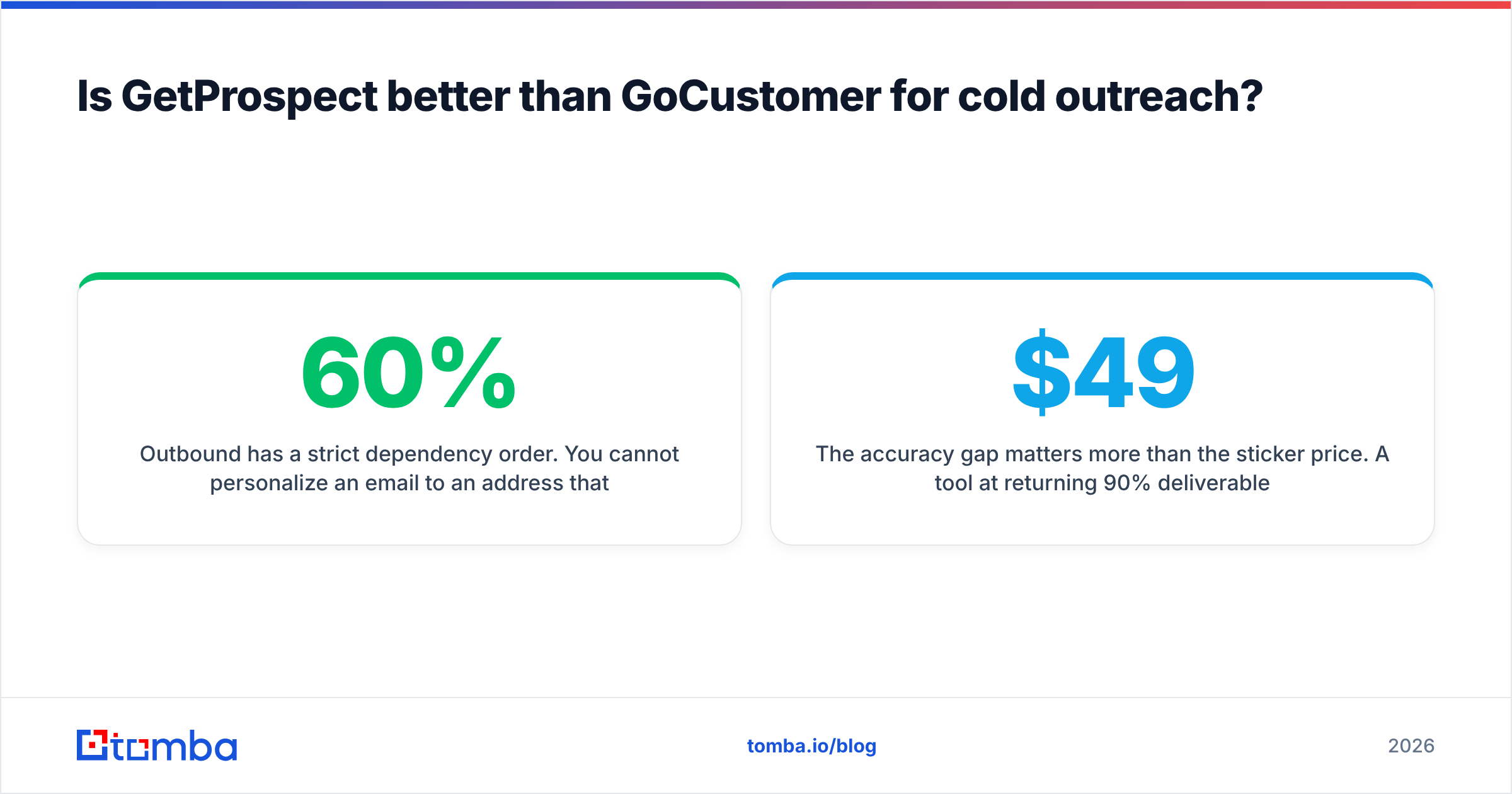
Outbound has a strict dependency order. You cannot personalize an email to an address that doesn't exist. You cannot A/B test subject lines against a list that bounces. Every downstream optimization — copy, timing, sequencing, multichannel — multiplies against your deliverable-contact base. If that base is 60% accurate, you've capped your ceiling before writing a word.
That said, "buy data first" doesn't mean "buy GetProspect." It means buy the data layer that gives you the highest verified-contact yield per dollar. Database subscriptions like GetProspect charge you for access to a static index; finder-first tools charge you for successful discoveries against live sources. If your ICP is well-covered by a mainstream database, the subscription is fine. If you're chasing niche verticals, non-US companies, or recently-changed roles, static databases decay and live discovery wins.

The accuracy gap matters more than the sticker price. A tool at $49/mo returning 90% deliverable addresses beats a tool at $99/mo returning 65%, even before you count the reputation damage from the extra bounces.
How to test this yourself in under an hour:
- Build a 100-row control list from your actual ICP — real companies, real named contacts, pulled from LinkedIn manually.
- Run the same list through each tool's free tier. GetProspect gives you ~50 valid emails free; Tomba gives you 25 searches free; most vendors will extend a trial if you ask.
- Measure hit rate, not coverage. Count how many rows came back with an address, then how many of those pass an independent verification pass.
- Send a 20-address test batch from a throwaway domain and record the hard-bounce rate. This is the only number that predicts your real-world outcome.
- Divide monthly cost by verified deliverable contacts. That's your true cost per usable lead — the only pricing metric worth comparing.
Teams that run this test are usually surprised. The tool with the biggest advertised database rarely wins on cost-per-verified-contact, because database size counts records, not accurate records.
What about deliverability — which tool protects your domain?#
Neither, fully. This is the honest answer that vendor comparison pages avoid.
GoCustomer handles the sending side of email deliverability — inbox rotation, throttling, warmup. That's real value, and it's the part most teams underinvest in. But sender reputation is downstream of list quality. Mailbox providers weigh bounce rate, spam complaints, and engagement. Rotation spreads the damage across more inboxes; it doesn't reduce it.
GetProspect handles the list side with bundled verification, but as noted, bundled verification is usually shallow. Catch-all domains, role-based addresses (info@, sales@), and recently-departed employees all slip through single-pass SMTP checks.
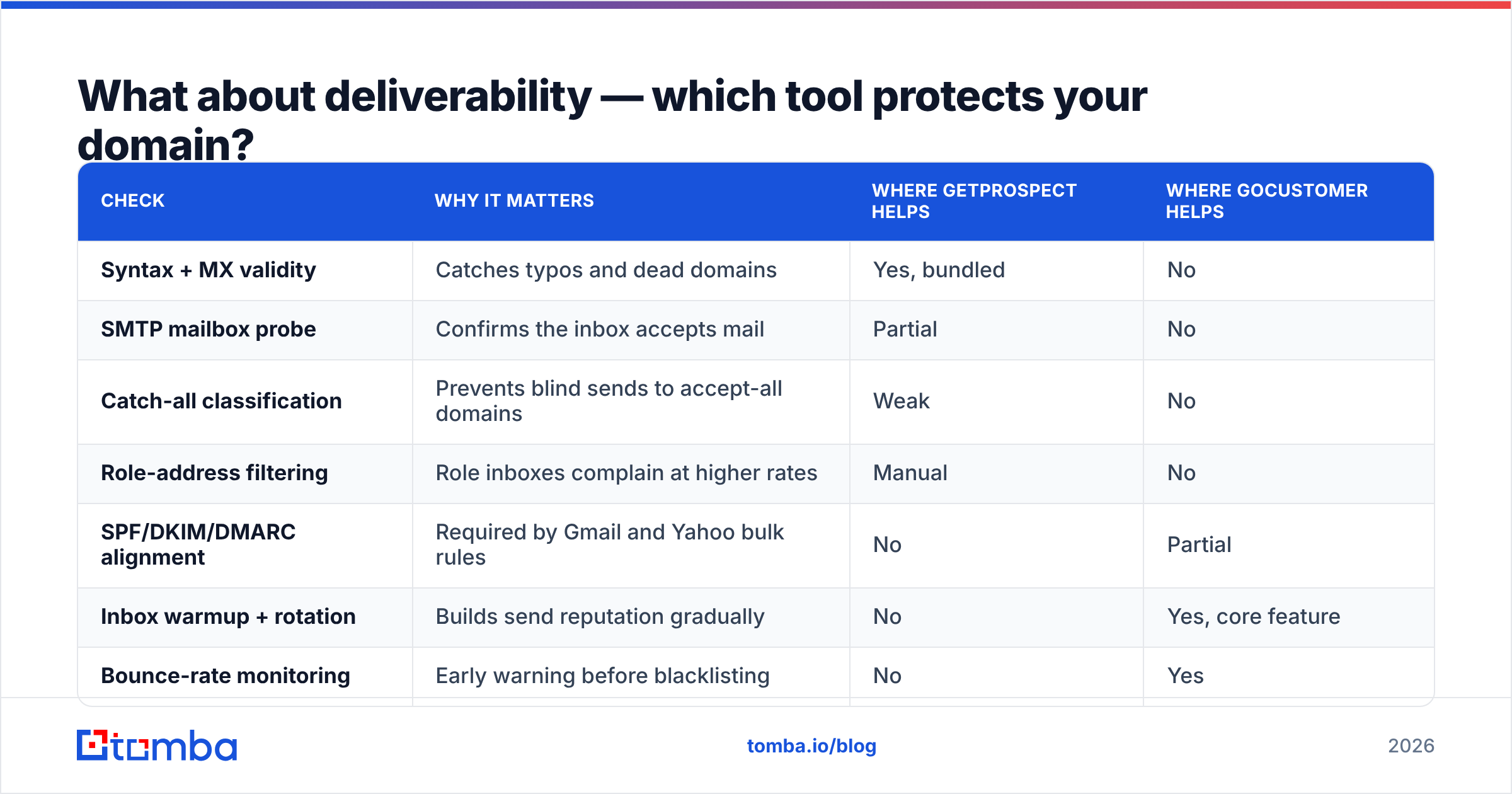
The gap between them is where most cold email programs die. Concretely, a healthy pre-send checklist looks like this:
| Check | Why it matters | Where GetProspect helps | Where GoCustomer helps |
|---|---|---|---|
| Syntax + MX validity | Catches typos and dead domains | Yes, bundled | No |
| SMTP mailbox probe | Confirms the inbox accepts mail | Partial | No |
| Catch-all classification | Prevents blind sends to accept-all domains | Weak | No |
| Role-address filtering | Role inboxes complain at higher rates | Manual | No |
| SPF/DKIM/DMARC alignment | Required by Gmail and Yahoo bulk rules | No | Partial |
| Inbox warmup + rotation | Builds send reputation gradually | No | Yes, core feature |
| Bounce-rate monitoring | Early warning before blacklisting | No | Yes |
Fill the "no" column with dedicated tools. A free email checker and an SPF checker close two of those gaps at zero cost. For volume, bulk verification before every send is non-negotiable — see bulk verify for the batch workflow.
Which should you choose, and what's the cheaper stack?#
Match the tool to the bottleneck you actually have.
Choose GetProspect if: your prospecting starts in LinkedIn Sales Navigator, you build large static lists per campaign, and you want database filtering plus extraction in one subscription. It's a solid fit for recruiting agencies and lead-gen shops where list volume is the deliverable.
Choose GoCustomer if: you already have a reliable data source, your bottleneck is reply rate rather than contact count, and you're willing to pay a premium for AI-generated personalization instead of writing sequence variants yourself.
Choose neither as your data layer if: your cost-per-verified-contact test came back poorly, or your ICP sits outside mainstream database coverage. In that case the cheaper stack is a dedicated finder plus verifier feeding a sequencer you already pay for.
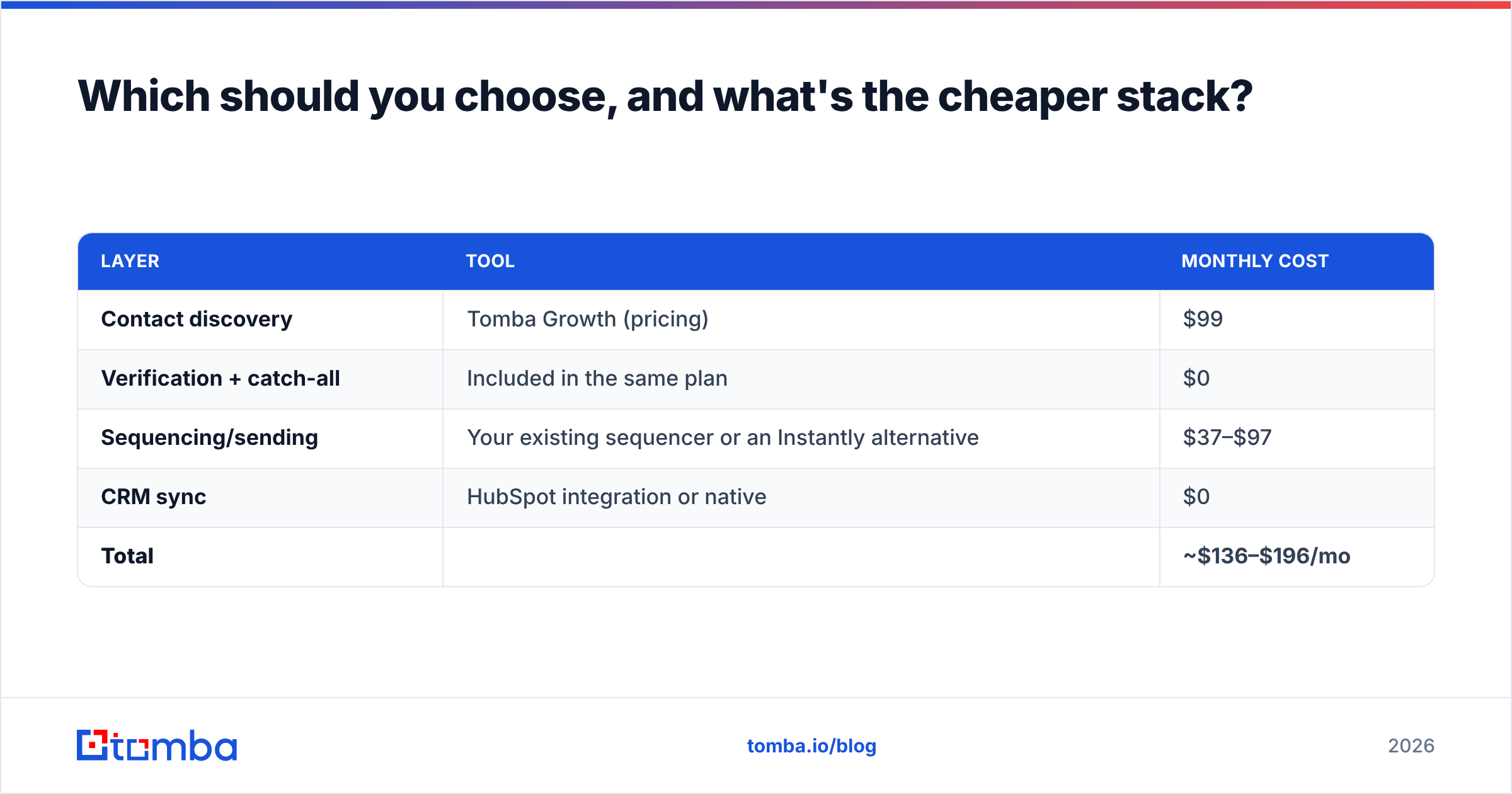
A worked example of the third path:
| Layer | Tool | Monthly cost |
|---|---|---|
| Contact discovery | Tomba Growth (pricing) | $99 |
| Verification + catch-all | Included in the same plan | $0 |
| Sequencing/sending | Your existing sequencer or an Instantly alternative | $37–$97 |
| CRM sync | HubSpot integration or native | $0 |
| Total | ~$136–$196/mo |
Compare that to GetProspect plus GoCustomer at $200–$300/mo, and the delta buys you either more credits or more mailboxes.
It's also worth naming the alternatives that don't fit this two-way frame. If you want a purchasable, prebuilt contact list rather than a search-and-discover workflow, BookYourData sells pay-as-you-go verified lists with no subscription — a genuinely different model that suits teams running occasional campaigns instead of continuous prospecting. And if you want to check independent user sentiment before committing, G2's sales intelligence category has enough recent reviews on both platforms to spot the recurring complaints.
What's the verdict on GetProspect vs GoCustomer?#
They're complements, not competitors — and if you can only fund one, fund the data.
GetProspect wins the head-to-head if the question is "which do I buy first", because list quality gates everything downstream. GoCustomer wins if you're already sitting on clean, verified data and your reply rates are the constraint. Most teams reading this comparison are in the first bucket and don't realize it yet.
Run the 100-row test. Measure cost per verified deliverable contact, not per record in a marketing claim. Then pick the sending layer separately, on its own merits, once the data layer is solved.
Solve the data layer first. Tomba Email Finder finds professional email addresses by domain, name, or company, with verification and catch-all handling built into the same plan — no separate verifier subscription. Start free with 25 searches a month, scale to Starter at $49/mo or Growth at $99/mo when your volume justifies it, and pipe the results straight into whichever sequencer you choose via the Tomba API or a native integration. Get your list right, and every tool downstream works better.
Related guides#
Ready to find emails that actually work?
Join 150,000+ professionals who stopped guessing and started sending. Free credits on signup — no credit card required.
Get the Tomba newsletter
Practical outbound tactics and product updates — once every two weeks.
About the author