GetProspect vs Infofree (2026): Which Lead Data Tool Wins
GetProspect sells verified work emails scraped from LinkedIn. Infofree sells unlimited US business lists for a flat fee. They solve different problems — here is which one actually fits your outbound motion in 2026.
GetProspect vs Infofree is not really a fight. It is a fork in the road. One tool finds the work email of a named person. The other rents you a big list of US businesses. Pick the wrong side and you pay for data you cannot use. Here is how to tell which side you are on.
TL;DR
- GetProspect is a LinkedIn-centric email finder and B2B contact database. You search by person or company, get work emails, and export verified contacts. Best for targeted, persona-driven outbound.
- Infofree is a flat-fee service for US business and consumer lists. It comes from the same family as infoUSA. You get "unlimited" leads inside a bundled CRM. But the data is company-first, and light on verified work emails.
- They are not really competitors. GetProspect answers "what is this specific person's email?" Infofree answers "give me every HVAC company in Ohio with 10–50 employees."
- Pricing shapes the decision. GetProspect charges per credit tier. Infofree charges a flat monthly fee, with usage caps written into its terms.
- If your channel is cold email, verification quality matters more than list size. Budget for a separate verifier either way.
What is GetProspect and who is it for?#
GetProspect started as a Chrome extension. It pulled work emails off LinkedIn search results and Sales Navigator lists. It is now a full contact database. You get a web app, filters (job title, company size, industry, tech stack, location), CSV export, and an API.
The mental model is a targeted lookup tool. You already know who you want — VPs of Engineering at Series B SaaS companies in Berlin. GetProspect turns that description into a list of names with work emails attached.
What you actually get per contact:
- Work email — the core deliverable, pattern-derived and checked before delivery
- Full name and job title — usually accurate, because it mirrors the LinkedIn profile
- Company firmographics — domain, headcount band, industry, sometimes funding
- LinkedIn profile URL — useful for multichannel sequencing
- Company-level phone — often the switchboard, rarely a direct dial
- Email status flag — valid, risky, or unknown, depending on the plan
The free tier is real but small — roughly 50 valid emails a month at the time of writing. That is enough to test accuracy on your own ICP before you pay.
Where GetProspect gets thin: personal emails, direct-dial mobile numbers, and industries that do not live on LinkedIn. If your buyers are plumbing contractors, funeral homes, or independent pharmacies, a LinkedIn-derived database is a bad fit. Those people exist commercially, but not socially.
What is Infofree and where does its data come from?#
Infofree sells something different: unlimited access to a compiled US business and consumer database for a flat monthly fee. It was founded by Vin Gupta. He also founded infoUSA, the compiled-data company that later became part of Data Axle. That history matters. Compiled data is built from phone books, public filings, business registrations, credit bureaus, and phone checks — not from social profiles.
The product bundles four things:
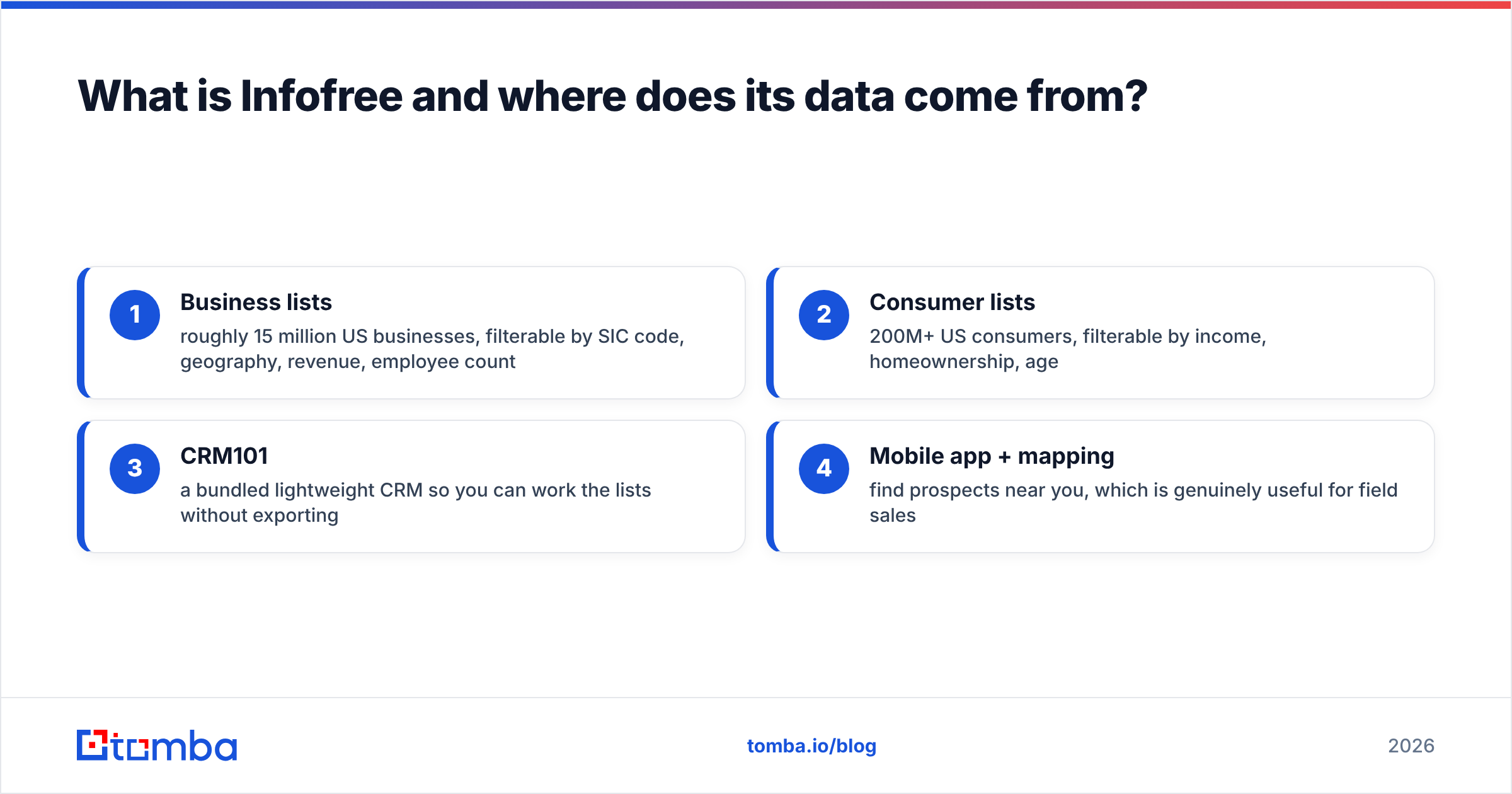
- Business lists — roughly 15 million US businesses, filterable by SIC code, geography, revenue, employee count
- Consumer lists — 200M+ US consumers, filterable by income, homeownership, age
- CRM101 — a bundled lightweight CRM, so you can work the lists without exporting
- Mobile app + mapping — find prospects near you, which is genuinely useful for field sales
Infofree's sweet spot is local and regional B2B/B2C sales: insurance agents, merchant services reps, commercial cleaning, payroll, office equipment, home services. If your question is geographic — "every dentist within 30 miles" — Infofree is built for that. GetProspect is not.
The catch is what "unlimited" means. Flat-fee list services almost always have fair-use limits. Expect daily view caps, monthly download caps, and terms that ban resale or bulk transfer. Read the current terms before you build a workflow around downloading 100,000 records a month. Vendors change these limits. In marketing copy, "unlimited" has rarely meant unlimited in the contract.

GetProspect vs Infofree: how do they compare head to head?#
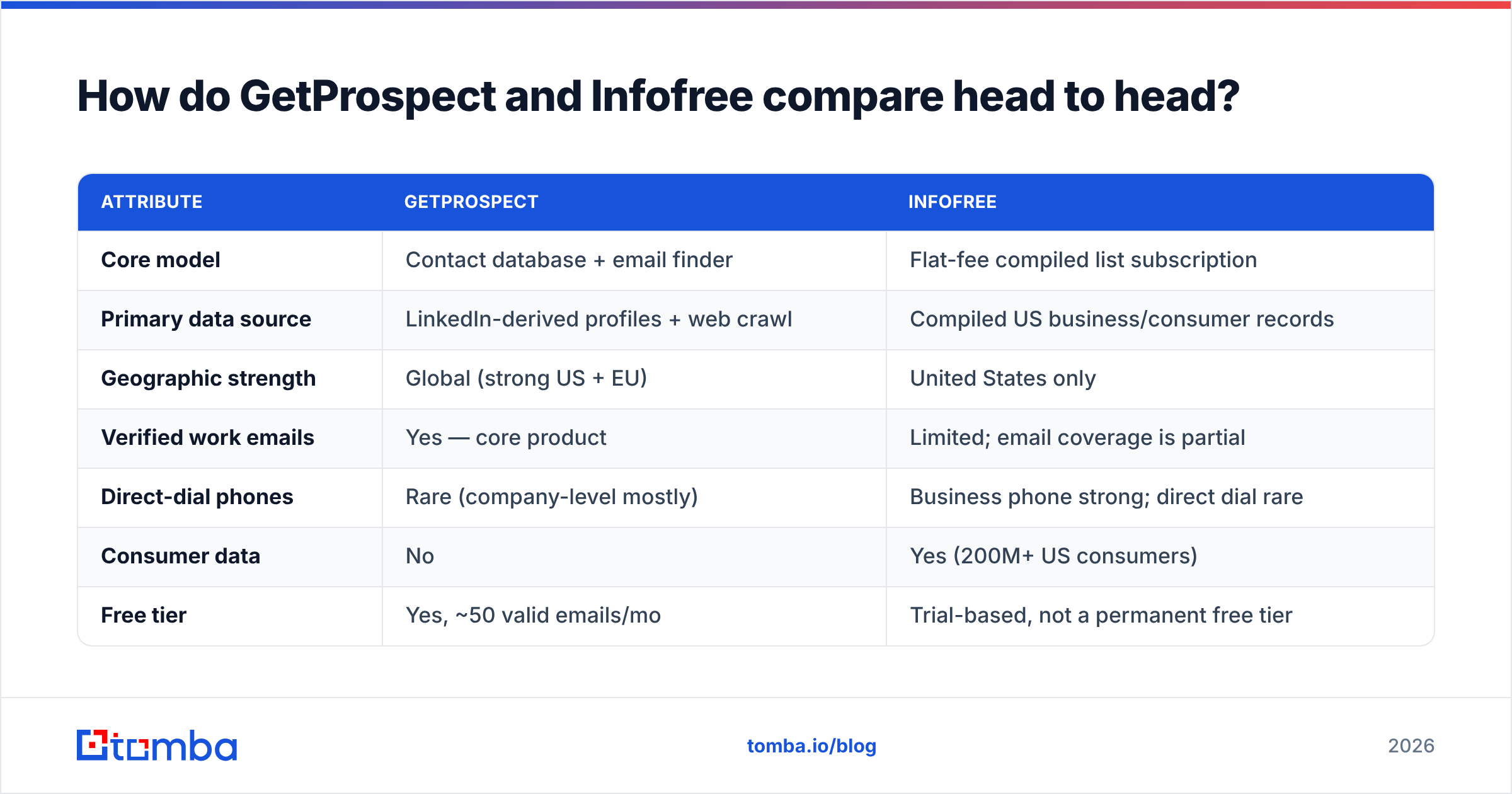
Here is the honest side-by-side. Treat pricing as directional. Both vendors change plans, so check their pricing pages before you buy.
| Attribute | GetProspect | Infofree |
|---|---|---|
| Core model | Contact database + email finder | Flat-fee compiled list subscription |
| Primary data source | LinkedIn-derived profiles + web crawl | Compiled US business/consumer records |
| Geographic strength | Global (strong US + EU) | United States only |
| Verified work emails | Yes — core product | Limited; email coverage is partial |
| Direct-dial phones | Rare (company-level mostly) | Business phone strong; direct dial rare |
| Consumer data | No | Yes (200M+ US consumers) |
| Free tier | Yes, ~50 valid emails/mo | Trial-based, not a permanent free tier |
| Entry paid price | Roughly $49/mo range | Roughly $99/mo range for unlimited plans |
| Bundled CRM | No (integrates instead) | Yes (CRM101) |
| API access | Yes, on higher tiers | Not a developer-first product |
| Best for | SaaS, agency, tech outbound | Local/regional field and phone sales |
| Worst for | Non-LinkedIn trades and SMBs | International, tech-persona targeting |
The table makes the split obvious. These tools lose to each other on different questions. Buying Infofree for a global SaaS ICP is a mistake. Buying GetProspect to canvas every auto repair shop in Arizona is also a mistake.
Which one has better data accuracy?#
Accuracy is the only metric that survives contact with a real sending domain. It splits into two questions people keep mixing up.
Question one: is the record real? Compiled databases like Infofree's are strong here for firmographics. The business exists, the address is right, the SIC code is roughly right. Compiled B2B files decay a lot each year in phone and address fields. Still, the underlying business identity holds up well.
Question two: will the email land? This is where LinkedIn-derived finders win. They solve for one thing: an inbox that accepts mail. GetProspect checks emails before delivery and flags risky records. But no finder is perfect. Pattern-derived emails on catch-all domains are the universal blind spot. A catch-all server accepts every address up front, then quietly drops the bad ones. That is why so many "verified" lists still bounce.

Three practical rules, whichever vendor you pick:
- Never trust a vendor's accuracy claim without a sample test. Pull 200 records from your real ICP. Run them through an independent email verifier and measure. Vendor benchmarks run on easy domains.
- Handle catch-alls on purpose. Segment them out. Then either run a catch-all verifier, or mail them from a separate, low-volume domain. One bad batch should not poison your main sender reputation.
- Re-verify anything older than 90 days. People change jobs fast. A six-month-old export is already stale, and that is before layoffs and reorgs.
If you run cold email at any volume, a 5% bounce rate is not a rounding error. It is the gap between the inbox and the spam folder. Google and Yahoo set hard limits on complaint and bounce rates. No vendor warranty protects your domain when you cross them.
What does each one actually cost in practice?#
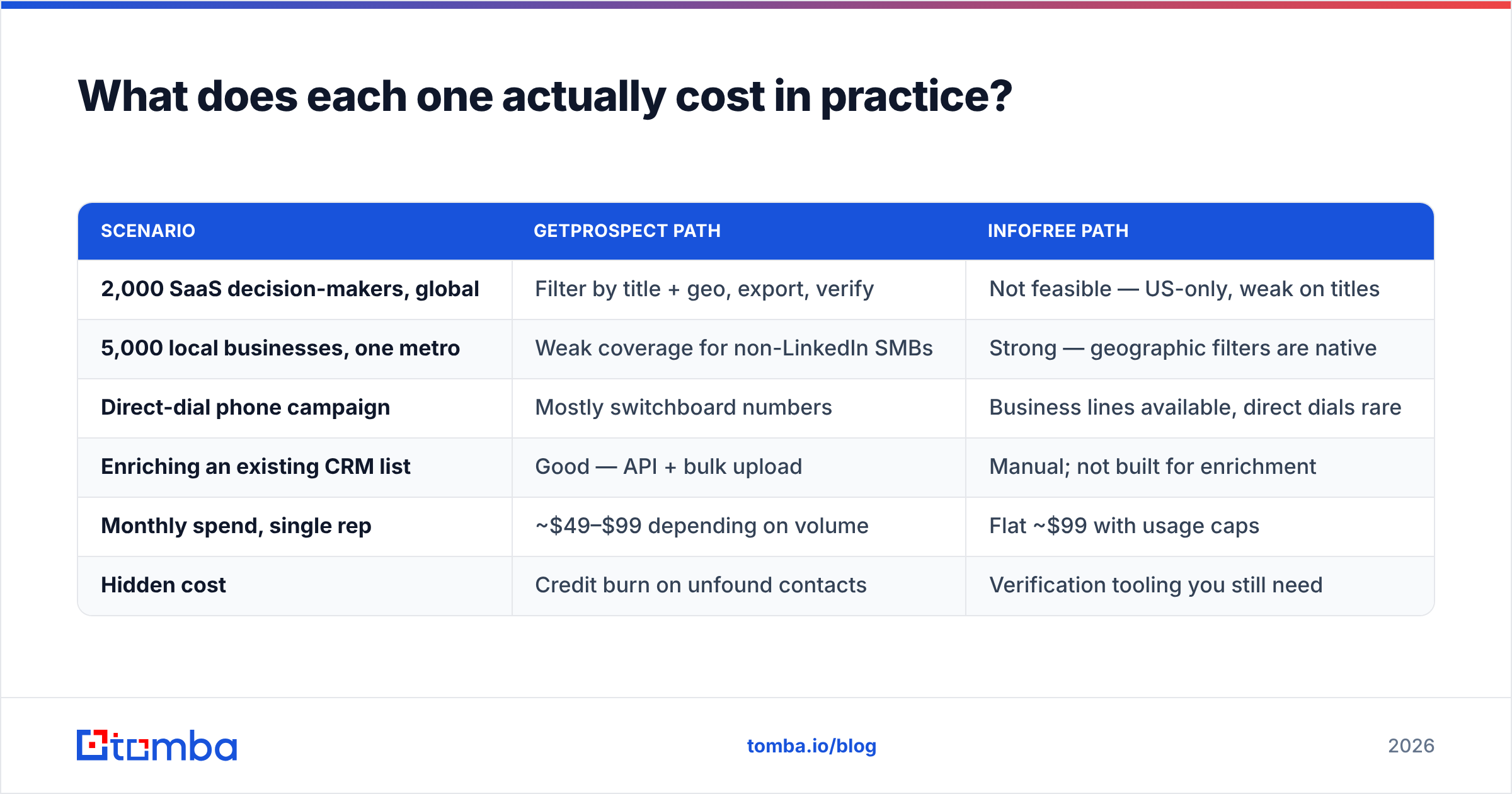
Sticker price is the wrong comparison. Compare cost per usable, verified, sendable contact.
| Scenario | GetProspect path | Infofree path |
|---|---|---|
| 2,000 SaaS decision-makers, global | Filter by title + geo, export, verify | Not feasible — US-only, weak on titles |
| 5,000 local businesses, one metro | Weak coverage for non-LinkedIn SMBs | Strong — geographic filters are native |
| Direct-dial phone campaign | Mostly switchboard numbers | Business lines available, direct dials rare |
| Enriching an existing CRM list | Good — API + bulk upload | Manual; not built for enrichment |
| Monthly spend, single rep | ~$49–$99 depending on volume | Flat ~$99 with usage caps |
| Hidden cost | Credit burn on unfound contacts | Verification tooling you still need |
The hidden cost line is the important one. On some GetProspect plans, credits burn even when a search returns partial data. Watch your credit-per-result ratio during the trial. With Infofree, the flat fee looks cheap at first. You still need a verification layer before any of those emails go into a sequence. Export limits also mean you cannot dump the database into your own warehouse.
There is a third path many teams end up on: use a dedicated finder API and keep list-building in your own stack. Tomba pricing starts free with 25 searches a month. Paid plans run $49/mo Starter, $99/mo Growth, and $249/mo Pro. The Tomba API means you are not locked into anyone's UI or export button. If your workflow is "scrape a target list, enrich it, verify it, push to CRM," an API-first finder tends to beat both a UI-first finder and a bundled list subscription.

Is GetProspect or Infofree better for cold email in 2026?#
GetProspect, clearly — with one caveat.
Cold email in 2026 lives and dies on sender reputation. Mailbox providers have tightened their bulk sending rules. Spam traps are more aggressive. A list with 8% invalid addresses gets your domain filtered before anyone reads your copy. Infofree's compiled data was built for direct mail and phone calls. Both channels shrug off stale records. A wrong address wastes a postcard. A wrong email address costs you deliverability on every campaign that follows.
GetProspect's data is built for email, so it starts ahead. The caveat: "verified at export" is not "verified today." Re-verification is not optional at either vendor.
Which database you bought from matters less than the basics. Good email deliverability comes down to authentication, a slow warm-up ramp, steady volume, and list hygiene. G2's category reviews are worth skimming for both vendors. Read the one- and two-star reviews first. That is where coverage gaps and billing surprises show up.
Are there better alternatives to both?#
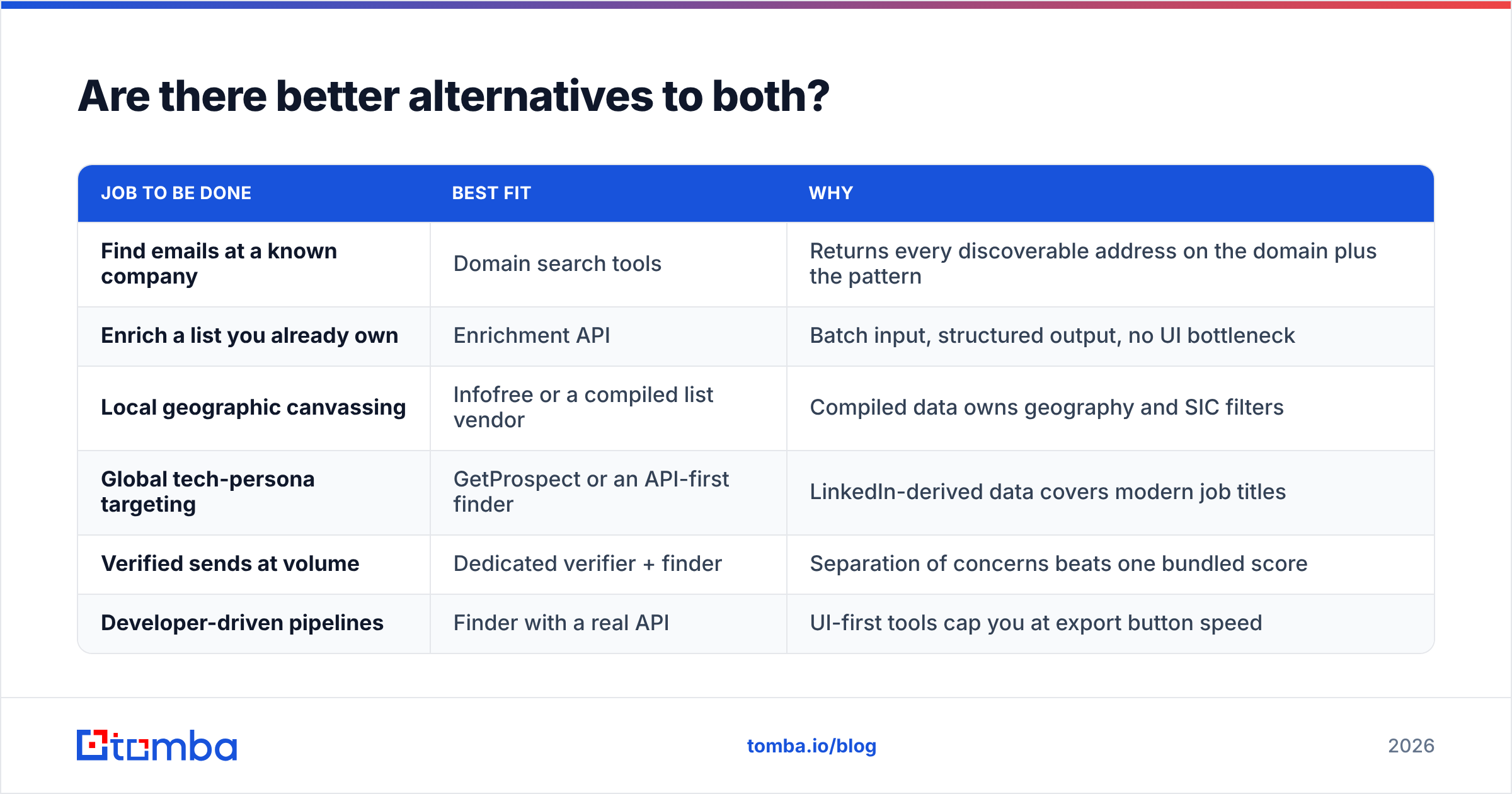
Sometimes the right answer is "neither, at least not alone." Here is how the wider field lines up for the jobs these two tools do.

| Job to be done | Best fit | Why |
|---|---|---|
| Find emails at a known company | Domain search tools | Returns every discoverable address on the domain plus the pattern |
| Enrich a list you already own | Enrichment API | Batch input, structured output, no UI bottleneck |
| Local geographic canvassing | Infofree or a compiled list vendor | Compiled data owns geography and SIC filters |
| Global tech-persona targeting | GetProspect or an API-first finder | LinkedIn-derived data covers modern job titles |
| Verified sends at volume | Dedicated verifier + finder | Separation of concerns beats one bundled score |
| Developer-driven pipelines | Finder with a real API | UI-first tools cap you at export button speed |
In practice, most teams stitch two or three tools together. A common stack: a compiled or scraped source for company targeting, a domain search pass to find the right people at each company, and a verification pass before anything hits a sequence. That mix beats a single bundled subscription on accuracy and on cost. You only pay each vendor for the part it is best at.
One more option for the "unlimited" crowd. BookYourData sells pay-as-you-go data with a stated accuracy guarantee. It is a fair middle ground if you dislike credit subscriptions and flat-fee usage caps alike. Different pricing philosophy, same rule: test a sample on your own ICP before you commit budget.
So which should you pick?#
The GetProspect vs Infofree choice comes down to where your buyers live.
Pick Infofree if you sell to US small businesses in a set geography. It fits phone and door-to-door work. You get a cheap flat fee and a bundled CRM you will not outgrow right away.
Pick GetProspect if you sell software or services to named job titles. It fits teams working outside the US as well as inside it, with email as the main channel.
Pick neither as your only tool if you run serious outbound volume. The bounce rate you inherit from any single database will cost you more than a second subscription would have.
Both camps agree on one thing. Bad data is the most expensive line item in outbound, and it never shows up as a line item.
Start with a clean source. Need accurate work emails for the people you actually want to reach? The Tomba Email Finder gets you there. Search by domain, name, or company, with verification built into the same pass, so you are not exporting guesses. The free tier gives you 25 searches a month to test it on your own ICP. Run 200 of your hardest contacts through it. Compare the bounce rate to your current tool, and let the numbers decide.
Related guides#
Ready to find emails that actually work?
Join 150,000+ professionals who stopped guessing and started sending. Free credits on signup — no credit card required.
Get the Tomba newsletter
Practical outbound tactics and product updates — once every two weeks.
About the author