GetProspect vs Kipplo: Which Email Finder Wins in 2026?
GetProspect and Kipplo both promise verified B2B emails at a low price. We break down data coverage, verification depth, LinkedIn workflows, and real cost per usable contact — plus where a third option beats both.
TL;DR
- GetProspect is the more established of the two: a large self-serve B2B contact database, a well-used LinkedIn Chrome extension, and a free tier that lets you test coverage before paying.
- Kipplo is the newer, leaner challenger — positioned around low-cost credits and a simpler UI, with a much smaller public track record and thinner third-party review coverage.
- The real differentiator is not "who has more contacts." It is how many of the emails you pull actually accept mail, which is a verification problem, not a database problem.
- If you send high volume to a narrow ICP, run both through a free trial on the same 100 target domains and compare valid-rate, not raw hit-rate.
- If your workflow is API-first or domain-first rather than LinkedIn-first, a dedicated finder-plus-verifier stack usually beats either tool on cost per usable contact.
What are GetProspect and Kipplo?#
Both tools sit in the same category — B2B email finders that turn a name, a company domain, or a LinkedIn profile into a work email address — but they arrived from different directions.
GetProspect launched as a LinkedIn email extractor and grew into a full contact database with filters (title, industry, headcount, geography), list management, and a light CRM-ish layer. Its center of gravity is still the browser extension: you browse LinkedIn Sales Navigator, select profiles, and pull emails into a list. It has a visible presence on review sites like G2, which matters when you are trying to sanity-check vendor claims.
Kipplo is the newer entrant, marketed on simplicity and price-per-credit. It targets founders and small outbound teams who want to search, enrich, and export without learning a platform. Because it is younger, there is far less independent data on its coverage — fewer public reviews, fewer third-party accuracy tests, less community chatter about edge cases like catch-all domains or EU coverage.
That asymmetry is the honest starting point of any GetProspect vs Kipplo comparison: one has a longer paper trail, the other has a cheaper entry point and less proof.
How do GetProspect and Kipplo actually differ?#
Here is the practical breakdown, organized by the decisions that actually change your outcome:
- Discovery model — GetProspect leans database-first with LinkedIn as the primary capture surface. Kipplo leans search-first: you query, it returns, you export. If your prospecting happens inside Sales Navigator all day, that difference is not cosmetic.
- Verification depth — GetProspect returns a status per email (valid / risky / unknown style labeling). Kipplo markets verified output too. Neither substitutes for a dedicated verification pass before a cold campaign, especially on catch-all domains.
- Data freshness — Job changes rot a B2B database at roughly 2–3% per month. A contact record built in 2024 is materially wrong by 2026. Ask both vendors when a record was last re-validated, not just how many records exist.
- Export and integration — CSV export is table stakes. What separates tools is whether enrichment can run inside your existing stack (CRM, spreadsheet, automation platform) without a manual download-upload loop.
- Pricing shape — Credits versus seats versus rollover. A cheap plan with non-rolling credits and a per-seat surcharge can cost more than a "pricier" plan with pooled, rolling credits.
- Support and accountability — Bigger vendors have SLAs and documented refund policies for bad data. Newer vendors often do not, which shifts the risk onto you.

Which one returns more valid emails?#
This is the only question that maps directly to revenue, and it is the one most comparison posts dodge.
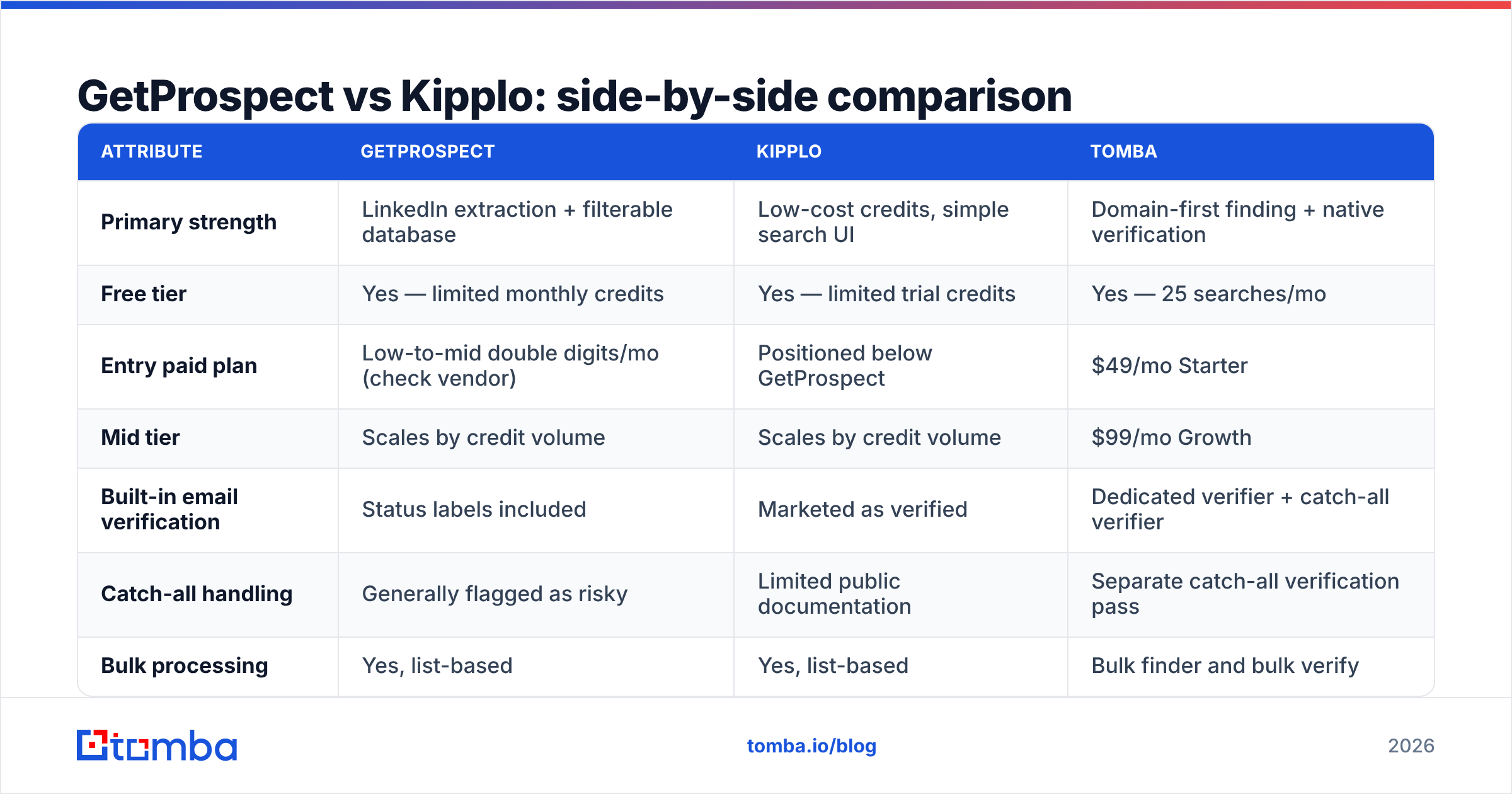
Raw hit-rate is easy to inflate. A tool can return firstname.lastname@company.com for every prospect using a pattern guess, hit 90% "found," and still bounce a third of the time. What matters is the valid rate: found emails that survive an independent verification pass and land in an inbox.

Run this test before you commit to either GetProspect or Kipplo:
- Pick 100 real prospects across 40+ distinct domains in your actual ICP — not a clean list of Fortune 500 companies where every tool wins.
- Run the same list through both tools' free or trial tiers.
- Take both output sets and verify them with a neutral third-party verifier — not the vendor's own status flag.
- Compare
valid emails / total prospects, then divide plan cost by that number. That is your true cost per usable contact.
Teams that run this test are routinely surprised. A tool with a 78% found-rate and a 92% valid-rate beats a tool with a 90% found-rate and a 68% valid-rate — and it beats it twice, because bounced sends also damage your sender reputation, which suppresses the campaigns you send next month.
If either tool returns a large block of results on catch-all domains, treat those separately. Catch-all servers accept everything at the SMTP layer, so a naive verifier marks them "valid" when they are unknown. A dedicated catch-all verifier is the only way to split real mailboxes from accept-all noise on those domains.
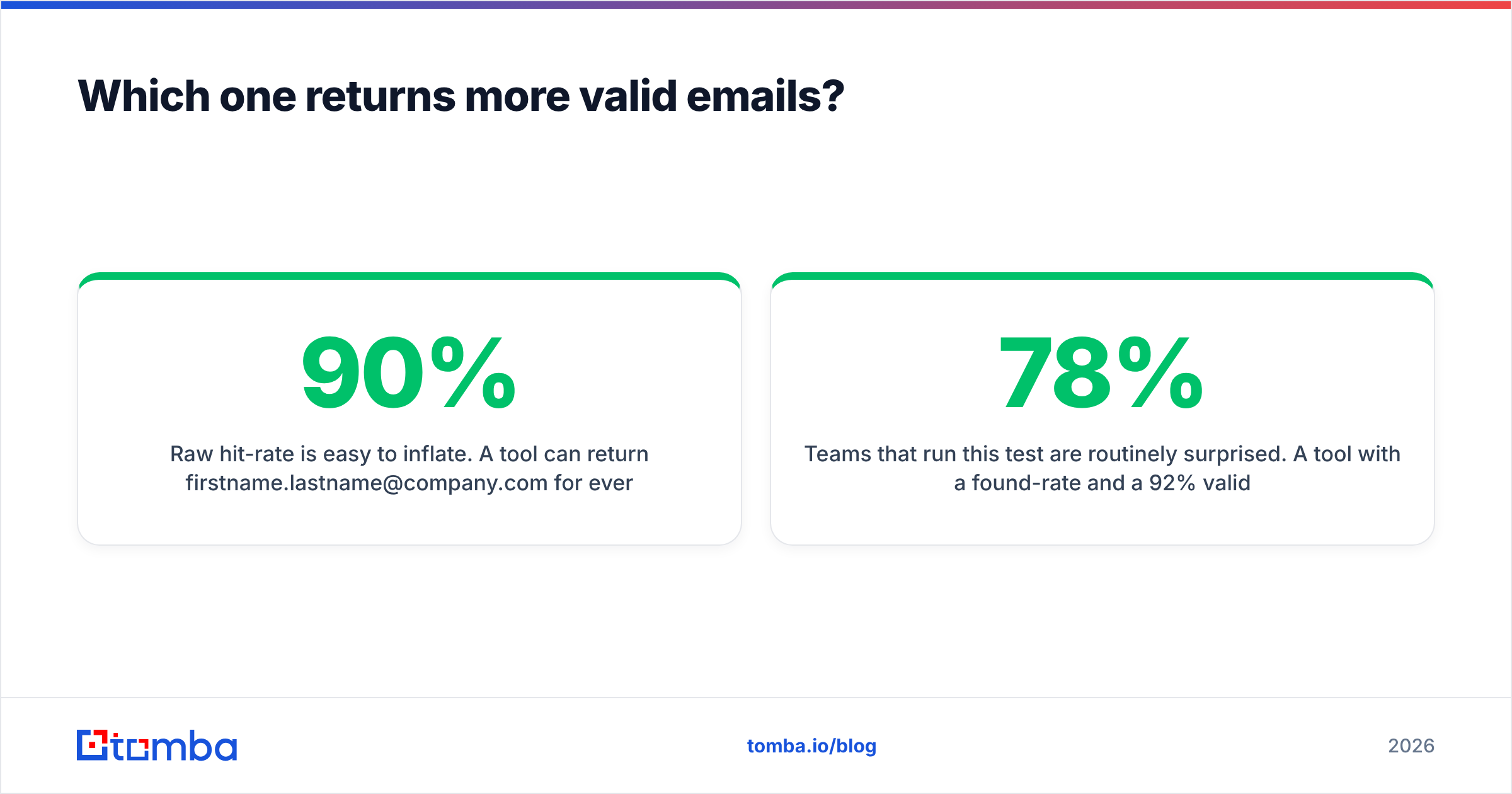
GetProspect vs Kipplo: side-by-side comparison#
Pricing and limits change frequently on both vendor sites — treat the figures below as a structure for your own check, and confirm current numbers on each vendor's pricing page before you buy.
| Attribute | GetProspect | Kipplo | Tomba |
|---|---|---|---|
| Primary strength | LinkedIn extraction + filterable database | Low-cost credits, simple search UI | Domain-first finding + native verification |
| Free tier | Yes — limited monthly credits | Yes — limited trial credits | Yes — 25 searches/mo |
| Entry paid plan | Low-to-mid double digits/mo (check vendor) | Positioned below GetProspect | $49/mo Starter |
| Mid tier | Scales by credit volume | Scales by credit volume | $99/mo Growth |
| Built-in email verification | Status labels included | Marketed as verified | Dedicated verifier + catch-all verifier |
| Catch-all handling | Generally flagged as risky | Limited public documentation | Separate catch-all verification pass |
| Bulk processing | Yes, list-based | Yes, list-based | Bulk finder and bulk verify |
| Public API | Yes | Limited public documentation | Full REST API + CLI + MCP |
| Spreadsheet add-ons | Partial | Limited | Google Sheets + Excel add-ins |
| Third-party review volume | Substantial | Thin (newer vendor) | Moderate and growing |
| Best for | LinkedIn-native SDR teams | Solo founders testing cheap volume | API/domain workflows needing verified output |

The pattern in that table is the pattern in the market: GetProspect wins on maturity and LinkedIn ergonomics, Kipplo competes on entry price, and neither is architected primarily around verification. If your bounce rate is the thing keeping you up at night, that gap matters more than the credit price.
Is GetProspect better than Kipplo for LinkedIn prospecting?#
For LinkedIn-first workflows, GetProspect currently has the stronger claim — mostly because of tenure. Its extension has been through more LinkedIn UI changes, more rate-limit shifts, and more user complaints that got fixed. Extension reliability is unglamorous, but a scraper that breaks silently for three days during a quarter-end push is an expensive problem.
Kipplo's LinkedIn story is less documented publicly. That does not mean it is bad; it means you cannot verify it from the outside. Test it against your own Sales Navigator saved searches before you plan a quarter around it.
Two caveats apply to both tools, and to every LinkedIn extractor on the market:
- LinkedIn's terms of service restrict automated scraping. Extensions operate in a grey zone, and account restrictions are a real risk when you pull aggressively. Pace your extraction.
- A LinkedIn profile is not an email. Every extractor still has to infer or look up the address. That inference step is exactly where accuracy differences appear, which is why teams often pair an extractor with a separate LinkedIn finder and verification layer rather than trusting a single pass.
What does each one really cost per usable email?#
Sticker price is the wrong metric. Build the comparison this way:
| Cost factor | Why it changes the math |
|---|---|
| Credits consumed on misses | Some tools charge for a search that returns nothing or returns unverifiable output |
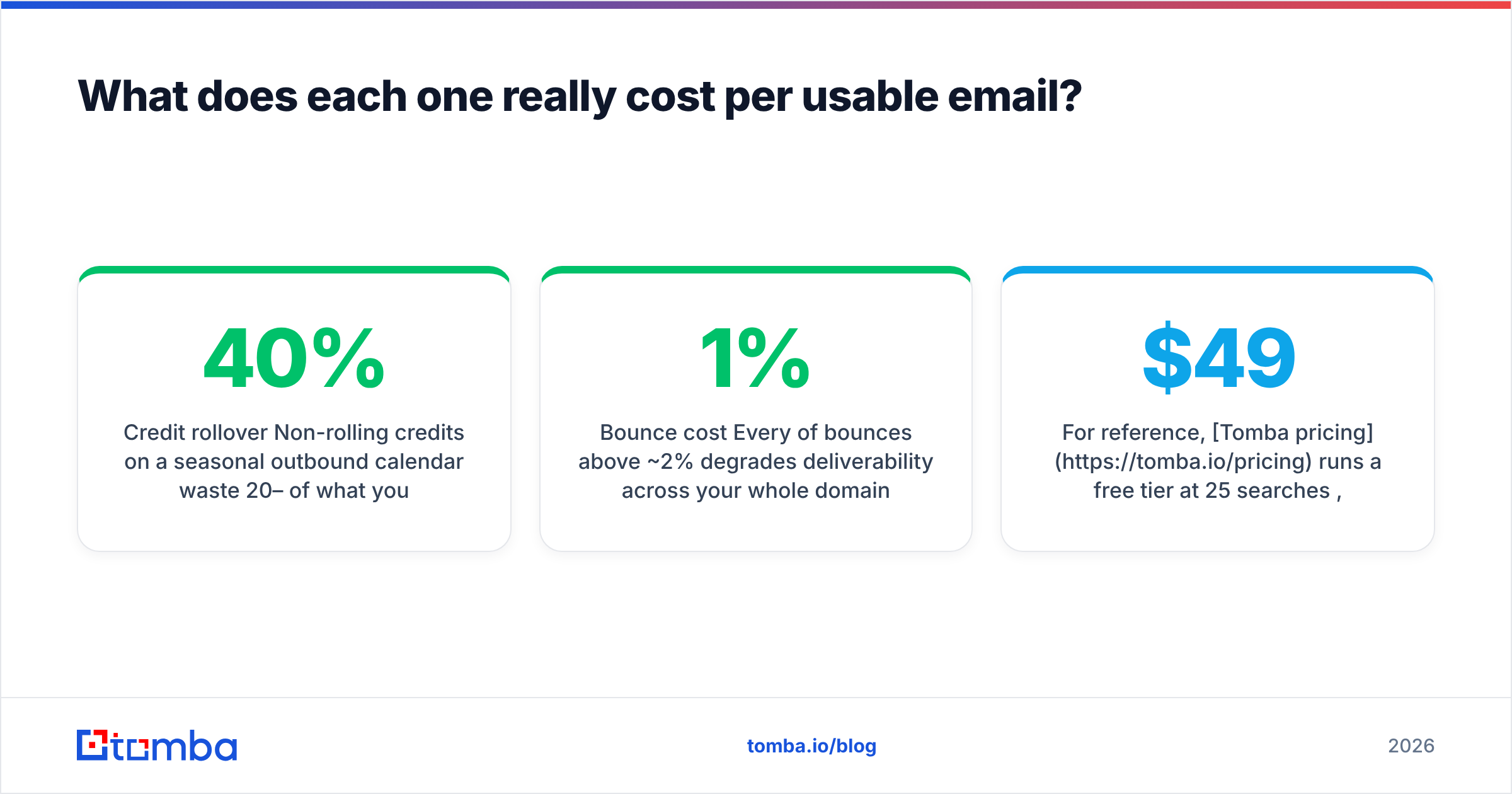
| Credit rollover | Non-rolling credits on a seasonal outbound calendar waste 20–40% of what you buy |
| Per-seat pricing | Two SDRs on a seat-priced plan can double the bill without doubling volume |
| Verification add-on | If you must buy a second tool to verify, add its cost to the finder's |
| Bounce cost | Every 1% of bounces above ~2% degrades deliverability across your whole domain |
| Re-enrichment cadence | Stale records mean paying twice for the same contact within a year |
For reference, Tomba pricing runs a free tier at 25 searches/mo, Starter at $49/mo, Growth at $99/mo, Pro at $249/mo, and custom Enterprise — with the email verifier bundled rather than sold as a separate SKU. Whether that lands cheaper than GetProspect or Kipplo depends entirely on your valid-rate, which is why you run the 100-prospect test first.

What about catch-all domains and deliverability?#
This is where cheap credits stop being cheap.
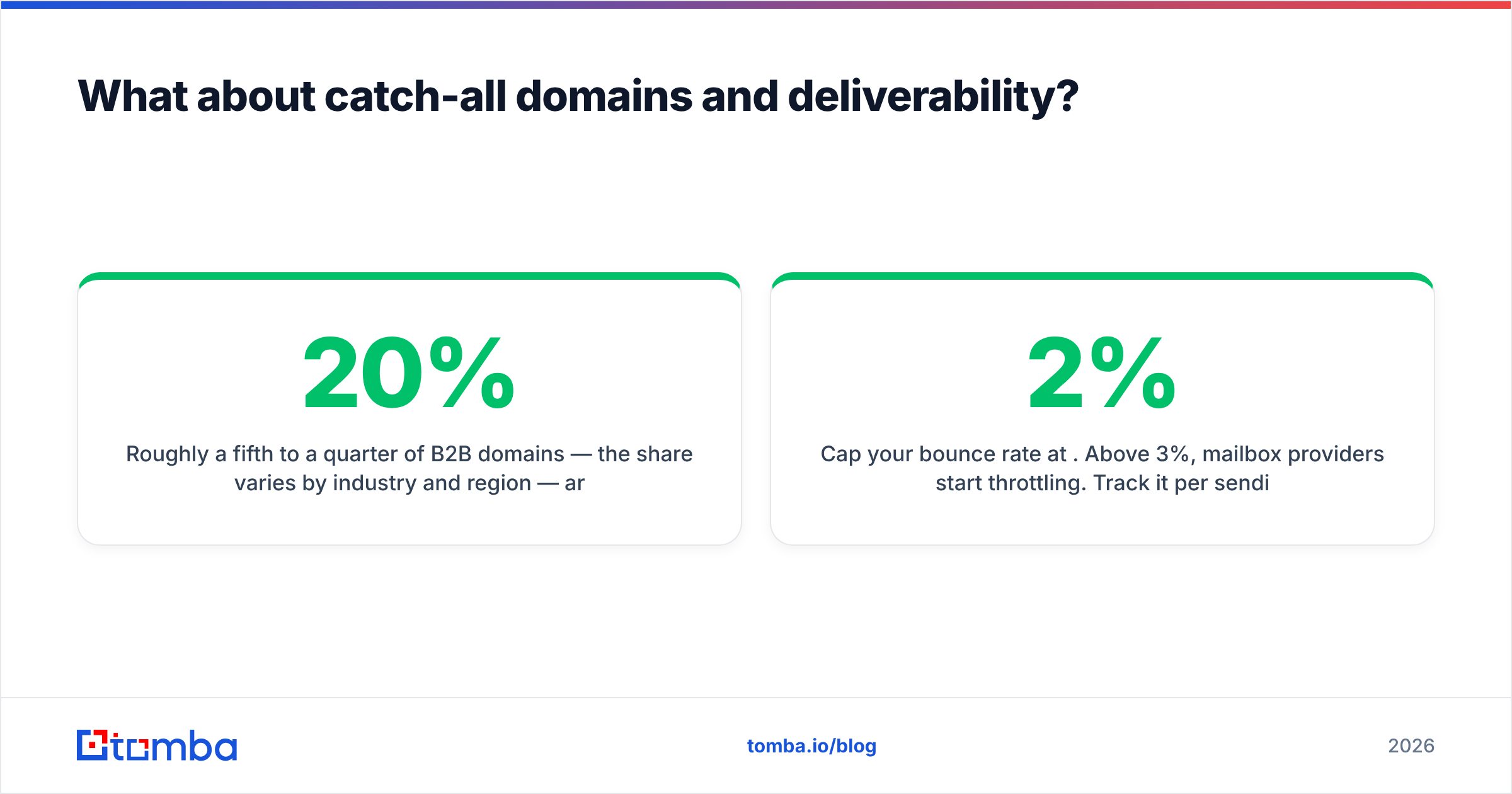
Roughly a fifth to a quarter of B2B domains — the share varies by industry and region — are configured as catch-all. Their mail servers accept every address at the SMTP handshake, so the standard verification ping returns "accepted" whether or not a human reads that mailbox. Send a 5,000-contact campaign with 20% unresolved catch-alls and you can silently torch your domain reputation while your dashboard shows a healthy delivery rate.
Handle it in three moves:
- Segment catch-alls out of your main send. Never mix them into a primary sequence until they are resolved.
- Resolve them with a dedicated pass. A catch-all finder uses pattern confidence plus secondary signals rather than relying on the SMTP response alone.
- Cap your bounce rate at 2%. Above 3%, mailbox providers start throttling. Track it per sending domain, not per campaign.
Neither GetProspect nor Kipplo markets itself primarily as a deliverability tool, and that is a fair division of labor — but it means the responsibility lands on you. Budget for it.
Are there better alternatives to both?#
Depending on your motion, yes — and being honest about that is more useful than declaring a winner.
- If your workflow is domain-first (you know the companies, you need the people), a domain search returns every discoverable address at a company plus the pattern, which is faster than enriching profiles one by one.
- If you need an API rather than a UI, check documentation quality before you commit. A well-documented email finder API with predictable rate limits saves more engineering hours than a 20% credit discount saves dollars.
- If you need a pre-built, purchase-once list rather than an ongoing seat, a database vendor like BookYourData is a legitimate route — you buy filtered contacts outright instead of metering credits, which suits one-off campaigns and agencies running a single push per client.
- If you already have emails and need them cleaned, skip the finder entirely and spend the budget on verification. Most teams with a bounce problem do not have a finding problem.
GetProspect vs Kipplo: which should you pick?#
Here is the honest verdict.
Pick GetProspect if your SDRs live inside LinkedIn, you want a filterable database in the same tool, and you value a vendor with enough public review history that you can predict what you are buying. It is the safer default of the two.
Pick Kipplo if you are a solo founder or a two-person team testing whether outbound works at all, price sensitivity is genuinely your binding constraint, and you are willing to run your own verification pass on top. Start on the trial, run the 100-prospect test, and do not prepay for a year on a vendor without a long track record.
Pick neither if your bottleneck is bounce rate, not contact volume. In that case the money belongs in verification and data hygiene, and the finder is almost interchangeable.
Whatever you choose, run this checklist before you commit budget:
- Test both on the same 100 prospects from your real ICP.
- Verify both outputs with an independent third-party verifier.
- Calculate cost per valid email, not per credit.
- Confirm credit rollover, seat pricing, and refund policy in writing.
- Segment catch-all domains before the first send.
If step 2 is where you keep getting stuck — and for most teams it is — start with a finder that ships verification in the same workflow instead of bolting it on afterward. The Tomba Email Finder returns a confidence score and verification status with every result, handles catch-all domains as a separate resolved class rather than a shrug, and gives you 25 free searches a month to run the exact head-to-head test described above before you pay anyone anything. Run it against your own list, compare valid-rates, and let the numbers pick the winner.
Related guides#
Ready to find emails that actually work?
Join 150,000+ professionals who stopped guessing and started sending. Free credits on signup — no credit card required.
Get the Tomba newsletter
Practical outbound tactics and product updates — once every two weeks.
About the author