GetProspect vs Labnify 2026: Find Emails or Send Them?
GetProspect finds and verifies B2B contacts. Labnify sends email at volume. They solve different halves of outbound — here's how they compare on data, deliverability, pricing, and where each one breaks.
TL;DR
- GetProspect and Labnify are not really competitors — GetProspect is a B2B contact database and email finder, Labnify is a bulk sending and email-infrastructure platform. Most teams that ask "which one" actually need one of each.
- GetProspect's strength is LinkedIn-driven list building with filters and a Chrome extension. Its weakness is what every database has: coverage gaps and stale rows on smaller companies.
- Labnify's strength is sending volume, SMTP relay control, and warmup. It does nothing to tell you whether the addresses on your list exist.
- If you buy only one thing, buy the layer you're worse at. Bad data breaks a good sender; a great sender cannot rescue a 22% bounce list.
- Cheapest sane stack in 2026: a finder plus a verifier (Tomba starts at $49/mo with a free 25-search tier), a sending platform sized to your volume, and a hard rule that nothing gets imported unverified.
What are GetProspect and Labnify, actually?#
Start with the boring truth: these two tools sit on opposite ends of the same pipeline.
GetProspect is a lead-generation platform built around a B2B contact database. You filter by job title, industry, headcount, location, and technology, or you run its Chrome extension over LinkedIn search results and export names, company data, and email addresses into a CRM-ish list view. It also bundles basic verification and, on higher tiers, an API.
Labnify approaches outbound from the delivery side. It's an email sending and infrastructure product — bulk campaigns, SMTP relay, warmup, list handling, and the plumbing that gets a large volume of mail out the door without torching your domain. It assumes you already have recipients.
So "GetProspect vs Labnify" is a bit like asking whether you need a quarry or a cement mixer. The honest answer depends on which one you're missing.

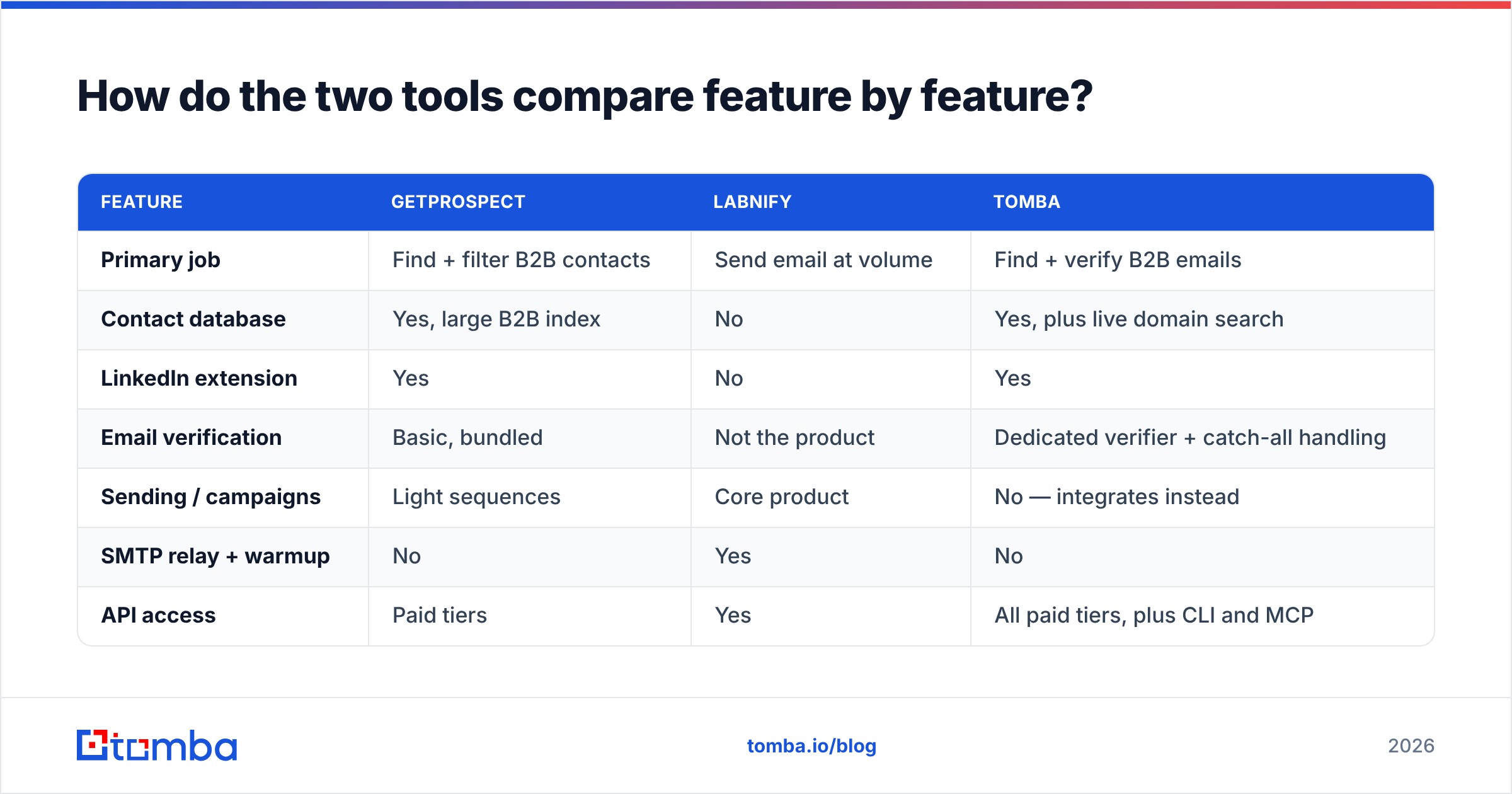
How do the two tools compare feature by feature?#
Here's the side-by-side. Treat all pricing as directional — both vendors change tiers, and you should confirm on their own pages before you sign anything.
| Feature | GetProspect | Labnify | Tomba |
|---|---|---|---|
| Primary job | Find + filter B2B contacts | Send email at volume | Find + verify B2B emails |
| Contact database | Yes, large B2B index | No | Yes, plus live domain search |
| LinkedIn extension | Yes | No | Yes |
| Email verification | Basic, bundled | Not the product | Dedicated verifier + catch-all handling |
| Sending / campaigns | Light sequences | Core product | No — integrates instead |
| SMTP relay + warmup | No | Yes | No |
| API access | Paid tiers | Yes | All paid tiers, plus CLI and MCP |
| Free tier | Yes, limited monthly credits | Trial-based | 25 searches/mo |
| Entry paid price | ~$49/mo published | Volume-based, see vendor page | $49/mo Starter |
| Best for | Building targeted lists | Sending 50k+/mo reliably | Data accuracy at the source |
Two things stand out. First, GetProspect and Tomba overlap heavily — both are in the find-and-verify business, and that's the real head-to-head buying decision. Second, Labnify barely overlaps with either. If you're comparing it to GetProspect, you're probably deciding what to build first, not what to replace.
Which parts of outbound does each layer own?#
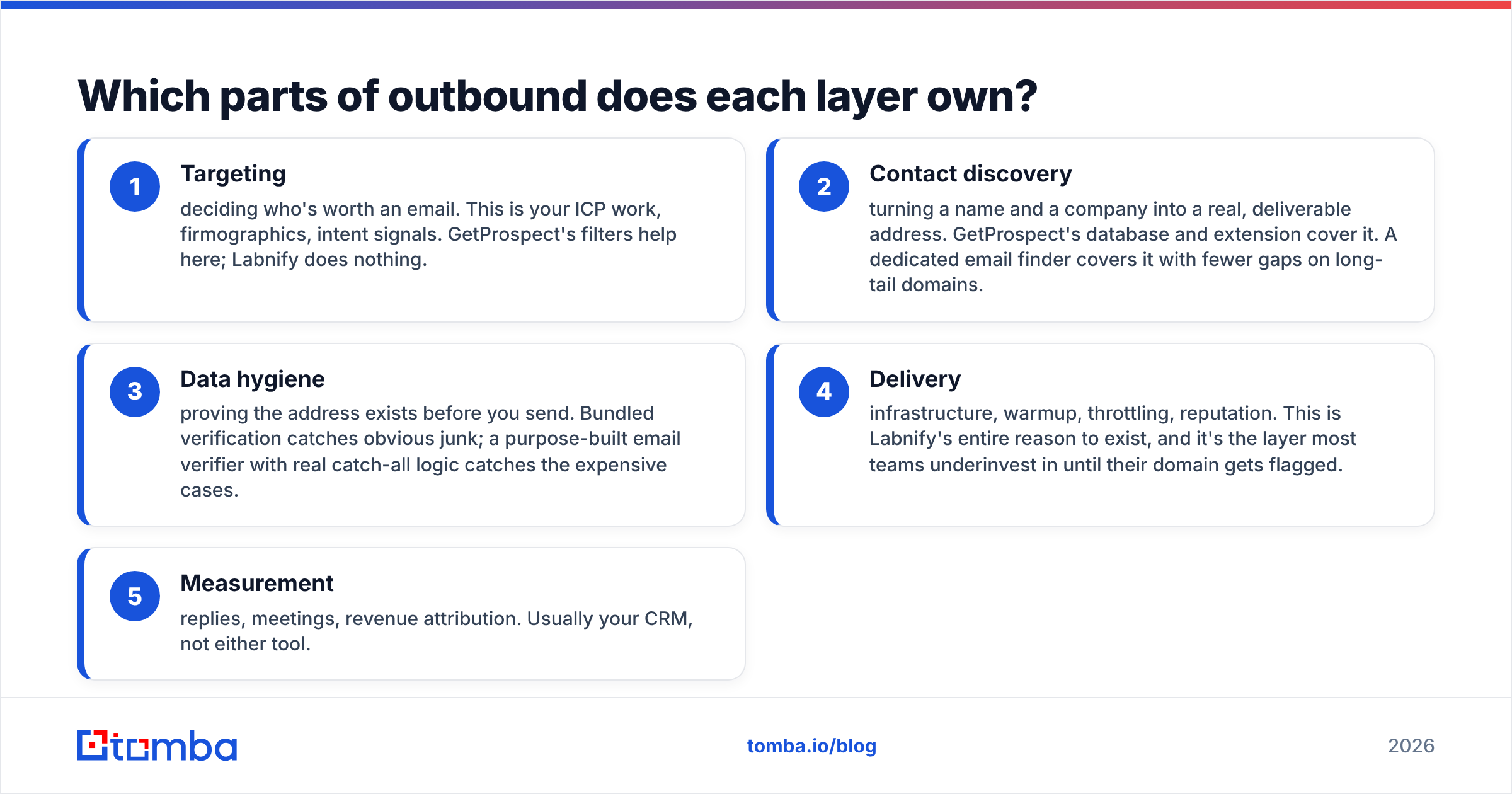
Outbound breaks into four jobs. Nobody does all four well, and the tools that claim to usually do two well and two badly.
- Targeting — deciding who's worth an email. This is your ICP work, firmographics, intent signals. GetProspect's filters help here; Labnify does nothing.
- Contact discovery — turning a name and a company into a real, deliverable address. GetProspect's database and extension cover it. A dedicated email finder covers it with fewer gaps on long-tail domains.
- Data hygiene — proving the address exists before you send. Bundled verification catches obvious junk; a purpose-built email verifier with real catch-all logic catches the expensive cases.
- Delivery — infrastructure, warmup, throttling, reputation. This is Labnify's entire reason to exist, and it's the layer most teams underinvest in until their domain gets flagged.
- Measurement — replies, meetings, revenue attribution. Usually your CRM, not either tool.
Map your gaps against that list. If you already have 40,000 clean contacts sitting in a spreadsheet and no way to send them, Labnify is the purchase. If you can send fine but your reply rate is 0.4% because half the list is wrong, no sending platform will save you.
Is GetProspect's data accurate enough for cold outreach?#
Accuracy is the question that decides everything downstream, so be specific about what "accurate" means. There are three failure modes, and vendors love to report only the first one:
- Not found. The tool returns nothing. Annoying, but cheap — you just move on.
- Found but wrong. The tool returns a plausible-looking address that bounces. This is the expensive one. Every bounce is a small deposit into a reputation account you can't easily withdraw from.
- Found, deliverable, but useless. Real mailbox, wrong person, or a
info@catch-all that nobody reads.
GetProspect performs respectably on well-indexed companies — SaaS, tech, mid-market firms with public LinkedIn footprints. Where it thins out is the long tail: regional firms, agencies under 20 people, non-English domains, and recently rebranded companies. That's not a knock unique to GetProspect. Every database built on crawl-plus-contribute data has the same shape. Read the G2 reviews for any finder in this category and you'll see the same pattern of complaints: great on big logos, patchy below 50 employees.
Two practical defenses, regardless of which finder you buy:
Verify at import, not at send. Run everything through verification the moment it lands in your list, so bad rows never reach a sequence. Pay special attention to catch-all domains — servers that accept everything and bounce later. A catch-all verifier is the difference between "unknown, send anyway" and an actual risk score.
Sample before you scale. Pull 100 contacts, verify them with a second, independent tool, and measure the disagreement rate. If two vendors disagree on more than ~8% of rows, one of them is guessing. That test costs you an afternoon and saves you a quarter.
What does Labnify solve that a finder can't?#
Deliverability is a physics problem, not a copy problem. You can write the best cold email of your career and still land in spam because your domain is 11 days old, your SPF record is broken, and you jumped from 20 to 900 sends a day.
Labnify's category — sending infrastructure — earns its keep on four things:
- Ramp control. Gradual volume increases per inbox, so mailbox providers see a growth curve instead of a spike.
- Relay and IP handling. Dedicated or pooled sending IPs, with the reputation isolation that implies.
- Warmup. Automated conversation traffic that builds engagement signals before real campaigns start.
- Throttling and rotation. Spreading volume across inboxes and domains so no single sender gets hammered.
None of that is optional at scale. Google and Microsoft both tightened bulk-sender requirements over the last two years — authentication, low complaint rates, one-click unsubscribe — and the enforcement is automated. If you want the mechanics, Google's own bulk sender guidelines are the primary source, not a blog summary of it.
But note the ordering: warmup protects a domain, it doesn't clean a list. Bounce rate is an input to reputation. Send 5,000 emails to a 20%-bad list and your infrastructure spend is buying you a faster route into the spam folder. Check your sender reputation before blaming the sending tool.

How do the pricing models actually differ?#
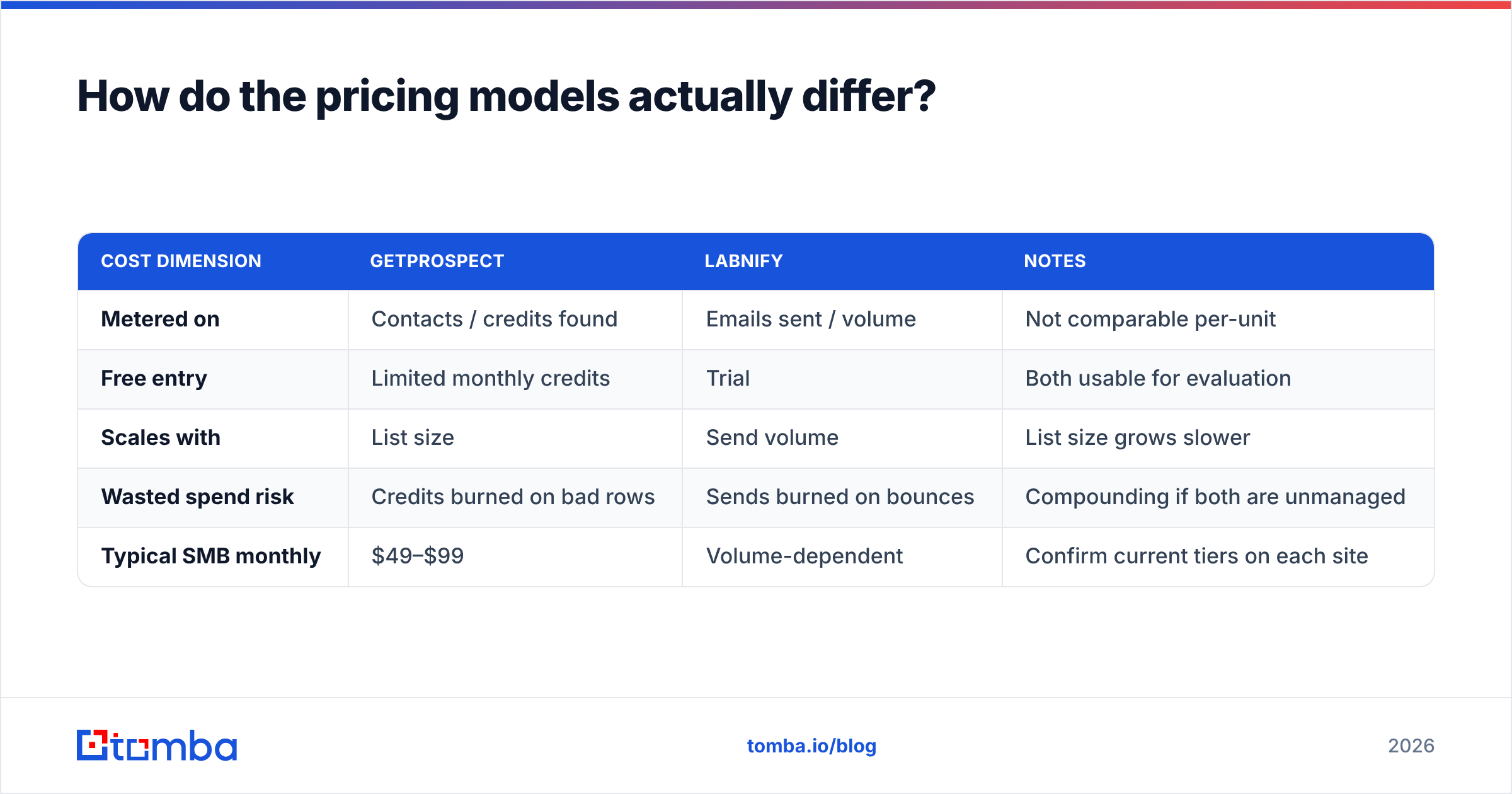
The two products meter completely different things, which is why "which is cheaper" is a trap question.
| Cost dimension | GetProspect | Labnify | Notes |
|---|---|---|---|
| Metered on | Contacts / credits found | Emails sent / volume | Not comparable per-unit |
| Free entry | Limited monthly credits | Trial | Both usable for evaluation |
| Scales with | List size | Send volume | List size grows slower |
| Wasted spend risk | Credits burned on bad rows | Sends burned on bounces | Compounding if both are unmanaged |
| Typical SMB monthly | $49–$99 | Volume-dependent | Confirm current tiers on each site |
The hidden cost is in row four. A credit spent on an address that bounces costs you twice — once at the finder, once at the sender, plus reputation damage that doesn't show up on any invoice. That's why the cheapest overall stack is usually the one with the most accurate data layer, even if that layer isn't the cheapest line item.
For reference, Tomba pricing runs a free tier at 25 searches/month, Starter at $49/mo, Growth at $99/mo, and Pro at $249/mo, with search and verification credits on the same plan rather than sold separately. Compare like for like: total cost per usable contact, not per credit.
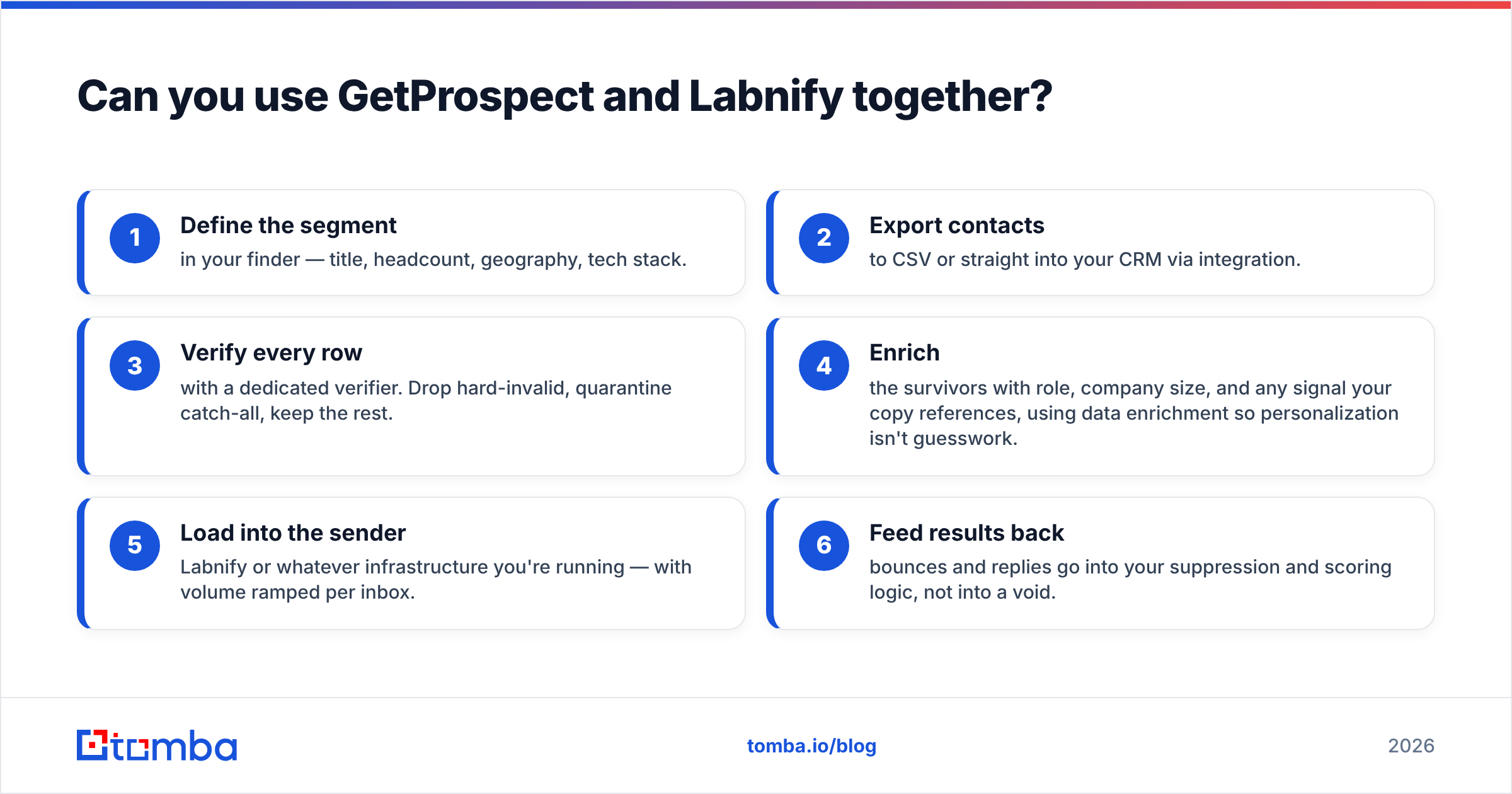
Can you use GetProspect and Labnify together?#
Yes, and for a lot of teams that's the correct answer. A workable pipeline looks like this:
- Define the segment in your finder — title, headcount, geography, tech stack.
- Export contacts to CSV or straight into your CRM via integration.
- Verify every row with a dedicated verifier. Drop hard-invalid, quarantine catch-all, keep the rest.
- Enrich the survivors with role, company size, and any signal your copy references, using data enrichment so personalization isn't guesswork.
- Load into the sender — Labnify or whatever infrastructure you're running — with volume ramped per inbox.
- Feed results back: bounces and replies go into your suppression and scoring logic, not into a void.
Step three is the one teams skip, and it's the one that determines whether steps five and six work. If your finder and verifier are the same vendor, make sure the verification is a genuine SMTP-level check, not a syntax and MX lookup wearing a costume.
Which should you choose in 2026?#
Pick by the bottleneck, not the brand.
Choose GetProspect if: your problem is who to contact. You need LinkedIn-native list building, your ICP is well-indexed mid-market companies, and you want a single UI where lists live alongside light sequencing. It's a solid generalist for teams building their first repeatable list motion.
Choose Labnify if: your problem is getting mail delivered. You have contacts, you're sending tens of thousands a month, and your current setup is throttling, bouncing, or landing in Promotions. Sending infrastructure is a specialist purchase and generalist tools handle it poorly.
Choose a dedicated finder + verifier if: your problem is data quality. If your bounce rate is above 3%, your reply rate is inexplicably low, or your reps keep flagging "wrong person," the fix is upstream of both tools. Run domain search to pull every public address at a target company, verify before import, and stop paying for the same bad row twice.
Choose all three if: you're running real volume. At 20,000+ sends a month, the specialists beat the all-in-one on every axis that matters, and the integration cost is a one-time afternoon.
One caveat worth stating plainly: all-in-one platforms are attractive because they collapse vendor management, and that's a real benefit. But every all-in-one has a weak layer. Find out which one it is before you route your whole pipeline through it, not after your domain reputation tanks in month three.
The bottom line#
GetProspect vs Labnify isn't a duel — it's a diagnostic. One tool answers "who do I email," the other answers "how do I get it delivered." Buying the wrong half is how teams end up with a $200/mo stack and a 1% reply rate.
Whatever you pick for sending, the data layer is where the leverage is. Start with contacts you can actually reach: the Tomba Email Finder locates professional addresses by name, domain, or company, verifies them at the SMTP level including catch-all domains, and hands your sending platform a list that won't quietly damage your reputation. Free tier is 25 searches a month — enough to sample your ICP and see the disagreement rate for yourself before you commit a dollar.
Related guides#
Ready to find emails that actually work?
Join 150,000+ professionals who stopped guessing and started sending. Free credits on signup — no credit card required.
Get the Tomba newsletter
Practical outbound tactics and product updates — once every two weeks.
About the author