GetProspect vs LeadLeaper: Which Email Finder Wins in 2026?
GetProspect and LeadLeaper both promise LinkedIn emails on demand, but they solve different problems. Here is how they compare on accuracy, pricing, export limits, and API access in 2026.
TL;DR
- GetProspect is a database-plus-extension platform: filterable B2B search, list management, a light CRM layer, and a LinkedIn Chrome extension. It suits marketers who want to build lists inside one UI.
- LeadLeaper is much narrower: a Chrome extension that pulls emails off LinkedIn search results and profiles, with a small built-in sender. It is fast and cheap, and it stops there.
- On coverage and verification depth, GetProspect is ahead. On speed of a single LinkedIn session, LeadLeaper is fine. Neither is a strong choice if you need API-first enrichment or catch-all handling.
- Cost per usable email matters more than sticker price. A $29 plan that returns 40% guessed addresses is more expensive than a $49 plan returning verified ones.
- If your workflow is API, bulk CSV, or CRM-triggered rather than manual LinkedIn browsing, look at a dedicated email finder instead of either tool.
What do GetProspect and LeadLeaper actually do?#
They are both sold as "LinkedIn email finders," which hides how different they are underneath.
GetProspect is a lead-generation platform. You can search a contact database by job title, company size, industry, location, and technology, save results into lists, add columns, and push them out to a CRM or CSV. The Chrome extension is one input among several. There is also an email verification step baked into the flow, so exports are supposed to arrive pre-filtered.
LeadLeaper is a browser extension first and almost only. You run a LinkedIn or Sales Navigator search, click the extension, and it captures the visible page of results and attempts to resolve work emails for them. Captured leads sit in a lightweight web app where you can export them or fire a basic email sequence. There is no independent database to query without LinkedIn in front of you.
That distinction decides most of the comparison:
- Input model — GetProspect: database search or extension. LeadLeaper: extension only, LinkedIn required.
- Output model — GetProspect: lists, CSV, CRM sync, some API access on higher tiers. LeadLeaper: CSV plus a built-in mailer.
- Verification — GetProspect verifies before it charges you a credit on most plans. LeadLeaper's verification is thinner and pattern-heavy.
- Team use — GetProspect has shared lists and seats. LeadLeaper is built around one person clicking through profiles.
- Ceiling — GetProspect scales to a few thousand contacts a month comfortably. LeadLeaper hits friction fast, because everything is gated by how many LinkedIn pages you can physically load.

Which one finds more valid emails?#
GetProspect wins on raw hit rate, but the gap narrows on well-known domains and widens badly on small companies.
Here is the mechanic that explains it. Both tools do some version of the same three steps: identify the person, guess or retrieve the company's email pattern, then confirm the address exists. The difference is what happens at step three. A platform with a large verified corpus and SMTP-level checking can say "this exact mailbox accepts mail." A pattern-only tool says "companies like this usually use first.last@, so here you go."
The second answer is where bounce rates come from. If you send 1,000 emails and 12% of them were pattern guesses on domains that actually use finitial+last, you have burned your domain reputation to learn something a verifier would have told you for a fraction of a cent.

Practical read on accuracy in 2026:
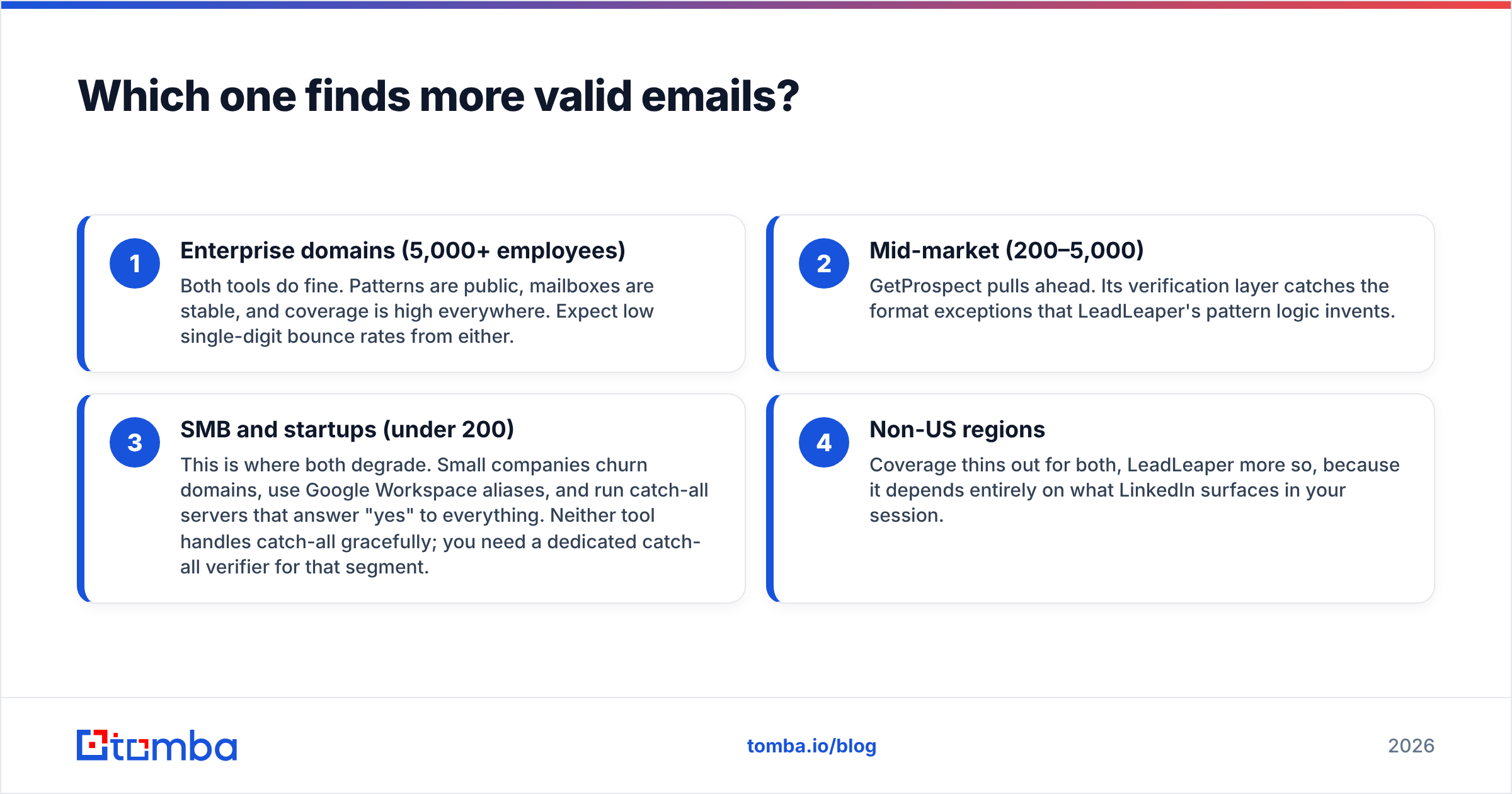
- Enterprise domains (5,000+ employees) — Both tools do fine. Patterns are public, mailboxes are stable, and coverage is high everywhere. Expect low single-digit bounce rates from either.
- Mid-market (200–5,000) — GetProspect pulls ahead. Its verification layer catches the format exceptions that LeadLeaper's pattern logic invents.
- SMB and startups (under 200) — This is where both degrade. Small companies churn domains, use Google Workspace aliases, and run catch-all servers that answer "yes" to everything. Neither tool handles catch-all gracefully; you need a dedicated catch-all verifier for that segment.
- Non-US regions — Coverage thins out for both, LeadLeaper more so, because it depends entirely on what LinkedIn surfaces in your session.
If you cannot tolerate bounces, treat any finder's output as a candidate list and run it through a separate email verifier before it touches your sending domain. That habit matters more than which of these two tools you pick.
How do GetProspect and LeadLeaper compare feature by feature?#
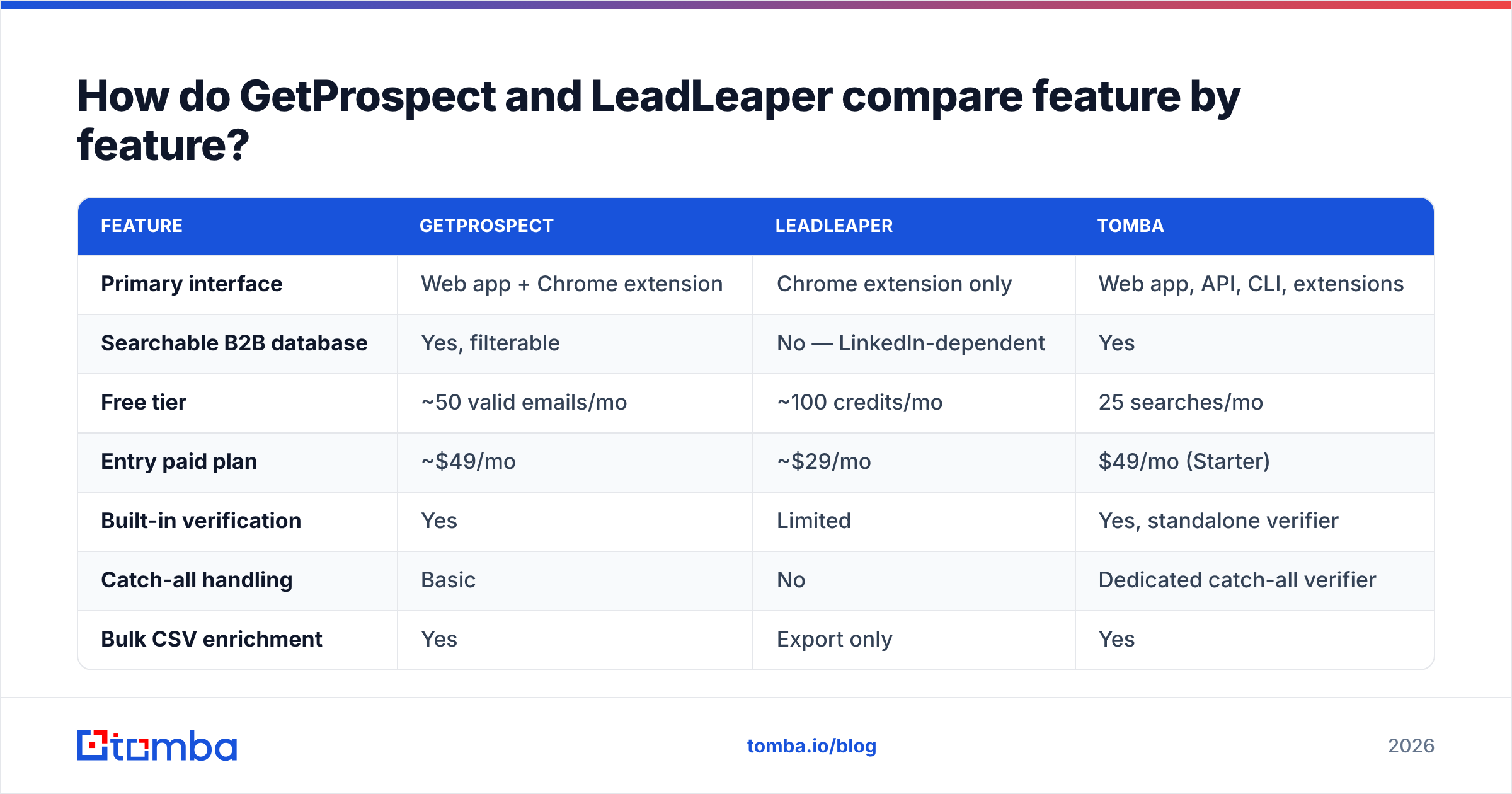
The table below is the short version. Prices move — check each vendor's page before you commit, and note that credit definitions differ (one tool's "credit" may be a search, another's may be a verified result).
| Feature | GetProspect | LeadLeaper | Tomba |
|---|---|---|---|
| Primary interface | Web app + Chrome extension | Chrome extension only | Web app, API, CLI, extensions |
| Searchable B2B database | Yes, filterable | No — LinkedIn-dependent | Yes |
| Free tier | ~50 valid emails/mo | ~100 credits/mo | 25 searches/mo |
| Entry paid plan | ~$49/mo | ~$29/mo | $49/mo (Starter) |
| Built-in verification | Yes | Limited | Yes, standalone verifier |
| Catch-all handling | Basic | No | Dedicated catch-all verifier |
| Bulk CSV enrichment | Yes | Export only | Yes |
| Public API | Higher tiers | Not meaningful | All paid plans |
| Phone numbers | Limited | No | Yes |
| Native CRM sync | HubSpot, Pipedrive, Zapier | Limited | HubSpot, Salesforce, Pipedrive, Zapier, Make |
| Built-in email sending | No | Yes, basic | No — integrates with your sender |
| Best fit | List building in one UI | Solo LinkedIn prospecting | API and bulk workflows |

Two rows deserve commentary.
Built-in sending. LeadLeaper's mailer looks like a bonus and usually is not. Sending cold email from a tool that is not built for deliverability — no warmup, no rotation, thin analytics — is a fast way to torch a domain. Most teams end up exporting anyway and sending from a proper sequencer. If you are evaluating that side of the stack, look at email deliverability fundamentals first, not at whichever finder bundles a send button.
API access. GetProspect exposes an API but gates it, and it is designed around the platform's own list objects. LeadLeaper effectively has none. If you want to enrich a signup form in real time, or backfill a warehouse table, both are the wrong shape and you want an email finder API instead.
What does each tool really cost per usable email?#
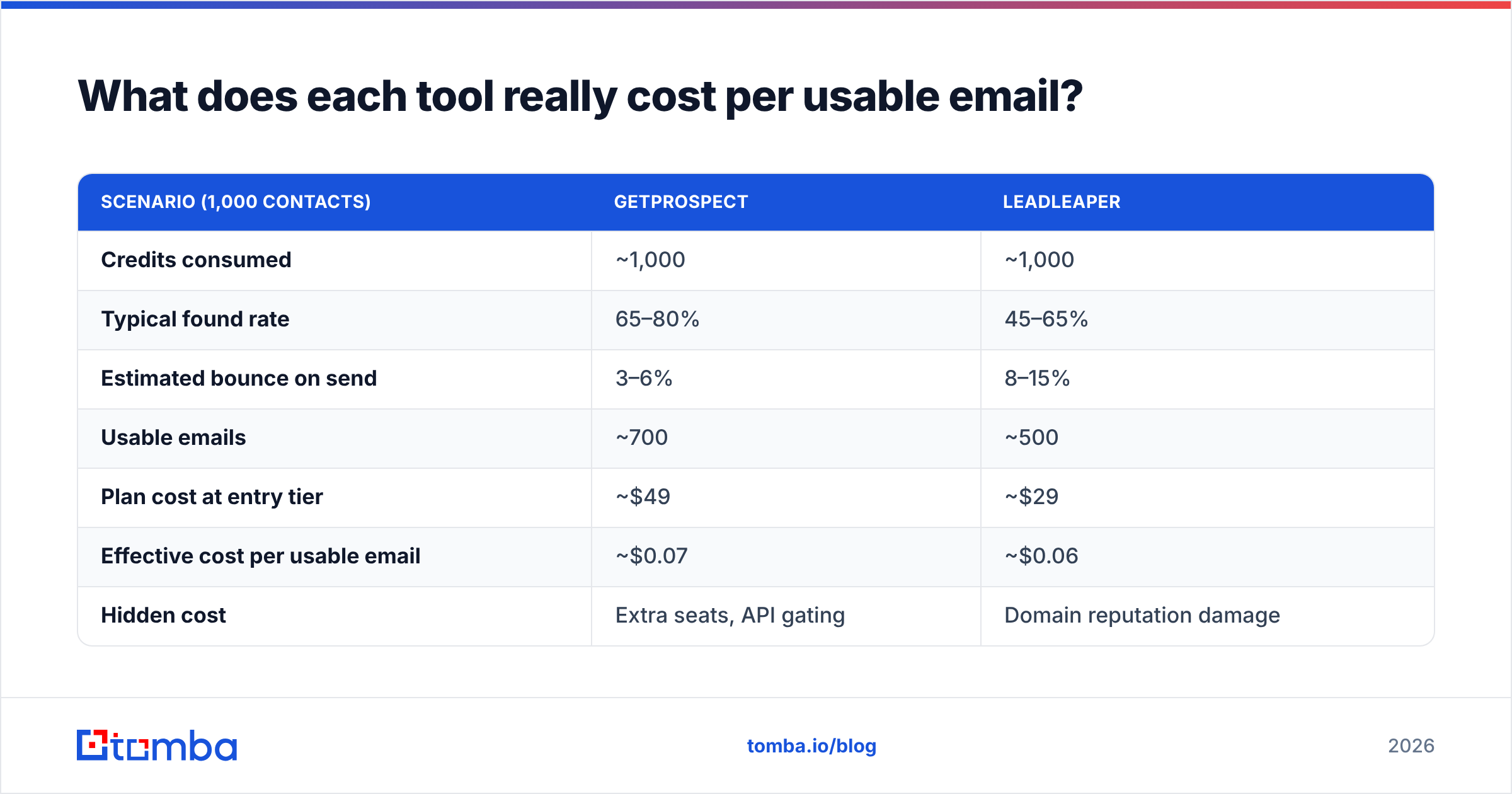
Divide plan price by verified, deliverable emails, not by credits granted.
| Scenario (1,000 contacts) | GetProspect | LeadLeaper |
|---|---|---|
| Credits consumed | ~1,000 | ~1,000 |
| Typical found rate | 65–80% | 45–65% |
| Estimated bounce on send | 3–6% | 8–15% |
| Usable emails | ~700 | ~500 |
| Plan cost at entry tier | ~$49 | ~$29 |
| Effective cost per usable email | ~$0.07 | ~$0.06 |
| Hidden cost | Extra seats, API gating | Domain reputation damage |
The headline numbers land close. The hidden row is the one that decides it. A 12% bounce rate on a new sending domain does not just cost you 120 wasted sends — it drags inbox placement down for the other 880, and that damage persists across campaigns. Cheap credits that produce guesses are not cheap.
Run the same math against your own list before switching tools. Take 200 contacts, run them through both trials, send to a seed segment, and count actual bounces. It takes an afternoon and it beats every vendor claim, including ours.
Who should choose GetProspect?#
Pick GetProspect if your work looks like this:
- You build lists as a project, not a stream. You sit down, define an ICP, filter a database, and export 500 rows. The web app supports that rhythm.
- You want the data layer and the list layer together. Custom columns, saved segments, and shared team lists remove a spreadsheet step.
- Your team is marketing-led. The UI is approachable, and the HubSpot path is well trodden.
- You need verification without a second vendor. For mid-market targets, the built-in check is usually good enough to ship.
Where it frustrates people: API access sits on higher tiers, credit consumption on failed lookups can surprise you, and coverage outside North America and Western Europe is uneven. Compare the plan structure against Tomba pricing if per-seat costs are a factor — seat-based and credit-based models diverge sharply once a third person joins.

Who should choose LeadLeaper?#
Pick LeadLeaper if you are one person, working live inside LinkedIn, and your volume is genuinely small.
- Solo founders doing 20–50 touches a week. The extension removes copy-paste friction and the free tier may cover you outright.
- Recruiters working profile by profile. You are already reading the profile; grabbing the email in the same click is the whole value.
- Anyone testing whether outbound works at all before committing budget to a platform.
Where it breaks down: there is no way to scale without more human hours, exports are basic, verification is thin, and the moment LinkedIn changes its DOM the extension can go quiet for days. It is a tactic, not infrastructure.
If your reason for wanting it is specifically "emails from LinkedIn profiles," that job can be done without a scraper sitting in your browser session — a server-side LinkedIn finder takes a profile URL and returns a verified address without touching your logged-in account.
Where do both tools fall short?#
Four gaps show up in almost every evaluation, and they are the reason teams eventually migrate off both.
- Catch-all domains. A catch-all server accepts every address, so a naive verifier marks garbage as valid. Somewhere between 15% and 25% of B2B domains are configured this way. Neither tool gives you a real answer here, and the false positives land in your bounce report weeks later.
- Bulk and batch work. Enriching 20,000 rows from a webinar list is not a browsing task. You want bulk email finder processing with a queue, retries, and a status column — not an extension you babysit.
- Programmatic access. Anything triggered by an event — a form fill, a CRM stage change, a product signup — needs an API with predictable latency and clear rate limits. Extension-first tools are structurally bad at this.
- Data provenance. Buyers in 2026 ask where records came from and how consent is handled. GDPR and CCPA exposure is real, and "the extension scraped it" is a weak answer during a security review. Check any vendor's published data sources before you standardize on it.
- Vendor lock on lists. Both keep your saved lists inside their UI. Confirm you can export everything, with all columns, at any time — before you have 40,000 contacts trapped in a tool you want to leave.
How should you choose between them in 2026?#
Match the tool to the shape of your workflow, not to a feature checklist.
- Manual, LinkedIn-centric, one person, low volume → LeadLeaper is defensible, and the free tier may be all you need.
- List-building in a UI, small team, marketing-owned → GetProspect is the stronger of the two and worth its higher entry price.
- API-driven, bulk, or CRM-triggered enrichment → Neither. You want a data platform with real endpoints, catch-all logic, and per-call pricing.
- Accuracy-critical outbound at volume → Whatever you pick for discovery, verify separately. Treat finding and verifying as two jobs.
One more piece of practical advice: benchmark on your ICP, not on a demo list of famous companies. Every finder looks excellent against Fortune 500 domains. The differences appear on 80-person SaaS companies in secondary markets, which is where most B2B pipeline actually lives. Cross-check what real users say on G2 for the segment you sell into, then run your own 200-row test.
Where does Tomba fit?#
Tomba is built for the third and fourth cases above — programmatic, bulk, accuracy-critical work — rather than for browsing profiles.
The Tomba Email Finder resolves addresses by domain, name, or company and returns a confidence score with every result, so you can set your own threshold instead of accepting a binary verdict. Verification, catch-all checking, domain search, and enrichment sit alongside it, and everything available in the UI is available through the API, the CLI, and the Sheets and Excel add-ins. Pricing starts with a free tier at 25 searches a month, then Starter at $49/mo, Growth at $99/mo, and Pro at $249/mo — no seat tax for adding a teammate to the same credit pool.
If you have been squeezing a browser extension for leads and your bounce rate keeps creeping up, run the same 200 contacts through the free tier and compare the deliverable count. That number, not a feature table, is the only comparison that ends the argument.
Related guides#
Ready to find emails that actually work?
Join 150,000+ professionals who stopped guessing and started sending. Free credits on signup — no credit card required.
Get the Tomba newsletter
Practical outbound tactics and product updates — once every two weeks.
About the author