GetProspect vs LeadMine: Which Email Finder Wins in 2026?
GetProspect sells a 200M-contact database with a LinkedIn extension. LeadMine sells a lean domain-search finder. We compare accuracy, pricing, credit models, and API depth to show which one actually fits your workflow.
GetProspect vs LeadMine is a choice between two different jobs. One builds lists. The other looks up emails for accounts you already picked. Here is the short version, then the numbers behind it.
TL;DR
- GetProspect is a contact-database play: ~200M+ profiles, a LinkedIn Chrome extension, list-building filters, and a free tier that gets you started. Best if you want to browse prospects rather than look them up one by one.
- LeadMine is the opposite bet: a lean domain-search and email-lookup tool with a simple API and no bloated CRM layer. Best if you already know the companies you want and just need addresses.
- On raw cost per verified email, LeadMine tends to win at low volume; GetProspect wins when you need filters, titles, and headcount data you'd otherwise buy separately.
Neither tool solves the expensive part:
- Neither ships a serious catch-all verification layer, which is where both leak money — roughly a fifth of B2B domains are catch-all, and "accepted" is not the same as "deliverable."
- If your pipeline is API-first and you care about verified-only billing, a third option like Tomba is worth pricing against both before you commit to an annual plan.
GetProspect vs LeadMine: what are they, actually?#
They solve the same end problem — get a working email for a person at a company — from opposite directions.
GetProspect is a database-first tool. You filter a large contact index by job title, industry, location, and headcount, then export the matches. The LinkedIn extension is the hook: browse Sales Navigator, click, and pull emails into a list. It also adds a light CRM view, so lists don't die in a spreadsheet on day one.
LeadMine is a lookup-first tool. You give it a name and a company domain, or just a domain. It returns the addresses it can find with a confidence indicator. There's no CRM layer. The API is thin and predictable, which is exactly what some teams want.
The difference shows up in how you start a session. With GetProspect you start from a persona ("VP Marketing, SaaS, 50–200 headcount, Germany"). With LeadMine you start from a list of target accounts you already picked. No account list, no work to do.

How do they compare on features and pricing?#
Here's the head-to-head. Pricing tiers move around a lot. Treat these numbers as the shape of the offer, not a quote, and check each vendor's page before you buy.
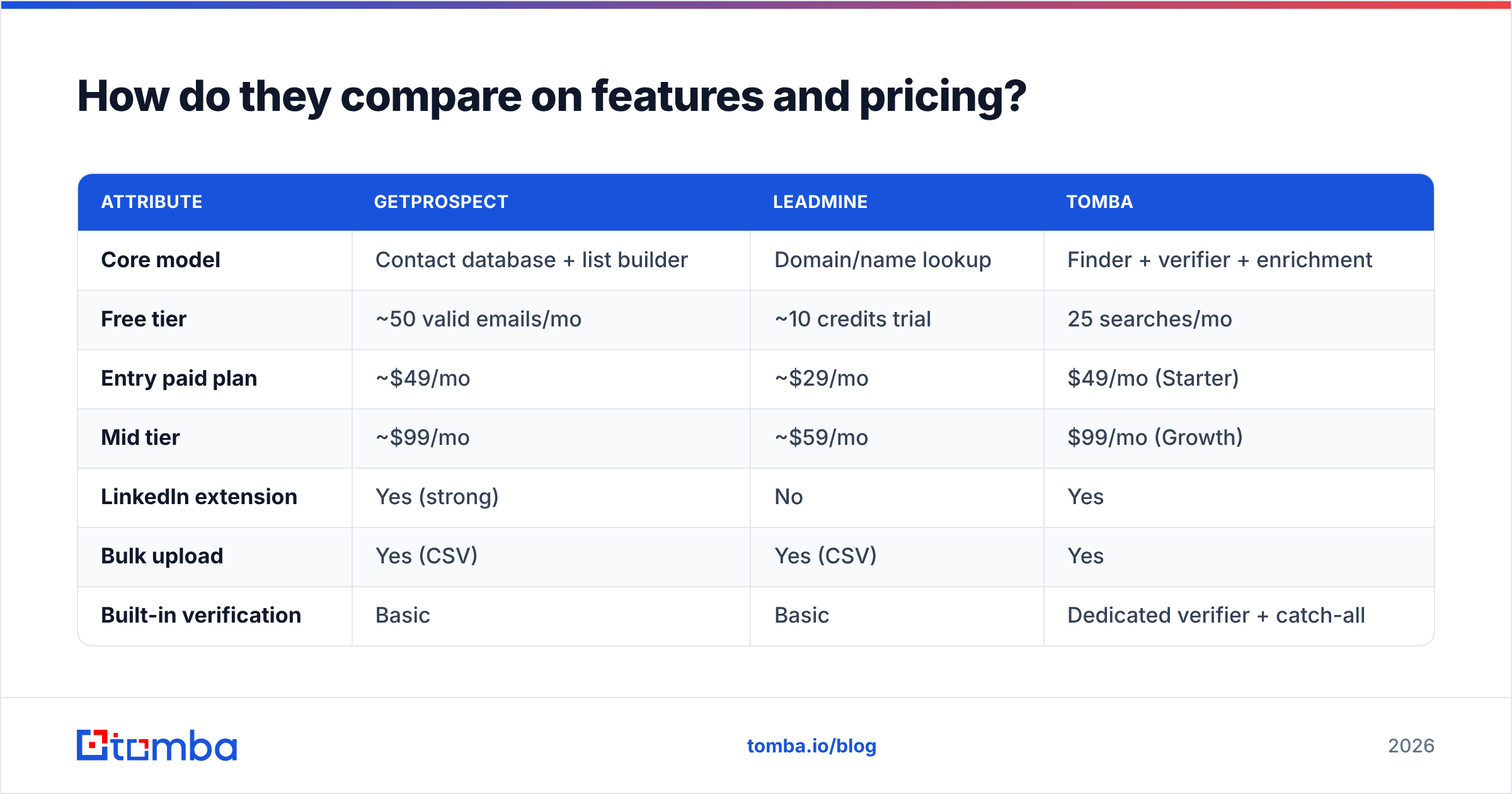
| Attribute | GetProspect | LeadMine | Tomba |
|---|---|---|---|
| Core model | Contact database + list builder | Domain/name lookup | Finder + verifier + enrichment |
| Free tier | ~50 valid emails/mo | ~10 credits trial | 25 searches/mo |
| Entry paid plan | ~$49/mo | ~$29/mo | $49/mo (Starter) |
| Mid tier | ~$99/mo | ~$59/mo | $99/mo (Growth) |
| LinkedIn extension | Yes (strong) | No | Yes |
| Bulk upload | Yes (CSV) | Yes (CSV) | Yes |
| Built-in verification | Basic | Basic | Dedicated verifier + catch-all |
| Public API | Yes | Yes (simple) | Yes (documented, CLI + MCP) |
| Phone numbers | Limited | No | Yes |
| Charges for unverified hits | Sometimes | Sometimes | No — verified-only billing |
| Best for | Persona-based list building | Known-account lookups | API-first, accuracy-sensitive teams |
Two lines in that table matter more than the rest.
The first is "charges for unverified hits." Every finder has a hit rate below 100%. The real question is whether you pay for the misses. Say a $29/mo plan hits 55% and bills every attempt. A $49/mo plan hits 92% and bills only confirmed results. The second plan is cheaper per usable address. Run that math before you compare sticker prices.
The second is catch-all handling. Both tools will hand you an address on a catch-all domain and mark it "valid" or "accept all." That domain accepts everything at the SMTP layer, including asdkjh@company.com. Without a dedicated catch-all verifier, you're guessing — and your bounce rate finds out first.

Which one is more accurate?#
Published accuracy claims are close to worthless. No vendor shows you the test set. A 98% score on Fortune 500 press contacts tells you nothing about your list of 300 German mid-market manufacturers.
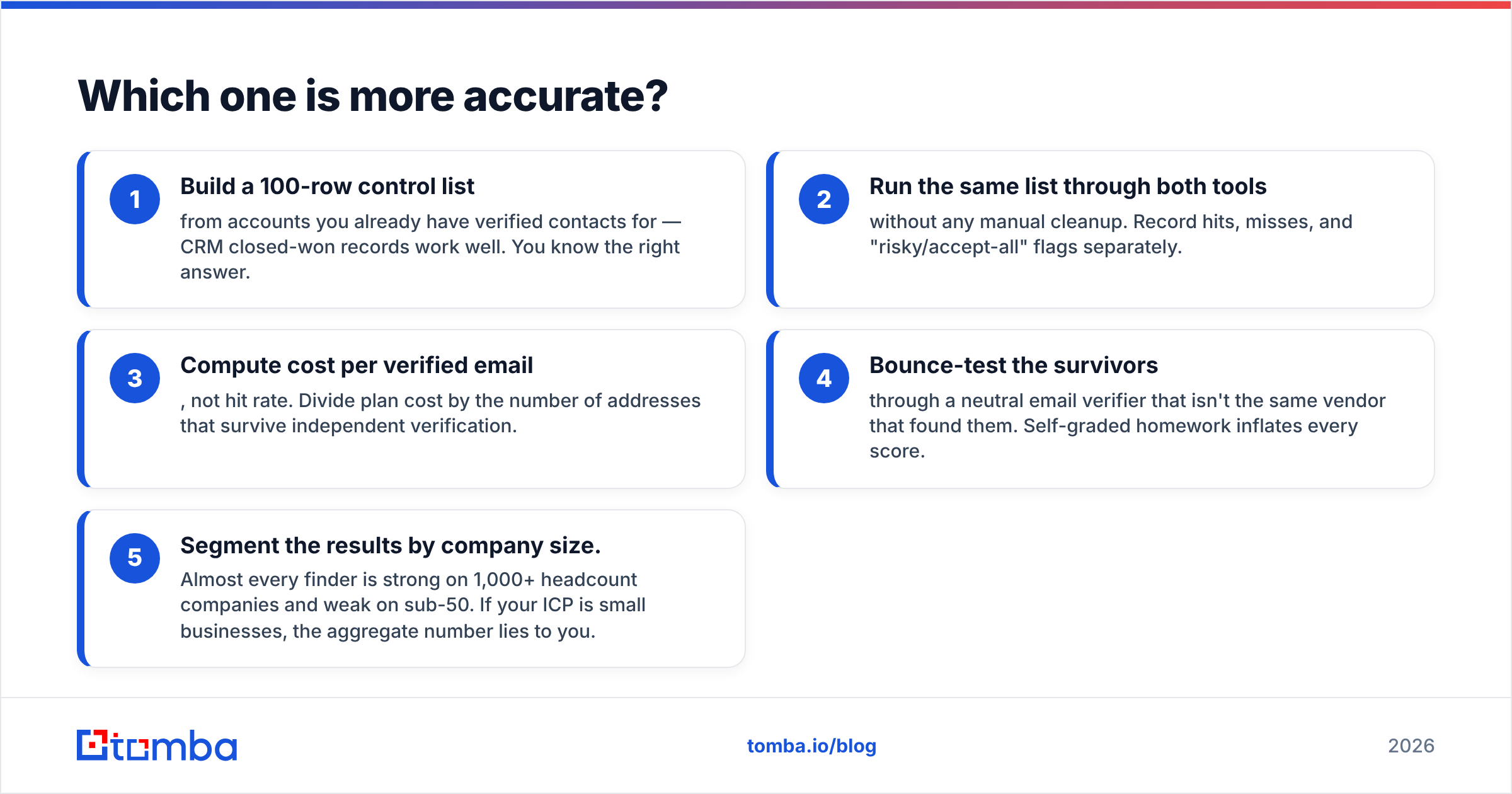
Here's how to test it honestly in under an hour:
- Build a 100-row control list from accounts you already have verified contacts for — CRM closed-won records work well. You know the right answer.
- Run the same list through both tools without any manual cleanup. Record hits, misses, and "risky/accept-all" flags separately.
- Compute cost per verified email, not hit rate. Divide plan cost by the number of addresses that survive independent verification.
- Bounce-test the survivors through a neutral email verifier that isn't the same vendor that found them. Self-graded homework inflates every score.
- Segment the results by company size. Almost every finder is strong on 1,000+ headcount companies and weak on sub-50. If your ICP is small businesses, the aggregate number lies to you.
What you'll usually see in a GetProspect vs LeadMine test: GetProspect covers mid-to-large companies better, because those profiles are well indexed on LinkedIn. LeadMine holds up better on smaller domains with predictable patterns, since pattern inference is most of what it does. Both drop off on companies with privacy-forward mail setups or odd address formats.

Is GetProspect better than LeadMine for LinkedIn prospecting?#
Yes, clearly — and this is the strongest reason to pick it.
GetProspect's extension is built around the Sales Navigator workflow: run a search, select results, extract in bulk, keep the enriched fields. LeadMine has nothing like it. If your team prospects inside LinkedIn, LeadMine adds an awkward step where somebody copies company names into a spreadsheet first.
That said, LinkedIn extraction is a fragile dependency. LinkedIn restricts scraping, extensions break after platform changes, and account risk is real. Build your whole pipeline on a browser extension and you hand a third party a single point of failure. Teams that got burned by this usually move to server-side lookups — a LinkedIn finder endpoint you call from your own stack, or plain domain search against target accounts.
Worth being blunt: neither tool has a moat here. The extension category is crowded — G2's lead intelligence grid lists dozens of near-identical products. What sets tools apart is data freshness and what happens after export.
Which one has the better API and automation story?#
LeadMine's API is simpler. GetProspect's API is more capable but more opinionated. Neither is best-in-class.
If you're wiring a finder into a data pipeline, the questions that matter aren't in either vendor's marketing:
- Does the API bill on request or on result? Request-billed APIs punish you for exploring.
- Is there a bulk endpoint, or do you loop single calls? Looping 10,000 singles is slow and rate-limit hostile.
- What's the rate limit on your actual tier, not the enterprise tier in the docs?
- Are there native connectors for the tools you already run — HubSpot, Sheets, Airtable, Zapier — or do you build glue code?
- Is there a CLI or agent-native interface? Increasingly relevant if LLM agents do your enrichment.
GetProspect covers connectors reasonably well. LeadMine leans on you writing the integration yourself. If you want documented bulk operations, a command-line client, and an MCP server so agents can call it directly, neither of these two competes there yet.
What do they cost per usable lead?#
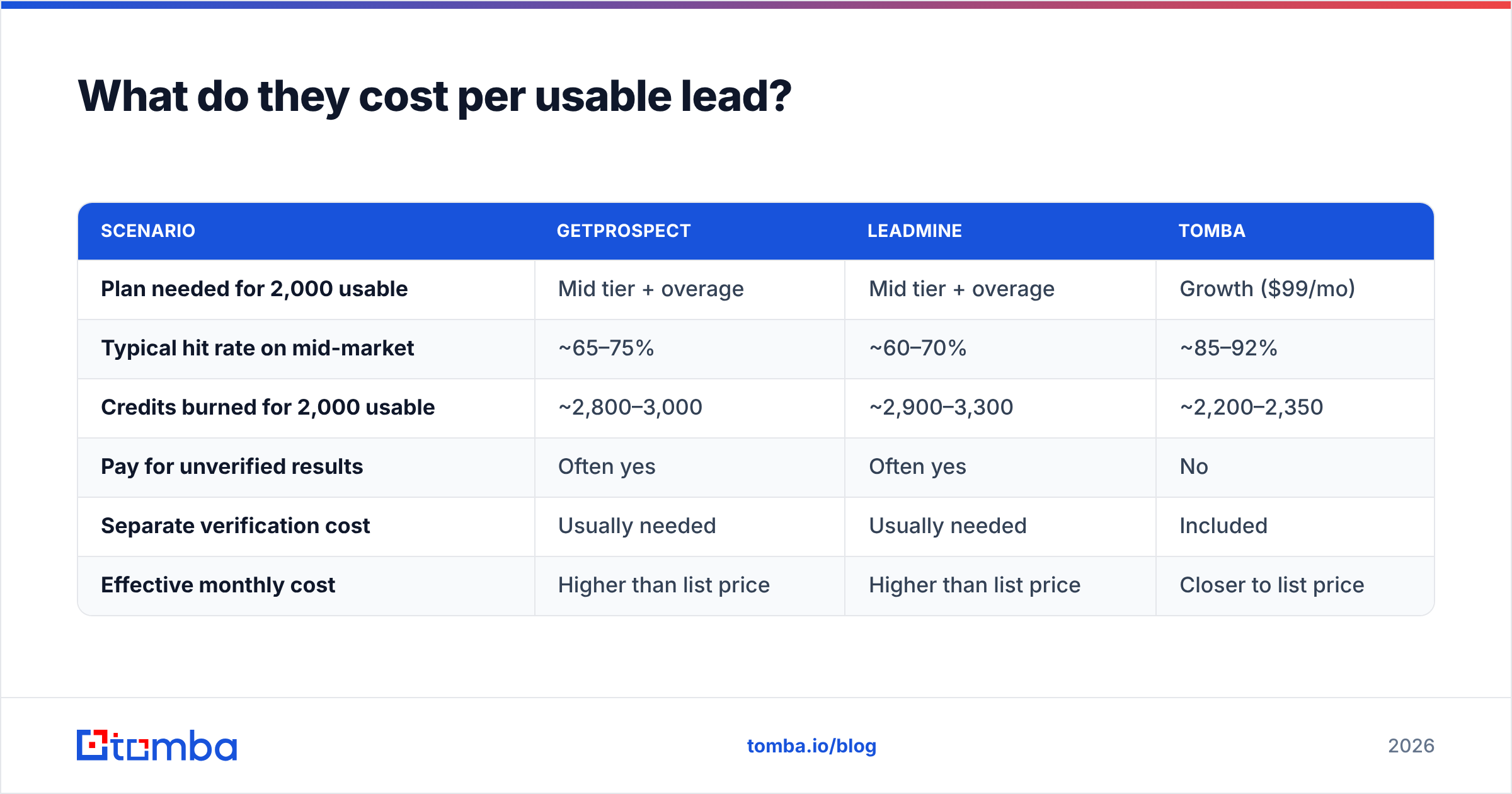
Sticker price is the wrong unit. Here's the same three tools on an honest metric. Assume you need 2,000 usable, verified addresses per month.
| Scenario | GetProspect | LeadMine | Tomba |
|---|---|---|---|
| Plan needed for 2,000 usable | Mid tier + overage | Mid tier + overage | Growth ($99/mo) |
| Typical hit rate on mid-market | ~65–75% | ~60–70% | ~85–92% |
| Credits burned for 2,000 usable | ~2,800–3,000 | ~2,900–3,300 | ~2,200–2,350 |
| Pay for unverified results | Often yes | Often yes | No |
| Separate verification cost | Usually needed | Usually needed | Included |
| Effective monthly cost | Higher than list price | Higher than list price | Closer to list price |
The pattern holds across most finder comparisons. The tool that bills only on verified results ends up cheaper at volume, even when its headline price is higher. Plug your own volumes into published Tomba pricing rather than trusting a table — including ours.
One more cost never makes it into a table: a damaged sending domain. A 12% bounce rate on a new domain can cost you weeks of email deliverability recovery. Google and Yahoo tightened bulk-sender rules in 2024 and haven't loosened them. Google's sender guidelines set a hard spam-rate ceiling. List hygiene is now a deliverability problem, not just a data-quality one.
Who should pick which?#
Pick GetProspect if:
- Your prospecting starts inside LinkedIn or Sales Navigator and you want extraction in the same tab.
- You need to discover prospects by filter, not just look up known ones.
- You want a light CRM layer so lists don't rot in spreadsheets.
- You're fine adding a separate verification step before sending.
Pick LeadMine if:
- You already have your target account list and just need addresses.
- You want a simple, predictable API without a platform wrapped around it.
- Your volume is low enough that the cheaper entry tier genuinely saves money.
- You don't need phone numbers, firmographics, or enrichment.
Look at a third option if:
- You're API-first and want bulk endpoints plus verified-only billing.
- Catch-all domains are a meaningful chunk of your list.
- You want finding, verification, and data enrichment from one vendor instead of stitching three.
- You want to stop paying for results you can't send to.
These two aren't the only options either. BookYourData takes a different approach: pre-verified lists you buy outright, with a bounce guarantee. That suits teams who would rather buy a clean file once than manage credits every month. Different model, and a genuinely good fit for some buyers.
What should you check before you commit to an annual plan?#
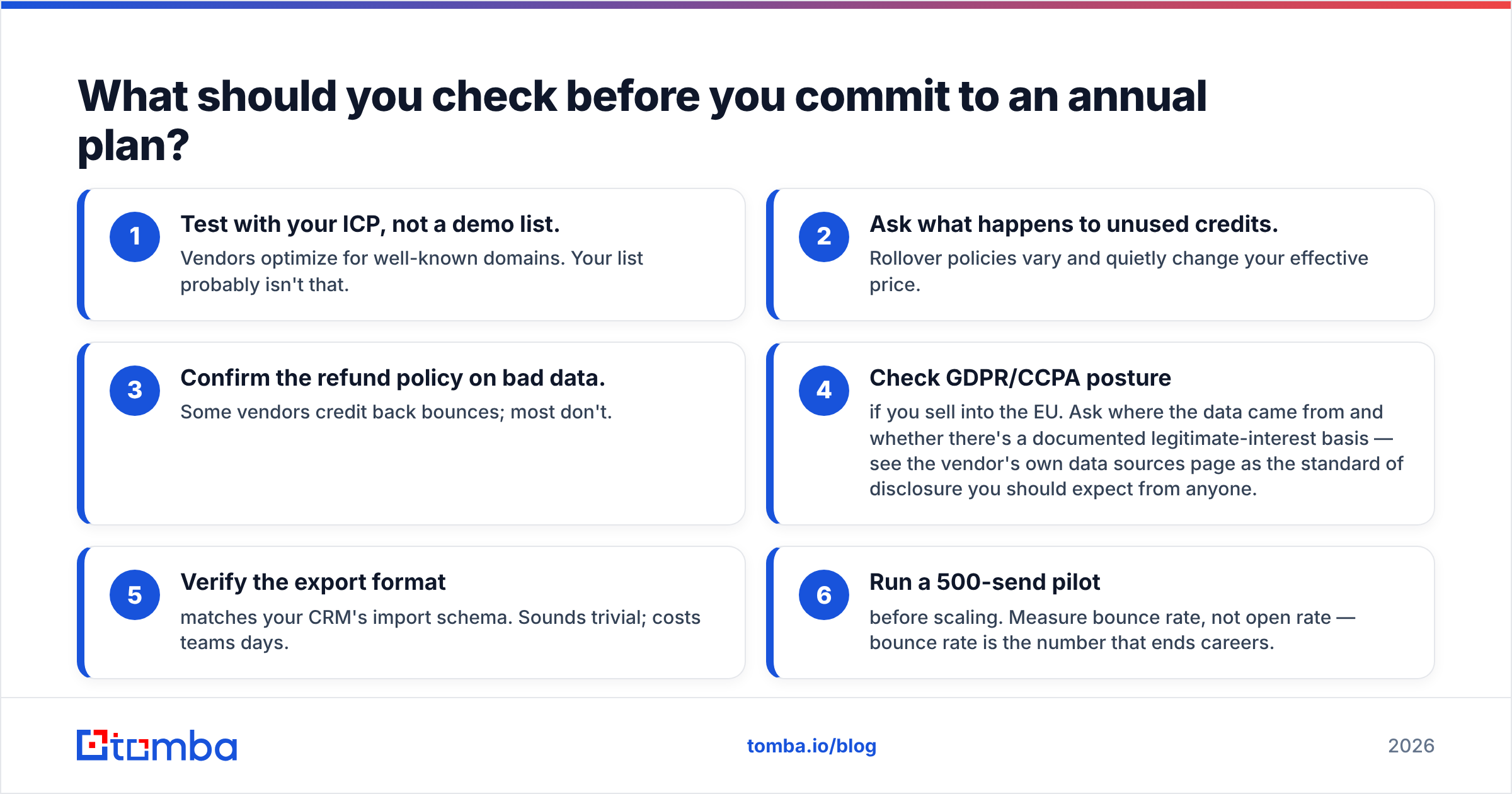
Run this checklist before any annual commitment, on either vendor:
- Test with your ICP, not a demo list. Vendors optimize for well-known domains. Your list probably isn't that.
- Ask what happens to unused credits. Rollover policies vary and quietly change your effective price.
- Confirm the refund policy on bad data. Some vendors credit back bounces; most don't.
- Check GDPR/CCPA posture if you sell into the EU. Ask where the data came from and whether there's a documented legitimate-interest basis — see the vendor's own data sources page as the standard of disclosure you should expect from anyone.
- Verify the export format matches your CRM's import schema. Sounds trivial; costs teams days.
- Run a 500-send pilot before scaling. Measure bounce rate, not open rate — bounce rate is the number that ends careers.
The verdict#
The GetProspect vs LeadMine verdict splits by use case. For LinkedIn-driven list building, GetProspect is the better of the two: the extension and the filters do real work LeadMine doesn't attempt. For cheap, known-account lookups at low volume, LeadMine is the leaner buy and the simpler API.
But the comparison has a blind spot. Both tools are built for finding and treat verifying as an afterthought. In 2026 that's backwards. Deliverability rules got stricter and catch-all domains got more common. The expensive failure is no longer "couldn't find the email." It's "sent to an address that torched your domain reputation."
If that's the failure you care about, run a side-by-side test with the Tomba Email Finder. The free tier gives you 25 searches to benchmark against your control list, results are verified before they're billed, and the catch-all layer tells you when "accept-all" really means deliverable. Run your own 100-row test against all three, look at cost per verified email, and let the numbers pick the winner.
Related guides#
Ready to find emails that actually work?
Join 150,000+ professionals who stopped guessing and started sending. Free credits on signup — no credit card required.
Get the Tomba newsletter
Practical outbound tactics and product updates — once every two weeks.
About the author