GetProspect vs LetsExtract: Which Email Finder Wins in 2026?
One is a cloud B2B database built on LinkedIn prospecting. The other is a Windows desktop scraper you buy once and run forever. Here is how GetProspect and LetsExtract actually compare on data quality, cost, compliance, and workflow fit.
GetProspect vs LetsExtract is not a like-for-like fight. One is a cloud B2B database. The other is a Windows scraper you install and run yourself. Here is where each one wins, what each one really costs, and which risks come with it.
TL;DR
- They are not the same category. GetProspect is a cloud B2B contact database with a LinkedIn Chrome extension. LetsExtract is Windows desktop software that pulls addresses from search engines, websites, and mailboxes.
- GetProspect wins on data hygiene and B2B fit. You get company filters, job titles, and verified work emails. LetsExtract gives you volume with almost no filters.
- LetsExtract wins on raw cost per address. It is a one-time license, not a subscription. But the addresses it collects carry real bounce and legal risk.
- Neither is a great API-first choice. If you need lookups inside a CRM, an enrichment job, or an agent workflow, a developer-first email finder beats both.
- Our pick: GetProspect for targeted B2B outbound. LetsExtract only for cleaning up lists you already own — not for building cold prospect lists in 2026.
What are GetProspect and LetsExtract, actually?#
The most common mistake here is to assume both tools do the same job. They don't.
GetProspect is a cloud lead-gen tool. You search a hosted B2B database by job title, company size, industry, and location. Or you install the Chrome extension and pull emails as you browse LinkedIn. Contacts land in a built-in list manager. Each row shows company, role, and social profile. Everything runs in the browser. Nothing installs on your machine.
LetsExtract is a Windows desktop app. LetsExtract Email Studio bundles three parts: an extractor, a verifier, and a sender. The extractor crawls search results, websites, local files, and IMAP or POP3 mailboxes. It pulls every string that looks like an address. You buy a license, install the .exe, and run it on your own machine and your own bandwidth.
That split drives every other difference:
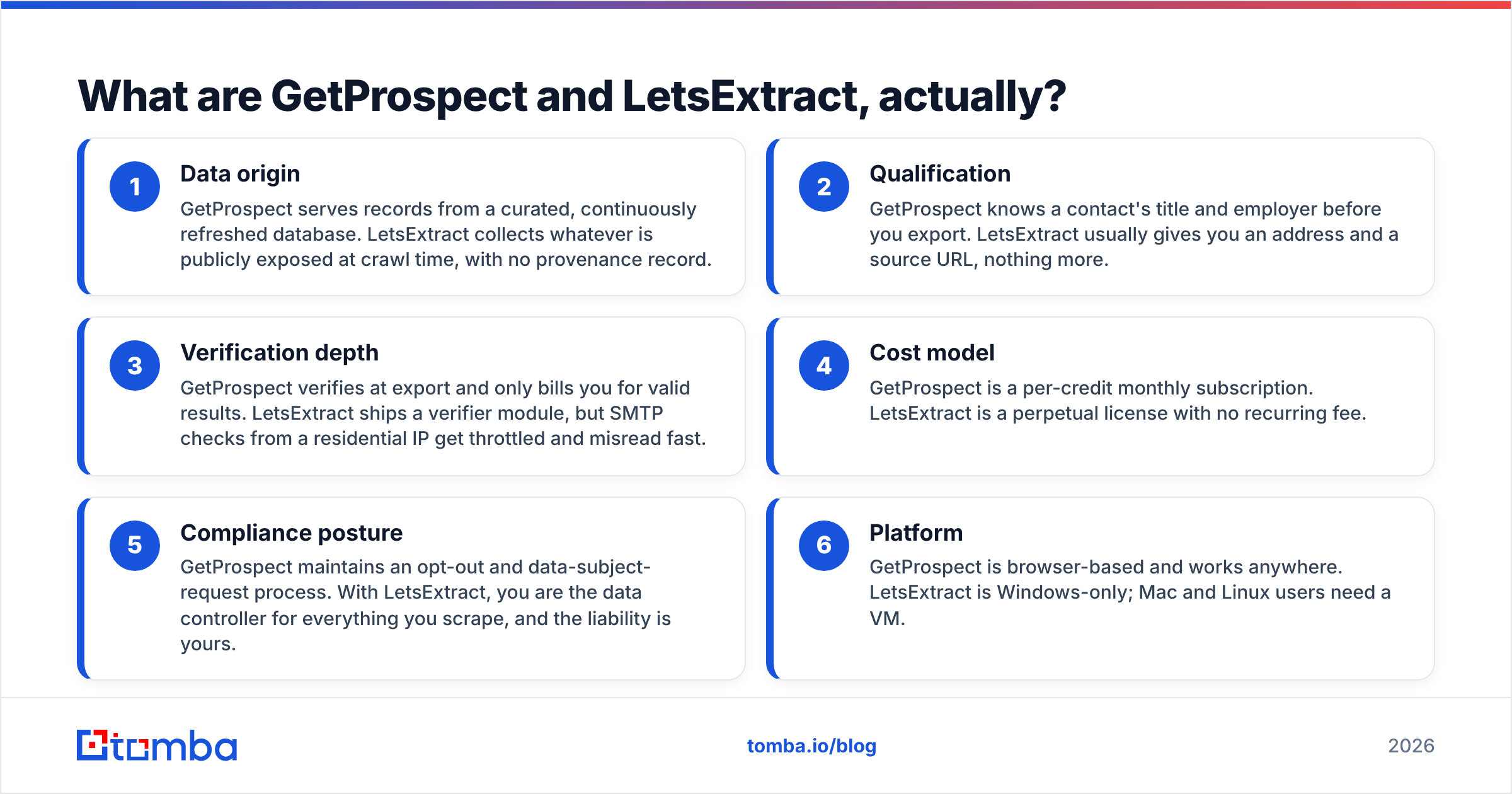
- Data origin — GetProspect serves records from a curated database. Staff refresh it all the time. LetsExtract grabs whatever is public at crawl time. There is no record of where it came from.
- Filters — GetProspect knows a contact's title and employer before you export. LetsExtract usually gives you an address and a source URL, nothing more.
- Email checks — GetProspect checks at export and only bills you for valid results. LetsExtract ships a verifier. But SMTP checks from a home IP get throttled, and the answers go wrong fast.
- Cost model — GetProspect bills monthly, by credit. LetsExtract is a one-time license with no monthly fee.
- Legal risk — GetProspect runs an opt-out and a way to handle data requests. With LetsExtract, you are the data controller for all you scrape. The risk is yours.
- Platform — GetProspect is browser-based and works anywhere. LetsExtract is Windows only. Mac and Linux users need a VM.

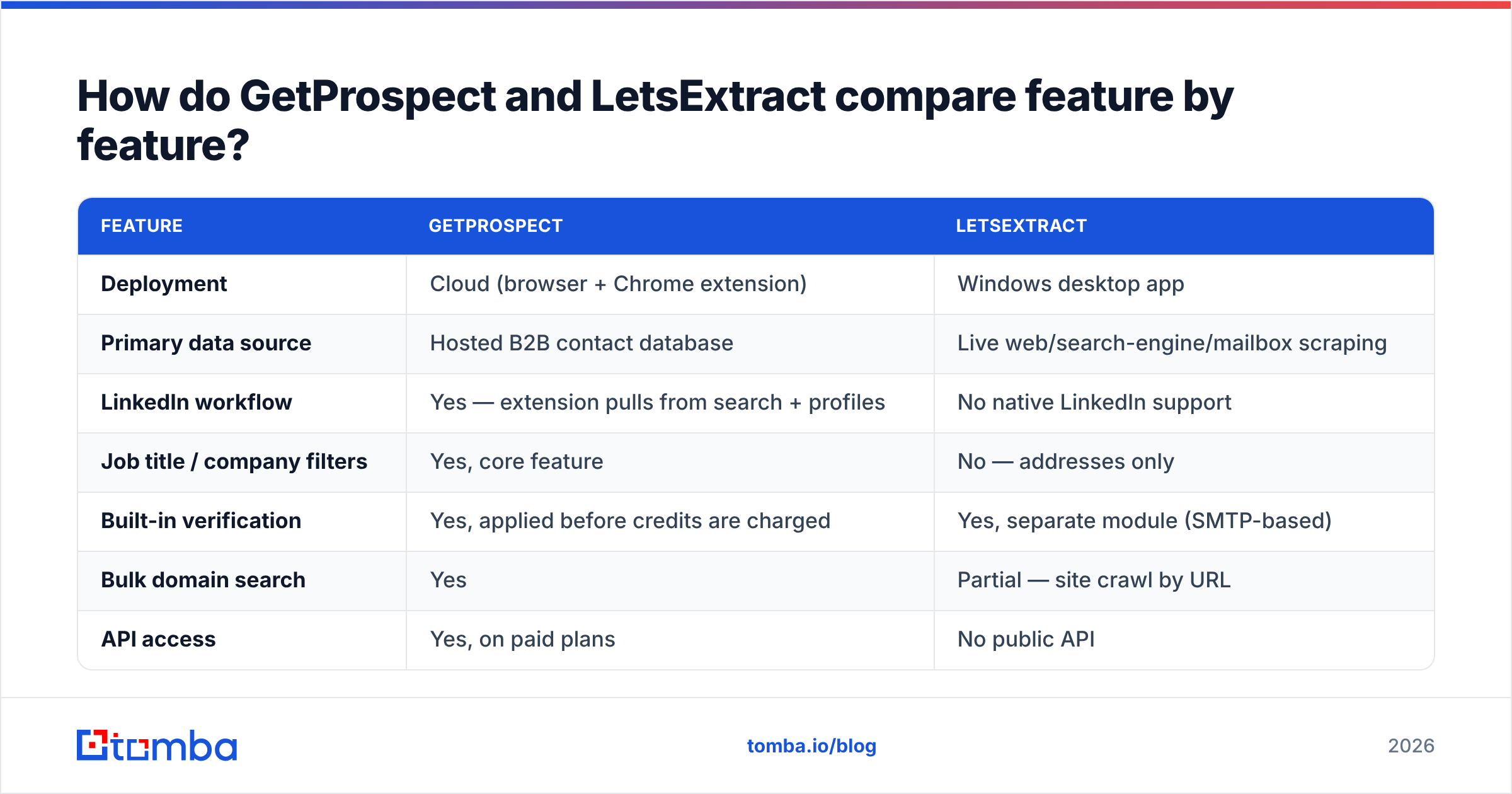
GetProspect vs LetsExtract: how do they compare feature by feature?#
| Feature | GetProspect | LetsExtract |
|---|---|---|
| Deployment | Cloud (browser + Chrome extension) | Windows desktop app |
| Primary data source | Hosted B2B contact database | Live web/search-engine/mailbox scraping |
| LinkedIn workflow | Yes — extension pulls from search + profiles | No native LinkedIn support |
| Job title / company filters | Yes, core feature | No — addresses only |
| Built-in verification | Yes, applied before credits are charged | Yes, separate module (SMTP-based) |
| Bulk domain search | Yes | Partial — site crawl by URL |
| API access | Yes, on paid plans | No public API |
| CRM integrations | HubSpot, Pipedrive, Zapier and others | None natively; CSV export only |
| Pricing model | Monthly subscription, credit-based | One-time perpetual license |
| Best for | Targeted B2B prospecting | Mailbox extraction, internal list work |
The gap that matters most for outbound teams is the filter layer. Say your ICP is "VP of Engineering at 200–1,000 employee SaaS companies in DACH." GetProspect answers that query straight away. LetsExtract cannot. It has no idea what a job title is. You would scrape wide, then rebuild the company data by hand. That is slower and less exact than buying the filtered data.
Which one produces more deliverable emails?#
GetProspect, by a wide margin. The reason is built into how each tool works.
Scraped addresses skew to what is easy to post on the open web: info@, contact@, sales@, support@. Add a long tail of stale addresses on old event pages and PDF footers. Most inbox providers filter role-based addresses, so they rarely reach a buyer. Cold-emailing them is a fast way to burn your sender reputation.
Database-backed finders like GetProspect start from a person: name, employer, known domain. They then work out the email pattern and build the work address. The hit rate on one lookup is lower than a bulk scrape's raw count. The usable count is far higher.

Two practical notes on accuracy claims from either vendor:
- Catch-all domains skew everything. Many big domains accept mail sent to any name. A basic SMTP check calls those addresses "valid," and they still bounce inside. Neither tool solves this out of the box. A catch-all verifier is the only safe way to score those records.
- Desktop SMTP checks are shaky. Run LetsExtract's verifier from a home or office IP. Your probes hit greylisting, rate limits, and spam filters. Good addresses come back "invalid." Catch-alls come back "valid." Cloud verifiers rotate IPs and keep ties with the big mailbox hosts. A desktop app cannot.
Want an outside read instead of vendor spin? Both tools have review histories on G2. Skim them before you spend.
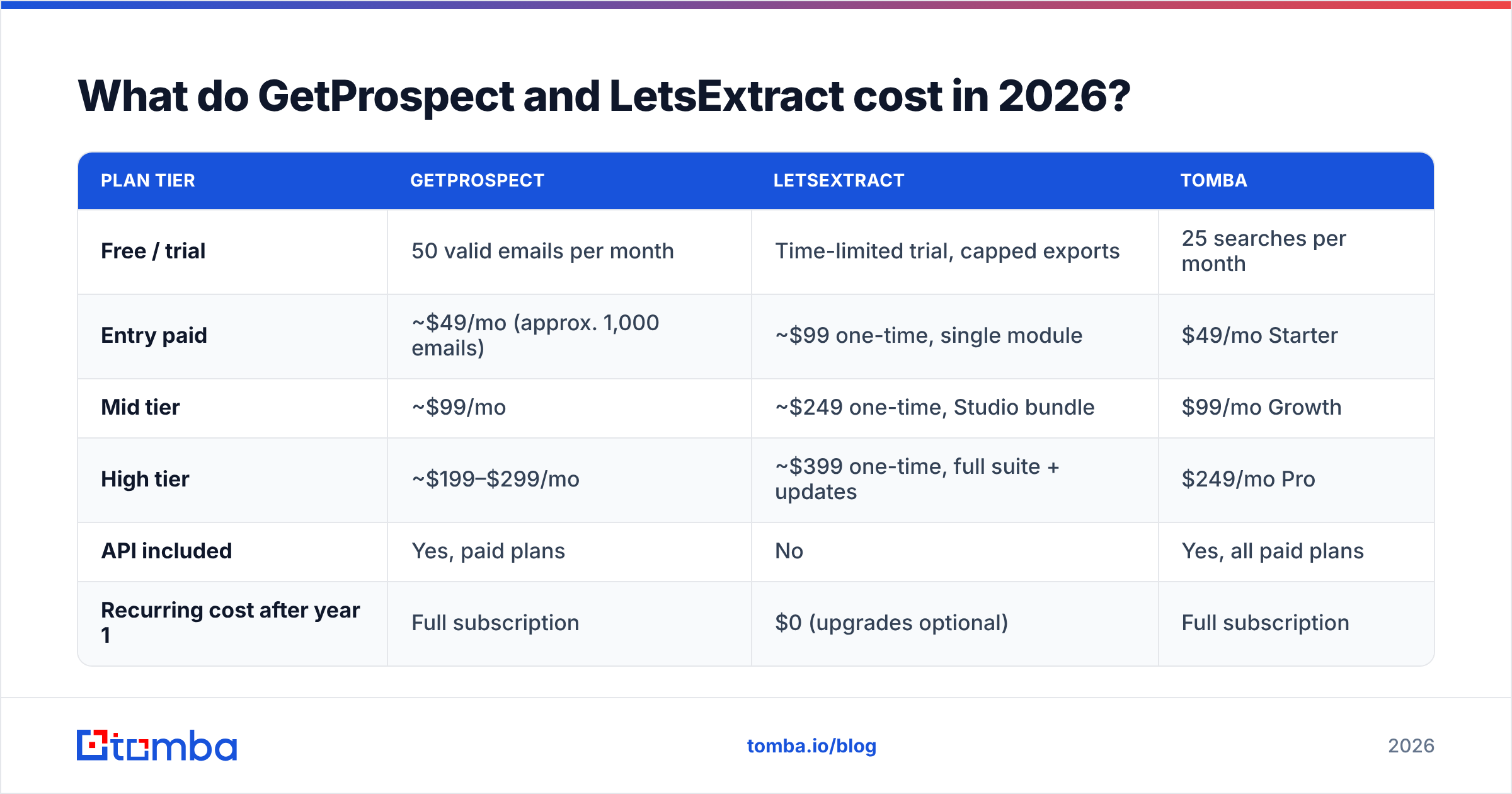
What do GetProspect and LetsExtract cost in 2026?#
| Plan tier | GetProspect | LetsExtract | Tomba |
|---|---|---|---|
| Free / trial | 50 valid emails per month | Time-limited trial, capped exports | 25 searches per month |
| Entry paid | ~$49/mo (approx. 1,000 emails) | ~$99 one-time, single module | $49/mo Starter |
| Mid tier | ~$99/mo | ~$249 one-time, Studio bundle | $99/mo Growth |
| High tier | ~$199–$299/mo | ~$399 one-time, full suite + updates | $249/mo Pro |
| API included | Yes, paid plans | No | Yes, all paid plans |
| Recurring cost after year 1 | Full subscription | $0 (upgrades optional) | Full subscription |
These are list prices from early 2026, and they move often. Yearly billing, deals, and credit-pack changes are all common. Check each vendor's own pricing page before you buy. Compare with published Tomba pricing if you are running a three-way test.
The one-time license looks hard to beat on a spreadsheet. It usually is not. Three costs never show up on the bill:
- Your time. One scrape-and-clean run can yield 2,000 messy addresses. Sorting them can eat a full day. At any real hourly rate, that costs more than a month of GetProspect.
- Domain damage. One campaign to a scraped list can bounce at 30–40%. That puts your sending domain in the penalty box for weeks. Winning back email deliverability costs more than any tool license.
- A second verifier. Most teams pay for a cloud verifier anyway, to clean up what the desktop tool spat out. That quietly adds the monthly bill back.

Is scraping emails with LetsExtract legal?#
Most comparison posts skip this part. For EU- and UK-facing teams, it decides the whole question.
Scraping addresses from websites and search engines is not illegal on its own. It does put you in a weak spot under GDPR. You become the data controller for every record you collect. You then owe a lawful basis, a source record, a privacy notice, and a way to honour delete requests. A scraped CSV gives you none of that. Article 14 also says you must tell people when you get their data from a third source. At scrape scale, that will not work.
In the US, CAN-SPAM treats scraping as a strike against you. Fines can rise when scraped addresses are in play. That does not make the practice illegal by itself. It does remove any benefit of the doubt once a complaint lands.
Database tools like GetProspect do not erase your duties. You still need a lawful basis for outreach. But you get a vendor with a written process, a suppression list, and a way to handle data requests. That is a very different risk from a desktop crawler pointed at Google.
Practical read: use LetsExtract on data you already own. Your own IMAP mailboxes, your own site, your own files. Treat open-web scraping as off-limits for cold outbound.
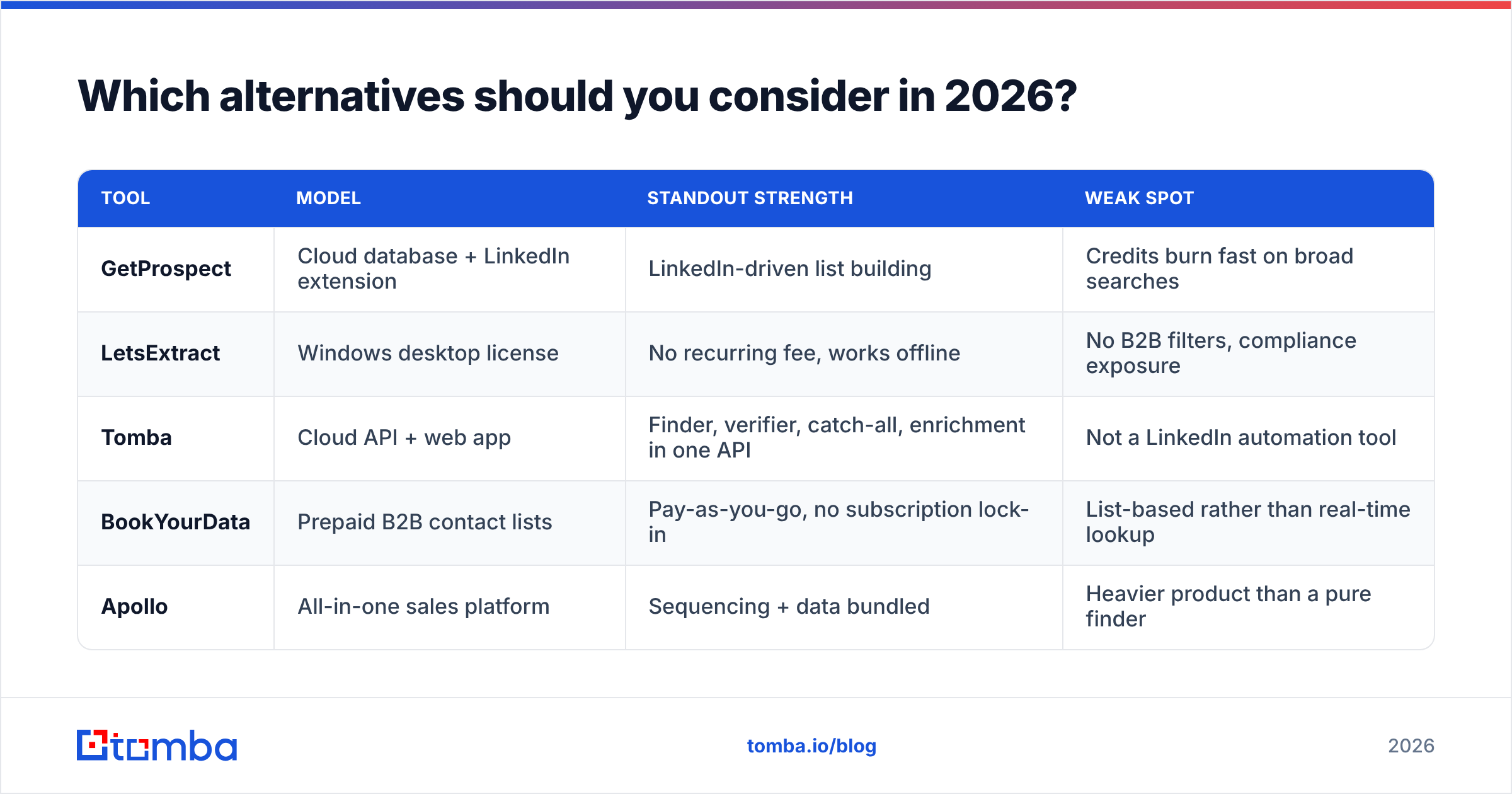
Which alternatives should you consider in 2026?#
In a GetProspect vs LetsExtract match-up, both tools sit at the edges of the market. One is database-first with a thin workflow layer. The other is a scraper you host. Most teams want something in between: verified B2B data with an API and a clear way to plug it in.

| Tool | Model | Standout strength | Weak spot |
|---|---|---|---|
| GetProspect | Cloud database + LinkedIn extension | LinkedIn-driven list building | Credits burn fast on broad searches |
| LetsExtract | Windows desktop license | No recurring fee, works offline | No B2B filters, compliance exposure |
| Tomba | Cloud API + web app | Finder, verifier, catch-all, enrichment in one API | Not a LinkedIn automation tool |
| BookYourData | Prepaid B2B contact lists | Pay-as-you-go, no subscription lock-in | List-based rather than real-time lookup |
| Apollo | All-in-one sales platform | Sequencing + data bundled | Heavier product than a pure finder |
Looking at the platform end of the market? Our breakdown of Apollo alternatives covers where bundled sequencing pays off and where it just adds weight.
Some teams need one thing only: find an email from a name and domain, in code, inside a pipeline they already run. Then the key features are the ones neither tool leads with. A clear REST API. Bulk endpoints. Catch-all scoring. An email verifier that runs on the same credits as the finder. Tomba was built for that shape: Free (25 searches/mo), Starter $49/mo, Growth $99/mo, and Pro $249/mo, plus custom Enterprise. Every tier includes API access. None of it sits behind an upgrade.
Who should pick which?#
Pick GetProspect if:
- Your prospecting starts in LinkedIn Sales Navigator and you want emails without leaving the tab.
- You need title, seniority, and company-size filters to hold your ICP.
- You want contacts flowing into HubSpot or Pipedrive without hand-editing CSVs.
- You'd rather pay monthly than run and patch a scraping setup.
Pick LetsExtract if:
- You need to pull addresses out of mailboxes, old archives, or your own sites.
- You're on Windows and want a one-time license with no monthly bill.
- Your job is cleaning up data you already hold, not cold prospecting.
- You have legal sign-off for how the collected data will be used.
Pick neither if:
- You need email lookup as an API call inside an app, CRM automation, or agent workflow.
- Bounces are your bottleneck and you need catch-all-aware checks.
- You work across the EU and want the cleanest legal story you can get.
Frequently asked questions#
Does GetProspect charge for invalid emails? It bills for verified results, not raw attempts. That is the sane setup. Still, check the current terms. Credit rules change from plan to plan.
Can LetsExtract find a specific person's work email? Not reliably. It scrapes; it does not solve for a person. If you need a named person at a known company, use a finder that works out email patterns, or a domain search that maps a firm's email format.
Is a one-time license cheaper long term? On the license line, yes. On total cost, usually not. Cleanup time, a second verifier, and bounce recovery all add up. For in-house data work, the math can flip.
Can I use both? Yes, and some teams do. GetProspect for net-new B2B prospecting. LetsExtract for pulling contacts out of old mailboxes. Just don't mix the two into one sending list.
The verdict#
On a straight GetProspect vs LetsExtract call for B2B outbound in 2026, GetProspect is the better tool. It gives you the filters, the email checks, and the CRM path that make a list usable. LetsExtract is solid desktop software for a smaller job. Using it to build cold lists is a bounce-and-legal bet most teams should skip.
Need verified work emails through an API you can drop into any workflow, with a verifier, catch-all scoring, and enrichment on one credit pool? Start with the Tomba Email Finder. The free tier gives you 25 searches a month, so you can test against your own ICP before you spend a thing. Starter is $49/mo when you're ready to scale.
Related guides#
Ready to find emails that actually work?
Join 150,000+ professionals who stopped guessing and started sending. Free credits on signup — no credit card required.
Get the Tomba newsletter
Practical outbound tactics and product updates — once every two weeks.
About the author