GetProspect vs LimeLeads (2026): Which Lead Database Wins?
GetProspect leans on LinkedIn and verified email finding; LimeLeads sells filtered US B2B lists. We compare accuracy, credits, and price to show which one actually fits your outbound motion in 2026.
GetProspect vs LimeLeads is really a question about which half of outbound you need help with. One tool finds emails for people you already know. The other finds the people. Here is the short version first, then the detail.
TL;DR
- GetProspect is an email finder first. It gives you a LinkedIn extension, a bulk finder, and a searchable contact database. You point it at people you already identified, and it returns work emails.
- LimeLeads is a list builder first. You filter a US-heavy B2B database by industry, size, title, and location, then export a CSV. Discovery is the product here, not enrichment.
- They solve different halves of the same problem. If you already have a target list, GetProspect wins. If you need to find the accounts, LimeLeads wins.
- Neither is strong on verification depth, catch-all handling, or API-first work. That is where a dedicated tool like Tomba slots in, alongside or instead of both.
- Budget reality: entry pricing runs about $49–$99 per month on either side. But each vendor counts credits differently, so the headline prices mislead.
What are GetProspect and LimeLeads?#
GetProspect is a B2B email finder. Its Chrome extension pulls contact data off LinkedIn search results and profiles. You run a Sales Navigator search and click the extension. It then adds work emails to the profiles it can match. It also ships a bulk finder (upload name + domain, get emails back), a light CRM-style list manager, and an internal contact database you can search by company attributes.
LimeLeads is a different animal. It is a static B2B contact database with a filter-and-export interface. You pick industry, employee count, revenue band, job title, and location. Then you preview the matching records, spend credits to unlock them, and download a CSV. There is no browser extension chasing LinkedIn profiles. There is no real-time SMTP check either, at least not the kind an email-verification specialist would call one.
That split drives everything else in this comparison. GetProspect is enrichment: you bring the name, it returns the email. LimeLeads is discovery: it hands you names you did not have, with contact details attached.
Most outbound teams need both. The question is whether either tool does both well enough to be your only data vendor.
How do GetProspect and LimeLeads compare at a glance?#
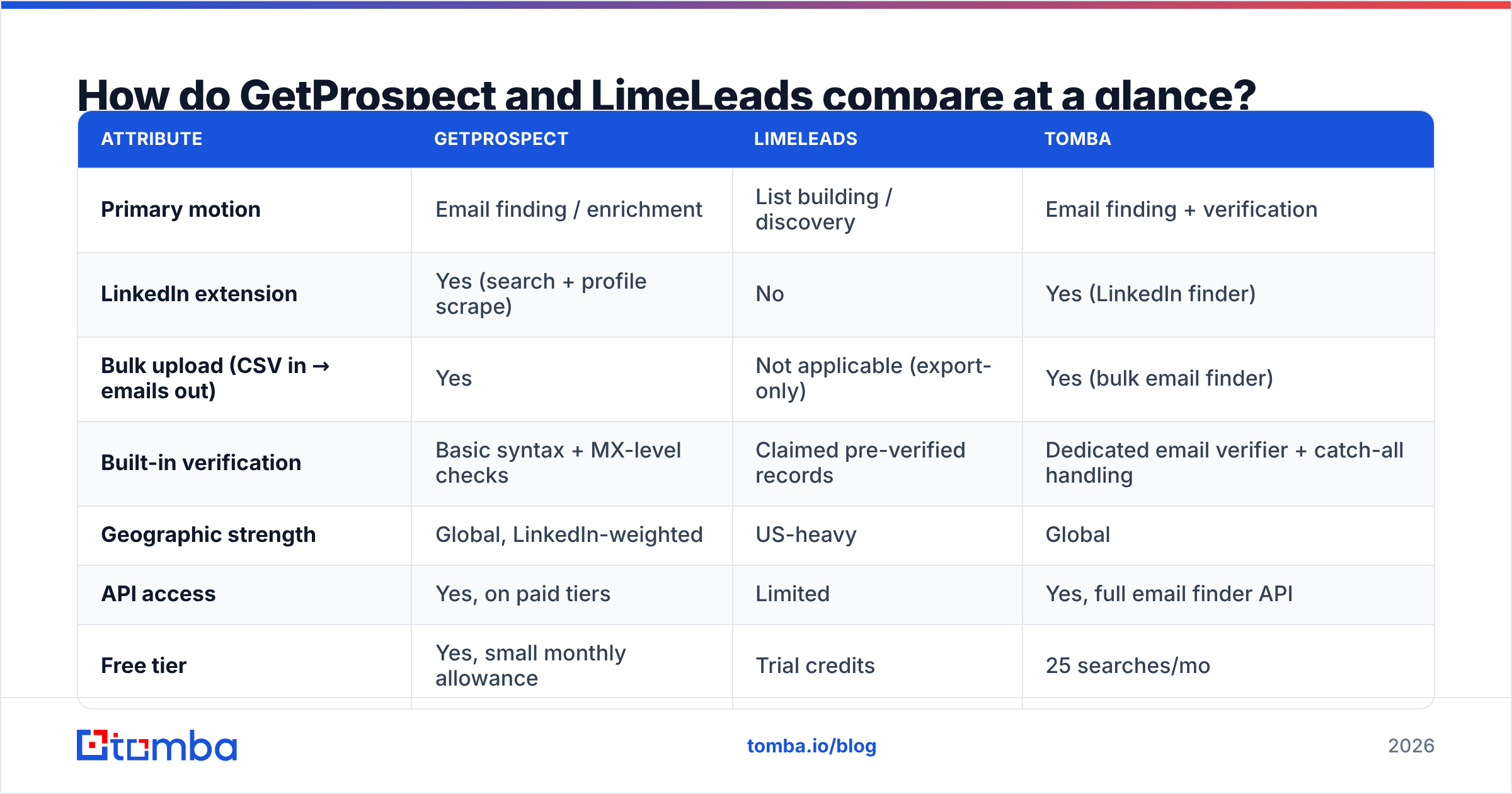
| Attribute | GetProspect | LimeLeads | Tomba |
|---|---|---|---|
| Primary motion | Email finding / enrichment | List building / discovery | Email finding + verification |
| LinkedIn extension | Yes (search + profile scrape) | No | Yes (LinkedIn finder) |
| Bulk upload (CSV in → emails out) | Yes | Not applicable (export-only) | Yes (bulk email finder) |
| Built-in verification | Basic syntax + MX-level checks | Claimed pre-verified records | Dedicated email verifier + catch-all handling |
| Geographic strength | Global, LinkedIn-weighted | US-heavy | Global |
| API access | Yes, on paid tiers | Limited | Yes, full email finder API |
| Free tier | Yes, small monthly allowance | Trial credits | 25 searches/mo |
| Entry paid price | ~$49/mo | ~$99/mo | $49/mo (Starter) |
| Best for | SDRs working LinkedIn lists | Marketers buying US SMB lists | Teams needing verified emails at scale |
Prices above reflect published tiers checked in early 2026. Both vendors change their packaging often. Check their own pricing pages before you commit to an annual plan.

GetProspect vs LimeLeads: which one has better data accuracy?#
Neither vendor publishes an audited accuracy figure. Treat their marketing numbers as claims, not measurements. You can still test them the same way. Take 200 contacts you know are valid — past customers, open pipeline, people who have replied to you. Run them through each tool. Then measure two things.
Coverage rate — of 200 known-good contacts, how many did the tool return an email for at all? Blanks cost you nothing in bounces. They do cost you pipeline.
Precision rate — of the emails it did return, how many are actually deliverable? This is the number that decides whether your domain survives the quarter.
The pattern across email finders is consistent. Coverage and precision trade against each other. Some tools guess hard: they permute a name against a domain and ship the result without an SMTP check. That buys high coverage and ugly bounce rates. Tools that only return what they can confirm show lower coverage and cleaner sends.
GetProspect sits closer to the guessing end. Much of its value comes from resolving LinkedIn profiles fast. So some returned addresses are pattern guesses rather than confirmed records. It does flag confidence. But the flag only helps if your team filters on it, and most teams do not.
LimeLeads fails in a different way: staleness. A static database of US SMB contacts decays fast. Job changes alone knock out a large share of B2B contact data every year. Estimates cited by vendors and analysts on G2 put annual B2B database decay somewhere in the 20–30% range. A record that was accurate eighteen months ago may point at someone who left two roles back.

The takeaway: whichever you pick, do not send to raw output. Run exports through a separate verification pass before they touch your sequencer. That holds for GetProspect's LinkedIn pulls. It goes double for LimeLeads CSVs.
How do pricing and credits actually work?#
Headline prices are close enough to be useless as a decision input. What separates them is the unit you are charged for.
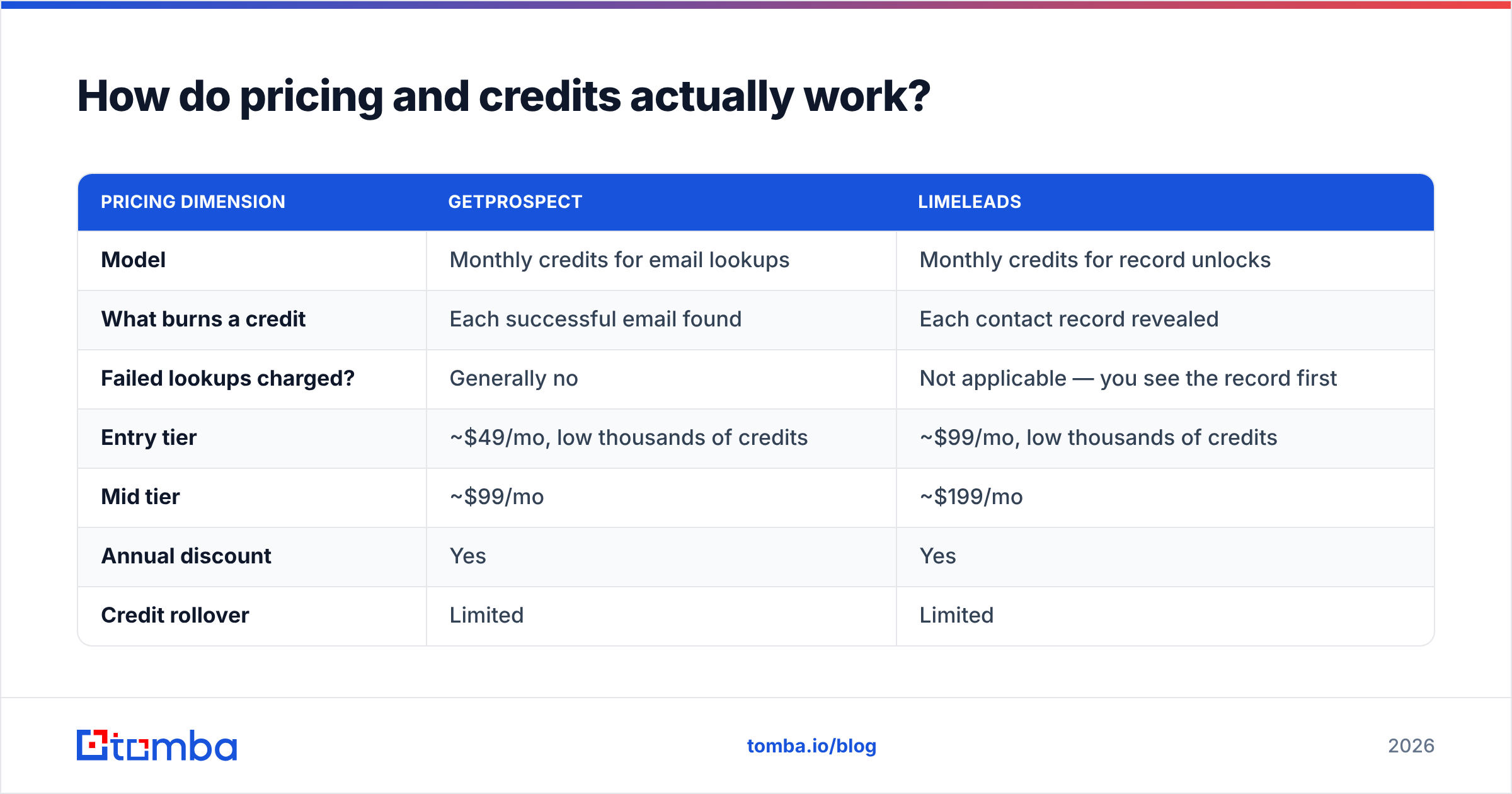
| Pricing dimension | GetProspect | LimeLeads |
|---|---|---|
| Model | Monthly credits for email lookups | Monthly credits for record unlocks |
| What burns a credit | Each successful email found | Each contact record revealed |
| Failed lookups charged? | Generally no | Not applicable — you see the record first |
| Entry tier | ~$49/mo, low thousands of credits | ~$99/mo, low thousands of credits |
| Mid tier | ~$99/mo | ~$199/mo |
| Annual discount | Yes | Yes |
| Credit rollover | Limited | Limited |
| Team seats | Extra cost above entry tiers | Extra cost above entry tiers |
Two traps to watch:
- Credits that expire monthly. Both vendors reset unused credits on the billing date. If your outbound is lumpy — a big campaign in month one, a quiet month two — you pay for capacity you never touch. Compare that against Tomba pricing. Starter runs $49/mo and Growth $99/mo, and a free 25-search tier lets you test the waters first.
- The verification tax. Neither price includes a serious verification layer. Budget $99/mo for data, then add a verification vendor at $30–$80/mo on top. Your real cost per usable contact is now 30–80% higher than the sticker suggests. Bundling finding and verification in one platform removes that line item.

Which is better for LinkedIn-driven prospecting?#
GetProspect, clearly. This is its home turf.
Say your SDR workflow starts inside Sales Navigator. You build a saved search, filter by headcount and title, and work the list. GetProspect's extension is the shorter path. It reads the result page, matches profiles to its database, and adds emails without you leaving the tab. LimeLeads has no equivalent. It does not touch LinkedIn at all.
One caveat applies to every LinkedIn-scraping extension in 2026. LinkedIn rate-limits and blocks automated data extraction, and its terms of service are blunt about it. Extensions get throttled. Accounts get flagged. Coverage can drop overnight when LinkedIn changes a page. Treat LinkedIn-dependent tooling as a channel that can break without notice, not as permanent plumbing.
There is a sturdier pattern for the same job. Capture the profile identity — name plus company domain — wherever you prospect. Then resolve emails through an API you control. Tomba's LinkedIn finder and domain search cover both directions. Resolve a known person, or pull the full contact map for a target company by domain. Your pipeline keeps running when a scraper gets blocked.

Which is better for building lists from scratch?#
LimeLeads, with one important asterisk.
Say you are a marketer who needs "500 operations managers at US manufacturing companies with 50–200 employees", and you have no starting list. LimeLeads gets you there in minutes. The filter interface is simple. The preview-before-you-spend model is fair. US SMB coverage is respectable for the price band.
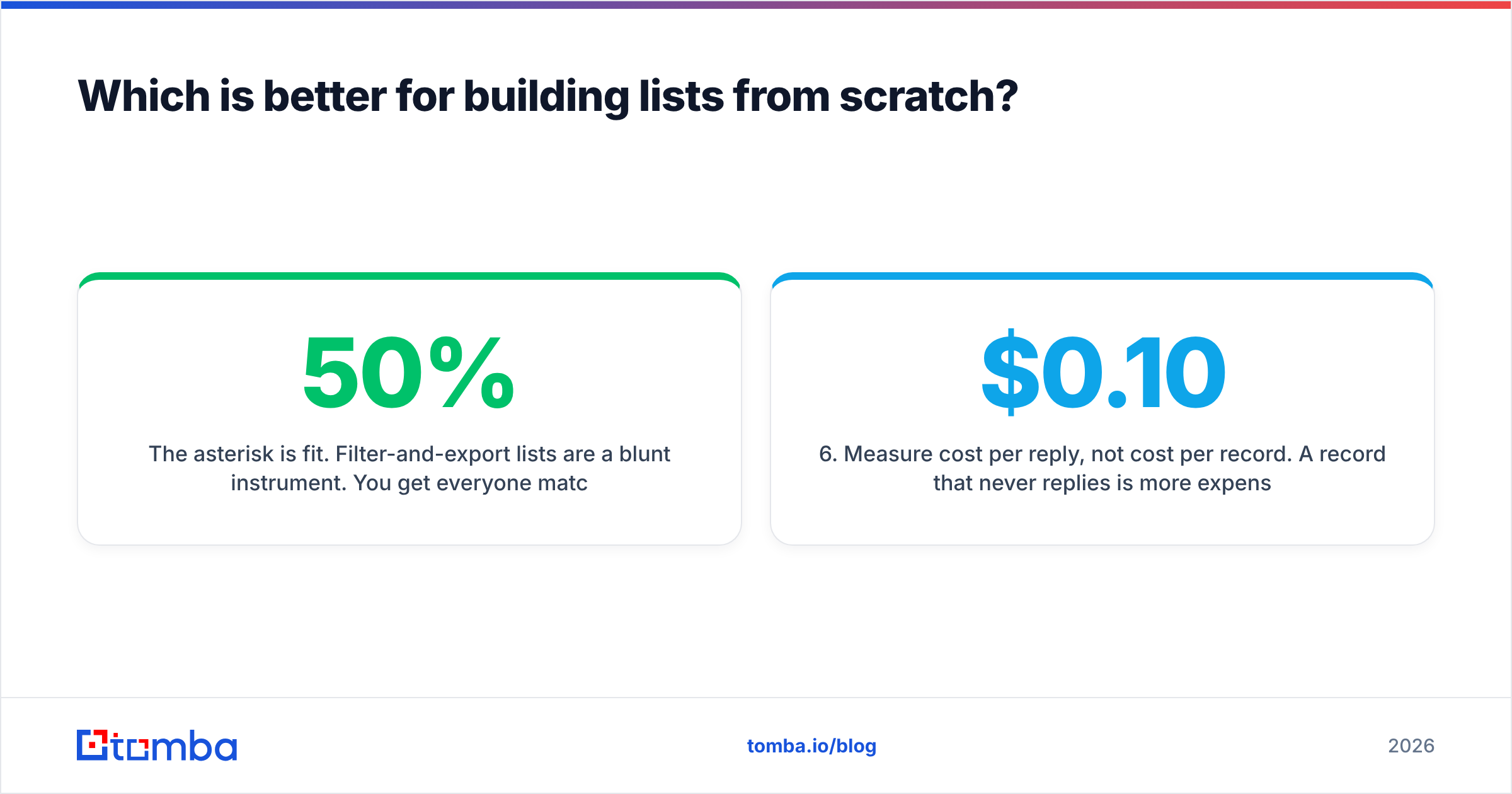
The asterisk is fit. Filter-and-export lists are a blunt instrument. You get everyone who matches the criteria, including companies that will never buy, contacts who left, and duplicates of records already in your CRM. Teams that live on this motion often find 30–50% of an export unusable after dedup, suppression, and verification. Your real cost per usable contact is then roughly double the credit price.
The market has more depth than these two names suggest. Providers like BookYourData compete on the same filter-and-export mechanics, with their own coverage strengths. The right answer often depends less on the vendor than on whether your ICP sits where their data is dense.
Here is the sequence that keeps list-buying honest, whichever vendor you use:
- Define the ICP tightly before you open the filter UI. "SaaS companies" is not an ICP. "Series A–B SaaS, 30–150 employees, US, with a named RevOps hire" is.
- Export small first. Buy 200 records, not 5,000. Test deliverability and reply rate before you scale the spend.
- Dedupe against your CRM immediately. Paying twice for contacts you already own is the most common waste in this category. A remove duplicates pass takes minutes.
- Verify every address yourself. Vendor-claimed verification is not the same as a fresh SMTP check on the day you send.
- Suppress catch-all domains or route them separately. Catch-all servers accept everything, so "valid" means nothing there. Use a dedicated catch-all verifier instead of guessing.
- Measure cost per reply, not cost per record. A $0.10 record that never replies costs more than a $0.50 record that books a meeting.
Where do both tools fall short?#
Verification depth. Both treat verification as a feature bolted onto a finder or a database. Neither gives you what a deliverability-minded team needs: catch-all classification, role-account flags, disposable-domain detection, and a status list you can build rules against. If you care about email deliverability, that gap gets expensive fast.
API maturity. GetProspect has an API. It works for basic lookups, but it was not built to be the backbone of an enrichment pipeline. LimeLeads is an export product at heart. If you want to enrich inbound signups in real time, or run enrichment inside a workflow tool, both will fight you.
Non-US coverage. LimeLeads skews heavily US. GetProspect is more global, thanks to LinkedIn's footprint. Still, coverage thins outside North America and Western Europe. If you sell into APAC, LATAM, or MENA, test both hard before committing.
Phone data. Neither is a serious phone provider. If you work email and dials together, you will add a third vendor — or move to a platform where the phone finder sits next to the email data.
GetProspect vs LimeLeads: which should you choose in 2026?#
Pick based on which half of the problem you actually have.
Choose GetProspect if your team works LinkedIn daily, you already know who you want to reach, and enrichment speed matters more than list breadth. Budget for a separate verification step.
Choose LimeLeads if you need US SMB list discovery on a modest budget, you are fine with CSV workflows, and you already have a verification and dedup process in place.
Choose neither if you want one system that finds, verifies, and enriches through an API. That is the seam where both tools leak. A third and fourth vendor then erase the savings that made them attractive.
The honest framing: GetProspect vs LimeLeads is a choice between two decent point solutions at their price. Neither is a data platform. Once outbound is a real revenue channel rather than an experiment, the math usually favors one platform that finds and verifies under a single contract, with an API you can build on.
Ready to test your list against a verified source?#
Run a sample before you renew anything. Take 100 contacts from your current vendor and drop them into the Tomba Email Finder. Compare coverage and confirmed-deliverable rates side by side. The free tier gives you 25 searches a month with no card. Starter is $49/mo and Growth is $99/mo — the same band you already spend. Verification, catch-all handling, domain search, and a full API come included rather than sold separately. If the numbers come back better, you have just removed a line item from your stack.
Related guides#
Ready to find emails that actually work?
Join 150,000+ professionals who stopped guessing and started sending. Free credits on signup — no credit card required.
Get the Tomba newsletter
Practical outbound tactics and product updates — once every two weeks.
About the author