GetProspect vs Mailmeteor (2026): Find vs Send Compared
GetProspect finds B2B emails. Mailmeteor sends them from Gmail. They are not really rivals — but most teams only budget for one. Here is which half of the job each tool covers, what it costs, and where the gaps are.
GetProspect vs Mailmeteor is an odd matchup. One tool finds B2B email addresses. The other sends mail from your own Gmail account. Most teams only budget for one, so the real question is which half of the job you need first.
TL;DR
- GetProspect and Mailmeteor are not competitors. GetProspect is a B2B contact database and email finder; Mailmeteor is a Gmail mail-merge sender. One fills the list, the other mails it.
- If you already have contacts and just need personalized sends from your own Gmail address, Mailmeteor is the cheaper, simpler buy — roughly $10–$25/month versus GetProspect's $49+/month entry tier.
- If your problem is "I don't know who to email," Mailmeteor cannot help you at all, and no amount of merge tags will fix an empty spreadsheet.
- Buying both is common and reasonable. So is replacing the finder half with a cheaper, higher-accuracy API and keeping Mailmeteor as the send layer.
- Whichever you pick, verify before you send. Gmail-based sending punishes bounce rates faster than dedicated ESP infrastructure does.
What are GetProspect and Mailmeteor, exactly?#
Think of cold outreach as a restaurant. GetProspect is the supplier that delivers ingredients to your back door. Mailmeteor is the waiter who carries plates to tables. Comparing them is comparing a vegetable truck to a serving tray — both matter, neither substitutes for the other.
GetProspect is a lead-generation platform built around a B2B contact database. You filter by job title, industry, headcount, technology, and location; you pull matching contacts with work emails attached; you export to CSV or push to your CRM. It also ships a LinkedIn Chrome extension that grabs profile data as you browse, plus a lightweight built-in email sender that most teams ignore in favour of their real sequencer.
Mailmeteor lives inside Google Workspace. You keep a spreadsheet in Google Sheets, write a template in Gmail, add merge tags like {{First name}}, and Mailmeteor sends the campaign one message at a time from your actual Gmail account. Because every email is a genuine Gmail send, recipients see a normal personal message — no marketing footer, no shared IP pool, no "via mailmeteor.com" header.
That difference in architecture drives every other difference between them.
GetProspect vs Mailmeteor: how do they compare head-to-head?#
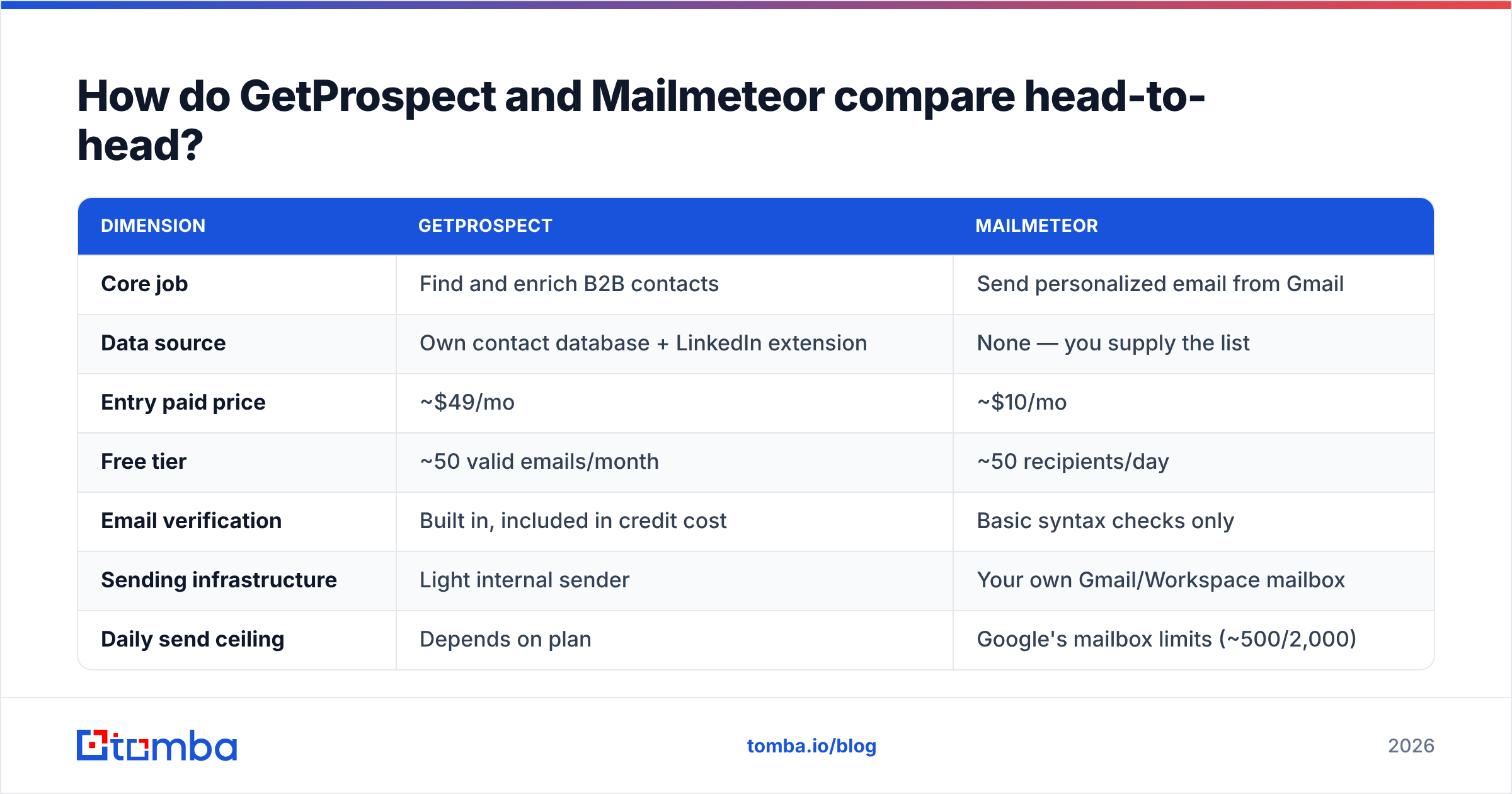
| Dimension | GetProspect | Mailmeteor |
|---|---|---|
| Core job | Find and enrich B2B contacts | Send personalized email from Gmail |
| Data source | Own contact database + LinkedIn extension | None — you supply the list |
| Entry paid price | ~$49/mo | ~$10/mo |
| Free tier | ~50 valid emails/month | ~50 recipients/day |
| Email verification | Built in, included in credit cost | Basic syntax checks only |
| Sending infrastructure | Light internal sender | Your own Gmail/Workspace mailbox |
| Daily send ceiling | Depends on plan | Google's mailbox limits (~500/2,000) |
| Sequences / follow-ups | Basic | Follow-ups on higher tiers |
| CRM integrations | HubSpot, Pipedrive, Salesforce, Zapier | Sheets-native; Zapier for the rest |
| Learning curve | Moderate — filters and credits | Very low — it's a Sheets add-on |
| Best for | Building a list from zero | Mailing a list you already own |
The table makes the real decision obvious: you are not picking a winner, you are diagnosing which half of your pipeline is broken.
Which problem do you actually have?#
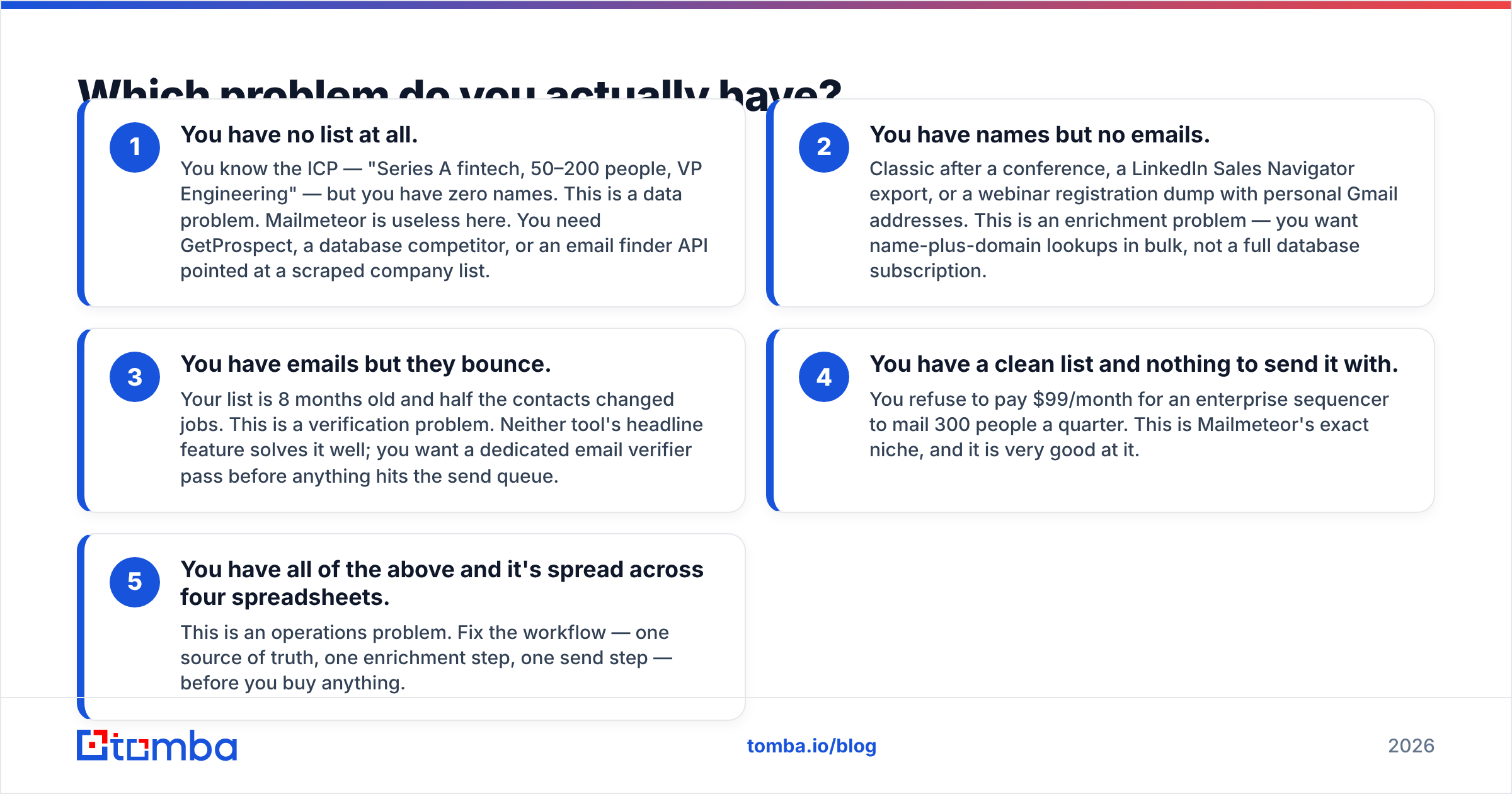
Run through these five in order. The first one that stings is your answer.
- You have no list at all. You know the ICP — "Series A fintech, 50–200 people, VP Engineering" — but you have zero names. This is a data problem. Mailmeteor is useless here. You need GetProspect, a database competitor, or an email finder API pointed at a scraped company list.
- You have names but no emails. Classic after a conference, a LinkedIn Sales Navigator export, or a webinar registration dump with personal Gmail addresses. This is an enrichment problem — you want name-plus-domain lookups in bulk, not a full database subscription.
- You have emails but they bounce. Your list is 8 months old and half the contacts changed jobs. This is a verification problem. Neither tool's headline feature solves it well; you want a dedicated email verifier pass before anything hits the send queue.
The last two are less about tools and more about process.
- You have a clean list and nothing to send it with. You refuse to pay $99/month for an enterprise sequencer to mail 300 people a quarter. This is Mailmeteor's exact niche, and it is very good at it.
- You have all of the above and it's spread across four spreadsheets. This is an operations problem. Fix the workflow — one source of truth, one enrichment step, one send step — before you buy anything.

What does GetProspect do well?#
Three things stand out.
The LinkedIn extension is genuinely convenient. You browse a search result page, click, and profiles land in a list with work emails appended. For reps who prospect visually — reading profiles, judging fit, cherry-picking — that beats writing filter queries.
The filtering is deep enough for real segmentation. Job title plus seniority plus company size plus tech stack narrows a market fast, and the saved-list structure keeps campaigns organized rather than dumping everything into one CSV graveyard.
Enrichment is bidirectional. Upload a list of company domains and get contacts back; upload names and get emails back. That flexibility matters when your inputs are messy, which they always are.
Where it frustrates people: credit accounting. Credits burn on searches that return contacts you never use. Coverage varies sharply by region — strong in US and Western Europe, thinner in APAC and LATAM. And the built-in sender is not a serious replacement for a sequencer. Reviews on G2 repeat the same two themes: good UI, uneven data outside core markets. Treat every database's advertised accuracy as a ceiling, not an average. Run your own sample test before you commit to an annual plan.
What does Mailmeteor do well?#
Mailmeteor's advantage is that it barely feels like a tool. If your team already lives in Google Sheets, the entire workflow is: add a column, write a Gmail draft, click send. No import mapping, no separate login, no seat provisioning.
Deliverability behaves well for a specific reason: messages route through your own mailbox and your own domain reputation, not a shared marketing IP. A 40-person campaign from a real Gmail account with a real signature looks like exactly what it is. Compare that to a bulk ESP where your reputation is entangled with strangers.
Tracking is present but restrained — opens, clicks, unsubscribes — and the higher tiers add scheduled follow-ups and attachment support.
The limits are structural, not fixable by paying more. Google caps external recipients per day at roughly 500 for consumer Gmail and 2,000 for most Workspace tiers. Those ceilings are enforced by Google, not by Mailmeteor. Google's own documentation is the authority here, and it changes. If your plan is 5,000 sends a day, Mailmeteor is architecturally the wrong choice no matter what tier you buy.
It also has no list-building, no data enrichment, and no verification beyond obvious syntax errors. It will happily mail 200 dead addresses and let your sender reputation absorb the damage.
Which is cheaper — and is that the right question?#
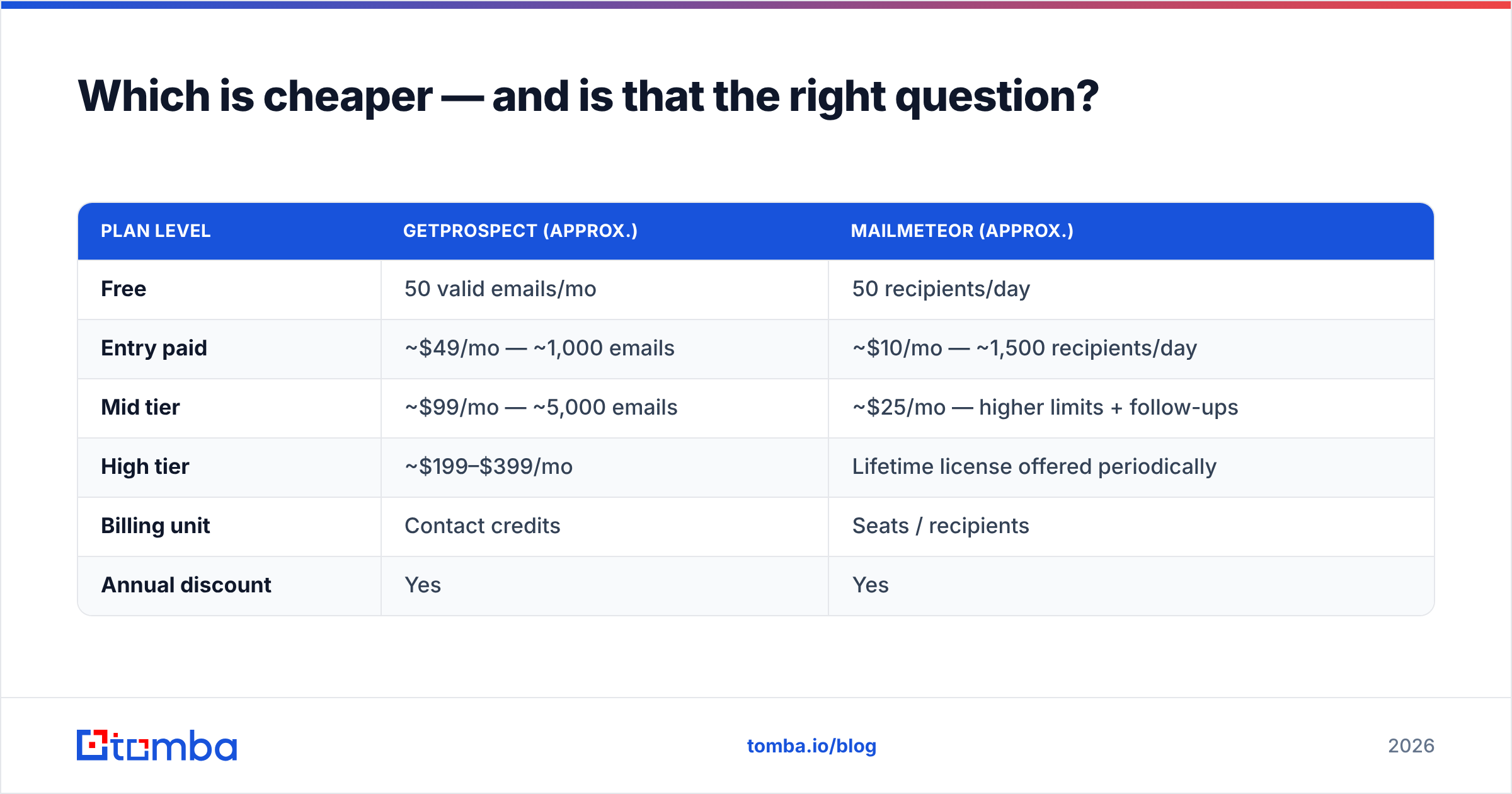
| Plan level | GetProspect (approx.) | Mailmeteor (approx.) |
|---|---|---|
| Free | 50 valid emails/mo | 50 recipients/day |
| Entry paid | ~$49/mo — ~1,000 emails | ~$10/mo — ~1,500 recipients/day |
| Mid tier | ~$99/mo — ~5,000 emails | ~$25/mo — higher limits + follow-ups |
| High tier | ~$199–$399/mo | Lifetime license offered periodically |
| Billing unit | Contact credits | Seats / recipients |
| Annual discount | Yes | Yes |
Prices move; check both vendors' pricing pages before you commit. But the shape of the comparison is stable. A data subscription costs roughly 4–5x a sending utility. Data carries a real cost to acquire and refresh every month. Sending is thin software on top of infrastructure Google already gave you.
So "which is cheaper" is the wrong question. The right one is: what does a bad contact cost you? If a 12% bounce rate gets your domain throttled two weeks into a quarter, the $40/month you saved on data is irrelevant. Data quality is the expensive variable; the send layer is close to a commodity.
Do you need both, or is there a better split?#
Plenty of teams run GetProspect for data and Mailmeteor for sending, and that stack works. In practice, GetProspect vs Mailmeteor is rarely an either/or choice. But the combined stack has two seams worth examining.
Seam one: verification. GetProspect verifies at extraction time. Your campaign might send four weeks later. Job changes do not wait for your sprint schedule. A verification pass immediately before send catches contacts who left, domains that changed MX records, and mailboxes that went dormant. Route the list through a bulk verify step and the bounce rate typically drops by several points on lists older than a month.
Seam two: coverage gaps. No single database covers every market. When GetProspect returns nothing for a target account, you need a fallback — a pattern-based finder that resolves firstname.lastname@domain.com from a name and a website, or a domain search that lists every published address at a company. Teams that run a primary database plus a fallback finder consistently report higher fill rates than teams committed to one source. BookYourData is another well-regarded option in this category if your needs skew toward pre-built, pay-as-you-go lists rather than a monthly seat.

What does a working stack look like in practice?#
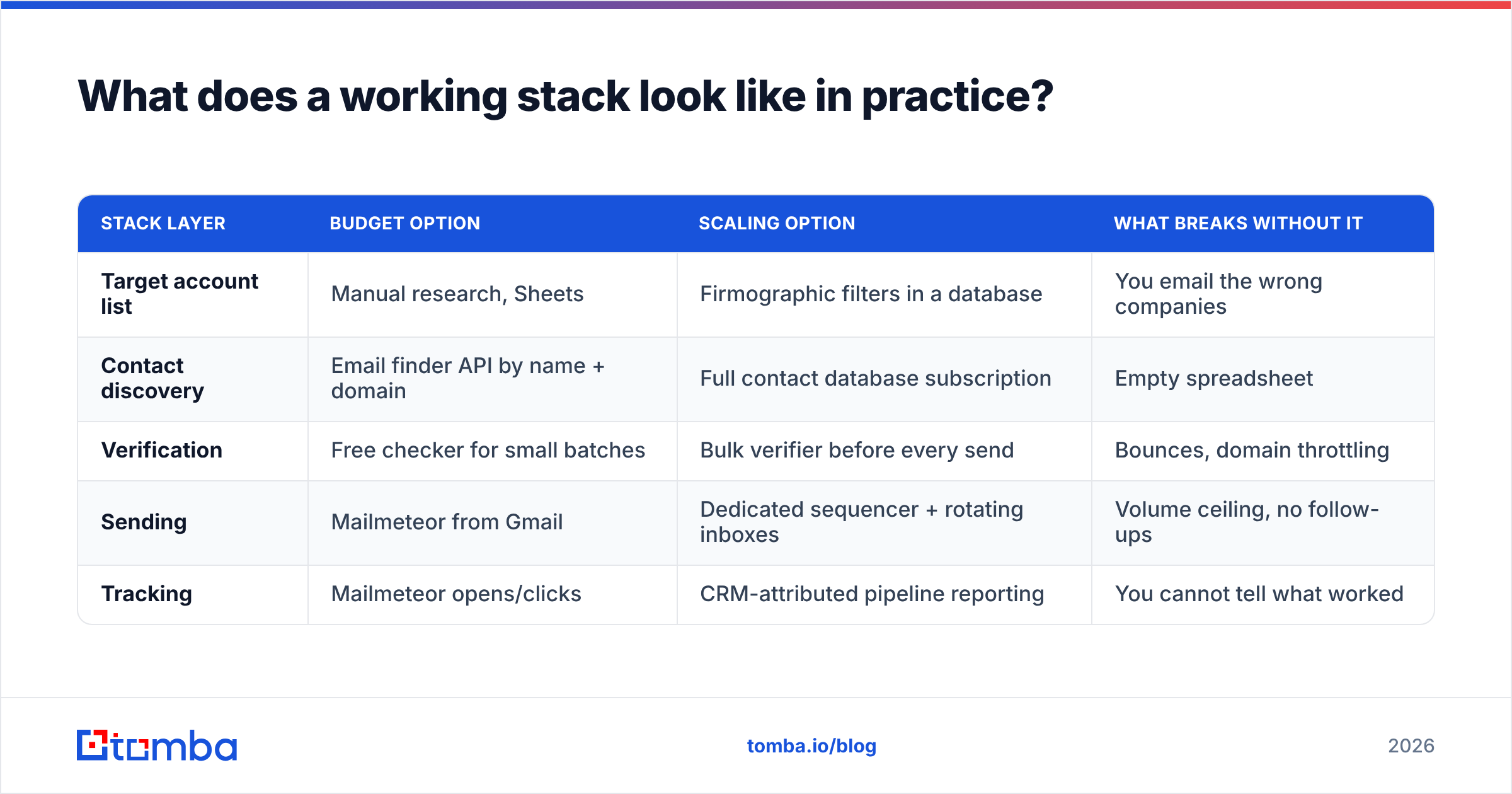
| Stack layer | Budget option | Scaling option | What breaks without it |
|---|---|---|---|
| Target account list | Manual research, Sheets | Firmographic filters in a database | You email the wrong companies |
| Contact discovery | Email finder API by name + domain | Full contact database subscription | Empty spreadsheet |
| Verification | Free checker for small batches | Bulk verifier before every send | Bounces, domain throttling |
| Sending | Mailmeteor from Gmail | Dedicated sequencer + rotating inboxes | Volume ceiling, no follow-ups |
| Tracking | Mailmeteor opens/clicks | CRM-attributed pipeline reporting | You cannot tell what worked |
Read that table top to bottom and the pattern is clear: the top three rows decide whether the campaign works, and the bottom two decide how much of it you can measure. Most teams over-invest in the bottom and under-invest in the top.
Here is a concrete low-cost version. Pull target companies from your own research. Resolve contacts through a finder API at a few cents each. Verify the output, then send with Mailmeteor at $10/month. That gets you a functioning outbound motion for well under the cost of a single database seat, and you only pay for the contacts you actually requested.
Who should pick which?#
Pick GetProspect if you prospect on LinkedIn daily, need firmographic filtering to define segments, and your bottleneck is genuinely "who do I contact." The extension workflow suits reps who research visually and decide account by account.
Pick Mailmeteor if your list already exists, your volume fits inside Gmail's ceilings, you want messages to look and behave like personal email, and you refuse to pay sequencer prices for quarterly campaigns. Solo founders, agencies mailing their own client base, university and nonprofit teams — this is the sweet spot.
Pick neither if your bounce rate is your actual problem. Buying more contacts or a nicer send button will not fix a hygiene issue. Verify first, then decide what to buy.
Pick a finder API plus Mailmeteor if you are cost-sensitive, technically comfortable, and your target list is defined by something other than generic firmographics — customers of a specific tool, attendees of a specific event, authors of specific content. Databases are weak on those; targeted lookups are not.
What should you test before committing?#
Run the same 50-contact sample through both free tiers before spending anything. Specifically:
- Match rate. Of 50 known-good people, how many does each source return an address for? Below 60% on your actual ICP is a red flag regardless of marketing claims.
- Accuracy. Verify the returned addresses with an independent checker. A high match rate built from guessed patterns is worse than a low one built from confirmed data.
- Regional coverage. Test your real geography, not the US. Coverage varies enormously outside North America and Western Europe.
- Send behaviour. Mail 20 verified contacts through Mailmeteor and watch the inbox placement, not just the open rate.
- Credit burn. Note how many credits a search consumes versus how many contacts you keep. That ratio is your true price per usable contact.
Two afternoons of testing will tell you more than any comparison article, including this one.
The verdict#
GetProspect vs Mailmeteor comes down to one question: which half of the job is broken? GetProspect is the stronger product in a harder category. B2B contact data is genuinely difficult, and it does a credible job with a pleasant interface. The price reflects the cost of maintaining a database. Mailmeteor is the better value in an easier category, and it does not pretend otherwise.
If you are buying one tool today: buy the one that fixes your bottleneck, not the one with the longer feature list.
If your bottleneck is the data — missing addresses, stale contacts, bounces eating your sender reputation — start with the Tomba Email Finder. The free tier gives you 25 searches a month to run your own accuracy test, and paid plans start at $49/month. The same account covers verification, domain search, and catch-all checks, so you are not stitching three vendors together. Test it against your own ICP, compare the match rates honestly, and keep whichever source wins.
Related guides#
Ready to find emails that actually work?
Join 150,000+ professionals who stopped guessing and started sending. Free credits on signup — no credit card required.
Get the Tomba newsletter
Practical outbound tactics and product updates — once every two weeks.
About the author