GetProspect vs MorphyMail (2026): Which Tool Do You Need?
GetProspect finds B2B emails. MorphyMail sends bulk email from your desktop. They solve opposite halves of outbound — here's which one your pipeline actually needs in 2026, and where each one breaks.
GetProspect vs MorphyMail is an odd match-up. One tool finds B2B emails. The other sends bulk email from your own PC. This guide shows which one you need in 2026, and where each one breaks.
TL;DR
- GetProspect vs MorphyMail is not a real fight. GetProspect is a B2B email finder built on LinkedIn data. MorphyMail is desktop bulk-email software.
- No verified contact data? GetProspect is the tool. Got a list and want cheap sends? That is MorphyMail's job.
- MorphyMail sends from your own machine. For cold B2B email in 2026, that is a risk. No warm-up, no IP checks, no trust score.
- GetProspect is weak on deep checks. Accuracy drops on catch-all and non-US domains.
- Most teams need three things: a finder, a verifier, and a modern sender. One desktop app is not that stack.
GetProspect vs MorphyMail: what does each tool do?#
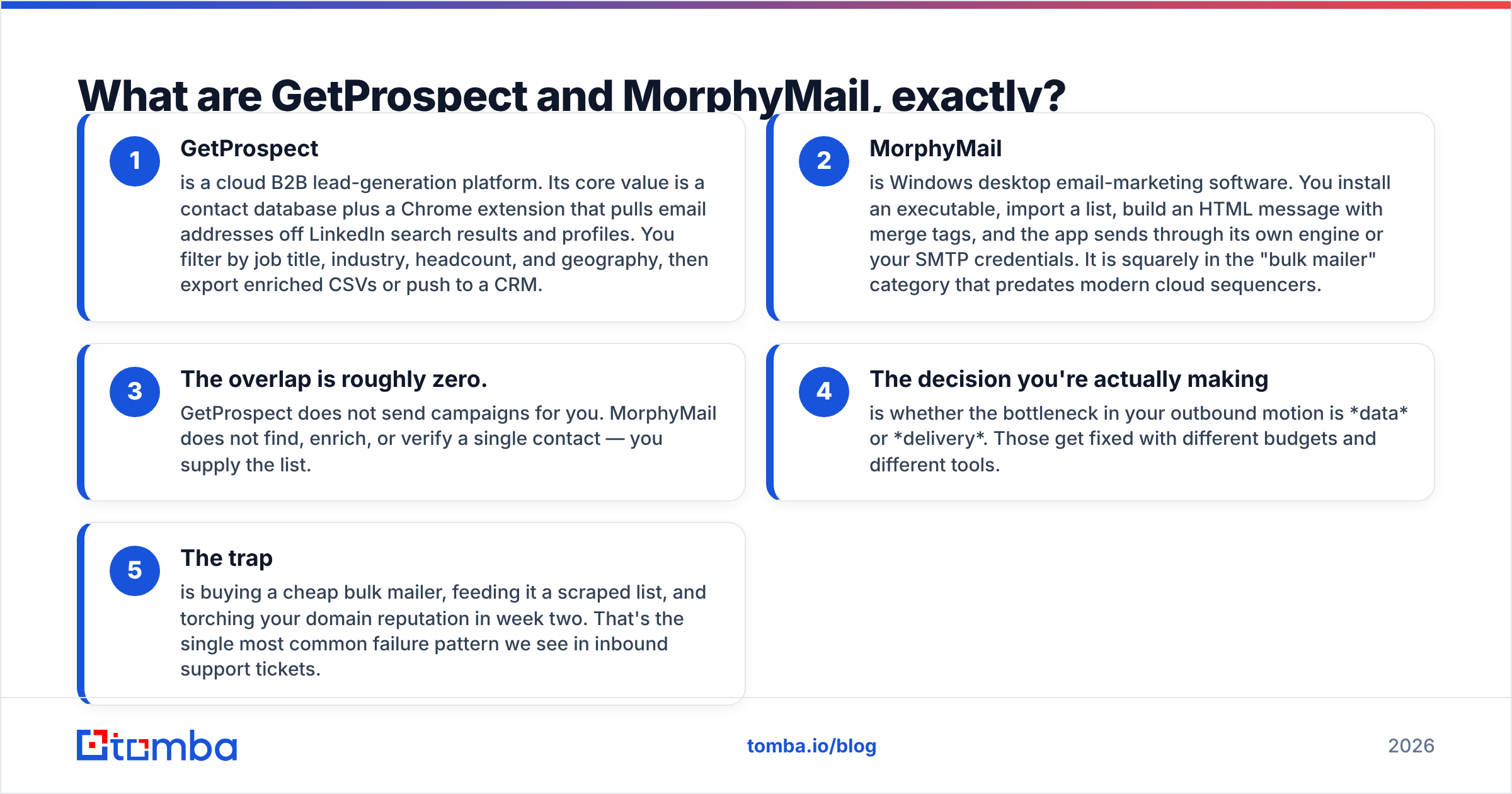
Start here. Most people who search GetProspect vs MorphyMail are weighing two tools that barely touch.
- GetProspect is a cloud B2B lead tool. It ships a contact database plus a Chrome add-on. The add-on pulls emails from LinkedIn profiles and search pages. You filter by job title, industry, size, and country. Then you export a CSV or push it to a CRM.
- MorphyMail is Windows email software. You install an app. You import a list. You build an HTML message with merge tags. The app sends through its own engine or your SMTP login. It is a classic bulk mailer.
- The overlap is near zero. GetProspect does not send campaigns. MorphyMail does not find or check a single contact. You bring the list.
- The real question is simple. Is your weak spot data or sending? Each gap costs a different budget and needs a different tool.
- The trap is cheap. You buy a bulk mailer, feed it a scraped list, and burn your domain in week two. We see this in support tickets every week.
Know the space already? GetProspect sits near Hunter, Apollo, and Tomba. MorphyMail sits near old desktop senders. It is nowhere near Instantly, Smartlead, or Mailchimp.
GetProspect vs MorphyMail: feature by feature#
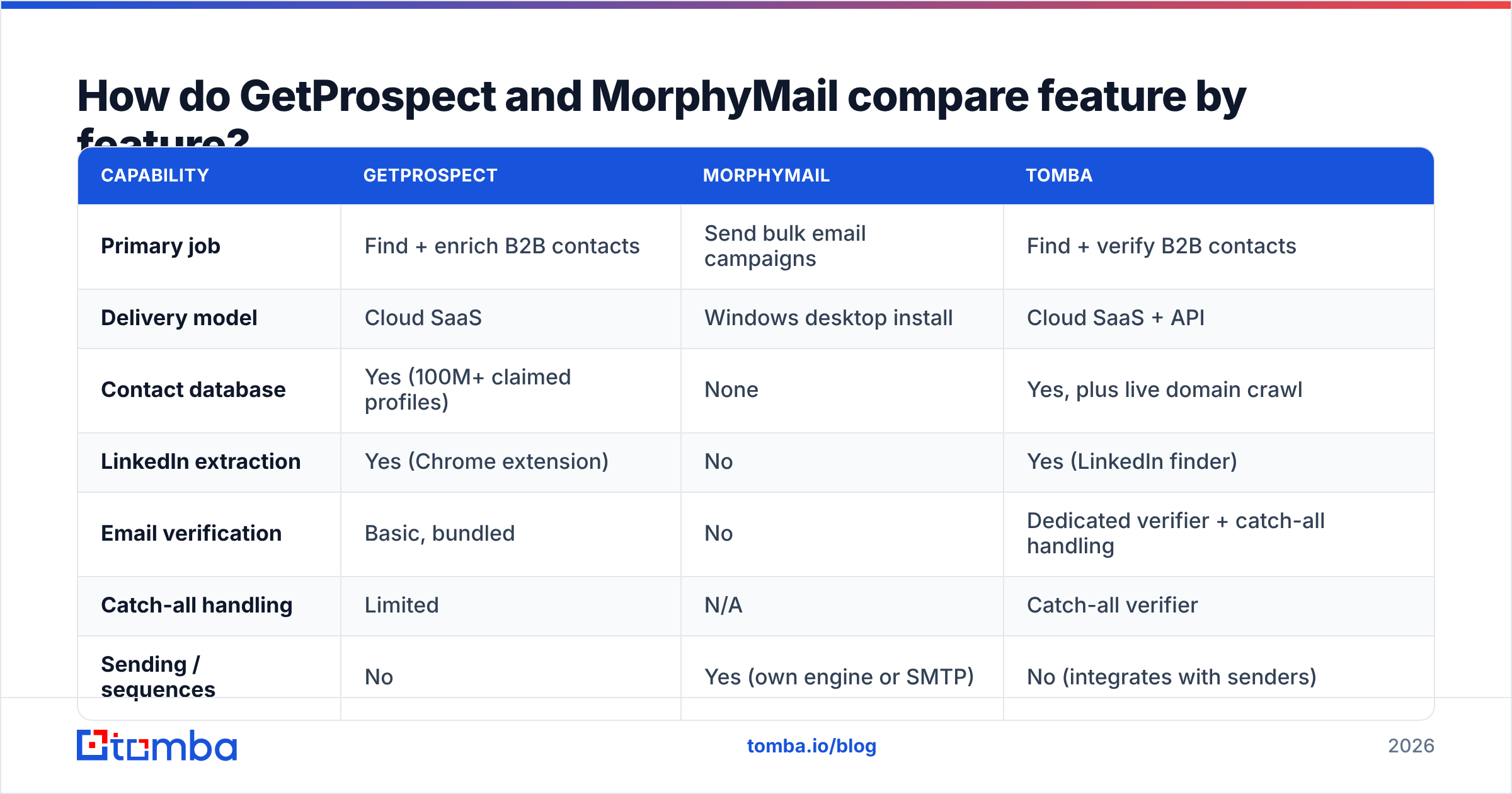
| Capability | GetProspect | MorphyMail | Tomba |
|---|---|---|---|
| Primary job | Find + enrich B2B contacts | Send bulk email campaigns | Find + verify B2B contacts |
| Delivery model | Cloud SaaS | Windows desktop install | Cloud SaaS + API |
| Contact database | Yes (100M+ claimed profiles) | None | Yes, plus live domain crawl |
| LinkedIn extraction | Yes (Chrome extension) | No | Yes (LinkedIn finder) |
| Email verification | Basic, bundled | No | Dedicated verifier + catch-all handling |
| Catch-all handling | Limited | N/A | Catch-all verifier |
| Sending / sequences | No | Yes (own engine or SMTP) | No (integrates with senders) |
| API access | Yes, higher tiers | No meaningful API | Yes, all paid tiers |
| Free tier | ~50 valid emails/mo | Trial version | 25 searches/mo |
| Entry paid price | ~$49/mo | One-time desktop license | $49/mo Starter |
| Best fit | SDR teams sourcing lists | Small in-house list blasts | Data-quality-first outbound + dev teams |
Two things stand out in the GetProspect vs MorphyMail grid.
First, look at the Sending and Contact database rows. They never both say yes. Neither tool is a full stack. Buy MorphyMail and you still have a data gap. Buy GetProspect and you still have a sending gap.
Second, the row of No entries under MorphyMail is not a flaw in its own lane. It was never built as a data tool. The flaw is using it as one.
How accurate is GetProspect email data?#
Accuracy is where finder tools split apart. Sales pages stay vague here. Every vendor quotes its best-case number.
Three things drive real accuracy. They matter far more than the headline claim.
Domain type. Google Workspace and Microsoft 365 domains are easy. Catch-all domains accept every address. There, most tools guess. If a tool cannot flag catch-all results, treat the whole batch as unchecked.
Location. US and UK coverage is strong almost everywhere. DACH, the Nordics, LATAM, and APAC vary a lot. Test on your own market. Do not test on a sample of San Francisco startups.
Freshness. B2B data goes stale by 2-3% each month. People change jobs. A database refreshed each quarter is worse than one refreshed daily. Size claims do not fix that.
GetProspect does well on the first two. LinkedIn data stays current, and the title filters are sharp. The weak spot is the check step. Bundled checks are often one SMTP ping. That is fast. It is also blind to catch-all domains and greylisting.

The fix is the same for any finder. Run each export through a real email verifier first. A second check costs pennies. A 12% bounce rate costs you the domain.
Is MorphyMail safe for cold outreach in 2026?#
Short answer: no, not for cold B2B email. It is fine for opt-in mail to people who know you. Route it through a good SMTP relay first.
Here is why desktop senders struggle now.
IP trust. A desktop app sends from a home or small-office IP. Mail filters block those ranges by default. Google and Microsoft raised bulk sender rules in 2024. They keep raising them. See Google's bulk sender guidelines for the current limits.
No warm-up. Modern cold email tools raise volume slowly. A desktop mailer sends what you tell it, when you tell it. Going from 0 to 800 sends in a day on a fresh domain kills your reputation.
No feedback. You see send counts, not inbox placement. You learn you are in spam when replies stop. A better stack lets you watch sender reputation and pull complaint data.
Setup is on you. SPF, DKIM, and DMARC become manual work. You can do it. Run your domain through an SPF checker before the first send. But the app will not warn you when it is wrong.
None of this makes MorphyMail bad software. It was built for 2012 email rules. Mailing 400 current customers from a warm domain? It works fine, and the one-time license is cheap.
GetProspect vs MorphyMail: which one should you buy?#
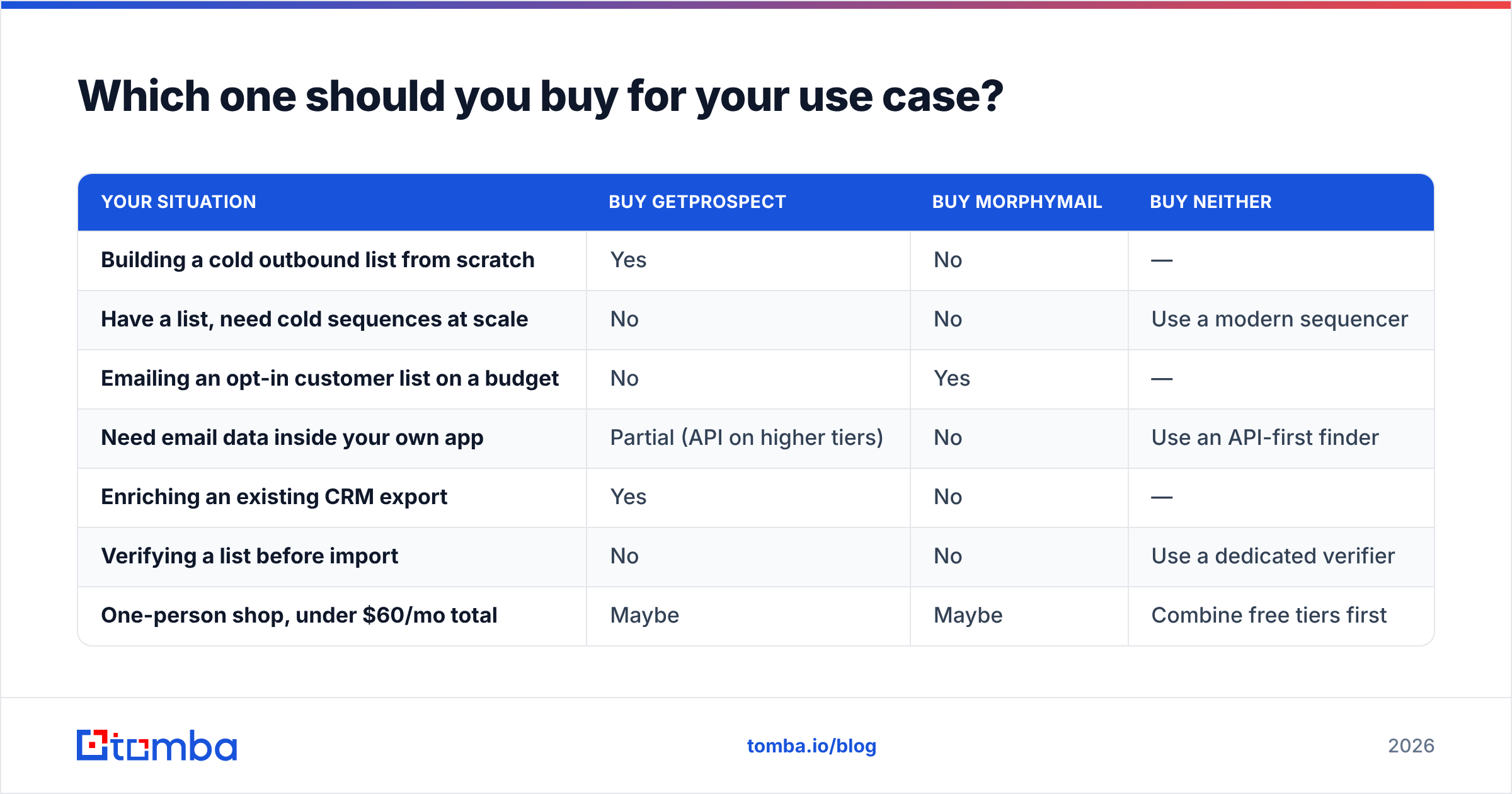
| Your situation | Buy GetProspect | Buy MorphyMail | Buy neither |
|---|---|---|---|
| Building a cold outbound list from scratch | Yes | No | — |
| Have a list, need cold sequences at scale | No | No | Use a modern sequencer |
| Emailing an opt-in customer list on a budget | No | Yes | — |
| Need email data inside your own app | Partial (API on higher tiers) | No | Use an API-first finder |
| Enriching an existing CRM export | Yes | No | — |
| Verifying a list before import | No | No | Use a dedicated verifier |
| One-person shop, under $60/mo total | Maybe | Maybe | Combine free tiers first |
Row two matters most for most readers. Say you have contacts and need multi-step cold sequences. You want reply detection, inbox rotation, and warm-up. Neither tool here does that. You need a sequencer. And the data still has to come from somewhere.

What does a full outbound stack look like?#
Three layers. You cannot skip one.
- Sourcing. A finder that turns a domain, a name, or a LinkedIn URL into a contact. GetProspect, Tomba, Apollo, and Hunter live here. Judge them on coverage of your market, not on total record counts.
- Checking. A verifier that marks each address valid, invalid, risky, or catch-all. It runs before your sender ever sees the list. This is the cheapest insurance in the stack. Teams skip it most.
- Sending. A platform with warm-up, inbox rotation, send windows, and placement reports. MorphyMail sends. It does not do the rest.
Here is a flow that works in 2026:
- Pick target accounts by size and industry. Run a domain search to get public contacts and the email pattern.
- Enrich named people one by one when the pattern is unclear.
- Verify the full export. Drop the invalid ones. Put catch-alls in a low-priority group.
- Push only clean contacts to your sequencer. Keep the daily cap low.
- Re-check anything older than 90 days before you reuse it.
That flow holds bounce rates under 2%. That number keeps you out of the spam folder. G2 reviewers in the lead intelligence category say the same thing: check depth beats database size.
GetProspect vs MorphyMail pricing: how do the plans compare?#
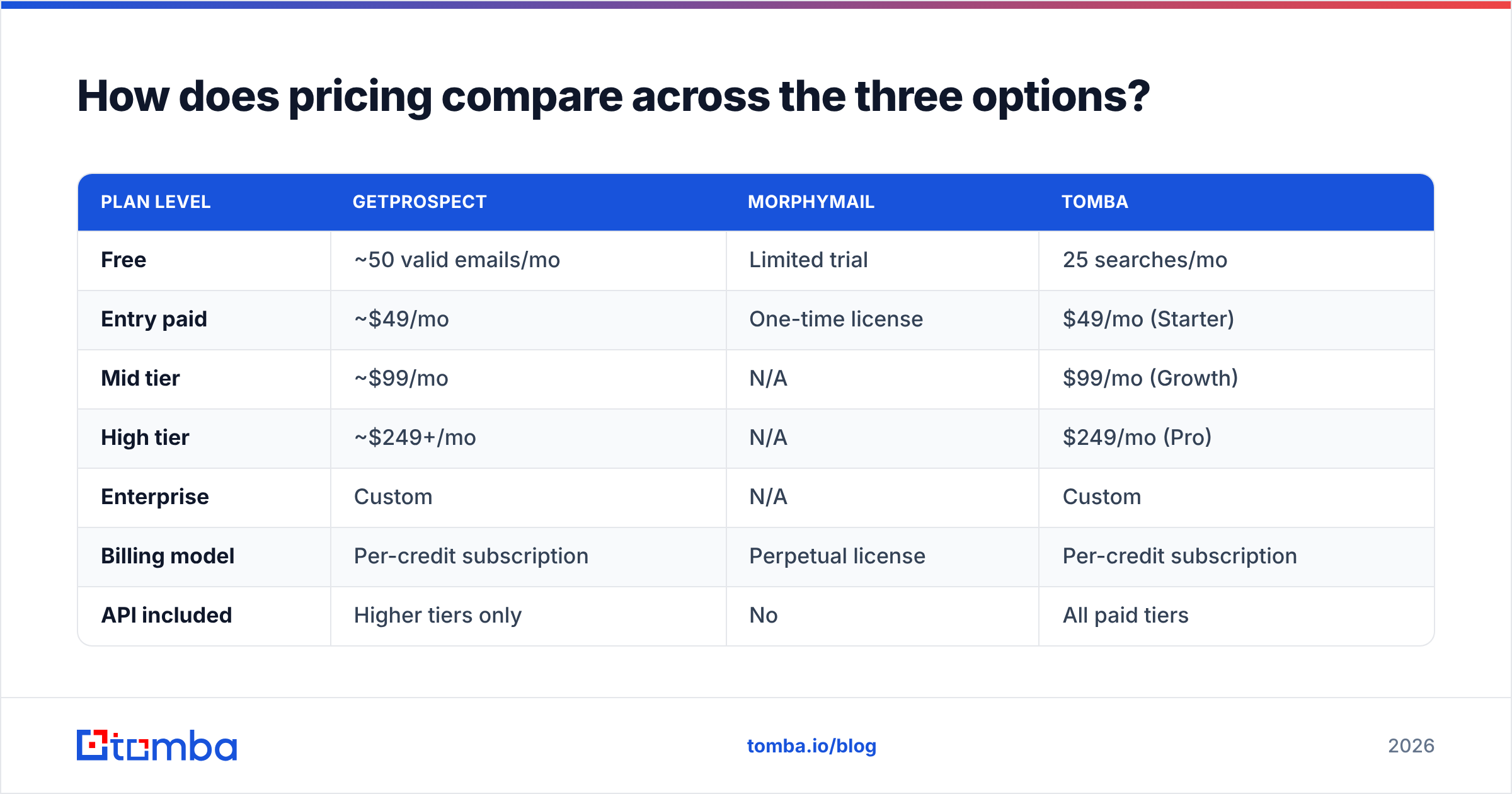
| Plan level | GetProspect | MorphyMail | Tomba |
|---|---|---|---|
| Free | ~50 valid emails/mo | Limited trial | 25 searches/mo |
| Entry paid | ~$49/mo | One-time license | $49/mo (Starter) |
| Mid tier | ~$99/mo | N/A | $99/mo (Growth) |
| High tier | ~$249+/mo | N/A | $249/mo (Pro) |
| Enterprise | Custom | N/A | Custom |
| Billing model | Per-credit subscription | Perpetual license | Per-credit subscription |
| API included | Higher tiers only | No | All paid tiers |
Check live prices on getprospect.com and morphymail.com before you buy. Vendor pricing moves. GetProspect has reshuffled its credit tiers more than once. Tomba's plans sit on the Tomba pricing page.
The sticker price is not the real story. The billing model is. A one-time license looks cheap. Then you burn a domain and pay to fix it. A finder plan looks pricey. Then you divide the cost by meetings booked.
One more thing to check with any finder. Do failed lookups eat credits? Some vendors charge for a search that returns nothing. Over 10,000 contacts, that adds up.
Where does Tomba fit in?#
Straight answer: Tomba competes with GetProspect, not MorphyMail. If you are shopping for a desktop bulk mailer, Tomba is not for you. We would rather say that than pretend.
Against GetProspect, four things stand out:
- Checking is a real product, not a bundled checkbox. You get a stand-alone verifier, a catch-all finder, and a score on every result.
- API on every paid plan. Building lookups into your own app? You do not need a top tier. The Tomba API starts at Starter.
- Clear sources. Each result lists the public pages it came from. That helps with GDPR files.
- Bulk jobs. Bulk email finder takes a CSV in and gives an enriched CSV out. There are Sheets and Excel add-ins too.
Where GetProspect wins: the LinkedIn export flow is smooth. If your day is run a search, export the page, that edge is real.
FAQ#
Can MorphyMail find email addresses? No. It is a sending tool. You bring the list. It has no database, no domain crawl, and no checks.
Does GetProspect send cold email sequences? Not really. It sources and enriches contacts. You export them to a CRM or a sequencer.
Is a desktop mailer cheaper than a cloud sender? On license cost, yes. Add up domain damage, clean-up work, and lost deals, and the answer flips for cold email.
What bounce rate is safe? Stay under 2%. Above 5%, big providers start to throttle you. So verify every list, no matter which finder made it.
Do I need both tools? Rarely. In the GetProspect vs MorphyMail match-up, a finder plus a modern sequencer beats a finder plus a desktop mailer.
The bottom line#
GetProspect vs MorphyMail ends fast once you name your gap. No contact data? You want a finder, and MorphyMail is not one. No sending setup? You want a sequencer. A desktop app is the wrong shape for cold email in 2026. It still works for warm, opt-in mail on a settled domain.
If data quality holds your pipeline back, start with the Tomba Email Finder. The free plan gives you 25 searches a month. Test your real market first: same firms, same countries, same titles. Then run the same 50 domains through both tools, verify both exports, and let the bounce rate pick the winner.
Related guides#
Ready to find emails that actually work?
Join 150,000+ professionals who stopped guessing and started sending. Free credits on signup — no credit card required.
Get the Tomba newsletter
Practical outbound tactics and product updates — once every two weeks.
About the author