GetProspect vs OutreachBin: Which Tool Wins in 2026?
GetProspect finds the emails. OutreachBin sends them. Here's an honest 2026 breakdown of pricing, data quality, deliverability features, and which one your outbound stack actually needs first.
TL;DR
- GetProspect and OutreachBin are not really competitors. GetProspect is a B2B contact database and email finder; OutreachBin is a cold email sending, sequencing, and inbox-warmup platform. Comparing them head-to-head is like comparing a quarry to a cement mixer.
- If you have no list, start with the finder. If you have a list but your emails land in spam or nothing gets sent on schedule, start with the sender.
- GetProspect's strength is LinkedIn-driven list building at a mid-market price. Its weakness is verification depth on catch-all domains and credit burn on low-quality rows.
- OutreachBin's strength is bundled warmup plus sequencing at a low monthly price. Its weakness is that it does nothing to improve the quality of the data you feed it.
- Most teams end up paying for both categories anyway. The cost-control lever is picking a finder with honest per-credit pricing and a real verification layer — that's where Tomba is worth a look next to GetProspect.
What are GetProspect and OutreachBin?#
GetProspect is a B2B contact-data platform. You search a database by job title, company, industry, headcount, or location, or you run its Chrome extension across LinkedIn search results and pull the matching work emails into a list. It stores contacts in a lightweight built-in CRM, enriches them with company data, and exports to CSV or your sales tools. Its core job is: turn a targeting definition into a list of reachable humans.
OutreachBin is a cold email execution platform. You connect your sending mailboxes, upload or sync a list, build a multi-step sequence with conditional follow-ups, and let it send on a schedule with human-like delays. It bundles inbox warmup — automated seed conversations between real inboxes to build sender reputation — into the same subscription. Its core job is: turn a list into replies without torching your domain.
That distinction matters more than any feature table, because the two tools fail in completely different ways. A bad finder gives you 400 addresses where 60 bounce. A bad sender gives you 400 perfectly valid addresses that all land in Promotions.

How do GetProspect and OutreachBin compare head-to-head?#
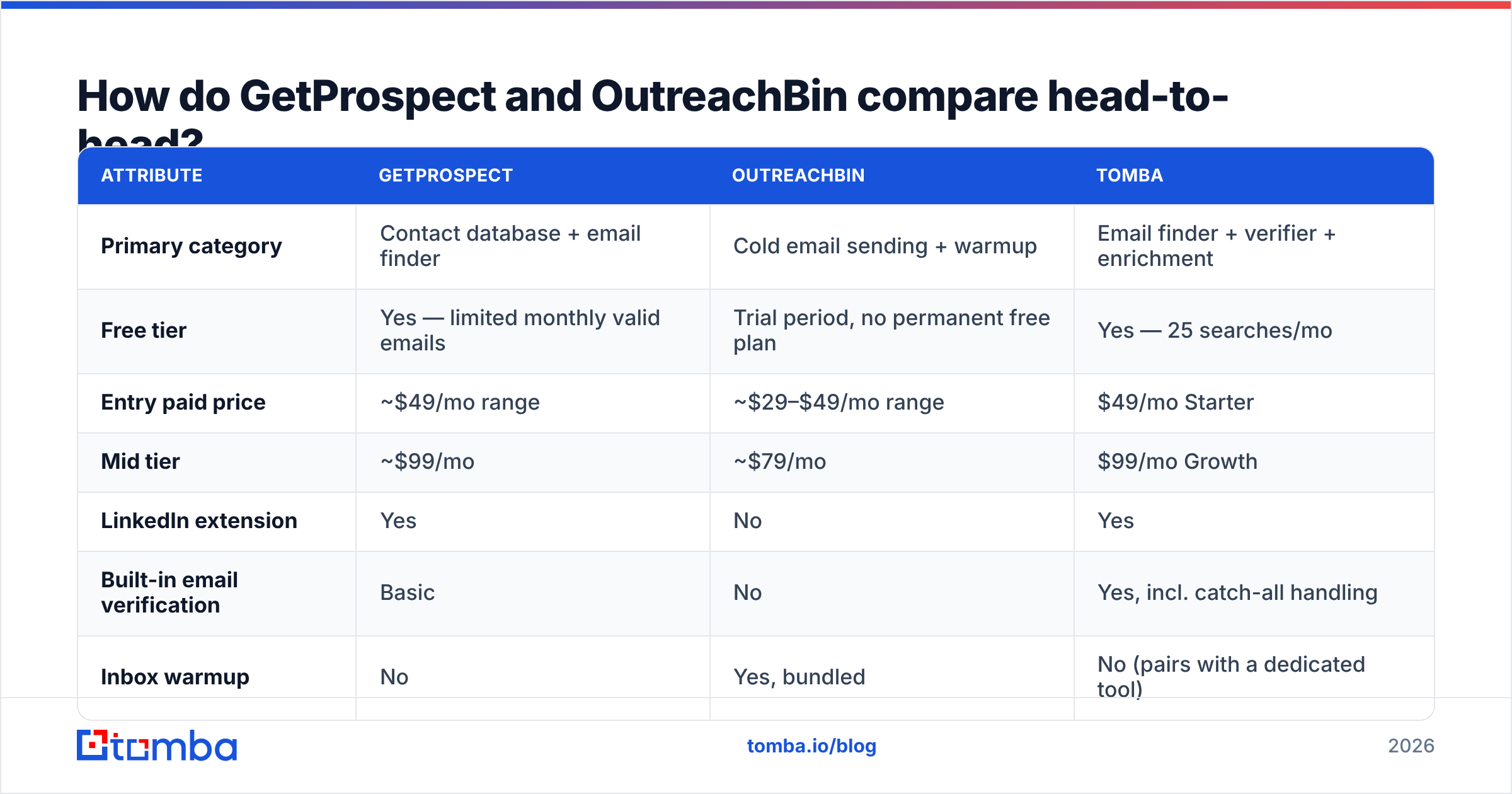
Here's the honest side-by-side. Pricing moves, so treat these as directional and confirm on each vendor's page before you buy.
| Attribute | GetProspect | OutreachBin | Tomba |
|---|---|---|---|
| Primary category | Contact database + email finder | Cold email sending + warmup | Email finder + verifier + enrichment |
| Free tier | Yes — limited monthly valid emails | Trial period, no permanent free plan | Yes — 25 searches/mo |
| Entry paid price | ~$49/mo range | ~$29–$49/mo range | $49/mo Starter |
| Mid tier | ~$99/mo | ~$79/mo | $99/mo Growth |
| LinkedIn extension | Yes | No | Yes |
| Built-in email verification | Basic | No | Yes, incl. catch-all handling |
| Inbox warmup | No | Yes, bundled | No (pairs with a dedicated tool) |
| Sequencing / drip campaigns | Limited | Yes — core feature | No |
| Public API | Yes | Limited | Yes, documented REST API |
| Bulk CSV processing | Yes | Import only | Yes, bulk finder + verifier |
| Best for | Building a targeted list from scratch | Sending and following up at volume | Accuracy-first finding and verification |
Two things jump out. First, the overlap between GetProspect and OutreachBin is close to zero — the only shared column is "costs money every month." Second, neither one fully covers the verification layer, which is where most cold email programs actually break.
Which problem are you actually trying to solve?#
Before you compare price tags, name the failure you're experiencing. The right tool falls out of the diagnosis almost automatically.
- "I don't have anyone to email." You need a finder or a database. GetProspect, Tomba, or a similar tool. Sending software is useless with an empty CSV.
- "I have 3,000 rows but I don't trust them." You need verification, not more rows. Bounce rate above 3% is the single fastest way to wreck sender reputation, and no sending platform can save you from it.
- "I send, but nothing arrives." That's a deliverability problem — SPF/DKIM/DMARC, domain age, warmup, content. OutreachBin's warmup addresses part of this.
- "I send, it arrives, nobody replies." That's a targeting and copy problem. New software will not fix it. Rewrite the offer.
- "I can send, but I can't follow up consistently." That's sequencing. OutreachBin, or any of the dozens of sending platforms, solves it.
- "My data goes stale in 90 days." You need enrichment on a schedule, not a one-time export.
Most teams that ask "GetProspect or OutreachBin?" are actually in bucket 1 or 2, and buying a sender first is why their first campaign flops.
Is GetProspect worth it in 2026?#
GetProspect earns its place for one specific workflow: you live inside LinkedIn Sales Navigator, you build audiences visually, and you want those audiences to become emailable lists in two clicks. The extension is solid, the filters are readable, and the built-in list management is enough that small teams skip a CRM for a while.
Where it gets expensive is the credit model. Like most finders, you burn credits on attempts, and results on catch-all domains — the ones where the mail server accepts everything and reveals nothing — come back as "valid" more often than they should. You then discover the truth on send day, in the form of hard bounces.
That's the practical gap. A finder that returns a confidence score without a real catch-all strategy is offloading its risk onto your domain reputation. If you're evaluating finders, put these questions on the list:
- Per-credit cost at your actual volume, not the headline monthly price. Divide plan price by monthly credits.
- What happens on a failed search — do you get charged for a miss?
- Catch-all handling — does the tool label them honestly or quietly mark them valid?
- Verification included or extra — many vendors sell finding and verifying as separate meters.
- API access on entry plans — some vendors gate the API behind the top tier, which kills automation for small teams.
- Export limits and data ownership — can you export everything you paid for, or is there a monthly export cap?
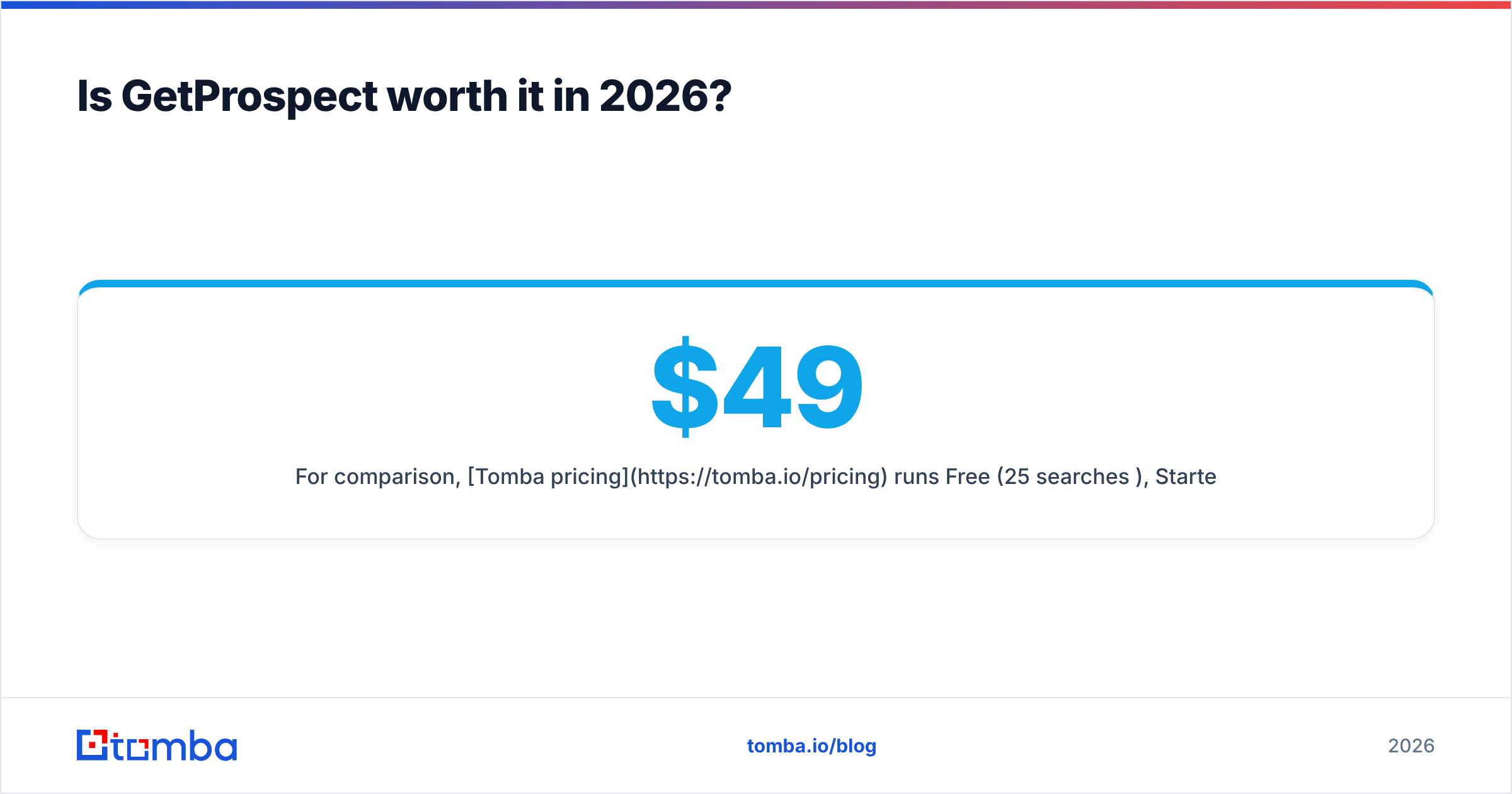
For comparison, Tomba pricing runs Free (25 searches/mo), Starter $49/mo, Growth $99/mo, Pro $249/mo, and Enterprise custom, with the email verifier and catch-all checks sitting in the same account rather than as a separate purchase. That bundling is the main reason teams switch — not raw database size.
Is OutreachBin worth it in 2026?#
OutreachBin's pitch is value: sequencing plus warmup for roughly what a single seat of an enterprise sales engagement platform costs before you've even added users. For a founder or a two-person sales team running a few hundred sends a day, that math works.
The warmup piece is genuinely useful. A brand-new domain with no sending history is treated as suspicious by every major mailbox provider, and Google and Microsoft both tightened bulk sender requirements in the last two years. Automated warmup — gradual volume ramp, seed inboxes replying and marking as important — measurably shortens the runway. If you want to sanity-check your ramp schedule before you start, the email warmup calculator will give you a day-by-day volume plan.
Where OutreachBin shows its size is at the edges: reporting depth, native CRM sync, team permissions, and the maturity of its integration catalog. Compared to the enterprise tier of the category — Outreach.io, Salesloft, and friends — it's leaner by design. Check current user sentiment on G2 before committing to an annual plan; sending tools change fast and reviews from two years ago describe a different product.
And the thing OutreachBin cannot do, no matter which plan you buy: improve your data. Warmup protects reputation you build. It does not protect you from a 14% bounce rate on a scraped list.

What does the full stack actually cost?#
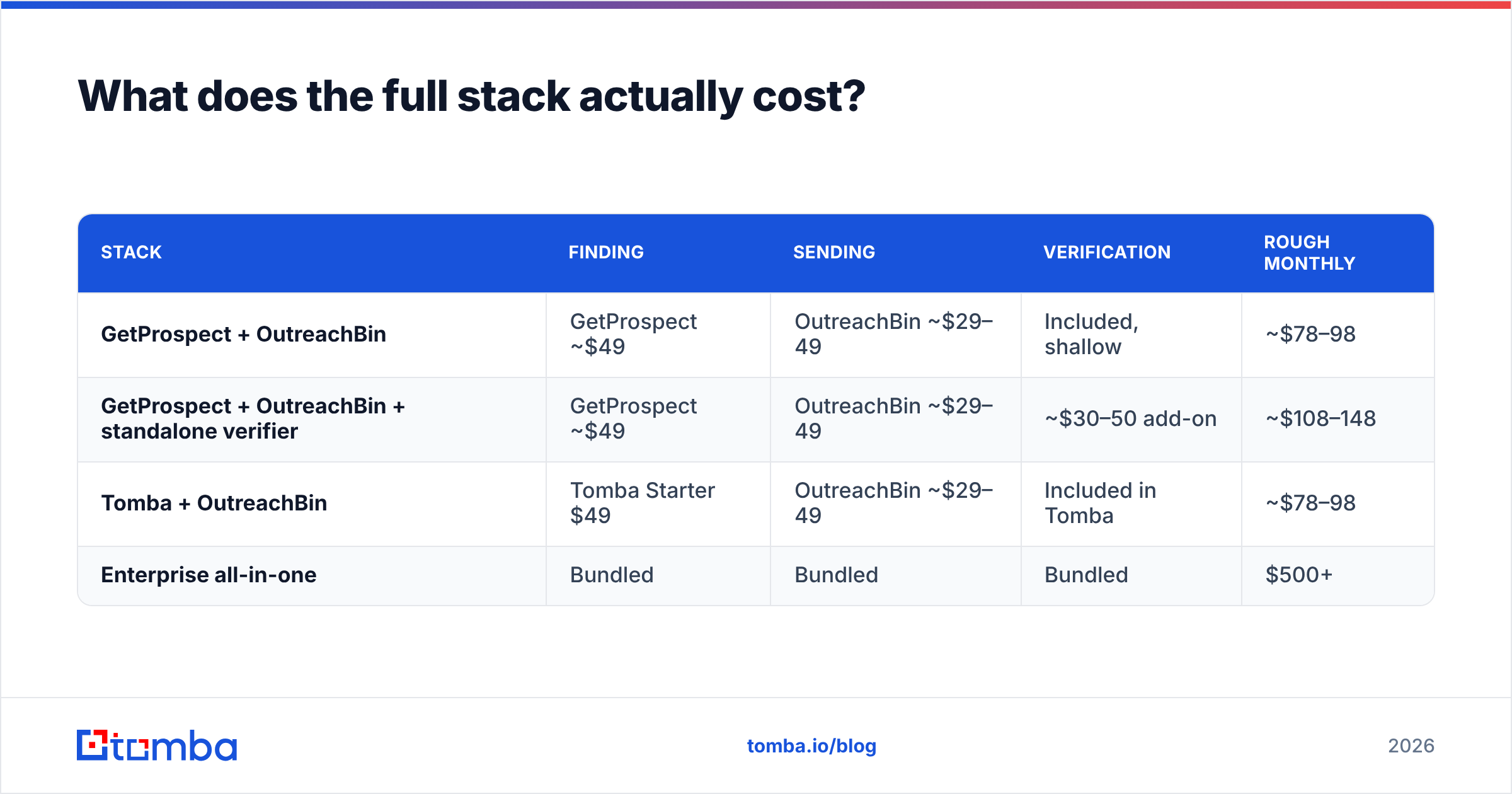
The honest answer to "GetProspect vs OutreachBin" is usually "both, plus verification." Here's what three realistic stacks look like for a small outbound team sending roughly 2,000 emails a month.
| Stack | Finding | Sending | Verification | Rough monthly |
|---|---|---|---|---|
| GetProspect + OutreachBin | GetProspect ~$49 | OutreachBin ~$29–49 | Included, shallow | ~$78–98 |
| GetProspect + OutreachBin + standalone verifier | GetProspect ~$49 | OutreachBin ~$29–49 | ~$30–50 add-on | ~$108–148 |
| Tomba + OutreachBin | Tomba Starter $49 | OutreachBin ~$29–49 | Included in Tomba | ~$78–98 |
| Enterprise all-in-one | Bundled | Bundled | Bundled | $500+ |
The middle row is where most teams land by month three, and it's the row nobody budgets for on day one. Consolidating finding and verification into one vendor is the cheapest structural fix available — it removes a subscription and removes the CSV shuffle between tools.
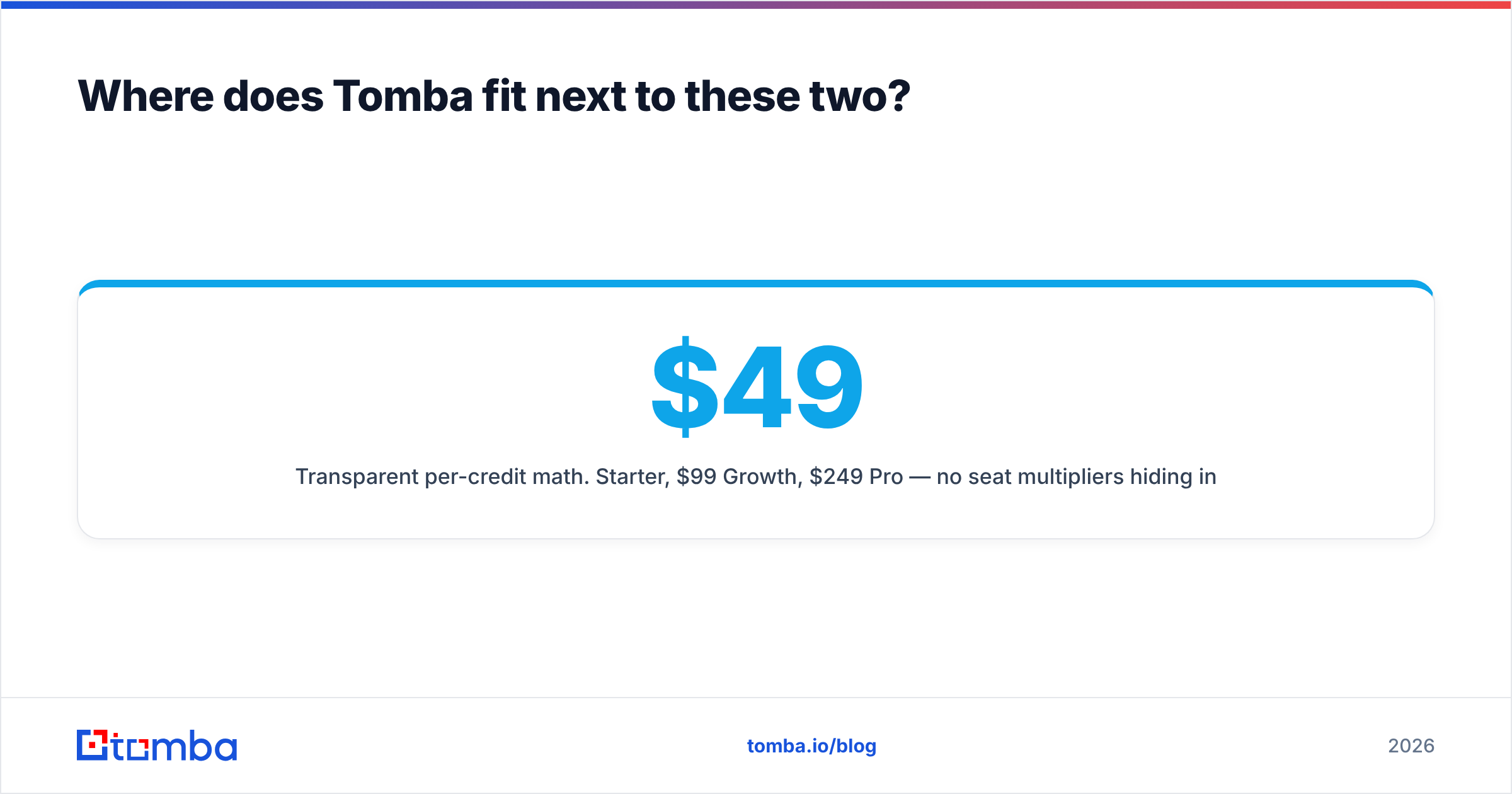
Where does Tomba fit next to these two?#
Tomba competes with GetProspect, not OutreachBin. It's a finder-and-verifier, and it deliberately doesn't try to be a sending platform — sending is a crowded, low-margin category where OutreachBin, Instantly, Saleshandy and a dozen others already fight it out.
What Tomba does differently on the data side:
- Verification is native, not a bolt-on. Every found address can run through the verifier in the same workflow, including catch-all domains, before it ever reaches your sequencer.
- Domain search first. Point domain search at a company and get the full public email footprint plus the dominant naming pattern, which is how you infer addresses for people who aren't in any database yet.
- API parity across plans. The Tomba API is documented and available without forcing an enterprise upgrade, so RevOps can wire finding into an existing workflow instead of exporting CSVs.
- Transparent per-credit math. $49 Starter, $99 Growth, $249 Pro — no seat multipliers hiding in the footnotes.
None of that replaces a sending tool. If you buy Tomba, you still need OutreachBin or an equivalent to actually run sequences. The point is that the money you save by not stacking a finder plus a separate verifier funds the sender.
Which should you choose: GetProspect or OutreachBin?#
Pick by the gap in your stack, not by feature count.
Choose GetProspect if: your prospecting starts in LinkedIn, you want a visual list builder, and you don't yet have a contact database. Accept that you'll want a verification step downstream.
Choose OutreachBin if: you already have clean, verified contacts and your bottleneck is consistent sending, follow-up cadence, and inbox placement on a new domain. The bundled warmup is the reason to pick it over pricier sequencers.
Choose a finder with built-in verification (Tomba, or GetProspect plus a dedicated verifier) if: your bounce rate is your actual problem. This is the most common real diagnosis and the least common purchase.
Choose neither yet if: your reply rate is the problem. Fix the ICP and the first two sentences of your email before adding tooling. The B2B glossary definition of a qualified lead is a cheaper starting point than another subscription.
Frequently asked questions#
Can OutreachBin find email addresses? No. It's a sending and warmup platform. You import contacts from a finder, a database, or your CRM.
Can GetProspect send cold email campaigns? It offers basic outreach features, but it's not built as a full sequencer. Teams running multi-step cadences at volume generally pair it with a dedicated sending tool.
Do I need a separate verifier if I use GetProspect? Usually yes, if you're sending at any volume. Even good finders return uncertain results on catch-all domains, and a 5%+ bounce rate will damage your email deliverability faster than any warmup can repair it.
Is warmup still necessary in 2026? For new domains and new mailboxes, yes. Mailbox providers weight sending history heavily. For an established domain with consistent volume and low complaint rates, marginal.
What's the cheapest working stack?
A finder with native verification on an entry plan ($49/mo) plus a low-cost sender with warmup ($29–49/mo). Roughly $80–100/mo covers a two-person team sending a few thousand emails.
Start with the data layer#
Sending software amplifies whatever you feed it. Feed it a verified list and warmup plus sequencing pays for itself. Feed it a scraped CSV and you'll spend the next quarter rebuilding a burned domain.
If your gap is the list — not the sending — start with the Tomba Email Finder. Find addresses by domain, name, or company, verify them in the same account before they ever hit a sequence, and test the whole workflow on the free tier's 25 searches before you commit a dollar. Then wire whichever sender you prefer on top.
Related guides#
Ready to find emails that actually work?
Join 150,000+ professionals who stopped guessing and started sending. Free credits on signup — no credit card required.
Get the Tomba newsletter
Practical outbound tactics and product updates — once every two weeks.
About the author