GetProspect vs PursueApp (2026): Which Tool Do You Need?
GetProspect finds and verifies B2B contacts. PursueApp sends the sequences. Comparing them head-to-head only makes sense once you know which half of the outbound stack you're actually missing.
GetProspect vs PursueApp looks like a head-to-head. It isn't. One tool finds B2B email addresses. The other sends cold email sequences to a list you already own. This guide covers what each one does, what they cost in 2026, and which half of your outbound stack to buy first.
TL;DR
- GetProspect is a data tool. It is a B2B contact database, a LinkedIn email finder, and a bulk verifier.
- PursueApp is a sending tool. It runs cold email sequences, personalization, inbox rotation, and reply detection.
- They are not real competitors. Most people comparing GetProspect vs PursueApp are picking which half of the stack to buy first. Buy the data half.
- GetProspect's paid plans start near $49/mo, with a small free tier. PursueApp has mostly sold one-time licenses on deal platforms. That changes the buying math.
- A sequencer with bad data burns domains. A great database with no sender just sits in a CSV. Most teams under 10 reps run one data source plus one sending tool.
- If your gap is finding and verifying addresses at volume, a dedicated email finder beats the finder bolted onto either product.
What are GetProspect and PursueApp, exactly?#
Start here. The category confusion is the whole reason this comparison exists.
GetProspect is a B2B lead database and email finder. You search a contact index by job title, company, industry, headcount, and location. You enrich a list of names and domains into work emails. Then you run those emails through a built-in verifier and push the result to a CRM or a CSV. Its most-used feature is the Chrome extension. It pulls contacts off LinkedIn and Sales Navigator search pages. GetProspect also has a light list manager and basic email sending. Sending is a side feature, not the product.
PursueApp is a cold email sequencer. You connect mailboxes, upload a contact list, and build a multi-step drip with simple rules. It sends on a schedule and personalizes with spintax and merge tags. It tracks opens, clicks, replies, and bounces. It stops the sequence when someone answers. It does not build lists. It does not find emails. It assumes your file is already clean.
So the honest question in getprospect vs pursueapp is not "which is better." It is "which layer of outbound am I missing, and what is the cheapest way to fill it?"
Are GetProspect and PursueApp really competitors?#
Only in the sense that a hammer and a saw compete for the same $100. Here is how the work splits.
- List building — GetProspect only. Filter the database, scrape a LinkedIn search, or upload domains. PursueApp has no discovery layer.
- Email finding and verification — GetProspect only. Pattern matching plus SMTP checks. Most plans charge per valid result, not per attempt.
- Sequencing and sending — PursueApp's core. Multi-step drips, delays, A/B variants, mailbox rotation, and timezone-aware scheduling.
- Reply handling — PursueApp only. Auto-pause on reply, bounce suppression, and click tracking per step.
- Deliverability hygiene — shallow on both sides. GetProspect filters bad addresses upstream. PursueApp throttles and rotates downstream. Neither replaces SPF, DKIM, DMARC, and warmup.
- CRM sync — both integrate, but in opposite directions. GetProspect pushes contacts in. PursueApp pushes activity out.
Read that list again and the answer falls out. These are stages of one pipeline, not two options on a shortlist.

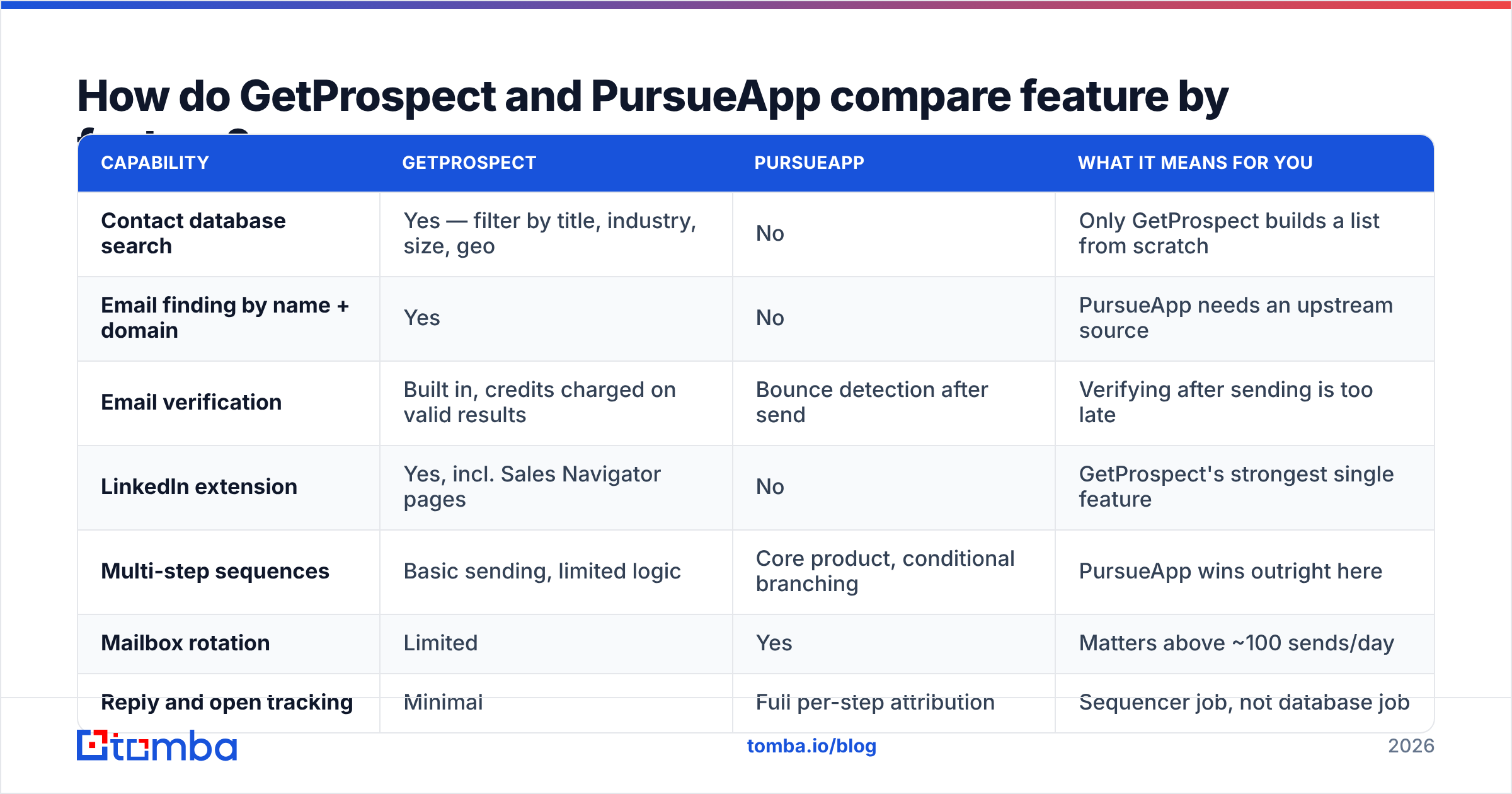
GetProspect vs PursueApp, feature by feature#
| Capability | GetProspect | PursueApp | What it means for you |
|---|---|---|---|
| Contact database search | Yes — filter by title, industry, size, geo | No | Only GetProspect builds a list from scratch |
| Email finding by name + domain | Yes | No | PursueApp needs an upstream source |
| Email verification | Built in, credits charged on valid results | Bounce detection after send | Verifying after sending is too late |
| LinkedIn extension | Yes, incl. Sales Navigator pages | No | GetProspect's strongest single feature |
| Multi-step sequences | Basic sending, limited logic | Core product, conditional branching | PursueApp wins outright here |
| Mailbox rotation | Limited | Yes | Matters above ~100 sends/day |
| Reply and open tracking | Minimal | Full per-step attribution | Sequencer job, not database job |
| API access | Yes, on higher tiers | Limited | Check before building automation |
| Native CRM integrations | HubSpot, Pipedrive, Salesforce, Zapier | Zapier-centric | Both workable, different directions |
| Best fit | SDRs building lists | Founders running drips on an existing list | Different buyer, same budget line |
Two things stand out. First, GetProspect verifies before you send, which is where verification belongs. A bounce that PursueApp reports back has already cost you sender reputation. Second, PursueApp's sequencing is a different weight class from GetProspect's send feature. If you need branching logic and five rotating mailboxes, GetProspect's built-in sending will frustrate you within a week.
How much do GetProspect and PursueApp cost in 2026?#
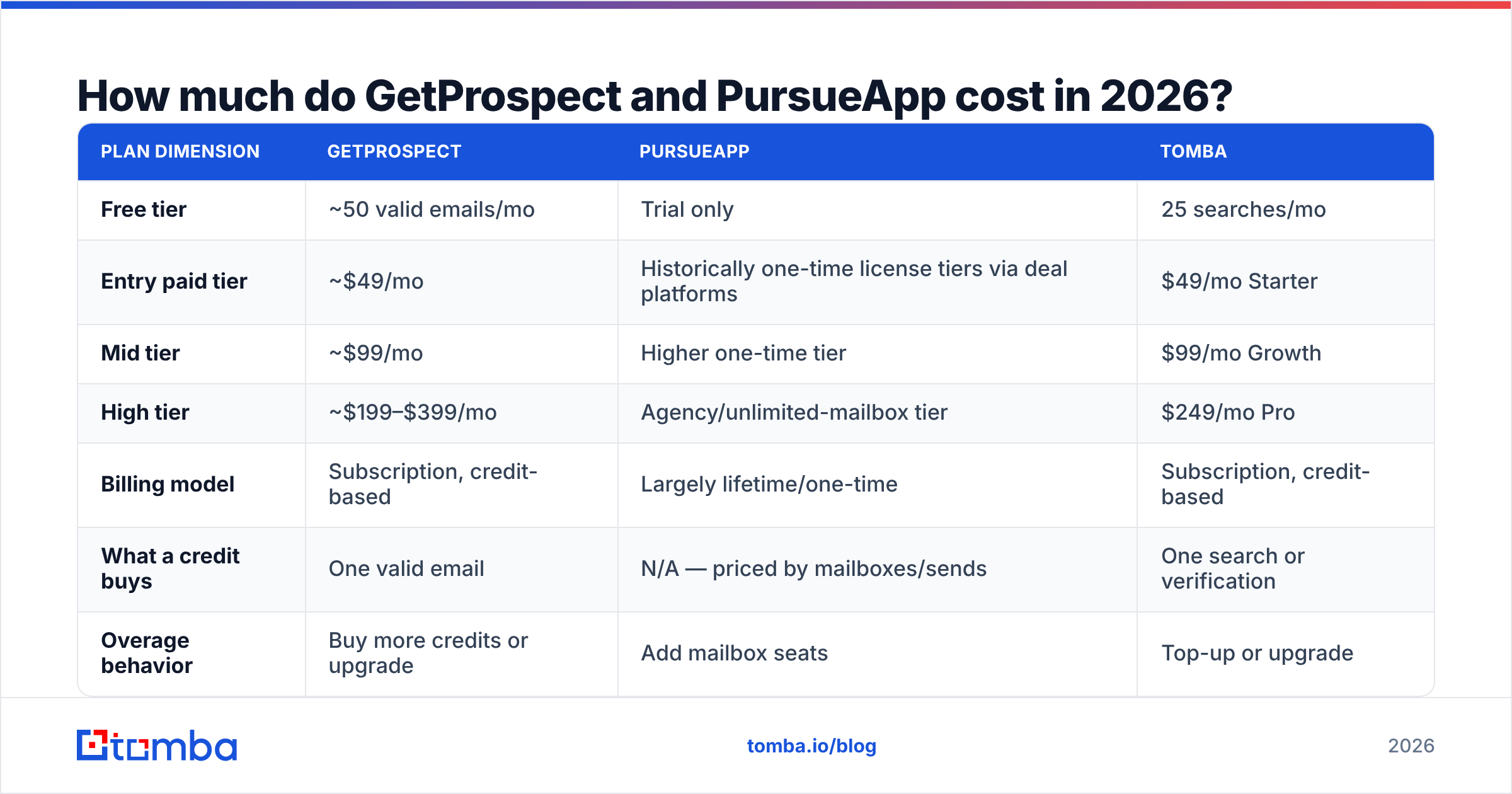
The pricing models differ so much that a monthly table alone can mislead you. Check each vendor's page before you buy. Both have repriced in the last two years.
| Plan dimension | GetProspect | PursueApp | Tomba |
|---|---|---|---|
| Free tier | ~50 valid emails/mo | Trial only | 25 searches/mo |
| Entry paid tier | ~$49/mo | Historically one-time license tiers via deal platforms | $49/mo Starter |
| Mid tier | ~$99/mo | Higher one-time tier | $99/mo Growth |
| High tier | ~$199–$399/mo | Agency/unlimited-mailbox tier | $249/mo Pro |
| Billing model | Subscription, credit-based | Largely lifetime/one-time | Subscription, credit-based |
| What a credit buys | One valid email | N/A — priced by mailboxes/sends | One search or verification |
| Overage behavior | Buy more credits or upgrade | Add mailbox seats | Top-up or upgrade |
The lifetime license is the real difference on PursueApp's side. Say you are a solo founder sending 300 emails a week from two mailboxes. A one-time purchase is hard to beat on raw cost. The trade-off is roadmap risk. Lifetime-deal products ship fewer deliverability updates than sequencers with recurring revenue. Cold email rules also change fast. Google and Yahoo's bulk sender rules alone forced most senders to rebuild their authentication setup.
On GetProspect's side, watch the credit math. Charging per valid email instead of per lookup is buyer-friendly. But the search step and the verify step often draw from the same pool. Model your real volume first. Finding 2,000 contacts a month at a 65% hit rate is a very different plan than 2,000 lookups.
For reference, Tomba pricing runs Free (25 searches/mo), Starter $49/mo, Growth $99/mo, and Pro $249/mo, plus custom Enterprise. Credits work the same way: one credit per result. Higher tiers add no separate charge for verification volume.
Which one gives you better data quality?#
Only one of them has data. So the real question is simple: is GetProspect's data good enough to send against?
Judge any B2B data source on four things, not one.
- Coverage — how much of your target list returns an email at all. Database tools look great on US mid-market SaaS. They thin out fast on EU SMBs and companies under 20 people.
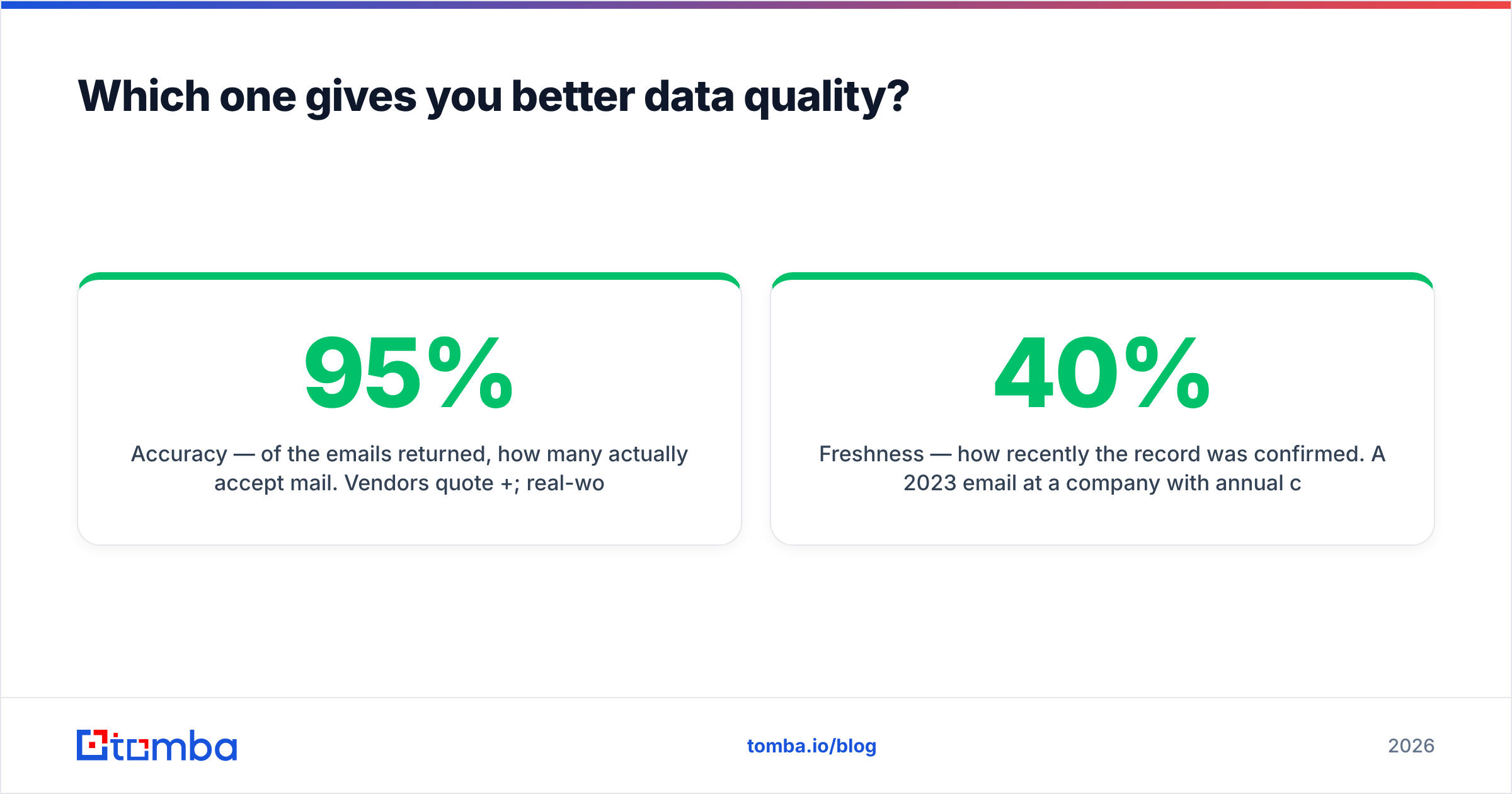
- Accuracy — how many of those emails accept mail. Vendors quote 95%+. Real cold lists land closer to 85–93%, depending on the vertical.
- Freshness — how recently the record was confirmed. A 2023 email at a company with 40% annual churn is a coin flip.
- Catch-all handling — what the tool does when a domain accepts everything. Marking every catch-all as valid inflates the stats and wrecks your bounce rate.
That last point separates real verification from marketing copy. About one in five B2B domains is catch-all. Basic SMTP checks cannot resolve them. Tools that pass catch-alls as valid hand you a number, not a verdict. Run those addresses through a dedicated catch-all verifier before they enter a sequence. Treat the ones you cannot resolve as a separate, lower-priority segment.
The practical test is cheap. Take 100 known-good contacts from your own CRM. Strip the emails. Run the names and domains back through each finder you are testing. Measure hit rate and exact-match accuracy. Do it for GetProspect and for one alternative. Let your own ICP decide instead of a vendor benchmark. Review data on G2 helps for support and UX signals. No aggregate rating predicts coverage on your accounts.
Which should you choose for cold outreach?#
Pick by the gap in your stack, not by the feature list.
Choose GetProspect if you live inside LinkedIn Sales Navigator, you need to turn saved searches into contact lists, and you already have a sender you like. That sender could be Instantly, Smartlead, Lemlist, HubSpot Sequences, or PursueApp. The extension workflow is fast, and verification in the same tool removes a handoff.
Choose PursueApp if you already have a data source and what you lack is steady multi-step follow-up across several mailboxes. That source could be a purchased list, a partner database, an enrichment API, or exports from GetProspect. The one-time price suits low-volume senders who do not want another subscription.
Choose neither, yet, if your domain is not authenticated and warmed. No tool saves a cold domain that sends 200 messages on day one. Set up SPF, DKIM, and DMARC first. Warm the domain for two to three weeks. Then buy tools. Check your records with a free email checker before you spend anything on software.

What does a realistic combined stack look like?#
Most teams under 10 reps land on the same four layers.
- Target definition — an ICP you can write down as firmographic filters. Keep it in a spreadsheet or a search UI, not in your head.
- Contact acquisition — a finder that turns companies into named people with verified work emails. This is the layer GetProspect sells, and quality varies a lot between vendors.
- Verification and segmentation — a hard gate before anything reaches a mailbox. Valid goes to the main sequence. Catch-all goes to a throttled one. Invalid gets dropped.
- Sending and follow-up — the sequencer. This is PursueApp's layer, alongside a dozen alternatives at similar prices.
Layers 2 and 3 carry most of the leverage. They decide whether layer 4 has a chance. A great sequence sent to a 22%-invalid list loses to a plain sequence sent to a 98%-valid list. The damage also compounds. Bounce rate feeds sender reputation, and reputation decides whether your next campaign reaches the inbox at all.
If you automate this, run layers 2 and 3 through an API instead of manual CSV round-trips. Export, upload, download, import: that is four failure points and a stale list. One email finder API call returns a verified address inline and removes all four.
What are the main GetProspect and PursueApp alternatives?#
If your gap is data: Apollo (huge database, weaker per-record accuracy), Hunter (strong domain search, thinner filters), Lusha (good phone coverage), Cognism (premium EU coverage at a premium price), BookYourData (pay-as-you-go list buying), and Tomba (finder, verifier, and catch-all handling behind a developer-first API).
If your gap is sending: Instantly, Smartlead, Saleshandy, Lemlist, Reply.io, and Woodpecker all ship deeper deliverability tooling than PursueApp, at a recurring cost. HubSpot Sales Hub sequences work well if your CRM is already HubSpot and volume is modest.
Avoid the all-in-one that does both layers at 60% quality. All-in-ones stay convenient until the data half is too thin for your market. Then you pay full price for half a product.
GetProspect vs PursueApp: frequently asked questions#
Can PursueApp find email addresses? No. It only sends to lists you supply. You need a separate finder or database.
Can GetProspect replace a sequencer? For very light use, maybe. For branching sequences across rotating mailboxes, no. That is a different product category.
Is a lifetime deal on a cold email tool risky? It is a real trade-off. Deliverability rules keep changing, and products without recurring revenue update more slowly. Judge by changelog activity, not by the discount.
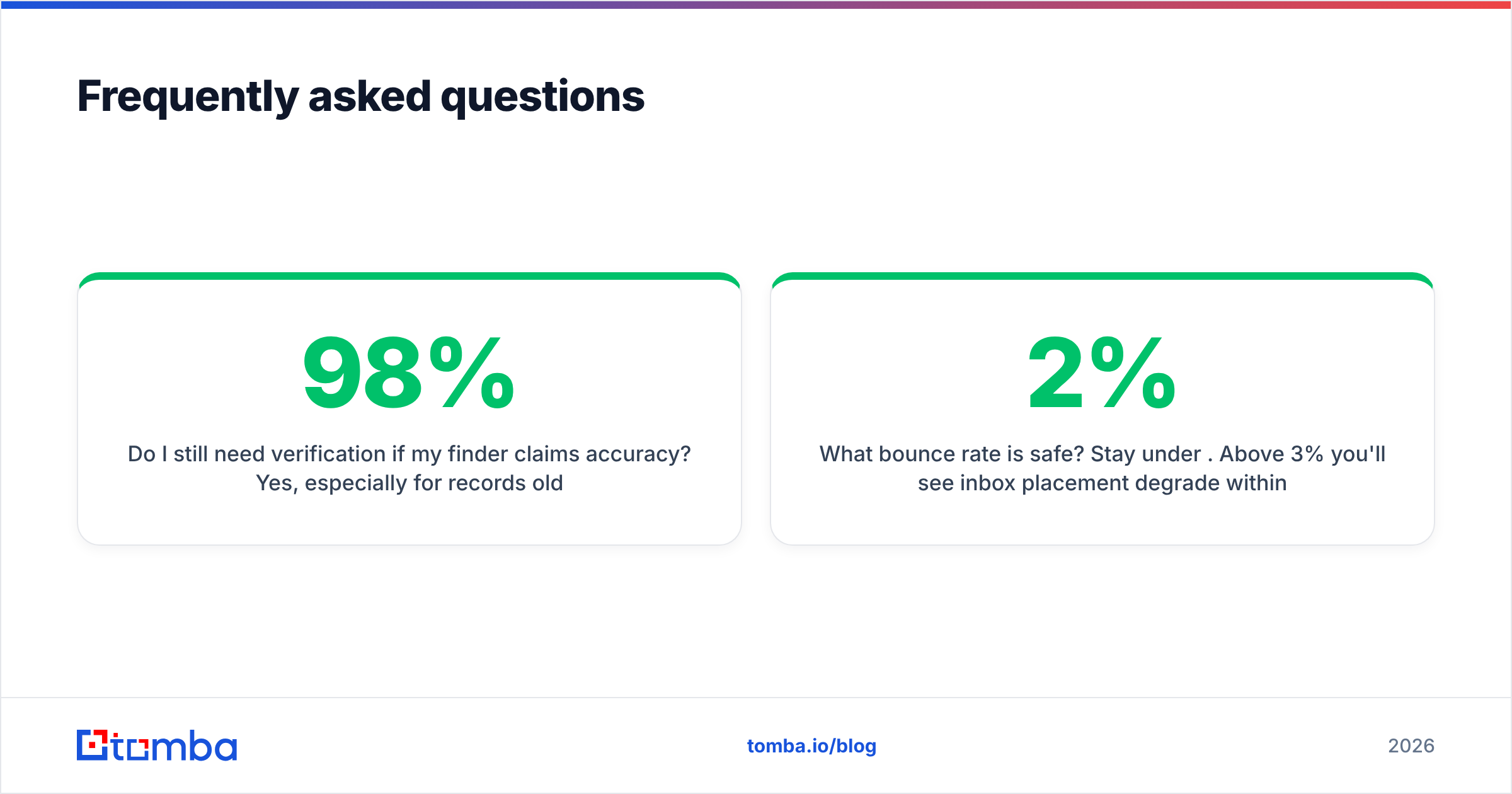
Do I still need verification if my finder claims 98% accuracy? Yes. Check records older than 90 days and every catch-all domain. Verification is cheap. A blacklisted domain is not.
What bounce rate is safe? Stay under 2%. Above 3%, inbox placement drops within days on most providers.
Where should you spend first?#
Spend on data first. A sequencer amplifies whatever list you feed it, good or bad. The cheapest way to fail at cold email is to automate messages to addresses that do not exist.
If GetProspect's LinkedIn workflow matches how you prospect, it is a fair buy. But maybe you need high hit rates on named contacts, verification that resolves catch-alls instead of guessing, bulk jobs without CSV shuffling, and an API you can wire into your sequencer. In that case, start with the Tomba Email Finder. The free tier covers 25 searches a month, Starter is $49/mo, and every result comes back verified. Then whatever you send with, PursueApp included, goes to real people.
Related guides#
Ready to find emails that actually work?
Join 150,000+ professionals who stopped guessing and started sending. Free credits on signup — no credit card required.
Get the Tomba newsletter
Practical outbound tactics and product updates — once every two weeks.
About the author