GetProspect vs Revli: Which Email Finder Wins in 2026?
GetProspect and Revli both promise verified B2B emails from a LinkedIn URL or a domain. We compare coverage, verification depth, export limits, API access and real cost per usable contact — plus when a third option makes more sense.
TL;DR
- GetProspect is the more mature product: a large prospect database, a LinkedIn extension, list management, CRM-style filters, and an established G2 presence. It is priced like a lead-gen platform, not a utility.
- Revli is the lighter, cheaper, utility-first option: point it at a name and domain (or a LinkedIn profile) and get an address back. Fewer workflow features, less lock-in, lower entry cost.
- Neither tool wins on every axis. GetProspect wins on database browsing and list workflows. Revli wins on price-per-lookup and simplicity.
- Both leave a verification gap. Catch-all domains — roughly a fifth of B2B domains — return "accept-all" and neither tool can resolve them with SMTP alone. Budget for a second verification pass.
- If you need an API-first stack (enrichment inside your CRM, bulk jobs, MCP/CLI access), a dedicated email finder with a documented API is usually the cheaper long-run answer.
What are GetProspect and Revli?#
Both tools solve the same narrow problem: you know who you want to reach and where they work, but you do not have their work email.
GetProspect launched as a LinkedIn email extractor and grew into a full prospecting suite. Today it markets a B2B contact database in the hundreds of millions, a Chrome extension that pulls emails off LinkedIn search results and Sales Navigator lists, saved lists with custom columns, and CSV/CRM export. The interface feels like a lightweight CRM — you build a list, filter it, enrich it, export it.
Revli sits at the other end of the spectrum. It is a focused email-finding utility with a generous free entry point and a much smaller surface area. You search by person and domain, or paste a LinkedIn profile, and get a result with a confidence indicator. There is no pretense of being a pipeline tool.
That difference in ambition drives almost every trade-off below. GetProspect asks you to live inside it. Revli asks you to call it and leave.
How does an email finder actually find an address?#
Understanding the mechanics tells you which tool will fail on your specific list. Every finder in this category combines the same five techniques:
- Pattern inference. The tool learns that a domain uses
first.last@orfinitial+last@, then applies that pattern to your target name. This is where most "found" emails come from. - Crawled sources. Public web pages, press releases, GitHub commits, conference speaker pages, and job boards leak real addresses. Good crawlers index them; weak ones do not.
- Contributed and licensed data. Extension users and partner feeds contribute observed addresses. This is the main driver of database size claims.
- SMTP handshake verification. The tool opens a conversation with the recipient's mail server and asks whether the mailbox exists — without sending anything. This is what turns a guess into a verified result.
- Confidence scoring. The output is a probability, not a fact. A 95% score on a pattern-inferred address means "this pattern is right 95% of the time on this domain," not "this human reads this inbox."
Point 5 is where most buyers get burned. Two tools can both report a "verified" email for the same person and one of them is wrong, because they scored different signals. That is why the only comparison that matters is the one you run on your own list.

Which one finds more valid emails?#
There is no honest universal answer, and any vendor giving you one is selling. Coverage is segment-dependent:
- US and Western European tech companies — both tools perform well. Patterns are well-documented, and these domains are heavily crawled. Expect hit rates in the same broad band.
- SMBs, agencies and local services — coverage drops sharply for both. Small domains have thin public footprints, and many run Google Workspace with catch-all enabled, so verification is inconclusive.
- Enterprise with strict mail gateways — SMTP probes get rejected or silently accepted by Microsoft 365 tenants. Both tools fall back to pattern confidence here, which inflates apparent accuracy.
- Non-Latin-script names and APAC domains — the weakest area across the whole category, not just these two tools.

The practical test takes twenty minutes. Pull 100 contacts you already have verified emails for — from closed-won deals, webinar registrants, or your CRM. Strip the email column. Run the list through both tools on their free tiers. Then score three numbers: hit rate (how many returned anything), precision (how many returned the correct address), and cost per correct address (credits burned divided by correct hits).
That last number is the one that should decide your purchase. A tool with a 70% hit rate at half the price beats a 85% tool that charges per attempted lookup.
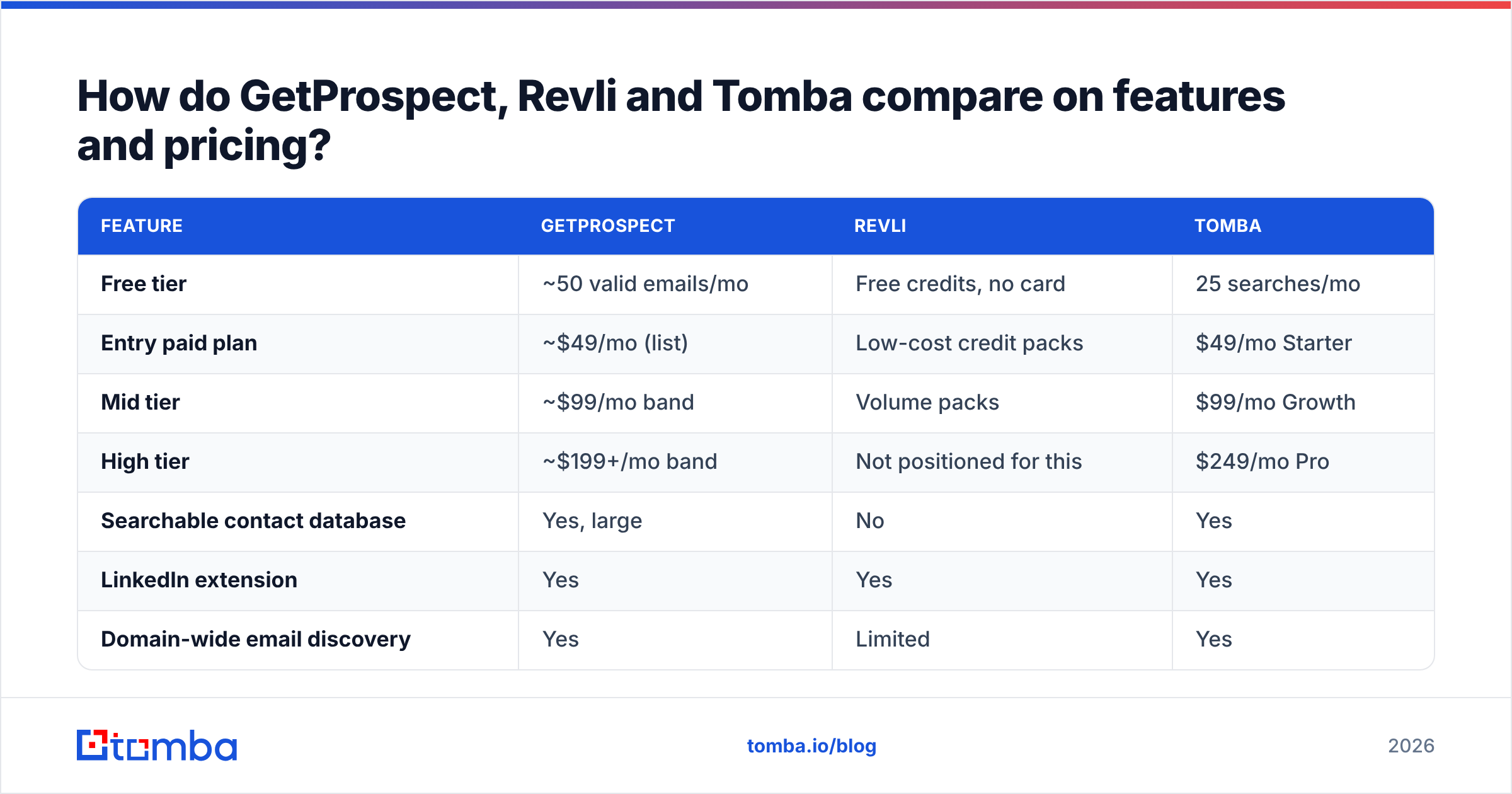
How do GetProspect, Revli and Tomba compare on features and pricing?#
Prices below are list prices published by each vendor at the time of writing. Verify on the vendor page before you buy — this category re-prices frequently, and annual discounts change the math.
| Feature | GetProspect | Revli | Tomba |
|---|---|---|---|
| Free tier | ~50 valid emails/mo | Free credits, no card | 25 searches/mo |
| Entry paid plan | ~$49/mo (list) | Low-cost credit packs | $49/mo Starter |
| Mid tier | ~$99/mo band | Volume packs | $99/mo Growth |
| High tier | ~$199+/mo band | Not positioned for this | $249/mo Pro |
| Searchable contact database | Yes, large | No | Yes |
| LinkedIn extension | Yes | Yes | Yes |
| Domain-wide email discovery | Yes | Limited | Yes |
| Standalone email verification | Included | Basic | Dedicated verifier |
| Catch-all resolution | No dedicated tool | No | Dedicated catch-all verifier |
| Documented public API | Yes | Limited | Yes, full REST API |
| Bulk CSV enrichment | Yes | Limited | Yes |
| Phone number lookup | Partial | No | Yes |
| Native CRM integrations | HubSpot, Pipedrive, Salesforce | Fewer | HubSpot, Salesforce, Pipedrive, Zapier, Make |
| Best for | List-building inside one UI | Cheap one-off lookups | API-first enrichment at volume |

Read that table as three different products rather than three grades of the same product. GetProspect sells a workspace. Revli sells lookups. A dedicated email finder with a full API sells infrastructure you build on top of.
Is GetProspect worth it in 2026?#
Yes, if your team builds lists by hand and lives in one tab.
GetProspect's real advantage is not the finder — it is everything around it. Saved lists with custom columns, deduplication, filters over the contact database, and a working Chrome extension add up to a workflow an SDR can learn in an afternoon. If your motion is "open Sales Navigator, build a search, extract, enrich, export to HubSpot," GetProspect handles the whole chain without glue code.
Where it strains:
- Credit accounting. Like most database products, credits are consumed on enrichment attempts and list operations, not just successful finds. Read the fine print on what counts as a billable event.
- Database freshness. Large static databases decay at roughly 2–3% per month as people change jobs. A record that was accurate in Q1 may be dead by Q4, and browsing a stale database feels productive while producing bounces.
- Price scaling. Per-seat plus per-credit pricing gets expensive fast when you add reps. Check the seat cost before you scale the team.
- API depth. The API exists, but it is a secondary citizen to the UI. If you plan to enrich programmatically at volume, benchmark it against an API-first competitor before committing.
Cross-check the current positioning on G2's lead intelligence category — review recency tells you more about a vendor's trajectory than any feature grid.
Is Revli worth it in 2026?#
Yes, if your volume is low and your requirement is genuinely "just find the email."
Revli's pitch is refreshingly narrow. There is no database to browse, no list manager to learn, and no seat-based pricing to negotiate. For a founder doing 30 outreach emails a week, or a recruiter checking one candidate at a time, that narrowness is a feature. You are not paying for a platform you will not open.
Where it strains:
- No database browsing. You cannot ask "show me all VPs of Engineering at Series B fintechs." You must already have the name and company. That rules out top-of-funnel discovery entirely.
- Bulk and API limits. If you want to enrich 5,000 rows overnight or call the finder from inside your product, you will outgrow a utility tool quickly.
- Verification depth. A confidence score is not a verification result. Assume you need a separate email verifier pass before anything goes into a sequence.
- Roadmap risk. Smaller tools ship less and pivot more. That is a fair trade at a low price, but it is a real consideration if you are wiring it into a critical workflow.
What about catch-all domains and verification?#
This is the section that decides whether your campaign lands, and both tools handle it the same way: incompletely.
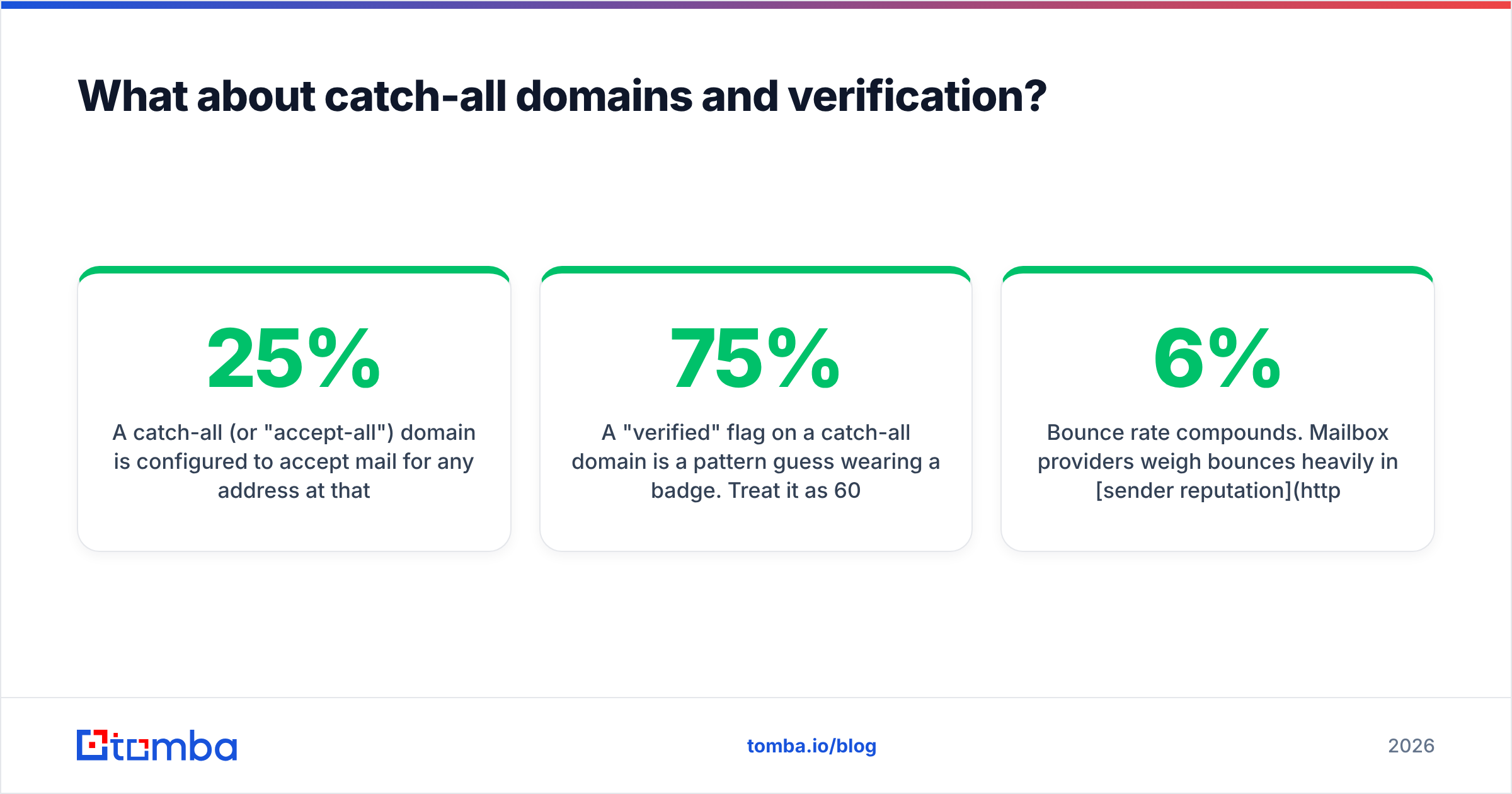
A catch-all (or "accept-all") domain is configured to accept mail for any address at that domain, valid or not. When a verifier runs an SMTP check against nonexistent.person@acme.com and the server replies "accepted," the verifier learns nothing. Roughly 15–25% of B2B domains behave this way, and the share is higher in enterprise and in regions with aggressive spam filtering.

What that means in practice:
- A "verified" flag on a catch-all domain is a pattern guess wearing a badge. Treat it as 60–75% confidence, not 95%.
- Bounce rate compounds. Mailbox providers weigh bounces heavily in sender reputation. A 6% bounce rate on a 2,000-email send does more damage than the 120 lost emails suggest, because it degrades delivery for the other 1,880.
- The fix is a second pass. Either segment catch-all results into a lower-priority tier, or run them through a dedicated catch-all verifier that uses signals beyond the SMTP handshake before you sequence them.
Neither GetProspect nor Revli markets a standalone catch-all resolution product. If your ICP skews enterprise, that gap costs you more than any pricing difference between the two.
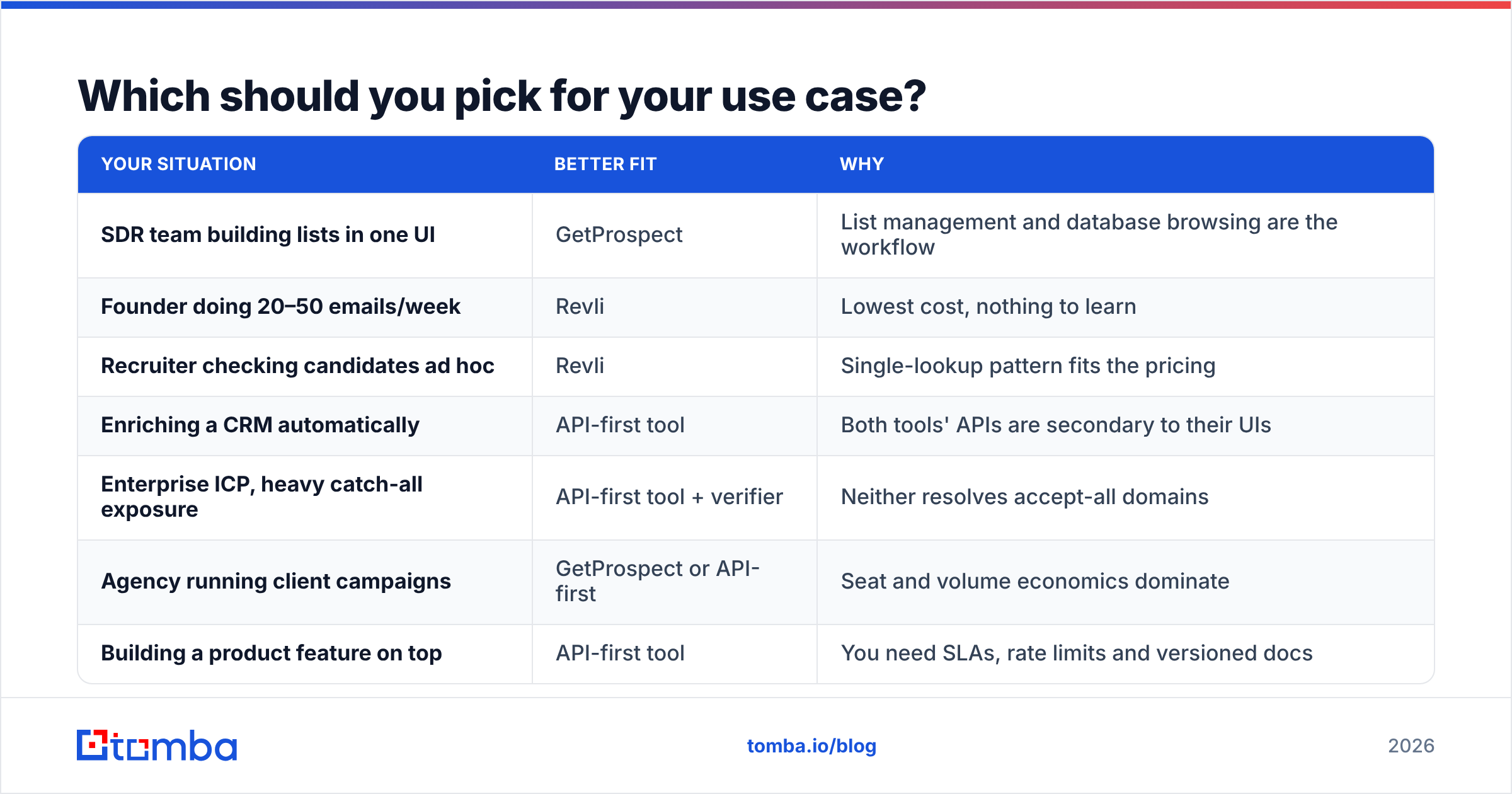
Which should you pick for your use case?#
| Your situation | Better fit | Why |
|---|---|---|
| SDR team building lists in one UI | GetProspect | List management and database browsing are the workflow |
| Founder doing 20–50 emails/week | Revli | Lowest cost, nothing to learn |
| Recruiter checking candidates ad hoc | Revli | Single-lookup pattern fits the pricing |
| Enriching a CRM automatically | API-first tool | Both tools' APIs are secondary to their UIs |
| Enterprise ICP, heavy catch-all exposure | API-first tool + verifier | Neither resolves accept-all domains |
| Agency running client campaigns | GetProspect or API-first | Seat and volume economics dominate |
| Building a product feature on top | API-first tool | You need SLAs, rate limits and versioned docs |
Where does Tomba fit in this comparison?#
Honestly: Tomba is not the answer if you want to browse a database inside a polished list UI all day. GetProspect is better at that, and pretending otherwise would waste your time.
Tomba's argument is different. It is built API-first, which changes the economics when finding emails is a step inside a larger system rather than a task a human performs. The Tomba API exposes the finder, verifier, domain search, catch-all verification, phone lookup and enrichment as separate documented endpoints, so you call only what you need and pay only for that. Bulk jobs run through the same interface as single lookups. There is a CLI and an MCP server if your workflow lives in a terminal or an AI agent rather than a browser.
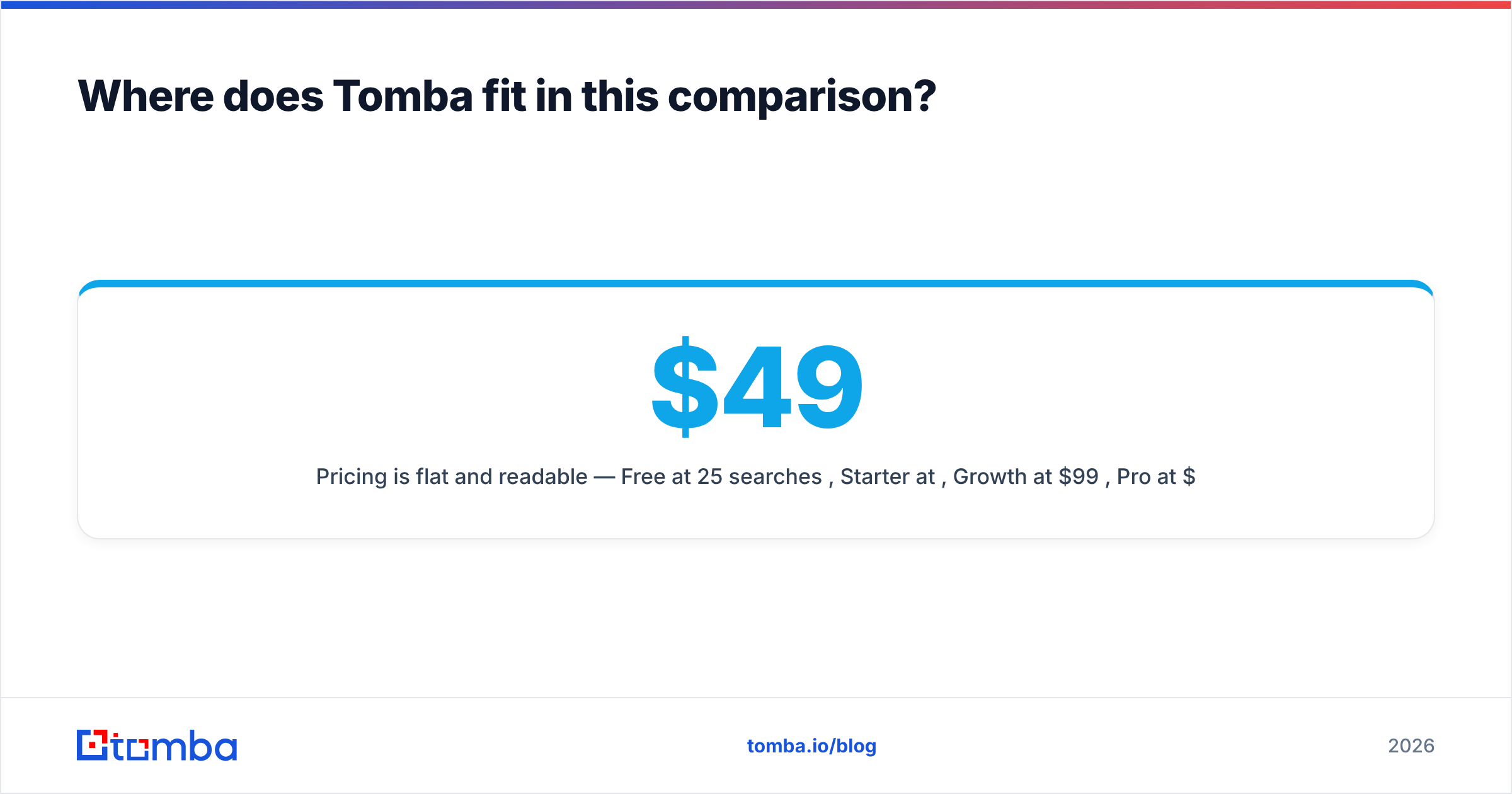
Pricing is flat and readable — Free at 25 searches/month, Starter at $49/month, Growth at $99/month, Pro at $249/month, with Enterprise negotiated. Full Tomba pricing is public, with no per-seat surcharge to discover after your first invoice.
The practical recommendation: run the 100-contact test described above across all three. Score hit rate, precision, and cost per correct address. Whichever tool wins on your list wins the argument — not the one with the biggest number on its homepage.
Ready to benchmark for yourself? Start with the Tomba Email Finder free tier — 25 searches a month, no card required. Drop in a domain and a name, compare the result against whatever GetProspect or Revli returned for the same contact, then check the bounce rate after your next send. That single comparison will tell you more than any review, including this one.
Related guides#
Ready to find emails that actually work?
Join 150,000+ professionals who stopped guessing and started sending. Free credits on signup — no credit card required.
Get the Tomba newsletter
Practical outbound tactics and product updates — once every two weeks.
About the author