GetProspect vs Sales Automation Systems: 2026 Buyer's Guide
GetProspect finds and enriches contacts. Sales automation systems send, sequence, and track them. Here is where each one actually earns its budget line — and where buying the wrong one costs you a quarter.
TL;DR
- GetProspect is a data tool — it finds, enriches, and stores B2B contacts. Sales automation systems (Outreach, Salesloft, Instantly, Reply.io, HubSpot Sequences) are execution tools — they send, sequence, track, and route.
- They are not substitutes. Buying an automation platform without a data source gives you an empty sequencer; buying a finder without a sender gives you a spreadsheet.
- The real question is which layer is your bottleneck right now. If reply rates are fine but list volume is thin, buy data. If you have 40,000 unworked contacts, buy execution.
- Cost asymmetry matters: data tools run $49–$99/mo for a working seat, automation platforms run $100–$165/user/mo on annual contracts. The cheap layer is usually the one you're underfunding.
- The stack that actually works in 2026: a verified data layer with API access, a sequencer with native inbox rotation, and a CRM as the system of record. Three tools, clearly separated.
What is GetProspect, exactly?#
GetProspect is a B2B contact database and email finder. You search by company, job title, industry, headcount, or location; it returns names, verified work emails, LinkedIn URLs, and company firmographics. It has a Chrome extension that pulls contacts off LinkedIn search results and a lightweight CRM-ish list manager so you can tag and segment what you pulled.
Think of it as the parts supplier, not the assembly line. It hands you clean components. What you do with them — the sequencing, the timing, the follow-up logic — happens somewhere else.
GetProspect does ship a basic email-sending feature, which is where buyer confusion starts. A send button is not a sales automation system, the same way a microwave is not a kitchen. It works for a one-off blast to 200 people. It does not do multichannel branching, inbox rotation across 15 mailboxes, reply detection that pauses a sequence mid-flight, or task queues for SDRs.
What counts as a sales automation system?#
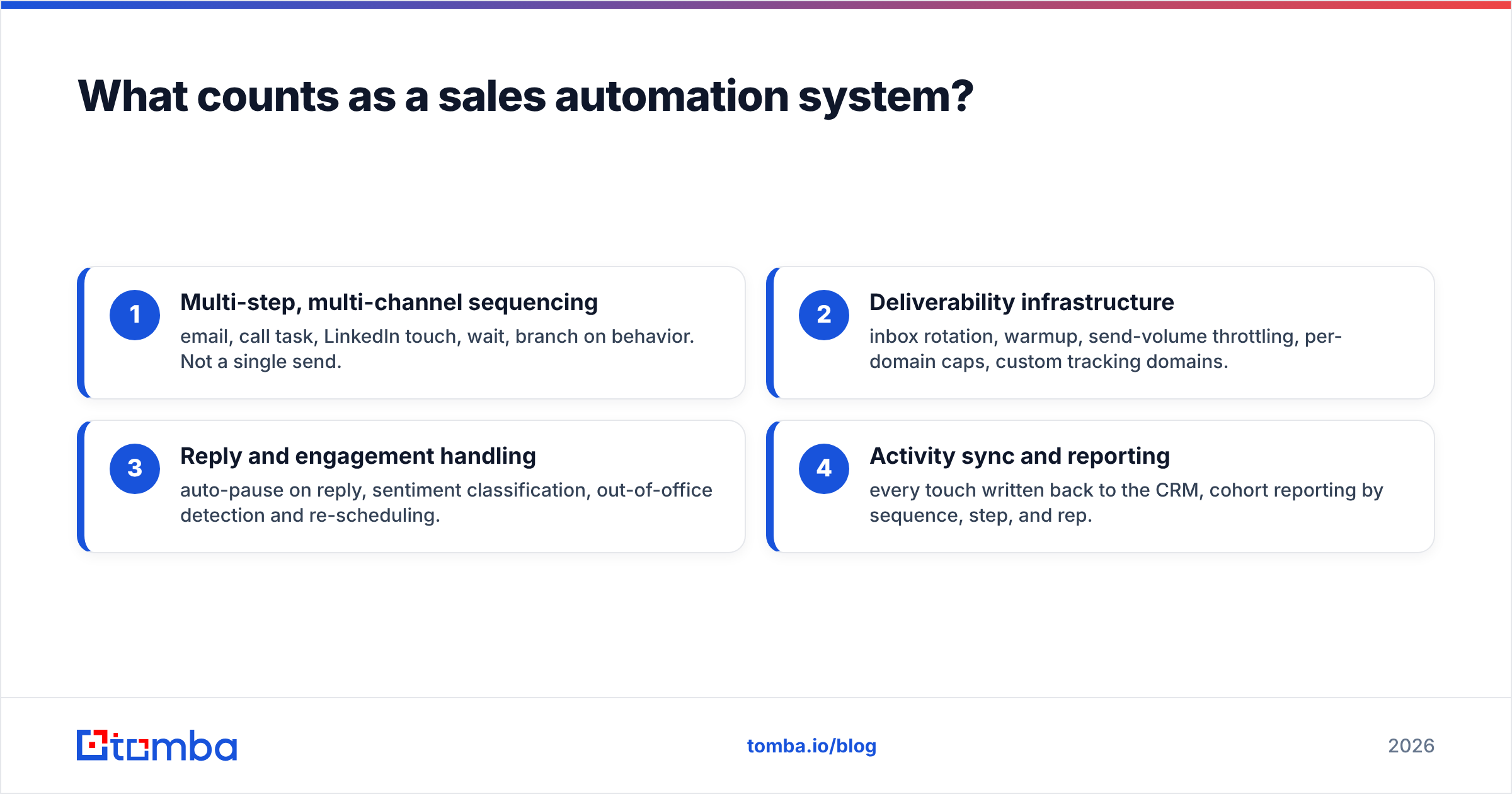
"Sales automation" is a loose category, so pin it down. A real sales automation system does at least four things a data tool cannot:
- Multi-step, multi-channel sequencing — email, call task, LinkedIn touch, wait, branch on behavior. Not a single send.
- Deliverability infrastructure — inbox rotation, warmup, send-volume throttling, per-domain caps, custom tracking domains.
- Reply and engagement handling — auto-pause on reply, sentiment classification, out-of-office detection and re-scheduling.
- Activity sync and reporting — every touch written back to the CRM, cohort reporting by sequence, step, and rep.
Products in this bucket range from enterprise revenue platforms (Outreach, Salesloft, HubSpot Sales Hub) to cold-email-native tools (Instantly, Smartlead, Reply.io, Lemlist) to LinkedIn-first automation (Expandi, Waalaxy). They differ enormously from each other — but all of them assume you arrive with a list.
GetProspect vs sales automation systems: how do they actually compare?#
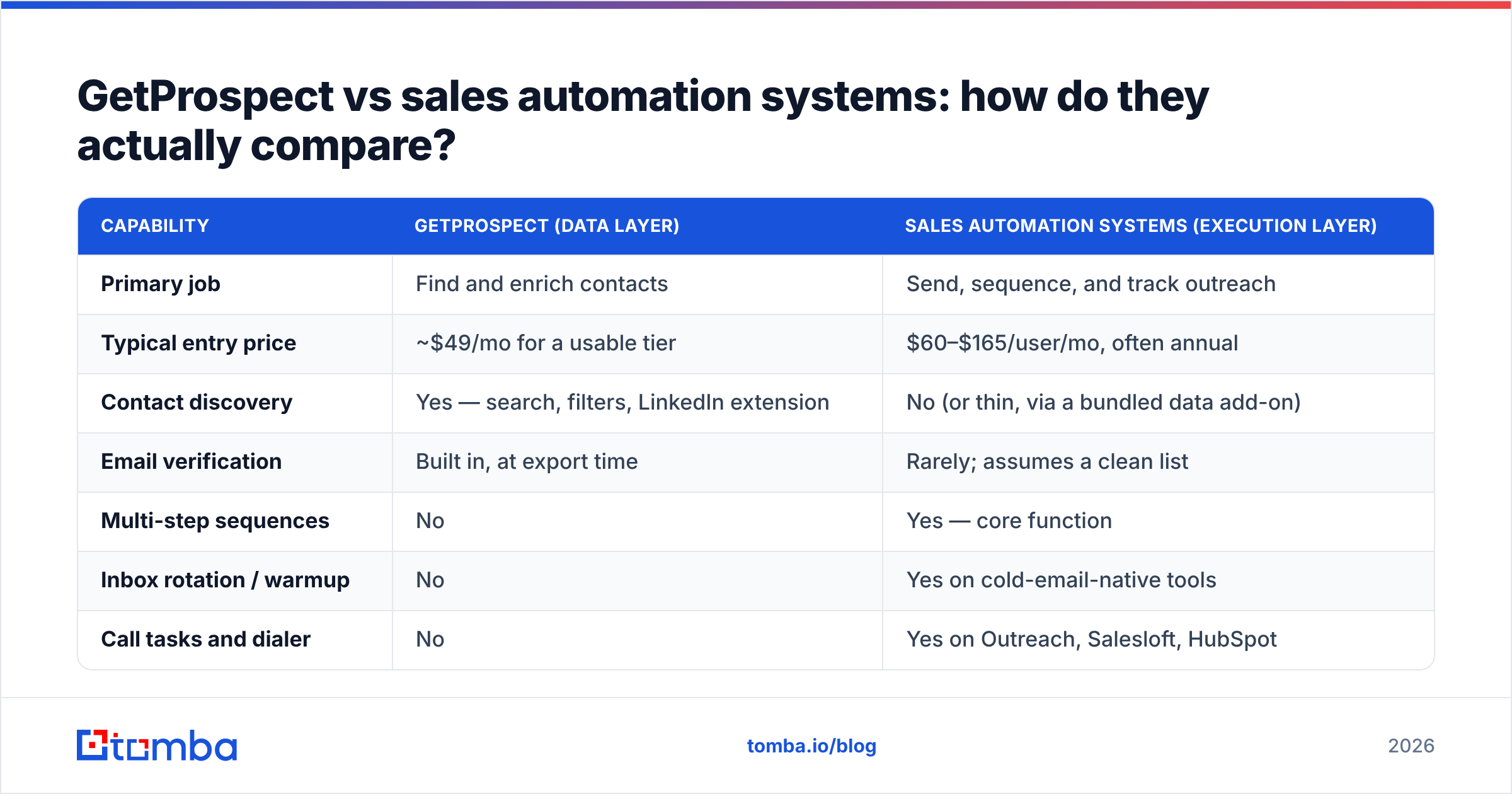
Here is the side-by-side that matters when you're deciding what to buy first.
| Capability | GetProspect (data layer) | Sales automation systems (execution layer) |
|---|---|---|
| Primary job | Find and enrich contacts | Send, sequence, and track outreach |
| Typical entry price | ~$49/mo for a usable tier | $60–$165/user/mo, often annual |
| Contact discovery | Yes — search, filters, LinkedIn extension | No (or thin, via a bundled data add-on) |
| Email verification | Built in, at export time | Rarely; assumes a clean list |
| Multi-step sequences | No | Yes — core function |
| Inbox rotation / warmup | No | Yes on cold-email-native tools |
| Call tasks and dialer | No | Yes on Outreach, Salesloft, HubSpot |
| CRM write-back | Export or basic sync | Native, bidirectional, field-level |
| Reply detection | No | Yes, with auto-pause |
| API for pipelines | Limited | Varies; strong on enterprise tiers |
| Fails when… | You have no sending infrastructure | Your list is stale or unverified |
Read that last row twice. Each tool has a specific failure mode, and they are opposite failure modes. An automation platform with bad data burns your domain reputation on bounces. A data tool with no automation produces CSVs nobody works.
Which layer is your actual bottleneck?#
Run this diagnostic before you sign anything. It takes ten minutes with your CRM export.
- Bounce rate above 4% — data problem. No sequencer fixes this. You need better sourcing and a real email verifier in the pipeline before send.
- Under 500 net-new contacts sourced per rep per month — data problem. Your reps are hand-scraping LinkedIn, which costs 6–10 hours a week each.
- Thousands of contacts sitting untouched past 30 days — execution problem. You have supply; you lack throughput.
- Reply rate under 2% on a clean, targeted list — neither. That's a messaging and targeting problem, and buying software will not fix it.
- Reps manually copying contacts between tools — integration problem. Solve it with an API or a middleware layer, not another seat license.
Most teams under 10 reps are data-bottlenecked and think they're execution-bottlenecked, because automation vendors market harder. Google's and Yahoo's bulk-sender rules — the ones that took effect in 2024 and have only tightened since — put a hard ceiling on spam complaints and effectively made list hygiene a prerequisite for volume, not an optimization. You can read the current bulk sender requirements straight from Google's postmaster documentation. The practical upshot: sending infrastructure got cheap and list quality got expensive.
How much does each layer really cost?#
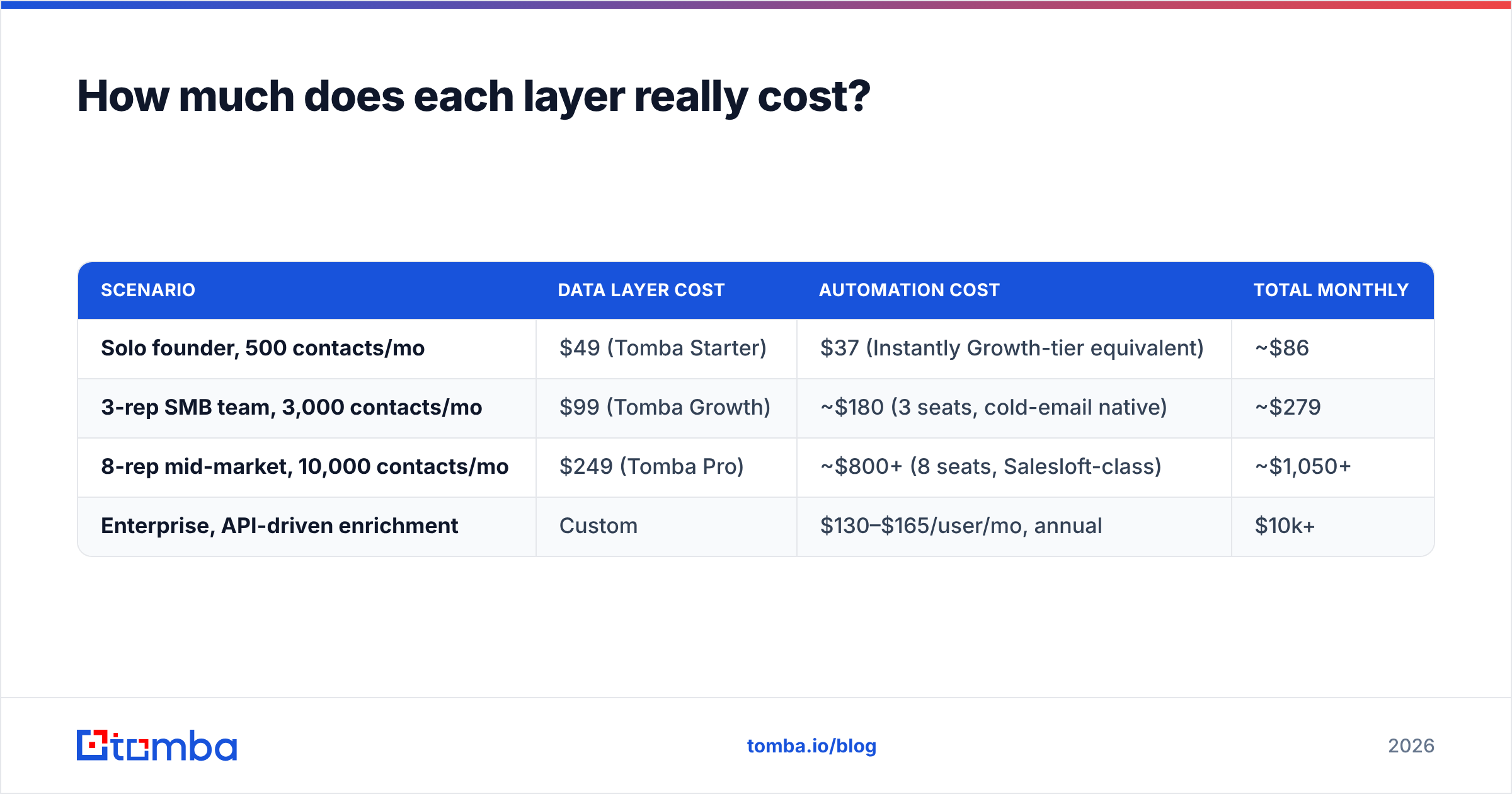
Sticker prices mislead here because the units differ. Data tools price per credit or per lookup; automation platforms price per seat. A five-rep team's math looks nothing like a one-founder team's.
| Scenario | Data layer cost | Automation cost | Total monthly |
|---|---|---|---|
| Solo founder, 500 contacts/mo | $49 (Tomba Starter) | $37 (Instantly Growth-tier equivalent) | ~$86 |
| 3-rep SMB team, 3,000 contacts/mo | $99 (Tomba Growth) | ~$180 (3 seats, cold-email native) | ~$279 |
| 8-rep mid-market, 10,000 contacts/mo | $249 (Tomba Pro) | ~$800+ (8 seats, Salesloft-class) | ~$1,050+ |
| Enterprise, API-driven enrichment | Custom | $130–$165/user/mo, annual | $10k+ |
Two things jump out. First, the data layer stays roughly flat as headcount grows because it scales on volume, not seats. Second, the automation layer scales linearly with headcount and dominates the bill past five reps. That's why RevOps teams squeeze automation seat counts and rarely squeeze data budgets — the ROI curve is steeper on data.
If you want a concrete anchor, Tomba pricing runs a free tier at 25 searches/mo, Starter at $49/mo, Growth at $99/mo, and Pro at $249/mo. GetProspect's own tiers sit in a comparable band; check the current numbers on getprospect.com since both vendors adjust credits per tier more often than headline prices.
Can one tool do both jobs well?#
Some try. Apollo, Amplemarket, and Seamless.AI bundle a database with a sequencer. GetProspect leans data-first with light sending. HubSpot leans execution-first with a light data add-on.
The honest verdict from teams running these at scale: bundles are convenient at low volume and constraining at high volume. Three specific failure points show up repeatedly.
- The weaker half caps you. All-in-ones are excellent at one layer and adequate at the other. You outgrow the adequate half around month nine and end up buying a second tool anyway — now paying for overlap.
- Deliverability is not a side feature. Inbox rotation, warmup pools, and per-domain throttling are hard engineering. Bundled senders typically ship a simplified version, and simplified is exactly what Gmail's filters penalize.
- Data freshness beats data breadth. A bundle's database is only refreshed as often as the vendor prioritizes it. When your ICP is narrow, a specialized finder with live verification beats a broad-but-stale bundled database — G2's category data consistently shows accuracy, not record count, driving satisfaction scores in lead intelligence.
The counter-argument is real, though: if you're a solo founder sending 300 emails a month, a bundle is one login, one bill, and one thing to learn. Optimize for simplicity until simplicity costs you deals.

What does a clean 2026 stack look like?#
Separate the layers explicitly and connect them with an API. That's it. The architecture that survives headcount changes has three components:
- Data layer — sources and verifies contacts. Should expose an API so enrichment happens automatically on CRM record creation, not manually in a browser tab. This is where an email finder API earns its keep: new account lands in your CRM, webhook fires, contacts come back enriched and verified in seconds.
- Execution layer — sequences and sends. Owns deliverability, warmup, throttling, and reply handling. Should never be the place your contact data lives permanently.
- System of record — your CRM. Every touch, every reply, every status change writes here. If your reporting comes out of the sequencer instead of the CRM, you have two versions of the truth.
Connect data → CRM → execution, and keep the arrows one-directional where you can. Bidirectional sync between three tools is how field conflicts start.
A practical note on the data layer: run verification twice. Once at source, once immediately before send. Contacts decay at roughly 2–3% per month as people change jobs, so a list sourced in January is meaningfully worse by April. Catch-all domains need their own handling — a standard verifier returns "unknown" and you either guess or use a dedicated catch-all verifier that probes further.
Where does Tomba fit in this comparison?#
Tomba sits squarely in the data layer, and deliberately so. It's an email finder, verifier, domain search, catch-all verifier, phone finder, and enrichment API — no sequencer, no dialer, no inbox rotation. That's a positioning choice, not a gap.
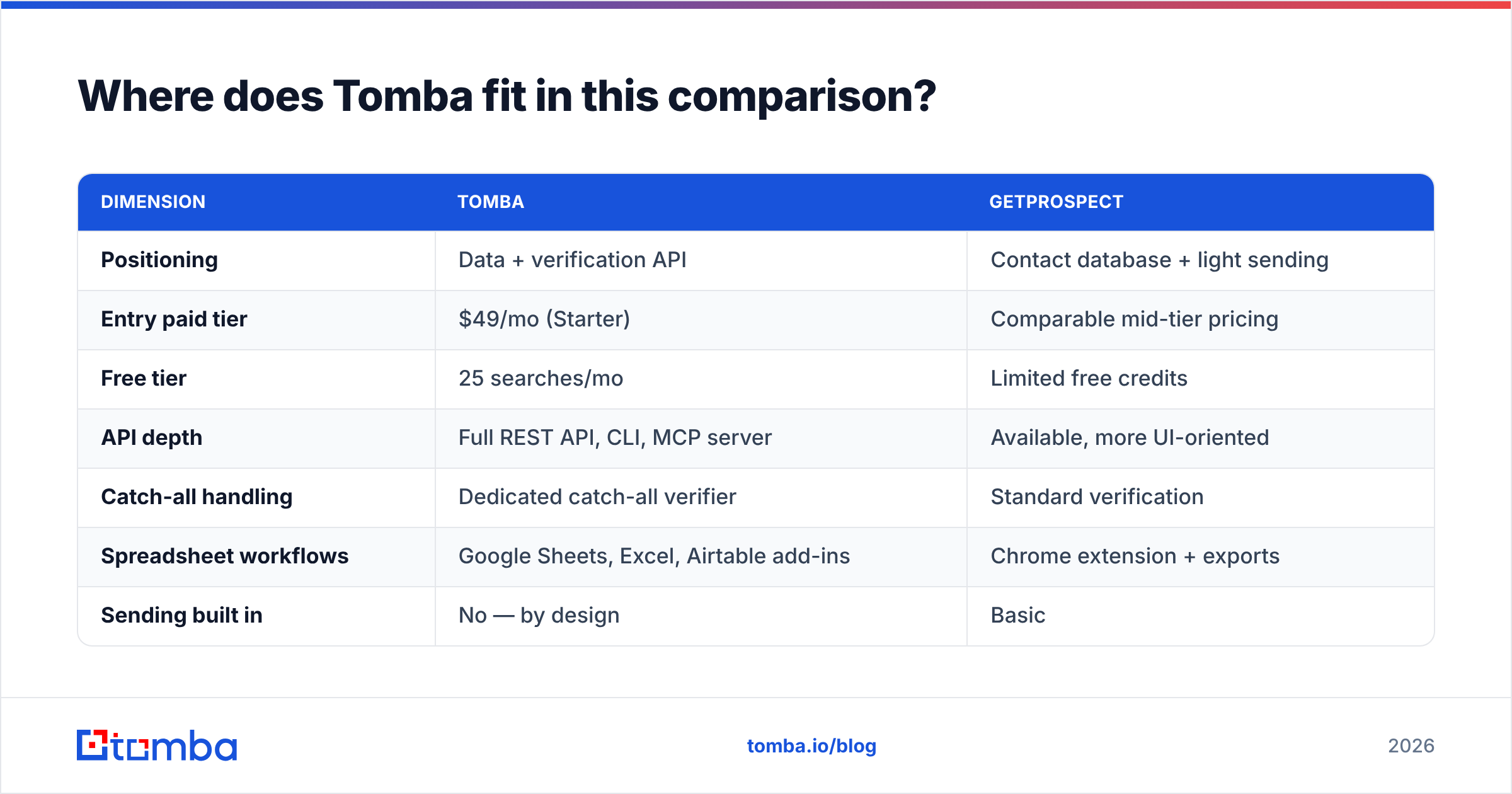
Against GetProspect specifically, the split is roughly this:
| Dimension | Tomba | GetProspect |
|---|---|---|
| Positioning | Data + verification API | Contact database + light sending |
| Entry paid tier | $49/mo (Starter) | Comparable mid-tier pricing |
| Free tier | 25 searches/mo | Limited free credits |
| API depth | Full REST API, CLI, MCP server | Available, more UI-oriented |
| Catch-all handling | Dedicated catch-all verifier | Standard verification |
| Spreadsheet workflows | Google Sheets, Excel, Airtable add-ins | Chrome extension + exports |
| Sending built in | No — by design | Basic |
| Best fit | Teams piping data into their own stack | Teams wanting search + light outreach in one UI |
Neither is a sales automation system, and neither pretends hard enough to be one. GetProspect is a respectable database with a friendlier browsing UI. Tomba is a stronger fit when enrichment needs to run headless — inside a script, a Zapier flow, a CRM webhook, or an AI agent via MCP — rather than a person clicking through search filters. If you're deciding between them, the tiebreaker is usually whether a human or a pipeline is doing the searching.
What should you buy first?#
Buy the layer that unblocks the other one.
If you have a sequencer and no list, the sequencer is idle capital. Fund data. If you have 30,000 verified contacts and two overloaded SDRs, the data is idle capital. Fund execution. If you have neither, start with data plus the cheapest credible sender you can find — because a good list with a mediocre sequencer outperforms a bad list with an excellent one, every time. Deliverability compounds downward from bounces, and no amount of sequencing logic recovers a burned domain.
And if you're at the stage where the answer is "we need more of both," build the pipeline first. Get enrichment happening automatically on record creation, get verification running pre-send, and only then add sequencer seats. Seats are the easiest thing to add and the hardest thing to justify removing.
Start with the layer that scales on volume instead of headcount. Tomba's Email Finder gives you 25 free searches to test accuracy against your own ICP before you commit — run it on 25 accounts you already know, check the hit rate and bounce rate yourself, then decide whether your bottleneck is really the sending or really the list. Most teams find out it was the list.
Related guides#
Ready to find emails that actually work?
Join 150,000+ professionals who stopped guessing and started sending. Free credits on signup — no credit card required.
Get the Tomba newsletter
Practical outbound tactics and product updates — once every two weeks.
About the author