GetProspect vs Salesgenie: Which B2B Data Tool Wins in 2026
GetProspect and Salesgenie solve the same problem from opposite ends: one finds emails on demand, the other sells you a list. Here is how they compare on coverage, accuracy, pricing, and export limits.
TL;DR
- GetProspect is a live email finder. You search by domain, title, or LinkedIn profile and it returns work emails on demand, with a free tier and per-email credit pricing.
- Salesgenie (Data Axle Genie) is a list database. You filter a compiled US business and consumer file by SIC code, revenue, employee count, or geography, then export or dial the records.
- They fail in opposite ways. GetProspect struggles on small local businesses with no web footprint. Salesgenie struggles on modern SaaS org charts and role-level email accuracy.
- Pricing models don't map cleanly. GetProspect sells credits monthly; Salesgenie sells seats and record allowances, usually with annual commitments and a trial.
- If your motion is B2B outbound to knowledge-worker titles, a dedicated finder plus verification beats a compiled list. That's where tools like Tomba, at $49/mo for the Starter plan, compete directly with GetProspect.
Choosing between these two isn't really a feature bake-off. It's a question about what kind of prospecting you do. Pick wrong and you either pay for 50,000 local HVAC records you'll never call, or you pay per-email for contacts a list vendor would have handed you in bulk.
What is GetProspect and who is it for?#
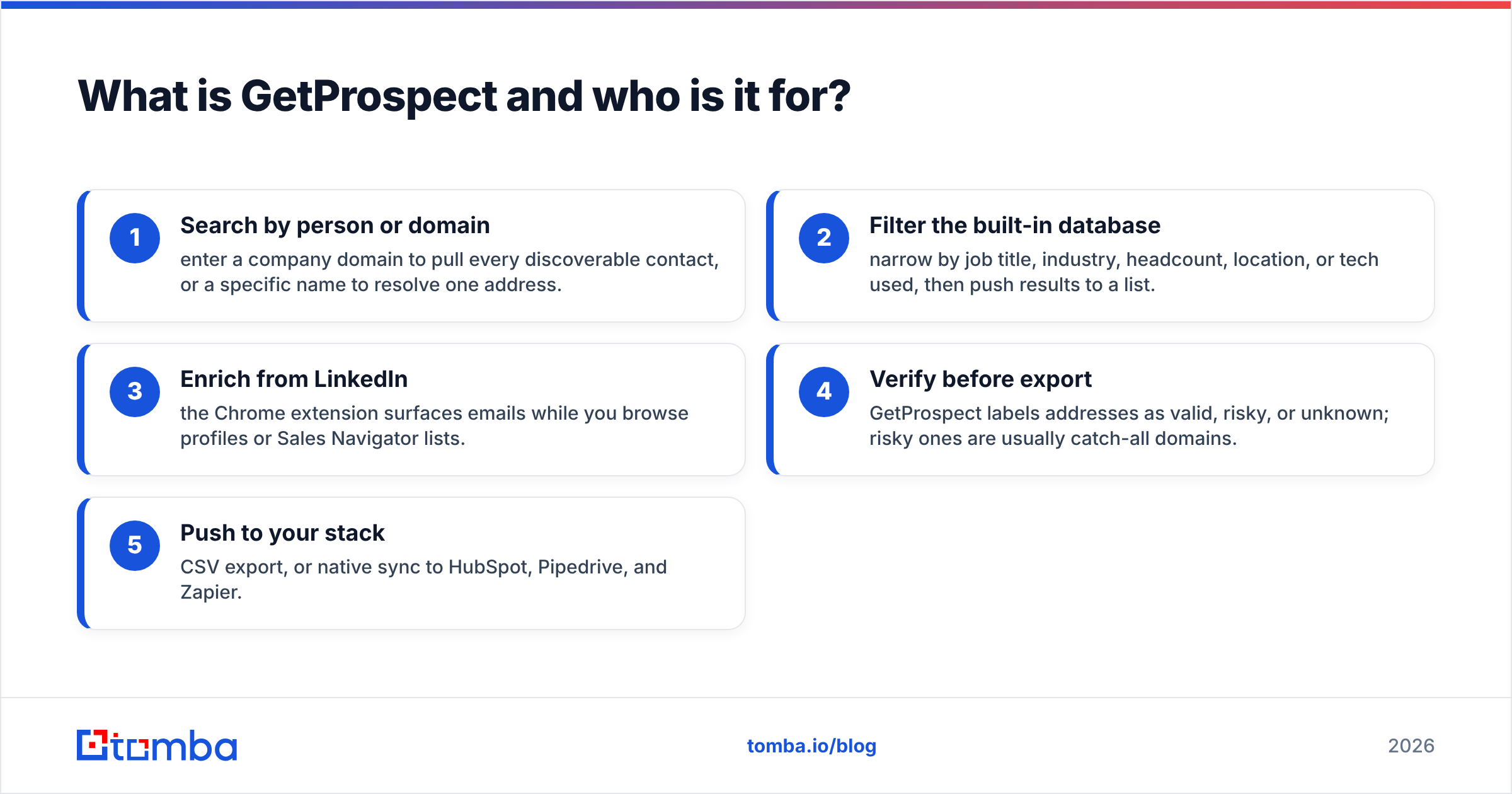
GetProspect is an email-finding platform built around a browser extension, a domain search, and a contact database you query with filters. You give it a name and a company, or a LinkedIn profile, or just a domain, and it returns a professional email address with a confidence indicator.
The core loop looks like this:
- Search by person or domain — enter a company domain to pull every discoverable contact, or a specific name to resolve one address.
- Filter the built-in database — narrow by job title, industry, headcount, location, or tech used, then push results to a list.
- Enrich from LinkedIn — the Chrome extension surfaces emails while you browse profiles or Sales Navigator lists.
- Verify before export — GetProspect labels addresses as valid, risky, or unknown; risky ones are usually catch-all domains.
- Push to your stack — CSV export, or native sync to HubSpot, Pipedrive, and Zapier.
The buyer is a founder, SDR, or growth marketer building targeted lists of 200–5,000 contacts a month, usually against software, agency, ecommerce, or professional-services companies. Free plan aside, you pay for volume of emails found, not for seats.
What is Salesgenie and how is it different?#
Salesgenie, now marketed under the Data Axle Genie brand, is a completely different animal. It's a subscription to a compiled database — roughly 30 million US businesses and well over 200 million consumer records — assembled from phone directories, public filings, credit sources, utility connections, and telephone verification calls.
You don't search for a person. You build a selection: all plumbing contractors in three ZIP codes with 5–20 employees and over $1M in revenue. Then you export the list, print mailing labels, or work it through the built-in dialer and CRM-lite features.
Key structural differences from GetProspect:
- Record-first, not person-first. Salesgenie's atomic unit is a business location. Contact names are attached where known, often "owner" or "manager" rather than a specific department head.
- Phone and postal are first-class. Direct-mail lists, do-not-call scrubbing, and telemarketing prep are native use cases, not afterthoughts.
- Coverage is US-heavy. International SMB coverage is thin compared to its domestic file.
- Email is a secondary field. Many records carry a generic company inbox rather than a personal work address, which matters enormously for cold email reply rates.
If you sell insurance, home services, local advertising, or B2C-adjacent products by phone and mail, this is a mature, well-known tool. If you sell software to a VP of Engineering, it's the wrong shape.
GetProspect vs Salesgenie: how do they compare head-to-head?#
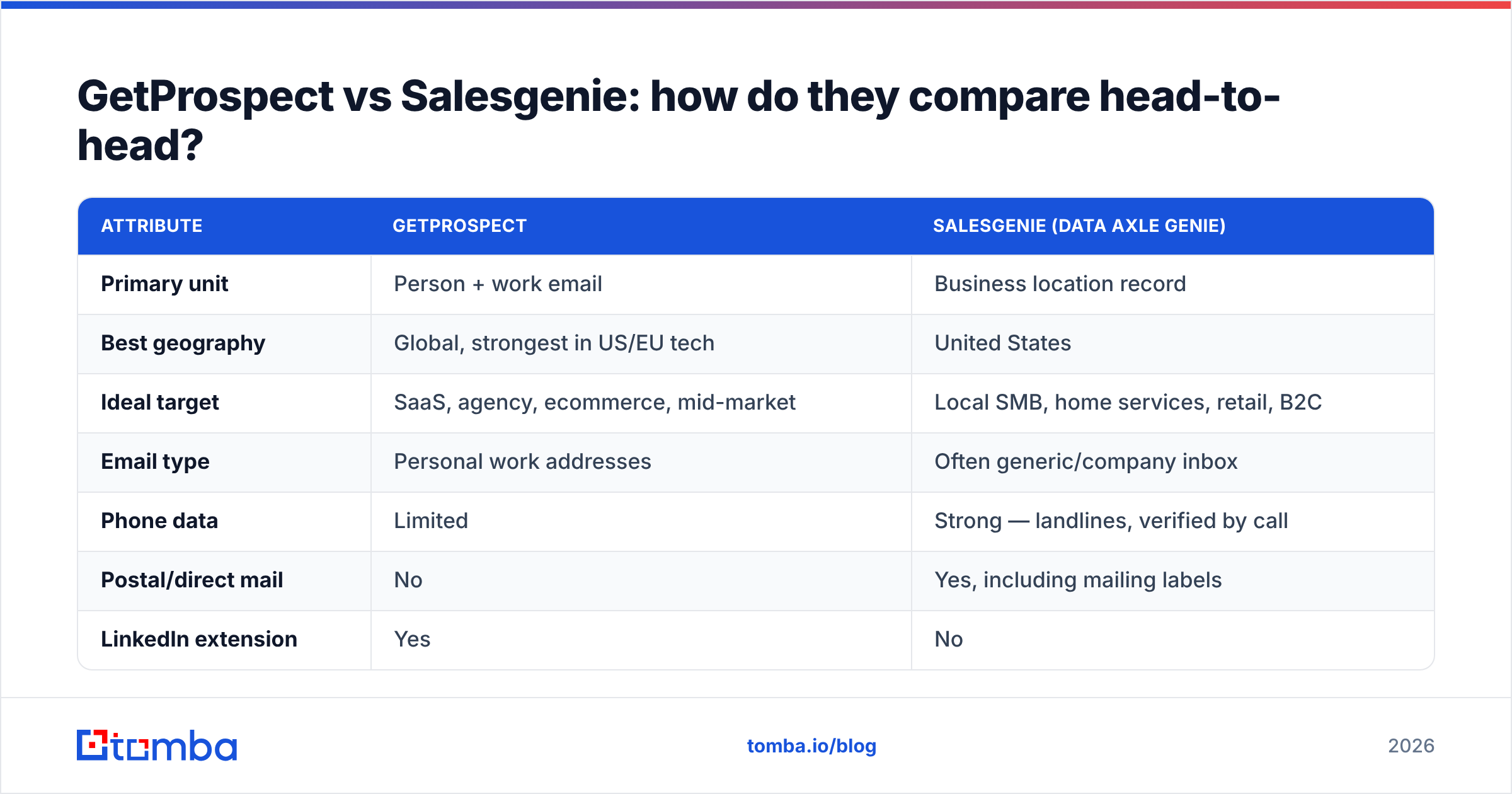
| Attribute | GetProspect | Salesgenie (Data Axle Genie) |
|---|---|---|
| Primary unit | Person + work email | Business location record |
| Best geography | Global, strongest in US/EU tech | United States |
| Ideal target | SaaS, agency, ecommerce, mid-market | Local SMB, home services, retail, B2C |
| Email type | Personal work addresses | Often generic/company inbox |
| Phone data | Limited | Strong — landlines, verified by call |
| Postal/direct mail | No | Yes, including mailing labels |
| LinkedIn extension | Yes | No |
| API access | Yes | Limited / enterprise |
| Free entry point | Free plan with monthly email quota | Free trial with capped record views |
| Contract | Monthly, cancel anytime | Typically annual or multi-month term |
| Learning curve | Under an hour | A day, plus a rep walkthrough |
The table makes the split obvious. These tools overlap on the word "leads" and almost nowhere else.
Which one has better data accuracy?#
This is where the comparison gets uncomfortable, because the two vendors measure accuracy differently and both are technically telling the truth.
GetProspect's accuracy is verification accuracy. When it returns an email, it has run SMTP-level checks and pattern inference. A "valid" result usually lands. The problem is coverage: for a 200-person B2B software company, expect a solid hit rate on named contacts; for a two-person landscaping business with a Wix site and a Gmail address, expect nothing.
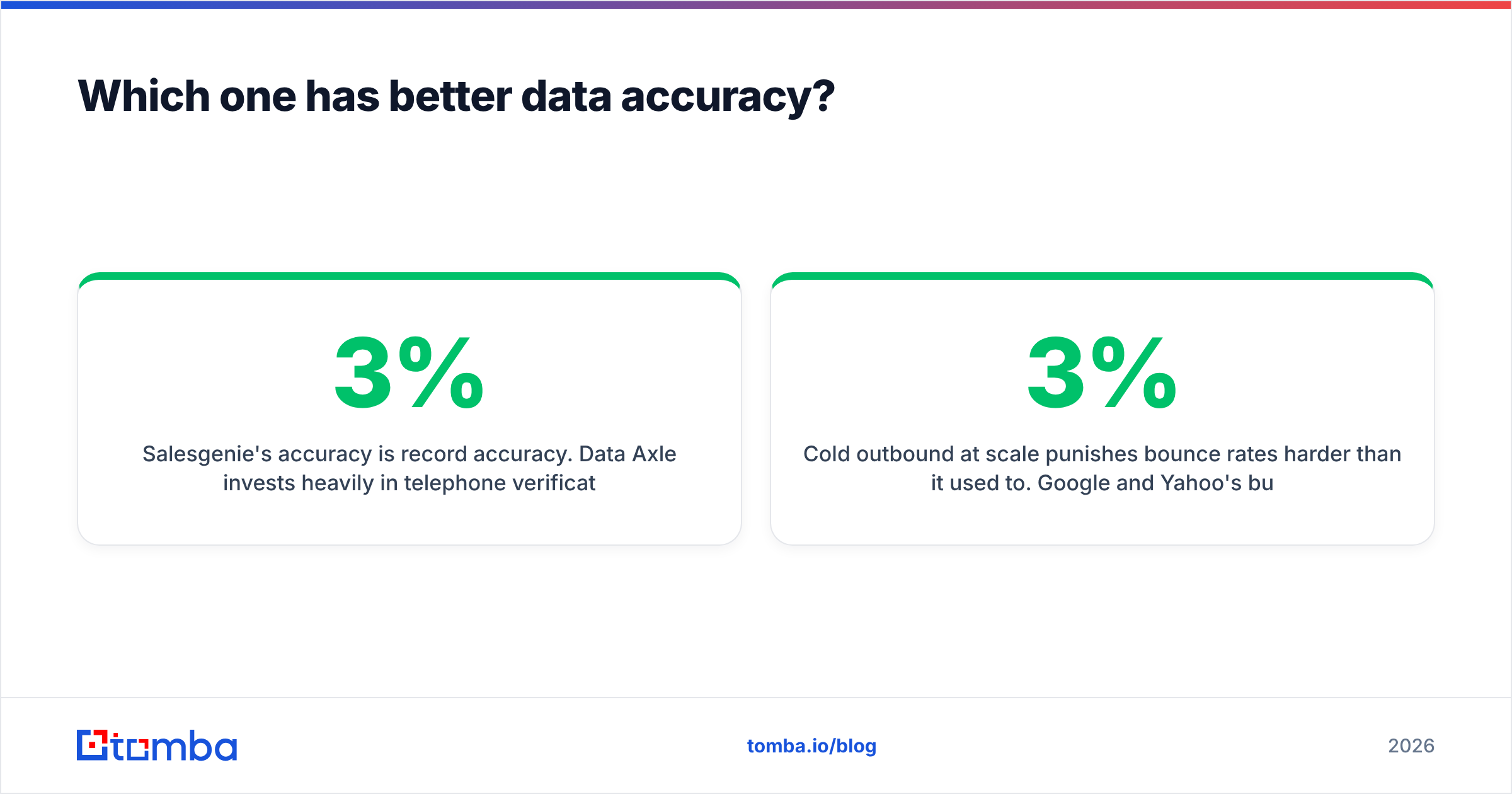
Salesgenie's accuracy is record accuracy. Data Axle invests heavily in telephone verification of business existence, address, and industry classification. That's genuinely valuable — the business is real, open, and in the category you filtered on. But "this company exists and does roofing" is a different claim than "jane@thatroofer.com will land in Jane's inbox today." Compiled email fields decay fast, and the industry rule of thumb is roughly 2–3% monthly B2B contact churn, which compounds to a quarter of a file going stale in a year.

The practical implication: whichever tool you choose, verify before you send. Both a finder's "risky" bucket and a compiled list's email column deserve a pass through a dedicated email verifier before anything hits your sequencer. Catch-all domains are the specific trap — they accept everything at the SMTP layer and tell you nothing, which is why a catch-all verifier exists as a separate step rather than a checkbox.
Cold outbound at scale punishes bounce rates harder than it used to. Google and Yahoo's bulk sender requirements pushed the practical ceiling to well under 3% hard bounces before your sender reputation starts absorbing damage. A 15% bounce rate from an unverified compiled list will cook a domain in a week.
How does pricing compare between GetProspect and Salesgenie?#
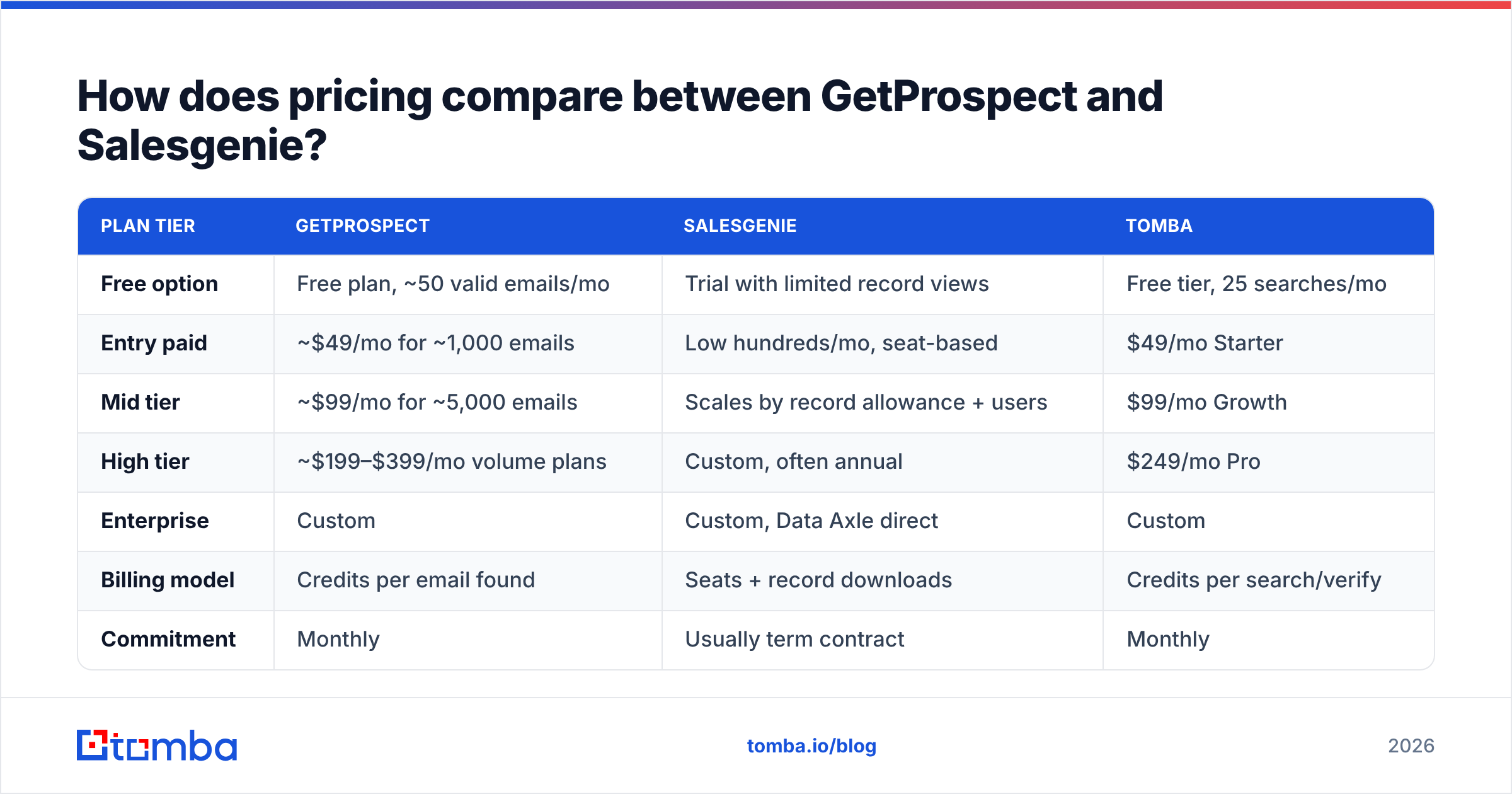
Neither vendor makes this simple, and both change plans periodically — treat these as shapes, not quotes, and confirm current numbers on their sites.
| Plan tier | GetProspect | Salesgenie | Tomba |
|---|---|---|---|
| Free option | Free plan, ~50 valid emails/mo | Trial with limited record views | Free tier, 25 searches/mo |
| Entry paid | ~$49/mo for ~1,000 emails | Low hundreds/mo, seat-based | $49/mo Starter |
| Mid tier | ~$99/mo for ~5,000 emails | Scales by record allowance + users | $99/mo Growth |
| High tier | ~$199–$399/mo volume plans | Custom, often annual | $249/mo Pro |
| Enterprise | Custom | Custom, Data Axle direct | Custom |
| Billing model | Credits per email found | Seats + record downloads | Credits per search/verify |
| Commitment | Monthly | Usually term contract | Monthly |
| API included | Yes on paid tiers | Enterprise-level | Yes on all paid tiers |
The structural difference matters more than the numbers. GetProspect and Tomba both charge for results — you spend a credit when an email comes back. Salesgenie charges for access — you pay for the seat and a download allowance whether the records convert or not. If you export 25,000 records and work 800 of them, your effective cost per usable lead is far higher than the sticker suggests.
There's a second hidden cost with list databases: the records you already have. Compiled files overlap heavily with anything you've bought before, so budget for deduplication. Running exports through a remove duplicates pass before import is not optional at volume.

Which tool fits your sales motion?#
Skip the feature lists and answer three questions.
1. Do you know the company or the person first? If you start from an ICP filter — "manufacturers in Ohio with 50+ employees" — a database like Salesgenie is built for that. If you start from a named account list or a LinkedIn search, a finder like GetProspect is built for that.
2. What channel closes your deals? Phone and mail favor Salesgenie's verified landlines and postal addresses. Email and LinkedIn favor GetProspect's personal work addresses. Multi-channel teams often end up with both, which is expensive and usually a sign the ICP is too broad.
3. Do you need an API? If enrichment needs to happen inside your product, your CRM workflow, or a nightly job, you need programmable access. GetProspect offers it on paid tiers; Salesgenie treats it as an enterprise conversation. A straightforward email finder API with documented rate limits and predictable credit accounting removes a lot of procurement friction here.

Are there better alternatives to GetProspect and Salesgenie?#
Both tools have real competition, and the honest answer depends on which half of the comparison you actually need.
If you need person-level email discovery — the GetProspect side — the market is crowded and pricing is broadly similar. Tomba, Hunter, Findymail, and Snov.io all compete on hit rate, verification depth, and integration surface. The differentiators worth checking are catch-all handling, whether verification is bundled or billed separately, and whether the domain search returns role patterns you can extrapolate from. On Tomba's pricing, search and verification credits sit on the same plan, which avoids the common annoyance of paying two vendors to find and then confirm the same address.
If you need compiled list data — the Salesgenie side — the credible alternatives include ZoomInfo at the enterprise end, Apollo for tech-heavy B2B, and BookYourData for prepaid, per-record B2B lists without a subscription commitment. BookYourData in particular is worth a look if your objection to Salesgenie is the annual contract rather than the data itself; it sells verified contacts in packs with a straightforward per-record price and a bounce guarantee, which is a fundamentally friendlier model for teams running occasional campaigns rather than continuous prospecting.
Independent review volume is a decent sanity check before you commit. Both vendors have substantial profiles on G2, and the pattern in the reviews is consistent with everything above: GetProspect complaints cluster around credit consumption and coverage gaps on smaller companies, Salesgenie complaints cluster around email freshness and contract terms.
What's the verdict on GetProspect vs Salesgenie?#
GetProspect wins for modern B2B email outbound. Better personal-email coverage, a LinkedIn workflow, monthly billing, and API access make it the default for anyone running sequences against named titles at companies with a real web presence.
Salesgenie wins for US local-business prospecting by phone and mail. Nothing in the email-finder category comes close to its verified coverage of small brick-and-mortar businesses, and if your reps dial for a living, that file is an asset.
Neither wins on its own if you skip verification. Both a finder's risky-bucket results and a compiled list's email column need a validation pass before your first send. That step costs pennies per record and protects the only asset in cold email that can't be repurchased — your domain.
If your comparison started because GetProspect's credit ceilings pinch or Salesgenie's contract terms feel heavy, run a side-by-side test on 100 accounts you already know. Pull them through the Tomba Email Finder free tier, check hit rate and bounce rate against your own known-good contacts, and let the numbers pick the vendor. Twenty-five free searches is enough to see the pattern, and $49/mo is enough to run a real campaign before you sign anything longer than a month.
Related guides#
Ready to find emails that actually work?
Join 150,000+ professionals who stopped guessing and started sending. Free credits on signup — no credit card required.
Get the Tomba newsletter
Practical outbound tactics and product updates — once every two weeks.
About the author