GetProspect vs SalesQL: Which Email Finder Wins in 2026?
Both tools promise LinkedIn-to-email in one click, but they charge, verify, and fail in very different ways. A neutral breakdown of accuracy, credits, exports, and API depth.
GetProspect vs SalesQL is a choice between two shapes of tool: a searchable lead database, or a reveal button that lives inside LinkedIn. Here is how the two compare on accuracy, credits, and cost per usable email.
TL;DR
- GetProspect is a lead database plus a LinkedIn extension. You get a searchable contact index, list management, CSV enrichment, and a Chrome extension that pulls emails off LinkedIn profiles and Sales Navigator searches.
- SalesQL is narrower on purpose. It lives almost entirely inside LinkedIn, pulls personal and work emails plus phone numbers, and exports to CSV or your CRM.
- Accuracy is close on standard corporate domains. It diverges badly on catch-all domains, small companies, and non-US regions. Neither vendor publishes an audited accuracy figure.
- Credit models differ more than headline prices. GetProspect charges for valid emails found. SalesQL charges per contact revealed, and phone numbers cost extra on higher tiers. Compare cost per usable record, not cost per month.
- If you need API-first enrichment rather than a browser extension, both are weak. That is where a dedicated email finder with a documented API usually wins.
What are GetProspect and SalesQL?#
Short version: both turn a LinkedIn profile into a contactable email address. They just disagree about what else the product should be.
GetProspect started as an email finder with a LinkedIn extension and grew into a B2B contact database. You can search its index by job title, company size, industry, and location. You can also save results into lists, enrich uploaded CSVs, and verify what you collect. The extension is one input among several.
SalesQL took the opposite path. It stayed a browser extension. You open a LinkedIn profile, a search result page, a group, or an event attendee list, and SalesQL reveals emails and phone numbers for those people. There is no real standalone database to search. LinkedIn is the search interface.
That one design choice drives almost every other tradeoff here. GetProspect asks "who fits my ICP?" and answers from an index. SalesQL asks "you already found them on LinkedIn, how do I reach them?"
How do GetProspect and SalesQL actually find emails?#
Both use the same three layers that every email finder uses. The layers tell you where each tool breaks.
- Pattern inference. The tool knows that acme.com uses
first.last@acme.combecause it has seen dozens of confirmed addresses from that domain. It applies the pattern to your target's name. This is fast, cheap, and where most "found" emails come from. - Index lookup. The tool already holds a record for that exact person, from crawled sources, contributed data, or partner feeds. Highest confidence, lowest coverage.
- SMTP-level validation. The tool asks the receiving mail server whether the mailbox exists. Nothing is sent. This is what separates a guess from a verified address.
GetProspect leans harder on layers 1 and 2 because it maintains an index. SalesQL leans on layers 1 and 3, run on demand per profile. In practice, GetProspect is more likely to return something for a well-known company. SalesQL is more likely to return a fresh result for someone who just changed jobs, because it computes at reveal time instead of serving a cached row.
The catch for both: layer 3 stops working on catch-all domains. Those domains accept every address at the SMTP layer and reject the bad ones later. Roughly a fifth to a quarter of B2B domains are set up this way. That share keeps climbing as more companies sit behind Microsoft 365 and Google Workspace with loose routing. Every vendor handles this differently. The honest ones tell you the result is unverifiable instead of marking it green. A dedicated catch-all verifier exists because the standard SMTP check gives up here.

GetProspect vs SalesQL: which one is more accurate?#
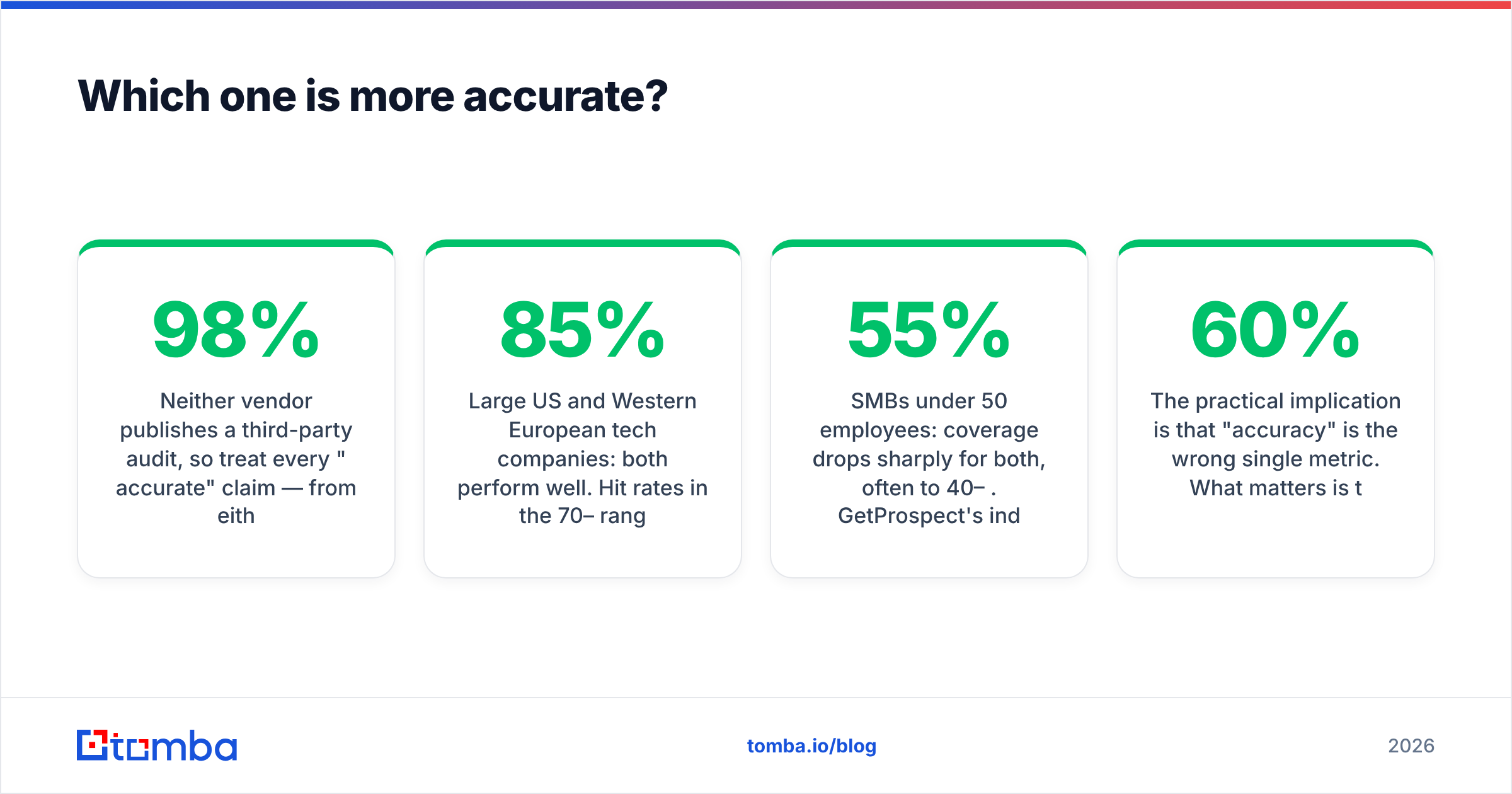
Neither vendor publishes a third-party audit. Treat every "98% accurate" claim as marketing until you test it on your own list. That applies to both of them, and to everyone else.
What holds up consistently in hands-on testing:
- Large US and Western European tech companies: both perform well. Hit rates land in the 70–85% range on named prospects, with bounce rates under 4% if you verify afterward. The gap between the two is inside the noise.
- SMBs under 50 employees: coverage drops sharply for both, often to 40–55%. GetProspect's index is thinner here. SalesQL has fewer confirmed examples to learn the pattern from.
- Non-English regions (LATAM, MENA, APAC): both degrade. Name transliteration breaks pattern inference, and local domain conventions are underrepresented in training data.
- Recent job changers: SalesQL tends to edge ahead. It computes against the current profile rather than a stored row that may be 8 months stale.
- Catch-all domains: both will hand you addresses labeled with reduced confidence. Do not mail these without a second verification pass.
The practical implication: "accuracy" is the wrong single metric. Three things matter together. Coverage is the share of your target list that gets any address. Precision is the share of those addresses that are real. Cost per usable record is what you actually pay. For most cold outbound programs, 60% coverage at 97% precision beats 85% coverage at 80% precision. Bounces damage sender reputation, and a smaller list does not.
Whatever you pick, run the output through a standalone email verifier before it touches a sending tool. Vendor-internal verification is a conflict of interest. The vendor gets paid for the emails it finds, not for the ones it throws away.
GetProspect vs SalesQL: features and pricing compared#
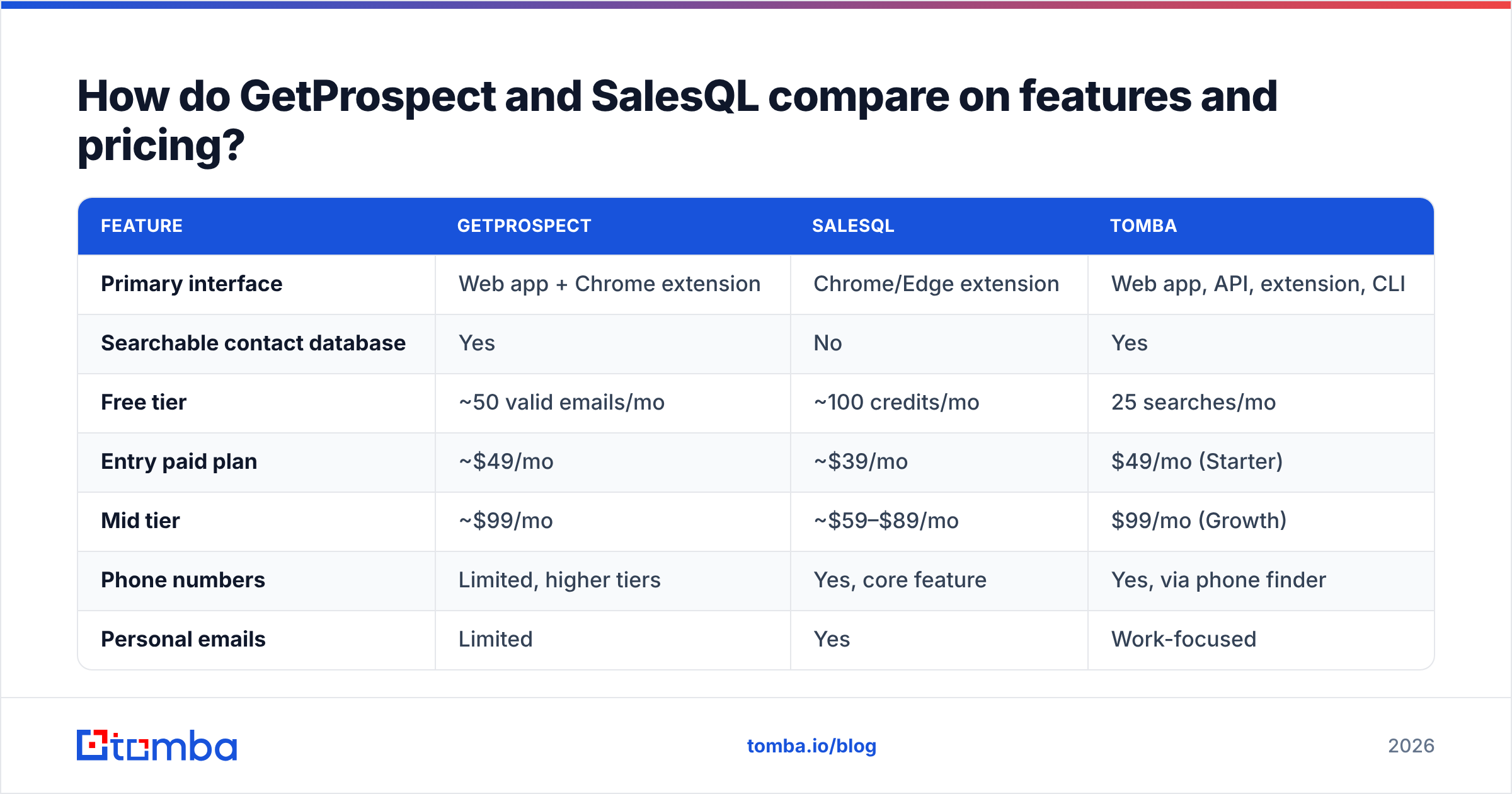
Published pricing changes often. Check both vendor pages before you buy. The figures below reflect list pricing at time of writing, and they are directional, not contractual.

| Feature | GetProspect | SalesQL | Tomba |
|---|---|---|---|
| Primary interface | Web app + Chrome extension | Chrome/Edge extension | Web app, API, extension, CLI |
| Searchable contact database | Yes | No | Yes |
| Free tier | ~50 valid emails/mo | ~100 credits/mo | 25 searches/mo |
| Entry paid plan | ~$49/mo | ~$39/mo | $49/mo (Starter) |
| Mid tier | ~$99/mo | ~$59–$89/mo | $99/mo (Growth) |
| Phone numbers | Limited, higher tiers | Yes, core feature | Yes, via phone finder |
| Personal emails | Limited | Yes | Work-focused |
| Bulk CSV enrichment | Yes | Limited | Yes |
| Public REST API | Yes, basic | Limited | Yes, documented |
| Catch-all handling | Flagged, no dedicated tool | Flagged | Dedicated catch-all verifier |
| Best for | List building from an index | LinkedIn-native reveal | API + bulk + verification |
Two things stand out.
First, SalesQL's cheaper entry price is not automatically cheaper per record. Say one credit reveals a contact, and you get an email 55% of the time on your segment. Your real cost per usable email is then roughly double the sticker rate. GetProspect charges only for valid emails found, which is the friendlier accounting model. But its plans start higher, and "valid" is defined by its own verifier.
Second, neither is built API-first. Both offer some programmatic access, but the center of gravity is a browser extension that a human clicks. If your workflow is "a webhook fires when a new signup lands and we enrich it in under a second," that is a different product category. Compare against a documented email finder API before you commit. Retrofitting an extension-first tool into an automated pipeline is where teams waste a quarter.
Which should you choose for your workflow?#
Pick by how your team actually sources prospects, not by feature count.
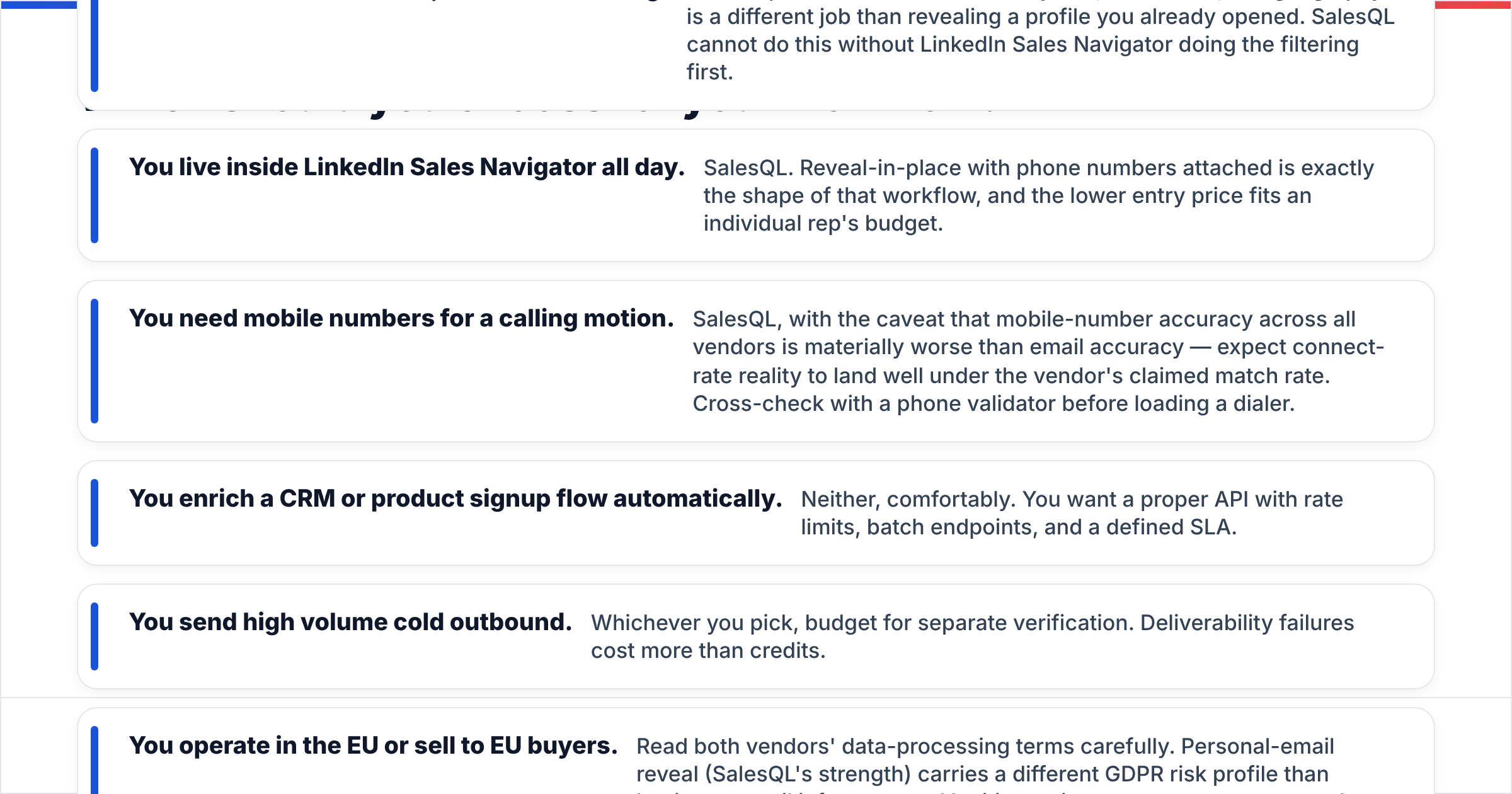
- You build lists from filters, not from browsing. GetProspect. A searchable index by title, headcount, and geography is a different job than revealing a profile you already opened. SalesQL cannot do this unless Sales Navigator does the filtering first.
- You live inside LinkedIn Sales Navigator all day. SalesQL. Reveal-in-place with phone numbers attached matches that workflow exactly, and the lower entry price fits one rep's budget.
- You need mobile numbers for a calling motion. SalesQL, with a caveat. Mobile-number accuracy across all vendors is much worse than email accuracy. Expect real connect rates to land well under the claimed match rate, and cross-check with a phone validator before you load a dialer.
Three more cases settle themselves:
- You enrich a CRM or product signup flow automatically. Neither, comfortably. You want a proper API with rate limits, batch endpoints, and a defined SLA.
- You send high-volume cold outbound. Whichever you pick, budget for separate verification. Deliverability failures cost more than credits.
- You operate in the EU or sell to EU buyers. Read both vendors' data-processing terms carefully. Personal-email reveal, which is SalesQL's strength, carries a different GDPR risk profile than business-email inference. Legitimate-interest arguments are weaker for personal addresses. This is a legal question, not a feature question.

What are the real limitations of both tools?#
Three that vendors rarely lead with.
LinkedIn platform risk. Every extension that reads profile data at scale works against LinkedIn's user agreement. Accounts get restricted. This is not a hypothetical. It is a routine cost of the whole extension category, and it hits GetProspect's extension and SalesQL alike. Any tool whose value depends on one platform's tolerance carries concentration risk you should price in.
Data decay. B2B contact data decays at roughly 25–30% per year, driven by job changes. A list you built in January is measurably worse by June. Index-based tools like GetProspect are more exposed than on-demand tools, unless the index is refreshed hard. Ask a vendor when their records were last verified, not how many records they hold. Transparency about data sources is a fair proxy for how seriously they take refresh.
Credit rollover and refunds. Read the fine print. Find out what happens to unused credits at month end, and whether you get refunded for hard bounces. Policies vary. The gap between "credits roll over" and "use it or lose it" can dominate your annual cost. Compare that against transparent Tomba pricing tiers as a reference point.
Want independent user sentiment instead of vendor copy? The review volume on G2 is a fair sanity check. Filter for reviewers at your company size, since SMB and enterprise experiences diverge sharply.
Is there a better option than either?#
Depends on which of the two jobs you actually have.
For LinkedIn-native reveal by a small rep team, SalesQL is legitimately good at its narrow job and priced accordingly. It is hard to beat if that is your only motion.
For list building plus enrichment plus verification as one pipeline, the extension-first framing starts to hurt. You end up with three tools: one to find, one to verify, one to push into the CRM. That is where a platform with a domain search, a bulk email finder, and a verification layer under one API key cuts both cost and failure points.
Other names worth benchmarking in the same test: Apollo (broadest database, noisiest data), Hunter (clean verification, thinner index), and Findymail (strong on validity, narrower coverage). Add BookYourData too. It sells pay-as-you-go verified lists instead of a subscription, which suits teams who want to buy a defined list once rather than rent seats forever.
Run the same 100-contact test list through three finalists. Measure coverage. Verify every returned address with a neutral verifier. Then compute cost per verified email. That number settles the argument in an afternoon, and it is worth more than any comparison post, including this one.
The verdict#
GetProspect wins if you need a searchable database and bulk enrichment. SalesQL wins if your whole motion happens inside LinkedIn and you need phone numbers. GetProspect vs SalesQL is not really a substitution question. Teams that try one and hate it usually picked the wrong shape of tool, not a bad tool.
Both leave the same gap: programmatic, verified, high-volume finding that runs without a human clicking an extension. If that is your gap, start with the Tomba Email Finder. The free tier gives you 25 searches a month, enough to run a real accuracy test on your own domains. Starter is $49/mo when you are ready to scale. Finder, verifier, catch-all handling, bulk, and enrichment all sit behind one documented API instead of three browser tabs. Test it against whichever tool you are leaning toward, on your own list, and let the bounce rate decide.
Related guides#
Ready to find emails that actually work?
Join 150,000+ professionals who stopped guessing and started sending. Free credits on signup — no credit card required.
Get the Tomba newsletter
Practical outbound tactics and product updates — once every two weeks.
About the author