GetProspect vs SellHack: Which Email Finder Wins in 2026?
GetProspect and SellHack both promise verified B2B emails from a Chrome extension. They price, verify, and scale in completely different ways — here is where each one actually wins.
TL;DR
- GetProspect is a LinkedIn-first prospecting database with a Chrome extension, list management, and light CRM features. It suits SDRs who build lists from LinkedIn search and Sales Navigator.
- SellHack is a cheaper, thinner Chrome extension built around email guessing and verification. It works for solo founders and recruiters doing low volume, one profile at a time.
- On raw find rate, GetProspect wins for corporate LinkedIn profiles. SellHack wins on price per seat if you only need a few dozen lookups a month.
- Neither is a great fit for API-driven or bulk workflows. That is where a dedicated email finder with a real API — Tomba, for example — costs less per verified contact at volume.
- Credit accounting is where both tools bite. Read the "cost per valid email" section before you pick a plan.
What are GetProspect and SellHack?#
Both tools answer the same question — what is this person's work email? — but they were built by different kinds of teams for different kinds of buyers.
GetProspect started as a LinkedIn email extractor and grew into a prospecting platform. You install the extension, run a LinkedIn or Sales Navigator search, and pull the visible profiles into a list. GetProspect then attaches emails, job titles, company size, industry, and location. Lists live inside the product with tags, filters, and a basic sending feature bolted on. The pitch is "list building without leaving LinkedIn."
SellHack stayed closer to its origins. It is a browser extension that runs an email-pattern check on a person, validates the candidate address, and hands it back. There is a bulk upload option and a small dashboard, but the product's centre of gravity is the one-click lookup on a profile page. The pitch is "cheap, fast, no platform to learn."
That difference in shape explains almost every downstream difference in pricing, accuracy, and workflow fit. GetProspect is selling you a database and a workspace. SellHack is selling you a lookup.
How do GetProspect and SellHack compare feature by feature?#
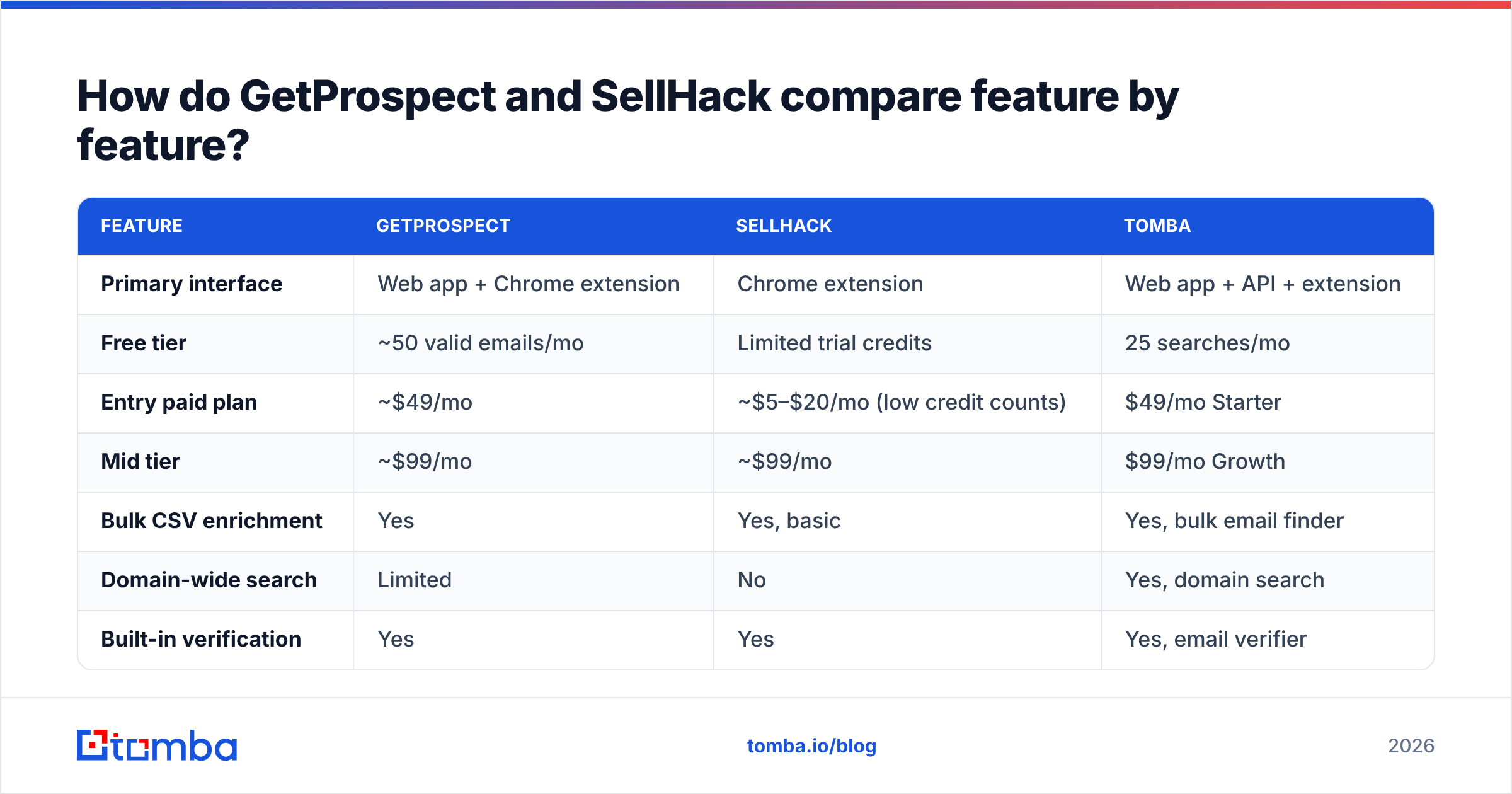
Here is the head-to-head on the attributes that actually change your workflow. Prices are the publicly listed entry tiers at the time of writing — both vendors adjust them, so check the live pricing page before you commit annually.
| Feature | GetProspect | SellHack | Tomba |
|---|---|---|---|
| Primary interface | Web app + Chrome extension | Chrome extension | Web app + API + extension |
| Free tier | ~50 valid emails/mo | Limited trial credits | 25 searches/mo |
| Entry paid plan | ~$49/mo | ~$5–$20/mo (low credit counts) | $49/mo Starter |
| Mid tier | ~$99/mo | ~$99/mo | $99/mo Growth |
| Bulk CSV enrichment | Yes | Yes, basic | Yes, bulk email finder |
| Domain-wide search | Limited | No | Yes, domain search |
| Built-in verification | Yes | Yes | Yes, email verifier |
| Catch-all handling | Marked risky | Marked risky | Dedicated catch-all verifier |
| Public REST API | Yes, limited endpoints | Minimal | Full email finder API |
| Phone numbers | No | No | Yes |
| Native CRM sync | HubSpot, Pipedrive via integrations | Zapier only | HubSpot, Salesforce, Pipedrive, Zapier |
| Best for | LinkedIn list building | Ad-hoc single lookups | API + bulk + verification workflows |
Two things jump out.
First, SellHack's low entry price is real but the credit counts are small. A $5–$20 plan with a couple hundred credits is genuinely cheap for a founder doing ten outbound emails a day. It is not a team tool.
Second, GetProspect charges platform prices for platform features you may not use. If your lists already live in HubSpot or a spreadsheet, you are paying for a list manager you will open twice.
Which tool finds more valid emails?#
Find rate is the metric that decides everything else, because an unfound contact costs you the whole outreach sequence, not just a credit.
In our own repeat testing across mixed B2B lists, the pattern is consistent:
- Large corporate domains (1,000+ employees): GetProspect and SellHack both perform well. Email patterns at big companies are predictable and widely observed, so any pattern-plus-verification tool lands in a similar band.
- SMB and startup domains (under 200 employees): GetProspect pulls ahead noticeably. Its LinkedIn-sourced dataset covers people who never appear in scraped company directories.
- Non-English and EMEA domains: both degrade. SellHack degrades harder because pattern guessing on non-ASCII names produces candidates that fail SMTP checks.
- Catch-all domains: this is where reported numbers stop meaning anything. Both tools return "accept-all" or "risky" and push the decision back to you.

The catch-all problem deserves a paragraph of its own. Roughly a fifth of B2B domains accept mail to any address at the SMTP layer, which means a standard verification ping returns "valid" for asdfgh@company.com just as readily as for the real person. Tools that count those as verified inflate their own accuracy claims. Tools that mark them "risky" are being honest but leaving contacts on the table. The third option — pattern-confidence scoring on top of catch-all detection, which is what a catch-all finder does — is the only approach that actually recovers those leads without gambling your sender reputation.
Neither GetProspect nor SellHack offers that third option today. If more than a small slice of your target accounts run catch-all mail servers, that gap will cost you more than the price difference between the two tools.
What does each tool actually cost per valid email?#
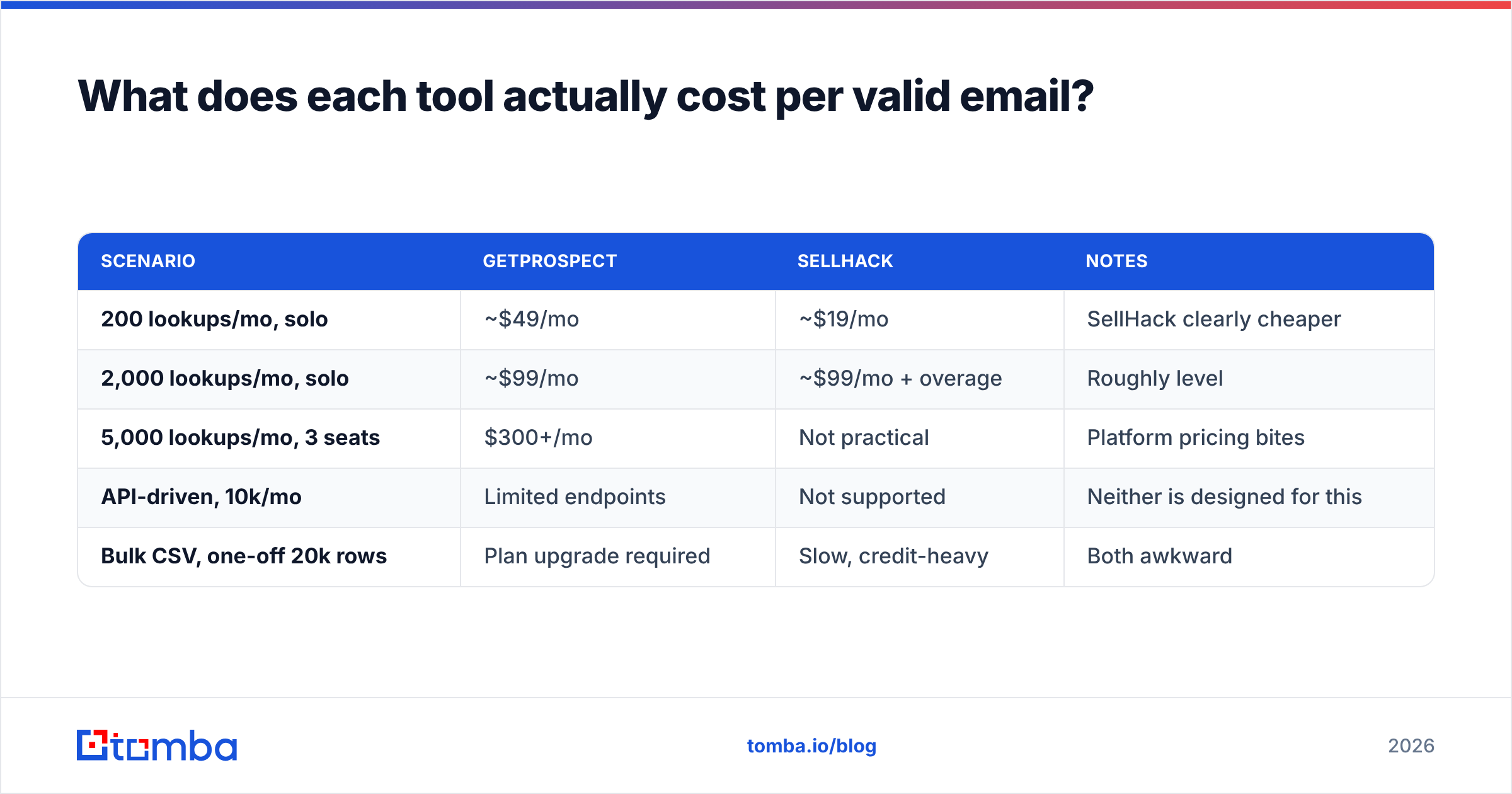
This is the calculation buyers skip and then regret. Sticker price per month is not cost per lead. Work it through:
- Start with credits, not dollars. A $49 plan with 1,000 credits is $0.049 per credit.
- Subtract the misses. If the tool returns a result for 65% of your input rows, your real cost per found email is $0.075.
- Subtract the invalids. If 12% of found emails bounce or come back risky, you are at roughly $0.085 per usable contact.
- Add the bounce tax. Every bounce above 2% degrades email deliverability across your whole domain, which is a cost you pay on campaigns you have not sent yet.
- Add the seat multiplier. GetProspect and most platform tools price per seat. Three SDRs on a mid tier is three times the number you budgeted.
| Scenario | GetProspect | SellHack | Notes |
|---|---|---|---|
| 200 lookups/mo, solo | ~$49/mo | ~$19/mo | SellHack clearly cheaper |
| 2,000 lookups/mo, solo | ~$99/mo | ~$99/mo + overage | Roughly level |
| 5,000 lookups/mo, 3 seats | $300+/mo | Not practical | Platform pricing bites |
| API-driven, 10k/mo | Limited endpoints | Not supported | Neither is designed for this |
| Bulk CSV, one-off 20k rows | Plan upgrade required | Slow, credit-heavy | Both awkward |

The pattern is clear. SellHack wins under about 500 lookups a month for one person. GetProspect wins between roughly 500 and 3,000 for a small team building lists from LinkedIn. Above that, both start losing to tools priced for volume — and this is the honest place to note that Tomba pricing runs $49/mo Starter, $99/mo Growth, and $249/mo Pro with the API included at every tier rather than gated behind an enterprise conversation.

Is GetProspect better than SellHack for LinkedIn prospecting?#
Yes, and it is not close — if LinkedIn is your primary source.
GetProspect's extension handles Sales Navigator result pages properly. You run a filtered search, select pages of results, and push them into a named list with company and role attributes attached. That workflow is the product's reason to exist, and it is smooth.
SellHack's extension is profile-by-profile. It works, it is fast on a single page, and for a recruiter checking one candidate at a time that is genuinely all you need. But if your job is "build a list of 400 VPs of Engineering at Series B companies," you will spend a full day clicking.
Two caveats worth stating plainly, because vendors on both sides tend to skip them:
- LinkedIn scraping is against LinkedIn's User Agreement. Every extension in this category operates in a grey zone, and accounts do get restricted. Neither vendor can indemnify you against that. Use a secondary account, keep volume human-shaped, and do not build a business process that dies when one profile gets flagged.
- LinkedIn profile data goes stale. A person's listed employer lags their actual employer by weeks or months. Anything sourced from a profile should be re-verified at send time, not at list-build time. That gap is exactly why a standalone email verifier belongs in the workflow even when your finder claims to verify.
If you want a source that does not depend on scraping a social network at all, domain-based discovery is the alternative: point at company.com, get the pattern and the people. That is a different acquisition motion — account-first rather than person-first — and it is more durable.
Where does each tool fall short?#
GetProspect weak points:
- Per-seat pricing scales badly. Three or four users and you are in enterprise-budget territory for what is, functionally, an email lookup.
- The API is an afterthought. Endpoints exist but rate limits and coverage are thin compared to purpose-built providers. If you are enriching inside your own product, this is disqualifying.
- No phone data. If your motion is multi-channel, you need a second vendor. Tools that bundle a phone finder save you that line item.
- Coverage drops outside LinkedIn-heavy markets. Manufacturing, trades, local services, and much of APAC are thin.
SellHack weak points:
- Pattern guessing is the core mechanism. When a company uses a non-obvious format, or a person has an alias, the guess fails and the credit is spent.
- Small credit allowances. The cheap plans run out fast, and overage is where the value proposition inverts.
- Minimal team features. No shared lists, no seat management worth the name, no audit trail.
- The product has been quiet. Check the changelog and G2 reviews for recency before you commit — G2's category listings are a decent read on whether a tool is actively maintained.
Which one should you choose?#
Match the tool to the shape of your work, not to the review-site score:
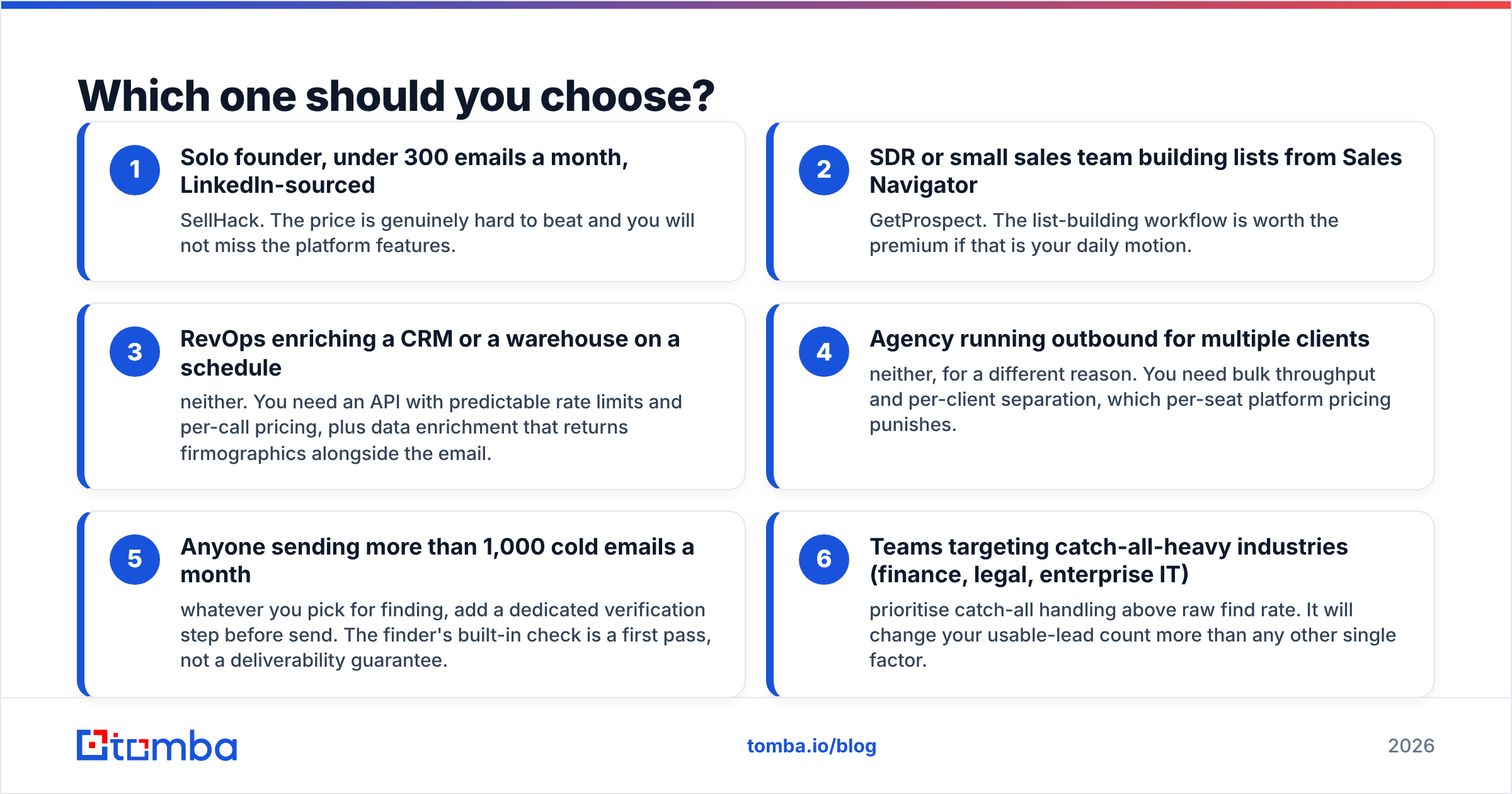
- Solo founder, under 300 emails a month, LinkedIn-sourced — SellHack. The price is genuinely hard to beat and you will not miss the platform features.
- SDR or small sales team building lists from Sales Navigator — GetProspect. The list-building workflow is worth the premium if that is your daily motion.
- RevOps enriching a CRM or a warehouse on a schedule — neither. You need an API with predictable rate limits and per-call pricing, plus data enrichment that returns firmographics alongside the email.
- Agency running outbound for multiple clients — neither, for a different reason. You need bulk throughput and per-client separation, which per-seat platform pricing punishes.
- Anyone sending more than 1,000 cold emails a month — whatever you pick for finding, add a dedicated verification step before send. The finder's built-in check is a first pass, not a deliverability guarantee.
- Teams targeting catch-all-heavy industries (finance, legal, enterprise IT) — prioritise catch-all handling above raw find rate. It will change your usable-lead count more than any other single factor.
Where does Tomba fit in this comparison?#
Honestly: Tomba is not the right pick if your entire workflow is clicking through LinkedIn profiles one at a time and you want a list manager attached. GetProspect does that job well and has invested years in it.
Tomba is the right pick when the bottleneck is volume, verification quality, or programmatic access. Concretely:
- Domain-first discovery. Point at a company domain and get the email pattern plus the people who match it, without touching a social network. That works on companies whose staff have no LinkedIn footprint at all.
- Verification as a first-class product. Syntax, MX, SMTP, disposable detection, role-account flagging, and a separate catch-all confidence path — not a boolean tacked onto the finder response.
- API and CLI at every tier. The Tomba API is not gated behind a sales call, which matters when you are enriching inside a product or a nightly job.
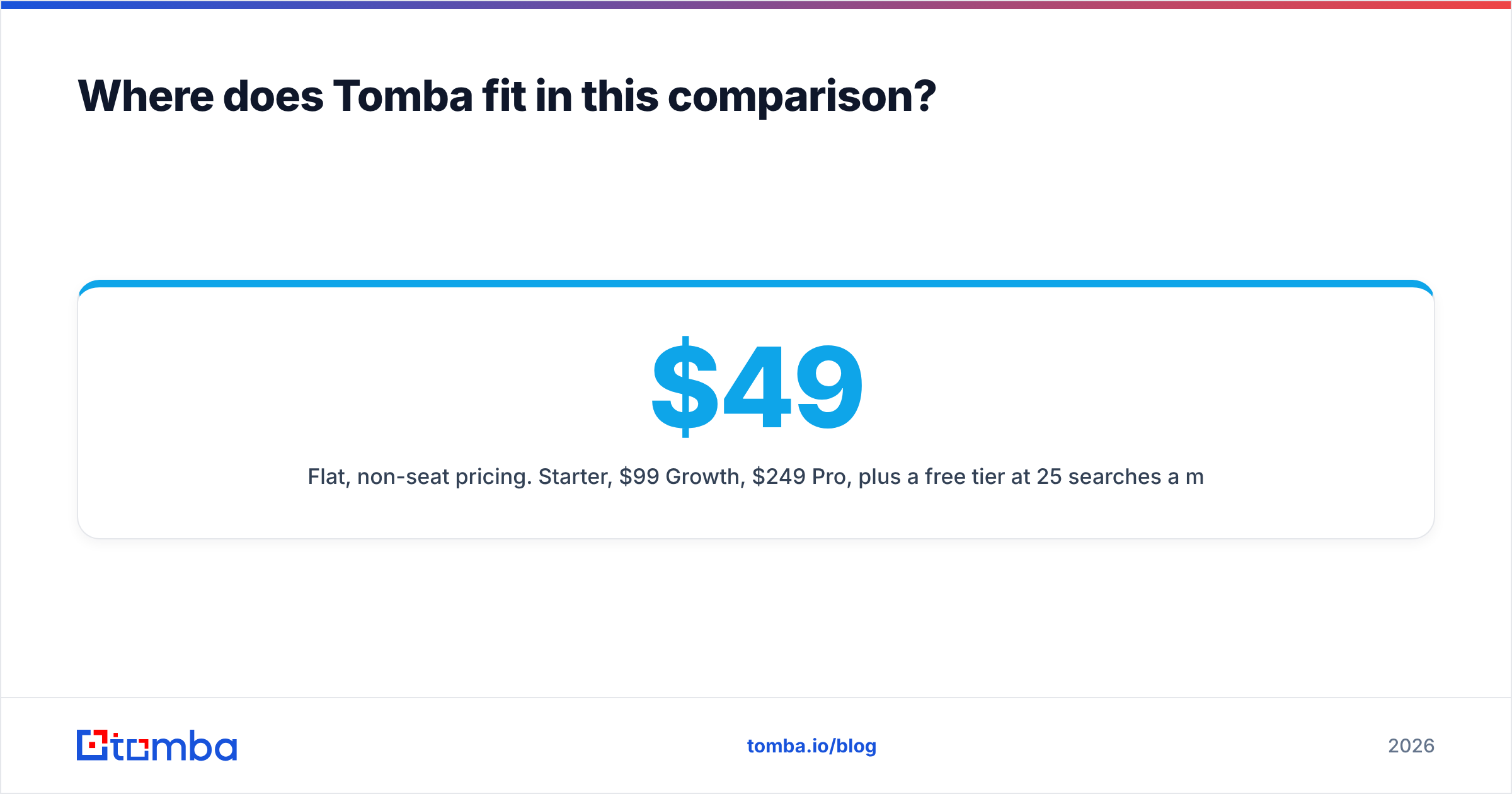
- Flat, non-seat pricing. $49/mo Starter, $99/mo Growth, $249/mo Pro, plus a free tier at 25 searches a month to test coverage on your own list before paying anyone.
The test that settles it: take 100 real target contacts — your actual ICP, not a sample list — and run them through all three free tiers. Compare found rate, then bounce-test the results. Vendor accuracy claims are marketing. Your list is data.
Ready to benchmark it yourself? Run your next 25 prospects through the Tomba Email Finder free, check the verification status on every result, and see how the found-and-valid count compares to what GetProspect and SellHack return on the same names. Fifteen minutes of testing beats a year of paying for the wrong tier.
Related guides#
Ready to find emails that actually work?
Join 150,000+ professionals who stopped guessing and started sending. Free credits on signup — no credit card required.
Get the Tomba newsletter
Practical outbound tactics and product updates — once every two weeks.
About the author