GetProspect vs SphereScout: Email Finder Comparison 2026
GetProspect is a known quantity with public pricing and a LinkedIn-first workflow. SphereScout is the newer, thinner-documented challenger. Here is how the two actually stack up on data, verification, and cost per usable contact in 2026.
TL;DR
- GetProspect is the established option: public pricing, a LinkedIn-first Chrome extension, a built-in CRM-lite layer, and a free tier of roughly 50 valid emails per month. It is easy to evaluate because most of what you need to know is published.
- SphereScout is the harder one to assess. Its public documentation, pricing page, and third-party review footprint are thin compared with GetProspect, which means you should treat any accuracy or coverage claim as unverified until you run your own test.
- The real deciding factor is not the feature list — it is cost per verified, deliverable contact, and neither vendor publishes that number. You have to compute it from a 200-row benchmark on your own ICP.
- If your workflow is "browse LinkedIn, click, enrich, export," GetProspect fits naturally. If your workflow is "pipe 40,000 domains through an API and get emails back," a finder with a documented API and per-result billing is the better shape.
- Run both against the same list before committing. A tool that finds 62% of your list at 91% deliverability beats one that finds 80% at 68% — and the second one always looks better on the marketing page.
What are GetProspect and SphereScout?#
GetProspect is a B2B email finder and lead database that has been around long enough to have a substantial public footprint. Its core loop is LinkedIn-centric: install the extension, browse a Sales Navigator search or a company page, and pull names, titles, companies, and emails into lists inside GetProspect. It layers on a lightweight CRM (custom columns, list segmentation, basic tracking) so smaller teams can prospect and organize in the same place. You can review its current plan structure directly on getprospect.com.
SphereScout positions itself in the same broad category — contact discovery and prospect data for outbound sellers. The honest problem for a buyer in 2026 is that it has far less public surface area: fewer independent reviews, less documentation, and less clarity around where its data originates and how frequently it refreshes. That is not automatically a mark against the product. Plenty of good tools start small. But it changes how you should evaluate it: with an established vendor you can partially rely on the public record, and with an unproven one you cannot.
So the practical framing of getprospect vs spherescout is not "which brand is better." It is "which one survives a controlled test on your list, at your volume, at a cost you can defend."
How do GetProspect and SphereScout compare on features and pricing?#
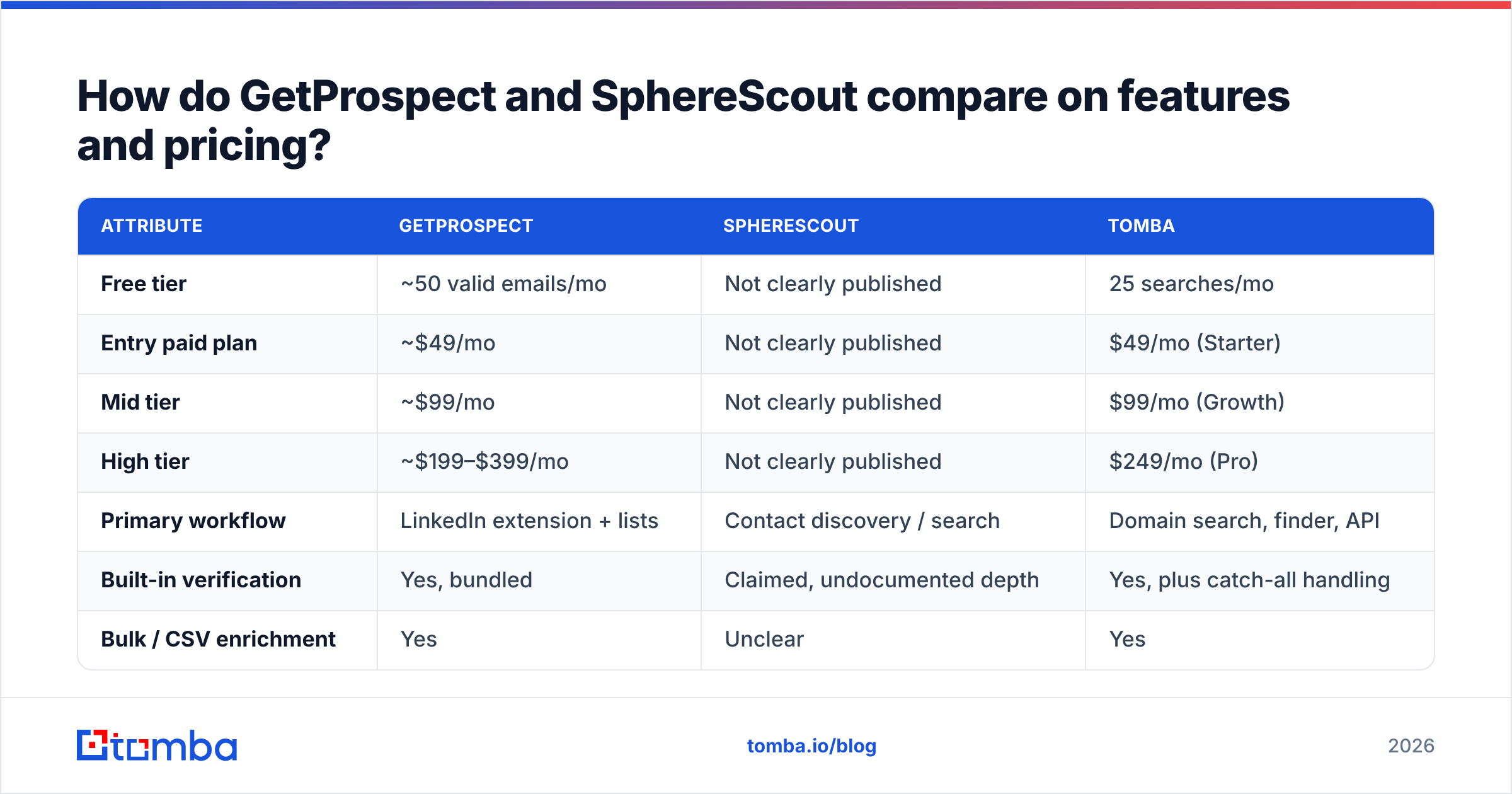
Here is the side-by-side, with a third column for a general-purpose finder benchmark so you have a reference point rather than a two-way echo chamber. Where a vendor does not publish a figure, this table says so instead of guessing.
| Attribute | GetProspect | SphereScout | Tomba |
|---|---|---|---|
| Free tier | ~50 valid emails/mo | Not clearly published | 25 searches/mo |
| Entry paid plan | ~$49/mo | Not clearly published | $49/mo (Starter) |
| Mid tier | ~$99/mo | Not clearly published | $99/mo (Growth) |
| High tier | ~$199–$399/mo | Not clearly published | $249/mo (Pro) |
| Primary workflow | LinkedIn extension + lists | Contact discovery / search | Domain search, finder, API |
| Built-in verification | Yes, bundled | Claimed, undocumented depth | Yes, plus catch-all handling |
| Bulk / CSV enrichment | Yes | Unclear | Yes |
| Public API docs | Yes | Limited | Yes, fully documented |
| CRM-lite features | Yes | Unclear | No — integrates instead |
| Independent review volume | High (G2, Capterra) | Low | Moderate |
Two things to take from that table. First, GetProspect's pricing ladder climbs steeply once you pass the entry plan — the jump from a starter tier to a serious volume tier is where most teams get surprised. Second, every "not clearly published" row for SphereScout is a diligence task you own. Ask the vendor for the number in writing before you sign anything longer than monthly.

You can sanity-check both vendors' standing on G2's lead intelligence category, which is the fastest way to see whether a tool has a real user base or a handful of seeded reviews.
What actually drives email finder accuracy?#
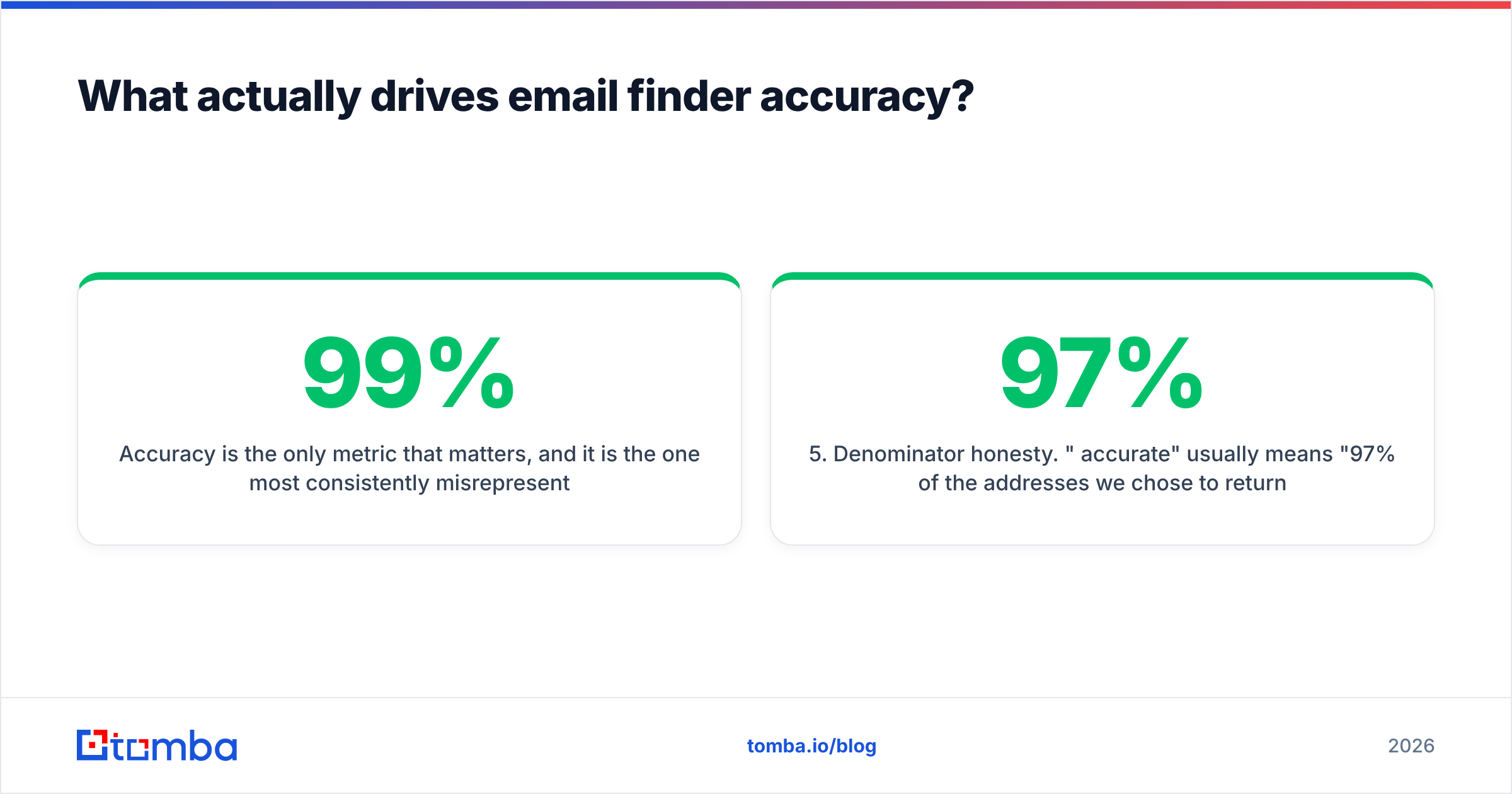
Accuracy is the only metric that matters, and it is the one most consistently misrepresented. Every vendor quotes a number in the 95–99% range. Those numbers are not comparable, because they measure different things.

Here is what actually moves the needle, in order of impact:
- Pattern inference quality. Most B2B addresses follow a company-wide pattern —
first.last@,flast@,first@. A finder that has enough observed addresses per domain infers the pattern confidently. One that has two samples is guessing. This is why coverage on mid-market and SMB domains varies so wildly between tools that look identical on Fortune 500 names. - SMTP validation depth. A real verification step opens an SMTP conversation with the receiving server and reads the response. A shallow one checks syntax and MX records and calls it a day. Both return "valid." Only one of them predicts a bounce.
- Catch-all handling. Roughly a fifth of B2B domains accept all mail, so SMTP tells you nothing. Tools that mark these "valid" inflate their accuracy score and hand you the bounces. Tools that mark them "unknown" look worse on paper and serve you better. A dedicated catch-all verifier is the honest middle path — it scores likelihood rather than pretending certainty.
- Data freshness. A contact record built in 2023 describes a person who has since changed jobs with meaningful probability. Ask each vendor when a record was last observed, not how many records they hold. Volume is a vanity metric; recency is the useful one.
- Denominator honesty. "97% accurate" usually means "97% of the addresses we chose to return were valid" — after the tool silently dropped everything it was unsure about. A tool returning 40% of your list at 97% accuracy is worse than one returning 75% at 90%. Always compute against your original row count, not the vendor's.
If you want to check any of this before buying, a free email checker will tell you what a single address resolves to independently of whichever tool produced it.
Which tool wins for each use case?#
Neither product is best at everything. Match the shape of the tool to the shape of your work:
- LinkedIn-driven, rep-by-rep prospecting — GetProspect. The extension workflow is its strongest asset, and the list layer means a rep can work end-to-end without a CRM handoff. If your team lives in Sales Navigator, this is the natural fit.
- Programmatic enrichment at volume — Neither, unless SphereScout's API turns out to be more complete than its public docs suggest. Enrichment at scale needs documented rate limits, predictable per-result billing, and a stable schema. Check the email finder API shape of any candidate before you build against it.
- One-off list cleaning — A dedicated email verifier beats both. You do not need a finder to clean a list you already have, and paying finder prices for verification is a common budget leak.
- Agency work across many client ICPs — Whichever tool bills per successful result rather than per attempt. Agencies burn credits fastest on lookups that return nothing, and that cost is invisible until the invoice arrives.
- Sub-$100/month solo operator — GetProspect's free tier gives you a real trial. For SphereScout, insist on a trial with export enabled; a demo without export tells you nothing about data quality.
How do they compare against the wider market?#
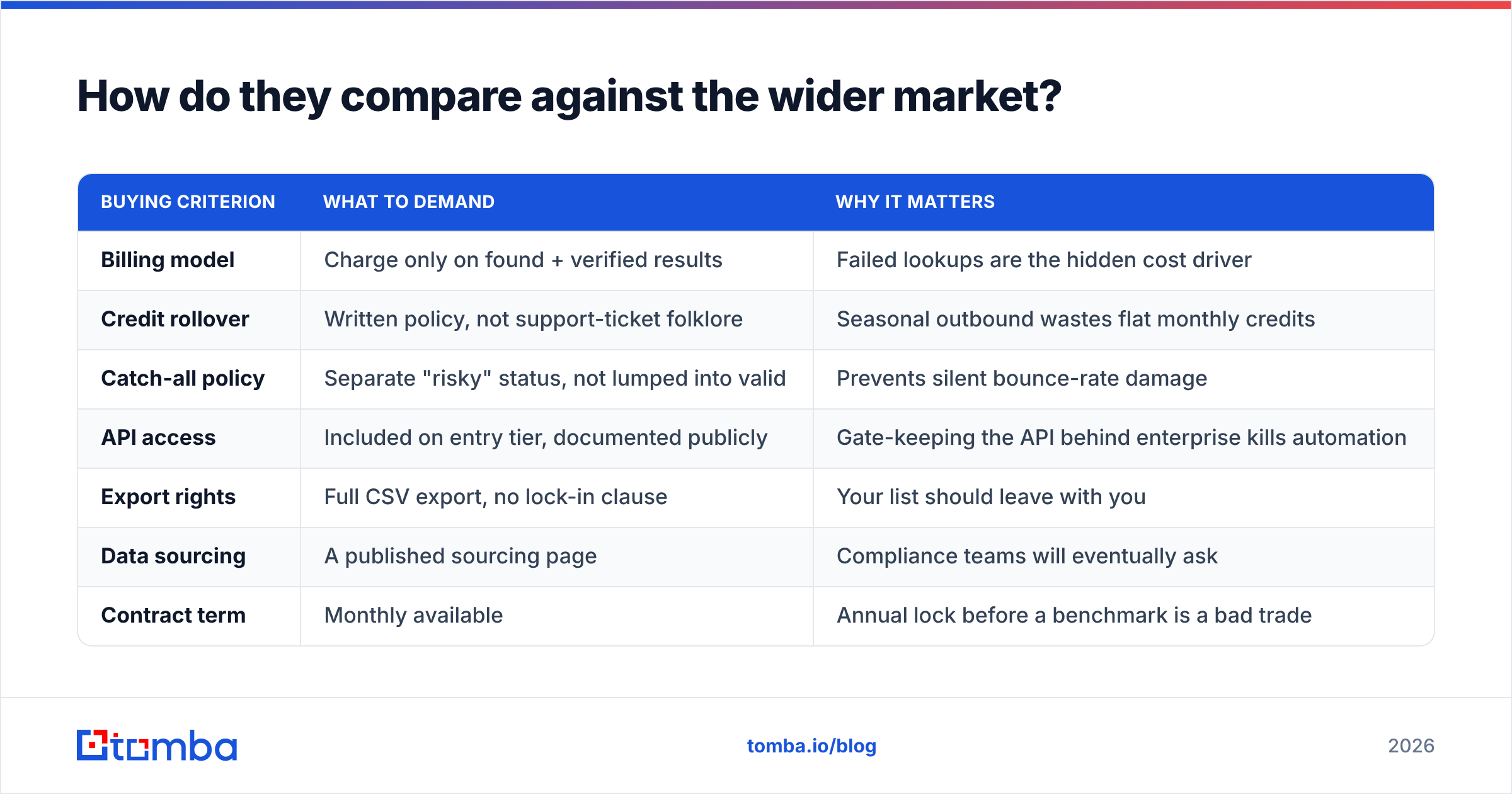
Both of these tools sit in a crowded category. It is worth seeing where the general field lands before you narrow to two names, because the "GetProspect or SphereScout" framing may itself be the wrong question.

| Buying criterion | What to demand | Why it matters |
|---|---|---|
| Billing model | Charge only on found + verified results | Failed lookups are the hidden cost driver |
| Credit rollover | Written policy, not support-ticket folklore | Seasonal outbound wastes flat monthly credits |
| Catch-all policy | Separate "risky" status, not lumped into valid | Prevents silent bounce-rate damage |
| API access | Included on entry tier, documented publicly | Gate-keeping the API behind enterprise kills automation |
| Export rights | Full CSV export, no lock-in clause | Your list should leave with you |
| Data sourcing | A published sourcing page | Compliance teams will eventually ask |
| Contract term | Monthly available | Annual lock before a benchmark is a bad trade |
If you are cost-sensitive, note that the entry tiers across the category cluster tightly — most credible finders land near $49/month for the first paid step, including Tomba pricing. The divergence happens at tier three and above, where GetProspect's ladder climbs toward $399/month while others cap the same volume near $249. That gap compounds over a year.

Worth naming a neighbor here rather than pretending the field is two tools wide: BookYourData takes a different route entirely — pay-as-you-go, no subscription, with a bounce guarantee. If your buying pain is "I hate monthly credits I don't use," that model deserves a look alongside both tools in this comparison.
What does each tool actually cost at real volume?#
Run the arithmetic before the demo, not after. Take 1,000 target contacts per month as the benchmark:
- Sticker price is the plan cost. Easy, and misleading.
- Effective price is plan cost divided by verified, deliverable contacts actually produced.
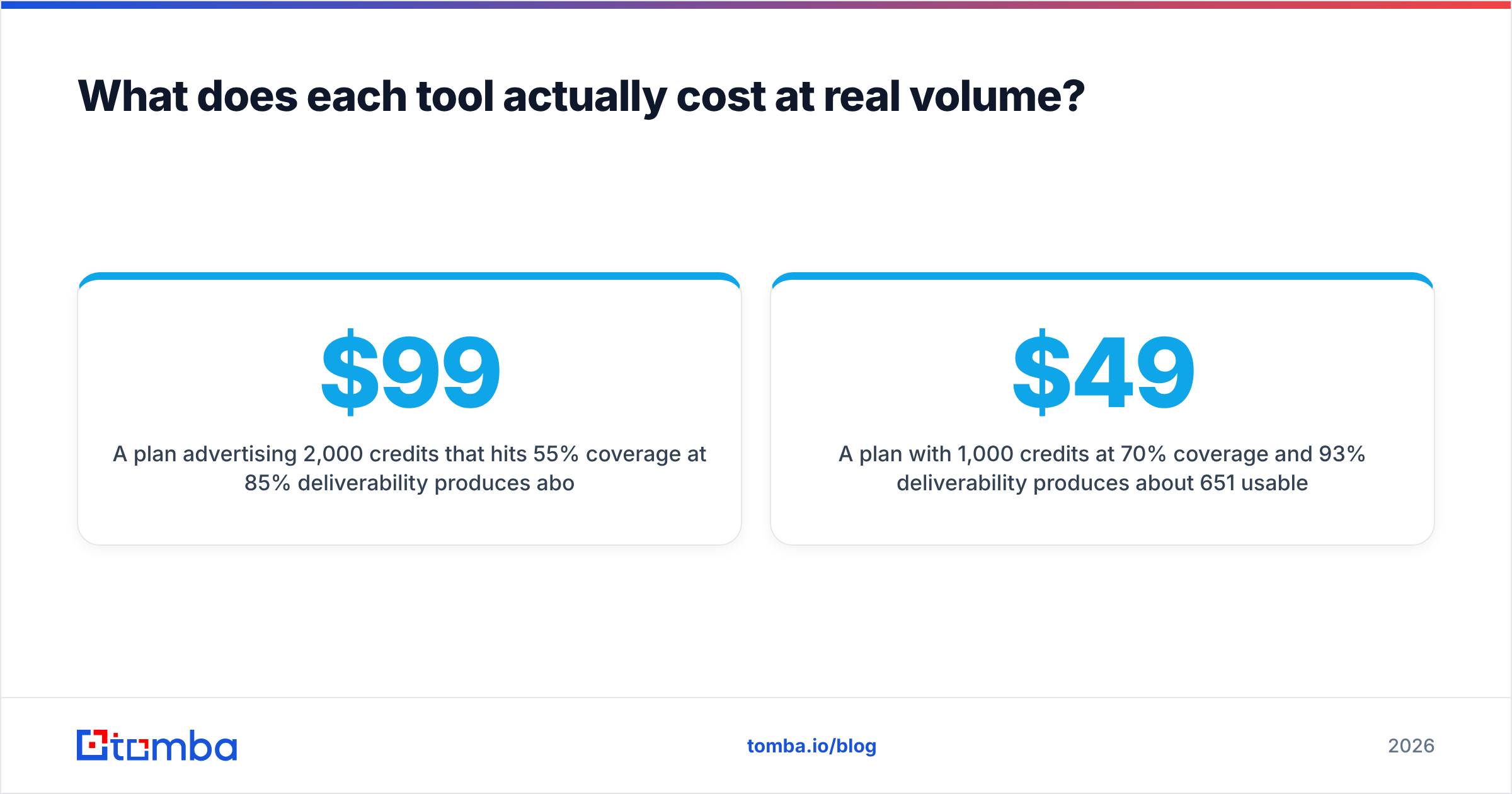
- A $99/month plan advertising 2,000 credits that hits 55% coverage at 85% deliverability produces about 935 usable contacts — roughly $0.106 each.
- A $49/month plan with 1,000 credits at 70% coverage and 93% deliverability produces about 651 usable contacts — roughly $0.075 each, at half the monthly commitment.
The cheaper plan wins on both absolute and unit cost, and no feature comparison table would have told you that. This is why the benchmark comes first.
To build the benchmark cleanly: take 200 real prospects from your ICP, run them through each candidate, then push all outputs through a single neutral email verification pass so you are grading with one ruler instead of each vendor's own. Count against your original 200 every time. For domain-level coverage checks, a domain search on twenty of your target accounts will expose coverage gaps in about ten minutes.
Is GetProspect better than SphereScout?#
For most buyers today, GetProspect is the safer pick — on transparency, not necessarily on data. You can see its pricing, read hundreds of independent reviews, and understand its workflow before you spend a dollar. SphereScout may well perform competitively; the issue is that you cannot know that from the outside, which pushes all the evaluation risk onto you.
That verdict flips under two conditions. First, if SphereScout gives you a real trial with export enabled and it beats GetProspect on your own 200-row benchmark, believe your data over the public record — your ICP is the only ICP that matters. Second, if your workflow is API-first rather than extension-first, GetProspect's LinkedIn-centric strengths are largely irrelevant to you and both tools should be judged purely on programmatic coverage and cost per result.
There is also a third answer worth stating plainly: for many teams, the winner of this matchup is neither. If you need documented API access on an entry plan, honest catch-all handling, and a price ceiling that does not triple at tier three, widen the shortlist. Comparing two tools is only useful when both are the right type of tool for the job.
What should you check before you buy?#
- Ask for coverage on your domains, not their case study's.
- Confirm what happens to unused credits at the end of the month, in writing.
- Test five known-good addresses and five known-dead ones. A tool that marks the dead ones valid is disqualified.
- Check whether the API is on the entry plan or gated behind an enterprise call.
- Confirm export format and whether enrichment fields travel with the export.
- Start monthly. Move to annual only after a full campaign cycle.
Where to go from here#
If your priority is finding accurate work emails without a steep pricing ladder or an opaque credit model, start with the Tomba Email Finder. The free tier gives you 25 searches to benchmark against whatever you are using now, Starter is $49/month, and the API, catch-all verification, and bulk enrichment are documented publicly rather than reserved for a sales call. Run the same 200 contacts through it and through your current tool, verify both outputs with one ruler, and let the cost-per-usable-contact number decide.
Related guides#
Ready to find emails that actually work?
Join 150,000+ professionals who stopped guessing and started sending. Free credits on signup — no credit card required.
Get the Tomba newsletter
Practical outbound tactics and product updates — once every two weeks.
About the author