GetProspect vs The Org: Which B2B Data Tool Wins in 2026?
GetProspect finds and verifies work emails. The Org maps who reports to whom. They solve different halves of the same problem — here's which one your pipeline actually needs, and how the two stack together.
TL;DR — GetProspect vs The Org in 30 seconds
- They are not competitors. GetProspect is an email finder and lead database. The Org is a public org-chart directory. It's like comparing a phone book to a seating chart.
- Need an address to send to? GetProspect wins outright. The Org publishes names, titles and reporting lines — not work emails.
- Need to know who signs off? The Org is genuinely useful, mostly free, and better than guessing from LinkedIn titles.
- The strongest play is stacking them. Map the buying committee on The Org. Then resolve those names to verified emails with a dedicated finder.
- Budget check. The Org's public charts are free to browse. GetProspect's paid tiers start near $49/month, about the same entry point as most email finders, Tomba included.
GetProspect vs The Org: what are they, actually?#
Start here. Most "GetProspect vs The Org" searches come from people who found both in one Google result and assumed they overlap. They barely do.
GetProspect is a B2B contact database and email finder. Give it a name and a company, a LinkedIn profile, or a domain. It returns a work email with a validity score. It also ships a Chrome extension that scrapes LinkedIn search results into a list, a bulk CSV enrichment flow, and a CRM sync. Its job is to turn a person into a deliverable inbox.
The Org is a public directory of company org charts. It shows who reports to whom, which VP owns which function, and how a leadership team is built. Companies can claim and publish their own chart. The Org also builds charts from public sources. Its job is to turn a company into a map.
Here is the practical split on data and coverage:
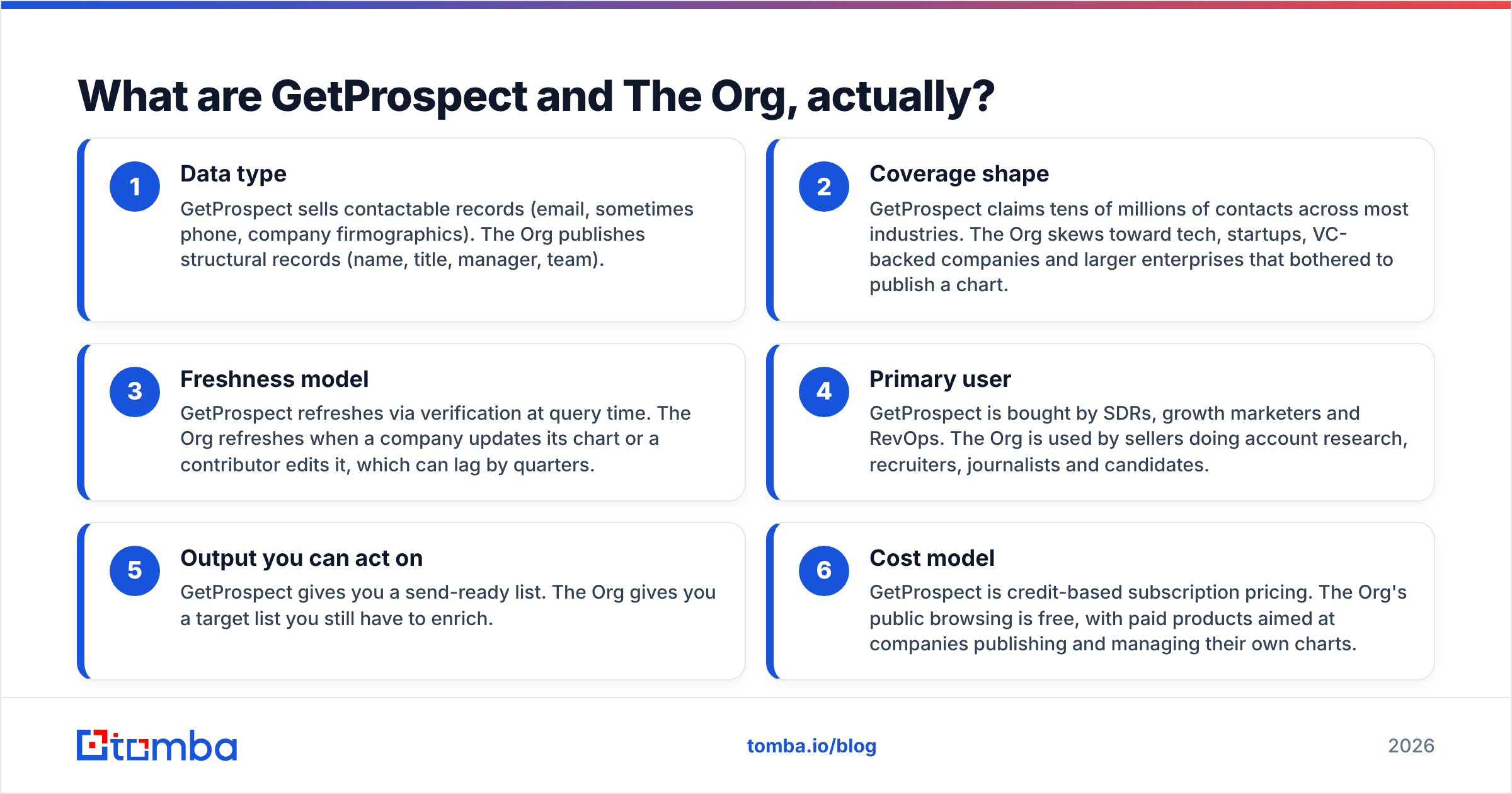
- Data type — GetProspect sells contactable records: email, sometimes phone, plus company firmographics. The Org publishes structural records: name, title, manager, team.
- Coverage shape — GetProspect claims tens of millions of contacts across most industries. The Org skews to tech, startups, VC-backed firms and large enterprises that bothered to publish a chart.
- Freshness model — GetProspect verifies at query time. The Org updates when a company edits its chart, which can lag by quarters.
And the practical split on who buys each one:
- Primary user — SDRs, growth marketers and RevOps buy GetProspect. Sellers, recruiters, journalists and candidates use The Org.
- Output you can act on — GetProspect gives you a send-ready list. The Org gives you a target list you still have to enrich.
- Cost model — GetProspect uses credit-based subscription pricing. The Org is free to browse, with paid products for companies managing their own charts.
If you take one thing from this GetProspect vs The Org comparison: The Org tells you who to email, and GetProspect tells you where to send it.
GetProspect vs The Org: how do they compare head to head?#
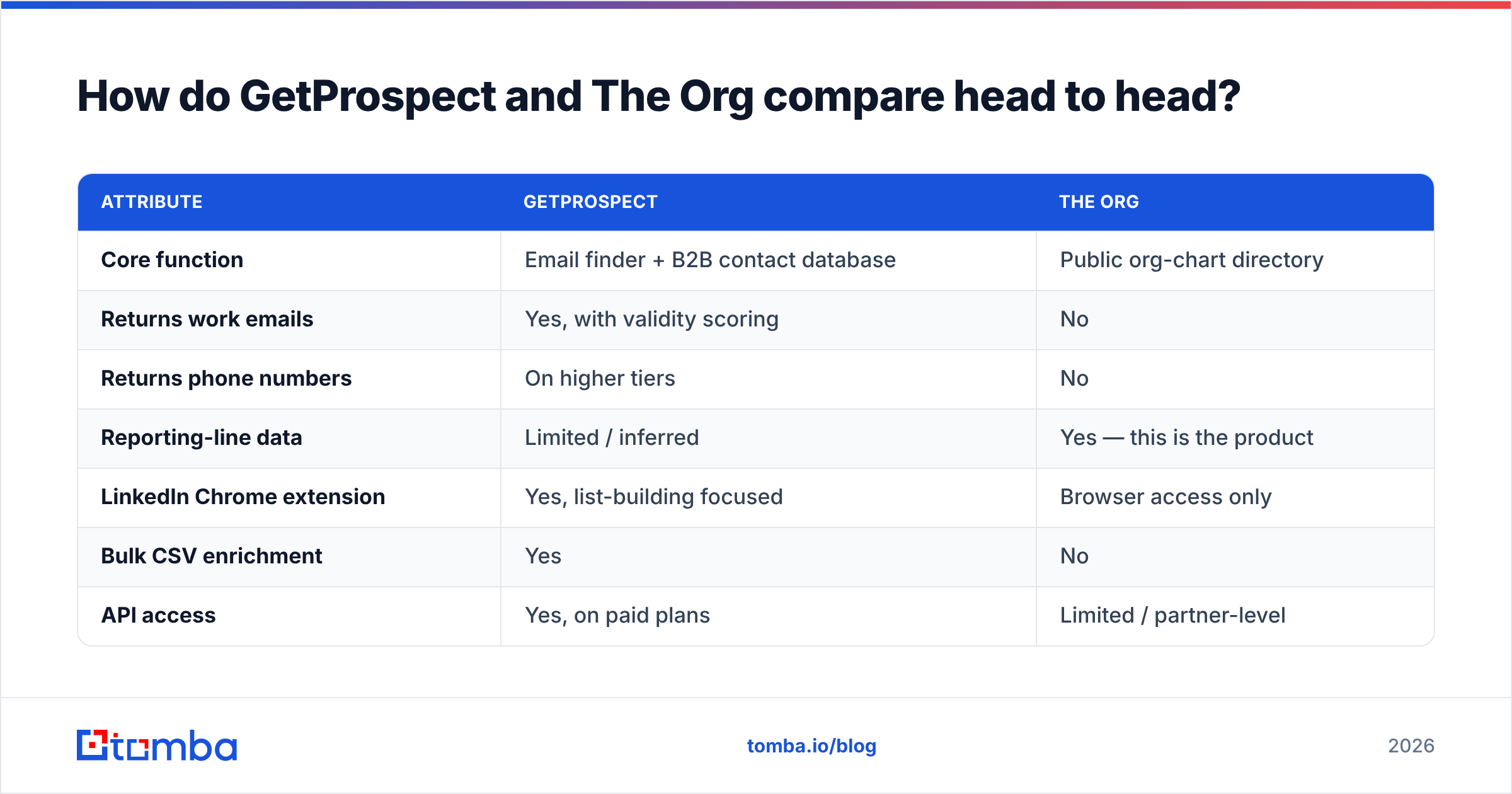
| Attribute | GetProspect | The Org |
|---|---|---|
| Core function | Email finder + B2B contact database | Public org-chart directory |
| Returns work emails | Yes, with validity scoring | No |
| Returns phone numbers | On higher tiers | No |
| Reporting-line data | Limited / inferred | Yes — this is the product |
| LinkedIn Chrome extension | Yes, list-building focused | Browser access only |
| Bulk CSV enrichment | Yes | No |
| API access | Yes, on paid plans | Limited / partner-level |
| CRM integrations | HubSpot, Pipedrive, Salesforce via native or Zapier | Minimal |
| Free tier | Yes — limited monthly credits | Yes — public charts are free to browse |
| Entry paid price | ~$49/month (verify current tiers) | Company-side publishing products, quoted |
| Best for | Building and sending to a list | Understanding an account before you send |
| Weakness | Coverage gaps outside tech/SaaS and Western markets | No contact data at all; chart staleness |
Two honest caveats on that table. First, pricing moves on both sides, so check each vendor's live pricing page before you budget. Second, coverage numbers from any contact-data vendor are self-reported. Treat them as marketing until you run your own sample test.

Which one gives you contact data you can actually email?#
GetProspect, and it isn't close — because The Org never claimed to.
The better GetProspect vs The Org question is how good GetProspect's data is next to the wider category. Email finders cluster into three quality bands:
- Pattern guessers — they infer
first.last@domain.comand run a light SMTP check. Cheap, with a high catch-all failure rate. - Database lookups — they match against a stored contact set. Fast, but records rot. A two-year-old email for someone who changed jobs is worse than no email.
- Hybrid finders — they combine a database, live pattern detection per domain, and a verification pass before returning a result.
GetProspect sits in the hybrid band, which is the right band. Where users hit friction, it's the same two places every hybrid tool struggles: catch-all domains, and non-US or non-tech companies where the source data is thinner. That's not a GetProspect flaw. It's a category flaw.
Whatever finder you use, verify before you send. Run any list through an email verifier and drop the unknowns instead of gambling on them. A 5% bounce rate on a cold domain costs you far more in email deliverability than those risky addresses could ever earn back.
Catch-all domains need their own check. The mail server accepts everything and tells you nothing, so a standard SMTP ping is useless. A catch-all verifier scores likelihood instead, so you don't find out the hard way.
How accurate is org-chart data compared to contact data?#
GetProspect vs The Org have different failure modes, and this matters more than people expect.
Contact data fails loudly. You send, it bounces, you know within minutes. You can measure it, benchmark it, and hold a vendor to a bounce-rate SLA.
Org-chart data fails quietly. The Org shows a VP of Engineering who left four months ago. Nothing bounces. You just write a personalised sequence about a reporting structure that no longer exists. Your prospect files you under "didn't do the homework." That's worse than a bounce, because it burns the account, not just the address.
So the rule with The Org is simple: use it for structure, and verify the people. Reporting lines between functions change slowly. The humans in those seats change fast, especially at Series B and up, where 20%+ annual leadership churn is normal.
Here's a cheap sanity check before you build a sequence on an org chart:
- Pull the chart on The Org. Note the three to five roles in the buying committee.
- Spot-check two names against the company's own site or a current LinkedIn profile.
- Resolve emails for the confirmed names with an email finder or a domain search on the company domain.
- Verify and drop anything that doesn't come back clean.
- Compare the two lists. If the finder surfaces senior titles the chart is missing, the chart is stale. Trust the live source.
Step 5 is the one people skip. It's also the one that catches a stale chart before it embarrasses you.
GetProspect vs The Org: how does pricing compare in 2026?#
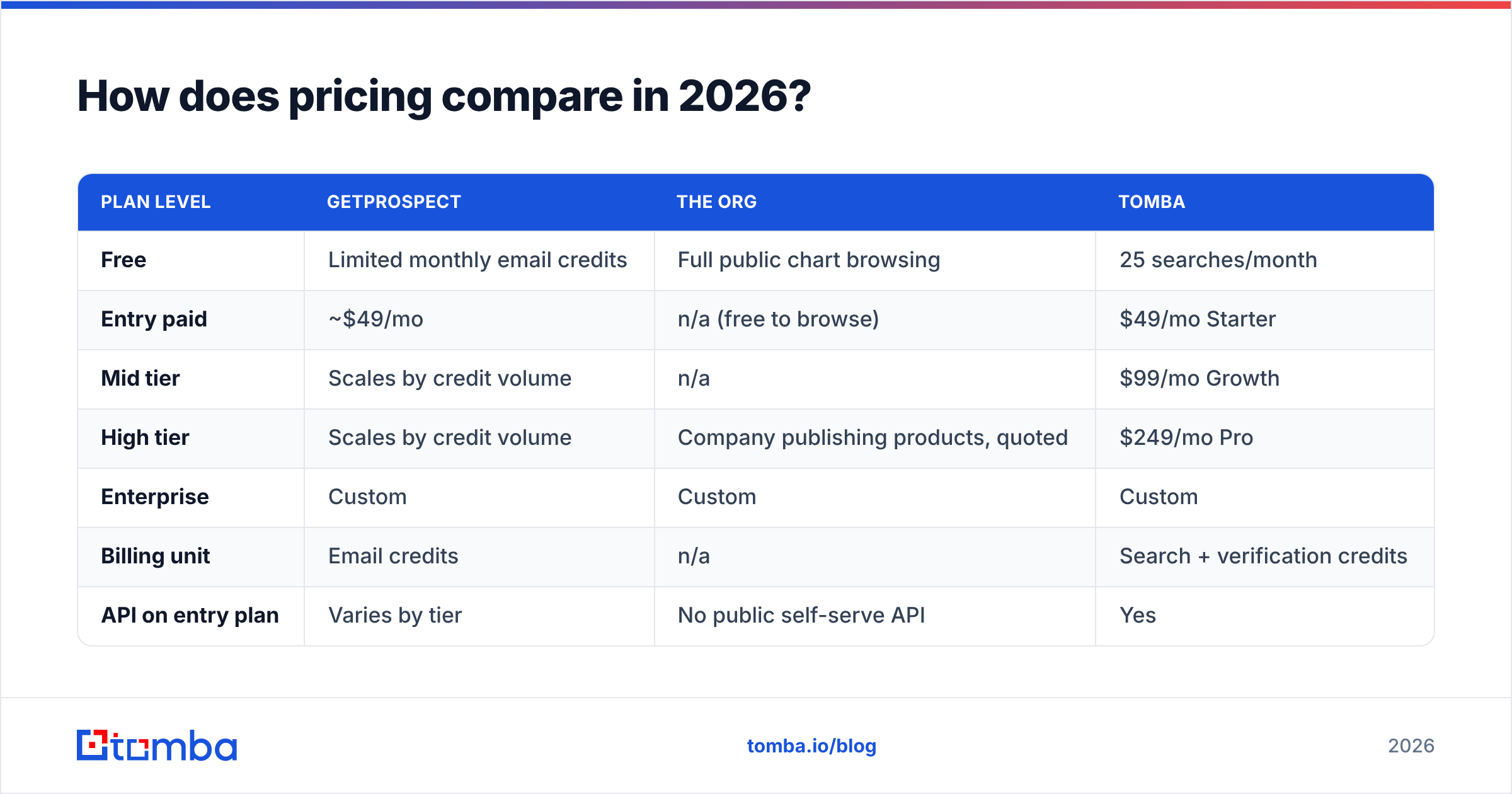
| Plan level | GetProspect | The Org | Tomba |
|---|---|---|---|
| Free | Limited monthly email credits | Full public chart browsing | 25 searches/month |
| Entry paid | ~$49/mo | n/a (free to browse) | $49/mo Starter |
| Mid tier | Scales by credit volume | n/a | $99/mo Growth |
| High tier | Scales by credit volume | Company publishing products, quoted | $249/mo Pro |
| Enterprise | Custom | Custom | Custom |
| Billing unit | Email credits | n/a | Search + verification credits |
| API on entry plan | Varies by tier | No public self-serve API | Yes |
Pricing is where GetProspect vs The Org stops being a fair fight, because one side is free to browse. So the real comparison isn't sticker price. It's cost per usable contact. A $49 plan that returns 1,000 emails at 70% deliverability gives you 700 usable records. A $99 plan returning 2,000 at 92% gives you 1,840. The second is cheaper per usable record, even though the invoice is bigger.
Run that math on your own sample before you sign an annual contract with anyone, including us. Want to see where Tomba's tiers land? The full breakdown is on the Tomba pricing page — free tier included, no card.

When should you use The Org instead of GetProspect?#
The GetProspect vs The Org call flips in a few real cases, where The Org is the better tool for the job:
- Enterprise account mapping. You're selling into a 5,000-person company and need to know whether Procurement reports into Finance or Ops. A chart beats a contact list.
- Multi-threading a stalled deal. Your champion went dark. The Org shows their manager and their peers — the two best people to route around to.
- Pre-call research. Ten minutes on a chart before a discovery call beats another 200 contacts in your database.
- Recruiting and competitive intel. A competitor's team structure tells you what they're investing in.
- Free-tier reality. With zero budget, The Org costs nothing and still gives you real signal. A free email finder tier gives you 25–50 credits, then a paywall.
And where The Org can't help: any volume outbound motion, any list build, any CRM enrichment job, and any market outside its coverage skew. If your ICP is regional manufacturers in Southern Europe, you'll find almost nothing.
Can you use both together?#
Yes — and running GetProspect vs The Org as a stack, not a choice, is the setup that actually performs. The pattern is map, then resolve, then verify:
- Map the account. Pull the org chart for your target company. Identify the economic buyer, the technical evaluator, and the likely blocker. Write down three to five names and titles.
- Resolve the emails. Feed those names and the company domain into an email finder. If the names came from LinkedIn, a LinkedIn finder does the same job from a profile URL.
- Verify before you queue. Run the list through verification. Cut anything scored risky or unknown.
Then make that data work in your sequences:
- Enrich for personalisation. Add seniority, department, headcount and tech stack via data enrichment, so your first line isn't "I saw you're the VP of Sales."
- Sequence by role, not by person. The economic buyer gets a business-outcome angle. The technical evaluator gets the how. The chart told you which is which.
- Log the structure in your CRM. Store the reporting relationship as a field. Next quarter, when your champion gets promoted, you already know who inherits the account.
Steps 1 and 2 are the whole reason the GetProspect vs The Org question exists. Neither tool does both. Anyone who tells you one replaces the other is selling something.
What are the alternatives to both?#
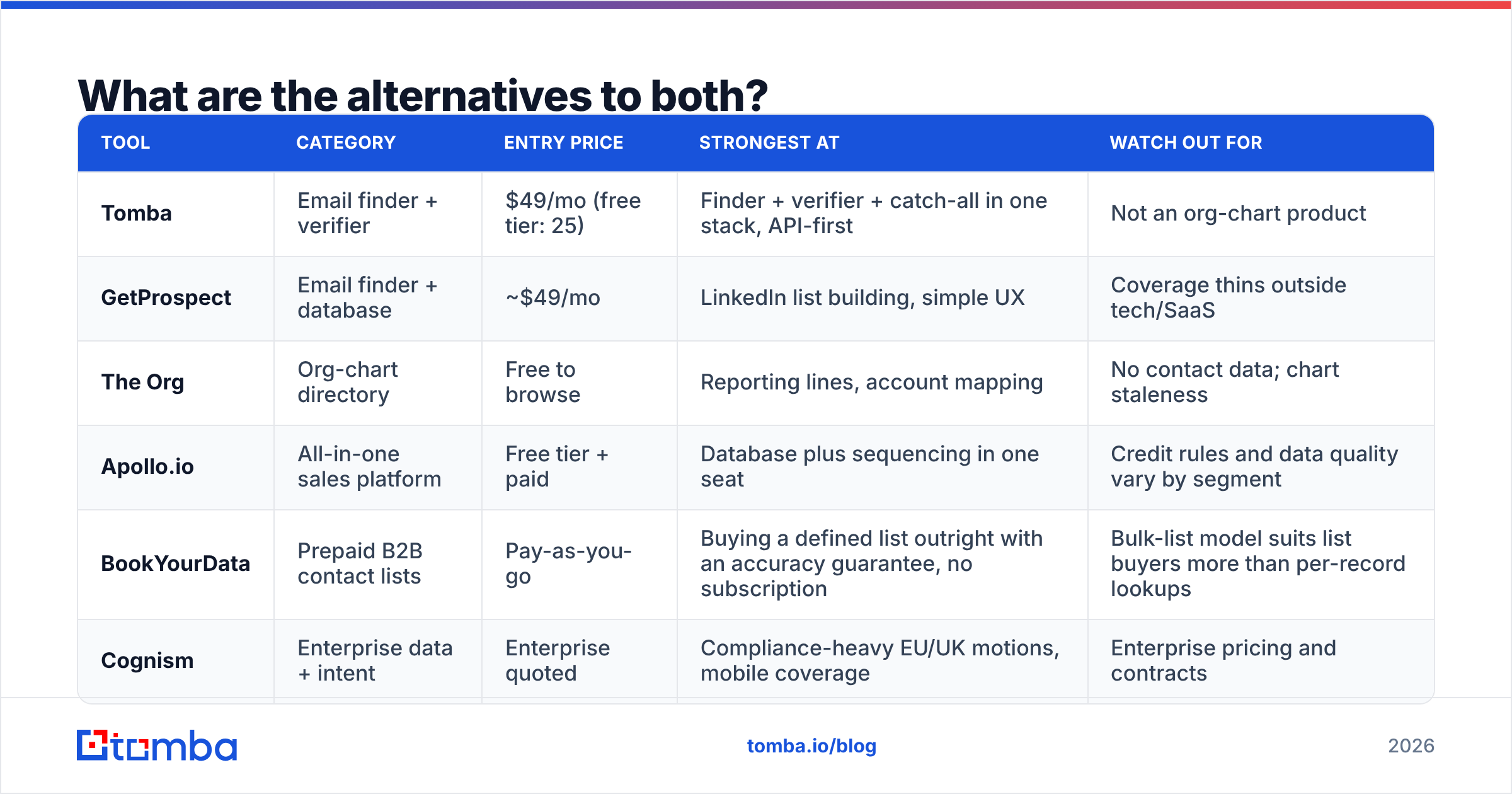
If neither side of GetProspect vs The Org fits your market, these are the tools teams test next:
| Tool | Category | Entry price | Strongest at | Watch out for |
|---|---|---|---|---|
| Tomba | Email finder + verifier | $49/mo (free tier: 25) | Finder + verifier + catch-all in one stack, API-first | Not an org-chart product |
| GetProspect | Email finder + database | ~$49/mo | LinkedIn list building, simple UX | Coverage thins outside tech/SaaS |
| The Org | Org-chart directory | Free to browse | Reporting lines, account mapping | No contact data; chart staleness |
| Apollo.io | All-in-one sales platform | Free tier + paid | Database plus sequencing in one seat | Credit rules and data quality vary by segment |
| BookYourData | Prepaid B2B contact lists | Pay-as-you-go | Buying a defined list outright with an accuracy guarantee, no subscription | Bulk-list model suits list buyers more than per-record lookups |
| Cognism | Enterprise data + intent | Enterprise quoted | Compliance-heavy EU/UK motions, mobile coverage | Enterprise pricing and contracts |
If GetProspect is the right shape but the coverage or credit model isn't working, test two or three finders in parallel on the same 100-row sample. That's the only benchmark that means anything, because a vendor's published accuracy figure comes from the vendor's own sample. Already looking at Apollo? Our Apollo alternative breakdown uses the same test method.
For the org-chart half, the honest answer is that there's no great substitute at The Org's price point. LinkedIn Sales Navigator's relationship mapping is the closest paid option. Crunchbase or a company's own leadership page fills gaps for smaller teams. It's worth skimming independent user reviews on G2 before you shortlist.
GetProspect vs The Org: which should you pick?#
Pick GetProspect if your bottleneck is volume. You know your ICP, you need 500 to 5,000 contactable records a month, and your outbound motion lives or dies on list quality.
Pick The Org if your bottleneck is navigation. You run 10 to 30 large accounts, deals stall because you're single-threaded, and you need to understand power structures more than you need 2,000 more rows.
Pick both if you're doing real account-based outbound. The combined cost is about one email-finder subscription, since The Org's public charts are free.
Pick neither if you need contact data outside their coverage, or you want finding, verification, catch-all handling and enrichment behind one API instead of two vendors. That's the gap Tomba was built for.
The bottom line#
"GetProspect vs The Org" is the wrong frame, and now you know why. One resolves people to inboxes. The other resolves companies to structures. The teams that win outbound in 2026 aren't picking the better tool. They realised these are two steps in one workflow and stopped treating them as an either/or.
The workflow usually breaks at step two. You have the names, you have the company, and you need verified addresses that won't torch your sender reputation. The Tomba Email Finder handles that step with verification built into the same call. Search by name and domain, get a scored result, then export it or push it into your CRM. Start free at 25 searches a month, run your own accuracy test against whatever you use today, and pay the $49/month Starter only if the numbers hold up. That's the right way to buy data.
Related guides#
Ready to find emails that actually work?
Join 150,000+ professionals who stopped guessing and started sending. Free credits on signup — no credit card required.
Get the Tomba newsletter
Practical outbound tactics and product updates — once every two weeks.
About the author