GetProspect vs TrueVerify: Find vs Verify Emails in 2026
One tool finds contacts, the other checks whether they exist. Here is an honest breakdown of GetProspect vs TrueVerify — accuracy, credits, pricing, and which one your outbound stack actually needs first.
TL;DR
- GetProspect and TrueVerify are not really competitors — GetProspect finds B2B contact data, TrueVerify checks whether an address is deliverable. Comparing them head-to-head only makes sense if you are deciding what to buy first.
- If your list is empty, you need a finder. If your list is 18 months old and your bounce rate just crossed 4%, you need a verifier. Most teams eventually need both.
- GetProspect's strength is LinkedIn-driven prospecting and a usable free tier; its weakness is that found emails still ship with a confidence score you have to trust.
- TrueVerify-style standalone verifiers are cheap per check and fast in bulk, but they add a second vendor, a second credit pool, and a second export/import loop.
- A single platform that does discovery and verification in one pass — the model Tomba uses — removes the handoff entirely and usually costs less than two point tools stacked.
What are GetProspect and TrueVerify, exactly?#
Different jobs, same pipeline.
GetProspect is a B2B lead-generation platform. You search a database or scrape a LinkedIn list, and it returns names, job titles, company data, and a best-guess work email for each person. It ships a Chrome extension, a lightweight built-in CRM, and CSV export. The product's centre of gravity is discovery — turning "VP of Engineering at Series B fintechs in Berlin" into 400 rows with addresses attached.
TrueVerify sits at the other end of the same pipeline. It is an email verification service: you upload a list you already own, it runs syntax checks, MX record lookups, SMTP handshakes, and role/disposable detection, then hands back each address labelled valid, invalid, risky, or unknown. It does not find anything. It tells you whether what you already have will bounce.
Here is the practical split:
- Finder (GetProspect) — input is a search filter or a LinkedIn profile; output is a new contact record that did not exist in your CRM this morning.
- Verifier (TrueVerify) — input is an existing address; output is a deliverability verdict on that address.
- Overlap — finders already run some verification internally before returning a result, which is why their outputs come with confidence scores.
- Gap — verifiers cannot recover a contact you never sourced, and finders rarely re-check addresses that have been sitting in your CRM for a year.
- Cost model — finders charge per contact revealed (expensive per unit), verifiers charge per check (cheap per unit, often sub-cent at volume).
- Failure mode — a finder that guesses badly poisons your list at the source; a verifier that is too permissive lets the poison through.
Understanding that split is the whole point of this comparison. Buying a verifier when you have no leads is like buying a smoke detector before you have built the house.
Why does the find-vs-verify distinction change your whole stack?#
Because bounce damage is cumulative and unrecoverable.
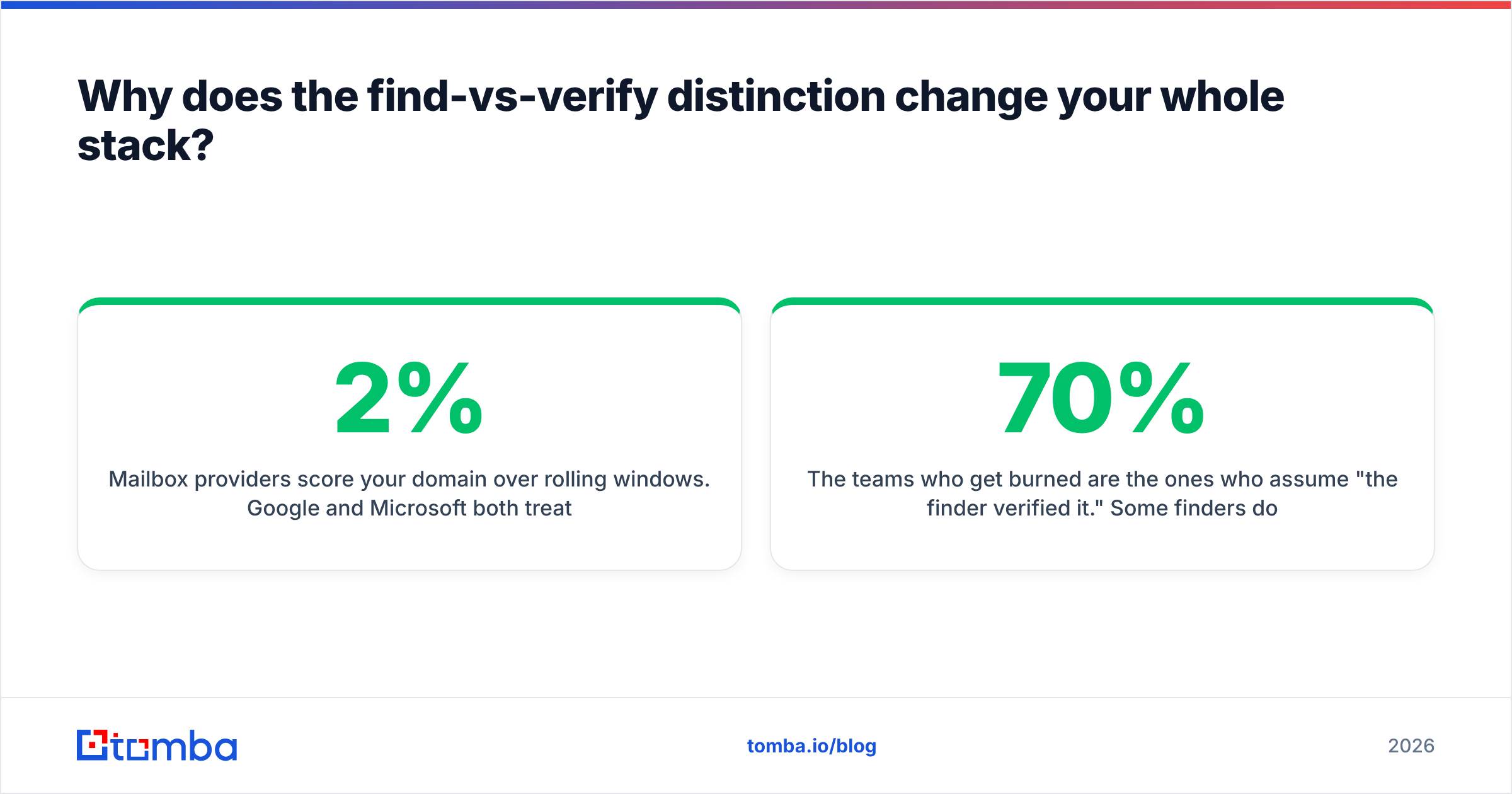
Mailbox providers score your domain over rolling windows. Google and Microsoft both treat hard-bounce rate as a primary negative signal, and once your sender reputation drops, clean sends from the same domain start landing in spam too. A 2% bounce rate is the usual "you are fine" threshold; above 5% you are actively burning the domain.
That means the order of operations matters more than the tool choice:
- Source contacts from a finder → you inherit whatever accuracy that vendor's pattern-matching achieved.
- Send without verification → any stale or guessed address becomes a hard bounce.
- Verify after the fact → you catch the bad ones, but only if you do it before the send, not after the campaign report.
The teams who get burned are the ones who assume "the finder verified it." Some finders do run a live SMTP check; some return a pattern guess (first.last@domain.com) with a 70% confidence score and let you find out the hard way. Read the vendor's own documentation on what its confidence score actually measures before you trust it.

How accurate is each tool in practice?#
Different question for each, which is exactly why the comparison is awkward.
For GetProspect, accuracy means coverage × correctness: what percentage of your target list gets an email at all, and what percentage of those emails are real. Public benchmarks and G2 reviews put mid-market finders in a broad 85–95% band for correctness on common domains, with coverage varying wildly by geography and company size. European SMBs and non-English domains are consistently harder. Anyone quoting a single flat accuracy number across every industry is selling you a marketing figure.
For TrueVerify, accuracy means verdict correctness: when it says valid, does the message deliver, and when it says invalid, was the address genuinely dead. The hard cases are:
- Catch-all domains. The server accepts everything at the SMTP layer, so a handshake proves nothing. Good verifiers flag these as "risky" or "accept-all" rather than pretending. Handling them properly needs a catch-all verifier with additional signals beyond the SMTP response.
- Greylisting. A temporary 4xx response looks like a failure but is a deliberate anti-spam delay. Verifiers that do not retry produce false invalids.
- Role accounts.
info@,sales@,support@are technically valid and commercially useless for cold outreach. Whether a tool flags them is a policy decision, not an accuracy one. - Aggressive spam traps. Some domains blacklist IPs that run repeated verification handshakes, which is why verifier IP hygiene matters as much as its logic.
The honest read: a standalone verifier will almost always beat a finder's internal check on edge-case domains, because that is its entire product. But it can only apply that skill to addresses you already have.

How do GetProspect and TrueVerify compare feature by feature?#
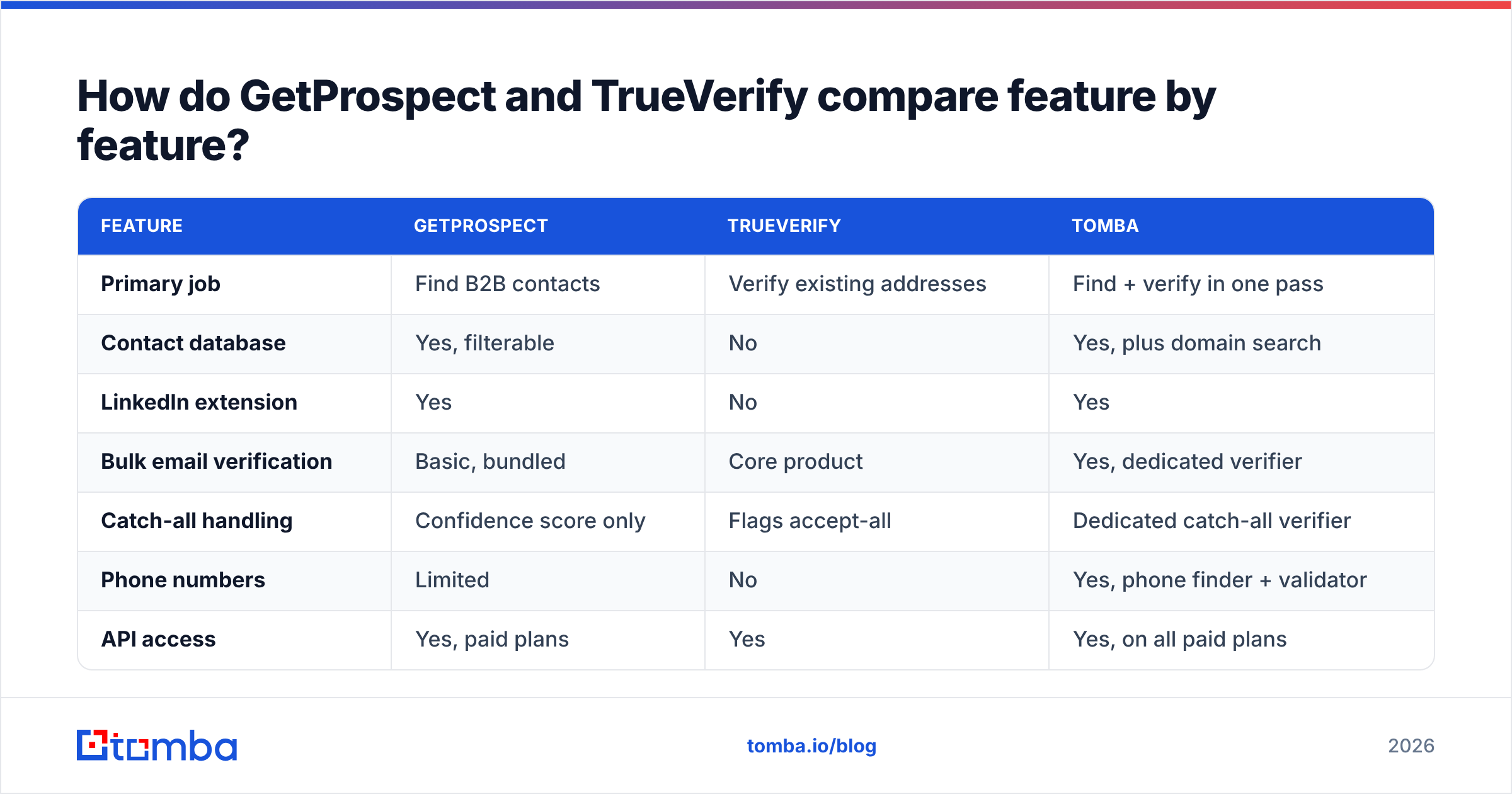
The table below is the fastest way to see the shape of each product. Treat pricing as directional — both vendors adjust plans, so check their live pricing pages before you commit.
| Feature | GetProspect | TrueVerify | Tomba |
|---|---|---|---|
| Primary job | Find B2B contacts | Verify existing addresses | Find + verify in one pass |
| Contact database | Yes, filterable | No | Yes, plus domain search |
| LinkedIn extension | Yes | No | Yes |
| Bulk email verification | Basic, bundled | Core product | Yes, dedicated verifier |
| Catch-all handling | Confidence score only | Flags accept-all | Dedicated catch-all verifier |
| Phone numbers | Limited | No | Yes, phone finder + validator |
| API access | Yes, paid plans | Yes | Yes, on all paid plans |
| Free tier | ~50 finds/mo | Small trial credit pack | 25 searches/mo |
| Entry paid price | ~$49/mo list | Pay-as-you-go credits | $49/mo Starter |
| Best for | Building lists from scratch | Cleaning lists you own | Teams who need both |

Two things stand out.
First, the free tiers are not equivalent. GetProspect's free finds and a verifier's trial credits measure different units — 50 contact reveals is worth roughly 20× more in raw cost than 50 verification checks. Do not compare the numbers directly.
Second, the API story differs. Verifiers tend to expose a simple single-endpoint API that is trivial to wire into a signup form for real-time validation. Finders expose richer but heavier APIs. If your use case is "block fake emails at registration," you want the verifier pattern; if it is "enrich every new CRM record," you want the finder pattern. Tomba's email verification API covers both shapes from one key, which is the main argument for consolidating.
What does each one actually cost at real volume?#
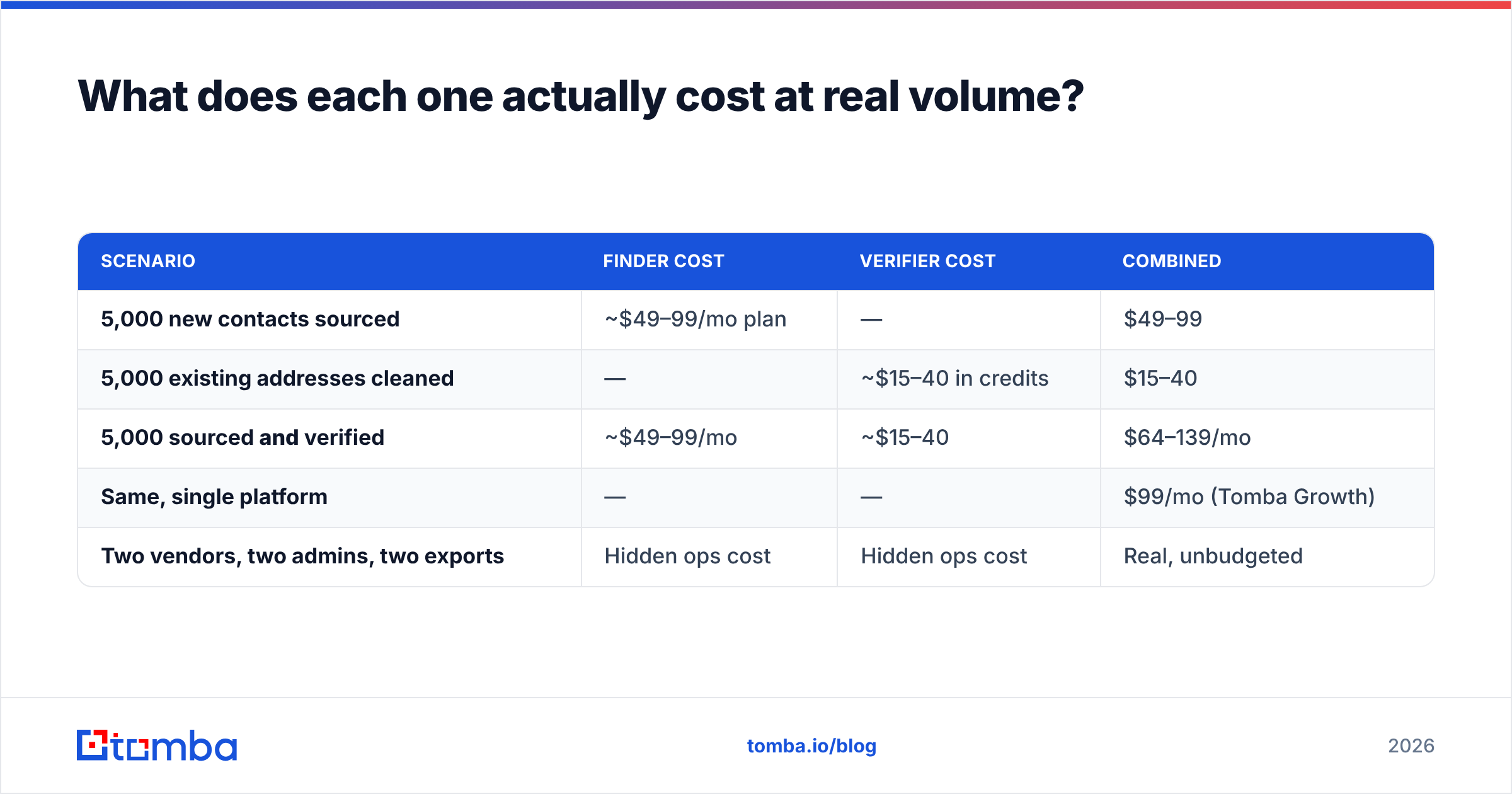
Run the numbers on 5,000 contacts, because per-unit pricing hides the total.
| Scenario | Finder cost | Verifier cost | Combined |
|---|---|---|---|
| 5,000 new contacts sourced | ~$49–99/mo plan | — | $49–99 |
| 5,000 existing addresses cleaned | — | ~$15–40 in credits | $15–40 |
| 5,000 sourced and verified | ~$49–99/mo | ~$15–40 | $64–139/mo |
| Same, single platform | — | — | $99/mo (Tomba Growth) |
| Two vendors, two admins, two exports | Hidden ops cost | Hidden ops cost | Real, unbudgeted |
The last row is the one finance teams miss. Two vendors means two contracts, two credit pools that expire on different schedules, and a manual CSV round-trip between them every time you build a list. That round-trip is where data quality quietly degrades — someone exports the wrong column, someone re-uploads a stale file, someone skips verification because it is Friday.
Consolidated Tomba pricing runs Free (25 searches/mo), Starter $49/mo, Growth $99/mo, Pro $249/mo, with Enterprise custom — and finding, verifying, bulk processing, and enrichment all draw from the same pool. Whether that is cheaper than GetProspect plus a verifier depends on your ratio of finds to checks, but it is always simpler.
Which should you pick for your use case?#
Pick by what is broken right now.
Choose GetProspect if: your pipeline problem is volume. You have ICP clarity, you know which companies to hit, and you simply do not have the contacts. GetProspect's LinkedIn workflow is genuinely good for SDRs who prospect visually — browse a Sales Navigator list, extract, export. The built-in mini-CRM is enough for a solo founder who has not bought HubSpot yet.
Choose TrueVerify (or any dedicated verifier) if: your pipeline problem is deliverability. You already have 40,000 rows from a trade show, a partner list, or three years of webinar signups, and your last campaign bounced at 7%. You do not need more contacts. You need to know which of the ones you have are still alive. Also choose a standalone verifier if you need real-time API validation on a public signup form — that is a different job from outbound entirely.
Choose both if: you are running continuous outbound at scale and your finder's internal verification is not clearing catch-all domains. This is a legitimate stack, just an expensive one.
Choose a consolidated platform if: you want one credit pool, one API key, and no CSV handoff. This is where an email verifier built into the same product as the finder pays off — every address you discover is checked in the same request, before it ever reaches your sequencer.

What do people get wrong about verification?#
Four recurring mistakes, all expensive.
- Verifying once and calling it done. B2B data decays at roughly 2–3% per month through job changes alone. A list verified in January is meaningfully wrong by June. Re-verify before every major send, not once per year.
- Treating "risky" as "valid." Catch-all and accept-all results are not green lights. Send to them in a separate, low-volume segment on a secondary domain if you must, never mixed into your main sequence.
- Ignoring role accounts. They inflate your "valid" count and depress your reply rate. Filter them out of cold campaigns even though they technically deliver.
- Assuming verification fixes reputation. It prevents further damage. It does not repair a domain you already burned — that needs warmup, volume throttling, and time. Verification is prevention, not treatment.
If you are auditing a list right now, the fastest diagnostic is a small sample: pull 500 random addresses, verify them, and extrapolate. If invalid + risky exceeds 15%, do not send to that list at all until it is cleaned.
Are there other options worth considering?#
Yes — the two-tool framing is narrower than the real market.
If your bottleneck is sourcing rather than verifying, dedicated B2B databases are worth a look. BookYourData, for example, sells pre-verified contact records outright rather than charging for search-and-guess, which suits teams who want a clean list on day one without building a prospecting motion. It is a different purchase model, and for some ICPs it is the better one.
If your bottleneck is research, tools that resolve a company domain into a full contact map matter more than either category here — that is what domain search does, returning every discoverable address at a company plus the detected email pattern, so you can extrapolate to people the database has never seen.
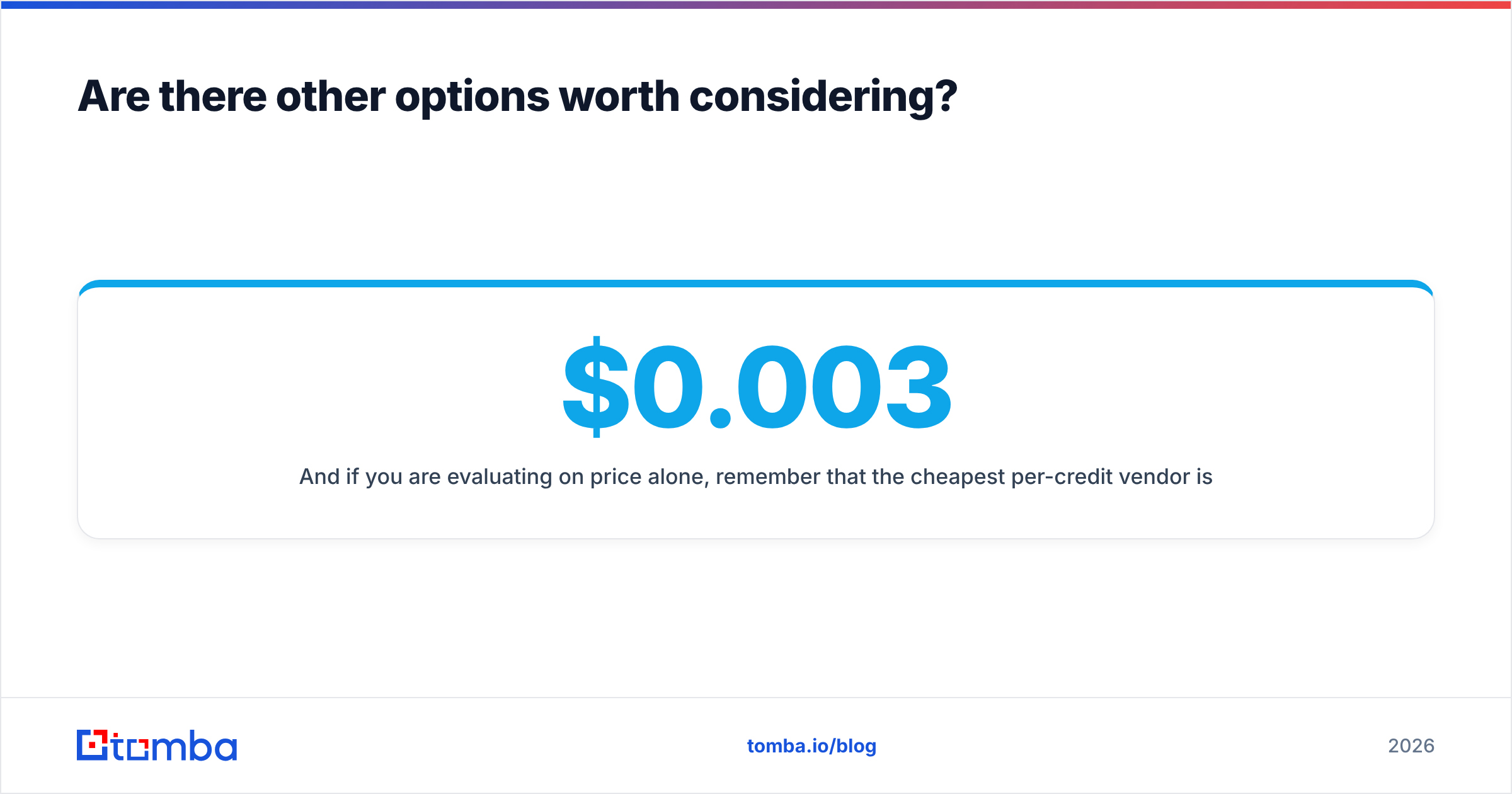
And if you are evaluating on price alone, remember that the cheapest per-credit vendor is rarely the cheapest per usable contact. A verifier at $0.003 per check that returns 30% "unknown" is worse value than one at $0.008 that resolves them. Model cost per contact you can actually email, not cost per API call. Vendor documentation and independent review sites like G2 and Capterra are useful for spotting where a tool's coverage falls apart by region.
What is the verdict on GetProspect vs TrueVerify?#
They are answers to different questions, so the honest verdict is conditional:
- Empty list, clear ICP → GetProspect wins, because a verifier has nothing to work with.
- Full list, bad bounce rate → TrueVerify wins, because more contacts will not fix deliverability.
- Both problems at once → stacking them works, but you are paying two bills and doing a manual handoff every week.
The structural argument against the two-tool stack is not that either product is bad. It is that the seam between them is where your data quality actually fails — in the export, the reimport, the "we'll verify it next time" shortcut. Every serious outbound team eventually collapses that seam.
Ready to stop moving CSVs between vendors? Tomba Email Finder discovers contacts by domain, name, or company and verifies each result in the same request — one credit pool, one API, catch-all handling included. Start on the free tier with 25 searches a month, or move to Starter at $49/mo when your outbound gets serious.
Related guides#
Ready to find emails that actually work?
Join 150,000+ professionals who stopped guessing and started sending. Free credits on signup — no credit card required.
Get the Tomba newsletter
Practical outbound tactics and product updates — once every two weeks.
About the author