GetProspect vs UnwrapEmail: Which Email Finder Wins in 2026?
GetProspect and UnwrapEmail solve the same problem in very different ways: one is a LinkedIn-first prospecting database, the other a lean lookup engine. Here's how they compare on accuracy, credits, catch-all handling, and real cost per usable lead.
TL;DR
- GetProspect is a LinkedIn-first prospecting platform: Chrome extension, contact database, list management, and light CRM-style workflow. It's built for people who source leads while browsing.
- UnwrapEmail is a lean lookup-and-verify engine: give it a name and domain, get an email back. Fewer surfaces, less workflow, cheaper entry point.
- On single-contact lookups, both land in a similar accuracy band. The gap opens on catch-all domains and bulk enrichment, where verification depth matters more than the finder itself.
- Price per usable email matters more than price per credit. A cheap tool that burns credits on unverifiable results is not cheap.
- If you need both LinkedIn-sourced prospecting and deep verification with an API, a third option like Tomba usually beats picking one of these and patching the gap.
What are GetProspect and UnwrapEmail?#
GetProspect started as a LinkedIn email extractor and grew into a full prospecting suite. You install the Chrome extension, run a LinkedIn Sales Navigator search, and pull profiles into lists with enriched emails attached. It also ships a searchable B2B contact database with filters for job title, industry, company size, and location, plus basic list hygiene and export to CSV or CRM.
UnwrapEmail takes the opposite posture. It's a focused email finder and verifier — you supply a full name and a company domain, it returns the most probable address with a confidence score. Credit-based, minimal UI, API-first thinking. There's no pretense of being a prospecting workspace.
That difference in scope is the whole story. Comparing them on "which finds more emails" misses the point; they're optimized for different moments in the pipeline.

How do GetProspect and UnwrapEmail actually find emails?#
Neither tool has a magic list of every email on earth. Both run variations of the same four-stage pipeline, and understanding it explains why results diverge:
- Pattern inference — The engine learns a company's email format (
first.last@,f.last@,first@) from known addresses at that domain, then applies it to your target's name. This is where most of the coverage comes from. - Database lookup — A cached contact record from crawling, partner data, or user contributions. Fast and free of SMTP risk, but decays roughly 2-3% per month as people change jobs.
- SMTP validation — The tool opens a conversation with the receiving mail server and asks whether the mailbox exists, without sending anything. This is what separates a guess from a verified address.
- Catch-all detection — Many corporate domains accept mail to any address, so SMTP always says yes. A serious tool flags this and refuses to score it as "valid"; a weak one silently returns a green checkmark.
- Confidence scoring — The final number you see is a blend of the four signals above. Two vendors can both say "95%" and mean completely different things.
- Re-verification cadence — How often stale records get re-checked. Rarely advertised, hugely predictive of real-world bounce rate.
GetProspect leans hardest on stages 2 and 1 — its database plus LinkedIn context. UnwrapEmail leans on stages 1 and 3 — pattern generation with an SMTP pass. That's why GetProspect tends to win on "I have a LinkedIn URL and nothing else," while UnwrapEmail tends to hold up better when you already know the domain and just need a clean address.
Which one is more accurate in practice?#
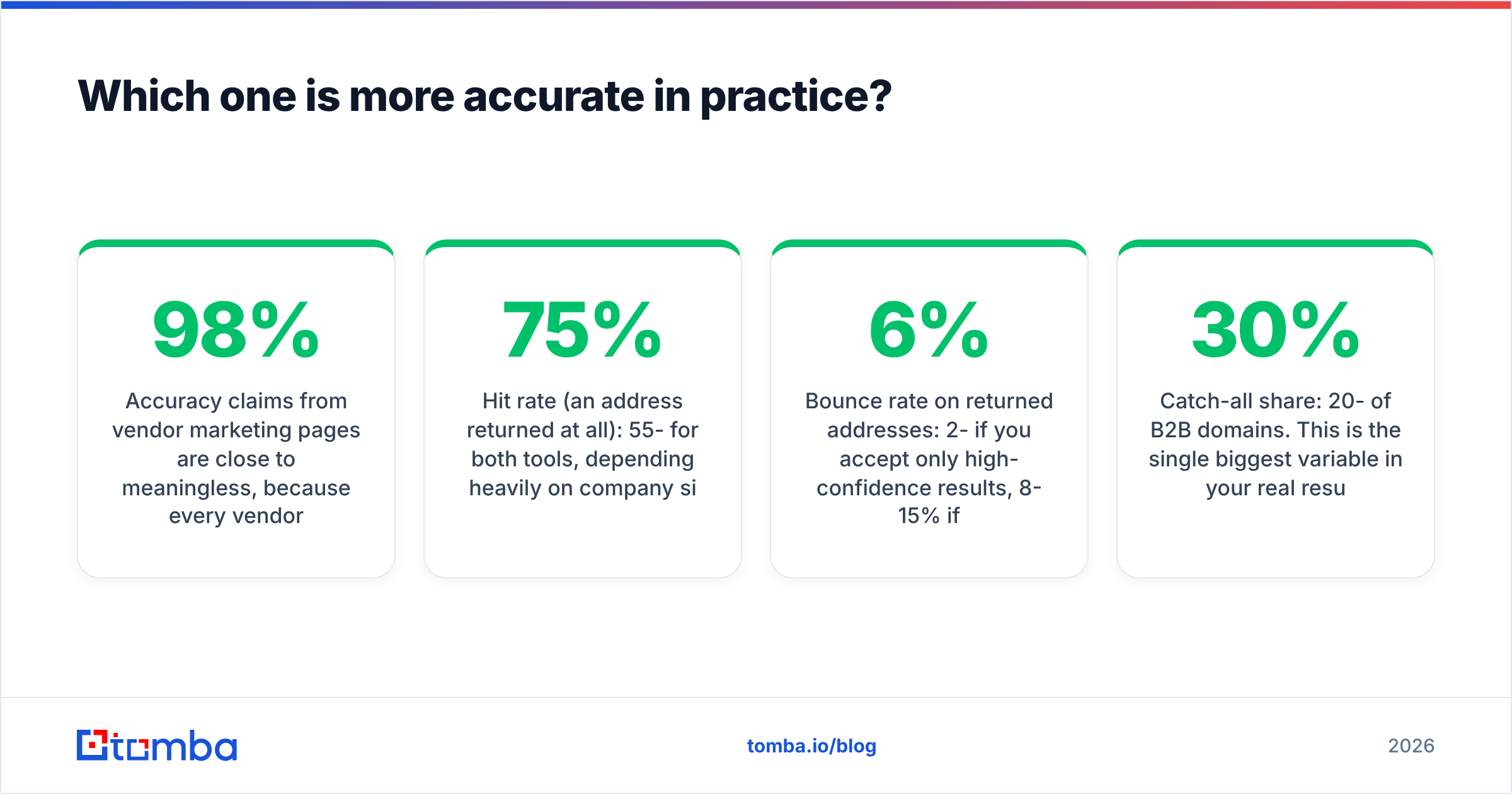
Accuracy claims from vendor marketing pages are close to meaningless, because every vendor defines the denominator differently. Some report "of the emails we returned, X% were valid" (which rewards returning fewer results). Others report "we found emails for X% of your list" (which rewards returning risky guesses). Read the fine print before you believe a 98%.

Here's a more honest framing. Across a typical mid-market B2B list — SaaS, agencies, professional services in North America and Western Europe — you should expect:
- Hit rate (an address returned at all): 55-75% for both tools, depending heavily on company size. Sub-20-employee companies are where coverage collapses.
- Bounce rate on returned addresses: 2-6% if you accept only high-confidence results, 8-15% if you accept everything the tool returns.
- Catch-all share: 20-30% of B2B domains. This is the single biggest variable in your real results and the one both tools handle least transparently.
The practical takeaway: run a 200-contact sample through each tool with your ICP before committing to an annual plan. Vendor benchmarks are run on lists that flatter vendor benchmarks. Yours won't look like theirs.
If more than a fifth of your target domains are catch-all, no finder alone will save you — you need a dedicated catch-all verifier layered on top, regardless of which of these two you pick.
How do GetProspect and UnwrapEmail compare on features and pricing?#
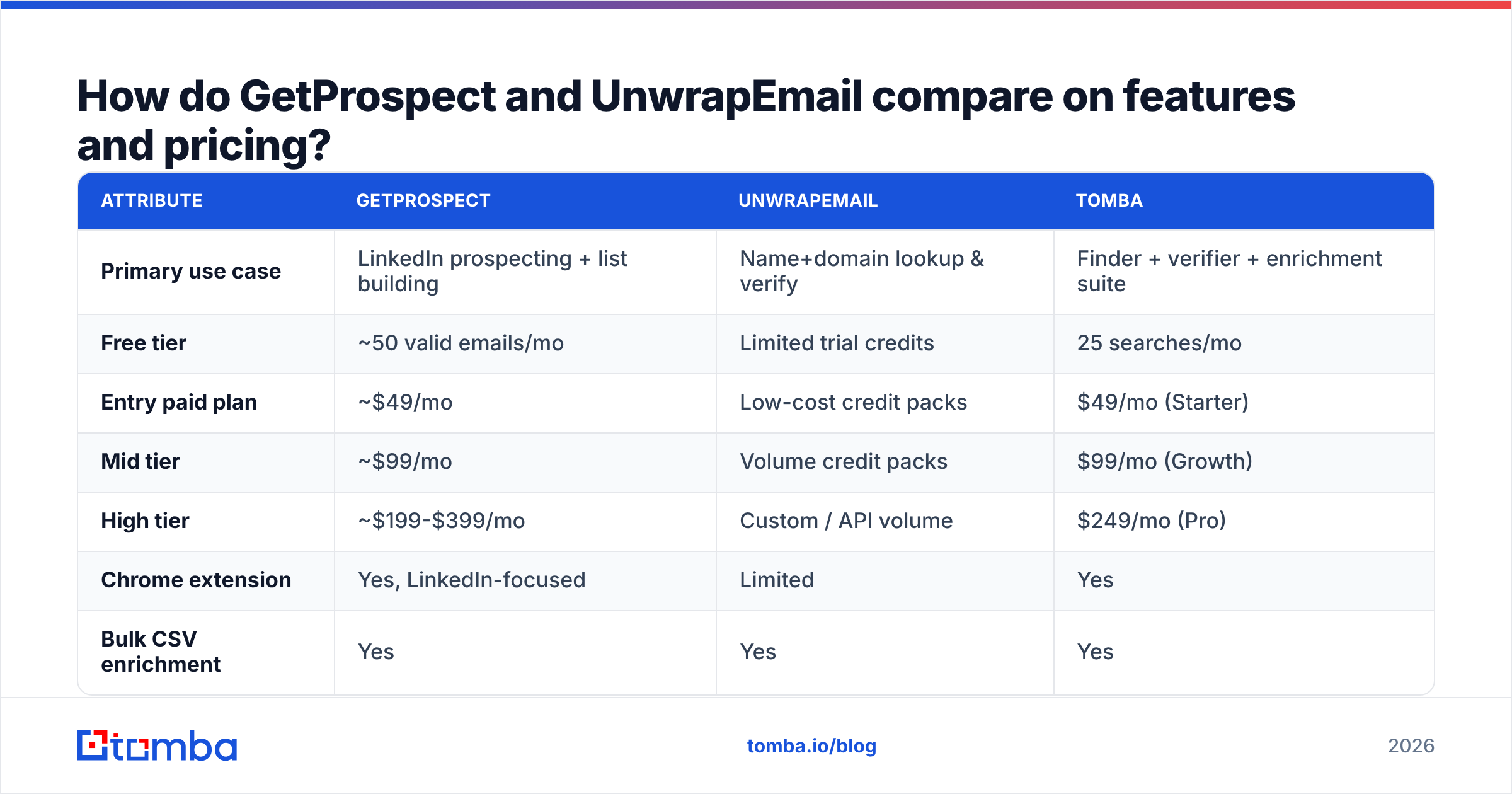
Pricing on both platforms has moved more than once, so treat these as directional and confirm on the vendor page before you buy. The structural differences are what matter and those change slowly.

| Attribute | GetProspect | UnwrapEmail | Tomba |
|---|---|---|---|
| Primary use case | LinkedIn prospecting + list building | Name+domain lookup & verify | Finder + verifier + enrichment suite |
| Free tier | ~50 valid emails/mo | Limited trial credits | 25 searches/mo |
| Entry paid plan | ~$49/mo | Low-cost credit packs | $49/mo (Starter) |
| Mid tier | ~$99/mo | Volume credit packs | $99/mo (Growth) |
| High tier | ~$199-$399/mo | Custom / API volume | $249/mo (Pro) |
| Chrome extension | Yes, LinkedIn-focused | Limited | Yes |
| Bulk CSV enrichment | Yes | Yes | Yes |
| Public API | Yes | Yes, API-first | Yes, documented + CLI + MCP |
| Catch-all handling | Flagged, limited resolution | Flagged | Dedicated catch-all verifier |
| Phone numbers | Partial | No | Yes |
| Native CRM integrations | HubSpot, Pipedrive, Zapier | Mostly via API/Zapier | HubSpot, Salesforce, Pipedrive, Sheets, Airtable, Zapier, Make |
Two things jump out.
First, the entry price is not the cost. GetProspect's cheaper tiers cap valid emails per month; UnwrapEmail's credit packs charge per lookup whether or not the result is usable. Ask both vendors the same question: do I get charged for a lookup that returns nothing? The answer moves your real cost per usable lead by 20-40%.
Second, integration surface predicts adoption. A tool your reps have to leave their workflow to use gets used in bursts and then abandoned. GetProspect wins here for LinkedIn-heavy teams. UnwrapEmail wins for engineering-driven teams that want a single endpoint and no UI at all.
Which tool fits which team?#
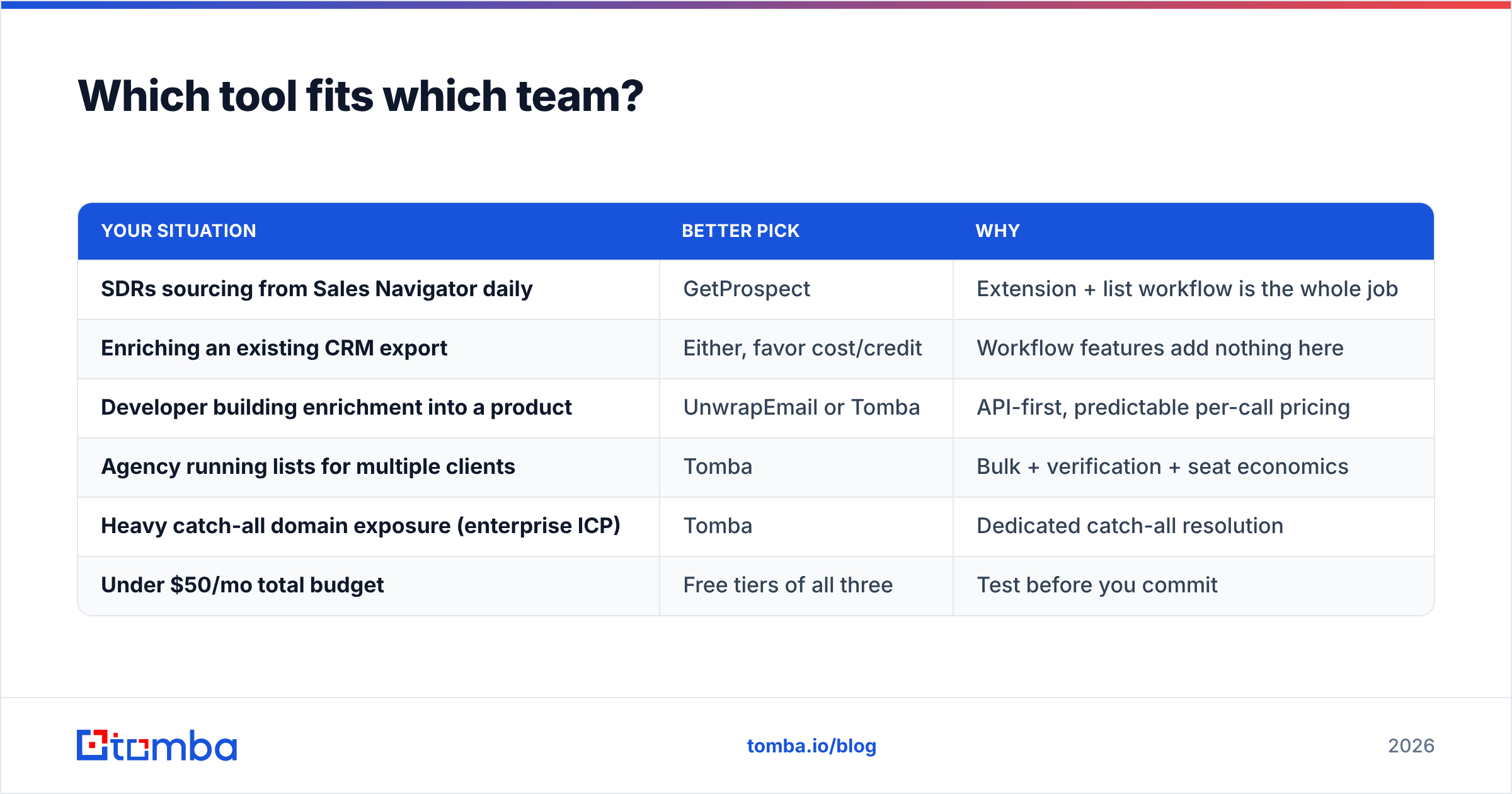
| Your situation | Better pick | Why |
|---|---|---|
| SDRs sourcing from Sales Navigator daily | GetProspect | Extension + list workflow is the whole job |
| Enriching an existing CRM export | Either, favor cost/credit | Workflow features add nothing here |
| Developer building enrichment into a product | UnwrapEmail or Tomba | API-first, predictable per-call pricing |
| Agency running lists for multiple clients | Tomba | Bulk + verification + seat economics |
| Heavy catch-all domain exposure (enterprise ICP) | Tomba | Dedicated catch-all resolution |
| Under $50/mo total budget | Free tiers of all three | Test before you commit |
What about catch-all domains and deliverability?#
This is where most tool comparisons stop being useful, so let's be blunt: a catch-all domain will accept mail addressed to asdkjfh@company.com. SMTP verification cannot distinguish a real mailbox from a fake one there. Any tool that returns "valid" on a catch-all domain without disclosing it is transferring risk onto your sender reputation.
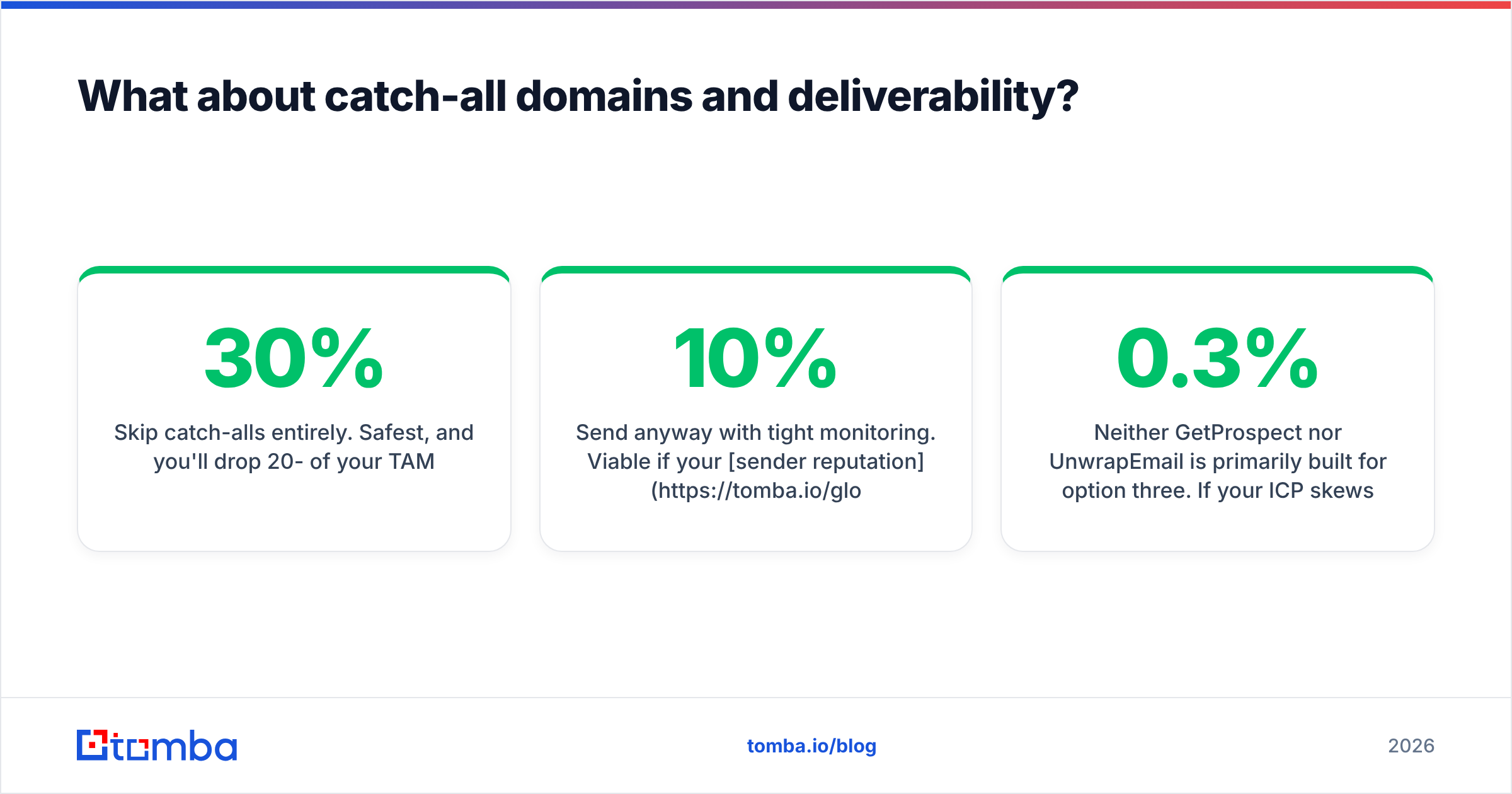
You have three options:
- Skip catch-alls entirely. Safest, and you'll drop 20-30% of your TAM.
- Send anyway with tight monitoring. Viable if your sender reputation is strong and you keep catch-all sends under ~10% of daily volume across warmed domains.
- Resolve them with a specialist layer. Pattern-corroboration, secondary sources, and engagement signals can raise confidence on catch-all addresses well above a coin flip.
Neither GetProspect nor UnwrapEmail is primarily built for option three. If your ICP skews enterprise — where catch-all configuration is near-universal — budget for a verification layer on top of whichever finder you choose. Google's own sender guidelines put the spam-complaint ceiling at 0.3%, and bounces from unresolved catch-alls are the fastest way to get there.

What are the hidden costs nobody lists on the pricing page?#
Four line items that don't appear in any comparison chart but show up in your invoice or your bounce rate:
- Credits burned on misses. If a failed lookup still costs a credit, a 60% hit rate means your effective price per usable email is 1.67x the sticker. Confirm this in writing.
- Re-verification. B2B data decays fast. A list enriched in January and mailed in April will bounce noticeably harder than one verified the week you send. Budget for a re-verify pass, not just the initial find.
- Seat pricing. Some plans price per user, some per workspace. A five-rep team on a per-seat plan can pay 5x what the pricing page implies.
- Export and API limits. Rate limits and monthly export caps can quietly force a tier upgrade you didn't plan for. Check the API docs, not the marketing page.
Run the arithmetic before signing: (plan cost) ÷ (credits × hit rate × non-bounce rate) = your true cost per deliverable contact. That number, not the headline price, is what you're actually buying. Tomba's pricing publishes credit behavior explicitly for exactly this reason — you should demand the same clarity from any vendor.
Is there a better third option?#
Honestly, sometimes. The GetProspect vs UnwrapEmail decision forces a trade-off — prospecting workflow or lean lookup economics — that doesn't have to exist.
Tomba sits across both: a bulk email finder for list work, a standalone email verifier with catch-all resolution, domain search, phone lookup, and a documented email finder API with a CLI and MCP server for teams that would rather script than click. Free tier is 25 searches/mo, Starter is $49/mo, Growth $99/mo, Pro $249/mo.
Where Tomba is not the obvious answer: if your entire motion is LinkedIn Sales Navigator and you want one extension that also manages your lists in-app, GetProspect's workflow is purpose-built for that and you'll feel it. Likewise, BookYourData is a strong fit if you'd rather buy pre-built verified lists than run lookups yourself — a different model, and a legitimate one. Pick the tool shaped like your workflow, not the one with the best landing page.
For an independent read on any of these, check current reviews on G2 — filter by company size, since enterprise and SMB reviewers report very different experiences with the same tool.
How should you actually run the evaluation?#
Do this in a week, not a quarter:
- Build a 200-row test list from your real ICP, with name + company domain + LinkedIn URL. Include a deliberate mix of company sizes.
- Run it through every free tier — GetProspect, UnwrapEmail, Tomba. All three have one.
- Measure hit rate and catch-all share per tool. Not "which found more" — which found more that you'd be willing to send to.
- Send a small verified batch (50 contacts) from a warmed domain and record the actual bounce rate. This is the only number that isn't a proxy.
- Divide plan cost by deliverable contacts. Now you have a comparison worth acting on.
Most teams discover their decision was never about accuracy — it was about whether they wanted a workflow tool or a data endpoint.
The bottom line#
GetProspect wins if your reps live in LinkedIn and want lists, filters, and an extension that keeps them in flow. UnwrapEmail wins if you want a cheap, quiet lookup endpoint with no workflow overhead. Both are reasonable; neither is a complete answer for teams with heavy catch-all exposure or serious bulk enrichment needs.
If that describes you, start with the Tomba Email Finder — 25 free searches a month, no card required, and catch-all verification built into the same platform instead of bolted on later. Run your own 200-row sample against it alongside the other two, and let your bounce rate pick the winner.
Related guides#
Ready to find emails that actually work?
Join 150,000+ professionals who stopped guessing and started sending. Free credits on signup — no credit card required.
Get the Tomba newsletter
Practical outbound tactics and product updates — once every two weeks.
About the author