Gigasheet Pricing, Reviews, Pros and Cons: 2026 Breakdown
Gigasheet turns a browser tab into a billion-row spreadsheet — but the jump from free to paid is steep. Here is what Gigasheet actually costs in 2026, what reviewers praise, where it falls short, and when a cheaper stack wins.

TL;DR
- Gigasheet is a browser-based spreadsheet built for files that break Excel and Google Sheets — think tens of millions of rows opened in a tab, no SQL required.
- The free Community plan is genuinely useful for one-off analysis; the paid jump is the real decision, and it is priced per user, not per row.
- Reviewers consistently praise speed on huge CSVs and the zero-learning-curve UI. The recurring complaints: formula depth, collaboration limits on lower tiers, and price relative to a Postgres-plus-BI stack.
- Gigasheet is an analysis layer, not a data source. It will not find, verify, or enrich contacts — you still need a provider for that.
- Best fit: RevOps, data, security, and fraud teams that regularly receive giant exports and need answers in minutes. Worst fit: teams whose files fit comfortably in Sheets.
What is Gigasheet, and who actually uses it?#
Gigasheet is a cloud spreadsheet designed for datasets that are too big for desktop tools but too small — or too ad hoc — to justify a data warehouse project. You upload a CSV, Parquet, JSON, or log export, and it opens in a familiar grid within seconds, whether it is 50,000 rows or 500 million.
Think of it as the difference between a hatchback and a flatbed truck. Google Sheets is fine for the weekly shop. When a vendor hands you an 8 GB export of every transaction from the last three years, you need something with a different chassis. Gigasheet's pitch is that you get the truck without having to learn to drive a semi — no SQL, no dbt models, no data engineer in the loop.
The typical users cluster into four groups:
- RevOps and marketing ops — deduping CRM exports, merging enrichment files, auditing lead lists before they hit HubSpot or Salesforce.
- Security and fraud analysts — sifting log dumps, breach data, and transaction records where the row count kills local tools.
- Data teams under time pressure — profiling a new source file before deciding whether it deserves a pipeline.
- Analysts at companies without a warehouse — where the alternative is "email the CSV to the one person who knows Python."
That last group is where most of the Gigasheet love comes from, and it explains a lot about how the pricing is structured.

How much does Gigasheet cost in 2026?#
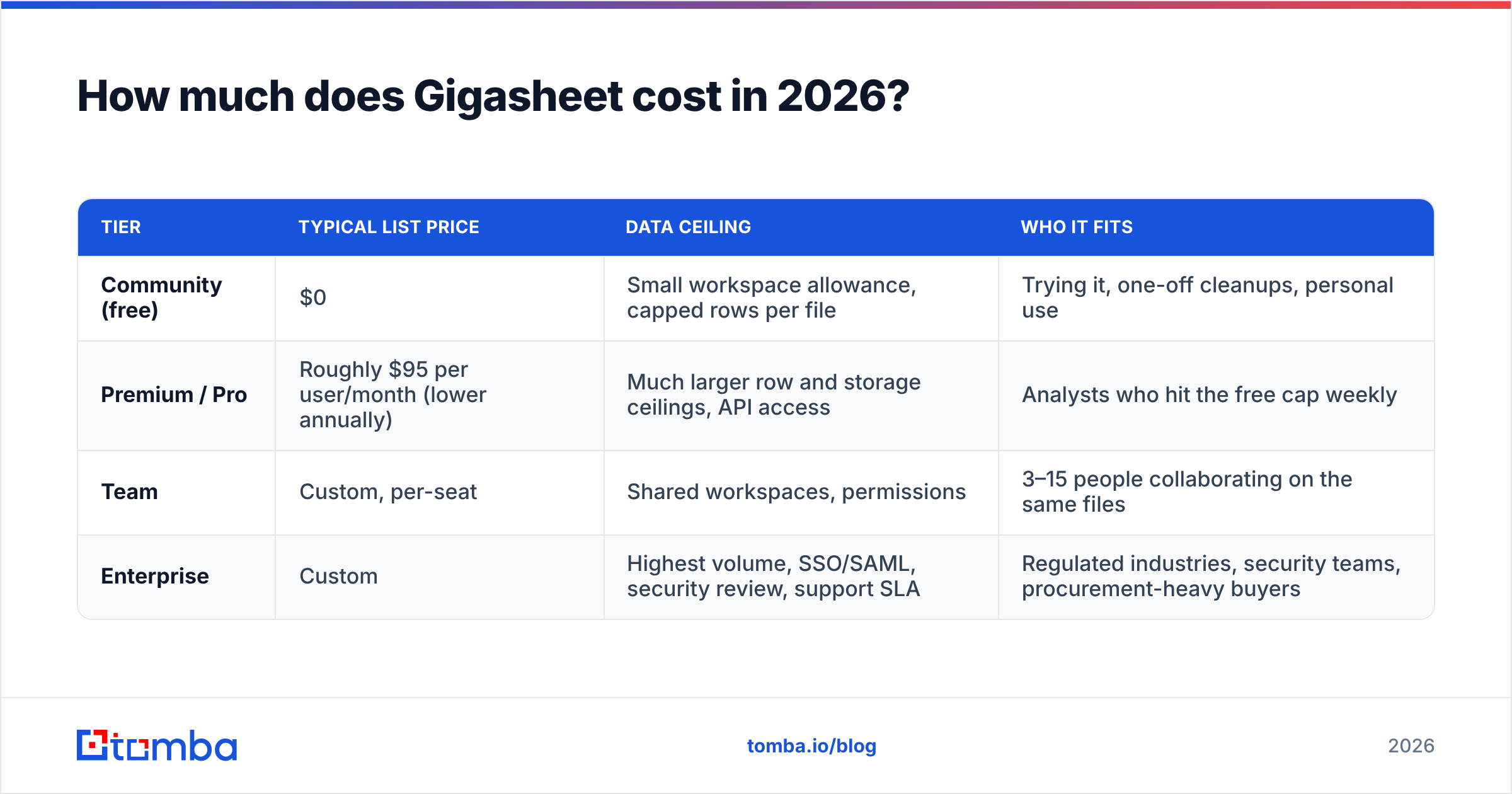
Gigasheet publishes a tiered, per-user model. The headline structure has been stable: a free Community tier with real limits, a mid-tier paid plan aimed at individual power users and small teams, and a custom Enterprise tier where SSO, larger data volumes, and security review live.
Prices and limits change. Treat the table below as a planning frame, and confirm current numbers on the official Gigasheet pricing page before you build a business case.
| Tier | Typical list price | Data ceiling | Who it fits |
|---|---|---|---|
| Community (free) | $0 | Small workspace allowance, capped rows per file | Trying it, one-off cleanups, personal use |
| Premium / Pro | Roughly $95 per user/month (lower annually) | Much larger row and storage ceilings, API access | Analysts who hit the free cap weekly |
| Team | Custom, per-seat | Shared workspaces, permissions | 3–15 people collaborating on the same files |
| Enterprise | Custom | Highest volume, SSO/SAML, security review, support SLA | Regulated industries, security teams, procurement-heavy buyers |
Three things matter more than the sticker price:
- It is priced per seat, not per row. If one analyst does all the heavy lifting, Gigasheet is cheap. If eight people each need occasional access, the math turns against you fast — this is the single biggest driver of "is Gigasheet worth it" complaints.
- The free tier is a real product, not a demo. Plenty of teams live on Community for months. That is good faith from the vendor, and it also means you can validate fit before spending anything.
- Storage and retention are part of the ceiling. Big files sit in the workspace. Teams that upload weekly exports and never clean up hit limits sooner than the row cap suggests.
What are the hidden costs?#
- Seat sprawl. The "let me just look at that file" request is how a one-seat tool becomes a five-seat invoice.
- Re-upload time. If your source data changes daily, manual uploads cost analyst hours that never show up on the invoice. The API is the fix, and API access typically sits above the free tier.
- Duplicate tooling. If you already pay for a warehouse plus a BI seat, Gigasheet may be a convenience layer rather than a replacement — worth it for speed, but budget it as an addition.
- Data hygiene you still have to buy elsewhere. Gigasheet will show you that 22% of a list has malformed or dead email addresses. It will not fix them. That is a separate line item.
What do Gigasheet reviews actually say?#
Public review sentiment on G2 and Capterra skews positive, and the praise is unusually specific — a good sign that reviewers are describing real workflows rather than filling out a rewards form.
What reviewers repeatedly praise:
- Time-to-first-answer. The most common phrase is some variant of "it just opened." Files that crash Excel load in under a minute.
- No learning curve. Filters, group-bys, and pivots behave like a spreadsheet. Non-technical stakeholders can self-serve, which removes a queue from the data team.
- Genuinely useful free tier. Reviewers who started free and upgraded describe a smooth path rather than a bait-and-switch.
- Responsive support. Small-vendor advantage: people report getting real humans quickly.
What reviewers repeatedly criticise:
- Formula and transformation depth. It is not Excel. Complex nested formulas, macros, and some advanced functions either do not exist or work differently. Power users hit this wall within a week.
- Price relative to alternatives. A recurring line in mixed reviews: "great tool, hard to justify at this per-seat price when DuckDB is free." That is a fair critique — and a real skills tradeoff, since DuckDB assumes SQL fluency.
- Collaboration gaps on lower tiers. Sharing, permissions, and commenting feel thinner than Google Sheets, which sets a very high bar.
- Occasional slowness on the heaviest operations. Joins and multi-column sorts on hundreds of millions of rows are fast for what they are, but not instant.
The honest summary: reviewers who bought Gigasheet for the specific problem of "huge file, need answers now" are happy. Reviewers who expected an Excel replacement are the ones writing three-star reviews.
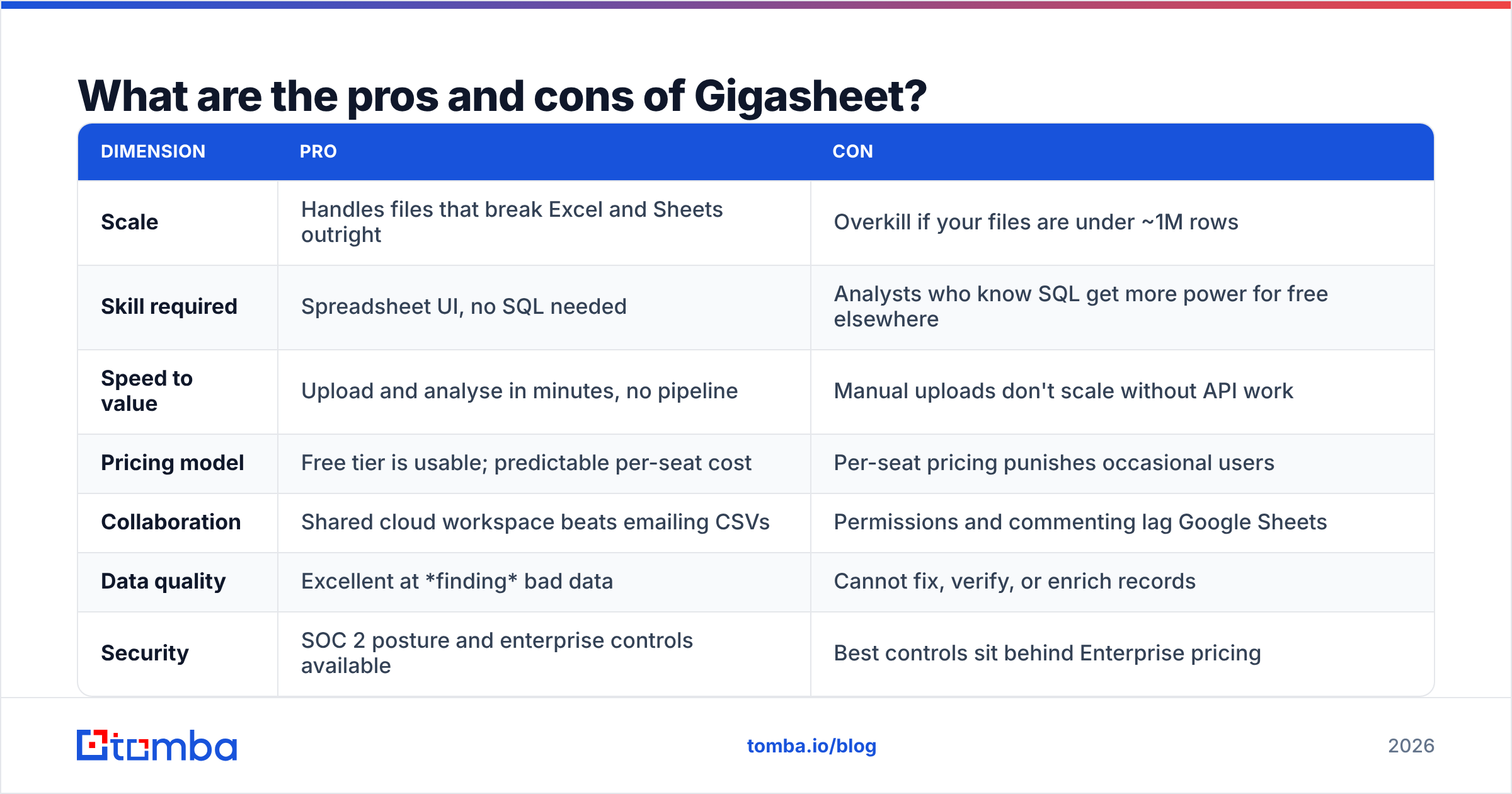
What are the pros and cons of Gigasheet?#
| Dimension | Pro | Con |
|---|---|---|
| Scale | Handles files that break Excel and Sheets outright | Overkill if your files are under ~1M rows |
| Skill required | Spreadsheet UI, no SQL needed | Analysts who know SQL get more power for free elsewhere |
| Speed to value | Upload and analyse in minutes, no pipeline | Manual uploads don't scale without API work |
| Pricing model | Free tier is usable; predictable per-seat cost | Per-seat pricing punishes occasional users |
| Collaboration | Shared cloud workspace beats emailing CSVs | Permissions and commenting lag Google Sheets |
| Data quality | Excellent at finding bad data | Cannot fix, verify, or enrich records |
| Security | SOC 2 posture and enterprise controls available | Best controls sit behind Enterprise pricing |
Is Gigasheet worth it for sales and RevOps teams?#
Yes — narrowly, and only if your list volumes are genuinely large.
Here is the honest test. Export your biggest lead file. If it opens in Google Sheets without a fight, you do not need Gigasheet; you need better hygiene and a tighter data enrichment process. If it hangs, truncates at the row limit, or you have started splitting one export into four tabs, Gigasheet pays for itself in recovered analyst hours in about a month.
The RevOps use case that comes up most often is list reconciliation before a campaign: merge a purchased list with a CRM export, dedupe on domain, flag records missing an email or job title, and segment by firmographics. Gigasheet does that in a UI your ops manager already understands, without a Python notebook and without waiting on a ticket.
What it will not do is close the gap the audit reveals. When the dedupe shows 40% of your records have no email address, or a third of the addresses are stale, you are back to sourcing. That is a job for an email finder and an email verifier, used as separate steps in the same workflow.

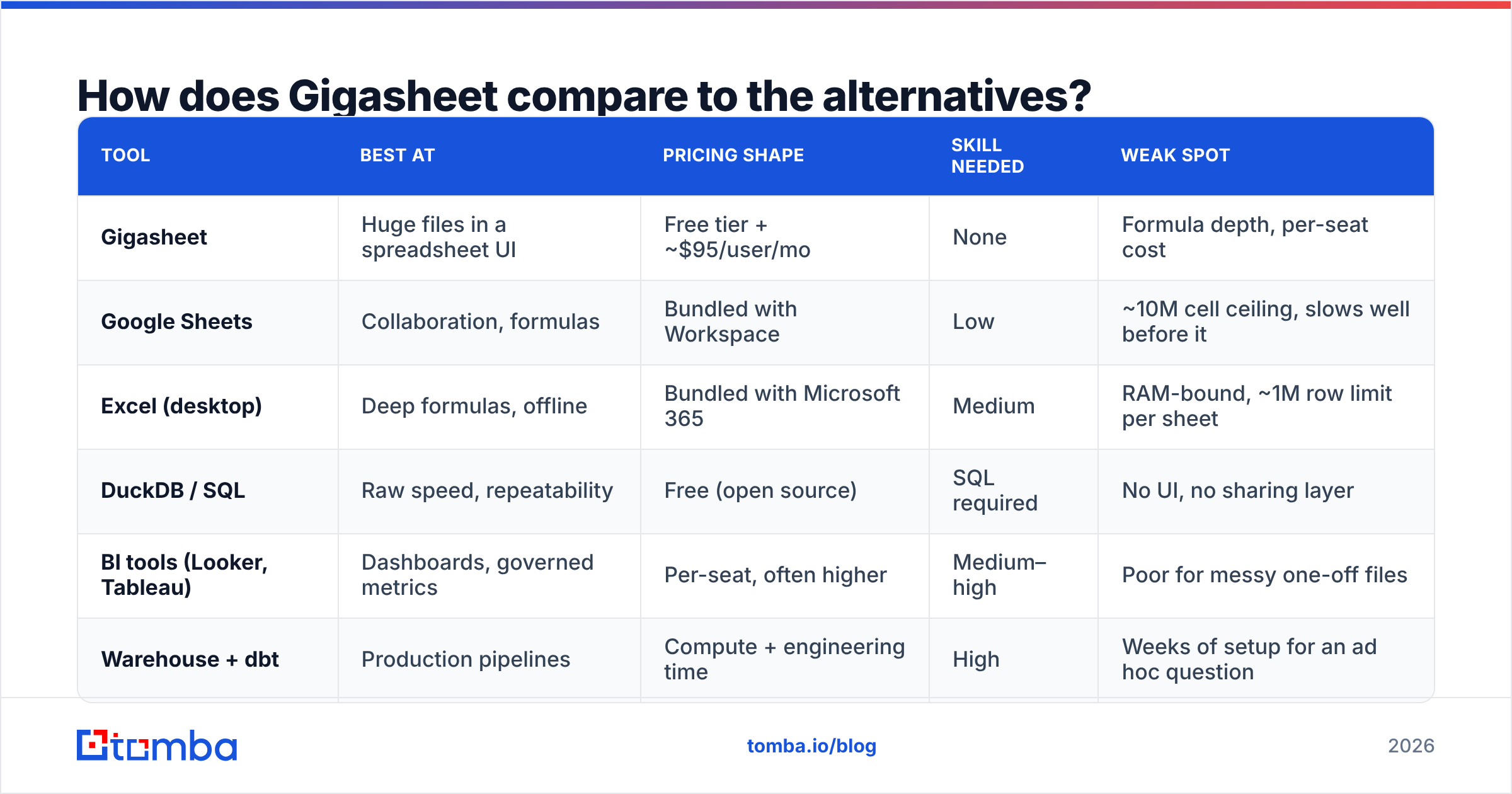
How does Gigasheet compare to the alternatives?#
| Tool | Best at | Pricing shape | Skill needed | Weak spot |
|---|---|---|---|---|
| Gigasheet | Huge files in a spreadsheet UI | Free tier + ~$95/user/mo | None | Formula depth, per-seat cost |
| Google Sheets | Collaboration, formulas | Bundled with Workspace | Low | ~10M cell ceiling, slows well before it |
| Excel (desktop) | Deep formulas, offline | Bundled with Microsoft 365 | Medium | RAM-bound, ~1M row limit per sheet |
| DuckDB / SQL | Raw speed, repeatability | Free (open source) | SQL required | No UI, no sharing layer |
| BI tools (Looker, Tableau) | Dashboards, governed metrics | Per-seat, often higher | Medium–high | Poor for messy one-off files |
| Warehouse + dbt | Production pipelines | Compute + engineering time | High | Weeks of setup for an ad hoc question |
Read the table by asking one question: is this a repeatable pipeline or a one-off investigation? Pipelines belong in a warehouse. Investigations belong in a spreadsheet — and if the investigation is 200 million rows, that spreadsheet is Gigasheet.
Where does Gigasheet fit in a prospecting workflow?#
Gigasheet sits in the middle of a chain, not at either end. A realistic sequence looks like this:
- Source the records. Pull contacts from a provider, a scrape, a conference list, or a B2B database. This is where addresses actually come from.
- Consolidate in Gigasheet. Merge sources, dedupe on domain or LinkedIn URL, normalise job titles, drop rows missing required fields.
- Fill the gaps. Push the cleaned list of names and domains through a bulk email finder to recover the missing addresses, then verify what came back.
- Re-import and segment. Bring the enriched file back into Gigasheet, score it, and split it into campaign-ready segments.
- Load and send. Push to your CRM or sequencer.
Steps 3 and 4 are where teams lose the most money by skipping. A clean file of invalid addresses is still a clean file of invalid addresses, and it will torch your sender reputation exactly as fast as a dirty one. If you are automating this loop, the Tomba API handles steps 3 as a batch job so the round trip is minutes rather than an afternoon of CSV shuffling.
Who should buy Gigasheet, and who should skip it?#
Buy it if:
- You receive files over ~5 million rows more than once a month.
- Your analysts are spreadsheet-fluent but not SQL-fluent.
- You need an answer today and a data pipeline would take three weeks.
- One or two people will hold the seats.
Skip it if:
- Your biggest file opens fine in Google Sheets.
- Your team already writes SQL against a warehouse — you will get more power from DuckDB or your existing stack at no extra cost.
- You need eight casual users, which turns a reasonable per-seat price into a real budget line.
- What you actually need is better data, not a better viewer. No spreadsheet, however large, invents an email address that was never in the file.
What is the verdict on Gigasheet pricing?#
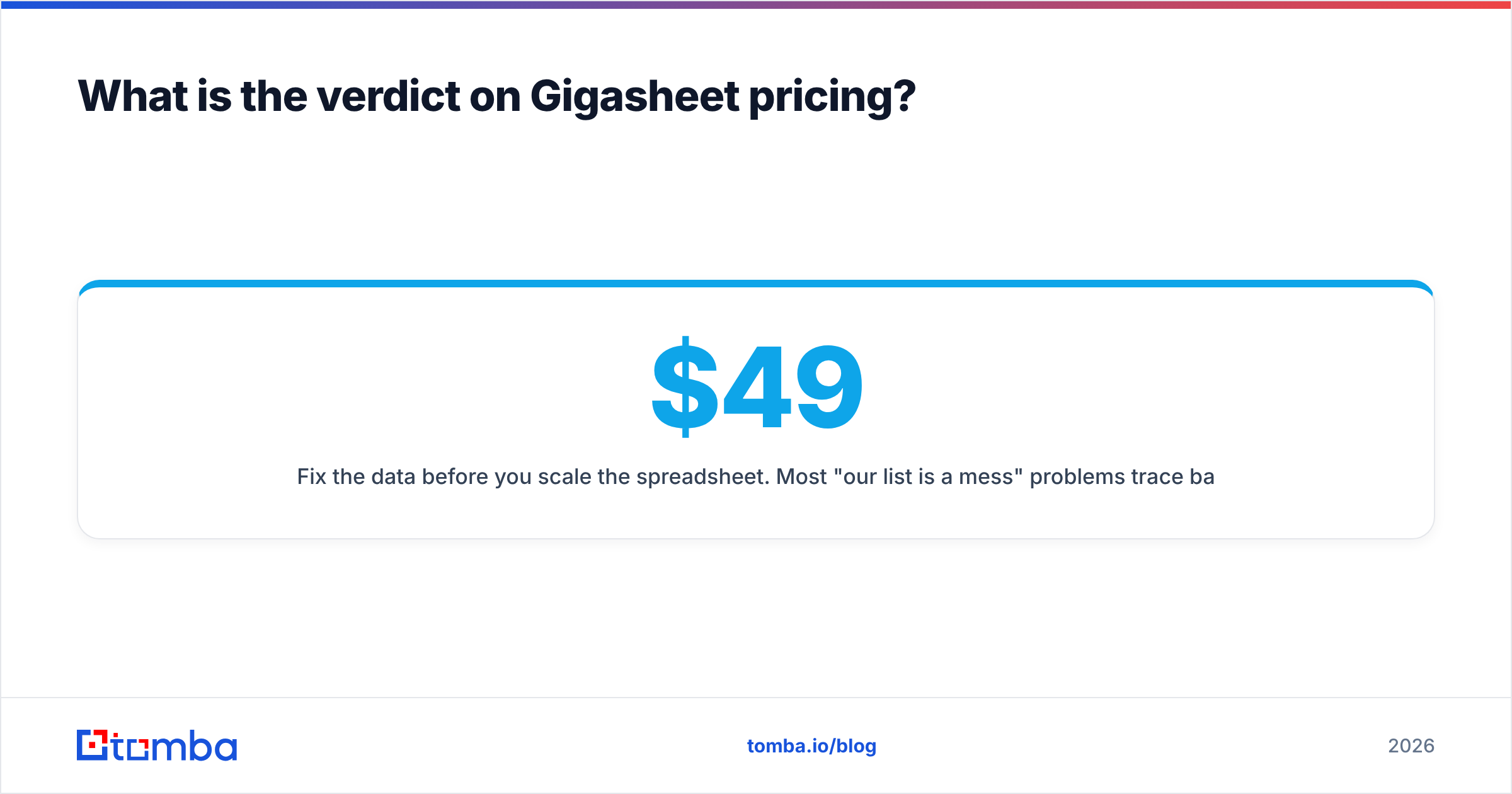
Gigasheet is fairly priced for what it is: a specialist tool that removes a specific, painful bottleneck. The free tier is honest, the paid tier is defensible for a dedicated analyst, and the Enterprise tier is a normal procurement conversation. The complaint that shows up in reviews is not that the tool is bad — it is that per-seat pricing does not match how spreadsheets get shared in the real world.
Run the free plan for two weeks against your actual worst file. If it saves your team more than an hour a week, the paid tier is an easy yes. If you find yourself uploading the same clean-ish 200,000-row list over and over, your bottleneck was never file size — it was data quality, and you are solving the wrong problem.
Fix the data before you scale the spreadsheet. Most "our list is a mess" problems trace back to missing and unverified contact data, not to row limits. Tomba Email Finder fills in the addresses your exports are missing — by domain, by name, or in bulk — with verification built into the same run. Start on the free tier (25 searches a month, no card), or check Tomba pricing if you are ready to run a full list: Starter is $49/mo, Growth $99/mo, and Pro $249/mo. Clean the source, and the spreadsheet gets a lot smaller.
Related guides#
Ready to find emails that actually work?
Join 150,000+ professionals who stopped guessing and started sending. Free credits on signup — no credit card required.
Get the Tomba newsletter
Practical outbound tactics and product updates — once every two weeks.
About the author