Gigasheet vs SignalHire: Which B2B Data Tool Wins in 2026?
Gigasheet cleans and analyzes million-row files. SignalHire finds emails and phone numbers. They get compared constantly, but they solve opposite halves of the same problem. Here is which one you actually need.
TL;DR
- Gigasheet and SignalHire are not really competitors. Gigasheet is a browser-based spreadsheet for files too big for Excel; SignalHire is a contact-sourcing tool that reveals emails and phone numbers from LinkedIn and its own database.
- Pick Gigasheet if your bottleneck is a 3-million-row export you can't open, dedupe, or join. Pick SignalHire if your bottleneck is a list of names with no contact details attached.
- Neither is cheap at scale: Gigasheet's paid tier sits near $95/month per user, and SignalHire's entry plan starts around $49/month for a few hundred credits. Both meter you differently — rows vs credits — which is where budgets break.
- If your real job is "turn a list of companies and people into verified, deliverable emails," a dedicated email finder with an API is faster and cheaper than either. Tomba starts at $49/month for that job specifically.
- The honest answer for most GTM teams: use one tool for enrichment, one lightweight tool for cleanup, and stop paying for a third seat you touch twice a month.
What is Gigasheet, and what is it actually for?#
Gigasheet is a spreadsheet that runs in your browser and doesn't fall over when the file has a few hundred million rows. That's the entire pitch, and it's a good one. Open a 2 GB CSV, filter it, group it, dedupe it, join it against another file, and export the slice you need — all without a data warehouse, a Python notebook, or a DBA.
The analogy: Excel is a home kitchen. Gigasheet is a commercial kitchen with the same knives and the same layout, just built to handle a hundred times the volume without the counter collapsing.
What it does well:
- Big-file handling. Files that crash Excel and choke Google Sheets open in seconds.
- Spreadsheet-shaped UX. Filters, pivots, and formulas your ops team already knows. No SQL required.
- Joins and dedupe at scale. Merge a CRM export with an event list and kill duplicates across both.
- Enrichment marketplace. Gigasheet resells third-party enrichment (company data, some contact data) as a column-level action, billed on top of your plan.
- Sharing and permissions. Teams work on the same dataset instead of emailing
final_v3_REAL.csvaround.
What it doesn't do: it doesn't originate contact data. Gigasheet makes your existing data usable. If the email column is empty, Gigasheet will happily show you 400,000 empty cells at full speed.
What is SignalHire, and where does it fit?#
SignalHire sits on the other end of the pipeline. It's a contact-finding platform built around a Chrome extension and a searchable database, aimed at recruiters first and salespeople second. You land on a LinkedIn profile, click the extension, and it attempts to reveal work emails, personal emails, and phone numbers. It also ships a bulk search, a basic ATS/CRM layer, and an API.
Its strengths:
- Phone number coverage. Recruiters buy SignalHire largely for mobile numbers, and that's where it earns its keep.
- LinkedIn-native workflow. Extension-first, so it lives where sourcers already work.
- Personal emails. Useful for recruiting outreach where a work address is the wrong channel.
- Lightweight pipeline tools. Candidate stages, notes, team sharing.
Its limits: credits burn fast, every reveal costs whether or not the result is usable, and the deliverability of what comes back varies by region and seniority. It's a sourcing tool, not a data-hygiene tool.

Is "Gigasheet vs SignalHire" even a fair comparison?#
Not on features — on jobs. The reason these two names end up in the same search box is that both promise to fix "my lead data is a mess." They just fix different halves:
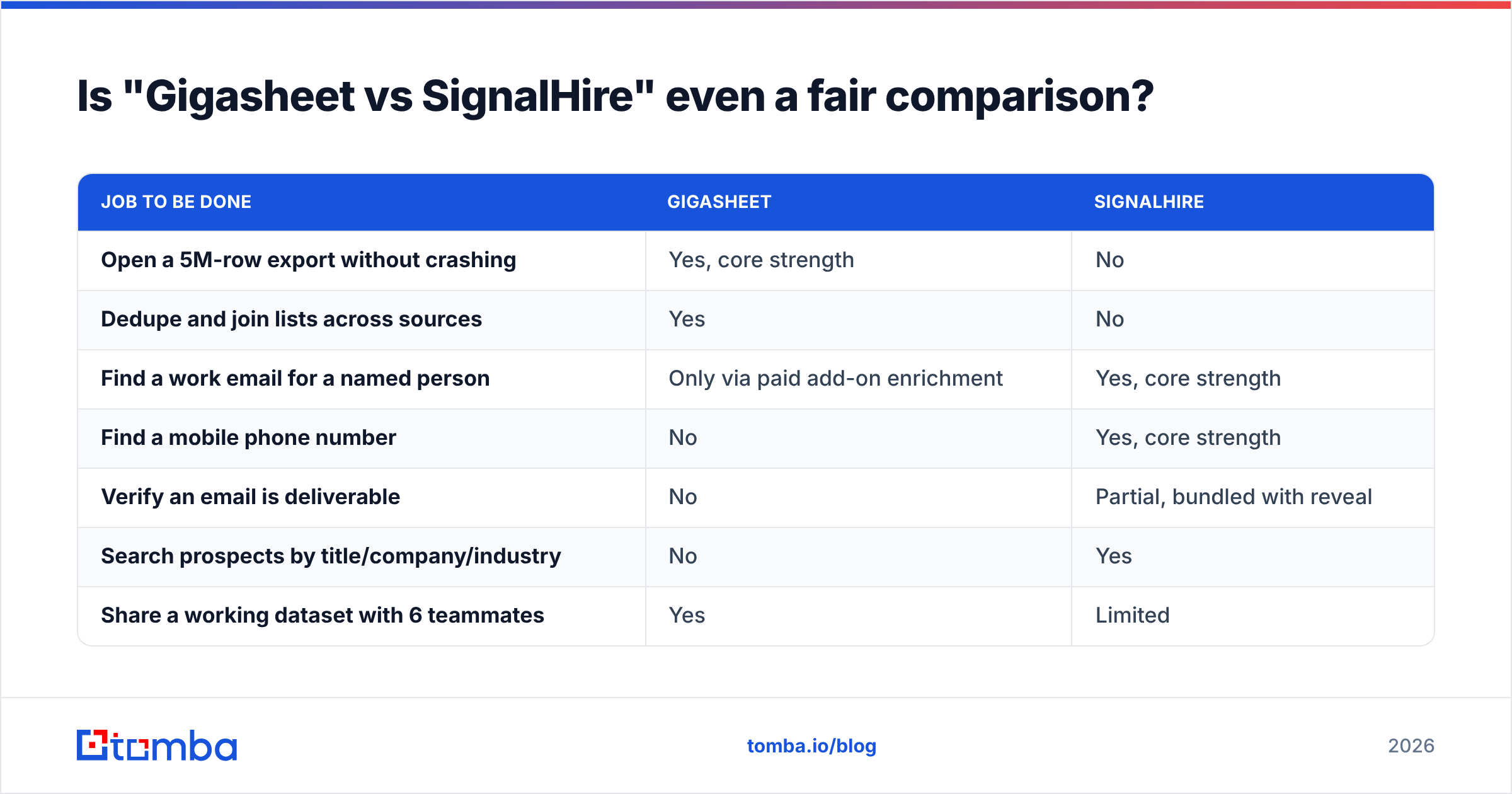
| Job to be done | Gigasheet | SignalHire |
|---|---|---|
| Open a 5M-row export without crashing | Yes, core strength | No |
| Dedupe and join lists across sources | Yes | No |
| Find a work email for a named person | Only via paid add-on enrichment | Yes, core strength |
| Find a mobile phone number | No | Yes, core strength |
| Verify an email is deliverable | No | Partial, bundled with reveal |
| Search prospects by title/company/industry | No | Yes |
| Share a working dataset with 6 teammates | Yes | Limited |
| Push results into a CRM automatically | Via export/integrations | Via API/integrations |
Read that table twice before you buy either. If four of your five checkmarks land in one column, the decision already made itself.
How do Gigasheet and SignalHire compare on pricing?#
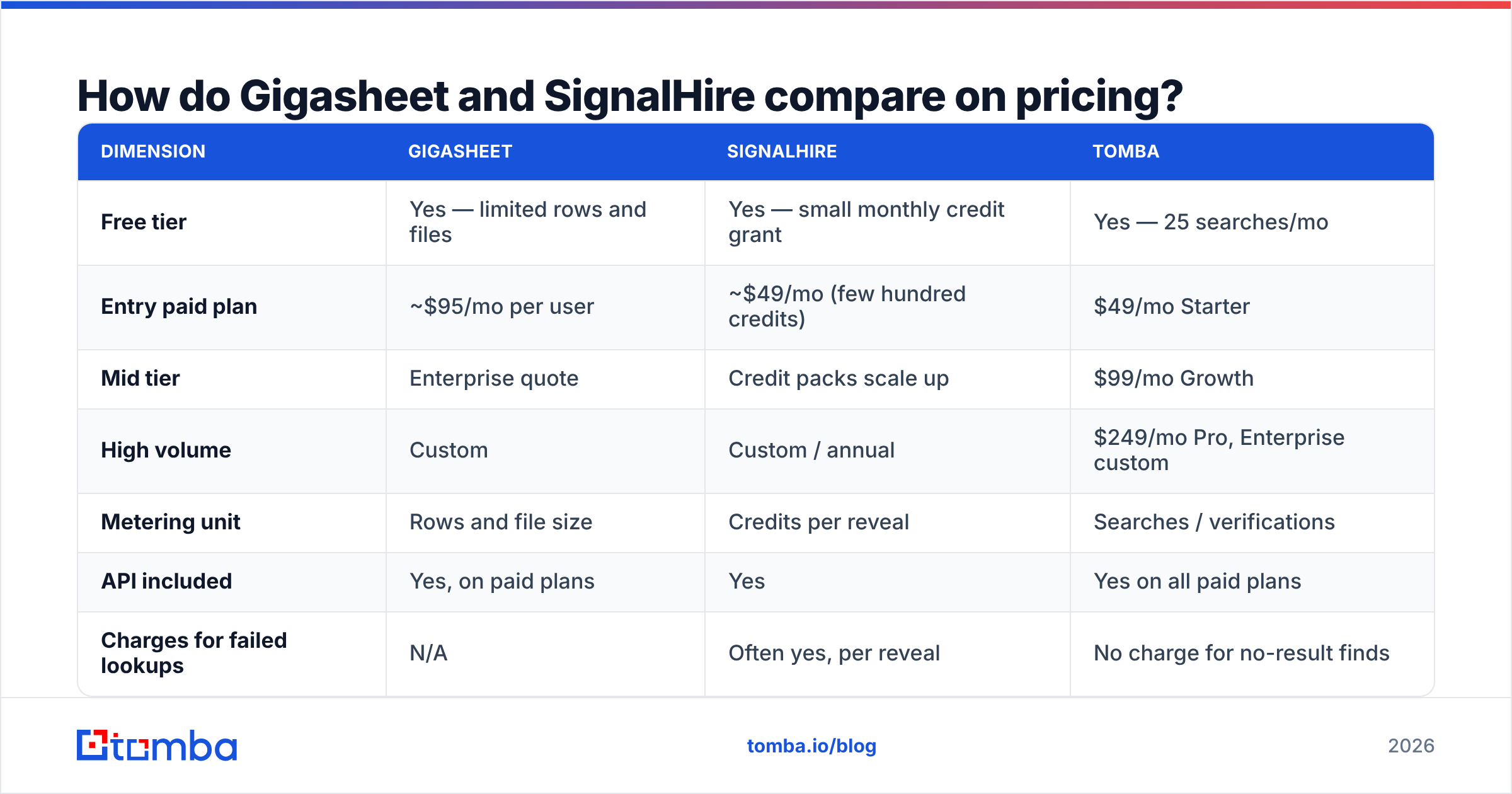
Both vendors change packaging often, so treat these as directional and confirm on their own pricing pages before you sign anything. As of early 2026:
| Dimension | Gigasheet | SignalHire | Tomba |
|---|---|---|---|
| Free tier | Yes — limited rows and files | Yes — small monthly credit grant | Yes — 25 searches/mo |
| Entry paid plan | ~$95/mo per user | ~$49/mo (few hundred credits) | $49/mo Starter |
| Mid tier | Enterprise quote | Credit packs scale up | $99/mo Growth |
| High volume | Custom | Custom / annual | $249/mo Pro, Enterprise custom |
| Metering unit | Rows and file size | Credits per reveal | Searches / verifications |
| API included | Yes, on paid plans | Yes | Yes on all paid plans |
| Charges for failed lookups | N/A | Often yes, per reveal | No charge for no-result finds |
| Best fit | Data ops, analysts | Recruiters, sourcers | Sales and growth teams building lists |
Two pricing traps worth naming:
Gigasheet's trap is seats. It's priced per user, and enrichment credits are separate. A five-person ops team that all need edit access hits several hundred dollars a month before a single row is enriched.
SignalHire's trap is failed reveals. Credit models that charge on attempt rather than on result quietly inflate your real cost per usable contact. If 30% of reveals come back empty or stale, your $49 plan is really costing you $70 in effective terms. Ask any vendor — including us — whether they bill for misses. The answer tells you a lot.
Which one has better contact data quality?#
SignalHire wins by default here, because Gigasheet doesn't originate contact data at all. But "wins by default" isn't the same as "good enough for cold outreach."
Three things determine whether a contact record is worth paying for:
- Source freshness. A record scraped 18 months ago describes a job someone may have left. Job-change rates in B2B run high enough that any database older than a quarter carries meaningful decay.
- Verification at delivery. Finding a plausible address is easy. Confirming the mailbox accepts mail is the hard part, and it's the part that protects your domain. If a tool hands you unverified addresses, budget for a separate email verifier pass before you send.
- Catch-all handling. A huge slice of B2B domains accept everything at the SMTP layer, so naive verification returns "valid" for addresses that will bounce. Tools that flag catch-alls honestly — instead of marking them green — save you a deliverability incident later.
SignalHire is reasonable on (1) for phone numbers and mixed on (2). Gigasheet's marketplace enrichment inherits whatever quality its underlying provider has, which varies by vendor and is hard to audit from inside a spreadsheet cell.
The practical move: whatever tool sources your emails, run them through verification before they touch a sending domain. That's true of SignalHire output, marketplace enrichment output, and any list you bought.
Which should you choose for your use case?#
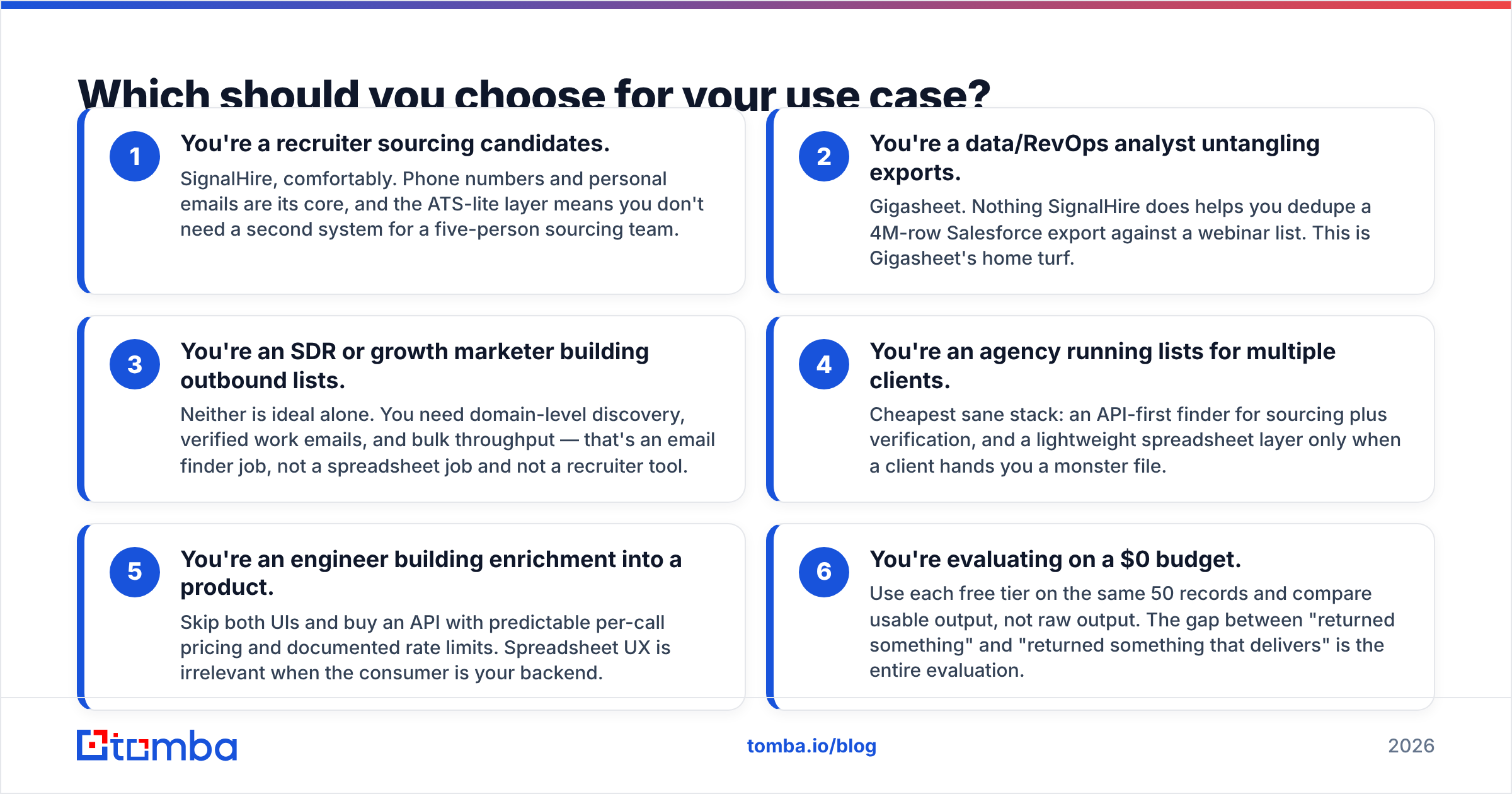
- You're a recruiter sourcing candidates. SignalHire, comfortably. Phone numbers and personal emails are its core, and the ATS-lite layer means you don't need a second system for a five-person sourcing team.
- You're a data/RevOps analyst untangling exports. Gigasheet. Nothing SignalHire does helps you dedupe a 4M-row Salesforce export against a webinar list. This is Gigasheet's home turf.
- You're an SDR or growth marketer building outbound lists. Neither is ideal alone. You need domain-level discovery, verified work emails, and bulk throughput — that's an email finder job, not a spreadsheet job and not a recruiter tool.
- You're an agency running lists for multiple clients. Cheapest sane stack: an API-first finder for sourcing plus verification, and a lightweight spreadsheet layer only when a client hands you a monster file.
- You're an engineer building enrichment into a product. Skip both UIs and buy an API with predictable per-call pricing and documented rate limits. Spreadsheet UX is irrelevant when the consumer is your backend.
- You're evaluating on a $0 budget. Use each free tier on the same 50 records and compare usable output, not raw output. The gap between "returned something" and "returned something that delivers" is the entire evaluation.

Can one tool replace both?#
Partly — and it depends which half of the problem is bigger for you.
If your pain is mostly sourcing (empty email columns, no phone numbers, no way to search by title), a dedicated finder replaces SignalHire for sales use cases and removes the need for Gigasheet's paid enrichment marketplace. You still won't get a big-data spreadsheet, but most teams discover they were using Gigasheet as an expensive dedupe button.
If your pain is mostly volume (files nothing else opens, joins across five systems, governance), keep Gigasheet and get your contact data from a source with an API you can call in bulk rather than clicking cell-by-cell enrichment.
Here's where Tomba lands in that split. Tomba is an email-finder-first platform: find addresses by domain, name, or company; verify them; handle catch-alls explicitly; and do it in bulk or over an API. Concretely:
- Domain search returns every discoverable address at a company plus the pattern it uses, so you can extrapolate to people the database has never seen.
- Bulk email finder takes a CSV of names and domains and hands back verified addresses — the operation people simulate badly inside spreadsheets.
- Tomba API covers find, verify, enrich, and catch-all checks, so an engineer can build the pipeline instead of an ops person maintaining a weekly click ritual.
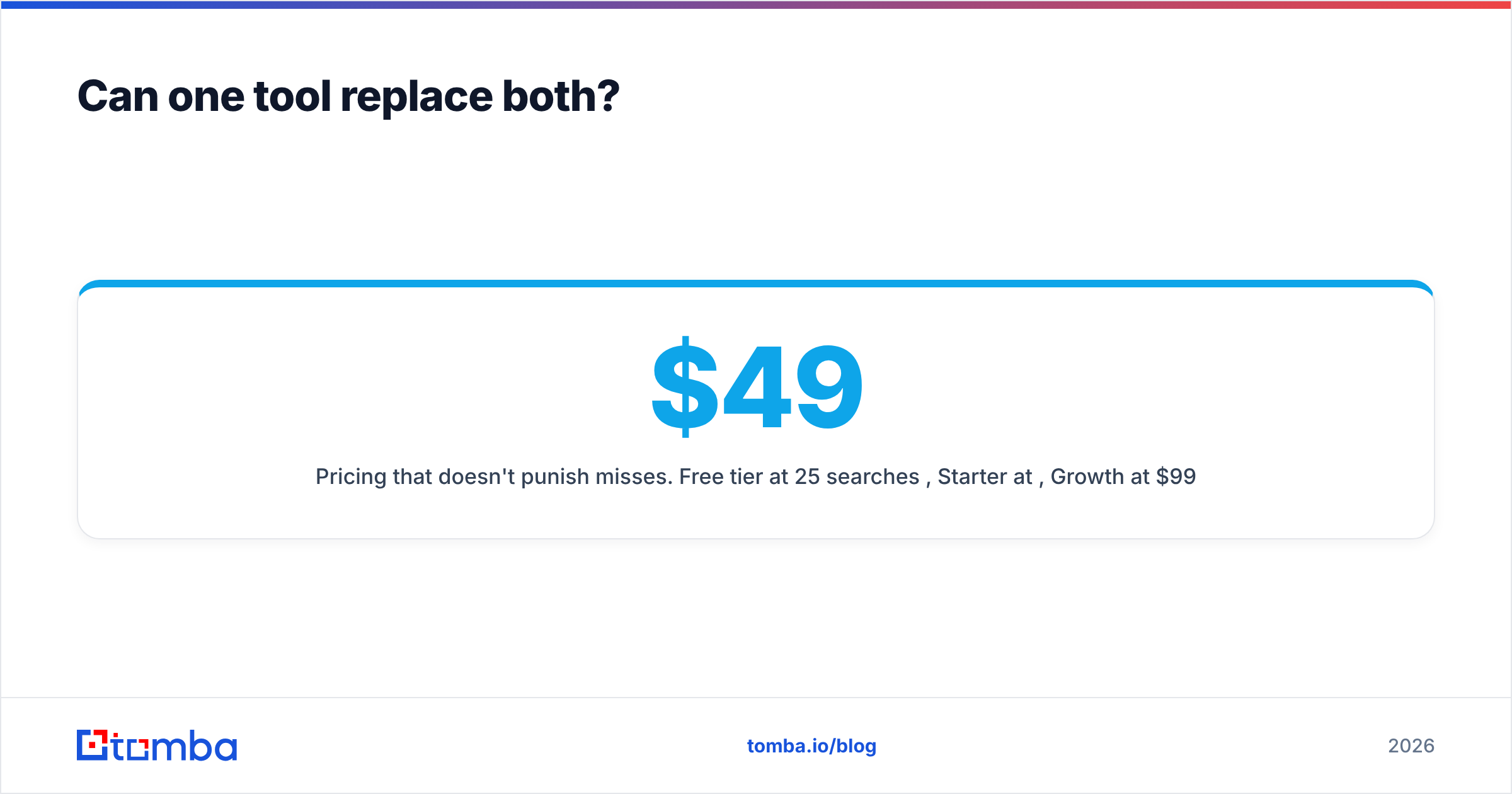
- Pricing that doesn't punish misses. Free tier at 25 searches/mo, Starter at $49/mo, Growth at $99/mo, Pro at $249/mo. Full Tomba pricing is public — no quote gate to see the numbers.
What Tomba does not do: it isn't a million-row spreadsheet, and it isn't a recruiting ATS. If those are your requirements, buy the tool that specializes in them.
What does a sane 2026 stack look like?#
A workflow most teams can run without three overlapping subscriptions:
- Define the account list in your CRM or a simple sheet — company, domain, target titles.
- Source contacts via an email finder API or bulk upload, keyed on domain plus name. Log which source produced each record.
- Verify before sending, always, including records from paid databases. Treat "valid" and "catch-all" as different states with different risk.
- Clean and dedupe — this is where a big-data spreadsheet earns its seat if, and only if, your files are genuinely large. Otherwise a script or your CRM's merge tool is enough.
- Add phone numbers selectively. Mobile data is the most expensive record type in B2B. Buy it for the 10% of accounts where a call actually changes the outcome, not for the whole list. Public reviews on G2 are useful for gauging phone accuracy by region before you commit.
- Measure cost per replied contact, not cost per record. That's the only metric that exposes whether your data spend is working.
Most teams that run this loop for a quarter find the same thing: the expensive part was never the spreadsheet. It was paying per reveal for records that bounced.
The verdict#
Gigasheet and SignalHire both do their jobs well, and their jobs barely overlap. Gigasheet is the right answer when the file is too big; SignalHire is the right answer when you need a recruiter's phone number. Neither is the right answer to "build me 5,000 verified B2B emails this month" — that's a specialized problem with a specialized tool.
If that's your problem, start with the Tomba Email Finder. Run the free tier's 25 searches against accounts you already know, check the results against your own inbox data, and only then decide whether $49/month beats what you're paying per reveal today. Bring evidence to the decision — that's the whole point of a free tier.
Related guides#
Ready to find emails that actually work?
Join 150,000+ professionals who stopped guessing and started sending. Free credits on signup — no credit card required.
Get the Tomba newsletter
Practical outbound tactics and product updates — once every two weeks.
About the author