Gigasheet vs UpLead: Spreadsheet Power vs Verified B2B Data
Gigasheet cleans and analyzes huge lead files. UpLead sells you the contacts in the first place. Here's how the two actually compare on pricing, data quality, and where each one breaks down.
TL;DR
- Gigasheet and UpLead are not real competitors. Gigasheet is a browser-based spreadsheet built for files too big for Excel; UpLead is a B2B contact database that sells you verified emails and phone numbers.
- If your problem is "I have a 4-million-row CSV and Excel crashes," buy Gigasheet. If your problem is "I have no contacts at all," buy UpLead.
- UpLead's pull is real-time email verification at export time and a credit model that doesn't charge you for bounces. Its weakness is credit math: mid-tier plans burn out fast on multi-field enrichment.
- Gigasheet's pull is scale plus no-code joins, dedupe, and filtering. Its weakness is that it holds no data of its own and does zero verification.
- Most teams that compare these two end up buying neither at first. They buy a per-lookup email finder API, keep enrichment costs variable, and only add a database seat once volume justifies it.
What are Gigasheet and UpLead, actually?#
Start here because the category confusion causes most bad purchases.
Gigasheet is a cloud spreadsheet. You upload a file — CSV, JSON, Parquet, log exports, CRM dumps — and it opens in a browser grid that handles hundreds of millions of rows without choking. You filter, group, join two files on a shared key, dedupe, and export. Think of it as Excel with the row ceiling removed and pivot tables that don't take three minutes to recalculate. It's a processing tool. It ships with no contacts inside it.
UpLead is the opposite. It's a B2B prospecting database — roughly 155 million contacts across 16 million companies, filterable by title, industry, headcount, technology stack, revenue band, and location. You build a list in the UI, spend credits to reveal contact details, and export to CSV or push to your CRM. It's a sourcing tool. It doesn't help you when your data is already messy and enormous.
So "Gigasheet vs UpLead" is really the question: is my bottleneck getting leads, or handling the leads I already have? Answer that and the comparison mostly resolves itself.

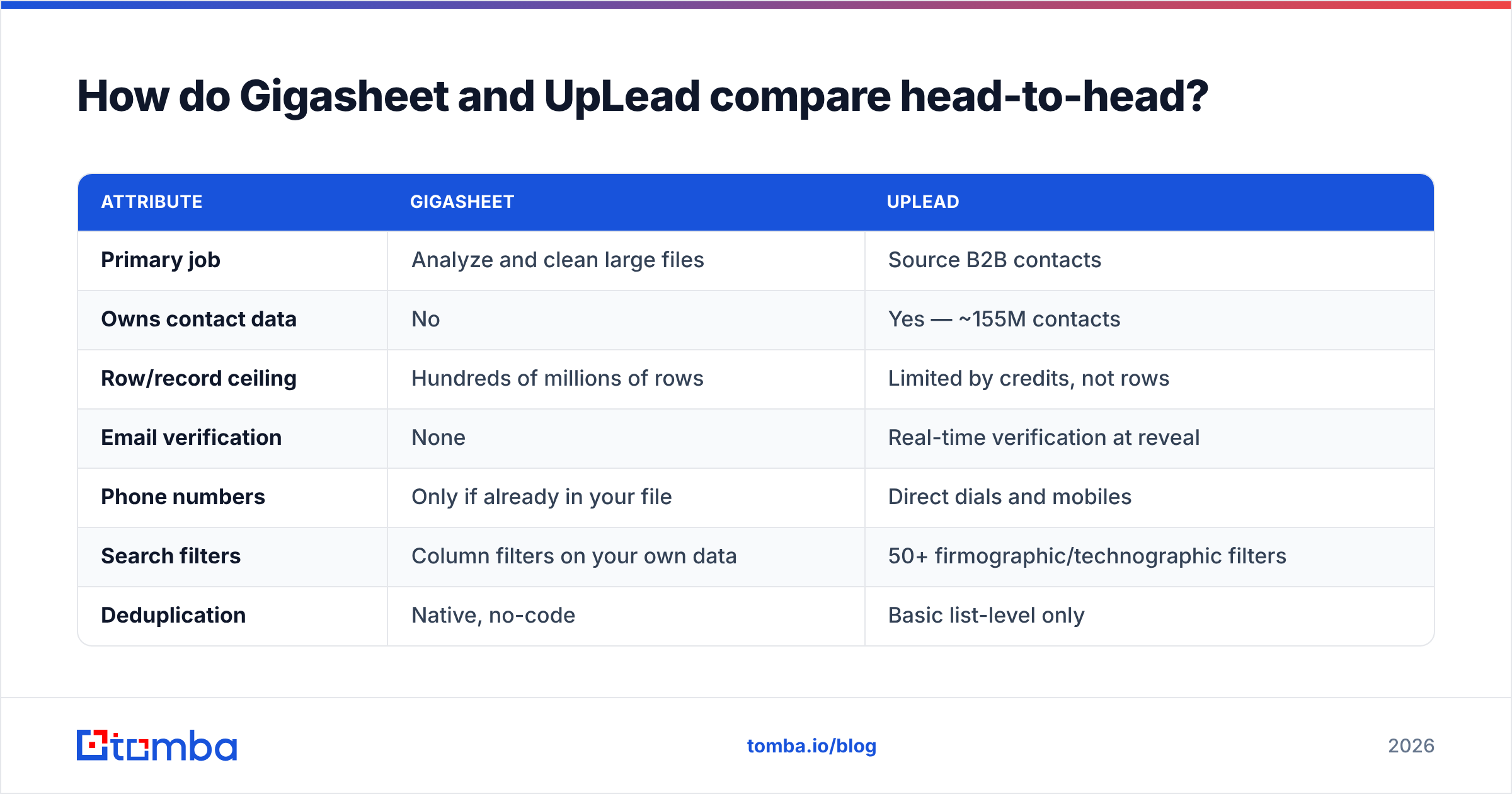
How do Gigasheet and UpLead compare head-to-head?#
| Attribute | Gigasheet | UpLead |
|---|---|---|
| Primary job | Analyze and clean large files | Source B2B contacts |
| Owns contact data | No | Yes — ~155M contacts |
| Row/record ceiling | Hundreds of millions of rows | Limited by credits, not rows |
| Email verification | None | Real-time verification at reveal |
| Phone numbers | Only if already in your file | Direct dials and mobiles |
| Search filters | Column filters on your own data | 50+ firmographic/technographic filters |
| Deduplication | Native, no-code | Basic list-level only |
| Chrome extension | No | Yes |
| API | Yes | Yes, on higher tiers |
| CRM push | Via export | Native Salesforce, HubSpot, Pipedrive |
| Best for | RevOps, data teams, analysts | SDRs, founders, demand gen |
| Free option | Free tier with row cap | 5 free credits (trial) |
The table makes the split obvious: there is exactly one row where they overlap meaningfully — both let you get a clean CSV out the other end. Everything else is a different job.
What is Gigasheet genuinely good at?#
Four things, and they're all things a spreadsheet normally fails at:
- Opening files that kill Excel. Excel's hard ceiling is 1,048,576 rows. Google Sheets caps at 10 million cells, which in a 20-column lead file means about 500,000 rows before it becomes unusable. Gigasheet opens a 50-million-row export and scrolls smoothly. If you've ever split a file into chunks just to look at it, this is the whole pitch.
- Joining data without SQL. You dropped a purchased list and a CRM export side by side and need to know who overlaps. In Gigasheet that's a point-and-click join on email or domain. No warehouse, no analyst ticket, no VLOOKUP that takes eight minutes to fill down.
- Deduping at scale. Multi-column dedupe across millions of rows is a genuinely hard operation in a normal spreadsheet. This is where most RevOps teams first discover the tool.
- Sharing a view without sharing the file. You can hand a filtered view to a colleague instead of emailing a 900 MB attachment that immediately goes stale.
What it does not do: tell you whether j.smith@acme.com is a real, deliverable mailbox. Gigasheet will happily process 400,000 dead addresses and never flag one. That's not a knock — it isn't a verification product — but teams routinely assume "clean data tool" means "validated data tool." It doesn't. You still need an email verifier in the pipeline before anything gets sent.
What is UpLead genuinely good at?#
UpLead's differentiator has been consistent for years: it verifies the email address at the moment you spend the credit, and it doesn't charge you when verification fails. Most databases charge for the reveal regardless of what comes back. That single policy is why UpLead reviews on G2 skew positive despite a smaller database than Apollo or ZoomInfo.
The other strengths:
- Filter depth relative to price. Technographic filters (find companies running Shopify Plus + Klaviyo) usually sit behind enterprise contracts elsewhere. UpLead exposes them on mid-tier plans.
- Intent data on higher tiers, sourced through a partnership, for teams doing account prioritization.
- A clean Chrome extension that pulls contact data while you're on a company site or LinkedIn profile.
- Straightforward CRM sync rather than an export-then-import ritual.
Where it strains: database size. 155 million contacts is respectable, but coverage is noticeably thinner outside North America and Western Europe, and thinner again in SMB and non-tech verticals. If your ICP is "operations managers at 30-person manufacturing firms in Poland," expect gaps — and expect to fall back on a domain search against specific company websites to fill them.
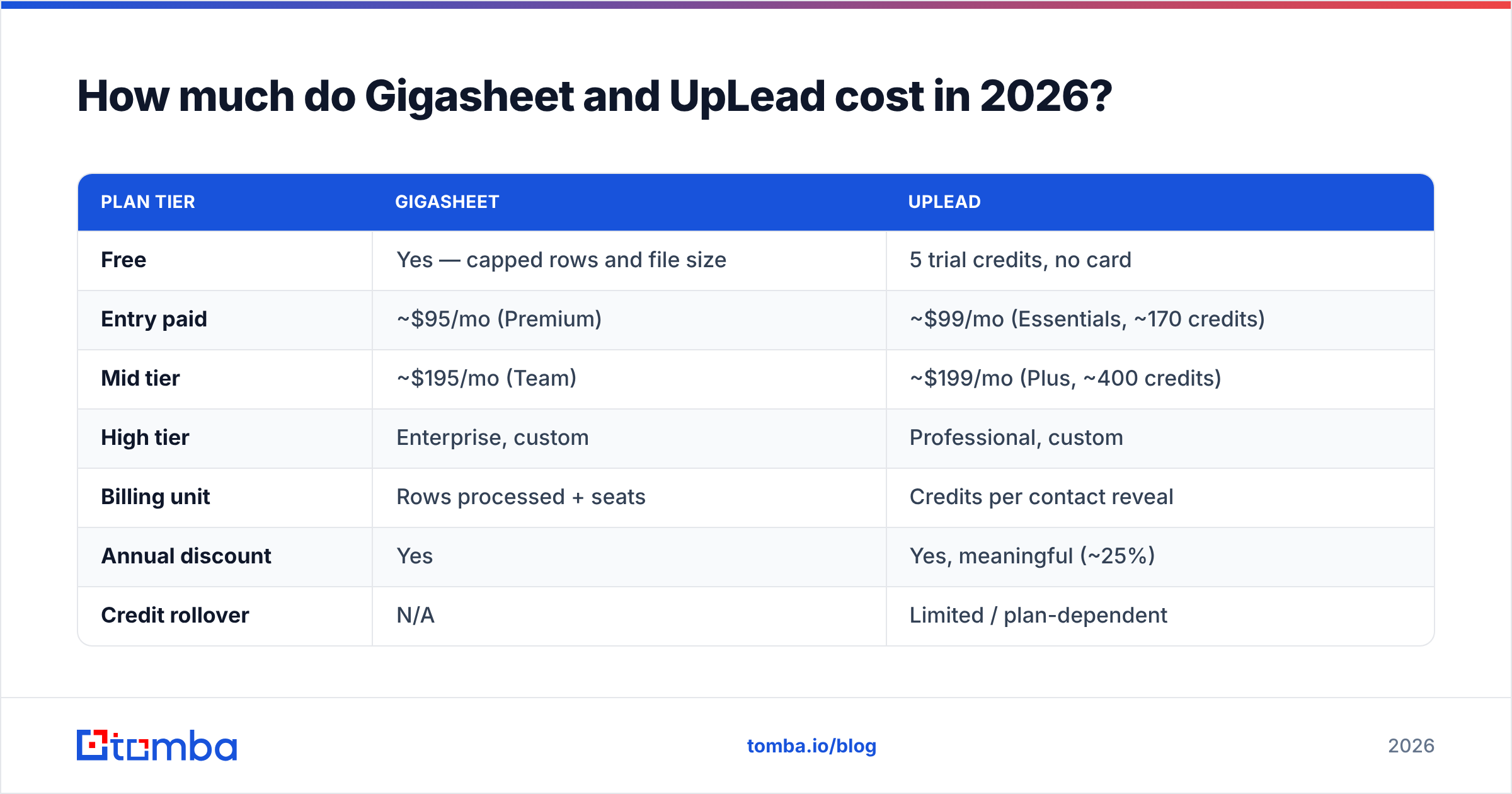
How much do Gigasheet and UpLead cost in 2026?#
Both vendors reprice periodically, so treat the figures below as list price at the time of writing and confirm on the vendor pages before you sign anything.
| Plan tier | Gigasheet | UpLead |
|---|---|---|
| Free | Yes — capped rows and file size | 5 trial credits, no card |
| Entry paid | ~$95/mo (Premium) | ~$99/mo (Essentials, ~170 credits) |
| Mid tier | ~$195/mo (Team) | ~$199/mo (Plus, ~400 credits) |
| High tier | Enterprise, custom | Professional, custom |
| Billing unit | Rows processed + seats | Credits per contact reveal |
| Annual discount | Yes | Yes, meaningful (~25%) |
| Credit rollover | N/A | Limited / plan-dependent |
| Overage behavior | Upgrade prompt | Buy credit packs |
The number that surprises people is UpLead's effective cost per usable contact. At roughly $99 for 170 credits, that's about $0.58 per revealed contact — and a phone number reveal typically costs additional credits. Run a 3,000-contact quarter and you're either on the Plus plan and still buying packs, or you're on an annual contract you negotiated down.
Gigasheet's pricing is quieter but scales differently: you're paying for rows processed and seats, not per record, so the cost per lead trends toward zero as volume rises. That's the right shape for a processing tool and the wrong shape for a sourcing tool.
Is UpLead's data accurate enough for cold outreach?#
Mostly, with two caveats.
The verification claim is about deliverability at time of reveal, not about role accuracy. An address can be perfectly deliverable and still belong to someone who left the company six weeks ago and whose mailbox now forwards to a manager. Job-change churn in B2B runs roughly 20–25% annually, which means a quarter of any list decays within a year no matter who sold it to you.
The second caveat is catch-all domains. A large share of enterprise mail servers accept every address at the domain, which makes standard SMTP verification return "valid" for addresses that don't exist. Any vendor claiming 95%+ accuracy is quietly excluding catch-alls from the denominator. If a meaningful slice of your ICP sits on catch-all infrastructure, you need a dedicated catch-all verifier regardless of which database you bought.
Practical rule: re-verify any list older than 30 days before it enters a sequence. It costs a fraction of a cent per record and protects the sender reputation you spent months building.
Which one should you buy for your specific situation?#
Match your bottleneck to the tool. These are the five patterns that cover most buyers:
- You're a solo founder with zero list. Buy UpLead (or a per-lookup finder). Gigasheet solves a problem you don't have yet. Your file is 800 rows; Excel is fine.
- You're RevOps at a company with three data sources that disagree. Buy Gigasheet. Your problem is reconciliation, not acquisition, and joining CRM + product usage + purchased lists is exactly the job it was built for.
- You run outbound at 5,000+ contacts/month. You'll likely need both — but check the math first. At that volume UpLead credits get expensive fast, and a bulk email finder with per-lookup pricing often lands cheaper for the same output.
- You bought a list from a broker and don't trust it. Neither tool alone fixes this. You need Gigasheet (or any dedupe tool) plus a verification pass. Verification is the step people skip and then blame the list.
- You're building an internal enrichment pipeline. Skip both UIs and go API-first. A database subscription with a manual export step is the wrong primitive when your endpoint is code.
Where does a dedicated email finder fit in this stack?#
Between them, honestly — and often instead of the database seat.
The unbundled version of this stack looks like: source company targets however you like (a scraped list, a conference exhibitor page, an investor portfolio page, LinkedIn), then resolve contacts per-domain via an API, verify, and load. You pay for what you look up rather than for a seat that expires whether you used it or not.
That's the model Tomba runs on. The email finder resolves a name plus domain into a verified address; domain search returns every public address at a company plus its detected email pattern; data enrichment fills in the rest of the record. Pricing starts free at 25 searches/month, then $49/mo for Starter, $99/mo for Growth, and $249/mo for Pro — see full Tomba pricing for credit allocations per tier.
The honest boundary: an email finder doesn't replace UpLead's discovery layer. If you genuinely need to browse "VPs of Engineering at Series B fintechs in Germany" without knowing the companies first, you need a searchable database, and UpLead is a reasonable one at its price. But a large share of teams already know their target accounts — they have a territory list, a partner list, a competitor's customer page — and are paying database prices for a resolution problem an API solves for a fraction of the cost.
Can one tool replace both?#
Not cleanly, and be suspicious of anyone who says otherwise.
Gigasheet cannot source contacts. UpLead cannot process a 10-million-row file — its export limits are well below that, and its grid isn't built for analysis. Platforms that claim to do both usually do one well and ship the other as a checkbox feature.
What you can do is collapse three purchases into two:
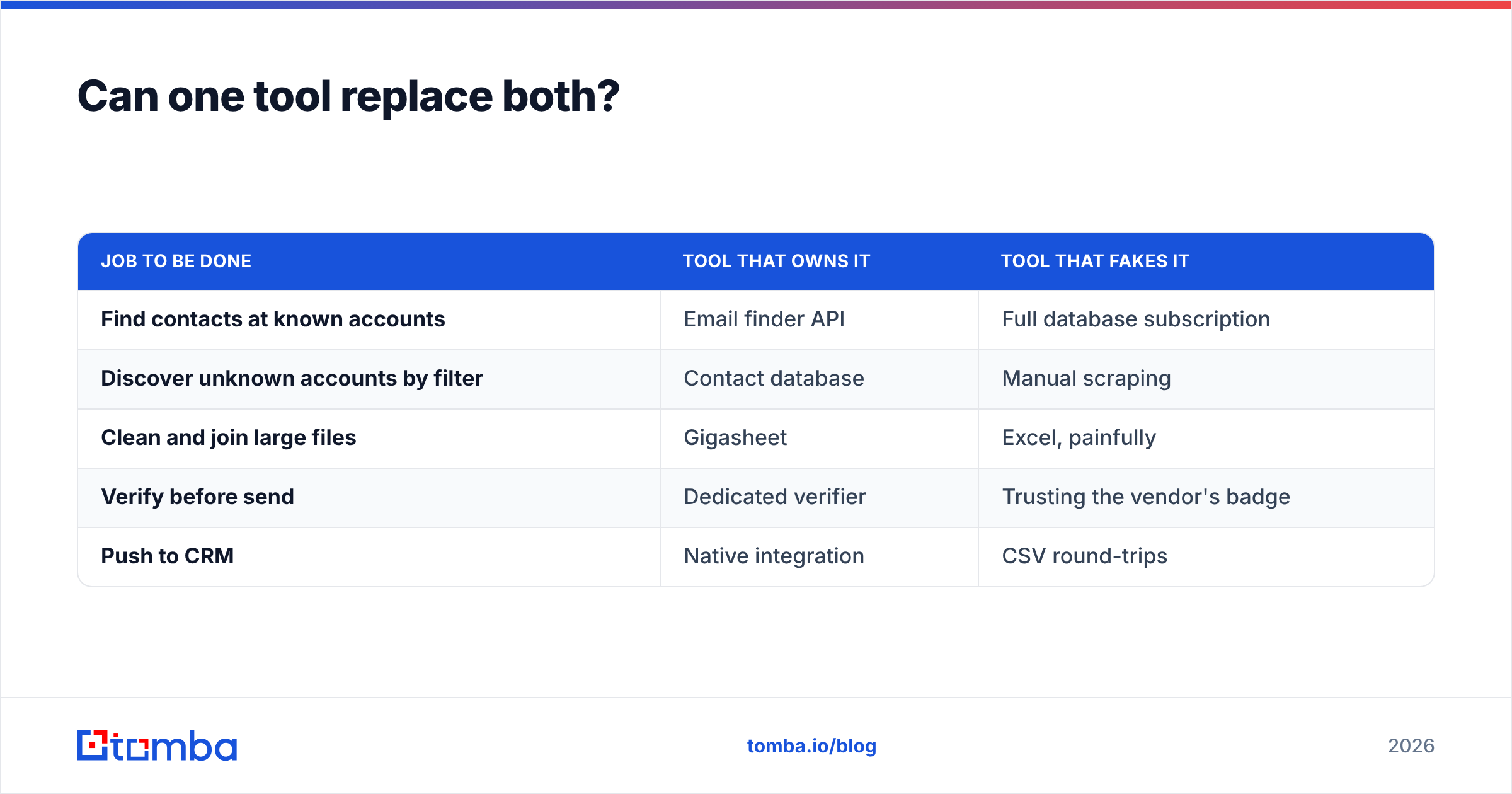
| Job to be done | Tool that owns it | Tool that fakes it |
|---|---|---|
| Find contacts at known accounts | Email finder API | Full database subscription |
| Discover unknown accounts by filter | Contact database | Manual scraping |
| Clean and join large files | Gigasheet | Excel, painfully |
| Verify before send | Dedicated verifier | Trusting the vendor's badge |
| Push to CRM | Native integration | CSV round-trips |
The middle column is what a lean 2026 data stack actually looks like. Notice that "full database subscription" appears once, as an optional line item — not as the foundation.
What's the verdict on Gigasheet vs UpLead?#
They solve different halves of the same workflow, so the winner depends entirely on which half is broken.
Buy Gigasheet if files are your pain: you're merging exports, deduping across sources, or repeatedly hitting Excel's row ceiling. It's the best no-code option in that lane and the cost curve improves with volume.
Buy UpLead if discovery is your pain: you need to find companies and people you don't yet know exist, you value verified-at-reveal credits, and your ICP sits in well-covered geographies. Watch the credit burn on multi-field enrichment.
Buy neither yet if you already know your target accounts. Resolve contacts per-lookup through an API, verify before send, and keep the fixed monthly commitment out of your stack until the volume actually justifies it. That's the sequencing mistake most teams make in reverse — they buy the database first, then discover 60% of their credits went to accounts they could have named on a whiteboard.
Ready to test the unbundled path? Start with the Tomba Email Finder — 25 free searches a month, no card, verified results, and a Tomba API that drops into whatever pipeline you've already built. Run it against 50 accounts you already care about and compare the hit rate against your current database export before you renew anything.
Related guides#
Ready to find emails that actually work?
Join 150,000+ professionals who stopped guessing and started sending. Free credits on signup — no credit card required.
Get the Tomba newsletter
Practical outbound tactics and product updates — once every two weeks.
About the author