Gigasheet vs ZoomInfo: Which B2B Data Tool Wins in 2026?
Gigasheet and ZoomInfo get compared constantly, but they solve opposite problems: one analyzes data you already own, the other sells you data you don't. Here's the honest breakdown, with pricing, accuracy, and the cheaper hybrid stack most teams end up building.
TL;DR
- They are not the same category. Gigasheet is a browser-based spreadsheet for files too big for Excel. ZoomInfo is a B2B contact and company database sold on annual seat contracts.
- Pick Gigasheet if your problem is "I have 4 million rows and Excel crashed." Pick ZoomInfo if your problem is "I don't have any rows yet and I need enterprise-grade firmographics and intent."
- Cost gap is enormous. Gigasheet has a free tier and self-serve monthly plans. ZoomInfo commonly lands in the $15,000–$40,000/year range once seats and data packages are added, on an annual commitment.
- Neither is a great pure email finder. ZoomInfo's contact records decay fast, and Gigasheet enriches only what you feed it. A dedicated finder plus verifier fills that gap for a fraction of the price.
- Most teams end up hybrid: cheap targeted contact discovery, a spreadsheet-grade tool for cleanup at scale, and verification before anything touches a sequence.
What are Gigasheet and ZoomInfo, actually?#
The reason this comparison confuses people is that both tools show up in the same buying conversation — "we need better B2B data" — while doing completely different jobs.
Gigasheet is a no-code big-data spreadsheet. You upload a CSV, JSON, or Parquet file with tens of millions of rows, and it opens in a browser interface that looks like Excel but behaves like a database. Filter, group, join, dedupe, pivot, and share — no SQL, no BI tool, no waiting on a data engineer. It also offers enrichment integrations so you can append company or contact fields to rows you already have.
ZoomInfo is a data vendor. Its value is the database itself: hundreds of millions of contact and company profiles, org charts, technographics, intent signals from Bidstream and its own network, plus a workflow layer (SalesOS, Engage, Copilot) sitting on top. You are buying access to records you did not have, gated by credits and seats.
Put simply: Gigasheet is a tool for data you own. ZoomInfo is a subscription for data you don't.
That distinction drives every other difference — price, contract length, accuracy expectations, and who on your team actually uses it.
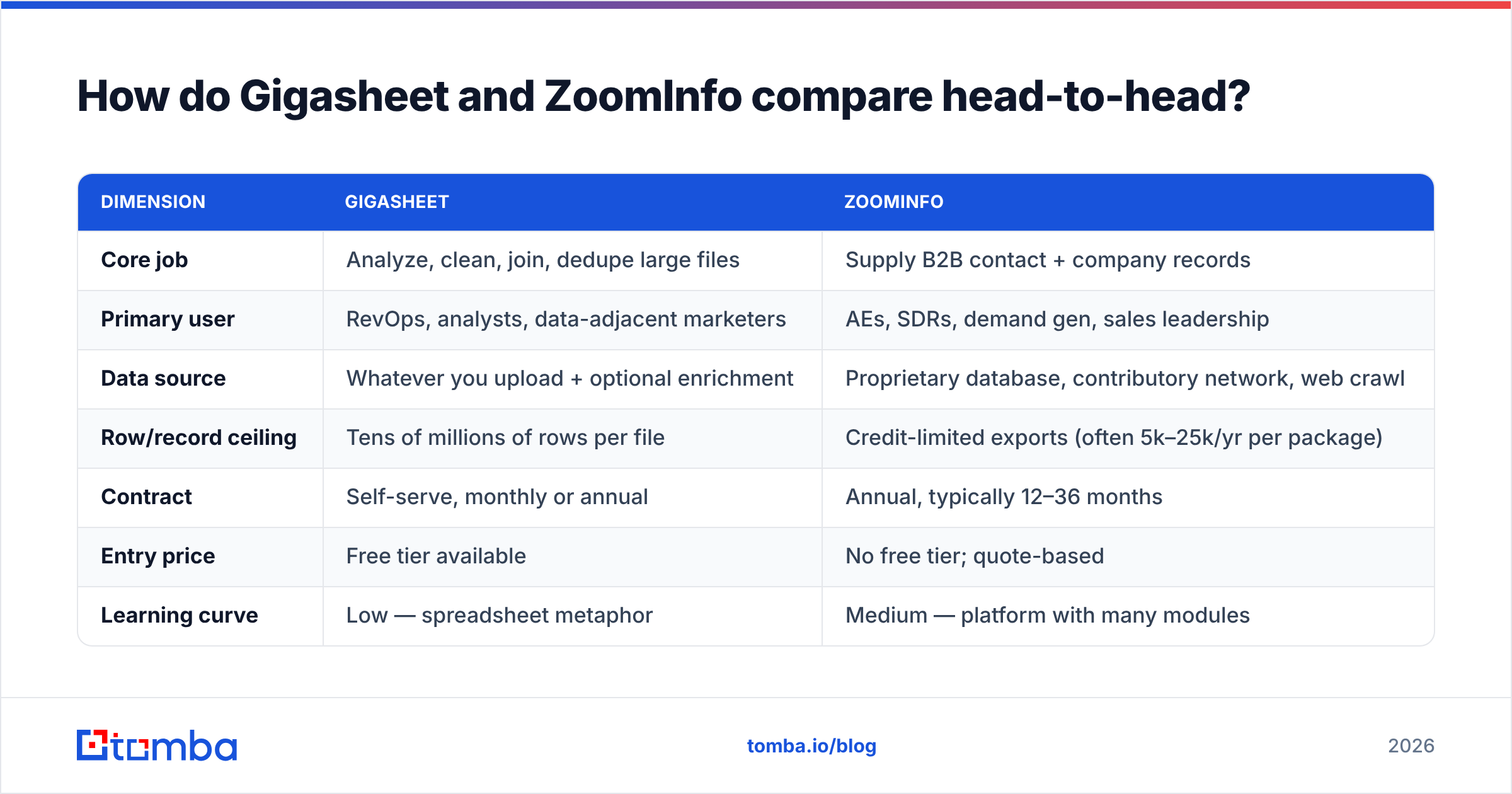
How do Gigasheet and ZoomInfo compare head-to-head?#
| Dimension | Gigasheet | ZoomInfo |
|---|---|---|
| Core job | Analyze, clean, join, dedupe large files | Supply B2B contact + company records |
| Primary user | RevOps, analysts, data-adjacent marketers | AEs, SDRs, demand gen, sales leadership |
| Data source | Whatever you upload + optional enrichment | Proprietary database, contributory network, web crawl |
| Row/record ceiling | Tens of millions of rows per file | Credit-limited exports (often 5k–25k/yr per package) |
| Contract | Self-serve, monthly or annual | Annual, typically 12–36 months |
| Entry price | Free tier available | No free tier; quote-based |
| Learning curve | Low — spreadsheet metaphor | Medium — platform with many modules |
| Intent data | No | Yes, a flagship feature |
| CRM sync | Via export/integrations | Native, deep (Salesforce, HubSpot, Dynamics) |
| Best at | Making a messy 3M-row list usable | Filling an empty pipeline with net-new accounts |
If a row in that table made you go "oh, I only care about one column" — that's your answer. The tools barely overlap.
What does Gigasheet actually do well?#
- Files that break Excel. Excel caps at 1,048,576 rows. Gigasheet handles files orders of magnitude larger in a browser tab, which is the entire reason most people find it.
- Deduplication and merging at scale. Combining exports from three vendors, a CRM dump, and a webinar list into one clean file is a genuinely painful task in most stacks. This is Gigasheet's strongest use case.
- No-code joins. VLOOKUP-style joins across multi-million-row datasets without writing SQL — useful when the person who needs the answer is not an analyst.
- Auditability. Filters and steps are visible and shareable, so a RevOps lead can hand a colleague a working view rather than a 400MB attachment.
- Enrichment on your terms. You choose which rows get enriched, so you're not paying to hydrate a list you're about to discard.
Where it stops: Gigasheet will not tell you who to contact at a company you've never heard of. It has no proprietary contact graph of its own to sell you. Feed it garbage and you get very well-organized garbage.

What does ZoomInfo actually do well?#
ZoomInfo's moat is coverage and enrichment depth, and it's real. On G2 it consistently ranks near the top of the sales-intelligence category on data breadth, and for good reason:
- Account-level firmographics are excellent — revenue bands, headcount, funding, subsidiaries, hierarchies.
- Org charts and reporting lines help you map a buying committee rather than guess at one.
- Intent and technographic signals let you prioritize accounts already researching your category. Very few competitors match this at the same fidelity.
- Native CRM and MAP integration means enrichment happens where reps live, not in a spreadsheet nobody opens.
- Compliance posture is mature — DSAR handling, GDPR/CCPA processes, notice-at-collection workflows.
Where it stops: cost, contract rigidity, and contact-level decay. Direct dials and personal-heavy records age fast in a market with 20%+ annual job-change rates. Buyers routinely report that account data holds up better than contact data, and that mid-market and non-US coverage thins out noticeably compared to US enterprise.
Where does each tool fall down?#
Honest failure modes, since every vendor page hides these:
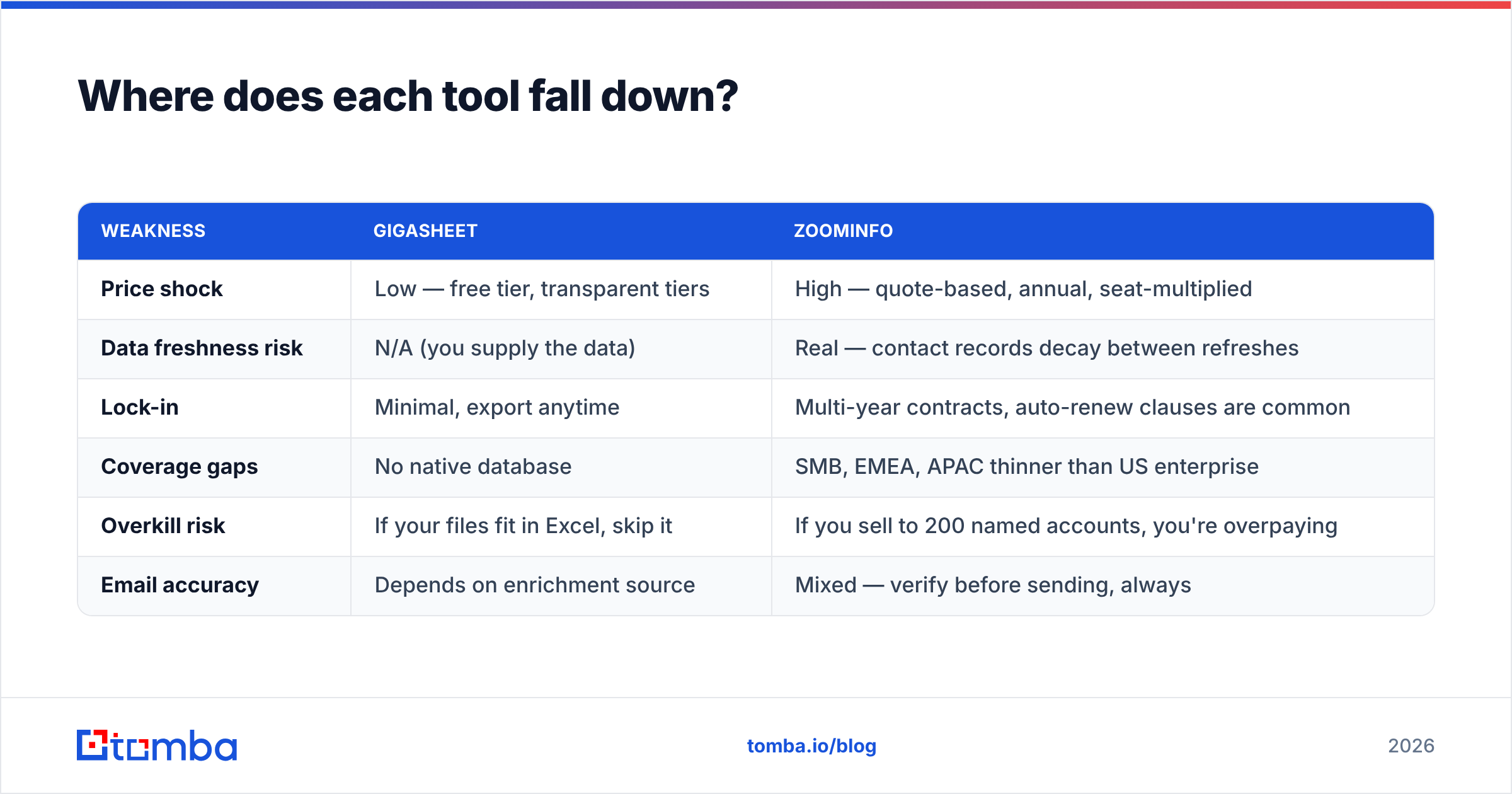
| Weakness | Gigasheet | ZoomInfo |
|---|---|---|
| Price shock | Low — free tier, transparent tiers | High — quote-based, annual, seat-multiplied |
| Data freshness risk | N/A (you supply the data) | Real — contact records decay between refreshes |
| Lock-in | Minimal, export anytime | Multi-year contracts, auto-renew clauses are common |
| Coverage gaps | No native database | SMB, EMEA, APAC thinner than US enterprise |
| Overkill risk | If your files fit in Excel, skip it | If you sell to 200 named accounts, you're overpaying |
| Email accuracy | Depends on enrichment source | Mixed — verify before sending, always |
The last row matters more than people admit. Whichever platform sourced an address, a bounce still costs you sender reputation. Running any list — ZoomInfo export, Gigasheet-merged file, or scraped CSV — through an email verifier before it hits a sequence is non-negotiable in 2026 now that Google and Microsoft enforce hard bounce-rate thresholds.
How much do Gigasheet and ZoomInfo cost in 2026?#
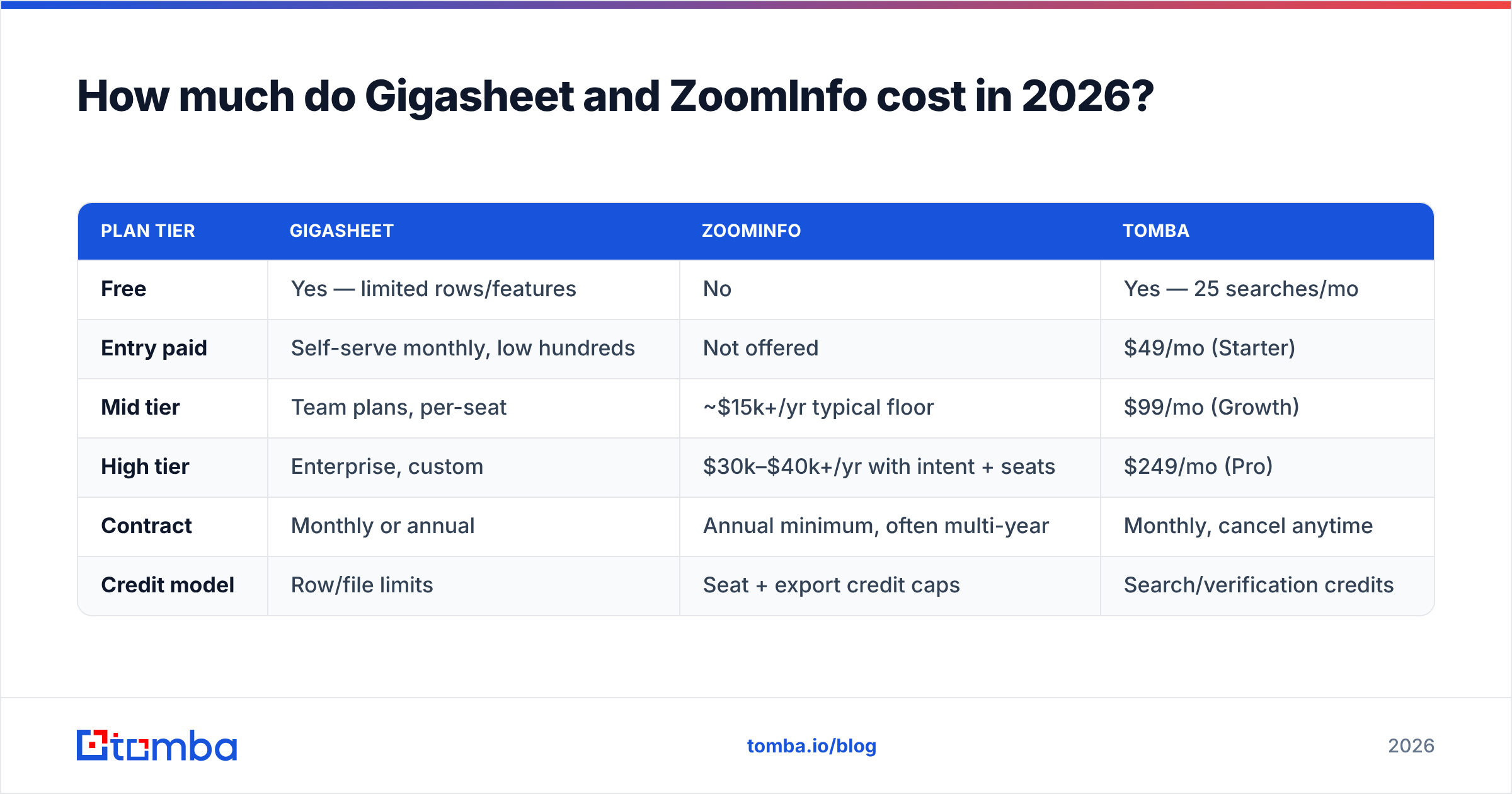
| Plan tier | Gigasheet | ZoomInfo | Tomba |
|---|---|---|---|
| Free | Yes — limited rows/features | No | Yes — 25 searches/mo |
| Entry paid | Self-serve monthly, low hundreds | Not offered | $49/mo (Starter) |
| Mid tier | Team plans, per-seat | ~$15k+/yr typical floor | $99/mo (Growth) |
| High tier | Enterprise, custom | $30k–$40k+/yr with intent + seats | $249/mo (Pro) |
| Contract | Monthly or annual | Annual minimum, often multi-year | Monthly, cancel anytime |
| Credit model | Row/file limits | Seat + export credit caps | Search/verification credits |
ZoomInfo does not publish pricing, and quotes swing hard based on seat count, modules, and how close you are to their quarter end. The figures above reflect what buyers commonly report in public reviews and procurement threads — treat them as a range, not a price list. Gigasheet publishes tiers but changes them periodically, so check their current page before budgeting.
For reference, Tomba pricing is fully self-serve: Free (25 searches/month), Starter $49/mo, Growth $99/mo, Pro $249/mo, Enterprise custom. That's a different order of magnitude, because it's a narrower product — contact discovery and verification, not an entire GTM platform.
Which one should you buy?#
Match the tool to the actual bottleneck:
- Bottleneck is "my list is a mess" → Gigasheet. Merging vendor exports, deduping a 6M-row CRM extract, joining event attendees against your customer table. Nothing else in this comparison touches it.
- Bottleneck is "we have no accounts to work" → ZoomInfo, if you sell to US mid-market and enterprise, have budget above $15k/year, and will actually use intent data. If you won't use intent, you're paying for the expensive half and ignoring it.
- Bottleneck is "I know the companies, I need the people" → Neither, at full price. This is where a dedicated email finder plus domain search does the job for a rounding error of a ZoomInfo contract.
- Bottleneck is "our CRM data is 40% stale" → Enrichment, not acquisition. Either ZoomInfo's enrich module or a cheaper data enrichment API pointed at your existing records.
- Bottleneck is "we need 50k contacts by Friday" → Bulk workflow: source in volume, then bulk verify before anything ships.

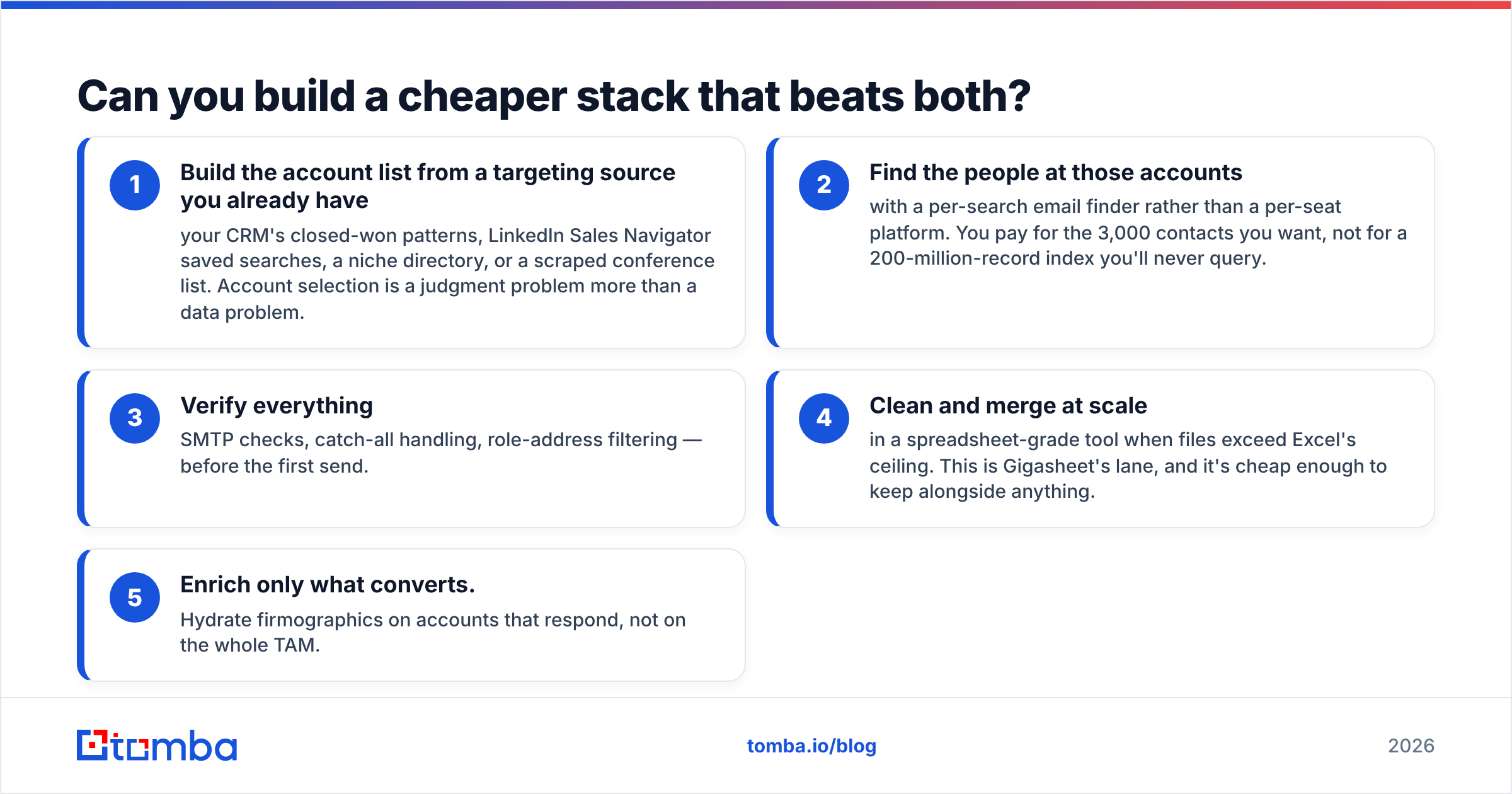
Can you build a cheaper stack that beats both?#
For a lot of teams, yes — and this is what actually happens after the first ZoomInfo renewal.
The pattern looks like this:
- Build the account list from a targeting source you already have — your CRM's closed-won patterns, LinkedIn Sales Navigator saved searches, a niche directory, or a scraped conference list. Account selection is a judgment problem more than a data problem.
- Find the people at those accounts with a per-search email finder rather than a per-seat platform. You pay for the 3,000 contacts you want, not for a 200-million-record index you'll never query.
- Verify everything — SMTP checks, catch-all handling, role-address filtering — before the first send.
- Clean and merge at scale in a spreadsheet-grade tool when files exceed Excel's ceiling. This is Gigasheet's lane, and it's cheap enough to keep alongside anything.
- Enrich only what converts. Hydrate firmographics on accounts that respond, not on the whole TAM.
The honest caveat: this stack has no intent data. If your GTM motion genuinely runs on third-party intent — meaning someone reviews the signal weekly and changes territory priorities because of it — ZoomInfo earns its price and you should keep it. If intent is a slide in a QBR nobody acts on, you're funding a feature you don't use.
The second caveat: this stack requires someone to own it. A platform bundles workflow; a stack requires you to wire the pieces. If your ops headcount is zero, bundling has real value.
What about accuracy and compliance?#
Two things worth checking regardless of which vendor wins:
Accuracy claims are measured differently by everyone. A "95% accurate" claim might mean deliverability at time of collection, not today. Ask any vendor — Gigasheet's enrichment partners, ZoomInfo, or anyone else — for their bounce-rate guarantee and refund policy, not their marketing number. Then run your own sample: pull 200 records, verify them independently, and compute your own rate. Tomba publishes its data sources for the same reason — a claim you can't trace is a claim you can't act on.
Compliance is on you, not the vendor. GDPR legitimate-interest processing requires you to document your basis, honor deletion requests, and keep a suppression list that actually works. ZoomInfo's compliance program is strong at the source level; it does not transfer liability for what you do downstream. If you sell into the EU, budget for a suppression process before you budget for data.
Frequently asked questions#
Is Gigasheet a ZoomInfo competitor? Not really. They compete only in the narrow sense that both appear in "B2B data tooling" budget lines. Gigasheet has no contact database to sell; ZoomInfo has no big-file spreadsheet analysis. Teams frequently run both.
Does Gigasheet have contact data? It offers enrichment integrations that append fields to your rows, but it is not itself a contact-data vendor. You bring the records.
Can ZoomInfo handle a 5-million-row file? Not as an analysis surface. Exports are credit-capped and the UI is not built for bulk file manipulation — which is precisely why some ZoomInfo customers also buy Gigasheet.
What's the cheapest way to just get verified work emails? A dedicated finder with a verification step. Pattern detection plus SMTP validation gets you accurate addresses for named companies at per-search pricing instead of per-seat contracts.
Do I need all three tools? Rarely. Most teams under 50 reps do fine with a finder plus verifier, adding a large-file spreadsheet tool only when list volume demands it.
The bottom line#
Gigasheet vs ZoomInfo isn't really a versus — it's a diagnosis. If your data is messy, Gigasheet. If your pipeline is empty and you sell to US enterprise with real intent workflows, ZoomInfo. If what you actually need is verified work emails at companies you've already picked, both are the wrong shape of tool at the wrong price.
That last case is the most common one, and it's the cheapest to solve. Start with the Tomba Email Finder — search by domain, name, or company, get pattern-matched addresses with confidence scores, and verify them in the same workflow before they ever reach your sequencer. The free tier gives you 25 searches a month to sanity-check the accuracy against whatever you're paying for now, and paid plans start at $49/mo with no annual commitment. Run the same 200 test contacts through both and let the bounce rate decide.
Related guides#
Ready to find emails that actually work?
Join 150,000+ professionals who stopped guessing and started sending. Free credits on signup — no credit card required.
Get the Tomba newsletter
Practical outbound tactics and product updates — once every two weeks.
About the author